1
WIP Data Capture System - User Manual
Setting up the Database for Captured Information
The WIP Data Capture System needs a place to store all of the information that it will collect. At
present, the WIP Data Capture system records transaction data in Microsoft Access database
format (either Access/97 or Access/2000 format). You can use a database that already exists on
your system, create a new one from scratch, or start with the example WIPData.mdb included on
the CD-ROM (WIPData.mdb is Access/2000 format; for Access/97, use WIPData97.mdb).
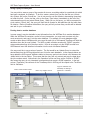
The database must contain a table which will receive the captured data; it does not matter if it is the
only table in the database or one of many. In the sample WIPData.mdb, the name of this table is
WIPLog. You can give the database and data table any name you choose.
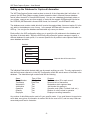
Each profile in the WIP configuration allows you to specify the full pathname to the database and
the name of the data table. While the WIPConfig utility allows the system manager to specify a
different database for each profile, it is common practice for all profiles to store captured data in the
same database and table.
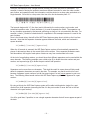
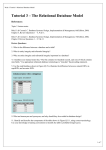
Database
MyTable1
MyTable2
WIPLog
Captured data will be stored here
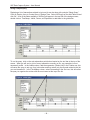
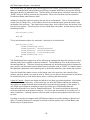
The individual fields within the data table can be named anything you wish. The only requirement is
that the field names referred to in the WIP Configuration match the actual names of the fields in the
database. The data table might contain fields like the following:
Name
RecordNumber
TimeStamp
Workstation
JobNumber
Operation
Quantity
Employee
Type of Data
AutoNumber
Date/Time
Text
Text
Text
Text
Text
Purpose
Provides unique ID for each record
Date and time of transaction
Workstation which captured data
Job Number this applies to
Operation code (Start, Finished, Hold, etc.)
Number of units involved in operation
Employee recording transaction
Any number of data fields can be used to fit your specific needs. It is a good idea not to require too
much data; every piece of information is another field for the user to fill in, and too many fields can
cause delays and lead to frustration.
-5-