1
Installing Client Software
The installation procedure for SL NEO client software is simple and standard.
The setup file slneo_setup.exe is loaded from a CD/DVD/Flash drive or from
the internet. The setup file contains the full set of client and server software and
the necessary set of codecs.
If the SL NEO software program has already been installed on the client
station, a new version may be installed without uninstalling the old version.
Before setup, shut down all SL NEO client programs and make a backup
copy if necessary.
In the first stage of setup, read the Licensing Agreement carefully. If you do
not agree to the conditions of the Agreement, you do not have the right to
set up or use SkyLark Technology, Inc.’s software products in any manner
whatsoever.
We strongly advise against the installation of additional codecs, video editing
software, or other video and sound processing software on the system.
C:\Program Files\SL NEO Media Platform is the folder in which the SL NEO
client software will be located after installation has finished. The recommended
HDD system free space for software installation is 70 Mb.
When the installation process is concluded, six icons will appear on the desktop:
:
SL NEO Media Server – is the icon that launches and shuts down the SL NEO
server software.
Air Manager – is the main client application for managing recording channels,
broadcasting servers, forming graphic formats, and managing media data.
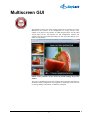
Multiscreen – is a client application: a control multi-screen for signals coming
through inputs and signals formed by broadcasting channels without SL NEO
servers found on the general network.
NewsCut – is a client application permitting non-linear editing at network
workstations with the use of proxy copies without copying media files to the
editing station and back to the server.
Multiscreen Client Software. © 2009-2011 Skylark Technology, Inc.
10