1
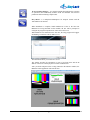
Double-clicking in the indicator window on the line containing the name of
the service opens the corresponding preview window. Double-clicking on
the preview window will switch the viewing to online mode.
In conclusion, windows should be placed in the necessary order and set at the
necessary size. Then the Multiscreen application should be closed and reopened
to save the settings.
The settings that have been introduced may be changed at any time using the
File/Configure…
Multiscreen Client Software. © 2009-2011 Skylark Technology, Inc.
12