1
CLC Sequence Viewer
USER MANUAL
Manual for
CLC Sequence Viewer 7.6.1
Windows, Mac OS X and Linux
September 3, 2015
This software is for research purposes only.
QIAGEN Aarhus A/S
Silkeborgvej 2
Prismet
DK-8000 Aarhus C
Denmark
Contents
I
Introduction
7
1 Introduction to CLC Sequence Viewer
8
1.1
Contact information . . . . . . . . . . . . . . . . . . . . . . . . . . . . . . . . .
10
1.2
Download and installation . . . . . . . . . . . . . . . . . . . . . . . . . . . . . .
10
1.3
System requirements . . . . . . . . . . . . . . . . . . . . . . . . . . . . . . . .
13
1.4
About CLC Workbenches
. . . . . . . . . . . . . . . . . . . . . . . . . . . . . .
13
1.5
When the program is installed: Getting started . . . . . . . . . . . . . . . . . . .
15
1.6
Plugins . . . . . . . . . . . . . . . . . . . . . . . . . . . . . . . . . . . . . . . .
16
1.7
Network configuration . . . . . . . . . . . . . . . . . . . . . . . . . . . . . . . .
19
1.8
The format of the user manual . . . . . . . . . . . . . . . . . . . . . . . . . . .
20
1.9
Latest improvements . . . . . . . . . . . . . . . . . . . . . . . . . . . . . . . .
21
2 Tutorials
II
22
2.1
Tutorial: Getting Started . . . . . . . . . . . . . . . . . . . . . . . . . . . . . . .
22
2.2
Tutorial: View a DNA Sequence . . . . . . . . . . . . . . . . . . . . . . . . . . .
25
2.3
Tutorial: Side Panel Settings . . . . . . . . . . . . . . . . . . . . . . . . . . . .
26
2.4
Tutorial: Align Protein Sequences . . . . . . . . . . . . . . . . . . . . . . . . . .
30
2.5
Tutorial: Find Restriction Sites . . . . . . . . . . . . . . . . . . . . . . . . . . .
31
Core Functionalities
37
3 User interface
38
3.1
Navigation Area . . . . . . . . . . . . . . . . . . . . . . . . . . . . . . . . . . .
39
3.2
View Area . . . . . . . . . . . . . . . . . . . . . . . . . . . . . . . . . . . . . . .
46
3.3
Zoom and selection in View Area . . . . . . . . . . . . . . . . . . . . . . . . . .
54
3
CONTENTS
4
3.4
Toolbox and Status Bar . . . . . . . . . . . . . . . . . . . . . . . . . . . . . . .
56
3.5
Workspace . . . . . . . . . . . . . . . . . . . . . . . . . . . . . . . . . . . . . .
59
3.6
List of shortcuts . . . . . . . . . . . . . . . . . . . . . . . . . . . . . . . . . . .
61
4 User preferences and settings
64
4.1
General preferences . . . . . . . . . . . . . . . . . . . . . . . . . . . . . . . . .
64
4.2
Default view preferences . . . . . . . . . . . . . . . . . . . . . . . . . . . . . .
66
4.3
Advanced preferences . . . . . . . . . . . . . . . . . . . . . . . . . . . . . . . .
69
4.4
Export/import of preferences . . . . . . . . . . . . . . . . . . . . . . . . . . . .
69
4.5
View settings for the Side Panel
70
. . . . . . . . . . . . . . . . . . . . . . . . . .
5 Printing
73
5.1
Selecting which part of the view to print . . . . . . . . . . . . . . . . . . . . . .
74
5.2
Page setup . . . . . . . . . . . . . . . . . . . . . . . . . . . . . . . . . . . . . .
75
5.3
Print preview . . . . . . . . . . . . . . . . . . . . . . . . . . . . . . . . . . . . .
76
6 Import/export of data and graphics
6.1
Standard import . . . . . . . . . . . . . . . . . . . . . . . . . . . . . . . . . . .
78
6.2
Data export . . . . . . . . . . . . . . . . . . . . . . . . . . . . . . . . . . . . . .
82
6.3
Export graphics to files . . . . . . . . . . . . . . . . . . . . . . . . . . . . . . .
91
6.4
Export graph data points to a file . . . . . . . . . . . . . . . . . . . . . . . . . .
95
6.5
Copy/paste view output . . . . . . . . . . . . . . . . . . . . . . . . . . . . . . .
96
7 History log
7.1
Element history . . . . . . . . . . . . . . . . . . . . . . . . . . . . . . . . . . .
8 Batching and result handling
III
77
98
98
101
8.1
How to handle results of analyses . . . . . . . . . . . . . . . . . . . . . . . . . 101
8.2
Working with tables . . . . . . . . . . . . . . . . . . . . . . . . . . . . . . . . . 103
Bioinformatics
9 Viewing and editing sequences
107
108
9.1
View sequence . . . . . . . . . . . . . . . . . . . . . . . . . . . . . . . . . . . . 108
9.2
Circular DNA . . . . . . . . . . . . . . . . . . . . . . . . . . . . . . . . . . . . . 114
CONTENTS
5
9.3
Working with annotations . . . . . . . . . . . . . . . . . . . . . . . . . . . . . . 117
9.4
Element information . . . . . . . . . . . . . . . . . . . . . . . . . . . . . . . . . 121
9.5
View as text . . . . . . . . . . . . . . . . . . . . . . . . . . . . . . . . . . . . . 122
9.6
Sequence Lists
. . . . . . . . . . . . . . . . . . . . . . . . . . . . . . . . . . . 123
10 Viewing structures
126
10.1 Importing molecule structure files . . . . . . . . . . . . . . . . . . . . . . . . . . 127
10.2 Viewing molecular structures in 3D . . . . . . . . . . . . . . . . . . . . . . . . . 127
10.3 Customizing the visualization . . . . . . . . . . . . . . . . . . . . . . . . . . . . 129
10.4 Snapshots of the molecule visualization . . . . . . . . . . . . . . . . . . . . . . 137
10.5 Tools for linking sequence and structure . . . . . . . . . . . . . . . . . . . . . . 138
11 Data download
139
11.1 GenBank search . . . . . . . . . . . . . . . . . . . . . . . . . . . . . . . . . . . 139
12 General sequence analyses
143
12.1 Extract sequences . . . . . . . . . . . . . . . . . . . . . . . . . . . . . . . . . . 143
12.2 Shuffle sequence . . . . . . . . . . . . . . . . . . . . . . . . . . . . . . . . . . 145
12.3 Sequence statistics . . . . . . . . . . . . . . . . . . . . . . . . . . . . . . . . . 147
12.4 Join sequences . . . . . . . . . . . . . . . . . . . . . . . . . . . . . . . . . . . 153
13 Nucleotide analyses
155
13.1 Convert DNA to RNA . . . . . . . . . . . . . . . . . . . . . . . . . . . . . . . . . 155
13.2 Convert RNA to DNA . . . . . . . . . . . . . . . . . . . . . . . . . . . . . . . . . 155
13.3 Reverse complements of sequences . . . . . . . . . . . . . . . . . . . . . . . . 157
13.4 Reverse sequence . . . . . . . . . . . . . . . . . . . . . . . . . . . . . . . . . . 157
13.5 Translation of DNA or RNA to protein . . . . . . . . . . . . . . . . . . . . . . . . 158
13.6 Find open reading frames . . . . . . . . . . . . . . . . . . . . . . . . . . . . . . 160
14 Restriction site analyses
163
14.1 Dynamic restriction sites . . . . . . . . . . . . . . . . . . . . . . . . . . . . . . 163
14.2 Restriction site analysis from the Toolbox . . . . . . . . . . . . . . . . . . . . . 167
14.3 Restriction enzyme lists . . . . . . . . . . . . . . . . . . . . . . . . . . . . . . . 172
15 Sequence alignment
175
CONTENTS
6
15.1 Create an alignment . . . . . . . . . . . . . . . . . . . . . . . . . . . . . . . . . 175
15.2 View alignments . . . . . . . . . . . . . . . . . . . . . . . . . . . . . . . . . . . 178
15.3 Edit alignments . . . . . . . . . . . . . . . . . . . . . . . . . . . . . . . . . . . 180
15.4 Bioinformatics explained: Multiple alignments . . . . . . . . . . . . . . . . . . . 182
16 Phylogenetic trees
184
16.1 Phylogenetic tree features . . . . . . . . . . . . . . . . . . . . . . . . . . . . . . 184
16.2 Create Trees . . . . . . . . . . . . . . . . . . . . . . . . . . . . . . . . . . . . . 185
16.3 Tree Settings . . . . . . . . . . . . . . . . . . . . . . . . . . . . . . . . . . . . . 189
IV
Appendix
198
A More features
199
B Graph preferences
204
C Formats for import and export
206
C.1
List of bioinformatic data formats . . . . . . . . . . . . . . . . . . . . . . . . . . 206
C.2
List of graphics data formats . . . . . . . . . . . . . . . . . . . . . . . . . . . . 208
D Restriction enzymes database configuration
210
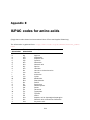
E IUPAC codes for amino acids
211
F IUPAC codes for nucleotides
212
Bibliography
213
V
215
Index
Part I
Introduction
7
Chapter 1
Introduction to CLC Sequence Viewer
Contents
1.1
1.2
Contact information . . . . . . . . . . . . . . .
Download and installation . . . . . . . . . . .
1.2.1
Program download . . . . . . . . . . . . .
1.2.2
Installation on Microsoft Windows . . . .
1.2.3
Installation on Mac OS X . . . . . . . . .
1.2.4
Installation on Linux with an installer . . .
1.2.5
Installation on Linux with an RPM-package
1.3
System requirements . . . . . . . . . . . . . .
1.4
About CLC Workbenches . . . . . . . . . . . .
1.4.1
New program feature request . . . . . . .
1.4.2
Getting help . . . . . . . . . . . . . . . .
1.4.3
CLC Sequence Viewer vs. Workbenches .
1.5
When the program is installed: Getting started
1.5.1
Quick start . . . . . . . . . . . . . . . . .
1.5.2
Import of example data . . . . . . . . . .
1.5.3
Import of example data . . . . . . . . . .
1.6
Plugins . . . . . . . . . . . . . . . . . . . . . .
1.6.1
Installing plugins . . . . . . . . . . . . . .
1.6.2
Uninstalling plugins . . . . . . . . . . . .
1.6.3
Updating plugins . . . . . . . . . . . . . .
1.6.4
Resources . . . . . . . . . . . . . . . . .
1.7
Network configuration . . . . . . . . . . . . .
1.8
The format of the user manual . . . . . . . . .
1.8.1
Text formats . . . . . . . . . . . . . . . .
1.9
Latest improvements . . . . . . . . . . . . . .
.
.
.
.
.
.
.
.
.
.
.
.
.
.
.
.
.
.
.
.
.
.
.
.
.
.
.
.
.
.
.
.
.
.
.
.
.
.
.
.
.
.
.
.
.
.
.
.
.
.
.
.
.
.
.
.
.
.
.
.
.
.
.
.
.
.
.
.
.
.
.
.
.
.
.
.
.
.
.
.
.
.
.
.
.
.
.
.
.
.
.
.
.
.
.
.
.
.
.
.
.
.
.
.
.
.
.
.
.
.
.
.
.
.
.
.
.
.
.
.
.
.
.
.
.
.
.
.
.
.
.
.
.
.
.
.
.
.
.
.
.
.
.
.
.
.
.
.
.
.
.
.
.
.
.
.
.
.
.
.
.
.
.
.
.
.
.
.
.
.
.
.
.
.
.
.
.
.
.
.
.
.
.
.
.
.
.
.
.
.
.
.
.
.
.
.
.
.
.
.
.
.
.
.
.
.
.
.
.
.
.
.
.
.
.
.
.
.
.
.
.
.
.
.
.
.
.
.
.
.
.
.
.
.
.
.
.
.
.
.
.
.
.
.
.
.
.
.
.
.
.
.
.
.
.
.
.
.
.
.
.
.
.
.
.
.
.
.
.
.
.
.
.
.
.
.
.
.
.
.
.
.
.
.
.
.
.
.
.
.
.
.
.
.
.
.
.
.
.
.
.
.
.
.
.
.
.
.
.
.
.
.
.
.
.
.
.
.
.
.
.
.
.
.
.
.
.
.
.
.
.
.
.
.
.
.
.
.
.
.
.
.
.
.
.
.
.
.
.
.
.
.
.
.
.
.
.
.
.
.
.
.
.
.
.
.
.
.
.
.
.
.
.
.
.
.
.
.
.
.
.
.
.
.
.
.
.
.
.
.
.
.
.
.
.
.
.
.
.
.
.
.
.
.
.
.
.
.
.
.
.
.
.
.
.
.
.
.
.
.
.
.
.
.
.
10
10
10
10
11
12
12
13
13
14
14
14
15
15
15
16
16
17
18
18
19
19
20
20
21
Welcome to CLC Sequence Viewer 7.6.1 --- a software package supporting your daily bioinformatics
work.
We strongly encourage you to read this user manual in order to get the best possible basis for
working with the software package.
8
CHAPTER 1. INTRODUCTION TO CLC SEQUENCE VIEWER
This software is for research purposes only.
9
CHAPTER 1. INTRODUCTION TO CLC SEQUENCE VIEWER
1.1
10
Contact information
The CLC Sequence Viewer is developed by:
CLC bio, a QIAGEN Company
Silkeborgvej 2
Prismet
8000 Aarhus C
Denmark
http://www.clcbio.com
VAT no.: DK 28 30 50 87
Telephone: 45 70 22 32 44
Fax: +45 86 20 12 22
E-mail: [email protected]
If you have questions or comments regarding the program, you can contact us through the support team as described here: http://www.clcsupport.com/clcgenomicsworkbench/
current/index.php?manual=Getting_help.html.
1.2
Download and installation
The CLC Sequence Viewer is developed for Windows, Mac OS X and Linux. The software for either
platform can be downloaded from http://www.clcbio.com/download.
1.2.1
Program download
The program is available for download on http://www.clcbio.com/download.
Before you download the program you are asked to fill in the Download dialog.
In the dialog you must choose:
• Which operating system you use
• Whether you would like to receive information about future releases
Depending on your operating system and your Internet browser, you are taken through some
download options.
When the download of the installer (an application which facilitates the installation of the
program) is complete, follow the platform specific instructions below to complete the installation
procedure.
1.2.2
Installation on Microsoft Windows
Starting the installation process is done in one of the following ways:
When you have downloaded an installer:
Locate the downloaded installer and double-click the icon.
The default location for downloaded files is your desktop.
CHAPTER 1. INTRODUCTION TO CLC SEQUENCE VIEWER
11
Installing the program is done in the following steps:
• On the welcome screen, click Next.
• Read and accept the License agreement and click Next.
• Choose where you would like to install the application and click Next.
• Choose a name for the Start Menu folder used to launch CLC Sequence Viewer and click
Next.
• Choose if CLC Sequence Viewer should be used to open CLC files and click Next.
• Choose where you would like to create shortcuts for launching CLC Sequence Viewer and
click Next.
• Choose if you would like to associate .clc files to CLC Sequence Viewer. If you check this
option, double-clicking a file with a "clc" extension will open the CLC Sequence Viewer.
• Wait for the installation process to complete, choose whether you would like to launch CLC
Sequence Viewer right away, and click Finish.
When the installation is complete the program can be launched from the Start Menu or from one
of the shortcuts you chose to create.
1.2.3
Installation on Mac OS X
Starting the installation process is done in the following way:
When you have downloaded an installer:
Locate the downloaded installer and double-click the icon.
The default location for downloaded files is your desktop.
Launch the installer by double-clicking on the "CLC Sequence Viewer" icon.
Installing the program is done in the following steps:
• On the welcome screen, click Next.
• Read and accept the License agreement and click Next.
• Choose where you would like to install the application and click Next.
• Choose if CLC Sequence Viewer should be used to open CLC files and click Next.
• Choose whether you would like to create desktop icon for launching CLC Sequence Viewer
and click Next.
• Choose if you would like to associate .clc files to CLC Sequence Viewer. If you check this
option, double-clicking a file with a "clc" extension will open the CLC Sequence Viewer.
• Wait for the installation process to complete, choose whether you would like to launch CLC
Sequence Viewer right away, and click Finish.
When the installation is complete the program can be launched from your Applications folder, or
from the desktop shortcut you chose to create. If you like, you can drag the application icon to
the dock for easy access.
CHAPTER 1. INTRODUCTION TO CLC SEQUENCE VIEWER
1.2.4
12
Installation on Linux with an installer
Navigate to the directory containing the installer and execute it. This can be done by running a
command similar to:
# sh CLCSequenceViewer_7_6_1_64.sh.sh
Installing the program is done in the following steps:
• On the welcome screen, click Next.
• Read and accept the License agreement and click Next.
• Choose where you would like to install the application and click Next.
For a system-wide installation you can choose for example /opt or /usr/local. If you do not
have root privileges you can choose to install in your home directory.
• Choose where you would like to create symbolic links to the program
DO NOT create symbolic links in the same location as the application.
Symbolic links should be installed in a location which is included in your environment PATH.
For a system-wide installation you can choose for example /usr/local/bin. If you do not have
root privileges you can create a 'bin' directory in your home directory and install symbolic
links there. You can also choose not to create symbolic links.
• Wait for the installation process to complete and click Finish.
If you choose to create symbolic links in a location which is included in your PATH, the program
can be executed by running the command:
# clcseqview7
Otherwise you start the application by navigating to the location where you choose to install it
and running the command:
# ./clcseqview7
1.2.5
Installation on Linux with an RPM-package
Navigate to the directory containing the rpm-package and install it using the rpm-tool by running
a command similar to:
# rpm -ivh CLCSequenceViewer_7_6_1_64.sh.rpm
Installation of RPM-packages usually requires root-privileges.
When the installation process is finished the program can be executed by running the command:
# clcseqview7
CHAPTER 1. INTRODUCTION TO CLC SEQUENCE VIEWER
1.3
13
System requirements
The system requirements of CLC Sequence Viewer are these:
• Windows Vista, Windows 7, Windows 8, or Windows Server 2008.
• Mac OS X 10.7 or later.
• Linux: RHEL 5.0 or later. SUSE 10.2 or later. Fedora 6 or later.
• 32 or 64 bit.
• 1 GB RAM required.
• 2 GB RAM recommended.
• 1024 x 768 display required.
• 1600 x 1200 display recommended. .
1.4
About CLC Workbenches
In November 2005 CLC bio released two Workbenches: CLC Free Workbench and CLC Protein
Workbench. CLC Protein Workbench is developed from the free version, giving it the well-tested
user friendliness and look & feel. However, the CLC Protein Workbench includes a range of more
advanced analyses.
In March 2006, CLC DNA Workbench (formerly CLC Gene Workbench) and CLC Main Workbench
were added to the product portfolio of CLC bio. Like CLC Protein Workbench, CLC DNA Workbench
builds on CLC Free Workbench. It shares some of the advanced product features of CLC Protein
Workbench, and it has additional advanced features. CLC Main Workbench holds all basic and
advanced features of the CLC Workbenches.
In June 2007, CLC RNA Workbench was released as a sister product of CLC Protein Workbench
and CLC DNA Workbench. CLC Main Workbench now also includes all the features of CLC RNA
Workbench.
In March 2008, the CLC Free Workbench changed name to CLC Sequence Viewer.
In June 2008, the first version of the CLC Genomics Workbench was released due to an
extraordinary demand for software capable of handling sequencing data from all new highthroughput sequencing platforms such as Roche-454, Illumina and SOLiD in addition to Sanger
reads and hybrid data.
For an overview of which features all the applications include, see http://www.clcbio.com/
features.
In December 2006, CLC bio released a Software Developer Kit which makes it possible for
anybody with a knowledge of programming in Java to develop plugins. The plugins are fully
integrated with the CLC Workbenches and the Viewer and provide an easy way to customize and
extend their functionalities.
In April 2012, CLC Protein Workbench, CLC DNA Workbench and CLC RNA Workbench were
discontinued. All customers with a valid license for any of these products were offered an
upgrade to the CLC Main Workbench.
CHAPTER 1. INTRODUCTION TO CLC SEQUENCE VIEWER
14
In February 2014, CLC bio expanded the product repertoire with the release of CLC Drug Discovery
Workbench, a product that enables studies of protein-ligand interactions for drug discovery.
In April 2014, CLC bio released the CLC Cancer Research Workbench, a new product tailored
to meet the requirements of clinicians and researchers working within the cancer field. The
Biomedical Genomics Workbench contains streamlined data analysis workflows with integrated
trimming and quality control.
In April 2015, the CLC Cancer Research Workbench was renamed to Biomedical Genomics
Workbench to meet the requirements of clinicians and researchers working within the hereditary
disease field, in addition to clinicians and researchers working within the cancer field.
1.4.1
New program feature request
The CLC team is continuously improving the CLC Sequence Viewer with our users' interests in
mind. We welcome all requests and feedback from users, as well as suggestions for new features
or more general improvements to the program. To contact us via the Workbench, please go to
the menu option:
Help | Contact Support
1.4.2
Getting help
Users of the freely available CLC Sequence Viewer can make use of any of our online
documentation sources, including the manuals (http://www.clcbio.com/manuals), tutorials (http://www.clcbio.com/tutorials) and other entries in our FAQ area (http:
//helpdesk.clcbio.com/index.php?pg=kb).
Start in safe mode
If the program becomes unstable on start-up, you can start it in Safe mode. This is done by
pressing and holding down the Shift button while the program starts.
When starting in safe mode, the user settings (e.g. the settings in the Side Panel) are deleted
and cannot be restored. Your data stored in the Navigation Area is not deleted. When started in
safe mode, some of the functionalities are missing, and you will have to restart the CLC Sequence
Viewer again (without pressing Shift.
1.4.3
CLC Sequence Viewer vs. Workbenches
The CLC Sequence Viewer is a user friendly application offering basic bioinformatics analyses. The
CLC Sequence Viewer can be used to view outputs from many analyses of the CLC commercial
workbenches, with notable exceptions being workflows and track-based data, which can only be
viewed using our commercial Workbench offerings.
Track-based outputs can be viewed using the CLC Genomics Workbench and CLC Main Workbench,
while workflows can be viewed in all commercial CLC workbenches, including the CLC Main
Workbench, CLC Genomics Workbench and the CLC Drug Discovery Workbench.
The CLC Workbenches and the CLC Sequence Viewer are developed for Windows, Mac and Linux
platforms. Data can be exported/imported between the different platforms in the same easy way
CHAPTER 1. INTRODUCTION TO CLC SEQUENCE VIEWER
15
as when exporting/importing between two computers with e.g. Windows.
1.5
When the program is installed: Getting started
CLC Sequence Viewer includes an extensive Help function, which can be found in the Help menu
of the program's Menu bar. The Help can also be shown by pressing F1. The help topics are
sorted in a table of contents and the topics can be searched.
Tutorials describing hands-on examples of how to use the individual tools and features of the CLC
Sequence Viewer can be found at http://www.clcbio.com/support/tutorials/. We
also recommend our Online presentations where a product specialist from CLC bio demonstrates
our software. This is a very easy way to get started using the program. Read more about video
tutorials and other online presentations here: http://www.clcbio.tv/.
1.5.1
Quick start
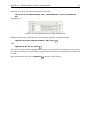
When the program opens for the first time, the background of the workspace is visible. In the
background are three quick start shortcuts, which will help you getting started. In the background
are two quick start shortcuts, which will help you getting started. These can be seen in figure 1.1.
Figure 1.1: Quick start short cuts, available in the background of the workspace.
The function of the quick start shortcuts is explained here:
• Import data. Opens the Import dialog, which you let you browse for, and import data from
your file system.
• New sequence. Opens a dialog which allows you to enter your own sequence.
• Read tutorials. Opens the tutorials menu with a number of tutorials. These are also
available from the Help menu in the Menu bar.
Below these three quick start shortcuts, you will see a text: "Looking for more features?" Clicking
this text will take you to a page on http://www.clcbio.com where you can read more about
how to get more functionalities into CLC Sequence Viewer.
1.5.2
Import of example data
It might be easier to understand the logic of the program by trying to do simple operations on
existing data. Therefore CLC Sequence Viewer includes an example data set.
CHAPTER 1. INTRODUCTION TO CLC SEQUENCE VIEWER
16
When downloading CLC Sequence Viewer you are asked if you would like to import the example
data set. If you accept, the data is downloaded automatically and saved in the program. If you
didn't download the data, or for some other reason need to download the data again, you have
two options:
You can click Import Example Data ( ) in the Help menu of the program. This imports the data
automatically. You can also go to http://www.clcbio.com/download and download the
example data from there.
If you download the file from the website, you need to import it into the program. See chapter 6
for more about importing data.
1.5.3
Import of example data
It might be easier to understand the logic of the program by trying to do simple operations on
existing data. Therefore CLC Sequence Viewer includes an example data set.
If you would like to download the example data you have three options:
1. You can click Download Example Data in the start up table that is visible in the CLC
Sequence Viewer when no datasets have been opened for viewing. This will take you
to http://www.clcbio.com/support/downloads/#data where you can choose to
download two different example datasets that can be used for the following purposes:
• Variant identification in a tumor sample. This dataset is taken from a larger whole
exome dataset and includes data from a small fraction of chromosome 5 (Example_data_tumor.zip).
• Identification of somatic variants in a tumor sample using the matched normal sample
for removal of germline variants. This is matched tumor and normal samples from
chromosome 22 from a whole exome dataset (Example_data_tumor_normal.zip).
2. You can also go to directly to http://www.clcbio.com/support/downloads/#data
and download the example data from there.
3. Finally, you can use these links to get the data:
http://download.clcbio.com/testdata/cancer/current/Example_data_tumor.
zip or
http://download.clcbio.com/testdata/cancer/current/Example_data_tumor_
normal.zip
When you have downloaded the data from the website, you need to import them into the CLC
Sequence Viewer. How to import data is described in section 6.1.
1.6
Plugins
When you install CLC Sequence Viewer, it has a standard set of features. However, you can
upgrade and customize the program using a variety of plugins.
As the range of plugins is continuously updated and expanded, they will not be listed here. Instead
we refer to http://www.clcbio.com/plugins for a full list of plugins with descriptions of
their functionalities.
CHAPTER 1. INTRODUCTION TO CLC SEQUENCE VIEWER
1.6.1
17
Installing plugins
Plugins are installed using the plugin manager1 :
Help in the Menu Bar | Plugins and Resources... (
or Plugins (
)
) in the Toolbar
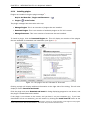
The plugin manager has three tabs at the top:
• Manage Plugins. This is an overview of plugins that are installed.
• Download Plugins. This is an overview of available plugins on CLC bio's server.
• Manage Resources. This is an overview of resources that are installed.
To install a plugin, click the Download Plugins tab. This will display an overview of the plugins
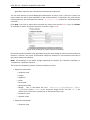
that are available for download and installation (see figure 1.2).
Figure 1.2: The plugins that are available for download.
Clicking a plugin will display additional information at the right side of the dialog. This will also
display a button: Download and Install.
Click the plugin and press Download and Install. A dialog displaying progress is now shown, and
the plugin is downloaded and installed.
If the plugin is not shown on the server, and you have it on your computer (e.g. if you have
downloaded it from our web-site), you can install it by clicking the Install from File button at the
1
In order to install plugins on Windows, the Workbench must be run in administrator mode: Right-click the program
shortcut and choose "Run as Administrator". Then follow the procedure described below.
CHAPTER 1. INTRODUCTION TO CLC SEQUENCE VIEWER
18
bottom of the dialog. This will open a dialog where you can browse for the plugin. The plugin file
should be a file of the type ".cpa".
When you close the dialog, you will be asked whether you wish to restart the CLC Sequence
Viewer. The plugin will not be ready for use until you have restarted.
1.6.2
Uninstalling plugins
Plugins are uninstalled using the plugin manager:
Help in the Menu Bar | Plugins and Resources... (
or Plugins (
)
) in the Toolbar
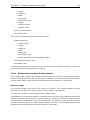
This will open the dialog shown in figure 1.3.
Figure 1.3: The plugin manager with plugins installed.
The installed plugins are shown in this dialog. To uninstall:
Click the plugin | Uninstall
If you do not wish to completely uninstall the plugin but you don't want it to be used next time
you start the Workbench, click the Disable button.
When you close the dialog, you will be asked whether you wish to restart the workbench. The
plugin will not be uninstalled until the workbench is restarted.
1.6.3
Updating plugins
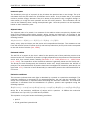
If a new version of a plugin is available, you will get a notification during start-up as shown in
figure 1.4.
In this list, select which plugins you wish to update, and click Install Updates. If you press
Cancel you will be able to install the plugins later by clicking Check for Updates in the Plugin
CHAPTER 1. INTRODUCTION TO CLC SEQUENCE VIEWER
19
Figure 1.4: Plugin updates.
manager (see figure 1.3).
1.6.4
Resources
Resources can be manually installed and un-installed the same way as plugins.
1.7
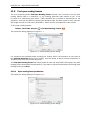
Network configuration
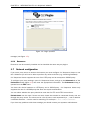
If you use a proxy server to access the Internet you must configure CLC Sequence Viewer to use
this. Otherwise you will not be able to perform any online activities (e.g. searching GenBank).
CLC Sequence Viewer supports the use of an HTTP-proxy and an anonymous SOCKS-proxy.
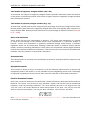
To configure your proxy settings, open CLC Sequence Viewer, and go to the Advanced-tab of the
Preferences dialog (figure 1.5) and enter the appropriate information. The Preferences dialog is
opened from the Edit menu.
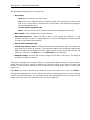
You have the choice between an HTTP-proxy and a SOCKS-proxy. CLC Sequence Viewer only
supports the use of a SOCKS-proxy that does not require authorization.
You can select whether the proxy should be used also for FTP and HTTPS connections.
Exclude hosts can be used if there are some hosts that should be contacted directly and not
through the proxy server. The value can be a list of hosts, each separated by a |, and in addition
a wildcard character * can be used for matching. For example: *.foo.com|localhost.
If you have any problems with these settings you should contact your systems administrator.
CHAPTER 1. INTRODUCTION TO CLC SEQUENCE VIEWER
20
Figure 1.5: Adjusting proxy preferences.
1.8
The format of the user manual
This user manual offers support to Windows, Mac OS X and Linux users. The software is very
similar on these operating systems. In areas where differences exist, these will be described
separately. However, the term "right-click" is used throughout the manual, but some Mac users
may have to use Ctrl+click in order to perform a "right-click" (if they have a single-button mouse).
The most recent version of the user manuals can be downloaded from http://www.clcbio.
com/usermanuals.
The user manual consists of four parts.
• The first part includes the introduction to the CLC Sequence Viewer.
• The second part describes in detail how to operate all the program's basic functionalities.
• The third part digs deeper into some of the molecular modeling and bioinformatic features
of the program. In this part, you will also find our "Bioinformatics explained" sections.
These sections elaborate on the algorithms and analyses of CLC Sequence Viewer and
provide more general knowledge of molecular modeling and bioinformatic concepts.
• The fourth part is the Appendix and Index.
Each chapter includes a short table of contents.
1.8.1
Text formats
In order to produce a clearly laid-out content in this manual, different formats are applied:
• A feature in the program is in bold starting with capital letters. ( Example: Navigation Area)
• An explanation of how a particular function is activated, is illustrated by "|" and bold. (E.g.:
select the element | Edit | Rename)
CHAPTER 1. INTRODUCTION TO CLC SEQUENCE VIEWER
1.9
21
Latest improvements
CLC Sequence Viewer is under constant development and improvement. A detailed list that
includes a description of new features, improvements, bugfixes, and changes for the current
version of CLC Sequence Viewer can be found at:
http://www.clcbio.com/products/latest-improvements-sequence-viewer/
Chapter 2
Tutorials
Contents
2.1
2.2
2.3
2.4
Tutorial: Getting Started . . . . . . . . . . . . . . . . . . . . . . . . . . . . .
2.1.1
Creating a a folder . . . . . . . . . . . . . . . . . . . . . . . . . . . . . .
2.1.2
Import data
23
23
. . . . . . . . . . . . . . . . . . . . . . . . .
25
Tutorial: Side Panel Settings . . . . . . . . . . . . . . . . . . . . . . . . . . .
2.3.1
Saving the settings in the Side Panel . . . . . . . . . . . . . . . . . . . .
26
28
2.3.2
Remove alignment view settings . . . . . . . . . . . . . . . . . . . . . .
29
2.3.3
Applying saved settings . . . . . . . . . . . . . . . . . . . . . . . . . . .
29
Tutorial: Align Protein Sequences . . . . . . . . . . . . . . . . . . . . . . . .
30
2.4.1
2.5
. . . . . . . . . . . . . . . . . . . . . . . . . . . . . . . . .
Tutorial: View a DNA Sequence
22
The alignment dialog . . . . . . . . . . . . . . . . . . . . . . . . . . . .
30
Tutorial: Find Restriction Sites . . . . . . . . . . . . . . . . . . . . . . . . . .
31
2.5.1
The Side Panel way of finding restriction sites . . . . . . . . . . . . . . .
32
2.5.2
The Toolbox way of finding restriction sites
33
. . . . . . . . . . . . . . . .
This chapter contains tutorials representing some of the features of CLC Sequence Viewer. The
first tutorials are meant as a short introduction to operating the program. The last tutorials give
examples of how to use some of the main features of CLC Sequence Viewer.
tutorials at http://www.clcbio.tv.
2.1
Watch video
Tutorial: Getting Started
This brief tutorial will take you through the most basic steps of working with the CLC Workbenches.
The tutorial introduces the user interface, shows how to create a folder, and demonstrates how
to import your own existing data into the program. The CLC Sequence Viewer will be used to
illustrate these functions.
When you open CLC Sequence Viewer for the first time, the user interface looks like figure 2.1.
At this stage, the important issues are the Navigation Area and the View Area.
22
CHAPTER 2. TUTORIALS
23
Figure 2.1: The user interface as it looks when you start the program for the first time. (Mac version
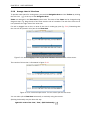
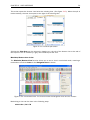
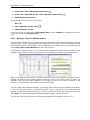
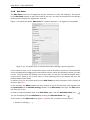
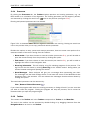
of CLC Sequence Viewer. The interface is similar for Windows and Linux.)
The Navigation Area to the left is where you keep all your data for use in the program. Most
analyses of CLC Sequence Viewer require that the data is saved in the Navigation Area. There
are several ways to get data into the Navigation Area, and this tutorial describes how to import
existing data.
The View Area is the main area to the right. This is where the data can be 'viewed'. In general,
a View is a display of a piece of data, and the View Area can include several Views. The Views
are represented by tabs, and can be organized e.g. by using 'drag and drop'.
2.1.1
Creating a a folder
When CLC Sequence Viewer is started there is one element in the Navigation Area called
CLC_Data1 . This element is a Location. A location points to a folder on your computer where
your data for use with CLC Sequence Viewer is stored.
The data in the location can be organized into folders. Create a folder:
File | New | Folder ( )
or Ctrl + Shift + N ( + Shift + N on Mac)
Name the folder 'My folder' and press Enter.
2.1.2
Import data
As an example, first generation sequence data as well as high throughput sequencing
data can be downloaded from http://www.clcbio.com/downloads under "EXAMPLE
DATA", Roche/454 pyrosequencing genome data from E. coli commensal strain K-12. The
NC_010473.gbk (GenBank format) can be imported by all types of CLC Workbenches, while import of the high throughput sequencing data requires specialised import actions. (This "EXAMPLE
DATA" file is chosen for demonstration purposes only - you may have another file on your desktop,
1
If you have downloaded the example data, this will be placed as a folder in CLC_Data
CHAPTER 2. TUTORIALS
24
which you can use to follow this tutorial. You can import all kinds of files.)
The sequence data is imported into the folder that was selected in the Navigation Area, before you
clicked Import. Double-click the sequence in the Navigation Area to view it. The NC_010473.gbk
(GenBank format) result looks like figure 2.2 while the high throughput data looks like figure 2.3.
Figure 2.2: The NC_010473.gbk (GenBank format) file is imported and opened.
The sequence is imported into the folder that was selected in the Navigation Area, before you
clicked Import. Double-click the sequence in the Navigation Area to view it.
Figure 2.3: The NC_010473 high throughput data imported and opened.
CHAPTER 2. TUTORIALS
2.2
25
Tutorial: View a DNA Sequence
This brief tutorial will take you through some different ways to display a sequence in the program.
The tutorial introduces zooming on a sequence, dragging tabs, and opening selection in new
view.
We will be working with the sequence called pcDNA3-atp8a1 located in the 'Cloning' folder in the
Example data. Double-click the sequence in the Navigation Area to open it. The sequence is
displayed with annotations above it. (See figure 2.4).
Figure 2.4: Sequence pcDNA3-atp8a1 opened in a view.
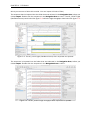
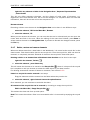
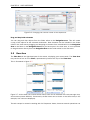
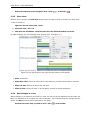
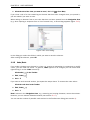
As default, CLC Sequence Viewer displays a sequence with annotations (colored arrows on
the sequence like the green promoter region annotation in figure 2.4) and zoomed to see the
residues.
In this tutorial we want to have an overview of the whole sequence. Hence;
click Zoom Out (
sequence
) in the Toolbar | click the sequence until you can see the whole
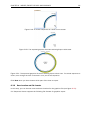
This sequence is circular, which is indicated by << and >> at the beginning and the end of the
sequence.
In the following we will show how the same sequence can be displayed in two different views one linear view and one circular view. First, zoom in to see the residues again by using the Zoom
In ( ) or the 100% ( ). Then we make a split view by:
press and hold the Ctrl-button on the keyboard (
( ) at the bottom of the view
on Mac) | click Show as Circular
This opens an additional view of the vector with a circular display, as can be seen in figure 2.5.
You may want to change the text size in the top panel to see more of the sequence. Scroll down
in the Sequence Settings panel to Text format and change text size to Tiny or Small. You can
also resize the panels relative to each other by clicking and dragging the separator line between
CHAPTER 2. TUTORIALS
26
Figure 2.5: The resulting two views which are split horizontally.
them.
Make a selection on the circular sequence (remember to switch to the Selection ( ) tool in the
tool bar). Note that this selection is also reflected in the linear view above, and that the selection
coordinates appear at the bottom right corner of the screen (in figure 2.5 the Ampicillin ORF was
selected).
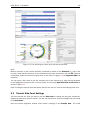
You can open a third view of just the selected part of the sequence by right-clicking anywhere
in the highlighted sequence text in the top panel and choosing Open Selection in New View as
shown in figure 2.6.
Click and drag the new tab from the bottom panel to the top one, next to the existing linear view.
2.3
Tutorial: Side Panel Settings
This brief tutorial will show you how to use the Side Panel to change the way your sequences,
alignments and other data are shown. You will also see how to save the changes that you made
in the Side Panel .
Open the protein alignment located under Protein orthologs in the Example data. The initial
CHAPTER 2. TUTORIALS
27
Figure 2.6: Creating a new view panel for just the selected sequence.
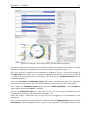
view of the alignment has colored the residues according to the Rasmol color scheme, and the
alignment is automatically wrapped to fit the width of the view (shown in figure 2.7).
Now, we are going to modify how this alignment is displayed. For this, we use the settings in
the Side Panel to the right. All the settings are organized into groups, which can be expanded
/ collapsed by clicking the name of the group. The first group is Sequence Layout which is
expanded by default.
First, select No wrap in the Sequence Layout. This means that each sequence in the alignment
is kept on the same line. To see more of the alignment, you now have to scroll horizontally.
Next, expand the Annotation Layout group and select Show Annotations. Set the Offset to
"More offset" and set the Label to "Stacked".
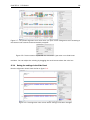
Click on the Annotation Types tab. Here you will see a list of the types annotation that are
carried by the sequences in the alignment (see figure 2.8).
Check the "Region" annotation type, and you will see the regions as red annotations on the
sequences.
Next, we will change the way the residues are colored. Click the Alignment Info group and under
Conservation, check "Background color". This will use a gradient as background color for the
CHAPTER 2. TUTORIALS
28
Figure 2.7: The protein alignment as it looks when you open it with background color according to
the Rasmol color scheme and automatically wrapped.
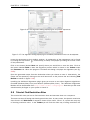
Figure 2.8: The Annotation Layout and the Annotation Types tabs in the Side Panel.
residues. You can adjust the coloring by dragging the small arrows above the color box.
2.3.1
Saving the settings in the Side Panel
Now the alignment should look similar to figure 2.9.
Figure 2.9: The alignment when all the above settings have been changed.
CHAPTER 2. TUTORIALS
29
At this point, if you just close the view, the changes made to the Side Panel will not be saved.
This means that you would have to perform the changes again next time you open the alignment.
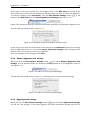
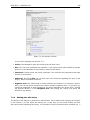
To save the changes to the Side Panel, click the Save/Restore Settings button ( ) at the
bottom of the Side Panel and click Save Alignment View Settings (see figure 2.10).
Figure 2.10: Saving the settings of the Side Panel either generally or this particular alignment only.
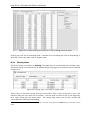
This will open the dialog shown in figure 2.11.
Figure 2.11: Dialog for saving the settings of the Side Panel.
In this way you can save the current state of the settings in the Side Panel so that you can apply
them to alignments later on. If you check Always apply these settings, these settings will be
applied every time you open a view of the alignment.
Type "My settings" in the dialog and click Save.
2.3.2
Remove alignment view settings
When you click the Save/Restore Settings button ( ) and select Remove Alignments View
Settings, you can choose whether this should be applied generally or on this alignment view only
(see figure 2.12).
Figure 2.12: Menu for removing saved settings.
This will open the dialog shown in figure 2.13 and allow you to remove specific settings.
Figure 2.13: Menu for removing saved settings.
2.3.3
Applying saved settings
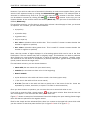
When you click the Save/Restore Settings button ( ) again and select Apply Saved Settings,
you will see "My settings" in the menu together with some pre-defined settings that the CLC
CHAPTER 2. TUTORIALS
30
Sequence Viewer has created for you (see figure 2.14).
Figure 2.14: Menu for applying saved settings.
Whenever you open an alignment, you will be able to apply these settings. Each kind of view has
its own list of settings that can be applied.
At the bottom of the list you will see the "CLC Standard Settings" which are the default settings
for the view.
2.4
Tutorial: Align Protein Sequences
This tutorial outlines some of the alignment functionality of the CLC Sequence Viewer. In addition
to creating alignments of nucleotide or peptide sequences, the software offers several ways to
view alignments. The alignments can then be used for building phylogenetic trees.
Sequences must be available via the Navigation Area to be included in an alignment. If you have
sequences open in a View that you have not saved, then you just need to select the view tab and
press Ctrl + S (or + S on Mac) to save them.
In this tutorial six protein sequences from the Example data folder will be aligned.
figure 2.15).
(See
Figure 2.15: Six protein sequences in 'Sequences' from the 'Protein orthologs' folder of the Example
data.
To align the sequences:
select and then right click on the sequences from the 'Protein orthologs' folder
under 'Example Data' | Toolbox | Alignments and Trees ( )| Create Alignment
( )
2.4.1
The alignment dialog
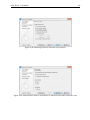
This opens the dialog shown in figure 2.16.
It is possible to add and remove sequences from Selected Elements list. Since we had already
selected the six proteins, just click Next to adjust parameters for the alignment.
Clicking Next opens the dialog shown in figure 2.17.
CHAPTER 2. TUTORIALS
31
Figure 2.16: The alignment dialog displaying the six protein sequences.
Figure 2.17: The alignment dialog displaying the available parameters which can be adjusted.
Leave the parameters at their default settings. An explanation of the parameters can be found
by clicking the help button ( ). Alternatively, a tooltip is displayed by holding the mouse cursor
on the parameters.
Click on the button labeled Next and specify where you would like to save the data. Click on
the button labeled Finish to start the alignment process which is shown in the Toolbox under
the Processes tab. When the program is finished calculating it displays the alignment (see fig.
2.18):
Open the generated output from the destination where you choose to save it. Alternatively, the
output can be opened by clicking on the small arrow next to the process bar and choosing Find
Results as shown in figure 2.19):
Installing the Additional Alignments plugin gives you access to two other alignment algorithms:
ClustalW (Windows/Mac/Linux) and Muscle (Windows/Mac/Linux). The Additional Alignments
Module can be downloaded from http://www.clcbio.com/plugins. Note that you will need
administrative privileges on your system to install it.
2.5
Tutorial: Find Restriction Sites
This tutorial will show you how to find restriction sites and annotate them on a sequence.
There are two ways of finding and showing restriction sites. In many cases, the dynamic restriction
sites found in the Side Panel of sequence views will be useful, since it is a quick and easy way
of showing restriction sites. In the Toolbox you will find the other way of doing restriction site
CHAPTER 2. TUTORIALS
32
Figure 2.18: The resulting alignment.
Figure 2.19: Find and open the output that was generated.
analyses. This way provides more control of the analysis and gives you more output options, e.g.
a table of restriction sites and a list of restriction enzymes that can be saved for later use. In this
tutorial, the first section describes how to use the Side Panel to show restriction sites, whereas
the second section describes the restriction map analysis performed from the Toolbox.
2.5.1
The Side Panel way of finding restriction sites
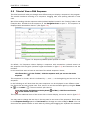
When you open a sequence, there is a Restriction sites setting in the Side Panel. By default, 10
of the most popular restriction enzymes are shown (see figure 2.20).
The restriction sites are shown on the sequence with an indication of cut site and recognition
sequence. In the list of enzymes in the Side Panel, the number of cut sites is shown in
parentheses for each enzyme (e.g. SalI cuts three times). If you wish to see the recognition
sequence of the enzyme, place your mouse cursor on the enzyme in the list for a short moment,
and a tool tip will appear.
You can add or remove enzymes from the list by clicking the Manage enzymes button.
CHAPTER 2. TUTORIALS
33
Figure 2.20: Showing restriction sites of ten restriction enzymes.
2.5.2
The Toolbox way of finding restriction sites
Suppose you are working with sequence 'ATP8a1 mRNA' from the example data, and you wish to
know which restriction enzymes will cut this sequence exactly once and create a 3' overhang. Do
the following:
select the ATP8a1 mRNA | Toolbox in the Menu Bar | Restriction Sites (
Restriction Site Analysis ( )
) |
Click Next to set parameters for the restriction map analysis.
In this step first select Use existing enzyme list and click the Browse for enzyme list button
( ). Select the 'Popular enzymes' in the Cloning folder under Enzyme lists (figure 2.21).
Then write 3' into the filter below to the left. Select all the enzymes and click the Add button
( ). The result should be like in figure 2.22.
Click on the button labeled Next. In this step you specify that you want to show enzymes that
cut the sequence only once. This means that you should de-select the Two restriction sites
checkbox (See figure 2.23).
Click on the button labeled Next and select that you want to Add restriction sites as annotations
on sequence and Create restriction map (figure 2.24).
Click on the button labeled Finish to start the restriction map analysis.
CHAPTER 2. TUTORIALS
34
Figure 2.21: Selecting enzyme list.
Figure 2.22: Selecting enzymes.
View restriction site
The restriction sites are shown in two views: one view is in a tabular format and the other view
displays the sites as annotations on the sequence. The result is shown in figure 2.25.
CHAPTER 2. TUTORIALS
Figure 2.23: Selecting output for restriction map analysis.
Figure 2.24: Add restriction sites as annotations on sequence and create restriction map.
35
CHAPTER 2. TUTORIALS
36
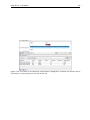
Figure 2.25: The result of the restriction map analysis is displayed in a table at the bottom and as
annotations on the sequence in the view at the top.
Part II
Core Functionalities
37
Chapter 3
User interface
Contents
3.1
3.2
3.3
3.4
3.5
Navigation Area . . . . . . . . . . . . . . . . . . . . . . . . . . . . . . . . . .
39
3.1.1
Data structure . . . . . . . . . . . . . . . . . . . . . . . . . . . . . . . .
40
3.1.2
Create new folders
. . . . . . . . . . . . . . . . . . . . . . . . . . . . .
41
3.1.3
Sorting folders . . . . . . . . . . . . . . . . . . . . . . . . . . . . . . . .
41
3.1.4
3.1.5
Multiselecting elements . . . . . . . . . . . . . . . . . . . . . . . . . . .
Moving and copying elements . . . . . . . . . . . . . . . . . . . . . . . .
41
42
3.1.6
Change element names . . . . . . . . . . . . . . . . . . . . . . . . . . .
43
3.1.7
Delete, restore and remove elements . . . . . . . . . . . . . . . . . . .
44
3.1.8
Show folder elements in a table . . . . . . . . . . . . . . . . . . . . . .
45
View Area . . . . . . . . . . . . . . . . . . . . . . . . . . . . . . . . . . . . .
46
3.2.1
Open view . . . . . . . . . . . . . . . . . . . . . . . . . . . . . . . . . .
47
3.2.2
Show element in another view . . . . . . . . . . . . . . . . . . . . . . .
47
3.2.3
Close views . . . . . . . . . . . . . . . . . . . . . . . . . . . . . . . . .
48
3.2.4
Save changes in a view . . . . . . . . . . . . . . . . . . . . . . . . . . .
48
3.2.5
Undo/Redo
. . . . . . . . . . . . . . . . . . . . . . . . . . . . . . . . .
49
3.2.6
Arrange views in View Area . . . . . . . . . . . . . . . . . . . . . . . . .
50
3.2.7
Moving a view to a different screen . . . . . . . . . . . . . . . . . . . . .
52
3.2.8
Side Panel . . . . . . . . . . . . . . . . . . . . . . . . . . . . . . . . . .
53
Zoom and selection in View Area . . . . . . . . . . . . . . . . . . . . . . . .
54
3.3.1
Zoom in . . . . . . . . . . . . . . . . . . . . . . . . . . . . . . . . . . .
55
3.3.2
Zoom out . . . . . . . . . . . . . . . . . . . . . . . . . . . . . . . . . . .
55
3.3.3
Selecting, panning and zooming . . . . . . . . . . . . . . . . . . . . . .
56
Toolbox and Status Bar . . . . . . . . . . . . . . . . . . . . . . . . . . . . . .
56
3.4.1
Processes . . . . . . . . . . . . . . . . . . . . . . . . . . . . . . . . . .
57
3.4.2
Toolbox . . . . . . . . . . . . . . . . . . . . . . . . . . . . . . . . . . . .
57
3.4.3
Status Bar . . . . . . . . . . . . . . . . . . . . . . . . . . . . . . . . . .
59
Workspace . . . . . . . . . . . . . . . . . . . . . . . . . . . . . . . . . . . . .
59
3.5.1
Create Workspace . . . . . . . . . . . . . . . . . . . . . . . . . . . . . .
60
3.5.2
Select Workspace . . . . . . . . . . . . . . . . . . . . . . . . . . . . . .
60
3.5.3
Delete Workspace . . . . . . . . . . . . . . . . . . . . . . . . . . . . . .
60
38
CHAPTER 3. USER INTERFACE
3.6
39
List of shortcuts . . . . . . . . . . . . . . . . . . . . . . . . . . . . . . . . . .
61
This chapter provides an overview of the different areas in the user interface of CLC Sequence
Viewer. As can be seen from figure 3.1 this includes a Navigation Area, View Area, Menu Bar,
Toolbar, Status Bar and Toolbox.
Figure 3.1: The user interface consists of the Menu Bar, Toolbar, Status Bar, Navigation Area,
Toolbox, and View Area.
3.1
Navigation Area
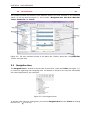
The Navigation Area is located in the left side of the screen, under the Toolbar (see figure 3.2).
It is used for organizing and navigating data. Its behavior is similar to the way files and folders
are usually displayed on your computer.
Figure 3.2: The Navigation Area.
To provide more space for viewing data, you can hide Navigation Area and the Toolbox by clicking
the hide icon ( ) at the top.
CHAPTER 3. USER INTERFACE
3.1.1
40
Data structure
The data in the Navigation Area is organized into a number of Locations. When the CLC Sequence
Viewer is started for the first time, there is one location called CLC_Data (unless your computer
administrator has configured the installation otherwise).
A location represents a folder on the computer: The data shown under a location in the Navigation
Area is stored on the computer in the folder which the location points to.
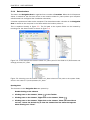
This is explained visually in figure 3.3. The full path to the system folder can be located by
mousing over the data location as shown in figure 3.4.
Figure 3.3: In this example the location called 'CLC_Data' points to the folder at C:\Documents and
settings\clcuser\CLC_Data.
Figure 3.4: Mousing over the location called 'CLC_Data' shows the full path to the system folder,
which in this case is C:\Users\boester\CLC_Data.
Opening data
The elements in the Navigation Area are opened by:
Double-clicking on the element
or Clicking once on the element | Show (
) in the Toolbar
or Clicking once on the element | Right-click on the element | Show (
)
or Clicking once on the element | Right-click on the element | Show (the one without
an icon) | Select the desired way to view the element from the menu that appears
when mousing over "Show"
CHAPTER 3. USER INTERFACE
41
This will open a view in the View Area, which is described in section 3.2.
Adding data
Data can be added to the Navigation Area in a number of ways. Files can be imported from
the file system (see chapter 6). Furthermore, an element can be added by dragging it into the
Navigation Area. This could be views that are open, elements on lists, e.g. search hits or
sequence lists, and files located on your computer.
If a file or another element is dropped on a folder, it is placed at the bottom of the folder. If it is
dropped on another element, it will be placed just below that element.
If the element already exists in the Navigation Area a copy will be created with the name
extension "-1", "-2" etc. if more than one copy exist.
3.1.2
Create new folders
In order to organize your files, they can be placed in folders. Creating a new folder can be done
in two ways:
right-click an element in the Navigation Area | New | Folder (
or File | New | Folder (
)
)
If a folder is selected in the Navigation Area when adding a new folder, the new folder is added
at the bottom of this folder. If an element is selected, the new folder is added right above that
element.
You can move the folder manually by selecting it and dragging it to the desired destination.
3.1.3
Sorting folders
You can sort the elements in a folder alphabetically:
right-click the folder | Sort Folder
On Windows, subfolders will be placed at the top of the folder, and the rest of the elements will
be listed below in alphabetical order. On Mac, both subfolders and other elements are listed
together in alphabetical order.
3.1.4
Multiselecting elements
Multiselecting elements means that you select more than one element at the same time. This
can be done in the following ways:
• Holding down the <Ctrl> key ( on Mac) while clicking on multiple elements selects the
elements that have been clicked.
• Selecting one element, and selecting another element while holding down the <Shift> key
selects all the elements listed between the two locations (the two end locations included).
• Selecting one element, and moving the curser with the arrow-keys while holding down the
<Shift> key, enables you to increase the number of elements selected.
CHAPTER 3. USER INTERFACE
3.1.5
42
Moving and copying elements
Elements can be moved and copied in several ways:
• Using Copy (
• Using Ctrl + C (
• Using Copy (
), Cut (
) and Paste (
+ C on Mac), Ctrl + X (
), Cut (
) and Paste (
) from the Edit menu.
+ X on Mac) and Ctrl + V (
+ V on Mac).
) in the Toolbar.
• Using drag and drop to move elements.
• Using drag and drop while pressing Ctrl / Command to copy elements.
In the following, all of these possibilities for moving and copying elements are described in further
detail.
Copy, cut and paste functions
Copies of elements and folders can be made with the copy/paste function which can be applied
in a number of ways:
select the files to copy | right-click one of the selected files | Copy (
the location to insert files into | Paste ( )
or select the files to copy | Ctrl + C (
+ P ( + P on Mac)
) | right-click
+ C on Mac) | select where to insert files | Ctrl
or select the files to copy | Edit in the Menu Bar | Copy (
files | Edit in the Menu Bar | Paste ( )
) | select where to insert
If there is already an element of that name, the pasted element will be renamed by appending a
number at the end of the name.
Elements can also be moved instead of copied. This is done with the cut/paste function:
select the files to cut | right-click one of the selected files | Cut (
the location to insert files into | Paste ( )
or select the files to cut | Ctrl + X (
+ V ( + V on Mac)
) | right-click
+ X on Mac) | select where to insert files | Ctrl
When you have cut the element, it is "grayed out" until you activate the paste function. If you
change your mind, you can revert the cut command by copying another element.
Note that if you move data between locations, the original data is kept. This means that you are
essentially doing a copy instead of a move operation.
Move using drag and drop
Using drag and drop in the Navigation Area, as well as in general, is a four-step process:
click the element | click on the element again, and hold left mouse button | drag
the element to the desired location | let go of mouse button
This allows you to:
CHAPTER 3. USER INTERFACE
43
• Move elements between different folders in the Navigation Area
• Drag from the Navigation Area to the View Area: A new view is opened in an existing View
Area if the element is dragged from the Navigation Area and dropped next to the tab(s) in
that View Area.
• Drag from the View Area to the Navigation Area: The element, e.g. a sequence, alignment,
search report etc. is saved where it is dropped. If the element already exists, you are asked
whether you want to save a copy. You drag from the View Area by dragging the tab of the
desired element.
Use of drag and drop is supported throughout the program, also to open and re-arrange views
(see section 3.2.6).
Note that if you move data between locations, the original data is kept. This means that you are
essentially doing a copy instead of a move operation.
Copy using drag and drop
To copy instead of move using drag and drop, hold the Ctrl (
on Mac) key while dragging:
click the element | click on the element again, and hold left mouse button | drag
the element to the desired location | press Ctrl ( on Mac) while you let go of
mouse button release the Ctrl/ button
3.1.6
Change element names
This section describes two ways of changing the names of sequences in the Navigation Area. In
the first part, the sequences themselves are not changed - it's their representation that changes.
The second part describes how to change the name of the element.
Change how sequences are displayed
Sequence elements can be displayed in the Navigation Area with different types of information:
• Name (this is the default information to be shown).
• Accession (sequences downloaded from databases like GenBank have an accession
number).
• Latin name.
• Latin name (accession).
• Common name.
• Common name (accession).
Whether sequences can be displayed with this information depends on their origin. Sequences
that you have created yourself or imported might not include this information, and you will only be
able to see them represented by their name. However, sequences downloaded from databases
like GenBank will include this information. To change how sequences are displayed:
CHAPTER 3. USER INTERFACE
44
right-click any element or folder in the Navigation Area | Sequence Representation
| select format
This will only affect sequence elements, and the display of other types of elements, e.g.
alignments, trees and external files, will be not be changed. If a sequence does not have this
information, there will be no text next to the sequence icon.
Rename element
Renaming a folder or an element in the Navigation Area can be done in two different ways:
select the element | Edit in the Menu Bar | Rename
or select the element | F2
When you can rename the element, you can see that the text is selected and you can move the
cursor back and forth in the text. When the editing of the name has finished; press Enter or
select another element in the Navigation Area. If you want to discard the changes instead, press
the Esc-key.
3.1.7
Delete, restore and remove elements
When one deletes data from a data folder in the Workbench, it is moved to the recycle bin in that
data location. Each data location has its own recycle bin. From the recycle bin, data can then be
restored, or completely removed. Removal of data from the recycle bin frees disk space.
Deleting a folder or an element from a Workbench data location can be done in two ways:
right-click the element | Delete (
)
or select the element | press Delete key
This will cause the element to be moved to the Recycle Bin ( ) where it is kept until the recycle
bin is emptied or until you choose to restore the data object to your data location.
For deleting annotations instead of folders or elements, see section 9.3.2.
Items in a recycle bin can be restored in two ways:
Drag the elements with the mouse into the folder where they used to be.
or select the element | right click and choose the option Restore.
Once restored, you can continue to work with that data.
All contents of the recycle bin can be removed by choosing to empty the recycle bin:
Edit in the Menu Bar | Empty Recycle Bin (
)
This deletes the data and frees up disk space.
Note! This cannot be undone. Data is not recoverable after it is removed by emptying the recycle
bin.
CHAPTER 3. USER INTERFACE
3.1.8
45
Show folder elements in a table
A location or a folder might contain large amounts of elements. It is possible to view their
elements in the View Area:
select a folder or location | Show (
) in the Toolbar
or
select a folder or location | right click on the folder and select Show (
( )
) | Contents
An example is shown in figure 3.5.
Figure 3.5: Viewing the elements in a folder.
When the elements are shown in the view, they can be sorted by clicking the heading of each
of the columns. You can further refine the sorting by pressing Ctrl ( on Mac) while clicking the
heading of another column.
Sorting the elements in a view does not affect the ordering of the elements in the Navigation
Area.
Note! The view only displays one "layer" at a time: the content of subfolders is not visible in this
view. Also note that only sequences have the full span of information like organism etc.
Batch edit folder elements
You can select a number of elements in the table, right-click and choose Edit to batch edit the
elements. In this way, you can change for example the description or name of several elements
in one go.
In figure 3.6 you can see an example where the name of two sequence are renamed in one go.
In this example, a dialog with a text field will be shown, letting you enter a new name for these
two sequences.
Note! This information is directly saved and you cannot undo.
CHAPTER 3. USER INTERFACE
46
Figure 3.6: Changing the common name of two sequences.
Drag and drop folder elements
You can drag and drop objects from the folder editor to the Navigation area. This will create
a copy of the objects at the selected destination. New elements can be included in the folder
editor in the view area by dragging and dropping an element from a destination in the Navigation
Area to the folder in the Navigation Area that you have open in the view area. It is not possible
to drag elements directly from the Navigation Area to the folder editor in the View area.
3.2
View Area
The View Area is the right-hand part of the screen, displaying your current work. The View Area
may consist of one or more Views, represented by tabs at the top of the View Area.
This is illustrated in figure 3.7.
Figure 3.7: A View Area can enclose several views, each view is indicated with a tab (see right view,
which shows protein P68225). Furthermore, several views can be shown at the same time (in this
example, four views are displayed).
The tab concept is central to working with CLC Sequence Viewer, because several operations can
CHAPTER 3. USER INTERFACE
47
be performed by dragging the tab of a view, and extended right-click menus can be activated from
the tabs.
This chapter deals with the handling of views inside a View Area. Furthermore, it deals with
rearranging the views.
Section 3.3 deals with the zooming and selecting functions.
3.2.1
Open view
Opening a view can be done in a number of ways:
double-click an element in the Navigation Area
or select an element in the Navigation Area | File | Show | Select the desired way to
view the element
or select an element in the Navigation Area | Ctrl + O (
+ B on Mac)
Opening a view while another view is already open, will show the new view in front of the other
view. The view that was already open can be brought to front by clicking its tab.
Note! If you right-click an open tab of any element, click Show, and then choose a different view
of the same element, this new view is automatically opened in a split-view, allowing you to see
both views.
See section 3.1.5 for instructions on how to open a view using drag and drop.
3.2.2
Show element in another view
Each element can be shown in different ways. A sequence, for example, can be shown as linear,
circular, text etc.
In the following example, you want to see a sequence in a circular view. If the sequence is
already open in a view, you can change the view to a circular view:
Click Show As Circular (
) at the lower left part of the view
The buttons used for switching views are shown in figure 3.8).
Figure 3.8: The buttons shown at the bottom of a view of a nucleotide sequence. You can click the
buttons to change the view to e.g. a circular view or a history view.
If the sequence is already open in a linear view (
linear view, you can split the views very easily:
), and you wish to see both a circular and a
Press Ctrl ( on Mac) while you | Click Show As Circular ( ) at the lower left part
of the view
This will open a split view with a linear view at the bottom and a circular view at the top (see 9.5).
You can also show a circular view of a sequence without opening the sequence first:
CHAPTER 3. USER INTERFACE
Select the sequence in the Navigation Area | Show (
3.2.3
48
) | As Circular (
)
Close views
When a view is closed, the View Area remains open as long as there is at least one open view.
A view is closed by:
right-click the tab of the View | Close
or select the view | Ctrl + W
or hold down the Ctrl-button | Click the tab of the view while the button is pressed
By right-clicking a tab, the following close options exist. See figure 3.9
Figure 3.9: By right-clicking a tab, several close options are available.
• Close. See above.
• Close Other Tabs. Closes all other tabs, in all tab areas, except the one that is selected.
• Close Tab Area. Closes all tabs in the tab area.
• Close All Tabs. Closes all tabs, in all tab areas. Leaves an empty workspace.
3.2.4
Save changes in a view
When changes to an element are made in a view, the text on the tab appears bold and italic (on
Mac it is indicated by an * before the name of the tab). This indicates that the changes are not
saved. The Save function may be activated in two ways:
Click the tab of the view you want to save | Save (
) in the toolbar.
CHAPTER 3. USER INTERFACE
49
or Click the tab of the view you want to save | Ctrl + S (
+ S on Mac)
If you close a tab of a view containing an element that has been changed since you opened it,
you are asked if you want to save.
When saving an element from a new view that has not been opened from the Navigation Area
(e.g. when opening a sequence from a list of search hits), a save dialog appears (figure 3.10).
Figure 3.10: Save dialog.
In the dialog you select the folder in which you want to save the element.
After naming the element, press OK
3.2.5
Undo/Redo
If you make a change to an element in a view, e.g. remove an annotation in a sequence or modify
a tree, you can undo the action. In general, Undo applies to all changes you can make when
right-clicking in a view. Undo is done by:
Click undo (
or Edit | Undo (
) in the Toolbar
)
or Ctrl + Z
If you want to undo several actions, just repeat the steps above. To reverse the undo action:
Click the redo icon in the Toolbar
or Edit | Redo (
)
or Ctrl + Y
Note! Actions in the Navigation Area, e.g. renaming and moving elements, cannot be undone.
However, you can restore deleted elements (see section 3.1.7).
You can set the number of possible undo actions in the Preferences dialog (see section 4).
CHAPTER 3. USER INTERFACE
3.2.6
50
Arrange views in View Area
To provide more space for viewing data, you can hide Navigation Area and the Toolbox by clicking
the hide icon ( ) at the top of the Navigation Area.
Views are arranged in the View Area by their tabs. The order of the views can be changed using
drag and drop. E.g. drag the tab of one view onto the tab of a another. The tab of the first view is
now placed at the right side of the other tab.
If a tab is dragged into a view, an area of the view is made gray (see fig. 3.11) illustrating that
the view will be placed in this part of the View Area.
Figure 3.11: When dragging a view, a gray area indicates where the view will be shown.
The results of this action is illustrated in figure 3.12.
Figure 3.12: A horizontal split-screen. The two views split the View Area.
You can also split a View Area horizontally or vertically using the menus.
Splitting horizontally may be done this way:
right-click a tab of the view | View | Split Horizontally (
)
CHAPTER 3. USER INTERFACE
51
This action opens the chosen view below the existing view. (See figure 3.13). When the split is
made vertically, the new view opens to the right of the existing view.
Figure 3.13: A vertical split-screen.
Splitting the View Area can be undone by dragging e.g. the tab of the bottom view to the tab of
the top view. This is marked by a gray area on the top of the view.
Maximize/Restore size of view
The Maximize/Restore View function allows you to see a view in maximized mode, meaning a
mode where no other views nor the Navigation Area is shown.
Figure 3.14: A maximized view. The function hides the Navigation Area and the Toolbox.
Maximizing a view can be done in the following ways:
select view | Ctrl + M
CHAPTER 3. USER INTERFACE
52
or select view | View | Maximize/restore View (
)
or select view | right-click the tab | View | Maximize/restore View (
)
or double-click the tab of view
The following restores the size of the view:
Ctrl + M
or View | Maximize/restore View (
)
or double-click title of view
Please note that you can also hide Navigation Area and the Toolbox by clicking the hide icon
( ) at the top of the Navigation Area
3.2.7
Moving a view to a different screen
Using multiple screens can be a great benefit when analyzing data with the CLC Sequence Viewer.
You can move a view to another screen by dragging the tab of the view and dropping it outside
the workbench window. Alternatively, you can right-click in the view area or on the tab itself and
select View | Move to New Window from the context menu.
An example is shown in figure 3.15, where the main Workbench window shows a table of open
reading frames, and the screen to the right is used to display the sequence and annotations.
Figure 3.15: Showing the table on one screen while the sequence is displayed on another screen.
Clicking the table of open reading frames causes the view on the other screen to follow the
selection. Note that the screen resolution in this figure is kept low in order to include it in the
manual; in a real scenario, the resolution will be much higher.
You can make more detached windows, by dropping tabs outside the open workbench windows,
or you can drag more tabs to a detached window. To get a tab back to the main workbench
window, just drag the detached tab back, and drop it next to the other tabs in the top of the view
area. Note: You should not drag the detached window header, just the tab itself.
You can also split the view area in the detached windows as described in section 3.2.6.
CHAPTER 3. USER INTERFACE
3.2.8
53
Side Panel
The Side Panel allows you to change the way the contents of a view are displayed. The options
in the Side Panel depend on the kind of data in the view, and they are described in the relevant
sections about sequences, alignments, trees etc.
Figure 3.16 shows the default Side Panel for a protein sequence. It is organized into palettes.
Figure 3.16: The default view of the Side Panel when opening a protein sequence.
In this example, there is one for Sequence layout, one for Annotation Layout etc. These palettes
can be re-organized by dragging the palette name with the mouse and dropping it where you want
it to be. They can either be situated next to each other, so that you can switch between them,
or they can be listed on top of each other, so that expanding one of the palettes will push the
palettes below further down.
In addition, they can be moved away from the Side Panel and placed anywhere on the screen as
shown in figure3.17.
In this example, the Motifs palette has been placed on top of the sequence view together with
the Protein info and the Residue coloring palettes. In the Side Panel to the right, the Find palette
has been put on top.
In order to make all palettes dock in the Side Panel again, click the Dock Side Panel icon (
You can completely hide the Side Panel by clicking the Hide Side Panel icon (
).
At the bottom of the Side Panel (see figure 3.18) there are a number of icons used to:
• Expand all settings (
).
).
CHAPTER 3. USER INTERFACE
54
Figure 3.17: Palettes can be organized in the Side Panel as you like or placed anywhere on the
screen.
• Collapse all settings (
• Dock all palettes (
).
)
• Get Help for the particular view and settings (
)
• Save the settings of the Side Panel or apply already saved settings. Read more in section
4.5
Figure 3.18: Controlling the Side Panel at the bottom
Note! Changes made to the Side Panel, including the organization of palettes will not be saved
when you save the view. See how to save the changes in section 4.5
3.3
Zoom and selection in View Area
All views except tabular and text views support zooming. Figure 3.19 shows the zoom tools,
located at the bottom right corner of the view.
The zoom tools consist of some shortcuts for zooming to fit the width of the view ( ), zoom
to 100 % to see details ( ), zoom to a selection ( ), a zoom slider, and two mouse mode
buttons ( ) ( ).
The slider reflects the current zoom level and can be used to quickly adjust this. For more
fine-grained control of the zoom level, move the mouse upwards while sliding.
CHAPTER 3. USER INTERFACE
55
Figure 3.19: The zoom tools are located at the bottom right corner of the view.
The sections below describes how to use these tools as well as other ways of zooming and
navigating data.
3.3.1
Zoom in
There are six ways of zooming in:
Click Zoom in mode ( ) in the zoom tools (or press Ctrl+2) | click the location in.
the view that you want to zoom in on
or Click Zoom in mode ( ) in the zoom tools | click-and-drag a box around a part of
the view | the view now zooms in on the part you selected
or Press '+' on your keyboard
or Move the zoom slider located in the zoom tools
or Click the plus icon in the zoom tools
The last option for zooming in is only available if you have a mouse with a scroll wheel:
or Press and hold Ctrl (
on Mac) | Move the scroll wheel on your mouse forward
Note! You might have to click in the view before you can use the keyboard or the scroll wheel to
zoom.
If you press the Shift button on your keyboard while in zoom mode, the zoom function is reversed.
If you want to zoom in to 100 % to see all the data, click the Zoom to base level (
3.3.2
) icon.
Zoom out
It is possible to zoom out in different ways:
Click Zoom out mode (
) in the zoom tools (or press Ctrl+3) | click in the view
or Press '-' on your keyboard
or Move the zoom slider located in the zoom tools
or Click the minus icon in the zoom tools
The last option for zooming out is only available if you have a mouse with a scroll wheel:
or Press and hold Ctrl (
on Mac) | Move the scroll wheel on your mouse backwards
CHAPTER 3. USER INTERFACE
56
Note! You might have to click in the view before you can use the keyboard or the scroll wheel to
zoom.
If you want to zoom out to see all the data, click the Zoom to Fit (
) icon.
If you press Shift while clicking in a View, the zoom function is reversed. Hence, clicking on a
sequence in this way while the Zoom out mode toolbar item is selected, zooms in instead of
zooming out.
3.3.3
Selecting, panning and zooming
In the zoom tools, you can control which mouse mode to use. The default is Selection mode
( ) which is used for selecting data in a view. Next to the selection mode, you can select the
Zoom in mode as described in section 3.3.1. If you press and hold this button, two other modes
become available as shown in figure 3.20:
• Panning (
• Zoom out (
zooms out.
) is used for dragging the view with the mouse as a way of scrolling.
) is used to change the mouse mode so that whenever you click the view, it
Figure 3.20: Additional mouse modes can be found in the zoom tools.
If you hold the mouse over the selection and zoom tools, tooltips will appear that provide further
information about how to use the tools.
The mouse modes only apply when the mouse is within the view where they are selected.
The Selection mode can also be invoked with the keyboard shortcut Ctrl+1, while the Panning
mode can be invoked with Ctrl+4.
For some views, if you have made a selection, there is a Zoom to Selection (
allows you to zoom and scroll directly to fit the view to the selection.
3.4
) button, which
Toolbox and Status Bar
The Toolbox is placed in the left side of the user interface of CLC Sequence Viewer below the
Navigation Area.
The Toolbox shows a Processes tab, Favorites tab and a Toolbox tab.
The Toolbox can be hidden, so that the Navigation Area is enlarged and thereby displays more
elements:
View | Show/Hide Toolbox | Show/Hide Toolbox
You can also click the Hide Toolbox (
) button.
CHAPTER 3. USER INTERFACE
3.4.1
57
Processes
By clicking the Processes tab, the Toolbox displays previous and running processes, e.g. an
NCBI search or a calculation of an alignment. The running processes can be stopped, paused,
and resumed by clicking the small icon ( ) next to the process (see figure 3.21).
Running and paused processes are not deleted.
Figure 3.21: A database search and an alignment calculation are running. Clicking the small icon
next to the process allow you to stop, pause and resume processes.
Besides the options to stop, pause and resume processes, there are some extra options for a
selected number of the tools running from the Toolbox:
• Show results. If you have chosen to save the results (see section 8.1), you will be able to
open the results directly from the process by clicking this option.
• Find results. If you have chosen to save the results (see section 8.1), you will be able to
high-light the results in the Navigation Area.
• Show Log Information. This will display a log file showing progress of the process. The
log file can also be shown by clicking Show Log in the "handle results" dialog where you
choose between saving and opening the results.
• Show Messages. Some analyses will give you a message when processing your data.
The messages are the black dialogs shown in the lower left corner of the Workbench that
disappear after a few seconds. You can reiterate the messages that have been shown by
clicking this option.
The terminated processes can be removed by:
View | Remove Finished Processes (
)
If you close the program while there are running processes, a dialog will ask if you are sure that
you want to close the program. Closing the program will stop the process, and it cannot be
restarted when you open the program again.
3.4.2
Toolbox
The content of the Toolbox tab in the Toolbox corresponds to Toolbox in the Menu Bar.
The tools in the toolbox can be accessed by double-clicking or by dragging elements from the
Navigation Area to an item in the Toolbox.
CHAPTER 3. USER INTERFACE
58
Quick access to tools
To enable quick launch of tools in CLC Sequence Viewer, press Ctrl + Shift + T (
Mac) to show the quick launch dialog (see figure 3.22).
+ Shift + T on
Figure 3.22: Quick access to all tools in CLC Sequence Viewer.
When the dialog is opened, you can start typing search text in the text field at the top. This will
bring up the list of tools that match this text either in the name, description or location in the
Toolbox. In the example shown in figure 3.23, typing create shows a list of tools involving the
word "create", and the arrow keys or mouse can be used for selecting and starting a tool.
Figure 3.23: Typing in the search field at the top will filter the list of tools to launch.
CHAPTER 3. USER INTERFACE
59
Favorites toolbox
Next to the Toolbox tab, you find the Favorites tab. This can be used for organizing and getting
quick access to the tools you use the most. It consists of two parts as shown in figure 3.24.
Figure 3.24: Favorites toolbox.
Favorites You can manually add tools to the favorites menu simply by right-clicking the tool in
the Toolbox. You can also right-click the Favorites folder itself and select Add Tool. To
remove a tool, right-click and select Remove from Favorites. Note that you can also add
complete folders to the favorites.
Frequently used The list of tools in this folder is automatically populated as you use the
Workbench. The most frequently used tools are listed at the top.
3.4.3
Status Bar
As can be seen from figure 3.1, the Status Bar is located at the bottom of the window. In the
left side of the bar is an indication of whether the computer is making calculations or whether it
is idle. The right side of the Status Bar indicates the range of the selection of a sequence. (See
chapter 3.3.3 for more about the Selection mode button.)
3.5
Workspace
If you are working on a project and have arranged the views for this project, you can save this
arrangement using Workspaces. A Workspace remembers the way you have arranged the views,
and you can switch between different workspaces.
The Navigation Area always contains the same data across Workspaces. It is, however, possible
to open different folders in the different Workspaces. Consequently, the program allows you to
display different clusters of the data in separate Workspaces.
All Workspaces are automatically saved when closing down CLC Sequence Viewer. The next time
you run the program, the Workspaces are reopened exactly as you left them.
Note! It is not possible to run more than one version of CLC Sequence Viewer at a time. Use two
or more Workspaces instead.
CHAPTER 3. USER INTERFACE
3.5.1
60
Create Workspace
When working with large amounts of data, it might be a good idea to split the work into two
or more Workspaces. As default the CLC Sequence Viewer opens one Workspace. Additional
Workspaces are created in the following way:
Workspace in the Menu Bar) | Create Workspace | enter name of Workspace | OK
When the new Workspace is created, the heading of the program frame displays the name of
the new Workspace. Initially, the selected elements in the Navigation Area is collapsed and the
View Area is empty and ready to work with. (See figure 3.25).
Figure 3.25: An empty Workspace.
3.5.2
Select Workspace
When there is more than one Workspace in the CLC Sequence Viewer, there are two ways to
switch between them:
Workspace (
) in the Toolbar | Select the Workspace to activate
or Workspace in the Menu Bar | Select Workspace (
to activate | OK
) | choose which Workspace
The name of the selected Workspace is shown after "CLC Sequence Viewer" at the top left corner
of the main window, in figure 3.25 it says: (default).
3.5.3
Delete Workspace
Deleting a Workspace can be done in the following way:
Workspace in the Menu Bar | Delete Workspace | choose which Workspace to
delete | OK
Note! Be careful to select the right Workspace when deleting. The delete action cannot be
undone. (However, no data is lost, because a workspace is only a representation of data.)
It is not possible to delete the default workspace.
CHAPTER 3. USER INTERFACE
3.6
List of shortcuts
The keyboard shortcuts in CLC Sequence Viewer are listed below.
61
CHAPTER 3. USER INTERFACE
Action
Adjust selection
Adjust workflow layout
BLAST
BLAST at NCBI
Close
Close all views
Copy
Create alignment
Create track list
Cut
Delete
Exit
Export
Export graphics
Find Next Conflict
Find Previous Conflict
Help
Import
Maximize/restore size of View
Move gaps in alignment
New Folder
New Sequence
Panning Mode
Paste
Print
Redo
Rename
Reverse zoom mode
Save
Save As
Scrolling horizontally
Search local data
Search via Side Panel
Search NCBI
Search UniProt
Select All
Select Selection Mode
Show folder content
Show/hide Side Panel
Sort folder
Split Horizontally
Split Vertically
Start Tool Quick Launch
Translate to Protein
Undo
Update folder
User Preferences
62
Windows/Linux
Shift + arrow keys
Shift + Alt + L
Ctrl + Shift + L
Ctrl + Shift + B
Ctrl + W
Ctrl + Shift + W
Ctrl + C
Ctrl + Shift + A
Ctrl + L
Ctrl + X
Delete
Alt + F4
Ctrl + E
Ctrl + G
'.' (dot)
',' (comma)
F1
Ctrl + I
Ctrl + M
Ctrl + arrow keys
Ctrl + Shift + N
Ctrl + N
Ctrl + 4
Ctrl + V
Ctrl + P
Ctrl + Y
F2
press and hold Shift
Ctrl + S
Ctrl + Shift + S
Shift + Scroll wheel
Ctrl + Shift + F
Ctrl + F
Ctrl + B
Ctrl + Shift + U
Ctrl + A
Ctrl + 1 (one)
Ctrl + O
Ctrl + U
Ctrl + Shift + R
Ctrl + T
Ctrl + J
Ctrl + Shift + T
Ctrl + Shift + P
Ctrl + Z
F5
Ctrl + K
Mac OS X
Shift + arrow keys
+ Shift + Alt + L
+ Shift + L
+ Shift + B
+W
+ Shift + W
+C
+ Shift + A
+L
+X
Delete or
+ Backspace
+Q
+E
+G
'.' (dot)
',' (comma)
F1
+I
+M
+ arrow keys
+ Shift + N
+N
+4
+V
+P
+Y
F2
press and hold Shift
+S
+ Shift + S
Shift + Scroll wheel
+ Shift + F
+F
+B
+ Shift + U
+A
+ 1 (one)
+O
+U
+ Shift + R
+T
+J
+ Shift + T
+ Shift + P
+Z
F5
+;
CHAPTER 3. USER INTERFACE
Action
Vertical scroll in read tracks
Vertical scroll in reads tracks, fast
Vertical zoom in graph tracks
Workflow, add element
Workflow, collapse if its expanded
Workflow, create installer
Workflow, execute
Workflow, expand if its collapsed
Workflow, highlight used elements
Workflow, remove all elements
Zoom
Zoom In Mode
Zoom In (without clicking)
Zoom Out Mode
Zoom Out (without clicking)
Zoom to base level
Zoom to fit screen
Zoom to selection
63
Windows/Linux
Alt + Scroll wheel
Shift+Alt+Scroll wheel
Alt + Scroll wheel
Alt + Shift + E
Alt + Shift + '-' (minus)
Alt + Shift + I
Ctrl + enter
Alt + Shift + '+' (plus)
Alt + Shift + U
Alt + Shift + R
Ctrl + Scroll wheel
Ctrl + 2
'+' (plus)
Ctrl + 3
'-' (minus)
Ctrl + 0
Ctrl + 6
Ctrl + 5
Mac OS X
Alt + Scroll wheel
Shift+Alt+Scroll wheel
Alt + Scroll wheel
Alt + Shift + E
Alt + Shift + '-'
Alt + Shift + I
+ enter
Alt + Shift + '-'
Alt + Shift + U
Alt + Shift + R
Ctrl + Scroll wheel
+2
'+' (plus)
+3
'-' (minus)
+0
+6
+5
Combinations of keys and mouse movements are listed below.
Action
Maximize View
Restore View
Reverse zoom mode
Select multiple elements that are
not grouped together
Select multiple elements that are
grouped together
Windows/Linux
Mac OS X
Shift
Ctrl
Shift
Shift
Shift
Mouse movement
Double-click the tab of the View
Double-click the View title
Click in view
Click elements
Click elements
"Elements" in this context refers to elements and folders in the Navigation Area selections on
sequences, and rows in tables.
Chapter 4
User preferences and settings
Contents
4.1
General preferences . . . . . . . . . . . . . . . . . . . . . . . . . . . . . . . .
64
4.2
Default view preferences . . . . . . . . . . . . . . . . . . . . . . . . . . . . .
66
4.3
4.4
4.2.1
Number formatting in tables
. . . . . . . . . . . . . . . . . . . . . . . .
67
4.2.2
Import and export Side Panel settings . . . . . . . . . . . . . . . . . . .
67
Advanced preferences
Export/import of preferences
69
. . . . . . . . . . . . . . . . . . . . . . . . . .
69
The different options for export and import . . . . . . . . . . . . . . . . .
69
View settings for the Side Panel . . . . . . . . . . . . . . . . . . . . . . . . .
70
4.4.1
4.5
. . . . . . . . . . . . . . . . . . . . . . . . . . . . . .
4.5.1
Saving, removing and applying saved settings . . . . . . . . . . . . . . .
70
The first three sections in this chapter deal with the general preferences that can be set for CLC
Sequence Viewer using the Preferences dialog. The next section explains how the settings in the
Side Panel can be saved and applied to other views. Finally, you can learn how to import and
export the preferences.
The Preferences dialog offers opportunities for changing the default settings for different features
of the program.
The Preferences dialog is opened in one of the following ways and can be seen in figure 4.2:
Edit | Preferences (
or Ctrl + K (
4.1
)
+ ; on Mac)
General preferences
The General preferences include:
• Undo Limit. As default the undo limit is set to 500. By writing a higher number in this field,
more actions can be undone. Undo applies to all changes made on molecules, sequences,
alignments or trees. See section 3.2.5 for more on this topic.
64
CHAPTER 4. USER PREFERENCES AND SETTINGS
65
Figure 4.1: Preferences include General preferences, View preferences, Data preferences, and
Advanced settings.
Figure 4.2: Preferences include General preferences, View preferences, Data preferences, and
Advanced settings.
• Audit Support. If this option is checked, all manual editing of sequences will be marked
with an annotation on the sequence (see figure 4.3). Placing the mouse on the annotation
will reveal additional details about the change made to the sequence (see figure 4.4). Note
that no matter whether Audit Support is checked or not, all changes are also recorded in
the History ( ) (see section 7).
• Number of hits. The number of hits shown in CLC Sequence Viewer, when e.g. searching
NCBI. (The sequences shown in the program are not downloaded, until they are opened or
dragged/saved into the Navigation Area).
• Locale Setting. Specify which country you are located in. This determines how punctation
is used in numbers all over the program.
• Show Dialogs. A lot of information dialogs have a checkbox: "Never show this dialog again".
When you see a dialog and check this box in the dialog, the dialog will not be shown again.
If you regret and wish to have the dialog displayed again, click the button in the General
Preferences: Show Dialogs. Then all the dialogs will be shown again.
CHAPTER 4. USER PREFERENCES AND SETTINGS
66
Figure 4.3: Annotations added when the sequence is edited.
Figure 4.4: Details of the editing.
4.2
Default view preferences
There are six groups of default View settings:
1. Toolbar
2. Show Side Panel
3. New View
4. Sequence Representation
5. User Defined View Settings
6. Molecule Project 3D Editor
In general, these are default settings for the user interface.
The Toolbar preferences let you choose the size of the toolbar icons, and you can choose whether
to display names below the icons.
The Show Side Panel setting allows you to choose whether to display the side panel.
The New view setting allows you to choose whether the View preferences are to be shown
automatically when opening a new view. If this option is not chosen, you can press (Ctrl + U (
+ U on Mac)) to see the preferences panels of an open view.
The Sequence Representation allows you to change the way the elements appear in the
Navigation Area. The following text can be used to describe the element:
• Name (this is the default information to be shown).
• Accession (sequences downloaded from databases like GenBank have an accession
number).
• Latin name.
• Latin name (accession).
• Common name.
• Common name (accession).
CHAPTER 4. USER PREFERENCES AND SETTINGS
67
The User Defined View Settings gives you an overview of the different Side Panel settings that
are saved for each view. See section 4.5 for more about how to create and save style sheets.
If there are other settings beside CLC Standard Settings, you can use this overview to choose
which of the settings should be used per default when you open a view (see an example in
figure 4.5).
Figure 4.5: Selecting the default view setting.
In this example, the CLC Standard Settings is chosen as default.
The Molecule Project 3D Editor gives you the option to turn off the modern OpenGL rendering
for Molecule Projects (see section 10.2.2).
4.2.1
Number formatting in tables
In the preferences, you can specify how the numbers should be formatted in tables (see
figure 4.6).
Figure 4.6: Number formatting of tables.
The examples below the text field are updated when you change the value so that you can see
the effect. After you have changed the preference, you have to re-open your tables to see the
effect.
4.2.2
Import and export Side Panel settings
If you have created a special set of settings in the Side Panel that you wish to share with other
CLC users, you can export the settings in a file. The other user can then import the settings.
CHAPTER 4. USER PREFERENCES AND SETTINGS
68
To export the Side Panel settings, first select the views that you wish to export settings for. Use
Ctrl+click ( + click on Mac) or Shift+click to select multiple views. Next click the Export...button.
Note that there is also another export button at the very bottom of the dialog, but this will export
the other settings of the Preferences dialog (see section 4.4).
A dialog will be shown (see figure 4.7) that allows you to select which of the settings you wish to
export.
Figure 4.7: Exporting all settings for circular views.
When multiple views are selected for export, all the view settings for the views will be shown
in the dialog. Click Export and you will now be able to define a save folder and name for the
exported file. The settings are saved in a file with a .vsf extension (View Settings File).
To import a Side Panel settings file, make sure you are at the bottom of the View panel of the
Preferences dialog, and click the Import... button. Note that there is also another import button
at the very bottom of the dialog, but this will import the other settings of the Preferences dialog
(see section 4.4).
The dialog asks if you wish to overwrite existing Side Panel settings, or if you wish to merge the
imported settings into the existing ones (see figure 4.8).
Figure 4.8: When you import settings, you are asked if you wish to overwrite existing settings or if
you wish to merge the new settings into the old ones.
Note! If you choose to overwrite the existing settings, you will loose all the Side Panel settings
that you have previously saved.
To avoid confusion of the different import and export options, here is an overview:
• Import and export of bioinformatics data such as sequences, alignments etc. (described
in section 6.1).
• Graphics export of the views which creates image files in various formats (described in
section 6.3).
CHAPTER 4. USER PREFERENCES AND SETTINGS
69
• Import and export of Side Panel Settings as described above.
• Import and export of all the Preferences except the Side Panel settings. This is described
in the previous section.
4.3
Advanced preferences
The Advanced settings include the possibility to set up a proxy server. This is described in
section 1.7.
4.4
Export/import of preferences
The user preferences of the CLC Sequence Viewer can be exported to other users of the program,
allowing other users to display data with the same preferences as yours. You can also use the
export/import preferences function to backup your preferences.
To export preferences, open the Preferences dialog (Ctrl + K (
+ ; on Mac)) and do the following:
Export | Select the relevant preferences | Export | Choose location for the exported
file | Enter name of file | Save
Note! The format of exported preferences is .cpf. This notation must be submitted to the name
of the exported file in order for the exported file to work.
Before exporting, you are asked about which of the different settings you want to include in the
exported file. One of the items in the list is "User Defined View Settings". If you export this, only
the information about which of the settings is the default setting for each view is exported. If you
wish to export the Side Panel Settings themselves, see section 4.2.2.
The process of importing preferences is similar to exporting:
Press Ctrl + K ( + ; on Mac) to open Preferences | Import | Browse to and select
the .cpf file | Import and apply preferences
4.4.1
The different options for export and import
To avoid confusion of the different import and export options, you can find an overview here:
• Import and export of bioinformatics data such as molecules, sequences, alignments etc.
(described in section 6.1).
• Graphics export of the views that create image files in various formats (described in
section 6.3).
• Import and export of Side Panel Settings as described in the next section.
• Import and export of all the Preferences except the Side Panel settings. This is described
above.
CHAPTER 4. USER PREFERENCES AND SETTINGS
4.5
70
View settings for the Side Panel
The Side Panel is shown to the right of all views that are opened in CLC Sequence Viewer and is
described in further detail in section 3.2.8.
When you have adjusted a view of e.g. a sequence, your settings in the Side Panel can be saved.
When you open other sequences, which you want to display in a similar way, the saved settings
can be applied. The options for saving and applying are available at the bottom of the Side Panel
(see figure 4.9).
Figure 4.9: At the bottom of the Side Panel you save the view settings
4.5.1
Saving, removing and applying saved settings
To save and apply the saved settings, click (
following options are available (figure 4.10):
) seen in figure 4.9. This opens a menu where the
Figure 4.10: When you have adjusted the side panel settings and would like to save these, this
can be done with the "Save ... Settings" function, where "..." is the element you are working on e.g. "Track List View", "Sequence View", "Table View", "Alignment View" etc. Saved settings can be
deleted again with "Remove ... Settings" and can be applied to other elements with "Apply Saved
Settings".
• Save ... Settings. ( ) The settings can be saved in two different ways. When you select
either way of saving settings a dialog will open (see figure 4.11) where you can enter a
name for your settings.
For ... View in General ( ) Will save the currently used settings with all elements of
the same type as the one used for adjusting the settings. E.g. if you have selected to
save settings "For Track View in General" the settings will be applied each time you
open an element of the same type, which in this case means each time one of the
saved tracks are opened from the Navigation Area. These "general" settings are user
specific and will not be saved with or exported with the element.
On This Only ( ) Settings can be saved with the specific element that you are working
on in the View area and will not affect any other elements (neither in the View Area or
CHAPTER 4. USER PREFERENCES AND SETTINGS
71
in the Navigation Area). E.g. for a track you would get the option to save settings "On
This Track Only". The settings are saved with only this element (and will be exported
with the element if you later select to export the element to another destination).
Figure 4.11: The save settings dialog.Two options exist for saving settings. Click on the relevant
option to open the dialog shown at the bottom of the figure.
• Remove ... Settings. ( ) Gives you the option to remove settings specifically for the
element that you are working on in the View Area, or on all elements of the same type.
When you have selected the relevant option, the dialog shown in figure 4.12 opens and
allows you to select which of the saved settings to remove.
From ... View in General ( ) Will remove the currently used settings on all elements
of the same type as the one used for adjusting the settings. E.g. if you have selected
to remove settings from all alignments using "From Alignment View in General", all
alignments in your Navigation Area will be opened with the standard settings in stead.
From This ... Only ( ) When you select this option, the selected settings will only
be removed from the particular element that you are working on in the View area and
will not affect any other elements (neither in the View Area or in the Navigation Area).
The settings for this particular element will be replaced with the CLC standard settings
( ).
Figure 4.12: The remove settings dialog for a track.
• Apply Saved Settings. ( ) This is a submenu containing the settings that you have
previously saved (figure 4.13). By clicking one of the settings, they will be applied to the
current view. You will also see a number of pre-defined view settings in this submenu. They
are meant to be examples of how to use the Side Panel and provide quick ways of adjusting
the view to common usages. At the bottom of the list of settings you will see CLC Standard
Settings which represent the way the program was set up, when you first launched it. ( )
The settings are specific to the type of view. Hence, when you save settings of a circular view,
they will not be available if you open the sequence in a linear view.
If you wish to export the settings that you have saved, this can be done in the Preferences dialog
under the View tab (see section 4.2.2).
CHAPTER 4. USER PREFERENCES AND SETTINGS
Figure 4.13: Applying saved settings.
72
Chapter 5
Printing
Contents
5.1
Selecting which part of the view to print . . . . . . . . . . . . . . . . . . . .
74
5.2
Page setup . . . . . . . . . . . . . . . . . . . . . . . . . . . . . . . . . . . . .
75
5.2.1
5.3
Header and footer . . . . . . . . . . . . . . . . . . . . . . . . . . . . . .
76
Print preview . . . . . . . . . . . . . . . . . . . . . . . . . . . . . . . . . . . .
76
CLC Sequence Viewer offers different choices of printing the result of your work.
This chapter deals with printing directly from CLC Sequence Viewer. Another option for using the
graphical output of your work, is to export graphics (see chapter 6.3) in a graphic format, and
then import it into a document or a presentation.
All the kinds of data that you can view in the View Area can be printed. The CLC Sequence Viewer
uses a WYSIWYG principle: What You See Is What You Get. This means that you should use the
options in the Side Panel to change how your data, e.g. a sequence, looks on the screen. When
you print it, it will look exactly the same way on print as on the screen.
For some of the views, the layout will be slightly changed in order to be printer-friendly.
It is not possible to print elements directly from the Navigation Area. They must first be opened
in a view in order to be printed. To print the contents of a view:
select relevant view | Print (
) in the toolbar
This will show a print dialog (see figure 5.1).
In this dialog, you can:
• Select which part of the view you want to print.
• Adjust Page Setup.
• See a print Preview window.
These three options are described in the three following sections.
73
CHAPTER 5. PRINTING
74
Figure 5.1: The Print dialog.
5.1
Selecting which part of the view to print
In the print dialog you can choose to:
• Print visible area, or
• Print whole view
These options are available for all views that can be zoomed in and out. In figure 5.2 is a view of
a circular sequence which is zoomed in so that you can only see a part of it.
Figure 5.2: A circular sequence as it looks on the screen.
When selecting Print visible area, your print will reflect the part of the sequence that is visible in
the view. The result from printing the view from figure 5.2 and choosing Print visible area can be
seen in figure 5.3.
Figure 5.3: A print of the sequence selecting Print visible area.
On the other hand, if you select Print whole view, you will get a result that looks like figure 5.4.
This means that you also print the part of the sequence which is not visible when you have
zoomed in.
CHAPTER 5. PRINTING
75
Figure 5.4: A print of the sequence selecting Print whole view. The whole sequence is shown, even
though the view is zoomed in on a part of the sequence.
5.2
Page setup
No matter whether you have chosen to print the visible area or the whole view, you can adjust
page setup of the print. An example of this can be seen in figure 5.5
Figure 5.5: Page Setup.
In this dialog you can adjust both the setup of the pages and specify a header and a footer by
clicking the tab at the top of the dialog.
You can modify the layout of the page using the following options:
• Orientation.
Portrait. Will print with the paper oriented vertically.
Landscape. Will print with the paper oriented horizontally.
• Paper size. Adjust the size to match the paper in your printer.
• Fit to pages. Can be used to control how the graphics should be split across pages (see
figure 5.6 for an example).
Horizontal pages. If you set the value to e.g. 2, the printed content will be broken
up horizontally and split across 2 pages. This is useful for sequences that are not
wrapped
Vertical pages. If you set the value to e.g. 2, the printed content will be broken up
vertically and split across 2 pages.
Note! It is a good idea to consider adjusting view settings (e.g. Wrap for sequences), in the
Side Panel before printing. As explained in the beginning of this chapter, the printed material will
look like the view on the screen, and therefore these settings should also be considered when
adjusting Page Setup.
CHAPTER 5. PRINTING
76
Figure 5.6: An example where Fit to pages horizontally is set to 2, and Fit to pages vertically is set
to 3.
5.2.1
Header and footer
Click the Header/Footer tab to edit the header and footer text. By clicking in the text field
for either Custom header text or Custom footer text you can access the auto formats for
header/footer text in Insert a caret position. Click either Date, View name, or User name to
include the auto format in the header/footer text.
Click OK when you have adjusted the Page Setup. The settings are saved so that you do not
have to adjust them again next time you print. You can also change the Page Setup from the File
menu.
5.3
Print preview
The preview is shown in figure 5.7.
Figure 5.7: Print preview.
The Print preview window lets you see the layout of the pages that are printed. Use the arrows
in the toolbar to navigate between the pages. Click Print ( ) to show the print dialog, which lets
you choose e.g. which pages to print.
The Print preview window is for preview only - the layout of the pages must be adjusted in the
Page setup.
Chapter 6
Import/export of data and graphics
Contents
6.1
6.2
Standard import . . . . . . . . . . . . . . . . . . . . . . . . . . . . . . . . . .
78
6.1.1
Import using the import dialog . . . . . . . . . . . . . . . . . . . . . . .
78
6.1.2
Import using drag and drop . . . . . . . . . . . . . . . . . . . . . . . . .
79
6.1.3
Import using copy/paste of text . . . . . . . . . . . . . . . . . . . . . . .
79
6.1.4
External files . . . . . . . . . . . . . . . . . . . . . . . . . . . . . . . . .
79
6.1.5
Import Vector NTI data
. . . . . . . . . . . . . . . . . . . . . . . . . . .
79
Data export . . . . . . . . . . . . . . . . . . . . . . . . . . . . . . . . . . . .
82
6.2.1
Export of folders and multiple elements in CLC format . . . . . . . . . .
86
6.2.2
Export of dependent elements . . . . . . . . . . . . . . . . . . . . . . .
87
6.2.3
Export history . . . . . . . . . . . . . . . . . . . . . . . . . . . . . . . .
87
6.2.4
The CLC format . . . . . . . . . . . . . . . . . . . . . . . . . . . . . . .
88
6.2.5
Backing up data from the CLC Workbench . . . . . . . . . . . . . . . . .
89
6.2.6
Export of tables . . . . . . . . . . . . . . . . . . . . . . . . . . . . . . .
6.3
Export graphics to files . . . . . . . . . . . . . . . . . . . . . . . . . . . . . .
90
91
6.3.1
Which part of the view to export
. . . . . . . . . . . . . . . . . . . . . .
91
6.3.2
Save location and file formats . . . . . . . . . . . . . . . . . . . . . . .
92
6.3.3
Graphics export parameters . . . . . . . . . . . . . . . . . . . . . . . . .
94
6.3.4
Exporting protein reports . . . . . . . . . . . . . . . . . . . . . . . . . .
95
6.4
Export graph data points to a file . . . . . . . . . . . . . . . . . . . . . . . .
95
6.5
Copy/paste view output . . . . . . . . . . . . . . . . . . . . . . . . . . . . .
96
CLC Sequence Viewer handles a large number of different data formats. In order to work with
data in the Workbench, it has to be imported ( ). Data types that are not recognized by the
Workbench are imported as "external files" which means that when you open these, they will
open in the default application for that file type on your computer (e.g. Word documents will open
in Word).
This chapter first deals with importing and exporting data in bioinformatic data formats and as
external files. Next comes an explanation of how to export graph data points to a file, and how
to export graphics.
77
CHAPTER 6. IMPORT/EXPORT OF DATA AND GRAPHICS
6.1
78
Standard import
CLC Sequence Viewer has support for a wide range of bioinformatic data such as molecules,
sequences, alignments etc. See a full list of the data formats in section C.1.
These data can be imported through the Import dialog, using drag/drop or copy/paste as
explained below.
6.1.1
Import using the import dialog
To start the import using the import dialog:
click Import (
) in the Toolbar
This will show a dialog similar to figure 6.1. You can change which kind of file types that should
be shown by selecting a file format in the Files of type box.
Figure 6.1: The import dialog.
Next, select one or more files or folders to import and click Next.
This allows you to select a place for saving the result files.
If you import one or more folders, the contents of the folder is automatically imported and placed
in that folder in the Navigation Area. If the folder contains subfolders, the whole folder structure
is imported.
In the import dialog (figure 6.1), there are three import options:
Automatic import This will import the file and CLC Sequence Viewer will try to determine the
format of the file. The format is determined based on the file extension (e.g. SwissProt
files have .swp at the end of the file name) in combination with a detection of elements in
the file that are specific to the individual file formats. If the file type is not recognized, it
will be imported as an external file. In most cases, automatic import will yield a successful
result, but if the import goes wrong, the next option can be helpful:
Force import as type This option should be used if CLC Sequence Viewer cannot successfully
determine the file format. By forcing the import as a specific type, the automatic
determination of the file format is bypassed, and the file is imported as the type specified.
CHAPTER 6. IMPORT/EXPORT OF DATA AND GRAPHICS
79
Force import as external file This option should be used if a file is imported as a bioinformatics
file when it should just have been external file. It could be an ordinary text file which is
imported as a sequence.
6.1.2
Import using drag and drop
It is also possible to drag a file from e.g. the desktop into the Navigation Area of CLC Sequence
Viewer. This is equivalent to importing the file using the Automatic import option described
above. If the file type is not recognized, it will be imported as an external file.
6.1.3
Import using copy/paste of text
If you have e.g. a text file or a browser displaying a sequence in one of the formats that can
be imported by CLC Sequence Viewer, there is a very easy way to get this sequence into the
Navigation Area:
Copy the text from the text file or browser | Select a folder in the Navigation Area
| Paste ( )
This will create a new sequence based on the text copied. This operation is equivalent to saving
the text in a text file and importing it into the CLC Sequence Viewer.
If the sequence is not formatted, i.e. if you just have a text like this: "ATGACGAATAGGAGTTCTAGCTA" you can also paste this into the Navigation Area.
Note! Make sure you copy all the relevant text - otherwise CLC Sequence Viewer might not be
able to interpret the text.
6.1.4
External files
In order to help you organize your research projects, CLC Sequence Viewer lets you import all
kinds of files. E.g. if you have Word, Excel or pdf-files related to your project, you can import
them into the Navigation Area of CLC Sequence Viewer. Importing an external file creates a copy
of the file which is stored at the location you have chosen for import. The file can now be opened
by double-clicking the file in the Navigation Area. The file is opened using the default application
for this file type (e.g. Microsoft Word for .doc-files and Adobe Reader for .pdf).
External files are imported and exported in the same way as bioinformatics files (see section 6.1).
Bioinformatics files not recognized by CLC Sequence Viewer are also treated as external files.
6.1.5
Import Vector NTI data
There are several ways of importing your Vector NTI data into the CLC Workbench. The best way
to go depends on how your data is currently stored in Vector NTI:
• Your data is stored in the Vector NTI Local Database which can be accessed through Vector
NTI Explorer. This is described in the first section below.
• Your data is stored as single files on your computer (just like Word documents etc.). This
is described in the second section below.
CHAPTER 6. IMPORT/EXPORT OF DATA AND GRAPHICS
80
Import from the Vector NTI Local Database
If your Vector NTI data are stored in a Vector NTI Local Database (as the one shown in figure 6.2),
you can import all the data in one step, or you can import selected parts of it.
Figure 6.2: Data stored in the Vector NTI Local Database accessed through Vector NTI Explorer.
Importing the entire database in one step
From the Workbench, there is a direct import of the whole database (see figure 6.3):
File | Import Vector NTI Database
Figure 6.3: Import the whole Vector NTI Database.
This will bring up a dialog letting you choose to import from the default location of the database,
or you can specify another location. If the database is installed in the default folder, like e.g.
C:\VNTI Database, press Yes. If not, click No and specify the database folder manually.
When the import has finished, the data will be listed in the Navigation Area of the Workbench as
shown in figure 6.4.
If something goes wrong during the import process, please report the problem to support-
CHAPTER 6. IMPORT/EXPORT OF DATA AND GRAPHICS
81
Figure 6.4: The Vector NTI Data folder containing all imported sequences of the Vector NTI
Database.
[email protected]. To circumvent the problem, see the following section on how to import parts
of the database. It will take a few more steps, but you will most likely be able to import this way.
Importing parts of the database
Instead of importing the whole database automatically, you can export parts of the database
from Vector NTI Explorer and subsequently import into the Workbench. First, export a selection
of files as an archive as shown in figure 6.5.
Figure 6.5: Select the relevant files and export them as an archive through the File menu.
This will produce a file with a ma4-, pa4- or oa4-extension. Back in the CLC Workbench, click
Import ( ) and select the file.
Importing single files
In Vector NTI, you can save a sequence in a file instead of in the database (see figure 6.6).
This will give you file with a .gb extension. This file can be easily imported into the CLC Workbench:
Import (
) | select the file | Select
CHAPTER 6. IMPORT/EXPORT OF DATA AND GRAPHICS
82
Figure 6.6: Saving a sequence as a file in Vector NTI.
You don't have to import one file at a time. You can simply select a bunch of files or an entire
folder, and the CLC Workbench will take care of the rest. Even if the files are in different formats.
You can also simply drag and drop the files into the Navigation Area of the CLC Workbench.
The CLC Workbench supports import of several NTI formats, but not all. I case problems are
encountered, try exporting NTI files to a more generic file format and then import these.
The Vector NTI import is a plugin which is pre-installed in the Workbench. It can be uninstalled
and updated using the plugin manager (see section 1.6).
6.2
Data export
The exporter can be used to:
• Export bioinformatic data in most of the formats that can be imported. There are a few
exceptions (see section C.1).
• Export one or more data elements at a time to a given format. When multiple data elements
are selected, each is written out to an individual file, unless compression is turned on, or
"Output as single file" is selected.
The standard export functionality can be launched using the Export button on the toolbar, or by
going to the menu:
File | Export (
)
An additional export tool is available from under the File menu:
File | Export with Dependent Elements
This tool is described further in section 6.2.2.
The general steps when configuring a standard export job are:
CHAPTER 6. IMPORT/EXPORT OF DATA AND GRAPHICS
83
• (Optional) Select the data to export in the Navigation Area.
• Start up the exporter tool via the Export button in the toolbar or using the Export option
under the File menu.
• Select the format the data should be exported to.
• Select the data to export, or confirm the data to export if it was already selected via the
Navigation Area.
• Configure the parameters. This includes compression, multiple or single outputs, and
naming of the output files, along with other format-specific settings where relevant.
• Select where the data should be exported to.
• Click on the button labeled Finish.
Selecting data for export - part I. You can select the data elements to export before you run the
export tool or after the format to export to has been selected. If you are not certain which formats
are supported for the data being exported, we recommend selecting the data in the Navigation
Area before launching the export tool.
Selecting a format to export to. When data is pre-selected in the Navigation Area before
launching the export tool you will see a column in the export interface called Supported formats.
Formats that the selected data elements can be exported to are indicated by a "Yes" in this
column. Supported formats will appear at the top of the list of formats. See figure 6.7.
Figure 6.7: The Select exporter dialog where sequence lists were pre-selected in the Navigation
Area before launching the export tool. Here, the formats sequence lists can be exported to are
listed at the top, with a Yes in the Selected formats column. Other formats are found below, with
No in this column.
Formats that cannot be used for export of the selected data have a "No" listed in the Supported
formats column. If you have selected multiple data elements of different types, then formats
which can be used for some of the selected data elements but not all of them are indicated by
the text "For some elements" in this column.
Please note that the information in the Supported formats column only refers to the data already
selected in the Navigation Area. If you are going to choose your data later in the export process,
then the information in this column will not be pertinent.
CHAPTER 6. IMPORT/EXPORT OF DATA AND GRAPHICS
84
Only one export format is available if you select a folder to be exported. This is described in more
detail in section 6.2.1.
Finding a particular format in the list. You can quickly find a particular format by using the text
box at the top of the exporter window as shown in figure 6.8, where formats that include the
term VCF are searched for. This search term will remain in place the next time the Export tool is
launched. Just delete the text from the search box if you no longer wish only the formats with
that term to be listed.
When the desired export format has been identified, click on the button labeled Open.
Selecting data for export - part II. A dialog appears, with a name reflecting the format you
have chosen. For example if the "Variant Call Format" (VCF format) was selected, the window is
labeled "Export VCF".
If you are logged into a CLC Server, you will be asked whether to run the export job using the
Workbench or the Server. After this, you are provided with the opportunity to select or de-select
data to be exported.
In figure 6.9 we show the selection of a variant track for export to VCF format.
Figure 6.8: The text field has been used to search for VCF format in the Select exporter dialog.
Figure 6.9: The Select exporter dialog. Select the data element(s) to export.
The parameters under Basic export parameters and File name are offered when exporting to any
format. There may be additional parameters for particular export formats. This is illustrated here
with the VCF exporter, where a reference sequence track must be selected. See figure 6.10.
Compression options. Within the Basic export parameters section, you can choose to compress
the exported files. The options are no compression (None), gzip or zip format. Choosing zip
format results in all data files being compressed into a single file. Choosing gzip compresses the
exported file for each data element individually.
Exporting multiple files. If you have selected multiple files of the same type, you can choose to
export them in one single file (only for certain file formats) by selecting "Output as single file" in
the Basic export parameters section. If you wish to keep the files separate after export, make
sure this box is not ticked. Note: Exporting in zip format will export only one zipped file, but the
files will be separated again when unzipped.
CHAPTER 6. IMPORT/EXPORT OF DATA AND GRAPHICS
85
Figure 6.10: Set the export parameters. When exporting in VCF format, a reference sequence track
must be selected.
Choosing the exported file name(s) The default setting for the File name is to use the original
data element name as the basename and the export format as the suffix.
When exporting just one data element, or exporting to a zip file, the desired filename could just
be typed in the Custom file name box.
When working with the export of multiple files, using some combination of the terms shown by
default in this field and in figure 6.12 are recommended. Clicking in the Custome file name
field with the mouse and then simultaneously pressing the Shift + F1 keys bring up a list of the
available terms that can be included in this field. You can see that "{1}" is the name of the input
element and "{2}" is the file name extension. It is possible to change the input file name and the
file extension name. We will look at an example to illustrate this:
In this example we would like to change the export file format to .fasta in a situation where .fa
was the default format that would be used if you kept the default file extension suggestion ("{2}").
To do this replace "{2}" with ".fasta" in the "Custom file name field". You can see that when
changing "{2}" to ".fasta" , the file name extension in the "Output file name" field automatically
changes to the new format (see figure 6.11).
Figure 6.11: The file name extension can be changed by typing in the preferred file name format.
CHAPTER 6. IMPORT/EXPORT OF DATA AND GRAPHICS
86
As you add or remove text and terms in the Custome file name field, the text in the Output file
name field will change so you can see what the result of your naming choice will be for your
data. When working with multiple files, only the name of the first one is shown. Just move the
mouse cursor over the name shown in the Output file name field to show a listing of the all the
filenames.
Figure 6.12: Use the custom file name pattern text field to make custom names.
The last step is to specify the exported data should be saved (figure 6.13).
Figure 6.13: Select where to save the exported data.
A note about decimals and Locale settings. When exporting to CSV and tab delimited files,
decimal numbers are formatted according to the Locale setting of the Workbench (see section
4.1). If you open the CSV or tab delimited file with spreadsheet software like Excel, you should
make sure that both the Workbench and the spreadsheet software are using the same Locale.
6.2.1
Export of folders and multiple elements in CLC format
In the list of export formats presented is one called zip format. Choosing this format means that
you wish to export the selected data element(s) or folders to a single, compressed CLC format
file. This is useful in cases where you wish to exchange data between workbenches or as part of
a simple backup procedure.
A zip file generated this way can be imported directly into a CLC Workbench using the Standard
Import tool and leaving the import type as Automatic.
Note! When exporting multiple files, the names will be listed in the "Output file name" text field
with only the first file name being visible and the rest being substituted by "...", but will appear
in a tool tip if you hover the mouse over that field (figure 6.14).
CHAPTER 6. IMPORT/EXPORT OF DATA AND GRAPHICS
87
Figure 6.14: The output file names are listed in the "Output file name" text field.
6.2.2
Export of dependent elements
Sometimes it can be useful to export the results of an analysis and its dependent elements. That
is, the results along with the data that was used in the analysis. For example, one might wish to
export an alignment along with all the sequences that were used in generating that alignment.
To export a data element with its dependent elements:
• Select the parent data element (like an alignment) in the Navigation Area.
• Start up the exporter tool by going to File | Export with Dependent Elements.
• Edit the output name if desired and select where the resulting zip format file should be
exported to.
The file you export contains compressed CLC format files containing the data element you chose
and all its dependent data elements.
A zip file created this way can be imported directly into a CLC workbench by going to
File | Import | Standard Import
In this case, the import type can be left as Automatic.
6.2.3
Export history
Each data element in the Workbench has a history. The history information includes things
like the date and time data was imported or an analysis was run, the parameters and values
set, and where the data came from. For example, in the case of an alignment, one would see
the sequence data used for that alignment listed. You can view this information for each data
element by clicking on the Show History view ( ) at the bottom of the viewing area when a data
element is open in the Workbench.
This history information can be exported to a pdf document. To do this:
• (Optional, but preferred) Select the data element (like an alignment) in the Navigation Area.
CHAPTER 6. IMPORT/EXPORT OF DATA AND GRAPHICS
88
• Start up the exporter tool via the Export button in the toolbar or using the Export option
under the File menu.
• Select the History PDF as the format to export to. See figure 6.15.
• Select the data to export, or confirm the data to export if it was already selected via the
Navigation Area.
• Edit any parameters of interest, such as the Page Setup details, the output filename(s) and
whether or not compression should be applied. See figure 6.16.
• Select where the data should be exported to.
• Click on the button labeled Finish.
Figure 6.15: Select "History PDF" for exporting the history of an element.
Figure 6.16: When exporting the history in PDF, it is possible to adjust the page setup.
6.2.4
The CLC format
The CLC Sequence Viewer stores bioinformatic data in CLC format. The CLC format contains
data, as well as information about that data like history information and comments you may have
added.
A given data element in the Workbench can contain different types of data. This is reflected
when exporting data, as the choice of different export formats can lead to the extraction of some
parts of that data object rather than others. The part of the data exported reflects the type of
data a given format can support. As a simple example, if you export the results of an alignment
to Annotation CSV format, you will get just the annotation information. If you exported to Fasta
alignment format, you would get the aligned sequences in fasta format, but no annotations.
The CLC format holds all the information for a given data object. Thus if you plan to share the
data with colleagues who also have a CLC Workbench or you are communicating with the CLC
Support team and you wish to share the data from within the Workbench, exporting to CLC format
CHAPTER 6. IMPORT/EXPORT OF DATA AND GRAPHICS
89
is usually the best choice as all information associated with that data object in your Workbench
will then be available to the other person who imports that data.
If you are planning to share your data with someone who does not have access to a CLC
Workbench, then you will wish to export to another data format. Specifically, one they can use
with the software they are working with.
6.2.5
Backing up data from the CLC Workbench
Regular backups of your data are advisable.
The data stored in your CLC Workbench is in the areas defined as CLC Data Locations. Whole
data locations can be backed up directly (option 1) or, for smaller amounts of data, you could
export the selected data elements to a zip file (option 2).
Option 1: Backing up each CLC Data Location
The easiest way for most people to find out where their data is stored is to put the mouse cursor
over the top level directories, that is, the ones that have an icon like ( ), in the Navigation
Area of the Workbench. This brings up a tool tip with the system location for that data location.
To back up all your CLC data, please ensure that all your CLC Data Locations are backed up.
Here, if you needed to recover the data later, you could put add the data folder from backup as a
data location in your Workbench. If the original data location is not present, then the data should
be usable directly. If the original data location is still present, the Workbench will re-index the
(new) data location. For large volumes of data, re-indexing can take some time.
Information about your data locations can also be found in an xml file called model_settings_300.xml
This file is located in the settings folder in the user home area. Further details about this file and
how it pertains to data locations in the Workbench can be found in the Deployment Manual:
http://www.clcsupport.com/workbenchdeployment/current/index.php?manual=
Changing_default_location.html
Option 2: Export a folder of data or individual data elements to a CLC zip file
This option is for backing up smaller amounts of data, for example, certain results files or a
whole data location, where that location contains smaller amounts of data. For data that takes
up many gigabases of space, this method can be used, but it can be very demanding on space,
as well as time.
Select the data items, including any folders, in the Navigation area of your Workbench and choose
to export by going to:
File | Export (
)
and choosing ZIP format.
The zip file created will contain all the data you selected. You can later re-import the zip file into
the Workbench by going to:
File | Import (
)
The only data files associated with the CLC Sequence Viewer not within a specified data location
are BLAST databases. It is unusual to back up BLAST databases as they are usually updated
CHAPTER 6. IMPORT/EXPORT OF DATA AND GRAPHICS
90
relatively frequently and in many cases can be easily re-created from the original files or redownloaded from public resources. If you do wish to backup your BLAST database files, they can
be found in the folders specified in the BLAST Database Manager, which is started by going to:
Toolbox | BLAST | Manage BLAST databases
.
6.2.6
Export of tables
Tables can be exported in four different formats; CSV, tab-separated, Excel, or html. When
exporting a table in CSV, tab-separated, or Excel format, numbers with many decimals are printed
in the exported file with 10 decimals, or in 1.123E-5 format when the number is close to zero.
When exporting a table in html format, data are exported with the number of decimals that have
been defined in the workbench preference settings. When tables are exported in html format
from the server or using command line tools, the default number of exported decimals is 3.
The Excel exporters, the CSV and tab delimited exporters, and the HTML exporter have been
extended with the ability to export only a sub-set of columns from the object being exported.
Uncheck the option "Export all columns" and click next to see a new dialog window in which
columns to be exported can be selected (figure 6.17) . The user can choose them one by one or
choose a predefined subset:
• All: will select all possible columns.
• None: will clear all preselected column.
• Default: will select the columns preselected by default by the software.
• Last export: will select all windows that were selected during the last export.
• Active editor (only if an active editor is currently open): the columns selected are the same
than in the active editor window.
Figure 6.17: Selecting columns to be exported.
After selecting columns, the user will be directed to the output destination wizard page.
CHAPTER 6. IMPORT/EXPORT OF DATA AND GRAPHICS
6.3
91
Export graphics to files
CLC Sequence Viewer supports export of graphics into a number of formats. This way, the visible
output of your work can easily be saved and used in presentations, reports etc. The Export
Graphics function ( ) is found in the Toolbar.
CLC Sequence Viewer uses a WYSIWYG principle for graphics export: What You See Is What You
Get. This means that you should use the options in the Side Panel to change how your data, e.g.
a sequence, looks in the program. When you export it, the graphics file will look exactly the same
way.
It is not possible to export graphics of elements directly from the Navigation Area. They must
first be opened in a view in order to be exported. To export graphics of the contents of a view:
select tab of View | Graphics (
) on Toolbar
This will display the dialog shown in figure 6.18.
Figure 6.18: Selecting to export whole view or to export only the visible area.
6.3.1
Which part of the view to export
In this dialog you can choose to:
• Export visible area, or
• Export whole view
These options are available for all views that can be zoomed in and out. In figure 6.19 is a view
of a circular sequence which is zoomed in so that you can only see a part of it.
When selecting Export visible area, the exported file will only contain the part of the sequence
that is visible in the view. The result from exporting the view from figure 6.19 and choosing
Export visible area can be seen in figure 6.20.
On the other hand, if you select Export whole view, you will get a result that looks like figure 6.21.
This means that the graphics file will also include the part of the sequence which is not visible
when you have zoomed in.
CHAPTER 6. IMPORT/EXPORT OF DATA AND GRAPHICS
92
Figure 6.19: A circular sequence as it looks on the screen.
Figure 6.20: The exported graphics file when selecting Export visible area.
Figure 6.21: The exported graphics file when selecting Export whole view. The whole sequence is
shown, even though the view is zoomed in on a part of the sequence.
Click Next when you have chosen which part of the view to export.
6.3.2
Save location and file formats
In this step, you can choose name and save location for the graphics file (see figure 6.22).
CLC Sequence Viewer supports the following file formats for graphics export:
CHAPTER 6. IMPORT/EXPORT OF DATA AND GRAPHICS
93
Figure 6.22: Location and name for the graphics file.
Format
Portable Network Graphics
JPEG
Tagged Image File
PostScript
Encapsulated PostScript
Portable Document Format
Scalable Vector Graphics
Suffix
.png
.jpg
.tif
.ps
.eps
.pdf
.svg
Type
bitmap
bitmap
bitmap
vector graphics
vector graphics
vector graphics
vector graphics
These formats can be divided into bitmap and vector graphics. The difference between these two
categories is described below:
Bitmap images
In a bitmap image, each dot in the image has a specified color. This implies, that if you zoom in
on the image there will not be enough dots, and if you zoom out there will be too many. In these
cases the image viewer has to interpolate the colors to fit what is actually looked at. A bitmap
image needs to have a high resolution if you want to zoom in. This format is a good choice for
storing images without large shapes (e.g. dot plots). It is also appropriate if you don't have the
need for resizing and editing the image after export.
Vector graphics
Vector graphic is a collection of shapes. Thus what is stored is e.g. information about where a
line starts and ends, and the color of the line and its width. This enables a given viewer to decide
how to draw the line, no matter what the zoom factor is, thereby always giving a correct image.
This format is good for e.g. graphs and reports, but less usable for e.g. dot plots. If the image is
to be resized or edited, vector graphics are by far the best format to store graphics. If you open
a vector graphics file in an application like e.g. Adobe Illustrator, you will be able to manipulate
the image in great detail.
Graphics files can also be imported into the Navigation Area. However, no kinds of graphics files
can be displayed in CLC Sequence Viewer. See section 6.1.4 for more about importing external
files into CLC Sequence Viewer.
CHAPTER 6. IMPORT/EXPORT OF DATA AND GRAPHICS
6.3.3
94
Graphics export parameters
When you have specified the name and location to save the graphics file, you can either click
Next or Finish. Clicking Next allows you to set further parameters for the graphics export,
whereas clicking Finish will export using the parameters that you have set last time you made a
graphics export in that file format (if it is the first time, it will use default parameters).
Parameters for bitmap formats
For bitmap files, clicking Next will display the dialog shown in figure 6.23.
Figure 6.23: Parameters for bitmap formats: size of the graphics file.
You can adjust the size (the resolution) of the file to four standard sizes:
• Screen resolution
• Low resolution
• Medium resolution
• High resolution
The actual size in pixels is displayed in parentheses. An estimate of the memory usage for
exporting the file is also shown. If the image is to be used on computer screens only, a low
resolution is sufficient. If the image is going to be used on printed material, a higher resolution
is necessary to produce a good result.
Parameters for vector formats
For pdf format, clicking Next will display the dialog shown in figure 6.24 (this is only the case if
the graphics is using more than one page).
The settings for the page setup are shown, and clicking the Page Setup button will display a
dialog where these settings can ba adjusted. This dialog is described in section 5.2.
The page setup is only available if you have selected to export the whole view - if you have chosen
to export the visible area only, the graphics file will be on one page with no headers or footers.
CHAPTER 6. IMPORT/EXPORT OF DATA AND GRAPHICS
95
Figure 6.24: Page setup parameters for vector formats.
6.3.4
Exporting protein reports
It is possible to export a protein report using the normal Export function (
a pdf file with a table of contents:
Click the report in the Navigation Area | Export (
) which will generate
) in the Toolbar | select pdf
You can also choose to export a protein report using the Export graphics function (
this way you will not get the table of contents.
6.4
), but in
Export graph data points to a file
Data points for graphs displayed along the sequence or along an alignment, mapping or BLAST
result, can be exported to a semicolon-separated text file (csv format). An example of such
a graph is shown in figure 6.25. This graph shows the coverage of reads of a read mapping
(produced with CLC Genomics Workbench).
Figure 6.25: A graph displayed along the mapped reads. Right-click the graph to export the data
points to a file.
To export the data points for the graph, right-click the graph and choose Export Graph to
Comma-separated File. Depending on what kind of graph you have selected, different options
will be shown: If the graph is covering a set of aligned sequences with a main sequence, such
as read mappings and BLAST results, the dialog shown in figure 6.26 will be displayed. These
kinds of graphs are located under Alignment info in the Side Panel. In all other cases, a normal
CHAPTER 6. IMPORT/EXPORT OF DATA AND GRAPHICS
96
file dialog will be shown letting you specify name and location for the file.
Figure 6.26: Choosing to include data points with gaps
In this dialog, select whether you wish to include positions where the main sequence (the
reference sequence for read mappings and the query sequence for BLAST results) has gaps.
If you are exporting e.g. coverage information from a read mapping, you would probably want
to exclude gaps, if you want the positions in the exported file to match the reference (i.e.
chromosome) coordinates. If you export including gaps, the data points in the file no longer
corresponds to the reference coordinates, because each gap will shift the coordinates.
Clicking Next will present a file dialog letting you specify name and location for the file.
The output format of the file is like this:
"Position";"Value";
"1";"13";
"2";"16";
"3";"23";
"4";"17";
...
6.5
Copy/paste view output
The content of tables, e.g. in reports, folder lists, and sequence lists can be copy/pasted into
different programs, where it can be edited. CLC Sequence Viewer pastes the data in tabulator
separated format which is useful if you use programs like Microsoft Word and Excel. There is a
huge number of programs in which the copy/paste can be applied. For simplicity, we include one
example of the copy/paste function from a Folder Content view to Microsoft Excel.
CHAPTER 6. IMPORT/EXPORT OF DATA AND GRAPHICS
97
First step is to select the desired elements in the view:
click a line in the Folder Content view | hold Shift-button | press arrow down/up
key
See figure 6.27.
Figure 6.27: Selected elements in a Folder Content view.
When the elements are selected, do the following to copy the selected elements:
right-click one of the selected elements | Edit | Copy (
)
Then:
right-click in the cell A1 | Paste (
)
The outcome might appear unorganized, but with a few operations the structure of the view in
CLC Sequence Viewer can be produced. (Except the icons which are replaced by file references
in Excel.)
Note that all tables can also be Exported (
) directly in Excel format.
Chapter 7
History log
Contents
7.1
Element history . . . . . . . . . . . . . . . . . . . . . . . . . . . . . . . . . .
7.1.1
Sharing data with history . . . . . . . . . . . . . . . . . . . . . . . . . .
98
99
CLC Sequence Viewer keeps a log of all operations you make in the program. If e.g. you rename
a sequence, align sequences, create a phylogenetic tree or translate a sequence, dock a ligand,
align sequences, or create a phylogenetic tree, you can always go back and check what you have
done. In this way, you are able to document and reproduce previous operations.
This can be useful in several situations: It can be used for documentation purposes, where
you can specify exactly how your data has been created and modified. It can also be useful if
you return to a project after some time and want to refresh your memory on how the data was
created. Also, if you have performed an analysis and you want to reproduce the analysis on
another element, you can check the history of the analysis which will give you all parameters you
set.
This chapter will describe how to use the History functionality of CLC Sequence Viewer.
7.1
Element history
You can view the history of all elements in the Navigation Area except files that are opened in
other programs (e.g. Word and pdf-files). The history starts when the element appears for the
first time in CLC Sequence Viewer. To view the history of an element:
Select the element in the Navigation Area | Show (
or If the element is already open | History (
) in the Toolbar | History (
)
) at the bottom left part of the view
This opens a view that looks like the one in figure 7.1.
When an element's history is opened, the newest change is submitted in the top of the view. The
following information is available:
• Title. The action that the user performed.
• Date and time. Date and time for the operation. The date and time are displayed according
98
CHAPTER 7. HISTORY LOG
99
Figure 7.1: An element's history.
to your locale settings (see section 4.1).
• Version. The Workbench type and version that has been used.
• User. The user who performed the operation. If you import some data created by another
person in a CLC Workbench, that person's name will be shown.
• Parameters. Details about the action performed. This could be the parameters that were
chosen for an analysis.
• Comments. By clicking Edit you can enter your own comments regarding this entry in the
history. These comments are saved.
• Originates from. This information is usually shown at the bottom of an element's history.
Here, you can see which elements the current element originates from. If you have e.g.
created an alignment of three sequences, the three sequences are shown here. Clicking
the element selects it in the Navigation Area, and clicking the 'history' link opens the
element's own history.
7.1.1
Sharing data with history
The history of an element is attached to that element, which means that exporting an element
in CLC format (*.clc) will export the history too. In this way, you can share folders and files
with others while preserving the history. If an element's history includes source elements (i.e. if
CHAPTER 7. HISTORY LOG
100
there are elements listed in 'Originates from'), they must also be exported in order to see the
full history. Otherwise, the history will have entries named "Element deleted". An easy way to
export an element with all its source elements is to use the Export Dependent Elements function
described in section 6.2.2.
The history view can be printed. To do so, click the Print icon (
exported as a pdf file:
Select the element in the Navigation Area | Export (
History PDF | Save
). The history can also be
) | in "File of type" choose
Chapter 8
Batching and result handling
Contents
8.1
8.2
How to handle results of analyses . . . . . . . . . . . . . . . . . . . . . . . . 101
8.1.1
Table outputs . . . . . . . . . . . . . . . . . . . . . . . . . . . . . . . . 102
8.1.2
Batch log . . . . . . . . . . . . . . . . . . . . . . . . . . . . . . . . . . . 103
Working with tables . . . . . . . . . . . . . . . . . . . . . . . . . . . . . . . . 103
8.2.1
8.1
Filtering tables . . . . . . . . . . . . . . . . . . . . . . . . . . . . . . . . 104
How to handle results of analyses
This section will explain how results generated from tools in the Toolbox are handled by CLC
Sequence Viewer. Note that this also applies to tools not running in batch mode (see above). All
the analyses in the Toolbox are performed in a step-by-step procedure. First, you select elements
for analyses, and then there are a number of steps where you can specify parameters (some of
the analyses have no parameters, e.g. when translating DNA to RNA). The final step concerns
the handling of the results of the analysis, and it is almost identical for all the analyses so we
explain it in this section in general.
Figure 8.1: The last step of the analyses exemplified by Translate DNA to RNA.
101
CHAPTER 8. BATCHING AND RESULT HANDLING
102
In this step, shown in figure 8.1, you have two options:
• Open. This will open the result of the analysis in a view. This is the default setting.
• Save. This means that the result will not be opened but saved to a folder in the Navigation
Area. If you select this option, click Next and you will see one more step where you can
specify where to save the results (see figure 8.2). In this step, you also have the option of
creating a new folder or adding a location by clicking the buttons ( )/ ( ) at the top of
the dialog.
Figure 8.2: Specify a folder for the results of the analysis.
8.1.1
Table outputs
Some analyses also generate a table with results, and for these analyses the last step looks like
figure 8.3.
Figure 8.3: Analyses which also generate tables.
In addition to the Open and Save options you can also choose whether the result of the analysis
should be added as annotations on the sequence or shown on a table. If both options are
CHAPTER 8. BATCHING AND RESULT HANDLING
103
selected, you will be able to click the results in the table and the corresponding region on the
sequence will be selected.
If you choose to add annotations to the sequence, they can be removed afterwards by clicking
Undo ( ) in the Toolbar.
8.1.2
Batch log
For some analyses, there is an extra option in the final step to create a log of the batch process
(see e.g. figure 8.3). This log will be created in the beginning of the process and continually
updated with information about the results. See an example of a log in figure 8.4. In this
example, the log displays information about how many open reading frames were found.
Figure 8.4: An example of a batch log when finding open reading frames.
The log will either be saved with the results of the analysis or opened in a view with the results,
depending on how you chose to handle the results.
8.2
Working with tables
Tables are used in a lot of places in the CLC Sequence Viewer. There are some general features
for all tables, irrespective of their contents, that are described here.
Figure 8.5 shows an example of a typical table. This is the table result of Find Open Reading
Frames ( ). We use this table as an example to illustrate concepts relevant to all kinds of
tables.
Table viewing options
Options relevant to the view of the table can be configured in the Side Panel on the right.
For example, the columns that can be dispalyed in the table are listed in the section called Show
column. The checkboxes allow you to see or hide any of the available columns for that table.
The Column width can be set to Automatic or Manual. By default, the first time you open a table,
it will be set to Automatic. The default selected columns are hereby resized to fit the width of
the viewing area. When changing to the Manual option, column widths will adjust to the actual
header size, and each column size can subsequently by adjusted manually. When the table
content exceeds the size of the viewing area, a horizontal scroll becomes available for navigation
across the columns.
Sorting tables
You can sort table according to the values of a particular column by clicking a column header.
(Pressing Ctrl on Mac - while you click will refine the existing sorting).
CHAPTER 8. BATCHING AND RESULT HANDLING
104
Figure 8.5: A table showing the results of an open reading frames analysis.
Clicking once will sort in ascending order. A second click will change the order to descending. A
third click will set the order back its original order.
8.2.1
Filtering tables
The final concept to introduce is Filtering. The table filter as an advanced and a simple mode.
The simple mode is the default and is applied simply by typing text or numbers (see an example
in figure 8.6).1
Figure 8.6: Typing "neg" in the filter in simple mode.
Typing "neg" in the filter will only show the rows where "neg" is part of the text in any of the
columns (also the ones that are not shown). The text does not have to be in the beginning,
thus "ega" would give the same result. This simple filter works fine for fast, textual and
non-complicated filtering and searching.
1
Note that for tables with more than 10000 rows, you have to actually click the Filter button for the table to take
effect.
CHAPTER 8. BATCHING AND RESULT HANDLING
105
However, if you wish to make use of numerical information or make more complex filters, you can
switch to the advanced mode by clicking the Advanced filter ( ) button. The advanced filter is
structure in a different way: First of all, you can have more than one criterion in the filter. Criteria
can be added or removed by clicking the Add ( ) or Remove ( ) buttons. At the top, you can
choose whether all the criteria should be fulfilled (Match all), or if just one of the needs to be
fulfilled (Match any).
For each filter criterion, you first have to select which column it should apply to. Next, you choose
an operator. For numbers, you can choose between:
• = (equal to)
• < (smaller than)
• > (greater than)
• <> (not equal to)
• abs. value < (absolute value smaller than. This is useful if it doesn't matter whether the
number is negative or positive)
• abs. value > (absolute value greater than. This is useful if it doesn't matter whether the
number is negative or positive)
Note, that the number of digits displayed is a formatting option which can be set in the View
Preferences. The true number may well be (slightly) larger. This behaviour can lead to problems
when filtering on exact matches using the = (equal to) operator on numbers. Instead, users
are advised to use two filters of inequalities (< (smaller than) and > (greater than)) delimiting a
(small) interval around the target value.
For text-based columns, you can choose between:
• starts with (the text starts with your search term)
• contains (the text does not have to be in the beginning)
• doesn't contain
• = (the whole text in the table cell has to match, also lower/upper case)
• =
6 (the text in the table cell has to not match)
• is in list (The text in the table cell has to match one of the items of the list. Items are
separated by comma, semicolon, or space. This filter is case-insensitive)
Once you have chosen an operator, you can enter the text or numerical value to use.
If you wish to reset the filter, simply remove ( ) all the search criteria. Note that the last one
will not disappear - it will be reset and allow you to start over.
Figure 8.7 shows an example of an advanced filter which displays the open reading frames larger
than 400 that are placed on the negative strand.
Both for the simple and the advanced filter, there is a counter at the upper left corner which tells
you the number of rows that pass the filter (91 in figure 8.6 and 15 in figure 8.7).
CHAPTER 8. BATCHING AND RESULT HANDLING
106
Figure 8.7: The advanced filter showing open reading frames larger than 400 that are placed on
the negative strand.
Part III
Bioinformatics
107
Chapter 9
Viewing and editing sequences
Contents
9.1
9.2
9.3
View sequence
. . . . . . . . . . . . . . . . . . . . . . . . . . . . . . . . . . 108
9.1.1
Sequence settings in Side Panel . . . . . . . . . . . . . . . . . . . . . . 109
9.1.2
Restriction sites in the Side Panel . . . . . . . . . . . . . . . . . . . . . 112
9.1.3
Selecting parts of the sequence . . . . . . . . . . . . . . . . . . . . . . 113
9.1.4
Editing the sequence . . . . . . . . . . . . . . . . . . . . . . . . . . . . 114
9.1.5
Sequence region types . . . . . . . . . . . . . . . . . . . . . . . . . . . 114
Circular DNA . . . . . . . . . . . . . . . . . . . . . . . . . . . . . . . . . . . . 114
9.2.1
Using split views to see details of the circular molecule . . . . . . . . . . 116
9.2.2
Mark molecule as circular and specify starting point . . . . . . . . . . . . 116
Working with annotations
. . . . . . . . . . . . . . . . . . . . . . . . . . . . 117
9.3.1
Viewing annotations . . . . . . . . . . . . . . . . . . . . . . . . . . . . . 117
9.3.2
Removing annotations . . . . . . . . . . . . . . . . . . . . . . . . . . . . 120
9.4
9.5
Element information . . . . . . . . . . . . . . . . . . . . . . . . . . . . . . . . 121
View as text . . . . . . . . . . . . . . . . . . . . . . . . . . . . . . . . . . . . 122
9.6
Sequence Lists . . . . . . . . . . . . . . . . . . . . . . . . . . . . . . . . . . 123
9.6.1
Graphical view of sequence lists . . . . . . . . . . . . . . . . . . . . . . 123
9.6.2
Sequence list table . . . . . . . . . . . . . . . . . . . . . . . . . . . . . 124
9.6.3
Extract sequences from sequence list . . . . . . . . . . . . . . . . . . . 125
CLC Sequence Viewer offers five different ways of viewing and editing single sequences as
described in the first five sections of this chapter. Furthermore, this chapter also explains how
to create a new sequence and how to gather several sequences in a sequence list.
9.1
View sequence
When you double-click a sequence in the Navigation Area, the sequence will open automatically,
and you will see the nucleotides or amino acids. The zoom options described in section 3.3 allow
you to e.g. zoom out in order to see more of the sequence in one view. There are a number of
options for viewing and editing the sequence which are all described in this section.
108
CHAPTER 9. VIEWING AND EDITING SEQUENCES
109
All the options described in this section also apply to alignments (further described in section 15.2).
9.1.1
Sequence settings in Side Panel
Each view of a sequence has a Side Panel located at the right side of the view (see figure 9.1.
Figure 9.1: Overview of the Side Panel which is always shown to the right of a view.
When you make changes in the Side Panel the view of the sequence is instantly updated. To
show or hide the Side Panel:
select the View | Ctrl + U
or Click the ( ) at the top right corner of the Side Panel to hide | Click the (
the right to show
) to
Below, each group of settings will be explained. Some of the preferences are not the same
for nucleotide and protein sequences, but the differences will be explained for each group of
settings.
Note! When you make changes to the settings in the Side Panel, they are not automatically
saved when you save the sequence. Click Save/restore Settings ( ) to save the settings (see
section 4.5 for more information).
Sequence Layout
These preferences determine the overall layout of the sequence:
• Spacing. Inserts a space at a specified interval:
No spacing. The sequence is shown with no spaces.
Every 10 residues. There is a space every 10 residues, starting from the beginning of
the sequence.
Every 3 residues, frame 1. There is a space every 3 residues, corresponding to the
reading frame starting at the first residue.
Every 3 residues, frame 2. There is a space every 3 residues, corresponding to the
reading frame starting at the second residue.
Every 3 residues, frame 3. There is a space every 3 residues, corresponding to the
reading frame starting at the third residue.
• Wrap sequences. Shows the sequence on more than one line.
CHAPTER 9. VIEWING AND EDITING SEQUENCES
110
No wrap. The sequence is displayed on one line.
Auto wrap. Wraps the sequence to fit the width of the view, not matter if it is zoomed
in our out (displays minimum 10 nucleotides on each line).
Fixed wrap. Makes it possible to specify when the sequence should be wrapped. In
the text field below, you can choose the number of residues to display on each line.
• Double stranded. Shows both strands of a sequence (only applies to DNA sequences).
• Numbers on sequences. Shows residue positions along the sequence. The starting point
can be changed by setting the number in the field below. If you set it to e.g. 101, the first
residue will have the position of -100. This can also be done by right-clicking an annotation
and choosing Set Numbers Relative to This Annotation.
• Numbers on plus strand. Whether to set the numbers relative to the positive or the negative
strand in a nucleotide sequence (only applies to DNA sequences).
• Lock numbers. When you scroll vertically, the position numbers remain visible. (Only
possible when the sequence is not wrapped.)
• Lock labels. When you scroll horizontally, the label of the sequence remains visible.
• Sequence label. Defines the label to the left of the sequence.
Name (this is the default information to be shown).
Accession (sequences downloaded from databases like GenBank have an accession
number).
Latin name.
Latin name (accession).
Common name.
Common name (accession).
• Matching residues as dots Residues in aligned sequences identical to residues in the
first (reference) sequence will be presented as dots. An option that is only available for
"Alignments" and "Read mappings".
Annotation Layout and Annotation Types
See section 9.3.1.
Restriction sites
See section 9.1.2.
Motifs
See section ??.
CHAPTER 9. VIEWING AND EDITING SEQUENCES
111
Residue coloring
These preferences make it possible to color both the residue letter and set a background color
for the residue.
• Non-standard residues. For nucleotide sequences this will color the residues that are not
C, G, A, T or U. For amino acids only B, Z, and X are colored as non-standard residues.
Foreground color. Sets the color of the letter. Click the color box to change the color.
Background color. Sets the background color of the residues. Click the color box to
change the color.
• Rasmol colors. Colors the residues according to the Rasmol color scheme.
See http://www.openrasmol.org/doc/rasmol.html
Foreground color. Sets the color of the letter. Click the color box to change the color.
Background color. Sets the background color of the residues. Click the color box to
change the color.
• Polarity colors (only protein). Colors the residues according to the following categories:
Green neutral, polar
Black neutral, nonpolar
Red acidic, polar
Blue basic ,polar
As with other options, you can choose to set or change the coloring for either the
residue letter or its background:
∗ Foreground color. Sets the color of the letter. Click the color box to change the
color.
∗ Background color. Sets the background color of the residues. Click the color box
to change the color.
• Trace colors (only DNA). Colors the residues according to the color conventions of
chromatogram traces: A=green, C=blue, G=black, and T=red.
Foreground color. Sets the color of the letter.
Background color. Sets the background color of the residues.
Find
The Find function can be used for searching the sequence and is invoked by pressing Ctrl +
Shift + F ( + Shift + F on Mac). Initially, specify the 'search term' to be found, select the type
of search (see various options in the following) and finally click on the Find button. The first
occurrence of the search term will then be highlighted. Clicking the find button again will find the
next occurrence and so on. If the search string is found, the corresponding part of the sequence
will be selected.
• Search term. Enter the text or number to search for. The search function does not
discriminate between lower and upper case characters.
CHAPTER 9. VIEWING AND EDITING SEQUENCES
112
• Sequence search. Search the nucleotides or amino acids. For amino acids, the single
letter abbreviations should be used for searching. The sequence search also has a set of
advanced search parameters:
Include negative strand. This will search on the negative strand as well.
Treat ambiguous characters as wildcards in search term. If you search for e.g. ATN,
you will find both ATG and ATC. If you wish to find literally exact matches for ATN (i.e.
only find ATN - not ATG), this option should not be selected.
Treat ambiguous characters as wildcards in sequence. If you search for e.g. ATG, you
will find both ATG and ATN. If you have large regions of Ns, this option should not be
selected.
Note that if you enter a position instead of a sequence, it will automatically switch to
position search.
• Annotation search. Searches the annotations on the sequence. The search is performed
both on the labels of the annotations, but also on the text appearing in the tooltip that you
see when you keep the mouse cursor fixed. If the search term is found, the part of the
sequence corresponding to the matching annotation is selected. Below this option you can
choose to search for translations as well. Sequences annotated with coding regions often
have the translation specified which can lead to undesired results.
• Position search. Finds a specific position on the sequence. In order to find an interval, e.g.
from position 500 to 570, enter "500..570" in the search field. This will make a selection
from position 500 to 570 (both included). Notice the two periods (..) between the start an
end number (see section ??). If you enter positions including thousands separators like
123,345, the comma will just be ignored and it would be equivalent to entering 123345.
• Include negative strand. When searching the sequence for nucleotides or amino acids, you
can search on both strands.
• Name search. Searches for sequence names. This is useful for searching sequence lists,
mapping results and BLAST results.
This concludes the description of the View Preferences. Next, the options for selecting and
editing sequences are described.
Text format
These preferences allow you to adjust the format of all the text in the view (both residue letters,
sequence name and translations if they are shown).
• Text size. Five different sizes.
• Font. Shows a list of Fonts available on your computer.
• Bold residues. Makes the residues bold.
9.1.2
Restriction sites in the Side Panel
Please see section 14.1.
CHAPTER 9. VIEWING AND EDITING SEQUENCES
9.1.3
113
Selecting parts of the sequence
You can select parts of a sequence:
Click Selection ( ) in Toolbar | Press and hold down the mouse button on the
sequence where you want the selection to start | move the mouse to the end of
the selection while holding the button | release the mouse button
Alternatively, you can search for a specific interval using the find function described above.
If you have made a selection and wish to adjust it:
drag the edge of the selection (you can see the mouse cursor change to a horizontal
arrow
or press and hold the Shift key while using the right and left arrow keys to adjust the
right side of the selection.
If you wish to select the entire sequence:
double-click the sequence name to the left
Selecting several parts at the same time (multiselect)
You can select several parts of sequence by holding down the Ctrl button while making selections.
Holding down the Shift button lets you extend or reduce an existing selection to the position you
clicked.
To select a part of a sequence covered by an annotation:
right-click the annotation | Select annotation
or double-click the annotation
To select a fragment between two restriction sites that are shown on the sequence:
double-click the sequence between the two restriction sites
(Read more about restriction sites in section 9.1.2.)
Open a selection in a new view
A selection can be opened in a new view and saved as a new sequence:
right-click the selection | Open selection in New View (
)
This opens the annotated part of the sequence in a new view. The new sequence can be saved
by dragging the tab of the sequence view into the Navigation Area.
The process described above is also the way to manually translate coding parts of sequences
(CDS) into protein. You simply translate the new sequence into protein. This is done by:
right-click the tab of the new sequence | Toolbox | Nucleotide Analysis (
Translate to Protein ( )
A selection can also be copied to the clipboard and pasted into another program:
make a selection | Ctrl + C (
+ C on Mac)
)|
CHAPTER 9. VIEWING AND EDITING SEQUENCES
114
Note! The annotations covering the selection will not be copied.
A selection of a sequence can be edited as described in the following section.
9.1.4
Editing the sequence
When you make a selection, it can be edited by:
right-click the selection | Edit Selection (
)
A dialog appears displaying the sequence. You can add, remove or change the text and click
OK. The original selected part of the sequence is now replaced by the sequence entered in the
dialog. This dialog also allows you to paste text into the sequence using Ctrl + V ( + V on Mac).
If you delete the text in the dialog and press OK, the selected text on the sequence will also be
deleted. Another way to delete a part of the sequence is to:
right-click the selection | Delete Selection (
)
If you wish to correct only one residue, this is possible by simply making the selection cover only
one residue and then type the new residue.
Note When editing annotated nucleotide sequences, the annotation content is not updated
automatically (but its position is). Please refer to section ?? for details on annotation editing.
Before exporting annotated nucleotide sequences in GenBank format, ensure that the annotations
in the Annotations Table reflect the edits that have been made to the sequence.
9.1.5
Sequence region types
The various annotations on sequences cover parts of the sequence. Some cover an interval,
some cover intervals with unknown endpoints, some cover more than one interval etc. In the
following, all of these will be referred to as regions. Regions are generally illustrated by markings
(often arrows) on the sequences. An arrow pointing to the right indicates that the corresponding
region is located on the positive strand of the sequence. Figure 9.2 is an example of three
regions with separate colors.
Figure 9.2: Three regions on a human beta globin DNA sequence (HUMHBB).
Figure 9.3 shows an artificial sequence with all the different kinds of regions.
9.2
Circular DNA
A sequence can be shown as a circular molecule:
Select a sequence in the Navigation Area and right-click on the file name | Hold
the mouse over "Show" to enable a list of options | Select "Circular View" ( )
CHAPTER 9. VIEWING AND EDITING SEQUENCES
115
Figure 9.3: Region #1: A single residue, Region #2: A range of residues including both endpoints,
Region #3: A range of residues starting somewhere before 30 and continuing up to and including
40, Region #4: A single residue somewhere between 50 and 60 inclusive, Region #5: A range of
residues beginning somewhere between 70 and 80 inclusive and ending at 90 inclusive, Region #6:
A range of residues beginning somewhere between 100 and 110 inclusive and ending somewhere
between 120 and 130 inclusive, Region #7: A site between residues 140 and 141, Region #8:
A site between two residues somewhere between 150 and 160 inclusive, Region #9: A region
that covers ranges from 170 to 180 inclusive and 190 to 200 inclusive, Region #10: A region on
negative strand that covers ranges from 210 to 220 inclusive, Region #11: A region on negative
strand that covers ranges from 230 to 240 inclusive and 250 to 260 inclusive.
or If the sequence is already open | Click "Show Circular View" (
part of the view
) at the lower left
This will open a view of the molecule similar to the one in figure 9.4.
Figure 9.4: A molecule shown in a circular view.
This view of the sequence shares some of the properties of the linear view of sequences as
described in section 9.1, but there are some differences. The similarities and differences are
listed below:
• Similarities:
The editing options.
CHAPTER 9. VIEWING AND EDITING SEQUENCES
116
Options for adding, editing and removing annotations.
Restriction Sites, Annotation Types, Find and Text Format preferences groups.
• Differences:
In the Sequence Layout preferences, only the following options are available in the
circular view: Numbers on plus strand, Numbers on sequence and Sequence label.
You cannot zoom in to see the residues in the circular molecule. If you wish to see
these details, split the view with a linear view of the sequence
In the Annotation Layout, you also have the option of showing the labels as Stacked.
This means that there are no overlapping labels and that all labels of both annotations
and restriction sites are adjusted along the left and right edges of the view.
9.2.1
Using split views to see details of the circular molecule
In order to see the nucleotides of a circular molecule you can open a new view displaying a
circular view of the molecule:
Press and hold the Ctrl button (
on Mac) | click Show Sequence ( ) at the
bottom of the view
This will open a linear view of the sequence below the circular view. When you zoom in on the
linear view you can see the residues as shown in figure 9.5.
Figure 9.5: Two views showing the same sequence. The bottom view is zoomed in.
Note! If you make a selection in one of the views, the other view will also make the corresponding
selection, providing an easy way for you to focus on the same region in both views.
9.2.2
Mark molecule as circular and specify starting point
You can mark a DNA molecule as circular by right-clicking its name in either the sequence view or
the circular view. In the right-click menu you can also make a circular molecule linear. A circular
molecule displayed in the normal sequence view, will have the sequence ends marked with a ï¾ 12 .
The starting point of a circular sequence can be changed by:
CHAPTER 9. VIEWING AND EDITING SEQUENCES
117
make a selection starting at the position that you want to be the new starting
point | right-click the selection | Move Starting Point to Selection Start
Note! This can only be done for sequence that have been marked as circular.
9.3
Working with annotations
Annotations provide information about specific regions of a sequence. A typical example is the
annotation of a gene on a genomic DNA sequence.
Annotations derive from different sources:
• Sequences downloaded from databases like GenBank are annotated.
• In some of the data formats that can be imported into CLC Sequence Viewer, sequences
can have annotations (GenBank, EMBL and Swiss-Prot format).
• The result of a number of analyses in CLC Sequence Viewer are annotations on the sequence
(e.g. finding open reading frames and restriction map analysis).
Note! Annotations are included if you export the sequence in GenBank, Swiss-Prot, EMBL or CLC
format. When exporting in other formats, annotations are not preserved in the exported file.
9.3.1
Viewing annotations
Annotations can be viewed in a number of different ways:
• As arrows or boxes in all views displaying sequences (sequence lists, alignments etc)
• In the table of annotations (
).
• In the text view of sequences (
)
In the following sections, these view options will be described in more detail.
View Annotations in sequence views
Figure 9.6 shows an annotation displayed on a sequence.
Figure 9.6: An annotation showing a coding region on a genomic dna sequence.
The various sequence views listed in section 9.3.1 have different default settings for showing
annotations. However, they all have two groups in the Side Panel in common:
CHAPTER 9. VIEWING AND EDITING SEQUENCES
118
• Annotation Layout
• Annotation Types
The two groups are shown in figure 9.7.
Figure 9.7: The annotation layout in the Side Panel. The annotation types can be shown by clicking
on the "Annotation types" tab.
In the Annotation layout group, you can specify how the annotations should be displayed (notice
that there are some minor differences between the different sequence views):
• Show annotations. Determines whether the annotations are shown.
• Position.
On sequence. The annotations are placed on the sequence. The residues are visible
through the annotations (if you have zoomed in to 100%).
Next to sequence. The annotations are placed above the sequence.
Separate layer. The annotations are placed above the sequence and above restriction
sites (only applicable for nucleotide sequences).
• Offset. If several annotations cover the same part of a sequence, they can be spread out.
Piled. The annotations are piled on top of each other. Only the one at front is visible.
Little offset. The annotations are piled on top of each other, but they have been offset
a little.
More offset. Same as above, but with more spreading.
Most offset. The annotations are placed above each other with a little space between.
This can take up a lot of space on the screen.
• Label. The name of the annotation can shown as a label. Additional information about the
sequence is shown if you place the mouse cursor on the annotation and keep it still.
No labels. No labels are displayed.
On annotation. The labels are displayed in the annotation's box.
Over annotation. The labels are displayed above the annotations.
Before annotation. The labels are placed just to the left of the annotation.
Flag. The labels are displayed as flags at the beginning of the annotation.
Stacked. The labels are offset so that the text of all labels is visible. This means that
there is varying distance between each sequence line to make room for the labels.
CHAPTER 9. VIEWING AND EDITING SEQUENCES
119
• Show arrows. Displays the end of the annotation as an arrow. This can be useful to see
the orientation of the annotation (for DNA sequences). Annotations on the negative strand
will have an arrow pointing to the left.
• Use gradients. Fills the boxes with gradient color.
In the Annotation types group, you can choose which kinds of annotations that should be
displayed. This group lists all the types of annotations that are attached to the sequence(s) in the
view. For sequences with many annotations, it can be easier to get an overview if you deselect
the annotation types that are not relevant.
Unchecking the checkboxes in the Annotation layout will not remove this type of annotations
them from the sequence - it will just hide them from the view.
Besides selecting which types of annotations that should be displayed, the Annotation types
group is also used to change the color of the annotations on the sequence. Click the colored
square next to the relevant annotation type to change the color.
This will display a dialog with five tabs: Swatches, HSB, HSI, RGB, and CMYK. They represent
five different ways of specifying colors. Apply your settings and click OK. When you click OK, the
color settings cannot be reset. The Reset function only works for changes made before pressing
OK.
Furthermore, the Annotation types can be used to easily browse the annotations by clicking the
small button ( ) next to the type. This will display a list of the annotations of that type (see
figure 9.8).
Figure 9.8: Browsing the gene annotations on a sequence.
Clicking an annotation in the list will select this region on the sequence. In this way, you can
quickly find a specific annotation on a long sequence.
Note: A waved end on an annotation (figure 9.9) means that the annotation is torn, i.e., it extends
beyond the sequence displayed.
Figure 9.9: Example of a torn annotation on a sequence.
CHAPTER 9. VIEWING AND EDITING SEQUENCES
120
View Annotations in a table
Annotations can also be viewed in a table:
Select a sequence in the Navigation Area and right-click on the file name | Hold
the mouse over "Show" to enable a list of options | Annotation Table ( )
or If the sequence is already open | Click Show Annotation Table (
left part of the view
) at the lower
This will open a view similar to the one in figure 9.10).
Figure 9.10: A table showing annotations on the sequence.
In the Side Panel you can show or hide individual annotation types in the table. E.g. if you
only wish to see "gene" annotations, de-select the other annotation types so that only "gene" is
selected.
Each row in the table is an annotation which is represented with the following information:
• Name.
• Type.
• Region.
• Qualifiers.
9.3.2
Removing annotations
Annotations can be hidden using the Annotation Types preferences in the Side Panel to the right
of the view (see section 9.3.1). In order to completely remove the annotation:
right-click the annotation | Delete Annotation (
)
CHAPTER 9. VIEWING AND EDITING SEQUENCES
121
If you want to remove all annotations of one type:
right-click an annotation of the type you want to remove | Delete | Delete Annotations of Type "type"
If you want to remove all annotations from a sequence:
right-click an annotation | Delete | Delete All Annotations
The removal of annotations can be undone using Ctrl + Z or Undo (
) in the Toolbar.
If you have more sequences (e.g. in a sequence list, alignment or contig), you have two additional
options:
right-click an annotation | Delete | Delete All Annotations from All Sequences
right-click an annotation | Delete | Delete Annotations of Type "type" from All
Sequences
9.4
Element information
The normal view of a sequence (by double-clicking) shows the annotations as boxes along the
sequence, but often there is more information available about sequences. This information is
available through the Element info view.
To view the sequence information:
Select a sequence in the Navigation Area and right-click on the file name | Hold
the mouse over "Show" to enable a list of options | Element Info ( )
Another way to show the text view is to open the sequence in the View Area and click on the
"Show Element Info" icon ( ) found at the bottom of the window.
This will display a view similar to fig 9.11.
Figure 9.11: The initial display of sequence info for the HUMHBB DNA sequence from the Example
data.
All the lines in the view are headings, and the corresponding text can be shown by clicking the
text.
• Name. The name of the sequence which is also shown in sequence views and in the
CHAPTER 9. VIEWING AND EDITING SEQUENCES
122
Navigation Area.
• Description. A description of the sequence.
• Comments. The author's comments about the sequence.
• Keywords. Keywords describing the sequence.
• Db source. Accession numbers in other databases concerning the same sequence.
• Gb Division. Abbreviation of GenBank divisions. See section 3.3 in the GenBank release
notes for a full list of GenBank divisions.
• Length. The length of the sequence.
• Modification date. Modification date from the database. This means that this date does
not reflect your own changes to the sequence. See the history (section 7) for information
about the latest changes to the sequence after it was downloaded from the database.
• Latin name. Latin name of the organism.
• Common name. Scientific name of the organism.
• Taxonomy name. Taxonomic classification levels.
The information available depends on the origin of the sequence. Sequences downloaded from
database like NCBI and UniProt (see section 11) have this information. On the other hand, some
sequence formats like fasta format do not contain this information.
Some of the information can be edited by clicking the blue Edit text. This means that you can
add your own information to sequences that do not derive from databases.
Note that for other kinds of data, the Element info will only have Name and Description.
9.5
View as text
A sequence can be viewed as text without any layout and text formatting. This displays all the
information about the sequence in the GenBank file format. To view a sequence as text:
Select a sequence in the Navigation Area and right-click on the file name | Hold
the mouse over "Show" to enable a list of options | Select "Text View" ( )
Another way to show the text view is to open the sequence in the View Area and click on the
"Show Text View" icon ( ) found at the bottom of the window.
This makes it possible to see background information about e.g. the authors and the origin of
DNA and protein sequences. Selections or the entire text of the Sequence Text View can be
copied and pasted into other programs:
Much of the information is also displayed in the Sequence info, where it is easier to get an
overview (see section 9.4.)
In the Side Panel, you find a search field for searching the text in the view.
CHAPTER 9. VIEWING AND EDITING SEQUENCES
9.6
123
Sequence Lists
The Sequence List shows a number of sequences in a tabular format or it can show the
sequences together in a normal sequence view.
Having sequences in a sequence list can help organizing sequence data.
Sequence lists are generated automatically when you import files containing more than one
sequence. Sequence lists may also be created as the output from particular Workbench tool
including database searches. See section ??.
See (chapter 11.1).
Sequence List can also be created from single sequences or by merging already existing
sequence lists with the Workbench. To do this:
select two or more sequences or sequence lists | right-click the elements | New |
Sequence List ( )
Alternatively, you can launch this took via the menu system:
File | New | Sequence List (
)
This opens the Sequence List Wizard:
Figure 9.12: A Sequence List dialog.
The dialog allows you to select more sequences to include in the list, or to remove already
chosen sequences from the list.
Clicking Finish opens the sequence list. It can be saved by clicking Save (
tab of the view into the Navigation Area.
) or by dragging the
Opening a Sequence list is done by:
right-click the sequence list in the Navigation Area | Show (
List ( ) OR Table ( )
) | Graphical Sequence
The two different views of the same sequence list are shown in split screen in figure 9.13.
9.6.1
Graphical view of sequence lists
The graphical view of sequence lists is almost identical to the view of single sequences (see
section 9.1). The main difference is that you now can see more than one sequence in the same
view.
CHAPTER 9. VIEWING AND EDITING SEQUENCES
124
Figure 9.13: A sequence list containing multiple sequences can be viewed in either a table or in
a graphical sequence list. The graphical view is useful for viewing annotations and the sequence
itself, while the table view provides other information like sequence lengths, and the number of
sequences in the list (number of Rows reported).
However, you also have a few extra options for sorting, deleting and adding sequences:
• To add extra sequences to the list, right-click an empty (white) space in the view, and select
Add Sequences.
• To delete a sequence from the list, right-click the sequence's name and select Delete
Sequence.
• To sort the sequences in the list, right-click the name of one of the sequences and select
Sort Sequence List by Name or Sort Sequence List by Length.
• To rename a sequence, right-click the name of the sequence and select Rename Sequence.
9.6.2
Sequence list table
Each sequence in the table sequence list is displayed with:
• Name.
• Accession.
• Description.
• Modification date.
• Length.
• First 50 residues.
CHAPTER 9. VIEWING AND EDITING SEQUENCES
125
The number of sequences in the list is reported as the number of Rows at the top of the table
view.
Adding and removing sequences from the list is easy: adding is done by dragging the sequence
from another list or from the Navigation Area and drop it in the table. To delete sequences,
simply select them and press Delete ( ).
You can also create a subset of the sequence list:
select the relevant sequences | right-click | Create New Sequence List
This will create a new sequence list, which only includes the selected sequences.
Learn more about tables in Appendix 8.2.
9.6.3
Extract sequences from sequence list
Sequences can be extracted from a sequence list when the sequence list is opened in tabular
view. One or more sequences can be dragged (with the mouse) directly from the table into the
Navigation Area. This allows you to extract specific sequences from the entire list. Another
option is to extract all sequences found in the list. This can be done with the Extract Sequences
tool:
Toolbox | General Sequence Analysis (
)| Extract Sequences (
)
.
A description of how to use the Extract Sequences tool can be found in section 12.1.
Click Next if you wish to adjust how to handle the results (see section 8.1). If not, click Finish.
Chapter 10
Viewing structures
Contents
10.1 Importing molecule structure files . . . . . . . . . . . . . . . . . . . . . . . . 127
10.1.1
Import issues . . . . . . . . . . . . . . . . . . . . . . . . . . . . . . . . 127
10.2 Viewing molecular structures in 3D . . . . . . . . . . . . . . . . . . . . . . . 127
10.2.1
Moving and rotating . . . . . . . . . . . . . . . . . . . . . . . . . . . . . 127
10.2.2
Troubleshooting 3D graphics errors . . . . . . . . . . . . . . . . . . . . . 128
10.3 Customizing the visualization . . . . . . . . . . . . . . . . . . . . . . . . . . . 129
10.3.1
Visualization styles and colors . . . . . . . . . . . . . . . . . . . . . . . 129
10.3.2
Project settings . . . . . . . . . . . . . . . . . . . . . . . . . . . . . . . 136
10.4 Snapshots of the molecule visualization . . . . . . . . . . . . . . . . . . . . . 137
10.5 Tools for linking sequence and structure . . . . . . . . . . . . . . . . . . . . 138
10.5.1
Show sequence associated with molecule . . . . . . . . . . . . . . . . . 138
Proteins are amino acid polymers that are involved in all aspects of cellular function. The structure
of a protein is defined by its particular amino acid sequence, with the amino acid sequence being
referred to as the primary protein structure. The amino acids fold up in local structural elements;
helices and sheets, also called the secondary structure of the protein. These structural elements
are then packed into globular folds, known as the tertiary structure or the three dimensional
structure.
In order to understand protein function it is often valuable to see the three dimensional structure
of the protein. This is possible when the structure of the protein has been resolved and published.
Structure files are usually deposited in the Protein Data Bank (PDB) http://www.rcsb.org/,
where the publicly available protein structure files can be searched and downloaded. The vast
majority of the protein structures have been determined by X-ray crystallography (88%) while
the rest of the structures predominantly have been obtained by Nuclear Magnetic Resonance
techniques.
In addition to protein structures, the PDB entries also contain structural information about
molecules that interact with the protein, such as nucleic acids, ligands, cofactors, and water.
There are also entries, which contain nucleic acids and no protein structure. The 3D Molecule
Viewer in the CLC Sequence Viewer is an integrated viewer of such structure files.
126
CHAPTER 10. VIEWING STRUCTURES
127
The 3D Molecule Viewer offers a range of tools for inspection and visualization of molecular
structures:
• Automatic sorting of molecules into categories: Proteins, Nucleic acids, Ligands, Cofactors,
Water molecules
• Hide/unhide individual molecules from the view
• Four different atom-based molecule visualizations
• Backbone visualization for proteins and nucleic acids
• Molecular surface visualization
• Selection of different color schemes for each molecule visualization
• Customized visualization for user selected atoms
• Browse amino acids and nucleic acids from sequence editors started from within the 3D
Molecule Viewer
10.1
Importing molecule structure files
Protein Data Bank (PDB) files can be imported from your own file system using Standard Import
section 6.1. Molecule Projects exported as CLC objects from other workbenches can also be
imported.
10.1.1
Import issues
When opening an imported molecule file for the first time, a notification is briefly shown in
the lower left corner of the Molecule Project editor, with information of the number of issues
encountered during import of the file. The issues are categorized and listed in a table view in the
Issues view. The Issues list can be opened by selecting Show | Issues from the menu appearing
when right-clicking in an empty space in the 3D view (figure 10.1).
Alternatively, the issues can be accessed from the lower left corner of the view, where buttons
are shown for each available view. If you hold down the Ctrl key (Cmd on Mac) while clicking on
the Issues icon ( ), the list will be shown in a split view together with the 3D view. The issues
list is linked with the molecules in the 3D view, such that selecting an entry in the list will select
the implicated atoms in the view, and zoom to put them into the center of the 3D view.
10.2
Viewing molecular structures in 3D
An example of a 3D structure that has been opened as a Molecule Project is shown in figure 10.2.
10.2.1
Moving and rotating
The molecules can be rotated by holding down the left mouse button while moving the mouse.
The right mouse button can be used to move the view.
CHAPTER 10. VIEWING STRUCTURES
128
Figure 10.1: At the bottom of the Molecule Project it is possible to switch to the "Show Issues" view
by clicking on the "table-with-exclamation-mark" icon.
Figure 10.2: 3D view of a calcium ATPase. All molecules in the PDB file are shown in the Molecule
Project. The Project Tree in the right side of the window lists the involved molecules.
Zooming can be done with the scroll-wheel or by holding down both left and right buttons while
moving the mouse up and down.
All molecules in the Molecule Project are listed in categories in the Project Tree. The individual
molecules or whole categories can be hidden from the view by un-cheking the boxes next to them.
It is possible to bring a particular molecule or a category of molecules into focus by selecting
the molecule or category of interest in the Project Tree view and double-click on the molecule or
category of interest. Another option is to use the zoom-to-fit button ( ) at the bottom of the
Project Tree view.
10.2.2
Troubleshooting 3D graphics errors
The 3D viewer uses OpenGL graphics hardware acceleration in order to provide the best possible
experience. If you experience any graphics problems with the 3D view, please make sure that the
drivers for your graphics card are up-to-date.
If the problems persist after upgrading the graphics card drivers, it is possible to change to a
rendering mode, which is compatible with a wider range of graphic cards. To change the graphics
CHAPTER 10. VIEWING STRUCTURES
129
mode go to Edit in the menu bar, select "Preferences", Click on "View", scroll down to the bottom
and find "Molecule Project 3D Editor" and uncheck the box "Use modern OpenGL rendering".
Finally, it should be noted that certain types of visualization are more demanding than others. In
particular, using multiple molecular surfaces may result in slower drawing, and even result in the
graphics card running out of available memory. Consider creating a single combined surface (by
using a selection) instead of creating surfaces for each single object. For molecules with a large
number of atoms, changing to wireframe rendering and hiding hydrogen atoms can also greatly
improve drawing speed.
10.3
Customizing the visualization
The molecular visualization of all molecules in the Molecule Project can be customized using
different visualization styles. The styles can be applied to one molecule at a time, or to a whole
category (or a mixture), by selecting the name of either the molecule or the category. Holding
down the Ctrl (Cmd on Mac) or shift key while clicking the entry names in the Project Tree will
select multiple molecules/categories.
The six leftmost quick-style buttons below the Project Tree view give access to the molecule
visualization styles, while context menus on the buttons (accessible via right-click or left-clickhold) give access to the color schemes available for the visualization styles. Visualization styles
and color schemes are also available from context menus directly on the selected entries in
the Project Tree. Other quick-style buttons are available for displaying hydrogen bonds between
Project Tree entries, for displaying labels in the 3D view and for creating custom atom groups.
They are all described in detail below.
Note! Whenever you wish to change the visualization styles by right-clicking the entries in the
Project Tree, please be aware that you must first click on the entry of interest, and ensure it is
highlighted in blue, before right-clicking.
10.3.1
Visualization styles and colors
Wireframe, Stick, Ball and stick, Space-filling/CPK
(
)(
)(
)(
)
Four different ways of visualizing molecules by showing all atoms are provided: Wireframe, Stick,
Ball and stick, and Space-filling/CPK.
The visualizations are mutually exclusive meaning that only one style can be applied at a time for
each selected molecule or atom group.
Six color schemes are available and can be accessed via right-clicking on the quick-style buttons:
• Color by Element. Classic CPK coloring based on atom type (e.g. oxygen red, carbon gray,
hydrogen white, nitrogen blue, sulfur yellow).
• Color by Temperature. For PDB files, this is based on the b-factors. For structure models
created with tools in a CLC workbench, this is based on an estimate of the local model
quality. The color scale goes from blue (0) over white (50) to red (100). The b-factors as
well as the local model quality estimate are measures of uncertainty or disorder in the atom
position; the higher the number, the higher the uncertainty.
CHAPTER 10. VIEWING STRUCTURES
130
• Color Carbons by Entry. Each entry (molecule or atom group) is assigned its own specific
color. Only carbon atoms are colored by the specific color, other atoms are colored by
element.
• Color by Entry. Each entry (molecule or atom group) is assigned its own specific color.
• Custom Color. The user selects a molecule color from a palette.
• Custom Carbon Color. The user selects a molecule color from a palette. Only carbon atoms
are colored by the specific color, other atoms are colored by element.
Backbone
(
)
For the molecules in the Proteins and Nucleic Acids categories, the backbone structure can be
visualized in a schematic rendering, highlighting the secondary structure elements for proteins
and matching base pairs for nucleic acids. The backbone visualization can be combined with any
of the atom-level visualizations.
Five color schemes are available for backbone structures:
• Color by Residue Position. Rainbow color scale going from blue over green to yellow and
red, following the residue number.
• Color by Type. For proteins, beta sheets are blue, helices red and loops/coil gray. For
nucleic acids backbone ribbons are white while the individual nucleotides are indicated in
green (T/U), red (A), yellow (G), and blue (C).
• Color by Backbone Temperature. For PDB files, this is based on the b-factors for the Cα
atoms (the central carbon atom in each amino acid). For structure models created with
tools in the workbench, this is based on an estimate of the local model quality. The color
scale goes from blue (0) over white (50) to red (100). The b-factors as well as the local
model quality estimate are measures of uncertainty or disorder in the atom position; the
higher the number, the higher the uncertainty.
• Color by Entry. Each chain/molecule is assigned its own specific color.
• Custom Color. The user selects a molecule color from a palette.
Surfaces
(
)
Molecular surfaces can be visualized.
Five color schemes are available for surfaces:
• Color by Charge. Charged amino acids close to the surface will show as red (negative) or
blue (positive) areas on the surface, with a color gradient that depends on the distance of
the charged atom to the surface.
CHAPTER 10. VIEWING STRUCTURES
131
• Color by Element. Smoothed out coloring based on the classic CPK coloring of the
heteroatoms close to the surface.
• Color by Temperature. Smoothed out coloring based on the temperature values assigned
to atoms close to the surface (See the "Wireframe, Stick, Ball and stick, Space-filling/CPK"
section above).
• Color by Entry. Each surface is assigned its own specific color.
• Custom Color. The user selects a surface color from a palette.
A surface spanning multiple molecules can be visualized by creating a custom atom group that
includes all atoms from the molecules (see section 10.3.1)
It is possible to adjust the opacity of a surface by adjusting the transparency slider at the bottom
of the menu.
Figure 10.3: Transparent surfaces
Notice that visual artifacts may appear when rotating a transparent surface. These artifacts
disappear as soon as the mouse is released.
Labels
(
)
Labels can be added to the molecules in the view by selecting an entry in the Project Tree and
clicking the label button at the bottom of the Project Tree view. The color of the labels can be
adjusted from the context menu by right clicking on the selected entry (which must be highlighted
in blue first) or on the label button in the bottom of the Project Tree view (see figure 10.4).
• For proteins and nucleic acids, each residue is labelled with the PDB name and number.
• For ligands, each atom is labelled with the atom name as given in the input.
CHAPTER 10. VIEWING STRUCTURES
132
Figure 10.4: The color of the labels can be adjusted in two different ways. Either directly using the
label button by right clicking the button, or by right clicking on the molecule or category of interest
in the Project Tree.
• For cofactors and water, one label is added with the name of the molecule.
• For atom groups including protein atoms, each protein residue is labelled with the PDB
name and number.
• For atom groups not including protein atoms, each atom is labelled with the atom name as
given in the input.
Labels can be removed again by clicking on the label button.
Hydrogen bonds
(
)
The Show Hydrogen Bond visualization style may be applied to molecules and atom group entries
in the project tree. If this style is enabled for a project tree entry, hydrogen bonds will be shown
to all other currently visible objects. The hydrogen bonds are updated dynamically: if a molecule
is toggled off, the hydrogen bonds to it will not be shown.
It is possible to customize the color of the hydrogen bonds using the context menu.
Create atom group
(
)
Often it is convenient to use a unique visualization style or color to highlight a particular set of
atoms, or to visualize only a subset of atoms from a molecule. This can be achieved by creating
an atom group. Atom groups can be created based on atoms selected in the 3D view or entries
selected in the Project Tree. When an atom group has been created, it appears as an entry in
the Project Tree in the category "Atom groups". The atoms can then be hidden or shown, and the
visualization changed, just as for the molecule entries in the Project Tree.
Note that an atom group entry can be renamed. Select the atom group in the Project Tree and
invoke the right-click context menu. Here, the Rename option is found.
Create atom group based on atoms selected in 3D view
When atoms are selected in the 3D view, brown spheres indicate which atoms are included in
the selection. The selection will appear as the entry "Current" in the Selections category in the
Project Tree.
CHAPTER 10. VIEWING STRUCTURES
133
Figure 10.5: The hydrogen bond visualization setting, with custom bond color
Figure 10.6: An atom group that has been highlighted by adding a unique visualization style.
Once a selection has been made, press the "Create Atom Group" button and a context menu will
show different options for creating a new atom group based on the selection:
• Selected Atoms. Creates an atom group containing exactly the selected atoms (those
indicated by brown spheres). If an entire molecule or residue is selected, this option is not
displayed.
• Selected Residue(s)/Molecules. Creates an atom group that includes all atoms in the
selected residues (for entries in the protein and nucleic acid categories) and molecules (for
the other categories).
• Nearby Atoms. Creates an atom group that contains residues (for the protein and nucleic
acid categories) and molecules (for the other categories) within 5 Å of the selected atoms.
Only atoms from currently visible Project Tree entries are considered.
• Hydrogen Bonded Atoms. Creates an atom group that contains residues (for the protein
and nucleic acid categories) and molecules (for the other categories) that have hydrogen
CHAPTER 10. VIEWING STRUCTURES
134
bonds to the selected atoms. Only atoms from currently visible Project Tree entries are
considered.
There are several ways to select atoms in the 3D view:
• Double click to select. Click on an atom to select it. When you double click on an atom
that belongs to a residue in a protein or in a nucleic acid chain, the entire residue will be
selected. For small molecules, the entire molecule will be selected.
• Adding atoms to a selection. Holding down Ctrl while picking atoms, will pile up the atoms
in the selection. All atoms in a molecule or category from the Project Tree, can be added
to the "Current" selection by choosing "Add to Current Selection" in the context menu.
Similarly, entire molecules can be removed from the current selection via the context menu.
• Spherical selection. Hold down the shift-key, click on an atom and drag the mouse away
from the atom. Then a sphere centered on the atom will appear, and all atoms inside the
sphere, visualized with one of the all-atom representations will be selected. The status bar
(lower right corner) will show the radius of the sphere.
• Show Sequence. Another option is to select protein or nucleic acid entries in the Project
Tree, and click the "Show Sequence" button found below the Project Tree (section 10.5.1).
A split-view will appear with a sequence editor for each of the sequence data types (Protein,
DNA, RNA) (figure 10.7). If you then select residues in the sequence view, the backbone
atoms of the selected residues will show up as the "Current" selection in the 3D view and
the Project Tree view. Notice that the link between the 3D view and the sequence editor is
lost if either window is closed, or if the sequence is modified.
Figure 10.7: The protein sequence in the split view is linked with the protein structure. This means
that when a part of the protein sequence is selected, the same region in the protein structure will
be selected.
Create atom group based on entries selected in the Project Tree
CHAPTER 10. VIEWING STRUCTURES
135
Select one or more entries in the Project Tree, and press the "Create Atom Group" button, then
a context menu will show different options for creating a new atom group based on the selected
entries:
• Nearby Atoms. Creates an atom group that contains residues (for the protein and nucleic
acid categories) and molecules (for the other categories) within 5 Å of the selected entries.
Only atoms from currently visible Project Tree entries are considered. This option is also
available on binding pocket entries (binding pockets can only be created in CLC Drug
Discovery Workbench).
• Hydrogen Bonded Atoms. Creates at atom group that contains residues (for the protein
and nucleic acid categories) and molecules (for the other categories) that have hydrogen
bonds to the selected entries. Only atoms from currently visible Project Tree entries are
considered.
If a Binding Site Setup is present in the Project Tree (A Binding Site Setup can only be created
using CLC Drug Discovery Workbench), and entries from the Ligands or Docking results categories
are selected, two extra options are available under the header Create Atom Group (Binding Site).
For these options, atom groups are created considering all molecules included in the Binding
Site Setup, and thus not taking into account which Project Tree entries are currently visible.
Zoom to fit
(
)
The "Zoom to fit" button can be used to automatically move a region of interest into the center
of the screen. This can be done by selecting a molecule or category of interest in the Project Tree
view followed by a click on the "Zoom to fit" button ( ) at the bottom of the Project Tree view
(figure 10.8). Double-clicking an entry in the Project Tree will have the same effect.
Figure 10.8: The "Fit to screen" button can be used to bring a particular molecule or category of
molecules in focus.
CHAPTER 10. VIEWING STRUCTURES
10.3.2
136
Project settings
A number of general settings can be adjusted from the Side Panel. Personal settings as well as
molecule visualizations can be saved by clicking in the lower right corner of the Side Panel ( ).
This is described in detail in section 4.5.
Project Tree Tools
Just below the Project Tree, the following tools are available
• Show Sequence Select molecules which have sequences associated (Protein, DNA, RNA)
in the Project Tree, and click this button. Then, a split-view will appear with a sequence list
editor for each of the sequence data types (Protein, DNA, RNA). This is described in section
10.5.1.
Property viewer
The Property viewer, found in the Side Panel, lists detailed information about the atoms that the
mouse hovers over. For all atoms the following information is listed:
• Molecule The name of the molecule the atom is part of.
• Residue For proteins and nucleic acids, the name and number of the residue the atom
belongs to is listed, and the chain name is displayed in parentheses.
• Name The particular atom name, if given in input, with the element type (Carbon, Nitrogen,
Oxygen...) displayed in parentheses.
• Hybridization The atom hybridization assigned to the atom.
• Charge The atomic charge as given in the input file. If charges are not given in the input
file, some charged chemical groups are automatically recognized and a charge assigned.
For atoms in molecules imported from a PDB file, extra information is given:
• Temperature Here is listed the b-factor assigned to the atom in the PDB file. The b-factor
is a measure of uncertainty or disorder in the atom position; the higher the number, the
higher the disorder.
• Occupancy For each atom in a PDB file, the occupancy is given. It is typically 1, but if
atoms are modeled in the PDB file, with no foundation in the raw data, the occupancy is 0.
If a residue or molecule has been resolved in multiple positions, the occupancy is between
0 and 1.
If an atom is selected, the Property view will be frozen with the details of the selected atom
shown. If then a second atom is selected (by holding down Ctrl while clicking), the distance
between the two selected atoms is shown. If a third atom is selected, the angle for the second
atom selected is shown. If a fourth atom is selected, the dihedral angle measured as the angle
between the planes formed by the three first and three last selected atoms is given.
If a molecule is selected in the Project Tree, the Property view shows information about this
molecule. Two measures are always shown:
CHAPTER 10. VIEWING STRUCTURES
137
Figure 10.9: Selecting two, three, or four atoms will display the distance, angle, or dihedral angle,
respectively.
• Atoms Number of atoms in the molecule.
• Weight The weight of the molecule in Daltons.
Visualization settings
Under "Visualization" five options exist:
• Hydrogens Hydrogen atoms can be shown (Show all hydrogens), hidden (Hide all hydrogens)
or partially shown (Show only polar hydrogens).
• Fog "Fog" is added to give a sense of depth in the view. The strength of the fog can be
adjusted or it can be disabled.
• Clipping plane This option makes it possible to add an imaginary plane at a specified
distance along the camera's line of sight. Only objects behind this plane will be drawn. It is
possible to clip only surfaces, or to clip surfaces together with proteins and nucleic acids.
Small molecules, like ligands and water molecules, are never clipped.
• 3D projection The view is opened up towards the viewer, with a "Perspective" 3D projection.
The field of view of the perspective can be adjusted, or the perspective can be disabled by
selecting an orthographic 3D projection.
• Coloring The background color can be selected from a color palette by clicking on the
colored box.
10.4
Snapshots of the molecule visualization
To save the current view as a picture, right-click in the View Area and select "File" and "Export
Graphics". Another way to save an image is by pressing the "Graphics" button in the Workbench
toolbar ( ). Next, select the location where you wish to save the image, select file format (PNG,
JPEG, or TIFF), and provide a name, if you wish to use another name than the default name.
You can also save the current view directly on data with a custom name, so that it can later be
applied (see section 4.5).
CHAPTER 10. VIEWING STRUCTURES
10.5
138
Tools for linking sequence and structure
The CLC Sequence Viewer has functionality that allows you to link a protein sequence to a protein
structure. Selections made on the sequence will show up on the structure. This allows you to
explore a protein sequence in a 3D structure context.
10.5.1
Show sequence associated with molecule
From the Side Panel, sequences associated with the molecules in the Molecule Project can be
opened as separate objects by selecting protein or nucleic acid entries in the Project Tree and
clicking the button labeled "Show Sequence" (figure 10.10). This will generate a Sequence or
Sequence List for each selected sequence type (protein, DNA, RNA). The sequences can be used
to select atoms in the Molecular Project as described in section 10.3.1. The sequences can also
be used as input for sequence analysis tools or be saved as independent objects.
Figure 10.10: Protein chain sequences and DNA sequences are shown in separate views.
Chapter 11
Data download
Contents
11.1 GenBank search . . . . . . . . . . . . . . . . . . . . . . . . . . . . . . . . . . 139
11.1.1
GenBank search options . . . . . . . . . . . . . . . . . . . . . . . . . . 139
11.1.2
Handling of GenBank search results . . . . . . . . . . . . . . . . . . . . 141
11.1.3
Save GenBank search parameters . . . . . . . . . . . . . . . . . . . . . 142
CLC Sequence Viewer allows you to search the for sequences on the Internet. You must be online
when initiating and performing searches in NCBI.
11.1
GenBank search
This section describes searches for sequences in GenBank - the NCBI Entrez database.
NCBI search view is opened in this way (figure 11.1):
Download | Search for Sequences at NCBI (
or Ctrl + B (
The
)
+ B on Mac)
This opens the following view:
11.1.1
GenBank search options
Conducting a search in the NCBI Database from CLC Sequence Viewer corresponds to conducting
the search on NCBI's website. When conducting the search from CLC Sequence Viewer, the
results are available and ready to work with straight away.
You can choose whether you want to search for nucleotide sequences or protein sequences.
As default, CLC Sequence Viewer offers one text field where the search parameters can be
entered. Click Add search parameters to add more parameters to your search.
Note! The search is a "and" search, meaning that when adding search parameters to your
search, you search for both (or all) text strings rather than "any" of the text strings.
You can append a wildcard character by checking the checkbox at the bottom. This means that
you only have to enter the first part of the search text, e.g. searching for "genom" will find both
139
CHAPTER 11. DATA DOWNLOAD
140
Figure 11.1: The GenBank search view.
"genomic" and "genome".
The following parameters can be added to the search:
• All fields. Text, searches in all parameters in the NCBI database at the same time.
• Organism. Text.
• Description. Text.
• Modified Since. Between 30 days and 10 years.
• Gene Location. Genomic DNA/RNA, Mitochondrion, or Chloroplast.
• Molecule. Genomic DNA/RNA, mRNA or rRNA.
• Sequence Length. Number for maximum or minimum length of the sequence.
• Gene Name. Text.
The search parameters are the most recently used. The All fields allows searches in all
parameters in the NCBI database at the same time. All fields also provide an opportunity to restrict a search to parameters which are not listed in the dialog. E.g. writing
gene[Feature key] AND mouse in All fields generates hits in the GenBank database which
contains one or more genes and where 'mouse' appears somewhere in GenBank file. You can
also write e.g. CD9 NOT homo sapiens in All fields.
Note! The 'Feature Key' option is only available in GenBank when searching for nucleotide
sequences. For more information about how to use this syntax, see http://www.ncbi.nlm.
nih.gov/books/NBK3837/
CHAPTER 11. DATA DOWNLOAD
141
When you are satisfied with the parameters you have entered, click Start search.
Note! When conducting a search, no files are downloaded. Instead, the program produces a list
of links to the files in the NCBI database. This ensures a much faster search.
11.1.2
Handling of GenBank search results
The search result is presented as a list of links to the files in the NCBI database. The View
displays 50 hits at a time. This can be changed in the Preferences (see chapter 4). More hits
can be displayed by clicking the More... button at the bottom right of the View.
Each sequence hit is represented by text in three columns:
• Accession.
• Description.
• Modification date.
• Length.
It is possible to exclude one or more of these columns by adjust the View preferences for the
database search view. Furthermore, your changes in the View preferences can be saved. See
section 4.5.
Several sequences can be selected, and by clicking the buttons in the bottom of the search view,
you can do the following:
• Download and open, doesn't save the sequence.
• Download and save, lets you choose location for saving sequence.
• Open at NCBI, searches the sequence at NCBI's web page.
Double-clicking a hit will download and open the sequence. The hits can also be copied into the
View Area or the Navigation Area from the search results by drag and drop, copy/paste or by
using the right-click menu as described below.
Drag and drop from GenBank search results
The sequences from the search results can be opened by dragging them into a position in the
View Area.
Note! A sequence is not saved until the View displaying the sequence is closed. When that
happens, a dialog opens: Save changes of sequence x? (Yes or No).
The sequence can also be saved by dragging it into the Navigation Area. It is possible to select
more sequences and drag all of them into the Navigation Area at the same time.
CHAPTER 11. DATA DOWNLOAD
142
Download GenBank search results using right-click menu
You may also select one or more sequences from the list and download using the right-click menu
(see figure 11.2). Choosing Download and Save lets you select a folder where the sequences
are saved when they are downloaded. Choosing Download and Open opens a new view for each
of the selected sequences.
Figure 11.2: By right-clicking a search result, it is possible to choose how to handle the relevant
sequence.
Copy/paste from GenBank search results
When using copy/paste to bring the search results into the Navigation Area, the actual files are
downloaded from GenBank.
To copy/paste files into the Navigation Area:
select one or more of the search results | Ctrl + C (
in the Navigation Area | Ctrl + V
+ C on Mac) | select a folder
Note! Search results are downloaded before they are saved. Downloading and saving several
files may take some time. However, since the process runs in the background (displayed in the
Status bar) it is possible to continue other tasks in the program. Like the search process, the
download process can be stopped. This is done in the Toolbox in the Processes tab.
11.1.3
Save GenBank search parameters
The search view can be saved either using dragging the search tab and and dropping it in the
Navigation Area or by clicking Save ( ). When saving the search, only the parameters are saved
- not the results of the search. This is useful if you have a special search that you perform from
time to time.
Even if you don't save the search, the next time you open the search view, it will remember the
parameters from the last time you did a search.
Chapter 12
General sequence analyses
Contents
12.1 Extract sequences . . . . . . . . . . . . . . . . . . . . . . . . . . . . . . . . 143
12.2 Shuffle sequence . . . . . . . . . . . . . . . . . . . . . . . . . . . . . . . . . 145
12.3 Sequence statistics . . . . . . . . . . . . . . . . . . . . . . . . . . . . . . . . 147
12.3.1
Bioinformatics explained: Protein statistics . . . . . . . . . . . . . . . . 149
12.4 Join sequences . . . . . . . . . . . . . . . . . . . . . . . . . . . . . . . . . . 153
CLC Sequence Viewer offers different kinds of sequence analyses, which apply to both protein
and DNA.
12.1
Extract sequences
This tool allows the extraction of sequences from other types of data in the Workbench, such as
sequence lists or alignments. The data types you can extract sequences from are:
• Alignments (
)
• BLAST result (
)
)
• BLAST overview tables (
• sequence lists (
)
• Contigs and read mappings (
• Read mapping tables (
)
• Read mapping tracks (
)
• RNA-Seq mapping results (
)
)
Note! When the Extract Sequences tool is run via the Workbench toolbox on an entire file of one
of the above types, all sequences are extracted from the data used as input. If only a subset
of the sequences is desired, for example, the reads from just a small area of a mapping, or the
143
CHAPTER 12. GENERAL SEQUENCE ANALYSES
144
sequences for only a few blast results, then a data set containing just this subsection or subset
should be created and the Extract Sequences tool should be run on that.
For extracting a subset of a mapping, please see section ?? that describes the function "Extract
from Selection" that also can be selected from the right click menu (see figure 12.1).
For extracting a subset of a sequence list, you can highlight the sequences of interest in the table
view of the sequence list, right click on the selection and launch the Extract Sequences tool.
The Extract Sequences tool can be launched via the Toolbox menu, by going to:
Toolbox | General Sequence Analysis (
)| Extract Sequences (
)
Alternatively, on all the data types listed above except sequence lists, the option to run this tool
appears by right clicking in the relevant area; a row in a table or in the read area of mapping
data. An example is shown in figure 12.1.
Please note that for mappings, only the read sequences are extracted. Reference and consensus
sequences are not extracted using this tool. Similarly, when extracting sequences from BLAST
results, the sequence hits are extracted, not the original query sequence or a consensus
sequence.
"Note also, that paired reads will be extracted in accordance with the read group settings, which
is specified during the original import of the reads. If the orientation has since been changed
(e.g. using the Element Info tab for the sequence list) the read group information will be modified
and reads will be extracted as specified by the modified read group. The default read group
orientation is forward-reverse."
Figure 12.1: Right click somewhere in the reads track area and select "Extract Sequences".
The dialog allows you to select the Destination. Here you can choose whether the extracted
sequences should be extracted as single sequences or placed in a new sequence list. For most
data types, it will make most sense to choose to extract the sequences into a sequence list. The
exception to this is when working with a sequence list, where choosing to extract to a sequence
list would create a copy of the same sequence list. In this case, the other option would generally
be chosen. This would then result in the generation of individual sequence objects for each
sequence in the sequence list.
Below these options, in the dialog, you can see the number of sequences that will be extracted.
CHAPTER 12. GENERAL SEQUENCE ANALYSES
145
Figure 12.2: Choosing whether the extracted sequences should be placed in a new list or as single
sequences.
12.2
Shuffle sequence
In some cases, it is beneficial to shuffle a sequence. This is an option in the Toolbox menu under
General Sequence Analyses. It is normally used for statistical analyses, e.g. when comparing an
alignment score with the distribution of scores of shuffled sequences.
Shuffling a sequence removes all annotations that relate to the residues. To launch the tool, go
to:
Toolbox | General Sequence Analysis (
)| Shuffle Sequence (
)
This opens the dialog displayed in figure 12.3:
Figure 12.3: Choosing sequence for shuffling.
If a sequence was selected before choosing the Toolbox action, this sequence is now listed in
CHAPTER 12. GENERAL SEQUENCE ANALYSES
146
the Selected Elements window of the dialog. Use the arrows to add or remove sequences or
sequence lists, from the selected elements.
Click Next to determine how the shuffling should be performed.
In this step, shown in figure 12.4:
Figure 12.4: Parameters for shuffling.
For nucleotides, the following parameters can be set:
• Mononucleotide shuffling. Shuffle method generating a sequence of the exact same
mononucleotide frequency
• Dinucleotide shuffling. Shuffle method generating a sequence of the exact same dinucleotide frequency
• Mononucleotide sampling from zero order Markov chain. Resampling method generating
a sequence of the same expected mononucleotide frequency.
• Dinucleotide sampling from first order Markov chain. Resampling method generating a
sequence of the same expected dinucleotide frequency.
For proteins, the following parameters can be set:
• Single amino acid shuffling. Shuffle method generating a sequence of the exact same
amino acid frequency.
• Single amino acid sampling from zero order Markov chain. Resampling method generating
a sequence of the same expected single amino acid frequency.
• Dipeptide shuffling. Shuffle method generating a sequence of the exact same dipeptide
frequency.
• Dipeptide sampling from first order Markov chain. Resampling method generating a
sequence of the same expected dipeptide frequency.
CHAPTER 12. GENERAL SEQUENCE ANALYSES
147
For further details of these algorithms, see [Clote et al., 2005]. In addition to the shuffle method,
you can specify the number of randomized sequences to output.
Click Next if you wish to adjust how to handle the results (see section 8.1). If not, click Finish.
This will open a new view in the View Area displaying the shuffled sequence. The new sequence
is not saved automatically. To save the sequence, drag it into the Navigation Area or press ctrl
+ S ( + S on Mac) to activate a save dialog.
12.3
Sequence statistics
CLC Sequence Viewer can produce an output with many relevant statistics for protein sequences.
Some of the statistics are also relevant to produce for DNA sequences. Therefore, this section
deals with both types of statistics. The required steps for producing the statistics are the same.
To create a statistic for the sequence, do the following:
Toolbox | General Sequence Analysis (
)| Create Sequence Statistics (
)
This opens a dialog where you can alter your choice of sequences. If you had already selected
sequences in the Navigation Area, these will be shown in the Selected Elements window.
However you can remove these, or add others, by using the arrows to move sequences in or out
of the Selected Elements window. You can also add sequence lists.
Note! You cannot create statistics for DNA and protein sequences at the same time; they must
be run separately.
When the sequences are selected, click Next.
This opens the dialog displayed in figure 12.5.
Figure 12.5: Setting parameters for the sequence statistics.
The dialog offers to adjust the following parameters:
• Individual statistics layout. If more sequences were selected in Step 1, this function
generates separate statistics for each sequence.
• Comparative statistics layout. If more sequences were selected in Step 1, this function
CHAPTER 12. GENERAL SEQUENCE ANALYSES
148
generates statistics with comparisons between the sequences.
You can also choose to include Background distribution of amino acids. If this box is ticked, an
extra column with amino acid distribution of the chosen species, is included in the table output.
(The distributions are calculated from UniProt www.uniprot.org version 6.0, dated September
13 2005.)
Click Next if you wish to adjust how to handle the results (see section 8.1). If not, click Finish.
An example of protein sequence statistics is shown in figure 12.6.
Figure 12.6: Example of protein sequence statistics.
Nucleotide sequence statistics are generated using the same dialog as used for protein sequence
statistics. However, the output of Nucleotide sequence statistics is less extensive than that of
the protein sequence statistics.
Note! The headings of the tables change depending on whether you calculate 'individual' or
'comparative' sequence statistics.
The output of comparative protein sequence statistics include:
• Sequence information:
Sequence type
Length
Organism
Name
Description
Modification Date
Weight. This is calculated like this: sumunitsinsequence (weight(unit)) − links ∗
weight(H2O) where links is the sequence length minus one and units are
amino acids. The atomic composition is defined the same way.
Isoelectric point
Aliphatic index
• Sequence Information:
Sequence type
CHAPTER 12. GENERAL SEQUENCE ANALYSES
149
Length
Organism
Name
Description
Modification Date
Weight
Isoelectric point
Aliphatic index
• Amino acid distribution
• Annotation table
The output of nucleotide sequence statistics include:
• General statistics:
Sequence type
Length
Organism
Name
Description
Modification Date
Weight (calculated as single-stranded DNA)
• Nucleotide distribution table
• Annotation table
If nucleotide sequences are used as input, and these are annotated with CDS, a section on
Codon statistics for Coding Regions is included.
12.3.1
Bioinformatics explained: Protein statistics
Every protein holds specific and individual features which are unique to that particular protein.
Features such as isoelectric point or amino acid composition can reveal important information of
a novel protein. Many of the features described below are calculated in a simple way.
Molecular weight
The molecular weight is the mass of a protein or molecule. The molecular weight is simply
calculated as the sum of the atomic mass of all the atoms in the molecule.
The weight of a protein is usually represented in Daltons (Da).
A calculation of the molecular weight of a protein does not usually include additional posttranslational modifications. For native and unknown proteins it tends to be difficult to assess whether
posttranslational modifications such as glycosylations are present on the protein, making a
calculation based solely on the amino acid sequence inaccurate. The molecular weight can be
determined very accurately by mass-spectrometry in a laboratory.
CHAPTER 12. GENERAL SEQUENCE ANALYSES
150
Isoelectric point
The isoelectric point (pI) of a protein is the pH where the proteins has no net charge. The pI is
calculated from the pKa values for 20 different amino acids. At a pH below the pI, the protein
carries a positive charge, whereas if the pH is above pI the proteins carry a negative charge. In
other words, pI is high for basic proteins and low for acidic proteins. This information can be
used in the laboratory when running electrophoretic gels. Here the proteins can be separated,
based on their isoelectric point.
Aliphatic index
The aliphatic index of a protein is a measure of the relative volume occupied by aliphatic side
chain of the following amino acids: alanine, valine, leucine and isoleucine. An increase in the
aliphatic index increases the thermostability of globular proteins. The index is calculated by the
following formula.
Aliphaticindex = X(Ala) + a ∗ X(V al) + b ∗ X(Leu) + b ∗ (X)Ile
X(Ala), X(Val), X(Ile) and X(Leu) are the amino acid compositional fractions. The constants a and
b are the relative volume of valine (a=2.9) and leucine/isoleucine (b=3.9) side chains compared
to the side chain of alanine [Ikai, 1980].
Estimated half-life
The half life of a protein is the time it takes for the protein pool of that particular protein to be
reduced to the half. The half life of proteins is highly dependent on the presence of the N-terminal
amino acid, thus overall protein stability [Bachmair et al., 1986, Gonda et al., 1989, Tobias
et al., 1991]. The importance of the N-terminal residues is generally known as the 'N-end rule'.
The N-end rule and consequently the N-terminal amino acid, simply determines the half-life of
proteins. The estimated half-life of proteins have been investigated in mammals, yeast and E. coli
(see Table 12.1). If leucine is found N-terminally in mammalian proteins the estimated half-life is
5.5 hours.
Extinction coefficient
This measure indicates how much light is absorbed by a protein at a particular wavelength. The
extinction coefficient is measured by UV spectrophotometry, but can also be calculated. The
amino acid composition is important when calculating the extinction coefficient. The extinction
coefficient is calculated from the absorbance of cysteine, tyrosine and tryptophan using the
following equation:
Ext(P rotein) = count(Cystine)∗Ext(Cystine)+count(T yr)∗Ext(T yr)+count(T rp)∗Ext(T rp)
where Ext is the extinction coefficient of amino acid in question. At 280nm the extinction
coefficients are: Cys=120, Tyr=1280 and Trp=5690.
This equation is only valid under the following conditions:
• pH 6.5
• 6.0 M guanidium hydrochloride
CHAPTER 12. GENERAL SEQUENCE ANALYSES
Amino acid
Ala (A)
Cys (C)
Asp (D)
Glu (E)
Phe (F)
Gly (G)
His (H)
Ile (I)
Lys (K)
Leu (L)
Met (M)
Asn (N)
Pro (P)
Gln (Q)
Arg (R)
Ser (S)
Thr (T)
Val (V)
Trp (W)
Tyr (Y)
Mammalian
4.4 hour
1.2 hours
1.1 hours
1 hour
1.1 hours
30 hours
3.5 hours
20 hours
1.3 hours
5.5 hours
30 hours
1.4 hours
>20 hours
0.8 hour
1 hour
1.9 hours
7.2 hours
100 hours
2.8 hours
2.8 hours
151
Yeast
>20 hours
>20 hours
3 min
30 min
3 min
>20 hours
10 min
30 min
3 min
3 min
>20 hours
3 min
>20 hours
10 min
2 min
>20 hours
>20 hours
>20 hours
3 min
10 min
E. coli
>10 hours
>10 hours
>10 hours
>10 hours
2 min
>10 hours
>10 hours
>10 hours
2 min
2 min
>10 hours
>10 hours
?
>10 hours
2 min
>10 hours
>10 hours
>10 hours
2 min
2 min
Table 12.1: Estimated half life. Half life of proteins where the N-terminal residue is listed in the
first column and the half-life in the subsequent columns for mammals, yeast and E. coli.
• 0.02 M phosphate buffer
The extinction coefficient values of the three important amino acids at different wavelengths are
found in [Gill and von Hippel, 1989].
Knowing the extinction coefficient, the absorbance (optical density) can be calculated using the
following formula:
Absorbance(P rotein) =
Ext(P rotein)
M olecular weight
Two values are reported. The first value is computed assuming that all cysteine residues appear
as half cystines, meaning they form di-sulfide bridges to other cysteines. The second number
assumes that no di-sulfide bonds are formed.
Atomic composition
Amino acids are indeed very simple compounds. All 20 amino acids consist of combinations of
only five different atoms. The atoms which can be found in these simple structures are: Carbon,
Nitrogen, Hydrogen, Sulfur, Oxygen. The atomic composition of a protein can for example be
used to calculate the precise molecular weight of the entire protein.
CHAPTER 12. GENERAL SEQUENCE ANALYSES
152
Total number of negatively charged residues (Asp+Glu)
At neutral pH, the fraction of negatively charged residues provides information about the location
of the protein. Intracellular proteins tend to have a higher fraction of negatively charged residues
than extracellular proteins.
Total number of positively charged residues (Arg+Lys)
At neutral pH, nuclear proteins have a high relative percentage of positively charged amino acids.
Nuclear proteins often bind to the negatively charged DNA, which may regulate gene expression or
help to fold the DNA. Nuclear proteins often have a low percentage of aromatic residues [Andrade
et al., 1998].
Amino acid distribution
Amino acids are the basic components of proteins. The amino acid distribution in a protein
is simply the percentage of the different amino acids represented in a particular protein of
interest. Amino acid composition is generally conserved through family-classes in different
organisms which can be useful when studying a particular protein or enzymes across species
borders. Another interesting observation is that amino acid composition variate slightly between
proteins from different subcellular localizations. This fact has been used in several computational
methods, used for prediction of subcellular localization.
Annotation table
This table provides an overview of all the different annotations associated with the sequence and
their incidence.
Dipeptide distribution
This measure is simply a count, or frequency, of all the observed adjacent pairs of amino acids
(dipeptides) found in the protein. It is only possible to report neighboring amino acids. Knowledge
on dipeptide composition have previously been used for prediction of subcellular localization.
Creative Commons License
All CLC bio's scientific articles are licensed under a Creative Commons Attribution-NonCommercialNoDerivs 2.5 License. You are free to copy, distribute, display, and use the work for educational
purposes, under the following conditions: You must attribute the work in its original form and
"CLC bio" has to be clearly labeled as author and provider of the work. You may not use this
work for commercial purposes. You may not alter, transform, nor build upon this work.
See http://creativecommons.org/licenses/by-nc-nd/2.5/ for more information on
how to use the contents.
CHAPTER 12. GENERAL SEQUENCE ANALYSES
12.4
153
Join sequences
CLC Sequence Viewer can join several nucleotide or protein sequences into one sequence. This
feature can for example be used to construct "supergenes" for phylogenetic inference by joining
several disjoint genes into one. Note, that when sequences are joined, all their annotations are
carried over to the new spliced sequence.
Two (or more) sequences can be joined by:
Toolbox | General Sequence Analyses | Join sequences (
)
This opens the dialog shown in figure 12.7.
Figure 12.7: Selecting two sequences to be joined.
If you have selected some sequences before choosing the Toolbox action, they are now listed in
the Selected Elements window of the dialog. Use the arrows to add or remove sequences from
the selected elements. Click Next opens the dialog shown in figure 12.8.
Figure 12.8: Setting the order in which sequences are joined.
In step 2 you can change the order in which the sequences will be joined. Select a sequence and
use the arrows to move the selected sequence up or down.
Click Next if you wish to adjust how to handle the results (see section 8.1). If not, click Finish.
CHAPTER 12. GENERAL SEQUENCE ANALYSES
154
The result is shown in figure 12.9.
Figure 12.9: The result of joining sequences is a new sequence containing the annotations of the
joined sequences (they each had a HBB annotation).
Chapter 13
Nucleotide analyses
Contents
13.1 Convert DNA to RNA . . . . . . . . . . . . . . . . . . . . . . . . . . . . . . . 155
13.2 Convert RNA to DNA . . . . . . . . . . . . . . . . . . . . . . . . . . . . . . . 155
13.3 Reverse complements of sequences . . . . . . . . . . . . . . . . . . . . . . . 157
13.4 Reverse sequence . . . . . . . . . . . . . . . . . . . . . . . . . . . . . . . . . 157
13.5 Translation of DNA or RNA to protein . . . . . . . . . . . . . . . . . . . . . . 158
13.6 Find open reading frames . . . . . . . . . . . . . . . . . . . . . . . . . . . . . 160
13.6.1
Open reading frame parameters . . . . . . . . . . . . . . . . . . . . . . 160
CLC Sequence Viewer offers different kinds of sequence analyses, which only apply to DNA and
RNA.
13.1
Convert DNA to RNA
CLC Sequence Viewer lets you convert a DNA sequence into RNA, substituting the T residues
(Thymine) for U residues (Urasil):
Toolbox | Nucleotide Analysis (
)| Convert DNA to RNA (
)
This opens the dialog displayed in figure 13.1:
If a sequence was selected before choosing the Toolbox action, this sequence is now listed in
the Selected Elements window of the dialog. Use the arrows to add or remove sequences or
sequence lists from the selected elements.
Click Next if you wish to adjust how to handle the results (see section 8.1). If not, click Finish.
Note! You can select multiple DNA sequences and sequence lists at a time. If the sequence list
contains RNA sequences as well, they will not be converted.
13.2
Convert RNA to DNA
CLC Sequence Viewer lets you convert an RNA sequence into DNA, substituting the U residues
(Urasil) for T residues (Thymine):
155
CHAPTER 13. NUCLEOTIDE ANALYSES
156
Figure 13.1: Translating DNA to RNA.
Toolbox | Nucleotide Analysis (
)| Convert RNA to DNA (
)
This opens the dialog displayed in figure 13.2:
Figure 13.2: Translating RNA to DNA.
If a sequence was selected before choosing the Toolbox action, this sequence is now listed in
the Selected Elements window of the dialog. Use the arrows to add or remove sequences or
sequence lists from the selected elements.
Click Next if you wish to adjust how to handle the results (see section 8.1). If not, click Finish.
This will open a new view in the View Area displaying the new DNA sequence. The new sequence
is not saved automatically. To save the sequence, drag it into the Navigation Area or press Ctrl
+ S ( + S on Mac) to activate a save dialog.
Note! You can select multiple RNA sequences and sequence lists at a time. If the sequence list
contains DNA sequences as well, they will not be converted.
CHAPTER 13. NUCLEOTIDE ANALYSES
13.3
157
Reverse complements of sequences
CLC Sequence Viewer is able to create the reverse complement of a nucleotide sequence. By
doing that, a new sequence is created which also has all the annotations reversed since they
now occupy the opposite strand of their previous location.
To quickly obtain the reverse complement of a sequence or part of a sequence, you may select
a region on the negative strand and open it in a new view:
right-click a selection on the negative strand | Open selection in New View (
)
By doing that, the sequence will be reversed. This is only possible when the double stranded
view option is enabled. It is possible to copy the selection and paste it in a word processing
program or an e-mail. To obtain a reverse complement of an entire sequence:
Toolbox | Nucleotide Analysis (
)| Reverse Complement Sequence (
)
This opens the dialog displayed in figure 13.3:
Figure 13.3: Creating a reverse complement sequence.
If a sequence was selected before choosing the Toolbox action, the sequence is now listed in
the Selected Elements window of the dialog. Use the arrows to add or remove sequences or
sequence lists from the selected elements.
Click Next if you wish to adjust how to handle the results (see section 8.1). If not, click Finish.
This will open a new view in the View Area displaying the reverse complement of the selected
sequence. The new sequence is not saved automatically. To save the sequence, drag it into the
Navigation Area or press Ctrl + S ( + S on Mac) to activate a save dialog.
13.4
Reverse sequence
CLC Sequence Viewer is able to create the reverse of a nucleotide sequence.
Note! This is not the same as a reverse complement. If you wish to create the reverse
complement, please refer to section 13.3.
To run the tool, go to:
CHAPTER 13. NUCLEOTIDE ANALYSES
Toolbox | Nucleotide Analysis (
158
)| Reverse Sequence (
)
This opens the dialog displayed in figure 13.4:
Figure 13.4: Reversing a sequence.
If a sequence was selected before choosing the Toolbox action, the sequence is now listed in
the Selected Elements window of the dialog. Use the arrows to add or remove sequences or
sequence lists from the selected elements.
Click Next if you wish to adjust how to handle the results (see section 8.1). If not, click Finish.
Note! This is not the same as a reverse complement. If you wish to create the reverse
complement, please refer to section 13.3.
13.5
Translation of DNA or RNA to protein
In CLC Sequence Viewer you can translate a nucleotide sequence into a protein sequence using
the Toolbox tools. Usually, you use the +1 reading frame which means that the translation
starts from the first nucleotide. Stop codons result in an asterisk being inserted in the protein
sequence at the corresponding position. It is possible to translate in any combination of the six
reading frames in one analysis. To translate, go to:
Toolbox | Nucleotide Analysis (
)| Translate to Protein (
)
This opens the dialog displayed in figure 13.5:
If a sequence was selected before choosing the Toolbox action, the sequence is now listed in
the Selected Elements window of the dialog. Use the arrows to add or remove sequences or
sequence lists from the selected elements.
Clicking Next generates the dialog seen in figure 13.6:
Here you have the following options:
Reading frames If you wish to translate the whole sequence, you must specify the reading frame
for the translation. If you select e.g. two reading frames, two protein sequences are
generated.
CHAPTER 13. NUCLEOTIDE ANALYSES
159
Figure 13.5: Choosing sequences for translation.
Figure 13.6: Choosing translation of CDS's using standard translation table.
Translate CDS You can choose to translate regions marked by and CDS or ORF annotation. This
will generate a protein sequence for each CDS or ORF annotation on the sequence. The
"Extract existing translations from annotation" allows to list the amino acid CDS sequence
shown in the tool tip annotation (e.g. interstate from NCBI download) and does therefore
not represent a translation of the actual nt sequence.
Genetic code translation table Lets you specify the genetic code for the translation.
The
translation tables are occasionally updated from NCBI. The tables are not available in this
printable version of the user manual. Instead, the tables are included in the Help-menu in
the Menu Bar (in the appendix).
Click Next if you wish to adjust how to handle the results (see section 8.1). If not, click Finish.
The newly created protein is shown, but is not saved automatically.
To save a protein sequence, drag it into the Navigation Area or press Ctrl + S (
activate a save dialog.
+ S on Mac) to
The name for a coding region translation consists of the name of the input sequence followed by
the annotation type and finally the annotation name.
CHAPTER 13. NUCLEOTIDE ANALYSES
13.6
160
Find open reading frames
The CLC Sequence Viewer Find Open Reading Frames function can be used to find all open
reading frames (ORF) in a sequence, or, by choosing particular start codons to use, it can
be used as a rudimentary gene finder. ORFs identified will be shown as annotations on the
sequence. You have the option of choosing a translation table, the start codons to use, minimum
ORF length as well as a few other parameters. These choices are explained in this section.
To find open reading frames:
Toolbox | Nucleotide Analysis (
)| Find Open Reading Frames (
)
This opens the dialog displayed in figure 13.7:
Figure 13.7: Create Reading Frame dialog.
If a sequence was selected before choosing the Toolbox action, the sequence is now listed in
the Selected Elements window of the dialog. Use the arrows to add or remove sequences or
sequence lists from the selected elements.
The Find Open Reading Frames tool simply looks for start and stop codons and reports any open
reading frames that satisfy the parameters. If you want to adjust the parameters for finding open
reading frames click Next.
13.6.1
Open reading frame parameters
This opens the dialog displayed in figure 13.8:
Figure 13.8: Create Reading Frame dialog.
CHAPTER 13. NUCLEOTIDE ANALYSES
161
The adjustable parameters for the search are:
• Start codon:
AUG. Most commonly used start codon.
Any. Find all open reading frames of specified length. Any combination of three bases
that is not a stop-codon is interpreted as a start codon, and translated according to
the specified genetic code.
All start codons in genetic code.
Other. Here you can specify a number of start codons separated by commas.
• Both strands. Finds reading frames on both strands.
• Open-ended Sequence. Allows the ORF to start or end outside the sequence. If the
sequence studied is a part of a larger sequence, it may be advantageous to allow the ORF
to start or end outside the sequence.
• Genetic code translation table.
• Include stop codon in result The ORFs will be shown as annotations which can include the
stop codon if this option is checked. The translation tables are occasionally updated from
NCBI. The tables are not available in this printable version of the user manual. Instead, the
tables are included in the Help-menu in the Menu Bar (in the appendix).
• Minimum Length. Specifies the minimum length for the ORFs to be found. The length is
specified as number of codons.
Using open reading frames for gene finding is a fairly simple approach which is likely to predict
genes which are not real. Setting a relatively high minimum length of the ORFs will reduce the
number of false positive predictions, but at the same time short genes may be missed (see
figure 13.9).
Click Next if you wish to adjust how to handle the results (see section 8.1). If not, click Finish.
Finding open reading frames is often a good first step in annotating sequences such as cloning
vectors or bacterial genomes. For eukaryotic genes, ORF determination may not always be very
helpful since the intron/exon structure is not part of the algorithm.
CHAPTER 13. NUCLEOTIDE ANALYSES
162
Figure 13.9: The first 12,000 positions of the E. coli sequence NC_000913 downloaded from
GenBank. The blue (dark) annotations are the genes while the yellow (brighter) annotations are the
ORFs with a length of at least 100 amino acids. On the positive strand around position 11,000,
a gene starts before the ORF. This is due to the use of the standard genetic code rather than the
bacterial code. This particular gene starts with CTG, which is a start codon in bacteria. Two short
genes are entirely missing, while a handful of open reading frames do not correspond to any of the
annotated genes.
Chapter 14
Restriction site analyses
Contents
14.1 Dynamic restriction sites . . . . . . . . . . . . . . . .
14.1.1 Sort enzymes . . . . . . . . . . . . . . . . . . .
14.1.2 Manage enzymes . . . . . . . . . . . . . . . . .
14.2 Restriction site analysis from the Toolbox . . . . . .
14.2.1 Selecting, sorting and filtering enzymes . . . . .
14.2.2 Number of cut sites . . . . . . . . . . . . . . . .
14.2.3 Output of restriction map analysis . . . . . . . .
14.2.4 Restriction sites as annotation on the sequence
14.2.5 Table of restriction sites . . . . . . . . . . . . .
14.3 Restriction enzyme lists . . . . . . . . . . . . . . . .
14.3.1 Create enzyme list . . . . . . . . . . . . . . . . .
14.3.2 View and modify enzyme list . . . . . . . . . . .
.
.
.
.
.
.
.
.
.
.
.
.
.
.
.
.
.
.
.
.
.
.
.
.
.
.
.
.
.
.
.
.
.
.
.
.
.
.
.
.
.
.
.
.
.
.
.
.
.
.
.
.
.
.
.
.
.
.
.
.
.
.
.
.
.
.
.
.
.
.
.
.
.
.
.
.
.
.
.
.
.
.
.
.
.
.
.
.
.
.
.
.
.
.
.
.
.
.
.
.
.
.
.
.
.
.
.
.
.
.
.
.
.
.
.
.
.
.
.
.
.
.
.
.
.
.
.
.
.
.
.
.
.
.
.
.
.
.
.
.
.
.
.
.
.
.
.
.
.
.
.
.
.
.
.
.
163
165
166
167
168
169
170
171
171
172
172
173
There are two ways of finding and showing restriction sites:
• In many cases, the dynamic restriction sites found in the Side Panel of sequence views will
be useful, since it is a quick and easy way of showing restriction sites.
• In the Toolbox you will find the other way of doing restriction site analyses. This way
provides more control of the analysis and gives you more output options, e.g. a table
of restriction sites and you can perform the same restriction map analysis on several
sequences in one step.
This chapter first describes the dynamic restriction sites, followed by "the toolbox way" (you
can run more extensive analysis via the restriction analysis tools available via the toolbox). The
final section in this chapter focuses on enzyme lists which represent an easy way of managing
restriction enzymes.
14.1
Dynamic restriction sites
If you open a sequence, a sequence list etc, you will find the Restriction Sites group in the Side
Panel.
163
CHAPTER 14. RESTRICTION SITE ANALYSES
164
As shown in figure 14.1 you can display restriction sites as colored triangles and lines on the
sequence. The Restriction sites group in the side panel shows a list of enzymes, represented
by different colors corresponding to the colors of the triangles on the sequence. By selecting or
deselecting the enzymes in the list, you can specify which enzymes' restriction sites should be
displayed.
Figure 14.1: Showing restriction sites of ten restriction enzymes.
The color of the restriction enzyme can be changed by clicking the colored box next to the
enzyme's name. The name of the enzyme can also be shown next to the restriction site by
selecting Show name flags above the list of restriction enzymes.
There is also an option to specify how the Labels shown be shown:
• No labels. This will just display the cut site with no information about the name of the
enzyme. Placing the mouse button on the cut site will reveal this information as a tool tip.
• Flag. This will place a flag just above the sequence with the enzyme name (see an example
in figure 14.2). Note that this option will make it hard to see when several cut sites are
located close to each other. In the circular view, this option is replaced by the Radial option:
• Radial. This option is only available in the circular view. It will place the restriction site
labels as close to the cut site as possible (see an example in figure 14.4).
• Stacked. This is similar to the flag option for linear sequence views, but it will stack the
labels so that all enzymes are shown. For circular views, it will align all the labels on each
side of the circle. This can be useful for clearly seeing the order of the cut sites when they
are located closely together (see an example in figure 14.3).
Note that in a circular view, the Stacked and Radial options also affect the layout of annotations.
CHAPTER 14. RESTRICTION SITE ANALYSES
165
Figure 14.2: Restriction site labels shown as flags.
Figure 14.3: Restriction site labels stacked.
Figure 14.4: Restriction site labels in radial layout.
14.1.1
Sort enzymes
Just above the list of enzymes there are three buttons to be used for sorting the list (see
figure 14.5):
Figure 14.5: Buttons to sort restriction enzymes.
• Sort enzymes alphabetically (
alphabetically.
).
Clicking this button will sort the list of enzymes
• Sort enzymes by number of restriction sites (
groups:
). This will divide the enzymes into four
Non-cutters.
Single cutters.
Double cutters.
Multiple cutters.
There is a checkbox for each group which can be used to hide / show all the enzymes in a
group.
• Sort enzymes by overhang (
). This will divide the enzymes into three groups:
Blunt. Enzymes cutting both strands at the same position.
3'. Enzymes producing an overhang at the 3' end.
5'. Enzymes producing an overhang at the 5' end.
There is a checkbox for each group which can be used to hide / show all the enzymes in a
group.
CHAPTER 14. RESTRICTION SITE ANALYSES
14.1.2
166
Manage enzymes
The list of restriction enzymes contains per default 20 of the most popular enzymes, but you can
easily modify this list and add more enzymes by clicking the Manage enzymes button. This will
display the dialog shown in figure 14.6.
Figure 14.6: Adding or removing enzymes from the Side Panel.
At the top, you can choose to Use existing enzyme list. Clicking this option lets you select an
enzyme list which is stored in the Navigation Area. See section 14.3 for more about creating
and modifying enzyme lists.
Below there are two panels:
• To the left, you can see all the enzymes that are in the list selected above. If you have not
chosen to use an existing enzyme list, this panel shows all the enzymes available 1 .
• To the right, you can see the list of the enzymes that will be used.
Select enzymes in the left side panel and add them to the right panel by double-clicking or clicking
the Add button ( ). If you e.g. wish to use EcoRV and BamHI, select these two enzymes and
add them to the right side panel.
If you wish to use all the enzymes in the list:
Click in the panel to the left | press Ctrl + A (
+ A on Mac) | Add (
)
The enzymes can be sorted by clicking the column headings, i.e. Name, Overhang, Methylation
or Popularity. This is particularly useful if you wish to use enzymes which produce e.g. a 3'
overhang. In this case, you can sort the list by clicking the Overhang column heading, and all the
enzymes producing 3' overhangs will be listed together for easy selection.
When looking for a specific enzyme, it is easier to use the Filter. If you wish to find e.g. HindIII
sites, simply type HindIII into the filter, and the list of enzymes will shrink automatically to only
include the HindIII enzyme. This can also be used to only show enzymes producing e.g. a 3'
overhang as shown in figure 14.17.
1
The CLC Sequence Viewer comes with a standard set of enzymes based on http://rebase.neb.com/rebase/
rebase.html. You can customize the enzyme database for your installation, see section D
CHAPTER 14. RESTRICTION SITE ANALYSES
167
Figure 14.7: Selecting enzymes.
If you need more detailed information and filtering of the enzymes, either place your mouse
cursor on an enzyme for one second to display additional information (see figure 14.18), or use
the view of enzyme lists (see 14.3).
Figure 14.8: Showing additional information about an enzyme like recognition sequence or a list of
commercial vendors.
At the bottom of the dialog, you can select to save this list of enzymes as a new file. In this way,
you can save the selection of enzymes for later use.
When you click Finish, the enzymes are added to the Side Panel and the cut sites are shown on
the sequence.
If you have specified a set of enzymes which you always use, it will probably be a good idea to
save the settings in the Side Panel (see section 3.2.8) for future use.
14.2
Restriction site analysis from the Toolbox
Besides the dynamic restriction sites, you can do a more elaborate restriction map analysis with
more output format using the Toolbox:
Toolbox | Restriction Sites (
) | Restriction Site Analysis (
This will display the dialog shown in figure 14.9.
)
CHAPTER 14. RESTRICTION SITE ANALYSES
168
Figure 14.9: Choosing sequence ATP8a1 mRNA for restriction map analysis.
If a sequence was selected before choosing the Toolbox action, this sequence is now listed in
the Selected Elements window of the dialog. Use the arrows to add or remove sequences or
sequence lists from the selected elements.
14.2.1
Selecting, sorting and filtering enzymes
Clicking Next lets you define which enzymes to use as basis for finding restriction sites on the
sequence. At the top, you can choose to Use existing enzyme list. Clicking this option lets you
select an enzyme list which is stored in the Navigation Area. See section 14.3 for more about
creating and modifying enzyme lists.
Below there are two panels:
• To the left, you can see all the enzymes that are in the list selected above. If you have not
chosen to use an existing enzyme list, this panel shows all the enzymes available 2 .
• To the right, you can see the list of the enzymes that will be used.
Select enzymes in the left side panel and add them to the right panel by double-clicking or clicking
the Add button ( ). If you e.g. wish to use EcoRV and BamHI, select these two enzymes and
add them to the right side panel.
If you wish to use all the enzymes in the list:
Click in the panel to the left | press Ctrl + A (
+ A on Mac) | Add (
)
The enzymes can be sorted by clicking the column headings, i.e. Name, Overhang, Methylation
or Popularity. This is particularly useful if you wish to use enzymes which produce e.g. a 3'
overhang. In this case, you can sort the list by clicking the Overhang column heading, and all the
enzymes producing 3' overhangs will be listed together for easy selection.
When looking for a specific enzyme, it is easier to use the Filter. If you wish to find e.g. HindIII
sites, simply type HindIII into the filter, and the list of enzymes will shrink automatically to only
include the HindIII enzyme. This can also be used to only show enzymes producing e.g. a 3'
overhang as shown in figure 14.17.
2
The CLC Sequence Viewer comes with a standard set of enzymes based on http://rebase.neb.com/rebase/
CHAPTER 14. RESTRICTION SITE ANALYSES
169
Figure 14.10: Selecting enzymes.
If you need more detailed information and filtering of the enzymes, either place your mouse
cursor on an enzyme for one second to display additional information (see figure 14.18), or use
the view of enzyme lists (see 14.3).
Figure 14.11: Showing additional information about an enzyme like recognition sequence or a list
of commercial vendors.
14.2.2
Number of cut sites
Clicking Next confirms the list of enzymes which will be included in the analysis, and takes you
to the dialog shown in figure 14.12.
If you wish the output of the restriction map analysis only to include restriction enzymes which
cut the sequence a specific number of times, use the checkboxes in this dialog:
• No restriction site (0)
• One restriction site (1)
• Two restriction sites (2)
• Three restriction site (3)
rebase.html. You can customize the enzyme database for your installation, see section D
CHAPTER 14. RESTRICTION SITE ANALYSES
170
Figure 14.12: Selecting number of cut sites.
• N restriction sites
Minimum
Maximum
• Any number of restriction sites > 0
The default setting is to include the enzymes which cut the sequence one or two times.
You can use the checkboxes to perform very specific searches for restriction sites: e.g. if you
wish to find enzymes which do not cut the sequence, or enzymes cutting exactly twice.
14.2.3
Output of restriction map analysis
Clicking next shows the dialog in figure 14.13.
Figure 14.13: Choosing to add restriction sites as annotations or creating a restriction map.
This dialog lets you specify how the result of the restriction map analysis should be presented:
• Add restriction sites as annotations to sequence(s). This option makes it possible to see
the restriction sites on the sequence (see figure 14.14) and save the annotations for later
use.
CHAPTER 14. RESTRICTION SITE ANALYSES
171
• Create restriction map. The restriction map is a table of restriction sites as shown in
figure 14.15. If more than one sequence were selected, the table will include the restriction
sites of all the sequences. This makes it easy to compare the result of the restriction map
analysis for two sequences (or more).
The following sections will describe these output formats in more detail.
In order to complete the analysis click Finish (see section 8.1 for information about the Save and
Open options).
14.2.4
Restriction sites as annotation on the sequence
If you chose to add the restriction sites as annotation to the sequence, the result will be similar
to the sequence shown in figure 14.14.
See section 9.3 for more information about viewing
Figure 14.14: The result of the restriction analysis shown as annotations.
annotations.
14.2.5
Table of restriction sites
The restriction map can be shown as a table of restriction sites (see figure 14.15).
Figure 14.15: The result of the restriction analysis shown as annotations.
Each row in the table represents a restriction enzyme. The following information is available for
each enzyme:
• Sequence. The name of the sequence which is relevant if you have performed restriction
map analysis on more than one sequence.
• Name. The name of the enzyme.
• Pattern. The recognition sequence of the enzyme.
• Overhang. The overhang produced by cutting with the enzyme (3', 5' or Blunt).
• Number of cut sites.
CHAPTER 14. RESTRICTION SITE ANALYSES
172
• Cut position(s). The position of each cut.
, If the enzyme cuts more than once, the positions are separated by commas.
[] If the enzyme's recognition sequence is on the negative strand, the cut position is
put in brackets (as the enzyme TsoI in figure 14.15 whose cut position is [134]).
() Some enzymes cut the sequence twice for each recognition site, and in this case
the two cut positions are surrounded by parentheses.
14.3
Restriction enzyme lists
CLC Sequence Viewer includes all the restriction enzymes available in the REBASE database3 .
However, when performing restriction site analyses, it is often an advantage to use a customized
list of enzymes. In this case, the user can create special lists containing e.g. all enzymes
available in the laboratory freezer, all enzymes used to create a given restriction map or all
enzymes that are available form the preferred vendor.
In the example data (see section 1.5.3) under Nucleotide->Restriction analysis, there are two
enzyme lists: one with the 50 most popular enzymes, and another with all enzymes that are
included in the CLC Sequence Viewer.
This section describes how you can create an enzyme list, and how you can modify it.
14.3.1
Create enzyme list
CLC Sequence Viewer uses enzymes from the REBASE restriction enzyme database at http:
//rebase.neb.com4 .
To create an enzyme list of a subset of these enzymes:
File | New | Enzyme list (
)
This opens the dialog shown in figure 14.16
Figure 14.16: Choosing enzymes for the new enzyme list.
At the top, you can choose to Use existing enzyme list. Clicking this option lets you select an
enzyme list which is stored in the Navigation Area. See section 14.3 for more about creating
and modifying enzyme lists.
3
4
You can customize the enzyme database for your installation, see section D
You can customize the enzyme database for your installation, see section D
CHAPTER 14. RESTRICTION SITE ANALYSES
173
Below there are two panels:
• To the left, you can see all the enzymes that are in the list selected above. If you have not
chosen to use an existing enzyme list, this panel shows all the enzymes available 5 .
• To the right, you can see the list of the enzymes that will be used.
Select enzymes in the left side panel and add them to the right panel by double-clicking or clicking
the Add button ( ). If you e.g. wish to use EcoRV and BamHI, select these two enzymes and
add them to the right side panel.
If you wish to use all the enzymes in the list:
Click in the panel to the left | press Ctrl + A (
+ A on Mac) | Add (
)
The enzymes can be sorted by clicking the column headings, i.e. Name, Overhang, Methylation
or Popularity. This is particularly useful if you wish to use enzymes which produce e.g. a 3'
overhang. In this case, you can sort the list by clicking the Overhang column heading, and all the
enzymes producing 3' overhangs will be listed together for easy selection.
When looking for a specific enzyme, it is easier to use the Filter. If you wish to find e.g. HindIII
sites, simply type HindIII into the filter, and the list of enzymes will shrink automatically to only
include the HindIII enzyme. This can also be used to only show enzymes producing e.g. a 3'
overhang as shown in figure 14.17.
Figure 14.17: Selecting enzymes.
If you need more detailed information and filtering of the enzymes, either place your mouse
cursor on an enzyme for one second to display additional information (see figure 14.18), or use
the view of enzyme lists (see 14.3).
Click Finish to open the enzyme list.
14.3.2
View and modify enzyme list
An enzyme list is shown in figure 14.19.
5
The list can be sorted by clicking the columns,
The CLC Sequence Viewer comes with a standard set of enzymes based on http://rebase.neb.com/rebase/
rebase.html. You can customize the enzyme database for your installation, see section D
CHAPTER 14. RESTRICTION SITE ANALYSES
174
Figure 14.18: Showing additional information about an enzyme like recognition sequence or a list
of commercial vendors.
Figure 14.19: An enzyme list.
and you can use the filter at the top right corner to search for specific enzymes, recognition
sequences etc.
If you wish to remove or add enzymes, click the Add/Remove Enzymes button at the bottom of
the view. This will present the same dialog as shown in figure 14.16 with the enzyme list shown
to the right.
If you wish to extract a subset of an enzyme list:
open the list | select the relevant enzymes | right-click | Create New Enzyme List
from Selection ( )
If you combined this method with the filter located at the top of the view, you can extract a
very specific set of enzymes. E.g. if you wish to create a list of enzymes sold by a particular
distributor, type the name of the distributor into the filter, and select and create a new enzyme
list from the selection.
Chapter 15
Sequence alignment
Contents
15.1 Create an alignment
. . . . . . . . . . . . . . . . . . . . . . . . . . . . . . . 175
15.1.1
Gap costs . . . . . . . . . . . . . . . . . . . . . . . . . . . . . . . . . . 176
15.1.2
Fast or accurate alignment algorithm . . . . . . . . . . . . . . . . . . . . 177
15.2 View alignments . . . . . . . . . . . . . . . . . . . . . . . . . . . . . . . . . . 178
15.3 Edit alignments . . . . . . . . . . . . . . . . . . . . . . . . . . . . . . . . . . 180
15.3.1
Move residues and gaps . . . . . . . . . . . . . . . . . . . . . . . . . . 180
15.3.2
Insert gaps . . . . . . . . . . . . . . . . . . . . . . . . . . . . . . . . . . 180
15.3.3
Delete residues and gaps . . . . . . . . . . . . . . . . . . . . . . . . . . 181
15.3.4
Move sequences up and down . . . . . . . . . . . . . . . . . . . . . . . 181
15.3.5
Delete and rename sequences . . . . . . . . . . . . . . . . . . . . . . . 181
15.4 Bioinformatics explained: Multiple alignments . . . . . . . . . . . . . . . . . 182
15.4.1
Use of multiple alignments . . . . . . . . . . . . . . . . . . . . . . . . . 182
15.4.2
Constructing multiple alignments . . . . . . . . . . . . . . . . . . . . . . 182
CLC Sequence Viewer can align nucleotides and proteins using a progressive alignment algorithm
(see section 15.4 or read the White paper on alignments in the Science section of http:
//www.clcbio.com).
This chapter describes how to use the program to align sequences. The chapter also describes
alignment algorithms in more general terms.
15.1
Create an alignment
To create an alignment in CLC Sequence Viewer:
Toolbox | Alignments and Trees (
)| Create Alignment (
)
This opens the dialog shown in figure 15.1.
If you have selected some elements before choosing the Toolbox action, they are now listed
in the Selected Elements window of the dialog. Use the arrows to add or remove sequences,
sequence lists or alignments from the selected elements. Click Next to adjust alignment
algorithm parameters. Clicking Next opens the dialog shown in figure 15.2.
175
CHAPTER 15. SEQUENCE ALIGNMENT
176
Figure 15.1: Creating an alignment.
Figure 15.2: Adjusting alignment algorithm parameters.
15.1.1
Gap costs
The alignment algorithm has three parameters concerning gap costs: Gap open cost, Gap
extension cost and End gap cost. The precision of these parameters is to one place of decimal.
• Gap open cost. The price for introducing gaps in an alignment.
• Gap extension cost. The price for every extension past the initial gap.
If you expect a lot of small gaps in your alignment, the Gap open cost should equal the Gap
extension cost. On the other hand, if you expect few but large gaps, the Gap open cost should
be set significantly higher than the Gap extension cost.
However, for most alignments it is a good idea to make the Gap open cost quite a bit higher
than the Gap extension cost. The default values are 10.0 and 1.0 for the two parameters,
respectively.
• End gap cost. The price of gaps at the beginning or the end of the alignment. One of the
advantages of the CLC Sequence Viewer alignment method is that it provides flexibility in
the treatment of gaps at the ends of the sequences. There are three possibilities:
CHAPTER 15. SEQUENCE ALIGNMENT
177
Free end gaps. Any number of gaps can be inserted in the ends of the sequences
without any cost.
Cheap end gaps. All end gaps are treated as gap extensions and any gaps past 10
are free.
End gaps as any other. Gaps at the ends of sequences are treated like gaps in any
other place in the sequences.
When aligning a long sequence with a short partial sequence, it is ideal to use free end gaps,
since this will be the best approximation to the situation. The many gaps inserted at the ends
are not due to evolutionary events, but rather to partial data.
Many homologous proteins have quite different ends, often with large insertions or deletions. This
confuses alignment algorithms, but using the Cheap end gaps option, large gaps will generally
be tolerated at the sequence ends, improving the overall alignment. This is the default setting of
the algorithm.
Finally, treating end gaps like any other gaps is the best option when you know that there are no
biologically distinct effects at the ends of the sequences.
Figures 15.3 and 15.4 illustrate the differences between the different gap scores at the sequence
ends.
Figure 15.3: The first 50 positions of two different alignments of seven calpastatin sequences. The
top alignment is made with cheap end gaps, while the bottom alignment is made with end gaps
having the same price as any other gaps. In this case it seems that the latter scoring scheme gives
the best result.
15.1.2
Fast or accurate alignment algorithm
CLC Sequence Viewer has two algorithms for calculating alignments:
• Fast (less accurate). This allows for use of an optimized alignment algorithm which is very
fast. The fast option is particularly useful for data sets with very long sequences.
• Slow (very accurate). This is the recommended choice unless you find the processing time
too long.
Both algorithms use progressive alignment. The faster algorithm builds the initial tree by doing
more approximate pairwise alignments than the slower option.
CHAPTER 15. SEQUENCE ALIGNMENT
178
Figure 15.4: The alignment of the coding sequence of bovine myoglobin with the full mRNA of
human gamma globin. The top alignment is made with free end gaps, while the bottom alignment
is made with end gaps treated as any other. The yellow annotation is the coding sequence in both
sequences. It is evident that free end gaps are ideal in this situation as the start codons are aligned
correctly in the top alignment. Treating end gaps as any other gaps in the case of aligning distant
homologs where one sequence is partial leads to a spreading out of the short sequence as in the
bottom alignment.
15.2
View alignments
Since an alignment is a display of several sequences arranged in rows, the basic options for
viewing alignments are the same as for viewing sequences. Therefore we refer to section 9.1 for
an explanation of these basic options.
However, there are a number of alignment-specific view options in the Alignment info in the Side
Panel to the right of the view. Below is more information on these view options.
The options in the Alignment info relate to each column in the alignment:
• Consensus. Shows a consensus sequence at the bottom of the alignment. The consensus
sequence is based on every single position in the alignment and reflects an artificial
sequence which resembles the sequence information of the alignment, but only as one
single sequence. If all sequences of the alignment is 100% identical the consensus
sequence will be identical to all sequences found in the alignment. If the sequences of the
alignment differ the consensus sequence will reflect the most common sequences in the
alignment. Parameters for adjusting the consensus sequences are described below.
Limit. This option determines how conserved the sequences must be in order to agree
on a consensus. Here you can also choose IUPAC which will display the ambiguity
code when there are differences between the sequences. E.g. an alignment with A
and a G at the same position will display an R in the consensus line if the IUPAC
option is selected. (The IUPAC codes can be found in section F and E.) Please note
that the IUPAC codes are only available for nucleotide alignments.
No gaps. Checking this option will not show gaps in the consensus.
Ambiguous symbol. Select how ambiguities should be displayed in the consensus
line (as N, ?, *, . or -). This option has no effect if IUPAC is selected in the Limit list
CHAPTER 15. SEQUENCE ALIGNMENT
179
above.
The Consensus Sequence can be opened in a new view, simply by right-clicking the
Consensus Sequence and click Open Consensus in New View.
• Conservation. Displays the level of conservation at each position in the alignment. The
conservation shows the conservation of all sequence positions. The height of the bar, or
the gradient of the color reflect how conserved that particular position is in the alignment.
If one position is 100% conserved the bar will be shown in full height, and it is colored in
the color specified at the right side of the gradient slider.
Foreground color. Colors the letters using a gradient, where the right side color is
used for highly conserved positions and the left side color is used for positions that
are less conserved.
Background color. Sets a background color of the residues using a gradient in the
same way as described above.
Graph. Displays the conservation level as a graph at the bottom of the alignment.
The bar (default view) show the conservation of all sequence positions. The height of
the graph reflects how conserved that particular position is in the alignment. If one
position is 100% conserved the graph will be shown in full height. Learn how to export
the data behind the graph in section 6.4.
∗ Height. Specifies the height of the graph.
∗ Type. The type of the graph.
· Line plot. Displays the graph as a line plot.
· Bar plot. Displays the graph as a bar plot.
· Colors. Displays the graph as a color bar using a gradient like the foreground
and background colors.
∗ Color box. Specifies the color of the graph for line and bar plots, and specifies a
gradient for colors.
• Gap fraction. Which fraction of the sequences in the alignment that have gaps. The gap
fraction is only relevant if there are gaps in the alignment.
Foreground color. Colors the letter using a gradient, where the left side color is used
if there are relatively few gaps, and the right side color is used if there are relatively
many gaps.
Background color. Sets a background color of the residues using a gradient in the
same way as described above.
Graph. Displays the gap fraction as a graph at the bottom of the alignment (Learn how
to export the data behind the graph in section 6.4).
∗ Height. Specifies the height of the graph.
∗ Type. The type of the graph.
· Line plot. Displays the graph as a line plot.
· Bar plot. Displays the graph as a line plot.
· Colors. Displays the graph as a color bar using a gradient like the foreground
and background colors.
∗ Color box. Specifies the color of the graph for line and bar plots, and specifies a
gradient for colors.
CHAPTER 15. SEQUENCE ALIGNMENT
180
• Color different residues. Indicates differences in aligned residues.
Foreground color. Colors the letter.
Background color. Sets a background color of the residues.
15.3
Edit alignments
15.3.1
Move residues and gaps
The placement of gaps in the alignment can be changed by modifying the parameters when
creating the alignment (see section 15.1). However, gaps and residues can also be moved after
the alignment is created:
select one or more gaps or residues in the alignment | drag the selection to move
This can be done both for single sequences, but also for multiple sequences by making a
selection covering more than one sequence. When you have made the selection, the mouse
pointer turns into a horizontal arrow indicating that the selection can be moved (see figure 15.5).
Note! Residues can only be moved when they are next to a gap.
Figure 15.5: Moving a part of an alignment. Notice the change of mouse pointer to a horizontal
arrow.
15.3.2
Insert gaps
The placement of gaps in the alignment can be changed by modifying the parameters when
creating the alignment. However, gaps can also be added manually after the alignment is
created.
To insert extra gaps:
select a part of the alignment | right-click the selection | Add gaps before/after
If you have made a selection covering e.g. five residues, a gap of five will be inserted. In this way
you can easily control the number of gaps to insert. Gaps will be inserted in the sequences that
you selected. If you make a selection in two sequences in an alignment, gaps will be inserted
into these two sequences. This means that these two sequences will be displaced compared to
the other sequences in the alignment.
CHAPTER 15. SEQUENCE ALIGNMENT
15.3.3
181
Delete residues and gaps
Residues or gaps can be deleted for individual sequences or for the whole alignment. For
individual sequences:
select the part of the sequence you want to delete | right-click the selection | Edit
Selection ( ) | Delete the text in the dialog | Replace
The selection shown in the dialog will be replaced by the text you enter. If you delete the text,
the selection will be replaced by an empty text, i.e. deleted.
In order to delete entire columns:
manually select the columns to delete | right-click the selection | click 'Delete
Selection'
15.3.4
Move sequences up and down
Sequences can be moved up and down in the alignment:
drag the name of the sequence up or down
When you move the mouse pointer over the label, the pointer will turn into a vertical arrow
indicating that the sequence can be moved.
The sequences can also be sorted automatically to let you save time moving the sequences
around. To sort the sequences alphabetically:
Right-click the name of a sequence | Sort Sequences Alphabetically
If you change the Sequence name (in the Sequence Layout view preferences), you will have to
ask the program to sort the sequences again.
If you have one particular sequence that you would like to use as a reference sequence, it can be
useful to move this to the top. This can be done manually, but it can also be done automatically:
Right-click the name of a sequence | Move Sequence to Top
15.3.5
Delete and rename sequences
Sequences can be removed from the alignment by right-clicking the label of a sequence:
right-click label | Delete Sequence
This can be undone by clicking Undo (
) in the Toolbar.
If you wish to delete several sequences, you can check all the sequences, right-click and choose
Delete Marked Sequences. To show the checkboxes, you first have to click the Show Selection
Boxes in the Side Panel.
A sequence can also be renamed:
right-click label | Rename Sequence
This will show a dialog, letting you rename the sequence. This will not affect the sequence that
CHAPTER 15. SEQUENCE ALIGNMENT
182
the alignment is based on.
15.4
Bioinformatics explained: Multiple alignments
Multiple alignments are at the core of bioinformatical analysis. Often the first step in a chain of
bioinformatical analyses is to construct a multiple alignment of a number of homologs DNA or
protein sequences. However, despite their frequent use, the development of multiple alignment
algorithms remains one of the algorithmically most challenging areas in bioinformatical research.
Constructing a multiple alignment corresponds to developing a hypothesis of how a number of
sequences have evolved through the processes of character substitution, insertion and deletion.
The input to multiple alignment algorithms is a number of homologous sequences i.e. sequences
that share a common ancestor and most often also share molecular function. The generated
alignment is a table (see figure 15.6) where each row corresponds to an input sequence and each
column corresponds to a position in the alignment. An individual column in this table represents
residues that have all diverged from a common ancestral residue. Gaps in the table (commonly
represented by a '-') represent positions where residues have been inserted or deleted and thus
do not have ancestral counterparts in all sequences.
15.4.1
Use of multiple alignments
Once a multiple alignment is constructed it can form the basis for a number of analyses:
• The phylogenetic relationship of the sequences can be investigated by tree-building methods
based on the alignment.
• Annotation of functional domains, which may only be known for a subset of the sequences,
can be transferred to aligned positions in other un-annotated sequences.
• Conserved regions in the alignment can be found which are prime candidates for holding
functionally important sites.
• Comparative bioinformatical analysis can be performed to identify functionally important
regions.
15.4.2
Constructing multiple alignments
Whereas the optimal solution to the pairwise alignment problem can be found in reasonable
time, the problem of constructing a multiple alignment is much harder.
The first major challenge in the multiple alignment procedure is how to rank different alignments
i.e. which scoring function to use. Since the sequences have a shared history they are correlated
through their phylogeny and the scoring function should ideally take this into account. Doing so
is, however, not straightforward as it increases the number of model parameters considerably.
It is therefore commonplace to either ignore this complication and assume sequences to be
unrelated, or to use heuristic corrections for shared ancestry.
The second challenge is to find the optimal alignment given a scoring function. For pairs of
sequences this can be done by dynamic programming algorithms, but for more than three
sequences this approach demands too much computer time and memory to be feasible.
CHAPTER 15. SEQUENCE ALIGNMENT
183
Figure 15.6: The tabular format of a multiple alignment of 24 Hemoglobin protein sequences.
Sequence names appear at the beginning of each row and the residue position is indicated by
the numbers at the top of the alignment columns. The level of sequence conservation is shown
on a color scale with blue residues being the least conserved and red residues being the most
conserved.
A commonly used approach is therefore to do progressive alignment [Feng and Doolittle, 1987]
where multiple alignments are built through the successive construction of pairwise alignments.
These algorithms provide a good compromise between time spent and the quality of the resulting
alignment
Presently, the most exciting development in multiple alignment methodology is the construction
of statistical alignment algorithms [Hein, 2001], [Hein et al., 2000]. These algorithms employ a
scoring function which incorporates the underlying phylogeny and use an explicit stochastic model
of molecular evolution which makes it possible to compare different solutions in a statistically
rigorous way. The optimization step, however, still relies on dynamic programming and practical
use of these algorithms thus awaits further developments.
Creative Commons License
All CLC bio's scientific articles are licensed under a Creative Commons Attribution-NonCommercialNoDerivs 2.5 License. You are free to copy, distribute, display, and use the work for educational
purposes, under the following conditions: You must attribute the work in its original form and
"CLC bio" has to be clearly labeled as author and provider of the work. You may not use this
work for commercial purposes. You may not alter, transform, nor build upon this work.
See http://creativecommons.org/licenses/by-nc-nd/2.5/ for more information on
how to use the contents.
Chapter 16
Phylogenetic trees
Contents
16.1 Phylogenetic tree features . . . . . . . . . . . . . . . . . . . . . . . . . . . . 184
16.2 Create Trees . . . . . . . . . . . . . . . . . . . . . . . . . . . . . . . . . . . . 185
16.2.1
Create tree . . . . . . . . . . . . . . . . . . . . . . . . . . . . . . . . . . 185
16.2.2
Bioinformatics explained . . . . . . . . . . . . . . . . . . . . . . . . . . 187
16.3 Tree Settings . . . . . . . . . . . . . . . . . . . . . . . . . . . . . . . . . . . 189
16.1
16.3.1
Minimap . . . . . . . . . . . . . . . . . . . . . . . . . . . . . . . . . . . 190
16.3.2
Tree layout . . . . . . . . . . . . . . . . . . . . . . . . . . . . . . . . . . 190
16.3.3
Node settings . . . . . . . . . . . . . . . . . . . . . . . . . . . . . . . . 191
16.3.4
Label settings . . . . . . . . . . . . . . . . . . . . . . . . . . . . . . . . 192
16.3.5
Background settings . . . . . . . . . . . . . . . . . . . . . . . . . . . . . 193
16.3.6
Branch layout . . . . . . . . . . . . . . . . . . . . . . . . . . . . . . . . 194
16.3.7
Bootstrap settings . . . . . . . . . . . . . . . . . . . . . . . . . . . . . . 195
16.3.8
Node right click menu . . . . . . . . . . . . . . . . . . . . . . . . . . . . 196
Phylogenetic tree features
Phylogenetics describes the taxonomical classification of organisms based on their evolutionary
history i.e. their phylogeny. Phylogenetics is therefore an integral part of the science of
systematics that aims to establish the phylogeny of organisms based on their characteristics.
Furthermore, phylogenetics is central to evolutionary biology as a whole as it is the condensation
of the overall paradigm of how life arose and developed on earth. The focus of this module is the
reconstruction and visualization of phylogenetic trees. Phylogenetic trees illustrate the inferred
evolutionary history of a set of organisms, and makes it possible to e.g. identify groups of closely
related organisms and observe clustering of organisms with common traits. See 16.2.2 for a
more detailed introduction to phylogenetic trees.
The viewer for visualizing and working with phylogenetic trees allows the user to create highquality, publication-ready figures of phylogenetic trees. Large trees can be explored in two
alternative tree layouts; circular and radial.
184
CHAPTER 16. PHYLOGENETIC TREES
185
Below is an overview of the main features of the phylogenetic tree editor. Further details can be
found in the subsequent sections.
Main features of the phylogenetic tree editor:
• Circular and radial layouts.
• Options for collapsing nodes based on bootstrap values.
• Re-ordering of tree nodes.
• Minimap navigation.
• Coloring and labeling of subtrees.
• Curved edges.
• Editable node sizes and line width.
• Intelligent visualization of overlapping labels and nodes.
16.2
Create Trees
For a given set of aligned sequences (see section 15.1) it is possible to infer their evolutionary
relationships. In CLC Sequence Viewer this may be done using one of two distance based
methods (see "Bioinformatics explained" in section 16.2.2).
16.2.1
Create tree
The "Create tree" tool can be used to generate a distance-based phylogenetic tree with multiple
alignments as input:
Toolbox | Alignments and Trees (
)| Create Tree (
)
This will open the dialog displayed in figure 16.1:
Figure 16.1: Creating a tree.
CHAPTER 16. PHYLOGENETIC TREES
186
If an alignment was selected before choosing the Toolbox action, this alignment is now listed in
the Selected Elements window of the dialog. Use the arrows to add or remove elements from
the Navigation Area. Click Next to adjust parameters.
Figure 16.2: Adjusting parameters for distance-based methods.
Figure 16.2 shows the parameters that can be set for this distance-based tree creation:
• Tree construction (see section 16.2.2)
Tree construction method
∗ The UPGMA method. Assumes constant rate of evolution.
∗ The Neighbor Joining method. Well suited for trees with varying rates of evolution.
Nucleotide distance measure
∗ Jukes-Cantor. Assumes equal base frequencies and equal substitution rates.
∗ Kimura 80. Assumes equal base frequencies but distinguishes between transitions and transversions.
Protein distance measure
∗ Jukes-Cantor. Assumes equal amino acid frequency and equal substitution rates.
∗ Kimura protein. Assumes equal amino acid frequency and equal substitution
rates. Includes a small correction term in the distance formula that is intended to
give better distance estimates than Jukes-Cantor.
• Bootstrapping.
Perform bootstrap analysis. To evaluate the reliability of the inferred trees, CLC
Sequence Viewer allows the option of doing a bootstrap analysis (see section 16.2.2).
A bootstrap value will be attached to each node, and this value is a measure of the
confidence in the subtree rooted at the node. The number of replicates used in the
bootstrap analysis can be adjusted in the wizard. The default value is 100 replicates
which is usually enough to distinguish between reliable and unreliable nodes in the
tree. The bootstrap value assigned to each inner node in the output tree is the
percentage (0-100) of replicates which contained the same subtree as the one rooted
at the inner node.
For a more detailed explanation, see "Bioinformatics explained" in section 16.2.2.
CHAPTER 16. PHYLOGENETIC TREES
16.2.2
187
Bioinformatics explained
The phylogenetic tree
The evolutionary hypothesis of a phylogeny can be graphically represented by a phylogenetic tree.
Figure 16.3 shows a proposed phylogeny for the great apes, Hominidae, taken in part from
Purvis [Purvis, 1995]. The tree consists of a number of nodes (also termed vertices) and
branches (also termed edges). These nodes can represent either an individual, a species, or
a higher grouping and are thus broadly termed taxonomical units. In this case, the terminal
nodes (also called leaves or tips of the tree) represent extant species of Hominidae and are the
operational taxonomical units (OTUs). The internal nodes, which here represent extinct common
ancestors of the great apes, are termed hypothetical taxonomical units since they are not directly
observable.
Figure 16.3: A proposed phylogeny of the great apes (Hominidae). Different components of the
tree are marked, see text for description.
The ordering of the nodes determine the tree topology and describes how lineages have diverged
over the course of evolution. The branches of the tree represent the amount of evolutionary
divergence between two nodes in the tree and can be based on different measurements. A tree
is completely specified by its topology and the set of all edge lengths.
The phylogenetic tree in figure 16.3 is rooted at the most recent common ancestor of all
Hominidae species, and therefore represents a hypothesis of the direction of evolution e.g. that
the common ancestor of gorilla, chimpanzee and man existed before the common ancestor
of chimpanzee and man. In contrast, an unrooted tree would represent relationships without
assumptions about ancestry.
Modern usage of phylogenies
Besides evolutionary biology and systematics the inference of phylogenies is central to other
areas of research.
As more and more genetic diversity is being revealed through the completion of multiple
genomes, an active area of research within bioinformatics is the development of comparative
machine learning algorithms that can simultaneously process data from multiple species [Siepel
and Haussler, 2004]. Through the comparative approach, valuable evolutionary information can
be obtained about which amino acid substitutions are functionally tolerant to the organism and
which are not. This information can be used to identify substitutions that affect protein function
and stability, and is of major importance to the study of proteins [Knudsen and Miyamoto,
2001]. Knowledge of the underlying phylogeny is, however, paramount to comparative methods
CHAPTER 16. PHYLOGENETIC TREES
188
of inference as the phylogeny describes the underlying correlation from shared history that exists
between data from different species.
In molecular epidemiology of infectious diseases, phylogenetic inference is also an important
tool. The very fast substitution rate of microorganisms, especially the RNA viruses, means that
these show substantial genetic divergence over the time-scale of months and years. Therefore,
the phylogenetic relationship between the pathogens from individuals in an epidemic can be
resolved and contribute valuable epidemiological information about transmission chains and
epidemiologically significant events [Leitner and Albert, 1999], [Forsberg et al., 2001].
Distance based reconstruction methods
Distance based phylogenetic reconstruction methods use a pairwise distance estimate between
the input organisms to reconstruct trees. The distances are an estimate of the evolutionary
distance between each pair of organisms which are usually computed from DNA or amino
acid sequences. Given two homologous sequences a distance estimate can be computed by
aligning the sequences and then counting the number of positions where the sequences differ.
The number of differences is called the observed number of substitutions and is usually an
underestimate of the real distance as multiple mutations could have occurred at any position.
To correct for these hidden substitutions a substitution model, such as Jukes-Cantor or Kimura
80, can be used to get a more precise distance estimate.
Alternatively, k-mer based methods or SNP based methods can be used to get a distance
estimate without the use of substitution models.
After distance estimates have been computed, a phylogenetic tree can be reconstructed using
a distance based reconstruction method. Most distance based methods perform a bottom up
reconstruction using a greedy clustering algorithm. Initially, each input organism is put in its
own cluster which corresponds to a leaf node in the resulting tree. Next, pairs of clusters are
iteratively joined into higher level clusters, which correspond to connecting two nodes in the tree
with a new parent node. When a single node remains, the tree is reconstructed.
The CLC Sequence Viewer provides two of the most widely used distance based reconstruction
methods:
• The UPGMA method [Michener and Sokal, 1957] which assumes a constant rate of
evolution (molecular clock hypothesis) in the different lineages. This method reconstruct
trees by iteratively joining the two nearest clusters until there is only one cluster left. The
result of the UPGMA method is a rooted bifurcating tree annotated with branch lengths.
• The Neighbor Joining method [Saitou and Nei, 1987] attempts to reconstruct a minimum
evolution tree (a tree where the sum of all branch lengths is minimized). Opposite to the
UPGMA method, the neighbor joining method is well suited for trees with varying rates of
evolution in different lineages. A tree is reconstructed by iteratively joining clusters which
are close to each other but at the same time far from all other clusters. The resulting tree
is a bifurcating tree with branch lenghts. Since no particular biological hypothesis is made
about the placement of the root in this method, the resulting tree is unrooted.
CHAPTER 16. PHYLOGENETIC TREES
189
Bootstrap tests
Bootstrap tests [Felsenstein, 1985] is one of the most common ways to evaluate the reliability
of the topology of a phylogenetic tree. In a bootstrap test, trees are evaluated using Efron's resampling technique [Efron, 1982], which samples nucleotides from the original set of sequences
as follows:
Given an alignment of n sequences (rows) of length l (columns), we randomly choose l columns
in the alignment with replacement and use them to create a new alignment. The new alignment
has n rows and l columns just like the original alignment but it may contain duplicate columns
and some columns in the original alignment may not be included in the new alignment. From
this new alignment we reconstruct the corresponding tree and compare it to the original tree.
For each subtree in the original tree we search for the same subtree in the new tree and add a
score of one to the node at the root of the subtree if the subtree is present in the new tree. This
procedure is repeated a number of times (usually around 100 times). The result is a counter for
each interior node of the original tree, which indicate how likely it is to observe the exact same
subtree when the input sequences are sampled. A bootstrap value is then computed for each
interior node as the percentage of resampled trees that contained the same subtree as that
rooted at the node.
Bootstrap values can be seen as a measure of how reliably we can reconstruct a tree, given
the sequence data available. If all trees reconstructed from resampled sequence data have very
different topologies, then most bootstrap values will be low, which is a strong indication that the
topology of the original tree cannot be trusted.
Scale bar
The scale bar unit depends on the distance measure used and the tree construction algorithm
used. The trees produced using the Maximum Likelihood Phylogeny tool has a very specific
interpretation: A distance of x means that the expected number of substitutions/changes per
nucleotide (amino acid for protein sequences) is x. i.e. if the distance between two taxa is 0.01,
you expected a change in each nucleotide independently with probability 1 %. For the remaining
algorithms, there is not as nice an interpretation. The distance depends on the weight given to
different mutations as specified by the distance measure.
16.3
Tree Settings
The Tree Settings Side Panel found in the left side of the view area can be used to adjust the
tree layout.
The preferred tree layout settings (user defined tree settings) can be saved and applied via the
top right Save Tree Settings (figure 16.4). Settings can either be saved For This Tree Only or
for all saved phylogenetic trees (For Tree View in General). The first option will save the layout
of the tree for that tree only and it ensures that the layout is preserved even if it is exported and
opened by a different user. The second option stores the layout globally in the Workbench and
makes it available to other trees through the Apply Saved Settings option.
Tree Settings contains the following categories:
• Minimap
CHAPTER 16. PHYLOGENETIC TREES
190
Figure 16.4: Save, remove or apply preferred layout settings.
• Tree layout
• Node settings
• Label settings
• Background settings
• Branch layout
• Bootstrap settings
16.3.1
Minimap
The Minimap is a navigation tool that shows a small version of the tree. A grey square indicates
the specific part of the tree that is visible in the View Area (figure 16.5). To navigate the tree
using the Minimap, click on the Minimap with the mouse and move the grey square around within
the Minimap.
Figure 16.5: Visualization of a phylogenetic tree. The grey square in the Minimap shows the part
of the tree that is shown in the View Area.
16.3.2
Tree layout
The Tree Layout can be adjusted in the Side Panel (figure 16.6).
• Layout Selects one of the five layout types: Phylogram, Cladogram, Circular Phylogram,
Circular Cladogram or Radial. Note that only the Cladogram layouts are available if all
branches in the tree have zero length.
CHAPTER 16. PHYLOGENETIC TREES
191
Figure 16.6: The tree layout can be adjusted in the Side Panel. Five different layouts can be
selected and the node order can be changed to increasing or decreasing. The tree topology and
node order can be reverted to the original view with the button labeled "Reset Tree Topology".
Phylogram is a rooted tree where the edges have "lengths", usually proportional to
the inferred amount of evolutionary change to have occurred along each branch.
Cladogram is a rooted tree without branch lengths which is useful for visualizing the
topology of trees.
Circular Phylogram is also a phylogram but with the leaves in a circular layout.
Circular Cladogram is also a cladogram but with the leaves in a circular layout.
Radial is an unrooted tree that has the same topology and branch lengths as the
rooted styles, but lacks any indication of evolutionary direction.
• Ordering The nodes can be ordered after the branch length; either Increasing (shown in
figure 16.7) or Decreasing.
• Reset Tree Topology Resets to the default tree topology and node order (see figure 16.7).
• Ordering The nodes can be ordered after the branch length; either Increasing (shown in
figure 16.7) or Decreasing.
• Reset Tree Topology Resets to the default tree topology and node order (see figure 16.7).
• Fixed width on zoom Locks the horizontal size of the tree to the size of the main window.
Zoom is therefore only performed on the vertical axis when this option is enabled.
• Show as unrooted tree The tree can be shown with or without a root.
16.3.3
Node settings
The nodes can be manipulated in several ways.
• Leaf node symbol Leaf nodes can be shown as a range of different symbols (Dot, Box,
Circle, etc.).
CHAPTER 16. PHYLOGENETIC TREES
192
Figure 16.7: The tree layout can be adjusted in the Side Panel. The top part of the figure shows a
tree with increasing node order. In the bottom part of the figure the tree has been reverted to the
original tree topology.
• Internal node symbols The internal nodes can also be shown with a range of different
symbols (Dot, Box, Circle, etc.).
• Max. symbol size The size of leaf- and internal node symbols can be adjusted.
• Avoid overlapping symbols The symbol size will be automatically limited to avoid overlaps
between symbols in the current view.
• Node color Specify a fixed color for all nodes in the tree.
16.3.4
Label settings
• Label font settings Can be used to specify/adjust font type, size and typography (Bold,
Italic or normal).
• Hide overlapping labels Disable automatic hiding of overlapping labels and display all labels
even if they overlap.
• Show internal node labels Labels for internal nodes of the tree (if any) can be displayed.
Please note that subtrees and nodes can be labeled with a custom text. This is done by
right clicking the node and selecting Edit Label (see figure 16.8).
• Show leaf node labels Leaf node labels can be shown or hidden.
• Rotate Subtree labels Subtree labels can be shown horizontally or vertically. Labels are
shown vertically when "Rotate subtree labels" has been selected. Subtree labels can
CHAPTER 16. PHYLOGENETIC TREES
193
be added with the right click option "Set Subtree Label" that is enabled from "Decorate
subtree" (see section 16.3.8).
• Align labels Align labels to the node furthest from the center of the tree so that all labels
are positioned next to each other. The exact behavior depends on the selected tree layout.
• Connect labels to nodes Adds a thin line from the leaf node to the aligned label. Only
possible when Align labels option is selected.
Figure 16.8: "Edit label" in the right click menu can be used to customize the label text. The way
node labels are displayed can be controlled through the labels settings in the right side panel.
When working with big trees there is typically not enough space to show all labels. As illustrated
in figure 16.8, only some of the labels are shown. The hidden labels are illustrated with thin
horizontal lines (figure 16.9).
There are different ways of showing more labels. One way is to reduce the font size of the labels,
which can be done under Label font settings in the Side Panel. Another option is to zoom in
on specific areas of the tree (figure 16.9 and figure 16.10). The last option is to disable Hide
overlapping labels under "Label settings" in the right side panel. When this option is unchecked
all labels are shown even if the text overlaps. When allowing overlapping labels it is usually a
good idea to disable Show label background under "Background settings" (see section 16.3.5).
Note! When working with a tree with hidden labels, it is possible to make the hidden label text
appear by moving the mouse over the node with the hidden label.
16.3.5
Background settings
• Show label background Show a background color for each label. Once ticked, it is possible
to specify a background color.
CHAPTER 16. PHYLOGENETIC TREES
194
Figure 16.9: The zoom function in the upper right corner of CLC Genomics Workbench can be used
to zoom in on a particular region of the tree. When the zoom function has been activated, use the
mouse to drag a rectangle over the area that you wish to zoom in at.
Figure 16.10: After zooming in on a region of interest more labels become visible. In this example
all labels are now visible.
16.3.6
Branch layout
• Branch length font settings Specify/adjust font type, size and typography (Bold, Italic or
normal).
• Line color Select the default line color.
• Line width Select the width of branches (1.0-3.0 pixels).
• Curvature Adjust the degree of branch curvature to get branches with round corners.
• Min. length Select a minimum branch length. This option can be used to prevent nodes
connected with a short branch to cluster at the parent node.
CHAPTER 16. PHYLOGENETIC TREES
195
• Show branch lengths Show or hide the branch lengths.
The branch layout settings in the Side Panel are shown in figure 16.11.
Figure 16.11: Branch Layout settings.
16.3.7
Bootstrap settings
Bootstrap values can be shown on the internal nodes. The bootstrap values are shown in percent
and can be interpreted as confidence levels where a bootstrap value close to 100 indicate a
clade, which is strongly supported by the data from which the tree was reconstructed. Bootstrap
values are useful for identifying clades in the tree where the topology (and branch lengths) should
not be trusted.
Some branches in rooted trees may not have bootstrap values. Trees constructed with neighbour
joining are unrooted and to correctly visualize them, the "Radial" view is required. In all other
tree views we need a root to visualize the tree. An "artificial node" and therefore an extra branch
are created for such visualization to achieve this, which makes it look like a bootstrap value is
missing
• Bootstrap value font settings Specify/adjust font type, size and typography (Bold, Italic or
normal).
• Show bootstrap values (%) Show or hide bootstrap values. When selected, the bootstrap
values (in percent) will be displayed on internal nodes if these have been computed during
the reconstruction of the tree.
• Bootstrap threshold (%) When specifying a bootstrap threshold, the branch lengths can
be controlled manually by collapsing internal nodes with bootstrap values under a certain
threshold.
• Highlight bootstrap ≥ (%) Highlights branches where the bootstrap value is above the user
defined threshold.
CHAPTER 16. PHYLOGENETIC TREES
16.3.8
196
Node right click menu
Additional options for layout and extraction of subtree data are available when right clicking the
nodes (figure 16.8):
Figure 16.12: A subtree can be hidden by selecting "Hide Subtree" and is shown again when
selecting "Show Hidden Subtree" on a parent node.
• Set Root At This Node Re-root the tree using the selected node as root. Please note that
re-rooting will change the tree topology.
• Set Root Above Node Re-root the tree by inserting a node between the selected node and
its parent. Useful for rooting trees using an outgroup.
• Collapse Branches associated with a selected node can be collapsed with or without the
associated labels. Collapsed branches can be uncollapsed using the Uncollapse option in
the same menu.
• Hide Can be used to hide a node or a subtree. Hidden nodes or subtrees can be shown
again using the Show Hidden Subtree function on a node which is root in a subtree
CHAPTER 16. PHYLOGENETIC TREES
197
Figure 16.13: When hiding nodes, a new button labeled "Show X hidden nodes" appears in the
Side Panel under "Tree Layout". When pressing this button, all hidden nodes are brought back.
containing hidden nodes (see figure 16.12). When hiding nodes, a new button appears
labeled "Show X hidden nodes" in the Side Panel under "Tree Layout" (figure 16.13). When
pressing this button, all hidden nodes are shown again.
• Decorate Subtree A subtree can be labeled with a customized name, and the subtree lines
and/or background can be colored. To save the decoration, see figure 16.4 and use option:
Save/Restore Settings | Save Tree View Settings On This Tree View only.
• Order Subtree Rearrange leaves and branches in a subtree by Increasing/Decreasing
depth, respectively. Alternatively, change the order of a node's children by left clicking and
dragging one of the node's children.
• Edit label Edit the text in the selected node label. Labels can be shown or hidden by using the
Side Panel:
Label settings | Show internal node labels
Part IV
Appendix
198
Appendix A
More features
You are currently using CLC bio's Sequence Viewer. If you want more features, try one of our
commercial workbenches. You can download a one-month demo at http://www.clcbio.
com/software.
See a list of all the features available below.
• CLC Sequence Viewer ( )
• CLC Main Workbench ( )
• CLC Genomics Workbench ( )
Data handling
Add multiple locations to Navigation Area
Share data on network drive
Search all your data
Viewer
Main
Genomics
Assembly of sequencing data
Advanced contig assembly
Importing and viewing trace data
Trim sequences
Assemble without use of reference sequence
Map to reference sequence
Assemble to existing contig
Viewing and edit contigs
Tabular view of an assembled contig (easy
data overview)
Secondary peak calling
Multiplexing based on barcode or name
Viewer
Main
Genomics
199
APPENDIX A. MORE FEATURES
200
Next-generation Sequencing Data Analysis
Import of 454, Illumina Genome Analyzer,
SOLiD and Helicos data
Reference assembly of human-size genomes
De novo assembly
SNP/DIP detection
Graphical display of large contigs
Support for mixed-data assembly
Paired data support
RNA-Seq analysis
Expression profiling by tags
ChIP-Seq analysis
Viewer
Main
Genomics
Expression Analysis
Import of Illumina BeadChip, Affymetrix, GEO
data
Import of Gene Ontology annotation files
Import of Custom expression data table and
Custom annotation files
Multigroup comparisons
Advanced plots: scatter plot, volcano plot,
box plot and MA plot
Hierarchical clustering
Statistical analysis on count-based and gaussian data
Annotation tests
Principal component analysis (PCA)
Hierarchical clustering and heat maps
Analysis of RNA-Seq/Tag profiling samples
Viewer
Main
Genomics
Molecular cloning
Advanced molecular cloning
Graphical display of in silico cloning
Advanced sequence manipulation
Viewer
Main
Genomics
Database searches
GenBank Entrez searches
UniProt searches (Swiss-Prot/TrEMBL)
Web-based sequence search using BLAST
BLAST on local database
Creation of local BLAST database
PubMed lookup
Web-based lookup of sequence data
Search for structures (at NCBI)
Viewer
Main
Genomics
APPENDIX A. MORE FEATURES
201
General sequence analyses
Linear sequence view
Circular sequence view
Text based sequence view
Editing sequences
Adding and editing sequence annotations
Advanced annotation table
Join multiple sequences into one
Sequence statistics
Shuffle sequence
Local complexity region analyses
Advanced protein statistics
Comprehensive protein characteristics report
Viewer
Main
Genomics
Nucleotide analyses
Basic gene finding
Reverse complement without loss of annotation
Restriction site analysis
Advanced interactive restriction site analysis
Translation of sequences from DNA to proteins
Interactive translations of sequences and
alignments
G/C content analyses and graphs
Viewer
Main
Genomics
Protein analyses
3D molecule view
Hydrophobicity analyses
Antigenicity analysis
Protein charge analysis
Reverse translation from protein to DNA
Proteolytic cleavage detection
Prediction of signal peptides (SignalP)
Transmembrane helix prediction (TMHMM)
Secondary protein structure prediction
PFAM domain search
Viewer
Main
Genomics
APPENDIX A. MORE FEATURES
202
Sequence alignment
Multiple sequence alignments (Two algorithms)
Advanced re-alignment and fix-point alignment options
Advanced alignment editing options
Join multiple alignments into one
Consensus sequence determination and
management
Conservation score along sequences
Sequence logo graphs along alignments
Gap fraction graphs
Copy annotations between sequences in
alignments
Pairwise comparison
Viewer
Main
Genomics
RNA secondary structure
Advanced prediction of RNA secondary structure
Integrated use of base pairing constraints
Graphical view and editing of secondary structure
Info about energy contributions of structure
elements
Prediction of multiple sub-optimal structures
Evaluate structure hypothesis
Structure scanning
Partition function
Viewer
Main
Genomics
Dot plots
Dot plot based analyses
Viewer
Main
Genomics
Phylogenetic trees
Neighbor-joining and UPGMA phylogenies
Maximum likelihood phylogeny of nucleotides
Viewer
Main
Genomics
Pattern discovery
Search for sequence match
Motif search for basic patterns
Motif search with regular expressions
Motif search with ProSite patterns
Pattern discovery
Viewer
Main
Genomics
APPENDIX A. MORE FEATURES
203
Primer design
Advanced primer design tools
Detailed primer and probe parameters
Graphical display of primers
Generation of primer design output
Support for Standard PCR
Support for Nested PCR
Support for TaqMan PCR
Support for Sequencing primers
Alignment based primer design
Alignment based TaqMan probe design
Match primer with sequence
Ordering of primers
Advanced analysis of primer properties
Viewer
Main
Genomics
Molecular cloning
Advanced molecular cloning
Graphical display of in silico cloning
Advanced sequence manipulation
Viewer
Main
Genomics
Virtual gel view
Fully integrated virtual 1D DNA gel simulator
Viewer
Main
Genomics
Appendix B
Graph preferences
This section explains the view settings of graphs. The Graph preferences at the top of the Side
Panel includes the following settings:
• Lock axes. This will always show the axes even though the plot is zoomed to a detailed
level.
• Frame. Shows a frame around the graph.
• Show legends. Shows the data legends.
• Tick type. Determine whether tick lines should be shown outside or inside the frame.
Outside
Inside
• Tick lines at. Choosing Major ticks will show a grid behind the graph.
None
Major ticks
• Horizontal axis range. Sets the range of the horizontal axis (x axis). Enter a value in Min
and Max, and press Enter. This will update the view. If you wait a few seconds without
pressing Enter, the view will also be updated.
• Vertical axis range. Sets the range of the vertical axis (y axis). Enter a value in Min and
Max, and press Enter. This will update the view. If you wait a few seconds without pressing
Enter, the view will also be updated.
• X-axis at zero. This will draw the x axis at y = 0. Note that the axis range will not be
changed.
• Y-axis at zero. This will draw the y axis at x = 0. Note that the axis range will not be
changed.
• Show as histogram. For some data-series it is possible to see the graph as a histogram
rather than a line plot.
204
APPENDIX B. GRAPH PREFERENCES
205
The Lines and plots below contains the following settings:
• Dot type
None
Cross
Plus
Square
Diamond
Circle
Triangle
Reverse triangle
Dot
• Dot color. Allows you to choose between many different colors. Click the color box to select
a color.
• Line width
Thin
Medium
Wide
• Line type
None
Line
Long dash
Short dash
• Line color. Allows you to choose between many different colors. Click the color box to
select a color.
For graphs with multiple data series, you can select which curve the dot and line preferences
should apply to. This setting is at the top of the Side Panel group.
Note that the graph title and the axes titles can be edited simply by clicking with the mouse.
These changes will be saved when you Save ( ) the graph - whereas the changes in the Side
Panel need to be saved explicitly (see section 4.5).
Appendix C
Formats for import and export
C.1
List of bioinformatic data formats
Below is a list of bioinformatic data formats, i.e. formats for importing and exporting molecule
structures, sequences, alignments and trees.
206
APPENDIX C. FORMATS FOR IMPORT AND EXPORT
C.1.1
207
Sequence data formats
File type
Suffix
Import
AB1
.ab1
X
Including chromatograms
ABI
.abi
X
Including chromatograms
CLC
.clc
X
Clone manager
.cm5
X
DNAstrider
.str/.strider
X
DS Gene
.bsml
X
EMBL
.emb/.embl
X
X
Rich information incl. annotations
(nucs only)
FASTA
.fsa/.fasta
X
X
Simple format, name & description
GCG sequence
.gcg
X
GenBank
.gbk/.gb/.gp
X
Gene Construction Kit
.gck
X
Lasergene
.pro/.seq
X
Nexus
.nxs/.nexus
X
Phred
.phd
X
Including chromatograms
PIR (NBRF)
.pir
X
Simple format, name & description
Raw sequence
any
X
Only sequence (no name)
SCF2
.scf
X
Including chromatograms
SCF3
.scf
X
X
Including chromatograms
Sequence Comma separated values
.csv
X
X
Simple format.
One seq per
line: name, description(optional),
sequence
Staden
.sdn
X
Swiss-Prot
.swp
X
X
Rich information incl. annotations
(only peptides)
Tab delimited text
.txt
X
Annotations in tab delimited text format
Vector NTI archives*
.ma4/.pa4/.oa4 X
Vector NTI Database*
X
Export
X
Description
Rich format including all information
Clone manager sequence format
X
Rich information incl. annotations
X
Rich information incl. annotations
X
Archives in rich format
Special import full database
*Vector NTI import functionality comes as standard within the CLC Main Workbench and can be
installed as a plugin via the Plugins Manager of the CLC Genomics Workbench (read more in
section 1.6.1).
APPENDIX C. FORMATS FOR IMPORT AND EXPORT
C.1.2
Alignment formats
File type
Suffix
Aligned fasta
CLC
ClustalW
GCG Alignment
Nexus
Phylip Alignment
C.1.3
Export
.fa
X
X
.clc
.aln
.msf
.nxs/.nexus
.phy
X
X
X
X
X
X
X
X
X
X
Suffix
.clc
.nwk
.nxs/.nexus
Import
X
X
X
Export
X
X
X
Description
Rich format including all information
Suffix
.clc
.pdb
Import
X
X
Export
X
Description
Rich format including all information
3D structure
Import
X
X
Export
X
X
X
X
X
X
Description
All tables and reports
All tables
All tables
All data in a textual format
Rich format including all information
All tables
Export reports in Portable Document
Format
Other formats
File type
CLC
PDB
C.1.5
Table and text formats
File type
Excel
Table CSV
Tab delimited
Text
CLC
HTML
Suffix
.xls/.xlsx
.csv
.txt
.txt
.clc
.html
PDF
.pdf
C.1.6
Description
Simple fasta-based format with - for
gaps
Rich format including all information
Import
Tree formats
File type
CLC
Newick
Nexus
C.1.4
208
X
X
X
File compression formats
File type
Zip export
Zip import
Suffix
.zip
.zip/.gz/.tar
Import
X
Export
X
Description
Selected files in CLC format
Contained files/folder structure
Note! It is possible to import 'external' files into the Workbench and view these in the Navigation
Area, but it is only the above mentioned formats whose contents can be shown in the Workbench.
C.2
List of graphics data formats
Below is a list of formats for exporting graphics. All data displayed in a graphical format can be
exported using these formats. Data represented in lists and tables can only be exported in .pdf
APPENDIX C. FORMATS FOR IMPORT AND EXPORT
format (see section 6.3 for further details).
Format
Portable Network Graphics
JPEG
Tagged Image File
PostScript
Encapsulated PostScript
Portable Document Format
Scalable Vector Graphics
Suffix
.png
.jpg
.tif
.ps
.eps
.pdf
.svg
Type
bitmap
bitmap
bitmap
vector graphics
vector graphics
vector graphics
vector graphics
209
Appendix D
Restriction enzymes database
configuration
CLC Sequence Viewer uses enzymes from the REBASE restriction enzyme database at http:
//rebase.neb.com. If you wish to add enzymes to this list, you can do this by manually using
the procedure described here.
Note! Please be aware that this process needs to be handled carefully, otherwise you may
have to re-install the Workbench to get it to work.
First, download the following file: http://www.clcbio.com/wbsettings/link_emboss_
e_custom. In the Workbench installation folder under settings, create a folder named rebase
and place the extracted link_emboss_e_custom file here.
Note that in MAC OS X, the extension file "link_emboss_e_custom" will have a ".txt" extension
in its filename and metadata that needs to be removed. Right click the file name, choose "Get
info" and remove ".txt" from the "Name & extension" field.
Open the file in a text editor. The top of the file contains information about the format, and at the
bottom there are two example enzymes that you should replace with your own.
Please note that the CLC Workbenches only support the addition of 2-cutter enzymes. Further
details about how to format your entries accordingly are given within the file mentioned above.
After adding the above file, or making changes to it, you must restart the Workbench for changes
take effect.
210
Appendix E
IUPAC codes for amino acids
(Single-letter codes based on International Union of Pure and Applied Chemistry)
The information is gathered from: http://www.insdc.org/documents/feature_table.
html
One-letter
abbreviation
A
R
N
D
C
Q
E
G
H
J
L
I
K
M
F
P
O
U
S
T
W
Y
V
B
Z
X
Three-letter
abbreviation
Ala
Arg
Asn
Asp
Cys
Gln
Glu
Gly
His
Xle
Leu
ILe
Lys
Met
Phe
Pro
Pyl
Sec
Ser
Thr
Trp
Tyr
Val
Asx
Glx
Xaa
Description
Alanine
Arginine
Asparagine
Aspartic acid
Cysteine
Glutamine
Glutamic acid
Glycine
Histidine
Leucine or Isoleucineucine
Leucine
Isoleucine
Lysine
Methionine
Phenylalanine
Proline
Pyrrolysine
Selenocysteine
Serine
Threonine
Tryptophan
Tyrosine
Valine
Aspartic acid or Asparagine Asparagine
Glutamic acid or Glutamine Glutamine
Any amino acid
211
Appendix F
IUPAC codes for nucleotides
(Single-letter codes based on International Union of Pure and Applied Chemistry)
The information is gathered from: http://www.iupac.org and http://www.insdc.org/
documents/feature_table.html.
Code
A
C
G
T
U
R
Y
M
K
W
S
B
D
H
V
N
Description
Adenine
Cytosine
Guanine
Thymine
Uracil
Purine (A or G)
Pyrimidine (C, T, or U)
C or A
T, U, or G
T, U, or A
C or G
C, T, U, or G (not A)
A, T, U, or G (not C)
A, T, U, or C (not G)
A, C, or G (not T, not U)
Any base (A, C, G, T, or U)
212
Bibliography
[Andrade et al., 1998] Andrade, M. A., O'Donoghue, S. I., and Rost, B. (1998). Adaptation of
protein surfaces to subcellular location. J Mol Biol, 276(2):517--525.
[Bachmair et al., 1986] Bachmair, A., Finley, D., and Varshavsky, A. (1986). In vivo half-life of a
protein is a function of its amino-terminal residue. Science, 234(4773):179--186.
[Clote et al., 2005] Clote, P., Ferré, F., Kranakis, E., and Krizanc, D. (2005). Structural RNA has
lower folding energy than random RNA of the same dinucleotide frequency. RNA, 11(5):578-591.
[Efron, 1982] Efron, B. (1982). The jackknife, the bootstrap and other resampling plans, volume 38. SIAM.
[Felsenstein, 1985] Felsenstein, J. (1985). Confidence limits on phylogenies: An approach using
the bootstrap. Journal of Molecular Evolution, 39:783--791.
[Feng and Doolittle, 1987] Feng, D. F. and Doolittle, R. F. (1987). Progressive sequence alignment as a prerequisite to correct phylogenetic trees. J Mol Evol, 25(4):351--360.
[Forsberg et al., 2001] Forsberg, R., Oleksiewicz, M. B., Petersen, A. M., Hein, J., Bøtner, A., and
Storgaard, T. (2001). A molecular clock dates the common ancestor of European-type porcine
reproductive and respiratory syndrome virus at more than 10 years before the emergence of
disease. Virology, 289(2):174--179.
[Gill and von Hippel, 1989] Gill, S. C. and von Hippel, P. H. (1989). Calculation of protein
extinction coefficients from amino acid sequence data. Anal Biochem, 182(2):319--326.
[Gonda et al., 1989] Gonda, D. K., Bachmair, A., Wünning, I., Tobias, J. W., Lane, W. S.,
and Varshavsky, A. (1989). Universality and structure of the N-end rule. J Biol Chem,
264(28):16700--16712.
[Hein, 2001] Hein, J. (2001). An algorithm for statistical alignment of sequences related by a
binary tree. In Pacific Symposium on Biocomputing, page 179.
[Hein et al., 2000] Hein, J., Wiuf, C., Knudsen, B., Møller, M. B., and Wibling, G. (2000).
Statistical alignment: computational properties, homology testing and goodness-of-fit. J Mol
Biol, 302(1):265--279.
[Ikai, 1980] Ikai, A. (1980). Thermostability and aliphatic index of globular proteins. J Biochem
(Tokyo), 88(6):1895--1898.
213
BIBLIOGRAPHY
214
[Knudsen and Miyamoto, 2001] Knudsen, B. and Miyamoto, M. M. (2001). A likelihood ratio
test for evolutionary rate shifts and functional divergence among proteins. Proc Natl Acad Sci
U S A, 98(25):14512--14517.
[Leitner and Albert, 1999] Leitner, T. and Albert, J. (1999). The molecular clock of HIV-1 unveiled
through analysis of a known transmission history. Proc Natl Acad Sci U S A, 96(19):10752-10757.
[Michener and Sokal, 1957] Michener, C. and Sokal, R. (1957). A quantitative approach to a
problem in classification. Evolution, 11:130--162.
[Purvis, 1995] Purvis, A. (1995). A composite estimate of primate phylogeny. Philos Trans R Soc
Lond B Biol Sci, 348(1326):405--421.
[Saitou and Nei, 1987] Saitou, N. and Nei, M. (1987). The neighbor-joining method: a new
method for reconstructing phylogenetic trees. Mol Biol Evol, 4(4):406--425.
[Siepel and Haussler, 2004] Siepel, A. and Haussler, D. (2004). Combining phylogenetic and
hidden Markov models in biosequence analysis. J Comput Biol, 11(2-3):413--428.
[Tobias et al., 1991] Tobias, J. W., Shrader, T. E., Rocap, G., and Varshavsky, A. (1991). The
N-end rule in bacteria. Science, 254(5036):1374--1377.
Part V
Index
215
Index
3D Molecule Viewer, 126
3D molecule view
navigate, 127
rotate, 127
styles, 129
zoom, 127
454 sequencing data, 199
AB1, file format, 207
Abbreviations
amino acids, 211
ABI, file format, 207
About CLC Workbenches, 13
Accession number, display, 43
.ace, file format, 208
Actions Drugdiscovery, 136
Add
annotations, 200
Adjust selection, 113
Advanced preferences, 69
Algorithm
alignment, 175
Align
protein sequences, tutorial, 30
sequences, 201
Alignment, see Alignments
Alignments, 175, 201
create, 175
edit, 180
fast algorithm, 177
multiple, Bioinformatics explained, 182
view, 178
view annotations on, 117
Aliphatic index, 150
.aln, file format, 208
Alphabetical sorting of folders, 41
Amino acid composition, 152
Amino acids
abbreviations, 211
UIPAC codes, 211
Annotation
select, 113
Annotation Layout, in Side Panel, 117
Annotation Types, in Side Panel, 117
Annotations
introduction to, 117
overview of, 120
show/hide, 117
table of, 120
types of, 117
view on sequence, 117
viewing, 117
Antigenicity, 201
Append wildcard, search, 140
Arrange
layout of sequence, 25
views in View Area, 50
Assembly, 199
Atomic composition, 151
Audit, 65
Backup, 89
Batch edit element properties, 45
Batch processing
log of, 103
Bibliography, 214
Bioinformatic data
export, 82
formats, 78, 206
BLAST, 200
Bootstrap tests, 189
Browser,import sequence from, 79
Bug reporting, 14
CDS, translate to protein, 113
Cheap end gaps, 177
ChIP-Seq analysis, 199
.cif, file format, 208
Circular view of sequence, 114, 200
.clc, file format, 88, 208
CLC Standard Settings, 71
CLC Workbenches, 13
216
INDEX
CLC, file format, 207, 208
associating with CLC Sequence Viewer, 11
Clone Manager, file format, 207
Cloning, 200, 203
Close view, 48
Clustal, file format, 208
Coding sequence, translate to protein, 113
.col, file format, 208
Color residues, 180
Comments, 121
Common name
batch edit, 45
Compare workbenches, 199
Configure network, 19
Consensus sequence, 178, 201
open, 179
Conservation, 179
graphs, 201
Contact information, 10
Contig, 199
Copy, 96
elements in Navigation Area, 42
into sequence, 114
search results, GenBank, 142
sequence, 122
sequence selection, 157
text selection, 122
.cpf, file format, 69
.chp, file format, 208
Create
alignment, 175
enzyme list, 172
new folder, 41
workspace, 60
Create tree, 185
Create Trees, 185
CSV
export graph data points, 95
formatting of decimal numbers, 86
.csv, file format, 208
CSV, file format, 208
.ct, file format, 208
Customizing visualization, 3D structure, 129
Data formats
bioinformatic, 206
graphics, 208
Data structure, 40
Database
217
GenBank, 139
local, 40
Db source, 121
Delete
element, 44
residues and gaps in alignment, 181
workspace, 60
Description, 121
batch edit, 45
DGE, 200
Digital gene expression, 200
DIP detection, 199
Dipeptide distribution, 152
Discovery studio
file format, 207
Distance based reconstruction methods
neighbor joining, 188
UPGMA, 188
DNA translation, 158
DNAstrider, file format, 207
Dot plots, 202
Double cutters, 165
Double stranded DNA, 109
Download and open
search results, GenBank, 142
Download and save
search results, GenBank, 142
Download of CLC Sequence Viewer, 10
Drag and drop
folder editor, 46
Navigation Area, 42
search results, GenBank, 141
DS Gene
file format, 207
Dual screen support, 52
Edit
alignments, 180, 201
annotations, 200
enzymes, 166
sequence, 114
sequences, 200
single bases, 114
Element
delete, 44
rename, 44
.embl, file format, 208
Embl, file format, 207
Encapsulated PostScript, export, 93
INDEX
End gap cost, 176
End gap costs
cheap end caps, 177
free end gaps, 177
Enzyme list, 172
create, 172
edit, 173
view, 173
.eps-format, export, 93
Error reports, 14
Example data, import, 15, 16
Excel, export file format, 208
Expand selection, 113
Export
bioinformatic data, 82
dependent objects, 87
folder, 86
graph in csv format, 95
graphics, 91
history, 87
list of formats, 206
preferences, 69
Side Panel Settings, 67
table, 90
tables, 208
Export visible area, 91
Export whole view, 91
Expression analysis, 200
Extensions, 16
External files, import and export, 79
Extinction coefficient, 150
Extract sequences, 143
FASTA, file format, 207
Favorite tools, 59
Feature request, 14
Feature table, 152
Filtering restriction enzymes, 166, 168, 173
Find
in GenBank file, 122
in sequence, 111
results from a finished process, 57
Find open reading frames, 160
Fit to pages, print, 75
Folder editor
drag and drop, 46
Folder, create new, tutorial, 23
Follow selection, 109
Footer, 76
218
Format, of the manual, 20
Fragment, select, 113
Free end gaps, 177
Frequently used tools, 59
.fsa, file format, 208
G/C content, 201
Gap
delete, 181
extension cost, 176
fraction, 179, 201
insert, 180
open cost, 176
Gb Division, 121
.gbk, file format, 208
GCG Alignment, file format, 208
GCG Sequence, file format, 207
.gck, file format, 208
GCK, Gene Construction Kit file format, 207
Gel electrophoresis, 203
GenBank
view sequence in, 122
file format, 207
search, 139, 200
Gene Construction Kit, file format, 207
Gene expression analysis, 200
Gene finding, 160
General preferences, 64
General Sequence Analyses, 143
Getting started tutorial, 22
.gff, file format, 208
Graph
export data points in csv format, 95
Graph Side Panel, 204
Graphics
data formats, 208
export, 91
.gzip, file format, 208
Gzip, file format, 208
Half-life, 150
Handling of results, 101
Header, 76
Heat map, 200
Help, 15
Hide/show Toolbox, 56
High-throughput sequencing, 199
History, 98
export, 87
INDEX
preserve when exporting, 99
source elements, 99
Hydrophobicity, 201
Illumina Genome Analyzer, 199
Import
bioinformatic data, 78, 79
existing data, 23
FASTA-data, 23
from a web page, 79
list of formats, 206
preferences, 69
raw sequence, 79
Side Panel Settings, 67
using copy paste, 79
Import issues, 127
Improvements, 21
Insert
gaps, 180
Installation, 10
Invert sequence, 157
Isoelectric point, 150
IUPAC codes
nucleotides, 212
Join
sequences, 153
.jpg-format, export, 93
Keywords, 121
Label
of sequence, 109
Landscape, Print orientation, 75
Lasergene sequence
file format, 207
Latin name
batch edit, 45
Length, 121
Linux
installation, 12
installation with RPM-package, 12
List of restriction enzymes, 172
List of sequences, 123
Load enzyme list, 166
Local complexity plot, 200
Locale setting, 65
Locations
multiple, 199
Log of batch processing, 103
219
Logo, sequence, 201
.ma4, file format, 208
Mac OS X installation, 11
Manipulate sequences, 200, 203
Manual editing, auditing, 65
Manual format, 20
Maximize size of view, 51
Maximum likelihood, 202
Menu Bar, illustration, 39
MFold, 202
Modification date, 121
Modify enzyme list, 173
Modules, 16
Molecular weight, 149
Monitors, supporting multiple monitors, 52
Motif search, 202
Mouse modes, 54
Move
elements in Navigation Area, 42
sequence to top, 181
sequences in alignment, 181
.msf, file format, 208
Multiple alignments, 182, 201
Multiselecting, 41
Name, 121
Navigate, 3D structure, 127
Navigation Area, 39
illustration, 39
NCBI, 139
Negatively charged residues, 151
Neighbor joining, 188
Neighbor-joining, 202
Nested PCR primers, 202
Network configuration, 19
Never show this dialog again, 65
New
feature request, 14
folder, 41
folder, tutorial, 23
New sequence
create from a selection, 113
Newick, file format, 208
Next-Generation Sequencing, 199
.nexus, file format, 208
Nexus, file format, 207, 208
NGS, 199
.nhr, file format, 208
INDEX
create tree, 185
create trees, 185
features, 184
label settings, 192
minimap, 190
neighbor joining, 188
node right click menu, 196
.oa4, file format, 208
node settings, 191
Open
tree layout, 190
consensus sequence, 179
tree settings, 189
from clipboard, 79
UPGMA, 188
Open reading frame determination, 160
.pir, file format, 208
Open-ended sequence, 161
PIR (NBRF), file format, 207
Order primers, 202
Plugins, 16
ORF, 160
.png-format, export, 93
Organism, 121
Polarity colors, 111
Originates from, 99
Portrait, Print orientation, 75
Overhang, find restriction enzymes based on, Positively charged residues, 152
166, 168, 173
PostScript, export, 93
Preference group, 70
.pa4, file format, 208
Preferences, 64
Page heading, 76
advanced, 69
Page number, 76
export, 69
Page setup, 75
General, 64
Parameters
import, 69
search, 139
style sheet, 70
Partition function, 202
toolbar, 66
Paste
View, 66
text to create a new sequence, 79
view, 53
Paste/copy, 96
Primer
Pattern discovery, 202
design, 202
PCR primers, 202
design from alignments, 202
.pdb, file format, 127, 208
Print, 73
.seq, file format, 208
preview, 76
PDB, file format, 208
visible area, 74
.pdf-format, export, 93
whole view, 74
Personal information, 14
.pro, file format, 208
Pfam domain search, 201
Problems when starting up, 14
.phr, file format, 208
Processes, 57
Phred, file format, 207
Properties, batch edit, 45
.phy, file format, 208
Protein
Phylip, file format, 208
charge, 201
Phylogenetic tree, 185, 202
Isoelectric point, 150
Phylogenetic tree methods, 187
report, 200
Phylogenetic trees
statistics, 149
background settings, 193
Proteolytic cleavage, 201
bootstrap settings, 195
Proxy server, 19
bootstrap tests, 189
.ps-format, export, 93
branch layout, 194
Non-standard residues, 111
Nucleotides
UIPAC codes, 212
Numbers on sequence, 109
.nwk, file format, 208
.nxs, file format, 208
220
INDEX
221
Quick start, 15
RNA translation, 158
RNA-Seq analysis, 199
.rnaml, file format, 208
Rotate, 3D structure, 127
Rasmol colors, 111
Reading frame, 160
Realign alignment, 201
Rebase, restriction enzyme database, 172
Recycle Bin, 44
Redo/Undo, 49
Reference sequence, 199
References, 214
Region
types, 114
Remove
annotations, 120
terminated processes, 57
Rename element, 44
Report program errors, 14
Report, protein, 200
Request new feature, 14
Residue coloring, 111
Restore
deleted elements, 44
size of view, 52
Restriction enzmyes
filter, 166, 168, 173
from certain suppliers, 166, 168, 173
Restriction enzyme list, 172
Restriction enzyme, star activity, 172
Restriction enzymes
methylation, 166, 168, 173
number of cut sites, 165
overhang, 166, 168, 173
sorting, 165
Restriction sites, 201
enzyme database Rebase, 172
select fragment, 113
number of, 169
on sequence, 110, 163
parameters, 167
tutorial, 31
Results handling, 101
Reverse complement, 157, 201
Reverse sequence, 157
Reverse translation, 201
Right-click on Mac, 20
RNA secondary structure, 202
Safe mode, 14
Save
changes in a view, 48
style sheet, 70
view preferences, 70
workspace, 59
Save enzyme list, 166
Scale bar, 189
SCF2, file format, 207
SCF3, file format, 207
Screen, multiple screen support, 52
Scroll wheel
to zoom in, 55
to zoom out, 55
Search
GenBank, 139
GenBank file, 122
handle results from GenBank, 141
hits, number of, 65
in a sequence, 111
in annotations, 111
local data, 199
options, GenBank, 139
parameters, 139
Secondary structure
predict RNA, 202
Secondary structure prediction, 201
Select
exact positions, 111
in sequence, 113
parts of a sequence, 113
workspace, 60
Select annotation, 113
Selection mode in the toolbar, 56
Selection, adjust, 113
Selection, expand, 113
Sequence
alignment, 175
analysis, 143
display different information, 43
extract from sequence list, 143
find, 111
information, 121
join, 153
.psi, file format, 208
PubMed references,search, 200
INDEX
layout, 109
lists, 123
logo, 201
region types, 114
search, 111
select, 113
shuffle, 145
statistics, 147
view, 108
view as text, 122
view circular, 114
view format, 43
Sequence comma separated values, file format,
207
Sequencing data, 199
Sequencing primers, 202
Share data, 199
Share Side Panel Settings, 67
Shortcuts, 61
Show
results from a finished process, 57
Show dialogs, 65
Show Side Panel, 66
Show/hide Toolbox, 56
Shuffle sequence, 145, 200
Side Panel
tutorial, 26
Side Panel Settings
export, 67
import, 67
share with others, 67
Side Panel, show, 66
Signal peptide, 201
Single base editing
in sequences, 114
Single cutters, 165
SNP detection, 199
Solexa, see Illumina Genome Analyzer
SOLiD data, 199
Sort
sequences alphabetically, 181
Sort, folders, 41
Source element, 99
Species, display name, 43
Staden, file format, 207
Standard Settings, CLC, 71
Star activity, 172
Start Codon, 161
222
Start-up problems, 14
Statistics
about sequence, 200
protein, 149
sequence, 147
Status Bar, 56, 59
illustration, 39
.str, file format, 208
Structure editor, 127
Structure scanning, 202
Style sheet, preferences, 70
Support, 14
.svg-format, export, 93
Swiss-Prot, file format, 207
Swiss-Prot/TrEMBL, 200
.swp, file format, 208
System requirements, 13
Tab delimited, file format, 208
Tab, file format, 207
Tabs, use of, 47
Tag-based expression profiling, 199
TaqMan primers, 202
.tar, file format, 208
Tar, file format, 208
Taxonomy
batch edit, 45
Terminated processes, 57
Text format, 112
user manual, 20
view sequence, 122
Text, file format, 208
.tif-format, export, 93
Toolbar
illustration, 39
preferences, 66
Toolbox, 56, 57
illustration, 39
show/hide, 56
Trace colors, 111
Trace data, 199
Translate
annotation to protein, 113
DNA to RNA, 155
nucleotide sequence, 158
RNA to DNA, 155
to DNA, 201
to protein, 158, 201
Transmembrane helix prediction, 201
INDEX
Tree generation, methods, 187
Trim, 199
TSV, file format, 207
Tutorial
Getting started, 22
.txt, file format, 208
UIPAC codes
amino acids, 211
Undo limit, 64
Undo/Redo, 49
UniProt
search, 200
UPGMA, 188
UPGMA algorithm, 202
Urls, Navigation Area, 79
User defined view settings, 67
User interface, 39
Vector graphics, export, 93
VectorNTI
file format, 207
View, 46
alignment, 178
GenBank format, 122
preferences, 53
save changes, 48
sequence, 108
sequence as text, 122
View Area, 46
illustration, 39
View preferences, 66
show automatically, 66
style sheet, 70
View settings
user defined, 67
Virtual gel, 203
Visualization styles, 3D structure, 129
.vsf, file format for settings, 67
Web page, import sequence from, 79
Wildcard, append to search, 140
Windows installation, 10
Workspace, 59
create, 60
delete, 60
save, 59
select, 60
Wrap sequences, 109
223
.xls, file format, 208
.xlsx, file format, 208
.xml, file format, 208
Zip, file format, 208
Zoom, 54
tutorial, 25
Zoom In, 55
Zoom Out, 55
Zoom, 3D structure, 127