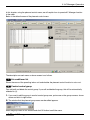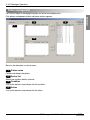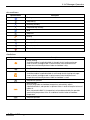
1
Installation/Owner's Manual
Advanced Central Control Manager
(PQCSS520A0E)
ITALIANO
AC Manager
ENGLISH
LG
ESPAÑOL
FRANÇAIS
DEUTSCH
Caution
CHINESE
• Before installation, be sure to read this manual.
• This device should be installed by a qualified technician.
• Even after reading this manual, be sure to keep it for
reference during its operation.
AC Manager
Manual contents
1. AC MANAGER OVERVIEW
1-1
AC Manager function ......................................................................................................1-2
AC Manager Overall system diagram............................................................................1-4
• AC Manager is connected to one ACP .....................................................................1-4
• AC Manager is connected to several ACP’s ............................................................1-6
What are included in AC Manager .................................................................................1-7
AC Manager hardware specification .............................................................................1-8
2. AC MANAGER INSTALLATION
2-1
Hardware Installation......................................................................................................2-2
• AC Manager is connected to one ACP .....................................................................2-2
• AC Manager is connected to several ACP’s ............................................................2-3
AC Manager software installation .................................................................................2-4
• Installation of USB Hard Lock key driver.................................................................2-4
• AC Manager program installation.............................................................................2-7
• Connecting lock key to AC Manager ........................................................................2-9
• AC Manager log in....................................................................................................2-10
• AC Manager program deletion ................................................................................2-13
3. AC MANAGER OPERATION
3-1
What’s in menu................................................................................................................3-2
Installation before using.................................................................................................3-3
• AC Manager main screen ..........................................................................................3-3
• AC Manager setting before using .............................................................................3-5
Basic control .................................................................................................................3-19
Peak control...................................................................................................................3-27
• Installation of peak exception .................................................................................3-31
Schedule ........................................................................................................................3-33
• Weekly schedule edit screen description ..............................................................3-35
• Weekly schedule setting screen description.........................................................3-38
• Special schedule edit screen description..............................................................3-40
2
AC Manager
• Special schedule setting screen setting ................................................................3-43
• Using weekly schedule function.............................................................................3-45
ENGLISH
• Creating the schedule and specifying the schedule group to operate ...............3-45
• Applying the pattern for the schedule group to operate ......................................3-45
• Applying the operation period of the schedule group which the pattern was
applied to ..................................................................................................................3-45
• By creating the schedule, specifying the schedule group to operate ................3-46
• Applying the patter for the specified schedule group to operate........................3-47
• Applying the operation period for the schedule group that the pattern was
applied to ..................................................................................................................3-50
• Using the special schedule function ......................................................................3-53
• By creating the schedule, specifying the schedule group to operate3-53
• Applying the pattern for the specified group to operate ......................................3-53
• Applying the period for the schedule group to which the pattern was applied,
to operate ..................................................................................................................3-53
• Specifiying the schedule group to operate by creating the schedule ................3-54
• Applying the pattern for the schedule group to operate ......................................3-55
• Applying the operation period of the schedule group to which the pattern
was applied ...............................................................................................................3-58
• Using the function to stop entire schedule ...........................................................3-60
• Using the function to send the current schedule..................................................3-60
History management.....................................................................................................3-62
• Selecting specific equipment..................................................................................3-64
Integrated power ...........................................................................................................3-67
Pleasant control ............................................................................................................3-69
• Auto switch operation..............................................................................................3-69
• Temperature limit operation....................................................................................3-70
Device connection control ...........................................................................................3-73
• Pattern management................................................................................................3-75
Monitor ...........................................................................................................................3-79
AC Manager Installation/User’s manual
3
4. NOTE
4-1
TCP/IP setting guide .......................................................................................................4-1
4
AC Manager
1. AC Smart Introduction
1. AC Manager Overview
ENGLISH
AC Manager function
AC Manager overall system diagram
What are included in AC Manager
AC Manager hardware specification
AC Manager stands for Advanced Central Control Manager, which is a PC control controller for
monitoring and controlling of air conditioner and ventilation in each room of the building from one spot
like control room.
AC Manager can specifically check the operation of each air conditioner and give control orders like
the air conditioner operation, wind strength, user lock, temperature setting and etc. AC Manager can
maintain the outdoor ventilator of the air conditioner up to 4096 rooms.
AC Manager can be connected to RMTS(Remote Total Management System) and if necessary, the
entire system operation can be monitored through the Internet from outside.
In addition to basic function control like the operation control of AC Manager, if the schedule control
and peak operation rate control function are used, unnecessary use of air conditioner can be avoided,
saving energy and it is convenient to use.
GUI(Graphical User Interface) has been applied to all functions and settings provided in AC Manager,
and clicking buttons on the screen with mouse enables you to use the program conveniently.
AC Manager can easily control the added or replaced air conditioner if new customer wants to add or
replace it or additionally purchase it.
AC Manager Installation/User’s manual
1-1
1. AC Smart Introduction
AC Manager Function
Individual/Integrated Operation Monitoring
AC Manager can check the operation status, operation mode, wind strength, wind direction, lock,
setting temperature, error and etc. of the air conditioner by selecting it individually, by group or
entirely. The manager of the building with lots of air conditioners installed can simply control them
from the central location if he has AC Manager installed in the control room.
Group management
The installed AC Manager can be managed by group. If you divide the air conditioners into groups by
character, location and size, you can use them conveniently. In addition, you can provide easily
identifiable names for setting groups and more intuitively manageable.
Self-diagnosis function
The air conditioner with AC Manager can self-diagnose the error status of 31 air conditioners and
send it to central controller. Users can take care of its malfunction promptly making its maintenance
easy. This function has a merit that extend the life of the air conditioner.
Reducing maintenance cost
When there is no AC Manager, the central control program of the air conditioner, the manager used to
manage lots of air conditioners by himself. However, with AC Manager program, all functions of the air
conditioner can be controllable from the control room, so it takes only one manager to easily control all
air conditioners.
Convenient GUI
Users don’t have to take special lessons to use AC Manager and he can use the program only by
clicking buttons on the screen using the mouse. You can easily understand AC Manager using
intuitive pictogram. In particular, in case of setting schedule, unlike prior version that required more
than 30 times of button-clicks in order to enter one schedule, by applying the patent technology,
simply moving the mouse and dragging the indicated period enables schedule setting.
1-2
AC Manager
1. AC Smart Introduction
Schedule auto operation maintenance / Saving energy
Remote control through the Internet
When using ACP as a server, using the Internet enables the control over all air conditioners through
connection to ACP. If you control the air conditioner using web browser, you can use only basic
control and monitoring function, not all functions of AC Manager.
Note : ACP
ACP(Advanced Control Platform) is a central controller that up to 256 of air conditioners can be
controlled in a space. ACP can be used to monitor the air conditioner and ventilation device
installed in each room of a building in a place like control room or school administration room or
control the operation.
Security function using the authentication key
AC Manager program is executed only when the authentication key is installed in PC. Therefore, AC
Manager blocks user’s access without the key, so that the air conditioner can be safely controlled.
AC Manager Installation/User’s manual
1-3
ENGLISH
The schedule auto operation function of AC Manager can be set yearly, weekly and daily. The air
conditioner can be on and off only when necessary, which brings excellent energy-saving effect. In
particular, for the institutions with specific schedule for each semester, such as elementary, middle
and high school and universities, this function maximizes the effect.
1. AC Smart Introduction
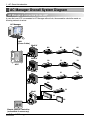
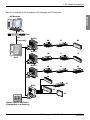
AC Manager Overall System Diagram
AC Manager is connected to one ACP
In case that one ACP is connected to AC Manager without hub, the connection should be made as
following network structure.
AC Manager
LAN
(Cross Cable)
LG-NET 1
LG-NET 2
1
2
DI
LG-NET 3
3
4
LG-NET 4
5
Multi V
00
01
02
10
11
12
20
21
22
TX
RX
TX
RX
TX
RX
TX
RX
6
7
8
FDD
ACT
LNK
Ethernet 2
ACT
LNK
Console
1
2
TX
RX
TX
RX
Ethernet 1
TX
RX
L1 2 3 4
Ext.
MENU/
SELECT
ON KSDO4H
9
10
11
12
13
14
15
16
17
18
19
20
PI485
Multi V
DO
Run
3
Power
4
ACP
L1 2 3 4
ON KSDO4H
PI485
Multi V
L1 2 3 4
ON KSDO4H
30
PI485
31
Multi
32
33
L1 2 3 4
ON KSDO4H
PI485
Simple Central Controller
(conectible if necessary)
1-4
AC Manager
1. AC Smart Introduction
Below is an example of the connection of AC Manager to ACP using hub.
ENGLISH
AC Manager
Hub
LAN
(Direct cable)
LG-NET 1
LG-NET 2
1
2
DI
LG-NET 3
3
4
LG-NET 4
5
Multi V
00
01
02
10
11
12
20
21
22
TX
RX
TX
RX
TX
RX
TX
RX
6
7
8
FDD
ACT
LNK
Ethernet 2
ACT
LNK
Console
1
2
TX
RX
TX
RX
Ethernet 1
TX
RX
L1 2 3 4
Ext.
MENU/
SELECT
ON KSDO4H
9
10
11
12
13
14
15
16
17
18
19
20
PI485
Multi V
DO
Run
3
Power
4
ACP
L1 2 3 4
ON KSDO4H
PI485
Multi V
L1 2 3 4
ON KSDO4H
30
PI485
31
Multi
32
33
L1 2 3 4
ON KSDO4H
PI485
Simple central controller
(Connectible if necessary)
AC Manager Installation/User’s manual
1-5
1. AC Smart Introduction
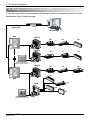
AC Manager is connected to several ACP’s
In case that several ACP’s are connected to AC Manager using hub, the network structure should be
connected as shown in below example.
LAN
(Direct cable)
Hub
AC Manager
ACP
LG-NET 1
LG-NET 2
1
2
DI
LG-NET 3
3
4
LG-NET 4
5
Multi V
TX
RX
TX
RX
TX
RX
TX
RX
6
7
8
9
10
11
12
13
14
15
16
17
18
19
20
FDD
Ext.
MENU/
SELECT
ACT
LNK
Ethernet 2
ACT
LNK
Console
1
DO
01
02
10
11
12
20
21
22
TX
RX
L1 2 3 4
Run
3
ON KSDO4H
2
00
TX
RX
TX
RX
Ethernet 1
Power
4
PI485
Multi V
L1 2 3 4
ON KSDO4H
Simple central controller
(Connectible if necessary)
PI485
Multi V
LG-NET 1
LG-NET 2
1
2
DI
LG-NET 3
3
4
LG-NET 4
5
TX
RX
TX
RX
TX
RX
TX
RX
6
7
8
9
10
11
12
13
14
15
16
17
18
19
20
FDD
Ext.
MENU/
SELECT
TX
RX
TX
RX
Ethernet 1
ACT
LNK
Ethernet 2
ACT
LNK
Console
TX
RX
L1 2 3 4
DO
ON KSDO4H
1
2
Run
30
3
Power
4
PI485
ACP
31
Multi
32
33
L1 2 3 4
1-6
AC Manager
ON KSDO4H
Simple central controller
(Connectible if necessary)
PI485
1. AC Smart Introduction
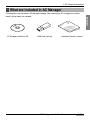
What are included in AC Manager
Following items are included in AC Manager package. After opening the AC manager box, please
check if all the items are included.
ENGLISH
LG
AC Manager installation CD
USB Hard Lock key
Installation/Owner’s manual
AC Manager Installation/User’s manual
1-7
1. AC Smart Introduction
AC Manager hardware specification
AC Manager requires a special PC for AC Manager that user purchased. AC Manager is a Windows
program, and requires 50 Mbytes in its installation.
The recommended system specification for AC Manager installation is as follows;
Item
Description
CPU
Over Pentium_ 2.2GHz
Main memory
OS
Over 256MB
Windows NT/ 2000/ XP
Hard disk
Web browser
Min. 600MB of margin (during operation, over 600MB)
Over Internet Explorer 5.0
Caution: Operation system
Windows XP is recommended.
Caution: Use standard product
We don’t take responsibility when the user used an adapter other than our standard
product and this caused any problem. Therefore, do not use other product. For the
applicable products, please contact LG system air conditioner support department.
1-8
AC Manager
2. AC Manager installation
2. AC Manager installation
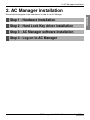
Please install the program in the order below, in order to use AC Manager.
ENGLISH
Step 1 : Hardware Installation
Step 2 : Hard Lock Key driver installation
Step 3 : AC Manager software installation
Step 4 : Log-on to AC Manager
AC Manager Installation/User’s manual
2-1
2. AC Manager installation
Hardware Installation
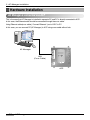
AC Manager is connected one ACP
This is the case that AC Manager is installed in separate PC and PC is directly connected to ACP.
In this case, the Ethernet cable should be connected through the cross cable.
Using Ethernet cable(cross cable), Connect Ethernet 1 port of APC to PC.
In this case, you can connect PC(AC Manager) to ACP using cross cable without hub.
LG-NET 1
AC Manager
LG-NET 2
1
2
DI
LG-NET 3
3
4
LG-NET 4
5
TX
RX
TX
RX
TX
RX
TX
RX
6
7
8
LAN
(Cross Cable)
FDD
9
10
11
12
13
14
15
16
17
18
19
20
Ext.
MENU/
SELECT
Ethernet 1
ACT
LNK
Ethernet 2
ACT
LNK
Console
1
2
DO
Run
3
Power
4
ACP
2-2
AC Manager
TX
RX
TX
RX
TX
RX
2. AC Manager installation
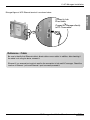
Enlarged figure of ACP Ethernet terminal is as shown below.
TX
RX
TX
RX
Connect to hub
hub:
Direct cable
t1
ACT
LNK
Connect AC Manager directly
to PC
PC:Cross
Cross cable
cable
t2
ACT
LNK
ole
TX
RX
t.
1
2
DI
3
4
5
6
LG-NET
7
8
LG-NET
9
10
11
12
13
14
15
16
17
18
19
20
LG-NET
LG-NET
1
2
3
4
FDD
MEN
U/
SELECT
Ext.
Etherne
t1
Etherne
t2
1
2
DO
Console
3
4
TX
RX
TX
RX
TX
RX
TX
RX
TX
RX
TX
RX
ACT
LNK
ACT
LNK
TX
RX
Run
Power
Reference : Cable
Be sure to identify that Ethernet cable is direct cable or cross cable. In addition, after checking if
the cable is ok using lan tester, connect it.
Ethernet 2 is a reserved port and not used for the connection to hub and AC manager. Check the
location of Ethernet 1 port and Ethernet 2 port to correctly connect it.
AC Manager Installation/User’s manual
2-3
ENGLISH
DD
2. AC Manager installation
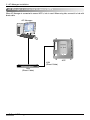
AC Manager is connected to several ACP’s
When AC Manager is connected to several ACP’s, hub is used. When using hub, connect it to hub with
direct cable.
AC Manager
LG-NET 1
LG-NET 2
1
2
DI
LG-NET 3
3
4
LG-NET 4
5
TX
RX
TX
RX
TX
RX
TX
RX
6
7
8
FDD
9
10
11
12
13
14
15
16
17
18
19
20
Ext.
MENU/
SELECT
ACT
LNK
Ethernet 2
ACT
LNK
Console
1
2
DO
Run
3
Power
4
ACP
LAN
(Direct Cable)
Hub
(Direct Cable)
2-4
AC Manager
TX
RX
TX
RX
Ethernet 1
TX
RX
2. AC Manager installation
AC Manager Software installation
USB Hard Lock key driver installation
ENGLISH
Note: Lock key
When installing AC Manager program, the lock key shouldn’t be connected to the computer.
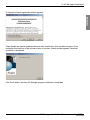
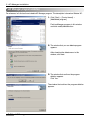
1. Insert the AC Manager installation CD into CD-ROM. AC Manager installation program is
automatically executed. If the program isn’t automatically executed, execute the Autorun.exe file in
CD. The initial screen appears as below.
As shown in the order of the button in this screen, the user installs the Lock Key driver and then
installs the AC Manager program. In this screen, you can see installation/user manual and install
Acrobat Reader program in order to check the manual. If you want to exit the installation, please press
exit button.
Click lock key driver installation button.
AC Manager Installation/User’s manual
2-5
2. AC Manager installation
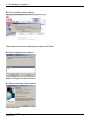
2. Driver installation screen appears.
Please read caution when installing driver and press OK button.
3. Select language window appears.
Select U.S English and click OK button.
4. Welcome message window appears.
Press Next button
2-6
AC Manager
2. AC Manager installation
5. Accept the license agreement window appears.
ENGLISH
Check Accept the license agreement box and click install button. Now installation begins. Driver
installation can take from a few minutes to tens of minutes. If below window appears, the driver
installation is completed.
Click Finish button, and then AC Manager program installation is completed.
AC Manager Installation/User’s manual
2-7
2. AC Manager installation
AC Manager Program Installation
1. Insert AC Manager installation CD into CD-ROM. AC Manager program is automatically executed.
If the program isn’t automatically executed, execute
Autorun.exe file in CD. Below initial screen appears.
The order of menu as shown in this figure,
user will install lock key driver and then AC
Manager program. In this screen, you can
read installation/user’s manual and install
Acrobat Reader program to check the
manual. If you complete the installation,
press Exit button.
Click AC Manager program
2. The following precautions will be
displayed. Check the content and
click on the OK button.
3. Select the language to install
2-8
AC Manager
then
2. AC Manager installation
4. Shortly after the installation program is
Press Next button.
5. The program is installed in “C: \ Program
Files \ LG Electronics”.
This screen indicating the installation is
completed appears.
Click Complete button.
Now AC Manager program installation is completed.
AC Manager Installation/User’s manual
2-9
ENGLISH
executed, the initial installation screen
appears.
2. AC Manager installation
Connecting Lock key to AC Manager
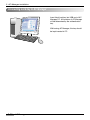
Insert Hard Lock key into USB port of AC
Manager PC. All functions of AC Manager
will be determined by the authentication
key.
While using AC Manager, this key should
be kept inserted in PC.
2-10
AC Manager
2. AC Manager installation
AC Manager Log-in
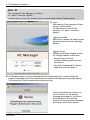
1. Execute AC Manager engine program.
Or, you can double-click
ACMSvcManager direct link icon as
shown on the right.
Click Install button in above screen and click Start button. As shown below, it will change to “Service
status: Running”.
If it changes to “Service status: Running”,
this means the program begins normally.
Press OK button and exit this window.
2. Execute AC Manager program.
Click [Start] → [Program] → [LG
Electronics inc] → [AC Manager] → [AC
Manager] to execute the below screen.
Or, if you double-click AC Manager
direct link icon as shown in the right
figure, this screen will be executed.
If the program is executed, the program initial screen appears after the loading screen.
AC Manager Installation/User’s manual
2-11
ENGLISH
Click [Start] → [Program] → [LG
Electronics inc] → [AC Manager] →
[ACMSvcManager] to execute this
screen.
2. AC Manager installation
Note : ID
The manager ID of AC Manager is as follows;
ID : admin , Password : digital21
Use this when you first log in and after log-in, we recommend another ID and password.
3. Log in
After entering ID and password in log-in
window, click the button.
For administration, enter ID and
password. (ID : admin , Password :
digital21)
Log-in succeed
When log-in succeed, the loading screen
appears at the bottom and a message
appears.
Log-in failed
Loading screen doesn’t appear and the
fail message appears at the bottom.
- Wrong Password: Wrong
Password.(Identify upper and lower
case letters.)
- Wrong ID: Unregistered ID. (Identify
upper and lower case letters.)
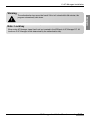
4. AC Manager program is always executed while the authentication key is inserted. When the
program is executed without the authentication key inserted, following warning message appears.
You should click OK and re-execute after inserting the key.
If the authentication key comes out or
the user takes it out, the warning
message below appears. If you insert
the authentication key within 30
seconds, the warning window disappear,
the program will normally operate.
2-12
AC Manager
2. AC Manager installation
Warning
Note : Lock key
When using AC Manager, keep Hard Lock key inserted in the USB port of AC Manager PC. All
functions of AC Manager will be determined by the authentication key.
AC Manager Installation/User’s manual
2-13
ENGLISH
The authentication key cannot be found! If this isn’t solved within 30 minutes, this
program automatically shut down.
2. AC Manager installation
AC Manager program deletion
For reference, let’s find out how to delete AC Manager program. This description is based on Window XP.
1. Click [Start] → [Control board] →
[Add/delete program].
Find imsManager program in this window
and click modify/delete button.
2. The window that you can delete program
appears.
After checking the delete menu in this
window, click next.
3. The window that confirms the program
deletion appears.
Click Yes.
The window that confirms the program deletion
appears.
2-14
AC Manager
2. AC Manager installation
4. The window indicating the program
ENGLISH
deletion is completed appears.
Click Complete.
Caution: Restart the computer
After removing AC Manager program, you should restart the computer immediately.
AC Manager Installation/User’s manual
2-15
3. AC Manager Operation
3. AC Manager Operation
If AC Manager program is installed, following menu and functions are available.
• What is in menu
• Preset
• Default control
• Peak control
• Schedule
• History management
• Accumulated power
• Pleasant control
• Device connected control
• Monitor
Let’s find out screen descriptions and how to use each function.
3-1
AC Manager
3. AC Manager Operation
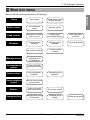
What is in menu
Below is the entire menu construction of AC Manager.
ENGLISH
Home
Main screen
Decide display content
from the top menu
Basic control
Air conditioner
control
Ventilator control
Peak control
Desired power consumption
display and control
Current power
consumption display
Set/Cancel peak
operation
Schedule
Edit/Set weekly
schedule
Edit/Set special
schedule
Set lock schedule
Set all stop schedule
Transmit current
schedule
Manage history
Save operating status
information for all
air conditioners
Accumulative
power
Power consumption
distribution for each room
Fresh control
Auto changeover
operation
Device interface
control
Operation setting according
to product condition
Monitor
Indoor unit status
information monitor
Error status monitor
System setting
Setting before using
AC Manager
Schedule group
setting
Temperature limit
operation
Control group setting
AC Manager Installation/User’s manual
3-2
3. AC Manager Operation
Preset
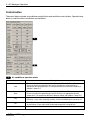
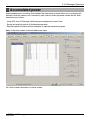
Let’s find out more details on most basic menu and button functions of the main screen of AC
Manager. Before using AC Manager, we will find out preset items. The description will be based on the
screen of which menu is set in English.
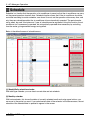
AC Manager Main Screen
1
2
4
3
5
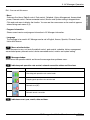
1 Basic menu
In file menu, below sub menu is dropped down.
User title setting: You can set user’s name.
User screen setting: You can set the screen to be placed
into main image.
Default screen : You can set default main image.
3-3
AC Manager
3. AC Manager Operation
Exit : You can exit this menu.
- Menu
- Program information
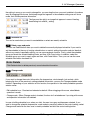
Shows current version and program information in AC Manager information.
- Language
The language to be used in AC Manager can be set in English, Korean, Spanish, Chinese, French,
Italian and German.
2
Menu selection button
Select the menu to carry out tasks like default control, peak control, schedule, history management,
accumulated power, pleasant control, device connected control, monitor and system setting.
3
Message window
Summarizes the operation details and shows the message when problems occur.
4
Indicates peak operation rate control, network connection status and fire alarm.
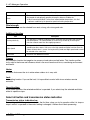
Item
Description
Executing peak operation rate control mode
Stopping peak operation rate control mode
Network error (NE)
Network normal connection
5
Indicates current year, month, date and hour.
AC Manager Installation/User’s manual
3-4
ENGLISH
Sub menu like Home, Default control, Peak control, Schedule, History Management, Accumulated
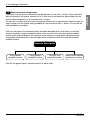
power, Pleasant control, Device connected control, Monitor and System setting is dropped down.
Click each sub menu to display the function. You can see the same screen as the one that appears
when clicking each menu of (2).
3. AC Manager Operation
AC Manager Preset Items
If you select the system setting in menu selection, the information setting window as shown in below
figure appears. You can use AC Manager only when you preset the name of indoor unit, using
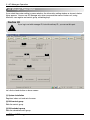
functions, user register and control group, schedule group.
Caution :ID
If you log in not with manager ID, but with ordinary ID, you can set this part.
1
2
3
4
5
Let’s find out each button on above screen.
(1) System installation
Registers indoor unit and sets its name.
(2) Edit control group
Edits the control group.
(3) Edit schedule group
Edits the schedule control group.
3-5
AC Manager
3. AC Manager Operation
(4) Peak exception setting
Sets the indoor unit for peak operation exception.
ENGLISH
(5) User information setting
Registers the manager and menu construction and on-line service.
Specific description on each menu is as follows;
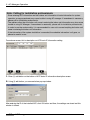
1
System Installation
Click system installation button and you can see the below window.
AC Manager Installation/User’s manual
3-6
3. AC Manager Operation
Note: Calling for installation professionals
- Since entering ACP information and the outdoor unit information is basic information for system
operation, wrong amendment may cause trouble in using AC manager. If amendment is necessary,
please call for installation professionals.
- The address other than the indoor unit name in entering the indoor unit information may also cause
trouble in using AC Manager. If amendment is necessary, please call for installation professionals.
- In order to use the system safely, it is recommended for user not to amend anything but indoor unit
name in entering the indoor unit information.
- If the information of the system installation is amended, the schedule information is all gone, so
please be careful in use.
From above screen, this is description on ACP basic IP information setting.
2
3
1
4
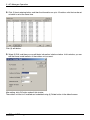
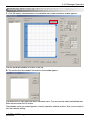
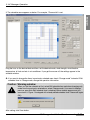
1. Enter (1) add button on the bottom of ACP basic IP information description screen.
2. Using (2) edit button, you can see below pop-up window.
After entering the IP of the installed ACP, click OK button and then, the settings are stored and this
window is closed.
3-7
AC Manager
3. AC Manager Operation
3. If there are many ACP’s, click (3) basic entering button and then, 16 ACP’s are set all at the same
time.
ENGLISH
Except the installed Quantity of ACP’s, when you delete rest of them, use (4) delete button.
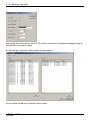
Below is description on the outdoor unit information description.
3
2
1
4
In this part, the outdoor unit information is added.
1. If you press (1) add button, the outdoor unit information is added to below the selected ACP’s.
AC Manager Installation/User’s manual
3-8
3. AC Manager Operation
2. Click (2) basic entering button, and then the information on up to 16 outdoor units that can be set
as below is set at the same time.
Click (3) edit button.
3. Select (3) Edit, and then you can edit basic information in below window. In this window, you can
edit the name, model and etc. of the outdoor unit you want.
After setting, click OK button and exit this window.
The outdoor unit that isn’t installed can be deleted using (4) Delete button in the default screen.
3-9
AC Manager
3. AC Manager Operation
Below is description on setting the information on the indoor unit.
ENGLISH
3
2
1
4
1. Click (1) Add and then one indoor unit information is added to under the outdoor unit at a time. You
can add the list by clicking as many as the number of the indoor unit.
2. After selecting the outdoor unit, click (2) Input default button, and then the entire indoor unit
information that can be set will be input.
3. Select the indoor unit and click (3) Edit button, and then below window appears. In this window, you
can edit the name, type and etc. of the indoor unit you want.
AC Manager Installation/User’s manual
3-10
3. AC Manager Operation
After setting, click OK to exit this window. The outdoor unit that isn’t installed can be deleted using (4)
Delete button in the default screen.
4. Click Edit port use button and then below window appears.
You can check and edit port information in this screen.
3-11
AC Manager
3. AC Manager Operation
5. Click Edit button and below window will appear.
ENGLISH
Set port name, connection device, drawing information, connected port, use and etc. and then, click
OK button to save the contents.
AC Manager Installation/User’s manual
3-12
3. AC Manager Operation
2
Edit control group
After system setting, the group should be edited. There are 2 types of groups, the control group with
main functions of control and monitoring and the schedule group operating according to the same
schedule as that of the control group. All indoor unit can normally operate only when it is included in
the control group and the schedule group by the group edit.
6
5
4
2
1
3
7
Let’s find out how to add the control group.
1. Using (1) Add group button, add the group.
2. After selecting the group, using (2) Edit group button, you can change the name of group in below
window.
After inputting the group name, click OK
button.
Let’s find out how to select the indoor unit.
3-13
AC Manager
3. AC Manager Operation
1. Select the desired indoor unit of the indoor unit information in (3) and click << button and then, this
indoor unit moves to (4). Now this indoor unit will be contained in the selected group.
3. Click (5) Indoor unit name, address and control group button and you can sort the indoor unit for
each item in ascending order. If you move and set the selected indoor unit in this way, the
selected/moved device will have the number of the group in the control group of the indoor unit as
(6).
4. Using Save button in (7), save the information.
Note: Key selection
- Using information print-out button, you can print out the information in excel or by printer.
- When selecting the indoor unit, while pressing Ctrl key, select one device and then, it is added.
While pressing Shift key, select one device, and then the entire indoor units from previous one to
current one are selected.
AC Manager Installation/User’s manual
3-14
ENGLISH
2. When you want to exclude a indoor unit from the group, select the indoor unit and click >> button.
3. AC Manager Operation
3
Edit schedule group
A group setting function to carry out schedule function. After system setting, the schedule group should
be edited. The schedule group can be set in the same way as the control group.
5
4
2
1
3
7
6
Let’s look over how to add the schedule group.
1. Using (1) Add group button to add the group. Click Add group button and the group name
automatically appears in (5) area.
2. After selecting the group from the control group, using (2) Edit group, you can change the name of
the group. In this way, the desired group can be added and deleted.
Let’s find out how to select the indoor unit.
1. If you select the indoor unit you want from the indoor unit information in (3) and click << button, the
indoor unit can be set in the selected group. If you want to exclude the indoor unit from the group,
while selecting the device, click >> button. Click (7) Import control group button, and you can import
the control group settings that you set with System setting button on the top.
2. If you click the indoor unit name, address and control group button, you can sort the indoor units in
ascending order for each item. If you move the indoor unit using >> and << button, the
selected/moved indoor unit will have the number of its group in the control group of the indoor
information as (5).
3. Using (6) Save button, save the information.
3-15
AC Manager
3. AC Manager Operation
Note: Information Print-out button
- You can print out the information in Excel or by printer using Information print-out button.
- While pressing Shift key, select one indoor unit, and the entire devices from previous
4
Peak exception setting
Note: Peak
Details on Peak will be explained in the description on each menu after the description on the main
screen.
1. After selecting the indoor unit that peak isn’t applied in (1), click >> button and then, peak “isn’t
applied to” the device, which is reflected to (2).
2. Click (3) Save button to save current status.
AC Manager Installation/User’s manual
3-16
ENGLISH
- When selecting the indoor unit, while pressing Ctrl key, select one indoor unit and then this will be
added.
3. AC Manager Operation
5
User I information setting
You can set the information on the user of AC Manager.
1. Click Register manager button in user information setting, and then below window appears.
2. Click Menu button and below window appears.
3-17
AC Manager
3. AC Manager Operation
3. If you click on-line service register button, below window will appear.
If you want to register to web site as an AC Manager user, enter service server and field information.
After entering what you want, click OK button. Click Cancel button to exit current window.
AC Manager Installation/User’s manual
3-18
ENGLISH
Select Menu button to be shown in the main menu of AC Manager. If you check all menu, all menu in
the main screen of AC Manager will be checked. If you check basic menu, some menu initially set will
appear in the main screen. After checking the menu you want, click OK button. If you click Cancel
button, you can exit current window.
3. AC Manager Operation
Basic Control
Basic control means functions like selection of group and air conditioner by AC Manager, operation
mode, wind strength, wind direction, all lock, individual lock(temperature lock, mode lock, wind lock),
desired temperature setting, operation and stop and etc. Click basic control button and below window
appears.
4
1
2
3
Above menu is the control program with central control method which manages the air conditioner
using computer screen. Using above buttons, you can easily operate and monitor the status of air
conditioner and integrately maintain the groups.
(1) Indoor unit operation status indication and selection window
(2) Control button
(3) Selection button and transmission status indication
(4) Group selection window
Let’s find out how to use each part.
3-19
AC Manager
3. AC Manager Operation
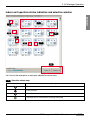
Indoor unit operation status indication and selection window
ENGLISH
7
1
2
6
3
5
4
8
Let’s find out the description on each part indicated on above menu.
1
Operation status lamp
Lamp color
Description
Operation status indication
Error indication
Stop indication
Indication that the control details are being transmitted
AC Manager Installation/User’s manual
3-20
3. AC Manager Operation
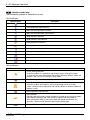
2
Operation mode lamp
The mode being operated is indicated as an icon.
<Air conditioner>
Operation mode
Description
Cooling operation indication
Cooling operation stop indication
Moist-removing operation indication
Moist-removing operation stop indication
Wind operation indication
Wind operation stop indication
Heating operation indication
Heating operation stop indication
Auto operation indication
Auto operation stop indication
Peak power control operation indication
Error indication of Indoor unit
Error indication of network error
<Air conditioner>
Operation mode
Description
Electric heating indication
Ventilation mode of air supply/discharge through electric heating Exchanger.
In summer/winter when temperature and humidity difference between indoor and
outdoor is big, use electric heating exchange mode.
Electric heating operation stop indication
Normal indication
Ventilation mode of discharged air not passing through electric exchanger.
Used in spring/fall when temperature and humidity difference between indoor and
outdoor is small.
Normal operation stop indication
Auto indication
Optimally operated in order to keep the balance of indoor air by measuring indoor
and outdoor temperature and auto-controlling supplied and discharged air.
When connected to Multi V, other than indoor and outdoor temperature, the
operation is determined by operation speed setting temperature.
Auto operation stop indication
3-21
AC Manager
3. AC Manager Operation
3
All lock
Lock
Description
Activate All lock
Deactivate all lock
4
Kind of unit
Icon
Description
Activate All lock
Deactivate all lock
5
Wind strength
Icon
Description
Weak wind strength
Weak medium wind strength
Strong wind strength
Auto wind
6
Desired temperature
Indicates desired temperature for each air conditioner. In error status, this isn’t indicated.
7
The selected indoor unit has thick blue background screen.
8
Select all and deactivate all
- Select all : All air conditioners of currently set group are selected.
- Deactivate all : All the selected air conditioners are deactivated.
AC Manager Installation/User’s manual
3-22
ENGLISH
A function that the operation of air conditioner cannot be controlled individually. In All lock, the air
conditioner can be controlled only from AC Manager.
3. AC Manager Operation
Control button
The control button includes air conditioner control button and ventilation control button. Operation/stop
button is used for both air conditioner and ventilation.
1
2
1
Air conditioner operation mode
Button
3-23
Description
Cool
The desired temperature can be selected between 18°C and 30°C.
Excessive cooling isn’t good for your health. therefore we recommend to set
appropriate desired temperature. The temperature difference between indoor and
outdoor is about 5°C.
Heat
The desired temperature can be selected between 18°C and 30°C.
Excessive heating isn’t good for your health, so please set appropriate desired
temperature. The temperature difference between indoor and outdoor is about 5°C.
Dry
If you use this function in rainy season or in high humidity, you can remove humidity
effectively. If you select removing humidity, the desired temperature cannot be set.
Fan
Air purification operation provides pleasant wind. In spring and fall, you may use only
air purification. If you select wind, the desired temperature cannot be set.
Auto
It evaluates the indoor condition and maintains the optimal condition automatically.
AC Manager
3. AC Manager Operation
Wind strength
A function adjusting the wind strength to weak, medium, strong and auto.
ENGLISH
Wind direction
The wind direction of air conditioner can be set.
Lock
There are All lock, temperature lock, Mode lock and Wind strength lock. temperature lock is for locking
temperature setting function, Mode lock is for mode setting function, wind strength lock is for wind
strength function. All lock is for locking all functions. Once lock is set, wire or wireless remote control
isn’t possible.
Caution: Temperature lock
If the temperature lock command is sent at the temperature out of the desired
temperature range, the device may not normally operate for the setting temperature,
so be sure to set temperature lock at the temperature within the desired temperature
range.
Caution: Individual lock setting(Temperature, wind strength lock)
Individual lock setting(Temperature, wind strength lock)
When 2-pin connector of PI485 is inserted, changing mode from wire remote controller
may change to previous mode during temperature and Wind Lock setting. In this case,
if you set temperature lock and Mode lock at the same time, you can solve this
problem. If 2-pin connector of PI485 is connected, we recommend you to use Temp
lock and Mode lock at the same time.
Desired temperature
Using (+), (-) button set the desired temperature. The desired temperature can be set between 18 and
30°C when cooling and heating, and if you press setting button, the temperature setting command is
sent to the indoor unit. If you preset the desired temperature setting range, the temperature can be set
within that range. When removing humidity or Wind is selected in operation mode, temperature cannot
be set.
2
Air conditioner ventilation mode
- Operation mode
Icon
Description
Electric heating
Ventilation mode of supplied/discharged air through electric heating exchanger.
In summer/winter when temperature and humidity difference between indoor and
outdoor is big, use electric heating mode.
Normal
Ventilation mode of supplied/discharged air not through electric heating exchanger.
Used in spring/fall when temperature and humidity difference between indoor and
outdoor is small
AC Manager Installation/User’s manual
3-24
3. AC Manager Operation
Icon
Description
Measures indoor and outdoor temperature and automatically adjusts supplied and
discharged air and optimally operates to keep the balance of indoor air.
❈ When connected to Multi V, other than indoor/outdoor temperature, this find
optimum condition by the operation speed and setting temperature.
Auto
Wind strength
The wind strength can be selected from weak, strong, ultra strong and auto.
Additional function
Icon
Description
Saving electricity
This operation is made by finding the most ventilation-efficient point and saving the
consumed power. The contaminated air can be easily emitted by increasing the
emission amount more than the supplying amount.
High Speed
This operation is intended to prevent the indoor contaminated air or humidity from
spreading to other rooms. You can use the high speed ventilation function when the
indoor contamination is severe. Saving electricity mode and High speed mode cannot
be selected at the same time.
Deactivate
Deactivate the additional function.
Plasma
Air purification function that negative ion comes out and make you feel better. This function purifies
virus, mold in the house and influenza, which is the most famous cold virus, considering environment
and health.
Heater
A function that warms the air in winter when outdoor air is very cold.
Lock
Lock setting function. If you set the lock, it is impossible to control with wire or wireless remote
controller.
Operation/stop
If you select operation, the selected ventilation is operated. If you select stop, the selected ventilation
under its operation stops.
Select all button and transmission status indication
Transmission status indication bar
Transmitting : If AC Manager is executed for the first time, when you try its operation while it is stops or
stops it while it is operated or the control setting is changed, it flickers due to data processing.
3-25
AC Manager
3. AC Manager Operation
Select all
Deactivate all
Deactivates all the air conditioners/ventilation products currently selected. This works in the same way
as Select all button.
Group selection window
Group name
Description
Control group
Logically identifies the group. For example, this identifies, such as lobby on the 1st
floor and meeting room on the 2nd floor.
Schedule group
The unit group of schedule setting. Each schedule group has the same schedule.
Physical group
Physical group is divided by ACP unit. For example, there are 3 ACP’s and then, 3
groups are constructed.
Select/Deactivate all group
Select all : While pressing Shift key, you can select the group you want. For example, in order to select
all, click “0” and while pressing Shift key, select “5”.
If you select all groups and click Select all button, then all indoor units in all groups are selected.
On the contrary, if you click Deactivate all button, all groups are deactivated.
Select individual group
Click the group you want, to select this function. At this time, if you select all or deactivate all, all the
indoor units in the group is selected and deactivated.
AC Manager Installation/User’s manual
3-26
ENGLISH
All the air conditioners/ventilation products in currently selected group are selected. If all in the current
group are selected, at this time, Select all means all air conditioners/ventilation products of all groups
are selected
3. AC Manager Operation
Peak control
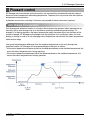
Peak control is a function managing the maximum consumed power. Peak control can use peak
operation rate control or demand control function depending on the specification of installed field.
Main functions of peak control are as follows;
- Managing all the installed air conditioners (Central control method)
- 24 hour peak operation rate monitoring / control
- Easy control/monitoring
- Peak power (kW) / possibly set as operation rate (%)
- Possibly adjust operation switch cycle (5~15 minutes)
- Possibly set an air conditioner not controlled by peak operation rate
The air conditioner forced to operate due to the peak operation rate control function is operating in
Wind mode if it is in cooling operation mode and if it is in heating operation mode, the operation stops.
However, even if the forced operation changes the air conditioner’s operation, this operates for user
not to feel the change in the aspect of cooling or heating effect.
If the air conditioner is in the forced operation due to peak operation rate control function, the auto
control of the central control method is used, so the air conditioner cannot be controlled individually.
However, if the current operation status only consumes the power under the operation rate setting
value, the air conditioner can be controlled individually.
Caution: If AC Manager is connected to ACP
If ACP is operated in the connection with AC Manager, do not use the operation rate
control function using ACP. ACP operates depending on the peek operation rate
setting.
3-27
AC Manager
3. AC Manager Operation
ENGLISH
1
2
3
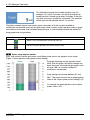
(1) Current operation status & power control setting
(2) Power using amount monitor
(3) Power control setting
From now on, we will find out the using method for each part.
1
Current operation status & power control setting
Current power indicates what percentage the operation
rate of current air conditioner reaches compared to total
operation rate. In addition, it shows how many kW
current using power is.
Current power
Desired power indicates what percentage the operation
rate of desired air conditioner reaches compared to total
operation rate of air conditioner. In addition, it shows how
many kW per hour the desired using power is.
Desired power
AC Manager Installation/User’s manual
3-28
3. AC Manager Operation
This indicates the cycle of the forced operation stop. For
example, if it is set to 5 minutes, you should change the air
conditioner that is forced to stop every 5 minutes so that the
stop time of every air conditioner is the same. The operation
switch cycle can be adjusted within 5~15 minutes.
The facility manager checks concurrently power value when all of the currently installed air
conditioners are operated and it sets the goal power value. It shows current operation status in graph
and numbers at the same time and when setting the goal, it is constructed to enable the method of
using graphs and using numbers.
Group name
Description
Appears when forced operation and forced stop is on.
Indicates that peak operation rate control function stops.
2
Power using amount monitor
Drag with mouse to set the goal power value. Below power control use appears as bar shape.
(Figure. Current operation status/power control setting)
The graph indicating current operation status
exists. With this graph, the facility manager can
check the power value and the goal power value
set when 100% of currently installed air
conditioners are operated.
Power setting can be made between 0% and
100%. The power set value set in graph appears
linked as the value in power control setting in (3).
For example, the peak operation rate of above
screen is set to 32%.
3-29
AC Manager
3. AC Manager Operation
3
Power control setting
Below is description on each item of above menu.
Button
Description
Desired power
Can be set by 0.1 kW.
Power rate
Can be set between 0% and 100% of maximum available power and adjusted by 1%.
Switch time
Meaning a cycle that stops the forced operation.
Can be set between 5 and 15 minutes and can be adjusted by 1 minute.
Peak not applied
According to setting, the minimum value of the desired power and desired power rate
changes.
This is because the minimum value changes depending on the number of peak not
applied air conditioner. The more the number of peak not applied air conditioner, the
more the number of operated air conditioner and the power consumed, so the
minimum value of desired power and desired operation rate changes.
Peak operation
Peak control is applied to the indoor unit.
AC Manager Installation/User’s manual
3-30
ENGLISH
There are 2 kinds of power control settings, adjusting the desired power using amount in kW and
adjusting it percentage to be operated. If air conditioner operation power exceeds the goal setting
value, peak operation rate control will force the air conditioner to operate in certain cycle according to
peak operation rate operation rule. The air conditioner forced to stop is operated in Wind mode, so
user cannot feel the change due to the forced operation in the aspect of cooling/heating effect.
3. AC Manager Operation
Setting peak not applied
1. The air conditioner not to be
affected by peak operation
rate control can be registered.
Click peak not applied button
and this window appears.
After selecting the indoor unit
you want, click >> button.
2. The selected indoor unit
moves to right panel as
shown in this screen.
If you want to set this device
to peak control again, while
selecting the device, click
Delete button.
3. Click Save button to exit this
window.
Caution: Peak operation
You shouldn’t force to change the indoor unit being controlled by Wind during peak
operation rate operation to cooling or heating. Peak operation rate operation problem
may occur.
3-31
AC Manager
3. AC Manager Operation
Depending on the setting of peak-not-applied air conditioner, the desired power and the setting value
of the desired operation rate may change. The more the number of peak-not-applied air conditioner,
the more the number of the air conditioner operated by user’s individual control may become. Due to
this, the power consumption increases, so the setting value of the desired power and desired
operation rate may vary.
Caution: Initialization of peak-not-applied air conditioner
Please note that in system setting menu, if you set the system menu in the system
setting menu and then save it, prior information of peak-not-applied
AC Manager Installation/User’s manual
3-32
ENGLISH
Note: Changing the desired power and the setting value of the desired
operation rate
3. AC Manager Operation
Schedule
Schedule is a function that the operation of air conditioner is preset so that the air conditioner can carry
out the preset operation at certain time. Schedule function means that if the air conditioner should be
controlled according to certain schedule, user doesn’t have to set the operation status every time, and
only the press schedule enables the air conditioner to be automatically operated. The period can be
set by week, day and 10 minutes and 1 year of schedule can be registered. Using this function, the air
conditioner isn’t unnecessarily operated, but automatically operated when necessary by controlling
from the center, giving excellent energy-saving effect.
Below is the default screen of schedule menu.
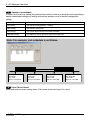
2
1
3
(1) Weekly/Daily schedule calendar
With table-type calendar, you can check current date and set schedule.
(2) Monthly calendar
With basic calendar, this shows the dates of currently selected month and using upper buttons, you
can move to the period you want. If you select certain date of the calendar in the above screen, the set
schedule of the selected date is updated to appear in the screen.
3-33
AC Manager
3. AC Manager Operation
(3) Schedule function
Note: As for schedule function, we explain on the menu first and then,
scenario.
Let’s find out each button on the schedule function screen and the screen for display. User can follow
the scenario and practice functions like Using weekly schedule function, Using special schedule
function, Using entire suspension schedule function, and Sending current schedule in following
description.
Menu description
Weekly schedule edit
screen setting
Weekly schedule setting
screen setting
Special schedule
edit screen setting
Special schedule
setting screen setting
AC Manager Installation/User’s manual
3-34
ENGLISH
By creating and editing weekly and special schedule, you can set schedule for your desired period. In
addition, using Send current schedule button, you can send currently set schedule to ACP and actually
apply it to the air conditioner system.
3. AC Manager Operation
Description on Edit weekly schedule screen
3
4
2
1
1
7
8
6
5
Let’s find out about each menu on above screen.
1 Schedule group selection window
The schedule function can be set in such way that the same or unique operation can be made for each
schedule group. For currently set group, the group name and group number appear in the list. Among
them, you can select the schedule group you want with mouse. If you want to edit the schedule group
like add/delete and etc. refer to Edit group menu of the system setting.
2 Control setting window
When the selected schedule group is operated according to the schedule, the operation mode to
operate, wind strength, wind direction, lock and desired temperature can be set. The function of control
setting button is the same as that of air conditioner control setting button. In addition, the schedule
control setting for the selected schedule group can be controlled in many ways for all days and hours.
You can click the button to easily switch functions.
3
Weekly operation schedule
In order to set weekly operation schedule for the selected schedule group, drag the mouse and select
the desired hour. If you set many hours, draw the desired hour vertically dragging it. This can be set by
10 minutes and the hour can be set by moving the scroll bar up and down. In the area corresponding
to the setting hour, the bitmap image showing the selected mode through control setting is shown. If
3-35
AC Manager
3. AC Manager Operation
The figure on the right is an image that appears in case of heating,
deactivating lock and 30_ setting.
1
Schedule list
This can be used when you want to create/delete or select new weekly schedule.
2
Delete, copy and paste
You can use Delete button when you want to delete the currently displayed schedule. If you want to
set the schedule in the way of making schedule hour or control setting information and etc. identical,
without any need of repeatedly editing, you can use copy/paste function. Firstly, select the schedule
group and check the schedule editing status and then, click Copy button. In addition, select the
schedule group you want to apply again and then, click Paste button. Then, you can see the same
schedule information has been set.
Note: Delete
Click Delete button to delete previously saved schedule information.
6
Change mode
If you want to change the control information like temperature, wind strength, lock and etc. while
keeping the hour in the previously setting schedule information, you can use Change schedule mode
function. Depending on your selection on this function, the operation in the weekly schedule operation
window varies.
- Edit schedule hour : Checked and selected as default. When dragging with mouse, select/delete
operation is made.
- Change mode : When Change mode is checked, the hour isn’t selected even if you drag with mouse
and operation information isn’t deleted.
In case of editing schedule hour, when you click, the area turns grey and becomes selected. If you
want to change the schedule temperature, mode and etc. previously edited in the control setting, select
Change mode and click the hour area in weekly schedule and click the control setting button.
AC Manager Installation/User’s manual
3-36
ENGLISH
the setting is wrong or you want to change this, you can drag the hour you want to delete in the above
way. By dragging with mouse, the bitmap image that appears in the schedule setting area will show
mode, lock and temperature information.
3. AC Manager Operation
7
Operation lock schedule
A function that limits(Lock setting) the operation/stop function of the wire remote controller according to
weekly schedule(day setting/hour setting) and controls operation on/off at certain time(operation
setting).
Button
Description
Day setting
Sets the day weekly(Monday ~ Sunday).
Hour setting
Sets control starting time.
Lock setting
Sets lock or deactivate the wire remote controller.
Operation setting
Sets operation start or operation stop of the indoor unit.
Note: For example, lock schedule is as follows.
Lock: ON
Day: Monday
Time: 17:00
Operation setting: NULL
8
Lock: OFF
Day: Tuesday
Time: 07:00
Operation setting: NULL
Lock: ON
Day: Tuesday
Time: 17:00
Operation setting: OFF
Lock: OFF
Day: Wednesday
Time: 07:00
Operation setting: OFF
Save, OK and Cancel
Saves and confirms current setting status. Click cancel and current input isn’t saved.
3-37
AC Manager
3. AC Manager Operation
Description on weekly schedule setting screen
In this screen, you can check weekly schedule status set within recent 2 months basically. You can
set/deactivate the desired schedule in certain week from all weekly schedules currently saved.
ENGLISH
3
4
2
1
Let’s find out about above menu.
1
Schedule calendar
The initial screen is the calendar of current month and click left and right button image on top and you
can move to past or future date you want. The schedule status changed according to this is shown.
2
Weekly schedule list
All of the currently created and saved weekly schedule are shown in a list.
3
Weekly setting schedule
This shows the setting status of weekly schedule list. For example, in the setting screen of above
weekly schedule, the weekly schedule of "Week Schedule Name 1" is set on 3th week of September.
If you want to set the schedule, click this schedule and press << button in (4) and if you want to cancel
this schedule, click >> cancel button.
AC Manager Installation/User’s manual
3-38
3. AC Manager Operation
4
Set/Cancel setting schedule button
This can be used when you want to set the weekly schedule on the desired week. Firstly, select the
desired schedule from (2) Weekly schedule list and click with mouse and select the desired week from
(3) Weekly setting schedule list and click << button and Save button. Now, you can check the setting
schedule appears in the desired period. When canceling the schedule, click >> button.
Caution: Schedule setting
When setting the schedule, 1~3 minute schedule setting is
maintained for time the actual schedule is set.
For example, when you set the schedule for the unit to be turned off at 5:00, the
operation is turned off from 5:00 to 5:03. Therefore even when you try to operate the
unit with the wired remote controller, it may be turned off.
3-39
AC Manager
3. AC Manager Operation
Description on Special schedule edit screen
4
2
ENGLISH
3
1
5
7
8
6
Let's find out about the description on above screen menu.
Caution: Delete
Basically, editing and function is the same as that of weekly schedule edit. Please note
that if you click Delete button, previously saved schedule information is deleted.
AC Manager Installation/User’s manual
3-40
3. AC Manager Operation
1
Selecting schedule group and indoor unit
Schedule function can be set in such way that the same or unique operation can be made for each
schedule group. The group name and group number appears in the list for currently setting groups.
Among them, you can select the schedule group using mouse. If you want to edit(add/delete) the
schedule group, please refer to the group edit menu in the system setting.
2
Control setting window
You can set the operation mode, wind strength, wind direction, lock and desired temperature. for
operation during the scheduled operation of the air conditioner. The function of the control setting
button is the same as the function of air conditioner control setting button.
In addition, the schedule control setting of the schedule group can be controlled for each hour.
3
Special operation schedule information
In order to set daily operation schedule for the selected schedule group, drag the mouse and select the
desired hour. If you set many hours, drag and draw the desired hour vertically. This can be set by 10
minutes and the hour can be set by moving the scroll bar up and down. In the area corresponding to
the setting hour, the bitmap image that shows the selected modes by (2) control setting appears. If you
made wrong setting or want to modify it, drag the same hour you want to delete and then, it is deleted.
4
Schedule list
This can be used if you want to create/delete or select new weekly schedule.
5
Delete, copy and paste
If you want to delete the currently displayed schedule, you can use Delete button.
If you want to set the schedule by making the schedule hour or control setting information and etc., you
don’t have to repeatedly edit them and you can use Copy and Paste function. Firstly, select the
schedule group and check the schedule edit status and then, click Copy button. Then, select the
schedule group you want to apply and click Paste button. Thereafter, you can see the same schedule
information has been set.
Note: Delete
When executing Delete, previously saved schedule information is deleted.
6
Change mode
If you want to change the control information like temperature, wind strength, lock and etc. while
maintaining the time among previously setting schedule information, you can use the schedule mode
change function. Depending on your selection of this function, the operation in weekly schedule
operation window varies.
3-41
AC Manager
3. AC Manager Operation
- Edit schedule hour : Checked and selected as a default value. Drag mouse for select/delete
operation.
In case of editing schedule hour, when clicking mouse, the area turns grey and becomes selected. If
you want to change temperature, mode and etc. in the edited schedule of previous control setting,
select Change mode, click the desired hour area in weekly schedule and then, click the control setting
button.
7
Operation lock schedule
A function that limits the operation/stop function of wire remote controller depending on the schedule
and control the operation On/Off(operation setting) at certain time.
Button
Description
Time setting
Sets control start time.
Lock setting
Sets or cancels wire remote controller lock.
Operation setting
Sets start or stop the operation of the indoor unit.
Note: For example, Lock schedule is as follows;
8
Save, OK and Cancel
Saves and confirm current setting status. Click Cancel and current status isn’t saved.
AC Manager Installation/User’s manual
3-42
ENGLISH
- Change mode : When Change mode is checked, the hour isn’t selected even if you drag the mouse
and the operation information isn’t deleted.
3. AC Manager Operation
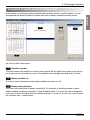
Special schedule setting screen setting
3
4
2
1
Let’s find out about above screen menu.
1
Special schedule calendar
At first, the calendar of current date appears as a default and clicking right/left button image on the top
of the calendar enables you to move past or future desired date. Thereby, the daily schedule status set
in (3) varies.
2
Special schedule list
All of the currently created and saved special schedule is shown in the list. If you want to add the
schedule other than this, you can additionally use the schedule list in the special schedule edit.
3
Special daily schedule
Shows the setting status of special schedule list.
3-43
AC Manager
3. AC Manager Operation
4
Special schedule setting button
You can use >> button when you want to cancel the schedule set on specific date. Select the date you
want to cancel from the special setting schedule list with mouse and click >> button. You can see the
setting schedule is cancelled.
Until now, the menu of the schedule function has been described. Now, we provides you with the
scenario practically using the schedule function. User may follow this order and use the schedule
function easily and conveniently. We introduce virtual scenario on using weekly schedule function,
using special schedule function, using Suspend entire schedule function and using Send current
schedule function.
Scenario description
Using weekly
schedule function
Using special
schedule function
Using all stop
schedule function
Using current schedule
transmission function
User will use general weekly schedule function as below order.
AC Manager Installation/User’s manual
3-44
ENGLISH
If you want to set the special schedule on the desired date, you can use << button. Firstly, select the
desired schedule in the special schedule list in (2) with mouse, and select the desired date from the
special setting schedule list in (3) and then click << button.
3. AC Manager Operation
Using weekly schedule function
Create schedule and designate the schedule
group to operate
Apply the pattern for the designated schedule
to be operated
Apply the period for the schedule group with the
pattern to be operated
We will introduce the virtual scenario that user takes this process. Follow this scenario and you can
use the schedule function.
3-45
AC Manager
3. AC Manager Operation
Satisfying the schedule group to operate by creating the schedule
1. In AC Manager main screen, click system setting button ➔ Edit schedule group, and then following
ENGLISH
screen appears.
5
1
4
2
3
1
7
6
1. Using (1) Add group button, Add group. Click Add group button and the, the group name
automatically appears in (5).
2. After selecting the group from the control group, using (2) Edit group, you can change the name. In
this way, you can add and delete the desired group.
3. Select the desired indoor unit of the indoor unit information in (3) and click << button and then they
move to (4). They can be set as an indoor device in the selected group. If you want to exclude an
indoor unit in this group, while selecting the indoor unit, you can click >> button.
4. Click the indoor unit name, address and control group button to select the indoor unit for each item
in ascending order. Move the indoor unit using >> and << button, and the selected/moved indoor
unit will have the group number as (5) in the control group of the indoor unit information.
5. Use (6) Save button to save the information set.
AC Manager Installation/User’s manual
3-46
3. AC Manager Operation
Applying the pattern for the schedule group to operate
1. Click Edit weekly schedule button in the schedule main screen and below window appears.
Click the bordered schedule list button on the top.
2. The window that the schedule information can be added appears.
Click Add button to input and save weekly schedule name. This name can be edited and deleted later.
Enter the name and click OK button.
The schedule name just entered appears in weekly operation schedule window. Now, you are ready to
start the schedule setting.
3-47
AC Manager
3. AC Manager Operation
3. The schedule name appears as below. For example, "Drama club" is set.
ENGLISH
Drag the hour on the desired date and then, set the desired mode, wind strength, wind direction,
temperature, all lock and etc. in air conditioner. If you get the mouse off, the settings appear in the
schedule window.
4. If you want to change the items in previously selected area, check “Change mode” instead of “Edit
schedule time. In Change mode, change the operation information.
Caution: Warning window
When you set the schedule at first, select Edit schedule time and when changing only
mode form the previously selected are, select Change mode. If you want to change
previous area while Edit schedule time is checked, below window appears and you
cannot edit it. Figure. Overlapped with already edited schedule time. Please edit again.
OK))
After setting, click Save button.
AC Manager Installation/User’s manual
3-48
3. AC Manager Operation
5. Click Copy button, and below window appears.
If you click Yes, current Week Schedule(0) is copied and may be applied to another area.
6. After selecting the group name that you want to paste this copied schedule from the schedule
group and select Paste button, the schedule of the schedule[0] will be copied here.
After setting, click Save and click OK to go back to the schedule main screen.
3-49
AC Manager
3. AC Manager Operation
Applying the operation period of the schedule group to which the pattern was applied
1. Creates the schedule group and sets the air conditioner operation schedule to apply to this group
Weekly schedule setting/setting schedule/Apply for a year/Saved schedule list/Drama club/Save/OK
Click the desired group name from the saved schedule list. If you apply this for a year, click Apply for a
year button. If you want specific period, click the desired week on the left calendar. If you click the
week, the week turns blue. At this time, click << button.
AC Manager Installation/User’s manual
3-50
ENGLISH
and applies the period to operate. In schedule main screen, click weekly schedule setting button,
and below window appears.
3. AC Manager Operation
2. Click << button, and the schedule name is reflected and shown as below.
Now, click Save button. If you want to delete the schedule, select the schedule name and click >>
button.
3. Click Save button and the confirmation message on the saving appears.
Click Yes, and below confirmation message appears.
Click OK.
3-51
AC Manager
3. AC Manager Operation
4. Now, you can see the schedule is reflected as bordered part below in the schedule main screen.
ENGLISH
AC Manager Installation/User’s manual
3-52
3. AC Manager Operation
Using special schedule function
User will use the special schedule function in the order as below.
Create the schedule and specify the schedule
group to operate
Apply the pattern for the specified schedule
to be operated
Apply the schedule group with the pattern
applied to operate
We introduce the virtual scenario that user takes these steps as an example. Following this scenario,
you can easily use the schedule function.
3-53
AC Manager
3. AC Manager Operation
Create the schedule and specify the schedule group to operate
1. In AC Manager main screen, click system setting button
Edit schedule group, and below screen appears.
ENGLISH
5
4
2
3
1
7
6
Using (1) Add group button, add group. Click Add group button and the group name automatically
appears in (5).
2. Select the group from the control group and use (2) Edit group to change the group name. In this
way, you can add and delete the desired group.
3. Select the desired indoor unit of the indoor unit information in (3) and click << button and they move
to (4). They can be set as the indoor units in the selected group. If you want to exclude certain
indoor unit, with the device selected, click >> button.
4. Click the indoor unit name, address and control group button and the indoor units are sorted for
each item in ascending order. Using >> and << button to move the indoor unit, the group number of
the selected and moved indoor unit appears in the control group of the indoor unit information as
(5).
5. Use (6) Save button to save the setting information.
AC Manager Installation/User’s manual
3-54
3. AC Manager Operation
Applying the pattern for the specified group to be operated
1. In schedule main screen, click Edit special schedule button and below screen appears.
Click the bordered schedule list button on the top.
2. The window that the schedule information can be added appears.
3-55
AC Manager
3. AC Manager Operation
3. Schedule name appears as below. For example, "Holiday" is set.
Drag time on the desired date and set the desired mode, wind strength, wind direction, temperature, all
lock and etc. from air conditioner. Get the mouse off and them the setting appears in the schedule
window.
4. If you want to change the information of the previously selected area, check "Change mode"
instead of "Edit schedule time". In Change mode, change the operation information.
AC Manager Installation/User’s manual
3-56
ENGLISH
Click Add button and enter and save weekly schedule name. This name can be edited and deleted
later. Enter the name and click OK button. In the special operation schedule window, the schedule
name just entered will be reflected. Now, it is ready for the schedule setting to begin.
3. AC Manager Operation
Note:
When setting the schedule at first, select Edit schedule time and select Change mode when you only
change mode in the previously selected area. If you want to change the mode of previous area with
Edit schedule time checked, below window appears and you cannot edit.
After setting, click Save button and below window appears.
Click OK button.
5. Click Copy button and below window appears.
If you click Yes, current Holiday schedule(0) is copied and applied to another schedule.
6. Select the group name that you want to paste this copied schedule from the schedule group and
select Paste button and then, the schedule of Schedule[0] will be copied here.
After setting, click OK button to go back to main screen.
3-57
AC Manager
3. AC Manager Operation
Applying the operation period of the schedule group with the pattern applied
1. Creates the special schedule group and sets the air conditioner operation schedule to apply this
Click the group name from the saved schedule list. Click the date you want to set the schedule. Click
the date and click << button. Click << button and the schedule list name is reflected to the schedule
period set as above screen. After setting, click Save button. If you want to delete the schedule, select
the schedule name and click >> button.
2. Click Save button and below Confirmation pop-up appears.
AC Manager Installation/User’s manual
3-58
ENGLISH
group and applies the operation period. In the schedule main screen, click the special schedule
setting button and then below window appears.
3. AC Manager Operation
Click Yes and below pop up appears.
Click OK to exit this window.
3. Now you can see the schedule is reflected in the schedule main screen as below.
Above screen is an example that "Holiday" has been added to the special schedule group and "Week
Schedule Name 1" has been added to weekly schedule group. In this way, user can manage and
adjust various schedule he wants.
3-59
AC Manager
3. AC Manager Operation
Using the function to suspend entire schedule
Click Suspend entire schedule button and below window appears.
ENGLISH
As a default, this function is checked as Deactivate. If you check Activate, you can stop the air
conditioner operation for certain period. This is a convenient function when controlling the air
conditioner at a time. After setting, click OK button.
AC Manager Installation/User’s manual
3-60
3. AC Manager Operation
Using the function to send the current schedule
1. Click Send current schedule button and below window appears.
Click Yes button and currently set schedule is applied.
2. As in the box in the bottom of below main screen, it is indicated that the schedule is being sent and
applied.
Now, we have looked over managing and adjusting weekly schedule and special schedule using the
schedule menu function,
3-61
AC Manager
3. AC Manager Operation
History management
In the history management menu, the control and error status of air
1
2
3
4
5
(1) History data display
(2) History period selection
(3) History device selection
(4) History data selection
(5) Inquiry, update
On above menu, let’s find out each item.
AC Manager Installation/User’s manual
3-62
ENGLISH
conditioner/ventilation/other system is record and shown. You can see the status like date, time,
address of air conditioner, operation mode, operation status, error code and etc. at a glance. Basically,
the history on all the device status of current system is updated and shown.
3. AC Manager Operation
1
History data display
A window displaying history data. The history of the devices connected to air conditioner, ventilation
and external input port can be displayed separately. By selecting AC, VENT and ETC on the left top of
the display window, the device history is displayed.
- AC : Data on air conditioner, indicating the information on date, time, address, mode, wind strength,
lock, temperature, operation, error and controller.
- VENT : Data on ventilation device, indicating the information on date, time, address, mode, wind
strength, filter, plasma, heater, additional function, lock operation, error and controller.
- ETC : Data on the external input port and devices connected to fire alarm and etc., indicating the
information on date, time, address, status and controller.
2
History period selection
Selection on present or past period, possibly checking the data on the desired history period.
As a default, Present period is selected.
- Present : If Present is selected, the history data is updated and displayed in real time whenever the
system status of air conditioner changes.
- Period selection : Check Period selection and click the button to select a specific date or period in the
past by the calendar and click Update button and the history of the selected period is shown.
3
History device selection
Basically, this function is used to save and show the history data of all devices, however, depending on
user’s selection, this can be used to show only the history of specific device.
- All devices : The data on all devices of the system when selecting all devices is shown.
- Specific devices : The data on specific device is shown. Let’s find out an example of the scenarios of
the specific device selection.
3-63
AC Manager
3. AC Manager Operation
Selecting specific device
1. Click Select button and below Select history device window appears.
ENGLISH
Select the desired device on above screen and click OK button. The settings are determined and the
window is closed.
AC Manager Installation/User’s manual
3-64
3. AC Manager Operation
2. Click Update button in main screen. Only the history data of the selected device is displayed as
below.
4
Select history data
Shows all kinds of data on the air conditioner/ventilation/external input device of the system and these
are divided into “Status information data” and “Error data”. If you want to check error history, don’t
check the status information, but check the error information. After checking, you should click the
update button on main screen to allow the information on the current status to appear on the screen.
3-65
AC Manager
3. AC Manager Operation
5
Inquiry, update
1. Click using time inquiry button and below screen appears.
2. Click Print button on main screen and below window appears.
If you want to print out, you can print out
entire area or the selected area in many
ways. Click OK button to print out the data.
3. Click Update button on main screen.
Current setting items appears on main screen. User can see all settings only when clicking Update
button.
AC Manager Installation/User’s manual
3-66
ENGLISH
You can inquire total using time of air
conditioner and using time of specific air
conditioner per date respectively. Click
Initialize operation time button, and you
can initialize previous using time and
accumulate the period again.
3. AC Manager Operation
Accumulated power
Accumulated power is a function that indicates the used power for each indoor unit or maintains this
efficiently when the outdoor unit is commonly used, such as studio apartment, condo and etc. Main
functions are as follows;
- Using ACP and AC Manager, distributing consumed power to each room
- Saving and printing function of distributed power data
- Remote inspection function without necessity of separate inspection program
Below is the main screen of accumulated power menu.
Let’s find out each information on above screen.
3-67
AC Manager
3. AC Manager Operation
1
Power information
2
Using Power
Shows total using power currently being used. You can check total using power and using power for
the group.
3
Period
You can check the power amount based on current level and certain period.
4
Print
You can print out the current details or save as file.
AC Manager Installation/User’s manual
3-68
ENGLISH
Shows the current using power for each indoor unit. Displays the name, address, current consumed
power and accumulated consumed power of the indoor unit in the group for each indoor unit group.
3. AC Manager Operation
Pleasant control
AC Manager can automatically control the indoor unit and ventilator connected through the network
based on current temperature and setting temperature. Therefore, this can provide user with optimum
and pleasant cooling function.
In pleasant control menu, following 2 functions are provided as these auto control functions.
Auto-Change Over operation
Auto-change over operation function is a function that maintains the optimum indoor temperature not
manually, but by auto-change over of air conditioner operation mode(cooling and heating). For
example, if in heating operation, the indoor temperature rapidly increases due to the increase of the
number of people, AC Manager auto-changes over the operation of air conditioner indoor unit from
heating to cooling in order to fit into changing indoor temperature and maintain the indoor temperature
within certain range.
Use inputs the temperature difference from the standard temperature for the auto-change over
operation function. AC Manager will be operated based on the input as follows;
• If the indoor temperature increases more than the difference based on the standard temperature, this
cools the indoor temperature by cooling operation.
• If the indoor temperature decreases below the difference based on the standard temperature, this
warms the indoor temperature by heating operation.
3-69
AC Manager
3. AC Manager Operation
Temperature limit operation
Temperature limit operation is a function that keeps the temperature of the place with the air
conditioner installed within certain range(+4°C ~ -4°C).
• If the indoor temperature increases higher than the setting temperature, the cooling function of the air
conditioner is operated and decreases the temperature. lower than the setting temperature.
The available setting temperature ranges within 35°C~45°C.
• If the indoor temperature. decreases lower than the setting temperature, the heating function of the
air conditioner is operated and increases the temperature higher than the setting temperature.
The available setting temperature ranges within 1°C~12°C.
AC Manager Installation/User’s manual
3-70
ENGLISH
In order to execute the temperature limit operation function, user will input maximum and minimum
temperature as follows and AC Manager operates based on the input as follows;
3. AC Manager Operation
In this chapter, using the pleasant control menu, we will explain how to operate AC Manager function
in the order.
Below is the default screen of the pleasant control menu.
1
3
4
2
The description on each menu on above screen is as follows.
1
Air conditioner list
Shows the name of the operating indoor unit and whether the pleasant control function is set or not.
2
Comfort control group
Can add, edit and delete the control group. If you edit and delete the group, this will be automatically
reflected to (4).
1. If you want to edit the group in comfort control group area, put mouse on the group name as shown
above and click its right button.
2. The window that the pleasant group name can be edited appears.
Enter the group name in this window and click OK button to edit the name.
3-71
AC Manager
3. AC Manager Operation
3
Auto-change over operation, temperature limit operation Tab
Auto-change over operation tab is as follows;
- Temperature difference : The temperature width that can change current temperature.
Item
Description
Average
The indoor unit being operated in the group operates auto-change over operation
function at the average temp of the detected temperature.
Operation
Auto-change over operation function is operated based on the fastest searched
indoor unit among the indoor units being operated within the group.
Fixed
Auto-change over operation function is operated depending on the detected temp
based on the firstly registered indoor unit in the group.
Temperature limit operation tab is as below.
Max and Min temperature can be set. Whether the pleasant control of comfort group is applied or not
is divided into applied and not applied.
Item
Description
Enable
Use auto-change over operation function in currently specified group.
Disable
Not use auto-change over operation function in currently specified group.
After setting, click Set button and click Send button.
AC Manager Installation/User’s manual
3-72
ENGLISH
- Standard temperature : Current standard temperature. The measurement method of the indoor
temperature is as below table.
3. AC Manager Operation
Device connected control
Emergency Stop Interlocking, the device connected control, is a function that stops all indoor units and
ventilation units in case of fire and other emergency. The summary on this function is as follows.
- Save current setting status function
The indoor units and ventilation units being currently monitored is data-based and saved.
- Operation setting function
If you set the external device and product status in the operation setting, the setting operation shall
be carried out when the device recognizes DI signal.
- Emergency stop function
When external signal is detected, this function is used to save current setting status and stop the
operation of all indoor device and ventilation product. Once the external signal is recognized, the
operation status of the product isn’t recovered even if the external signal doesn’t last.
Below is the main screen of device connected control.
2
1
3
Below is the description on each menu on above screen.
1
Pattern management
A button to manage the pattern for device connected control.
2
Device connected control setting
Current setting pattern is reflected to device connected setting list.
3
Save
Saves current setting.
3-73
AC Manager
3. AC Manager Operation
Pattern management
Let’s find out steps of managing the pattern for device connected control.
Click pattern management button and below window appears.
ENGLISH
3
2
1
4
Below is the description on above menu.
1
Pattern name
Creates and deletes the pattern.
2
Device list
Selects the condition details of device.
3
Condition
Lists up the device in accordance with the condition.
4
Action
Lists up the device in accordance with the action.
AC Manager Installation/User’s manual
3-74
3. AC Manager Operation
Let’s look over the order of example scenario.
1. Click Create button and below window appears.
Enter the pattern name and click OK button. Now, specific device that operates under this pattern or
air conditioner’s condition and its action are set.
2. Specific operation of the indoor unit and device can be set as input conditions. Select a device in
(2) and click << button to reflect it to (3). The input condition could be air conditioner or inputting DI
port. Let’s assume DI that detects fire in this example.
Select a device in (2) and click << button to reflect it to (3) as below.
3-75
AC Manager
3. AC Manager Operation
3. Now, set the operation status of air conditioner corresponding to the responsive print-out for the
condition. Double-click the device reflected in (4) and below window appears.
- Operation mode : Sets COOL, HEAT, FAN, AUTO and etc..
- Setting wind strength : Sets Fan speed. Sets LOW, HIGH, MID and etc.
- Lock : Determines whether to lock all.
- Indoor setting temperature : Means indoor temperature. Sets the temperature range to control. Using
>> and <<, provide the condition of temperature below the specific temperature.
- Operation/Stop : Determines whether to turn On or Off.
AC Manager Installation/User’s manual
3-76
ENGLISH
Indicate its status On when fire is detected in DI of port5-1, reflected in (3). The status of DI can be
determined to be On or Off by double-clicking the device. In this case, the air conditioner connected to
ACP5 should be Off as responsive action. Select air conditioner for the responsive action in (2) and
click << button to reflect it to (4) action area. Now, the screen appears as below.
3. AC Manager Operation
In this way, input the operation status of air conditioner corresponding to the input condition. In this
window, the operation mode, wind direction, whether to lock or not, whether to stop operation or not
and etc. can be set. This output can be made for the air conditioner, but depending on the status, this
could be DI. After setting, click OK button.
Note: Input and output
For Multiple inputs(Condition), multiple outputs(Action) can be made. If the external setting and the
status of product is set for Action setting, when the device detects DI signal, this performs the action.
4. In this way, select the device you want and click << button or >> to set and modify the condition
and operation and click Save button to save current details.
5. Now, in the device connected control setting in (2) on main screen, the pattern name is reflected as
below.
Click Enable beside the pattern name to determine whether to Enable or Disable. Click Save button on
main screen to save this.
3-77
AC Manager
3. AC Manager Operation
Monitor
Let’s find out the scenario order using above menu.
1. Click “Brief” tab and above default screen appears. This shows the operation status of the indoor
unit belonging to the current control group. Using below icon, for air conditioner, you can check
cooling, heating, wind, removing humidity, On/Off status of auto mode and error status. For
ventilation, you can check auto, electric heating, On/Off status and error status of normal mode.
Reference: Print screen
When you press the Print screen button, you can output the screen currently displayed on the
monitor. When you set the print page to Landscape, you can see the information more easily.
AC Manager Installation/User’s manual
3-78
ENGLISH
Monitor is a function that inquires the status information of the indoor device, monitor the error status
and guarantee the operation of air conditioner. In addition, this monitor function is a function that helps
user respond promptly when emergency and critical error occurs.
3. AC Manager Operation
<Air conditioner>
Operation mode
Description
Cooling
Stop Cooling
Removing humidity
Stop Removing humidity
Wind
Stop wind
Heating
Stop Heating
Auto operation
Stop auto operation
Error indication
<Ventilation>
Operation mode
Description
Electric heating
Ventilation mode of supplied/emitted air through electric heating exchanger.
Used as electric exchange mode in summer/winter when the difference of
temperature and humidity between indoor and outdoor is big.
Stop Electric heating operation
Normal indication
Ventilation mode of supplied/emitted air not through electric heating exchanger.
Used as electric exchange mode in spring/summer when the difference of
temperature and humidity between indoor and outdoor is small.
Stop Normal operation
Auto indication
By measuring indoor and outdoor temperature, automatically adjusts
supplied/emitted air, and operates in optimum status in order to keep the balance of
indoor air.
When connected to Multi V, the operation has been determined by the operation
speed setting temperature of the air conditioner besides indoor and outdoor
temperature.
Stop Auto operation
3-79
AC Manager
3. AC Manager Operation
2. Click “Detail” tab, and the address of all air conditioners, operation mode, status, indoor
temperature, setting temperature, all lock and etc. are listed up as shown below.
ENGLISH
Above details reflect the air conditioner information being operated in the default control in real time.
Let’s find out the menu on above screen.
AC Manager Installation/User’s manual
3-80
3. AC Manager Operation
Following information appears on the monitoring screen.
<Air conditioner>
Item
Name of Air conditioner
Description
Shows currently registered air conditioner name.
Operation mode
Shows the operation mode of the air conditioner set.
Operation status
Shows the wind strength of the air conditioner set.
Operation lock
Shows whether to set the temperature lock function or not.
Indoor temp
Shows the indoor temperature with the air conditioner.
Setting temp
Shows the desired temperature for indoor temperature.
All lock
Temperature lock
Prevents the operation status of air conditioner from changing.
Prevents the temperature of air conditioner from changing.
Mode lock
Prevents the mode of air conditioner from changing.
Wind lock
Prevents the wind strength of air conditioner from changing.
Wind strength
Wind direction
Temp setting range
Error
Shows the wind strength of air conditioner.
Shows the wind direction of air conditioner.
Shows the temperature range of air conditioner.
Shows the error status of air conditioner.
<Ventilation>
Item
Ventilation name
Address
Description
Shows the ventilation name registered in current system.
Shows the ventilation address.
Operation mode
Shows the operation mode of ventilation.
Operation status
Shows the operation status of ventilation.
All lock
Additional function
Plasma
Prevents the operation status of ventilation from changing.
Shows the additional function of ventilation.
Shows the plasma function of ventilation.
Heater
Shows the heater function of ventilation.
Wind strength
Shows the wind strength of ventilation.
Error
3-81
AC Manager
Shows the error status of ventilation.
3. AC Manager Operation
Let’s find out below buttons.
1
View all air conditioners
ENGLISH
View all information on air conditioners currently being operated.
2
View erroneous indoor unit
Below window appears. Erroneous indoor unit appears.
After checking the information, click OK button. You can save the erroneous information using Save as
file button.
3
Save as file
You can save current status as file.
4
Kind of indoor unit
You can select the subject of monitoring from air conditioner or ventilation. If air conditioner is checked,
only the air conditioner corresponding to each group on the screen appears. If ventilation is checked,
only the ventilation appears on the screen.
AC Manager Installation/User’s manual
3-82
3. AC Manager Operation
4. Note
TCP/IP setting guide
Below description is based on Window XP.
1. Click [Start] ➔ [Control board] on user’s PC, and below window appears.
Click “Connect network” with border on above screen.
2. The window that local area connection can be set appears.
Put the mouse on local area connection and right-click the mouse to select “property”.
4-1
AC Manager
3. AC Manager Operation
3. The window of local area property appears.
Double-click the Internet protocol (TCP/IP).
ENGLISH
Figure. Local area connection 2 property
4. IP setting window appears.
Select Use next IP address and enter IP to add and click OK. When adding private IP, receive IP from
the network administrator and enter this.
AC Manager Installation/User’s manual
4-2
3. AC Manager Operation
5. You can additionally enter IP for AC Manager in IP of existing PC. Click Advanced button on above
screen, and you can add IP. Click Advanced button and below window appears.
Enter additional IP here and while using
existing IP, you can use AC Manager.
After setting, click “OK” button.
Note: LAN Line
The additional IP in Advanced button will disappear when user remove LAN from PC. When LAN is
plugged again, this IP should be entered again. When using Manger, insert Hard_Lock key into USB
port of AC Manager PC. All functions of AC Manager are determined by authentication key.
4-3
AC Manager
P/No.: MFL37115806
Printed in Korea
After reading this manual, keep it in a place easily accessible to the user for future reference.