1
Installation and Operation
Controls and Connections
1.
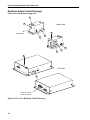
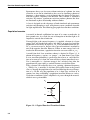
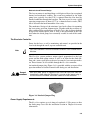
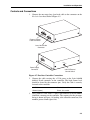
Connect the one meter long laser head cable to the connector on the
Excelsior laser head. Refer toFigure 4-5.
CON
T
LAS
ER
External Control
Cable Connector
Laser Head Cable
Connector
POW
ER
T
INT/EX
Power Supply
Connector
EXT
Internal/External
Control Switch
Figure 4-5: Excelsior Controller Connections
2.
Connect the cable carrying the +5 Vdc power to the 9-pin POWER
D-sub connector on the controller. The high current level
should be shared by the connector pins. Verify the cable is securely
fastened to the controller.
SUPPLY
3.
+5 VDC in
Pins 1, 2, 6, and 7
Ground (return)
Pins 4, 5, 8, and 9
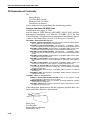
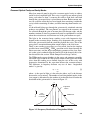
Next, connect a cable with a 15-pin D-sub connector to the EXTERNAL
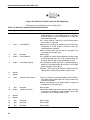
CONTROL connector on the controller. The sequence for the pin numbering is shown in Figure 4-6 (looking at the controller connector). Pin
numbers proceed from right to left.
4-5