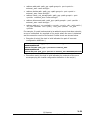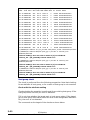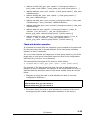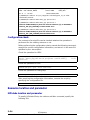
1
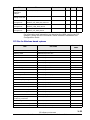
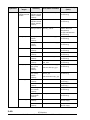
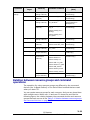
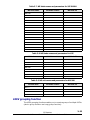
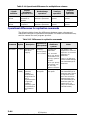
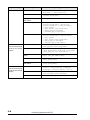
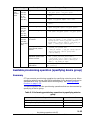
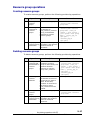
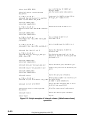
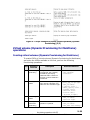
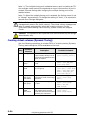
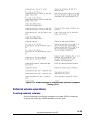
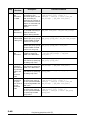
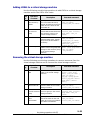
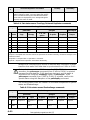
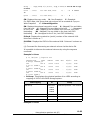
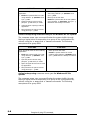
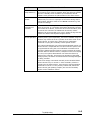
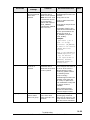
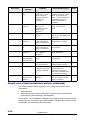
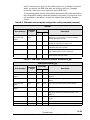
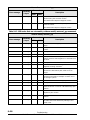
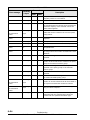
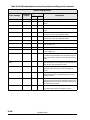
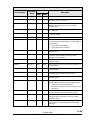
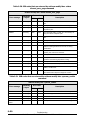
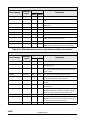
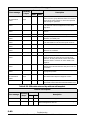
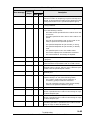
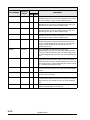
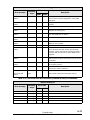
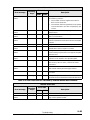
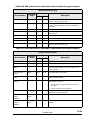
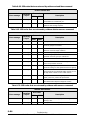
raidcom disconnect path
Error message
Executing
/ Async
Error code
SSB1
Description
SSB2
CMDRJE
Executing
2E20
4400
WWN is not registered.
CMDRJE
Executing
2E20
4500
There is no path group.
CMDRJE
Executing
2E20
4500
external_wwn is not defined.
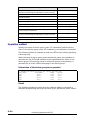
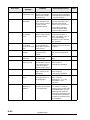
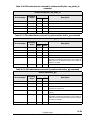
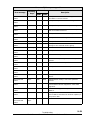
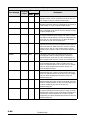
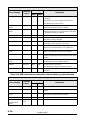
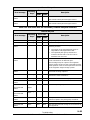
Get Command
Status
Async
2E30
001E
Online from the mainframe host.
CMDRJE
Executing
2E30
8400
The attribute of a port is not External(ELUN).
CMDRJE
Executing
2EDA
00EE
The command cannot be accepted. After a while,
execute the same command.
Get Command
Status
Async
2EDA
0905
An internal error occurred by the operation of a
path for an external path.
Call Hitachi Data Systems Support Center.
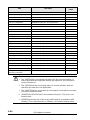
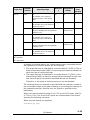
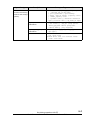
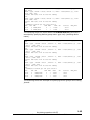
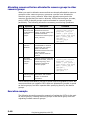
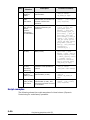
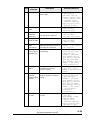
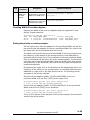
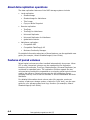
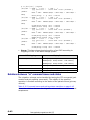
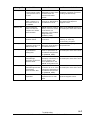
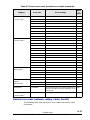
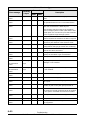
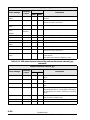
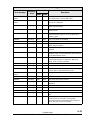
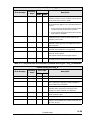
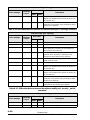
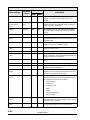
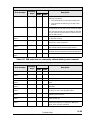
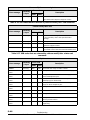
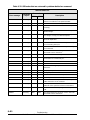
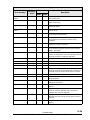
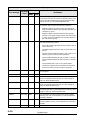
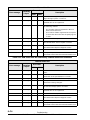
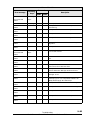
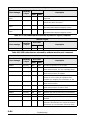
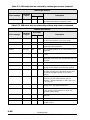
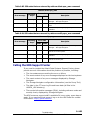
Table 9-63 SSB codes that are returned by raidcom delete path command
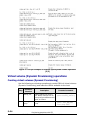
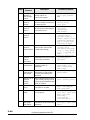
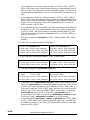
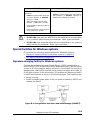
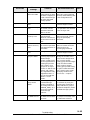
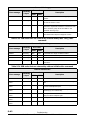
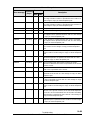
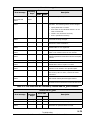
raidcom delete path
Error message
Executing
/ Async
Error code
SSB1
Description
SSB2
CMDRJE
Executing
2E00
4500
The path group is not in a effective range.
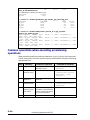
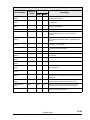
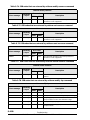
CMDRJE
Executing
2E00
8400
The value of the specified port is incorrect.
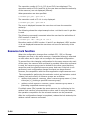
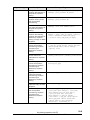
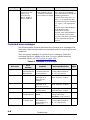
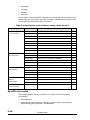
Get Command
Status
Async
2E10
4303
The path operations cannot be performed for the
following reasons:
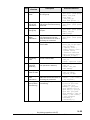
•
The target of the specified path group is
TagmaStore USP/TagmaStore NSC.
•
The specified path group contains the
external volume that is set the reserve
attribute from the host.
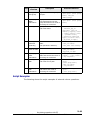
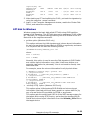
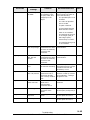
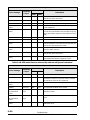
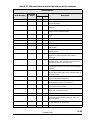
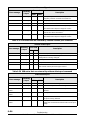
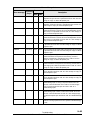
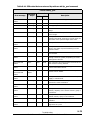
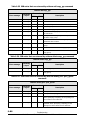
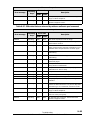
Get Command
Status
Async
2E11
8011
The operation cannot continue because the
microcode is being replaced.
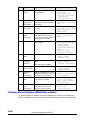
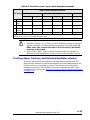
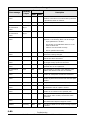
CMDRJE
Executing
2E11
9400
The command cannot be accepted. After a while,
execute the same command.
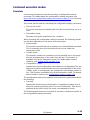
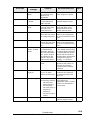
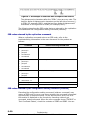
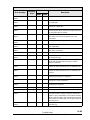
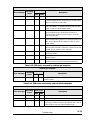
CMDRJE
Executing
2E20
4100
There is no external volume group.
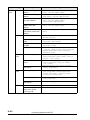
CMDRJE
Executing
2E20
4300
There is no external connection path.
CMDRJE
Executing
2E20
4400
WWN is not registered.
CMDRJE
Executing
2E20
4500
There is no path group.
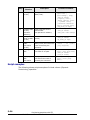
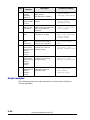
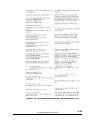
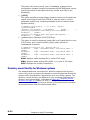
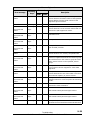
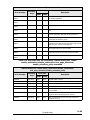
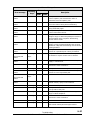
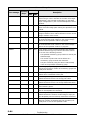
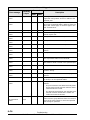
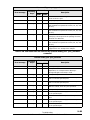
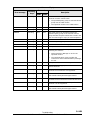
Get Command
Status
/Async
CMDRJE
Executing
2E23
4300
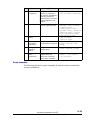
Get Command
Status
/Async
Paths cannot be deleted because there are no
normal paths.
CMDRJE
Executing
2E30
8400
The port attribute is not External (ELUN).
CMDRJE
Executing
2EDA
00EE
The command cannot be accepted. After a while,
execute the same command.
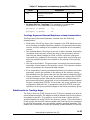
9–92
Troubleshooting
Hitachi Command Control Interface User and Reference Guide