1
Appendices
Appendix A
12.1 How to Run HyperTerminal
Instructions for using Windows Terminal Emulation Program
(Windows 3.1) for communication with a ProScan Controller.
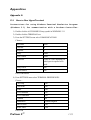
1) Double-click the ACCESSORIES Group symbol in WINDOWS 3.11
2) Double-click the TERMINAL Icon.
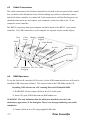
3) From the SETTINGS menu select COMMUNICATIONS.
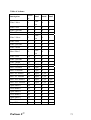
Choose: Baud Rate
9600
Data Bits
8
Stop Bits
1
Parity
None
Flow Control
None
Connector
Com1 or Com2 depending on
which port is required to be
used.
Parity Check
Off
Carrier Detect
Off
Press OK button.
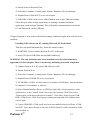
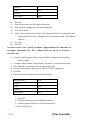
4) From SETTINGS menu select TERMINAL PREFERENCES
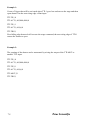
Choose: Line Wrap
On
Local Echo
On
Sound
Off
cr-cr/lf Inbound
On
cr-cr/lf Outbound
Off
Columns
80
Translations
United Kingdom
IBM to ANSI
Off
Buffer Lines
100
Press OK
ProScan II™
105