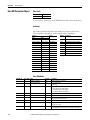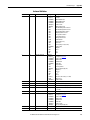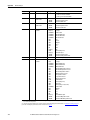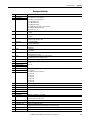
1
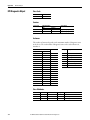
Application Techniques
Controller Examples for EtherNet/IP Network Communication
with PowerFlex 750-Series Drives
PLC-5, SLC 500, and MicroLogix 1100/1400 Controllers
Important User Information
Solid-state equipment has operational characteristics differing from those of electromechanical equipment. Safety
Guidelines for the Application, Installation and Maintenance of Solid State Controls (publication SGI-1.1 available from
your local Rockwell Automation® sales office or online at http://www.rockwellautomation.com/literature/) describes some
important differences between solid-state equipment and hard-wired electromechanical devices. Because of this difference,
and also because of the wide variety of uses for solid-state equipment, all persons responsible for applying this equipment
must satisfy themselves that each intended application of this equipment is acceptable.
In no event will Rockwell Automation, Inc. be responsible or liable for indirect or consequential damages resulting from the
use or application of this equipment.
The examples and diagrams in this manual are included solely for illustrative purposes. Because of the many variables and
requirements associated with any particular installation, Rockwell Automation, Inc. cannot assume responsibility or
liability for actual use based on the examples and diagrams.
No patent liability is assumed by Rockwell Automation, Inc. with respect to use of information, circuits, equipment, or
software described in this manual.
Reproduction of the contents of this manual, in whole or in part, without written permission of Rockwell Automation,
Inc., is prohibited.
Throughout this manual, when necessary, we use notes to make you aware of safety considerations.
WARNING: Identifies information about practices or circumstances that can cause an explosion in a hazardous environment,
which may lead to personal injury or death, property damage, or economic loss.
ATTENTION: Identifies information about practices or circumstances that can lead to personal injury or death, property
damage, or economic loss. Attentions help you identify a hazard, avoid a hazard, and recognize the consequence.
SHOCK HAZARD: Labels may be on or inside the equipment, for example, a drive or motor, to alert people that dangerous
voltage may be present.
BURN HAZARD: Labels may be on or inside the equipment, for example, a drive or motor, to alert people that surfaces may
reach dangerous temperatures.
IMPORTANT
Identifies information that is critical for successful application and understanding of the product.
Allen-Bradley, Rockwell Software, Rockwell Automation, TechConnect, PowerFlex, DriveExplorer, DriveTools, DriveExecutive, RSLinx, RSLogix, PLC-5, SLC, ControlLogix, CompactLogix, and MicroLogix are trademarks
of Rockwell Automation, Inc.
Trademarks not belonging to Rockwell Automation are property of their respective companies.
Table of Contents
Preface
Conventions Used in This Manual . . . . . . . . . . . . . . . . . . . . . . . . . . . . . . . . . 5
Rockwell Automation Support . . . . . . . . . . . . . . . . . . . . . . . . . . . . . . . . . . . . . 5
Additional Resources . . . . . . . . . . . . . . . . . . . . . . . . . . . . . . . . . . . . . . . . . . . . . . 6
Chapter 1
Configuring the I/O
Using RSLinx Classic Software . . . . . . . . . . . . . . . . . . . . . . . . . . . . . . . . . . . . . 7
Uploading the Electronic Data Sheet (EDS) File . . . . . . . . . . . . . . . . . . . . . 8
Limitations Using a PLC-5, SLC 500, or
MicroLogix 1100/1400 Controller . . . . . . . . . . . . . . . . . . . . . . . . . . . . . . 9
PLC-5 Controller Example . . . . . . . . . . . . . . . . . . . . . . . . . . . . . . . . . . . . . . . 10
SLC 500 Controller Example . . . . . . . . . . . . . . . . . . . . . . . . . . . . . . . . . . . . . 19
MicroLogix 1100/1400 Controller Example. . . . . . . . . . . . . . . . . . . . . . . . 28
Chapter 2
Using the I/O
About I/O Messaging . . . . . . . . . . . . . . . . . . . . . . . . . . . . . . . . . . . . . . . . . . . .
Understanding the I/O Image . . . . . . . . . . . . . . . . . . . . . . . . . . . . . . . . . . . . .
Using Logic Command/Status . . . . . . . . . . . . . . . . . . . . . . . . . . . . . . . . . . . .
Using Reference/Feedback . . . . . . . . . . . . . . . . . . . . . . . . . . . . . . . . . . . . . . . .
Using Datalinks . . . . . . . . . . . . . . . . . . . . . . . . . . . . . . . . . . . . . . . . . . . . . . . . . .
Example Ladder Logic Program Information . . . . . . . . . . . . . . . . . . . . . . .
PLC-5, SLC 500, and MicroLogix 1100/1400 Controller Example. . .
37
38
39
39
40
41
42
Chapter 3
Using Explicit Messaging
About Explicit Messaging . . . . . . . . . . . . . . . . . . . . . . . . . . . . . . . . . . . . . . . . .
Performing Explicit Messaging . . . . . . . . . . . . . . . . . . . . . . . . . . . . . . . . . . . .
PLC-5 Controller Examples. . . . . . . . . . . . . . . . . . . . . . . . . . . . . . . . . . . . . . .
SLC 500 Controller Examples. . . . . . . . . . . . . . . . . . . . . . . . . . . . . . . . . . . . .
MicroLogix 1100/1400 Controller Examples . . . . . . . . . . . . . . . . . . . . . . .
50
51
52
56
71
Appendix A
EtherNet/IP Objects
Supported Data Types . . . . . . . . . . . . . . . . . . . . . . . . . . . . . . . . . . . . . . . . . . . . 83
Identity Object. . . . . . . . . . . . . . . . . . . . . . . . . . . . . . . . . . . . . . . . . . . . . . . . . . . 84
Assembly Object . . . . . . . . . . . . . . . . . . . . . . . . . . . . . . . . . . . . . . . . . . . . . . . . . 85
Register Object. . . . . . . . . . . . . . . . . . . . . . . . . . . . . . . . . . . . . . . . . . . . . . . . . . . 86
PCCC Object . . . . . . . . . . . . . . . . . . . . . . . . . . . . . . . . . . . . . . . . . . . . . . . . . . . 87
DPI Device Object . . . . . . . . . . . . . . . . . . . . . . . . . . . . . . . . . . . . . . . . . . . . . . . 91
DPI Parameter Object . . . . . . . . . . . . . . . . . . . . . . . . . . . . . . . . . . . . . . . . . . . . 94
DPI Fault Object. . . . . . . . . . . . . . . . . . . . . . . . . . . . . . . . . . . . . . . . . . . . . . . . 100
DPI Alarm Object. . . . . . . . . . . . . . . . . . . . . . . . . . . . . . . . . . . . . . . . . . . . . . . 102
DPI Diagnostic Object . . . . . . . . . . . . . . . . . . . . . . . . . . . . . . . . . . . . . . . . . . 104
DPI Time Object . . . . . . . . . . . . . . . . . . . . . . . . . . . . . . . . . . . . . . . . . . . . . . . 106
Host DPI Parameter Object. . . . . . . . . . . . . . . . . . . . . . . . . . . . . . . . . . . . . . 108
TCP/IP Interface Object . . . . . . . . . . . . . . . . . . . . . . . . . . . . . . . . . . . . . . . . 114
Ethernet Link Object . . . . . . . . . . . . . . . . . . . . . . . . . . . . . . . . . . . . . . . . . . . . 116
Rockwell Automation Publication 750COM-AT001A-EN-P - August 2012
3
Table of Contents
Appendix B
Logic Command/Status Words:
PowerFlex 750-Series Drives
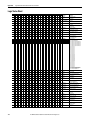
Logic Command Word . . . . . . . . . . . . . . . . . . . . . . . . . . . . . . . . . . . . . . . . . . 119
Logic Status Word . . . . . . . . . . . . . . . . . . . . . . . . . . . . . . . . . . . . . . . . . . . . . . 120
Glossary
Index
4
Rockwell Automation Publication 750COM-AT001A-EN-P - August 2012
Preface
This manual provides information about how to use Rockwell Automation
PLC-5®, SLC™ 500, and MicroLogix™ 1100/1400 controllers with PowerFlex®
750-Series drives over an EtherNet/IP network.
Conventions Used in This
Manual
The following conventions are used throughout this manual:
• Parameter names are shown in the format ‘Device’ Parameter xx - [*] or
‘Host’ Parameter xx - [*]. The xx represents the parameter number. The *
represents the parameter name—for example, ‘Device’ Parameter 01 [Operating Mode].
• The firmware revision number (FRN) is displayed as FRN X.xxx, where
‘X’ is the major revision number and ‘xxx’ is the minor revision number.
• For the screen captures in this manual, the following software was used:
– RSLinx® Classic software, version 2.52
– RSLogix™ 5 software, version 7.20
– RSLogix 500 software, version 7.20
Different versions of the software may differ in appearance and
procedures.
Rockwell Automation
Support
Rockwell Automation offers support services worldwide, with over 75 sales and
support offices, over 500 authorized distributors, and over 250 authorized
systems integrators located through the United States alone. In addition,
Rockwell Automation representatives are in every major country in the world.
Local Product Support
Contact your local Rockwell Automation representative for the following:
• Sales and order support
• Product technical training
• Warranty support
• Support service agreements
Technical Product Assistance
For technical assistance, please access the Allen-Bradley Technical Support
website at http://www.ab.com/support/abdrives or contact Rockwell
Automation.
Rockwell Automation Publication 750COM-AT001A-EN-P - August 2012
5
Preface
Additional Resources
These documents contain additional information concerning related products
from Rockwell Automation.
Resource
Description
Network Communication Option Module Installation Instructions, publication 750COM-IN002
Information on the installation of PowerFlex 750-Series Network
Communication Modules.
EtherNet/IP Media Planning and Installation Manual, ODVA publication 148 (1)
Information on the planning, installation, and techniques used to implement
an EtherNet/IP network.
EtherNet/IP Network Infrastructure Guidelines, ODVA publication 35(1)
Ethernet Design Considerations Reference Manual, publication ENET-RM002
EtherNet/IP Embedded Switch Technology - Linear and Device-level Ring Topologies, publication
ENET-AP005
DriveExplorer website http://www.ab.com/drives/driveexplorer, and online help (2)
DriveExecutive website http://www.ab.com/drives/drivetools, and online help
(2)
PowerFlex 750-Series Drive Installation Instructions, publication 750-IN001
PowerFlex 750-Series Drive Programming Manual, publication 750-PM001
Information on using the DriveExplorer™ software tool.
Information on using the DriveExecutive™ software tool.
Information on installing, programming, and technical data of PowerFlex 750Series drives.
PowerFlex 750-Series Drive Technical Data, publication 750-TD001
PowerFlex 20-HIM-A6/-C6S HIM (Human Interface Module) User Manual, publication 20HIM-UM001
Information on the installation and use of PowerFlex 20-HIM-A6 or 20-HIMC6S HIMs.
Getting Results with RSLinx Guide, publication LINX-GR001 and online help (2)
Information on using RSLinx Classic software.
RSLogix Emulate 5/500 Getting Results Guide, publication EMULAT-GR002 and online help (2)
Information on how to install and navigate the RSLogix Emulate software for
ladder logic programming with Allen-Bradley® PLC-5 and SLC 500 processors.
RSLogix 500 Getting Results Guide, publication LG500-GR002 and online help (2)
Information on using the RSLogix 500 software tool.
Enhanced and Ethernet PLC-5 Programmable Controllers User Manual, publication 1785-UM012
Information to help design, operate and maintain an Enhanced and Ethernet
PLC-5 programmable controller system.
SLC 500 Modular Hardware Style User Manual, publication 1747-UM011
Information on how to install, wire, use, and troubleshoot the SLC 500
controller with 1747-L5-xxx module.
MicroLogix 1100 Programmable Controllers User Manual, publication 1763-UM001
Information to install, wire, and troubleshoot the MicroLogix 1100 controller.
MicroLogix 1400 Programmable Controllers User Manual, publication 1766-UM001
Information to install, wire, and troubleshoot the MicroLogix 1400 controller.
(1) Use this link to the ODVA EtherNet/IP library: http://odva.org/Home/ODVATECHNOLOGIES/EtherNetIP/EtherNetIPLibrary/tabid/76/Default.aspx.
(2) The online help is installed with the software.
You can view or download publications at http://
www.rockwellautomation.com/literature. To order paper copies of technical
documentation, contact your local Allen-Bradley distributor or Rockwell
Automation sales representative.
To find your local Rockwell Automation distributor or sales representative, visit
http://www.rockwellautomation.com/locations.
For information, such as firmware updates or answers to drive-related questions,
go to the Drives Service & Support website at http://www.ab.com/support/
abdrives and click the Downloads or Knowledgebase link.
6
Rockwell Automation Publication 750COM-AT001A-EN-P - August 2012
Chapter
1
Configuring the I/O
This chapter provides instructions on how to configure a Rockwell Automation
PLC-5, SLC 500, or MicroLogix 1100/1400 controller to communicate over an
EtherNet/IP network with PowerFlex 750-Series drives.
Using RSLinx Classic Software
Topic
Page
Using RSLinx Classic Software
7
Uploading the Electronic Data Sheet (EDS) File
8
Limitations Using a PLC-5, SLC 500, or MicroLogix 1100/1400 Controller
9
PLC-5 Controller Example
10
SLC 500 Controller Example
19
MicroLogix 1100/1400 Controller Example
28
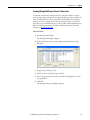
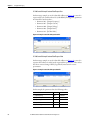
RSLinx Classic software, in all its variations (Lite, Gateway, OEM, and so forth), is
used to provide a communication link between the computer, network, and
controller. RSLinx Classic software requires its network-specific driver to be
configured before communication is established with network devices. Follow
these steps to configure the RSLinx driver.
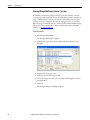
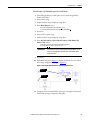
1. Start RSLinx Classic software.
2. From the Communications menu, choose Configure Drivers to display the
Configure Drivers dialog box.
3. From the Available Driver Types pull-down menu, choose EtherNet/IP
Driver.
4. Click Add New to display the Add New RSLinx Driver dialog box.
5. Use the default name or type a name.
6. Click OK.
The ‘Configure driver:’ dialog box appears.
7. Depending on your application, select either the browse local or remote
subnet option.
8. Click OK.
Rockwell Automation Publication 750COM-AT001A-EN-P - August 2012
7
Chapter 1
Configuring the I/O
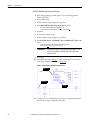
The Configure Drivers dialog box reappears with the new driver in the
Configured Drivers list.
9. Click Close to close the Configure Drivers dialog box.
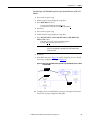
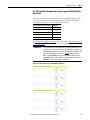
10. Keep RSLinx software running and verify that your computer recognizes
the drive.
a. From the Communications menu, choose RSWho.
b. In the menu tree, click ‘+’ next to the Ethernet driver.
Note that two other RSLinx drivers (Ethernet devices or Remote Devices
via Linx Gateway) may be used. Use one of these drivers if the ‘EtherNet/
IP Driver’ cannot see your drive.
Uploading the Electronic
Data Sheet (EDS) File
8
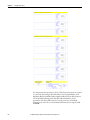
The option module has embedded EDS files for PowerFlex 750-Series drives.
This eliminates the need to download an EDS file from the Rockwell
Automation website. Instead, RSLinx software is used to upload the EDS file
from the option module. To do this, right-click the EtherNet/IP drive that is
shown as a yellow question mark or ‘Unrecognized Device’ in the RSWho dialog
box and choose ‘Upload EDS file from device’ as shown below.
Rockwell Automation Publication 750COM-AT001A-EN-P - August 2012
Configuring the I/O
Limitations Using a PLC-5,
SLC 500, or MicroLogix 1100/
1400 Controller
Chapter 1
Controlling I/O with explicit messages is relatively complex compared to normal
implicit I/O control.
ControlLogix® and CompactLogix™ controllers with EtherNet/IP provide the
easiest and most integrated form of implicit I/O control for a PowerFlex drive.
RSLogix 5000 software, version 16.00 or later, for ControlLogix and
CompactLogix controllers contains integrated profiles for PowerFlex drives that,
with a few clicks of the mouse, automatically create all controller tags and an
implicit connection at the specified Requested Packet Interval to control the
drive. This connection is monitored at both ends to verify that the controller and
drive are communicating. A watchdog will cause a drive fault if the drive does not
respond within approximately 100 milliseconds. Therefore, using a
ControlLogix or CompactLogix controller is by far the much preferred method
of controlling drives on EtherNet/IP.
If you are not using either of these type of controllers, then PowerFlex drives on
EtherNet/IP can be controlled with explicit messages using PLC-5, SLC 500 or
MicroLogix 1100/1400 controllers with the following limitations:
• An explicit message is a much slower form of control and is nondeterministic. This means that you cannot guarantee how long the drive
will take to start up or stop when the command is given. Therefore, all
equipment used in this manner should be subject to a risk assessment,
taking into account the mechanical and electrical implementation.
• A timeout value (in seconds) in the EtherNet/IP option module will issue
a drive fault if a message is not received from the controller within the
specified time. However, the controller has no way of detecting a loss of
communication to the drive until the next cycle of explicit messages. This
is another factor in the risk assessment.
• Any additional drives to be controlled will require additional explicit
messages for their control, and they need to be carefully sequenced. Most
controllers have small communication queues (see its User Manual), which
need to be carefully managed if messages are not to be lost.
• Each controller has a limited number of communication connections (see
its User Manual for maximum connections), which will limit the number
of drives that can be connected.
In summary, unlike a ControlLogix or CompactLogix controller, programming a
PLC-5, SLC 500 or MicroLogix 1100/1400 controller by using RSLogix 5 or
RSLogix 500 software with explicit messages is more difficult, and produces a
more complex program.
Rockwell Automation Publication 750COM-AT001A-EN-P - August 2012
9
Chapter 1
Configuring the I/O
PLC-5 Controller Example
IMPORTANT
The PLC-5 must be Series E (Rev. D.1 or later) to support the MultiHop feature
that routes messaging to the drive.
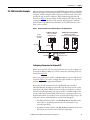
After the network communication 20-750-ENETR option module or embedded
EtherNet/IP adapter in a PowerFlex 755 drive is configured, the connected drive
and option module or adapter will be a single node on the network. This section
provides the steps needed to configure a simple DLR topology EtherNet/IP
network (see Figure 1). In our example, we will configure a PLC-5/40E
controller to communicate with the first drive in the network ring using Logic
Command/Status, Reference/Feedback, and 32 Datalinks (16 to read data and
16 to write data) over the network.
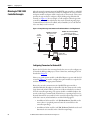
Figure 1 - Example PLC-5 Controller EtherNet/IP Device-level Ring Network
To Other
EtherNet/IP
Networks
1783-ETAP
IP Address 10.91.96.80
PLC-5/40E Controller with
Embedded Ethernet
IP Address 10.91.96.101 (1st Drive)
PowerFlex 750-Series Drives
(each with a 20-750-ENETR Option Module)
1783-ETAP
1783-ETAP
Computer with
Ethernet Connection
Configuring Parameters for Network I/O
Because the I/O for the drive is message-based, there is no need to configure any
I/O inside the RSLogix 5 project, version 7.00 or later, until using the I/O as
described in Chapter 2.
However, to get the option module or embedded adapter to operate with the I/O
created in Chapter 2, you need to configure the option module to accept the I/O
and the drive to point to the appropriate Datalinks.
Because the network communication 20-750-ENETR option module or
embedded EtherNet/IP adapter in a PowerFlex 755 drive always uses the 32-bit
Logic Status and 32-bit Feedback, at least two 32-bit words must be accounted
for in the controller input image. The option module or embedded adapter also
uses the 32-bit Logic Command and 32-bit Reference, requiring at least two 32bit words that must be accounted for in the controller output image.
10
Rockwell Automation Publication 750COM-AT001A-EN-P - August 2012
Configuring the I/O
Chapter 1
If any or all of the drive’s sixteen 32-bit Datalinks are used the following applies:
• An additional 32-bit word for ‘each’ [DL From Net xx] Datalink used to
write to drive or peripheral parameters must be accounted for in the
controller input image.
• An additional 32-bit word for ‘each’ [DL To Net xx] Datalink used to read
data must be accounted for in the controller output image.
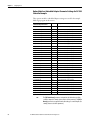
Option Module or Embedded Adapter Parameter Settings for PLC-5
Controller Example
These option module or embedded adapter settings were used for the example
ladder logic program in this section.
Option Module ‘Host’ Parameter or
Embedded Adapter Parameter
01 - [DL From Net 01]
02 - [DL From Net 02]
03 - [DL From Net 03]
04 - [DL From Net 04]
05 - [DL From Net 05]
06 - [DL From Net 06]
07 - [DL From Net 07]
08 - [DL From Net 08]
09 - [DL From Net 09]
10 - [DL From Net 10]
11 - [DL From Net 11]
12 - [DL From Net 12]
13 - [DL From Net 13]
14 - [DL From Net 14]
15 - [DL From Net 15]
16 - [DL From Net 16]
17 - [DL To Net 01]
18 - [DL To Net 02]
19 - [DL To Net 03]
20 - [DL To Net 04]
21 - [DL To Net 05]
22 - [DL To Net 06]
23 - [DL To Net 07]
24 - [DL To Net 08]
25 - [DL To Net 09]
26 - [DL To Net 10]
27 - [DL To Net 11]
28 - [DL To Net 12]
29 - [DL To Net 13]
30 - [DL To Net 14]
31 - [DL To Net 15]
32 - [DL To Net 16]
TIP
Value
Description
370
371
535
536
537
538
539
556
557
571
572
573
574
575
576
577
370
371
535
536
537
538
539
556
557
571
572
573
574
575
576
577
Points to drive Par. 370 - [Stop Mode A]
Points to drive Par. 371 - [Stop Mode B]
Points to drive Par. 535 - [Accel Time 1]
Points to drive Par. 536 - [Accel Time 2]
Points to drive Par. 537 - [Decel Time 1]
Points to drive Par. 538 - [Decel Time 2]
Points to drive Par. 539 - [Jog Acc Dec Time]
Points to drive Par. 556 - [Jog Speed 1]
Points to drive Par. 557 - [Jog Speed 2]
Points to drive Par. 571 - [Preset Speed 1]
Points to drive Par. 572 - [Preset Speed 2]
Points to drive Par. 573 - [Preset Speed 3]
Points to drive Par. 574 - [Preset Speed 4]
Points to drive Par. 575 - [Preset Speed 5]
Points to drive Par. 576 - [Preset Speed 6]
Points to drive Par. 577 - [Preset Speed 7]
Points to drive Par. 370 - [Stop Mode A]
Points to drive Par. 371 - [Stop Mode B]
Points to drive Par. 535 - [Accel Time 1]
Points to drive Par. 536 - [Accel Time 2]
Points to drive Par. 537 - [Decel Time 1]
Points to drive Par. 538 - [Decel Time 2]
Points to drive Par. 539 - [Jog Acc Dec Time]
Points to drive Par. 556 - [Jog Speed 1]
Points to drive Par. 557 - [Jog Speed 2]
Points to drive Par. 571 - [Preset Speed 1]
Points to drive Par. 572 - [Preset Speed 2]
Points to drive Par. 573 - [Preset Speed 3]
Points to drive Par. 574 - [Preset Speed 4]
Points to drive Par. 575 - [Preset Speed 5]
Points to drive Par. 576 - [Preset Speed 6]
Points to drive Par. 577 - [Preset Speed 7]
The [DL From Net xx] parameters are inputs into the drive that come from
controller outputs (for example, data to write to a drive parameter). The [DL To
Net xx] parameters are outputs from the drive that go to controller inputs (for
example, data to read a drive parameter).
Rockwell Automation Publication 750COM-AT001A-EN-P - August 2012
11
Chapter 1
Configuring the I/O
Creating RSLogix 5 Project, Version 7.00 or Later
To transmit (read and write) data between the controller and drive, you must
create message instructions that allocate data table addresses in the controller for
Logic Command/Status, Reference/Feedback, and Datalinks. Note that three
messages need to be configured. The timeout message has to be executed first
before the Logic Command, Reference, and DL To/From Net Datalink messages
will work. For more information on N42:3 and N45 target device data table
addresses, see N-Files on page 89.
Select the Controller
1. Start RSLogix 5 software.
The RSLogix 5 dialog box appears.
2. From the File menu, choose New to display the Select Processor Type
dialog box.
3. Assign a name for the processor.
4. From the pull-down menus, choose the appropriate selections to match
your PLC-5 controller and application.
5. Click OK.
The RSLogix 5 project dialog box appears.
12
Rockwell Automation Publication 750COM-AT001A-EN-P - August 2012
Configuring the I/O
Chapter 1
Create PLC-5 Ladder Logic for the Control Timeout
1. In the RSLogix 5 project dialog box treeview under Program Files doubleclick LAD 2.
2. Insert a ladder rung.
3. Double-click the rung to display the rung editor.
4. Enter MSG MGxx:n, where:
xx is an unused data file number (for example, MG10:n), and
n is an unused element of the data file chosen for xx (for example, MG10:0)
5. Press Enter.
6. Insert another separate rung.
7. Double-click the rung to display the rung editor.
8. Enter BST XIC MGxx:n/DN NXB XIC MGxx:n/ER BND OTU
MGxx:n/EN, where:
xx and n must correspond to the assigned data file number and element
(for example, MG10:0) for the message created in steps 2…5.
IMPORTANT
The information must be entered with appropriate numbers for ‘xx’
and ‘n’ for your application, and with spaces and forward slashes
exactly as shown.
9. Press Enter.
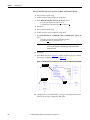
10. In the MSG instruction (Figure 2), double-click Setup Screen to launch
the message configuration dialog box (Figure 3).
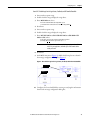
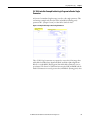
Figure 2 - PLC-5 Ladder Logic for the Control Timeout
Steps 2…5
Steps 6…9
Step 10
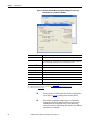
11. Configure the General tab fields by entering or verifying the information
shown in the message configuration dialog box.
Rockwell Automation Publication 750COM-AT001A-EN-P - August 2012
13
Chapter 1
Configuring the I/O
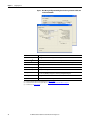
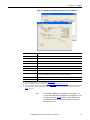
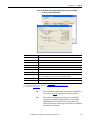
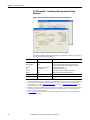
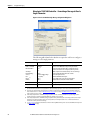
Figure 3 - PLC-5 Message Configuration Dialog Boxes for the Control Timeout
General Tab: This PLC-5
Setting
Communication Command
PLC-5 Typed Write. The controller type and command type for the controller to write the control timeout value to the drive.
Data Table Address (1)
N20:0. An unused controller data table address containing the control timeout value to be written.
Size in Elements (2)
1. Number of elements (words) to be transferred. Each element size is a 16-bit integer.
Port Number
2. Controller port to which the network is connected.
General Tab: Target Device
Setting
Data Table Address (3)
N42:3. Specific starting address of the destination file in the drive.
MultiHop
Yes. Enables communication to allow network messaging to be routed to the option module/drive. When ‘Yes’ is selected, a
MultiHop tab appears on the message configuration dialog box.
MultiHop Tab
Setting
To Address
10.91.100.79. The IP address of the option module connected to the drive.
(1) For details on data table addresses for this example project, see Table 3 on page 43.
(2) For details to determine element size for a specific drive, see Understanding Controller Data Table Addresses on page 42.
(3) For details on setting the control timeout value and its function, see N-Files on page 89. The Control Timeout (N42:3) is stored in RAM. If the EtherNet/IP option module is power
cycled, the Control Timeout Message must be re-sent. If the Control Timeout is not changed from a non-zero value, the control message (page 17) will error out.
TIP
14
The Control Timeout (N42:3) must be changed to a non-zero value (5…20
seconds recommended). If the Control Timeout is not changed from a non-zero
value, the control message (page 17) will error out. The Control Timeout is
stored in RAM. If the option module is power cycled, the Control Timeout
Message must be re-sent.
Rockwell Automation Publication 750COM-AT001A-EN-P - August 2012
Configuring the I/O
Chapter 1
Create PLC-5 Ladder Logic for the Logic Status, Feedback, and DL from Net Datalinks
1. Insert another separate rung.
2. Double-click the rung to display the rung editor.
3. Enter MSG MGxx:n, where:
xx is an unused data file number (for example, MG11:n), and
n is an unused element of the data file chosen for xx (for example, MG11:0)
4. Press Enter.
5. Insert another separate rung.
6. Double-click the rung to display the rung editor.
7. Enter BST XIC MGxx:n/DN NXB XIC MGxx:n/ER BND OTU
MGxx:n/EN, where:
xx and n must correspond to the assigned data file number and element
(for example, MG11:0) for the message created in steps 1…4.
IMPORTANT
The information must be entered with appropriate numbers for ‘xx’
and ‘n’ for your application, and with spaces and forward slashes
exactly as shown.
8. Press Enter.
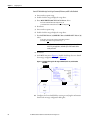
9. In the MSG instruction (Figure 4), double-click Setup Screen to launch
the message configuration dialog box (Figure 5).
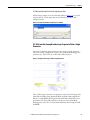
Figure 4 - PLC-5 Ladder Logic for the Logic Status, Feedback, and DL from Net Datalinks
Steps 1…4
Steps 5…8
Step 9
10. Configure the General tab fields by entering or verifying the information
shown in the message configuration dialog box.
Rockwell Automation Publication 750COM-AT001A-EN-P - August 2012
15
Chapter 1
Configuring the I/O
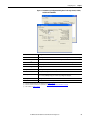
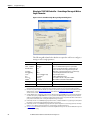
Figure 5 - PLC-5 Message Configuration Dialog Boxes for the Logic Status Feedback, and
DL from Net Datalinks
General Tab: This PLC-5
Setting
Communication Command
PLC-5 Typed Read. The controller type and command type for the controller to read data from the drive.
Data Table Address (1)
N20:1. An unused controller data table address containing the data to be read from the drive.
Size in Elements (2)
36. Number of elements (words) to be transferred. Each element size is a 16-bit integer.
Port Number
2. Controller port to which the network is connected.
General Tab: Target Device
Setting
Data Table Address (3)
N45:0. Specific starting address of the source file in the drive.
MultiHop
Yes. Enables communication to allow network messaging to be routed to the option module/drive. When
‘Yes’ is selected, a MultiHop tab appears on the message configuration dialog box.
MultiHop Tab
Setting
To Address
10.91.100.79. The IP address of the option module connected to the drive.
(1) For details on data table addresses for this example project, see Table 3 on page 43.
(2) For details to determine element size for a specific drive, see Understanding Controller Data Table Addresses on page 42.
(3) For N-File details, see N-Files on page 89.
16
Rockwell Automation Publication 750COM-AT001A-EN-P - August 2012
Configuring the I/O
Chapter 1
Create PLC-5 Ladder Logic for the Logic Command, Reference, and DL to Net Datalinks
1. Insert another separate rung.
2. Double-click the rung to display the rung editor.
3. Enter MSG MGxx:n, where:
xx is an unused data file number (for example, MG12:n), and
n is an unused element of the data file chosen for xx (for example, MG12:0)
4. Press Enter.
5. Insert another separate rung.
6. Double-click the rung to display the rung editor.
7. Enter BST XIC MGxx:n/DN NXB XIC MGxx:n/ER BND OTU
MGxx:n/EN, where:
xx and n must correspond to the assigned data file number and element
(for example, MG12:0) for the message created in steps 1…4.
IMPORTANT
The information must be entered with appropriate numbers for ‘xx’
and ‘n’ for your application, and with spaces and forward slashes
exactly as shown.
8. Press Enter.
9. In the MSG instruction (Figure 6), double-click Setup Screen to launch
the message configuration dialog box (Figure 7).
Figure 6 - PLC-5 Ladder Logic for the Logic Command, Reference, and DL to Net Datalinks
Steps 1…4
Steps 5…8
Step 9
10. Configure the General tab fields by entering or verifying the information
shown in the message configuration dialog box.
Rockwell Automation Publication 750COM-AT001A-EN-P - August 2012
17
Chapter 1
Configuring the I/O
Figure 7 - PLC-5 Message Configuration Dialog Boxes for the Logic Command, Reference,
and DL to Net Datalinks
General Tab: This PLC-5
Setting
Communication Command
PLC-5 Typed Write. The controller type and command type for the controller to write data to the drive.
Data Table Address (1)
N20:37. An unused controller data table address containing the data to be written to the drive.
Size in Elements (2)
36. Number of elements (words) to be transferred. Each element size is a 16-bit integer.
Port Number
2. Controller port to which the network is connected.
General Tab: Target Device
Setting
Data Table Address (3)
N45:0. Specific starting address of the destination file in the drive.
MultiHop
Yes. Enables communication to allow network messaging to be routed to the option module/drive. When
‘Yes’ is selected, a MultiHop tab appears on the message configuration dialog box.
MultiHop Tab
Setting
To Address
10.91.100.79. The IP address of the option module connected to the drive.
(1) For details on data table addresses for this example project, see Table 3 on page 43.
(2) For details to determine element size for a specific drive, see Understanding Controller Data Table Addresses on page 42.
(3) For N-File details, see N-Files on page 89.
18
TIP
This message will error out if the Control Timeout value is not changed from a
non-zero value. See page 13 for writing a value to the Control Timeout.
TIP
If the controller is controlling more than one drive, it is recommended to
intersperse the control I/O messaging for each drive to conserve network
bandwidth and decrease response time. That is, sequence the message
instructions for each drive so that its group of messages will occur at a different
time than those for another drive.
Rockwell Automation Publication 750COM-AT001A-EN-P - August 2012
Configuring the I/O
SLC 500 Controller Example
Chapter 1
After the network communication 20-750-ENETR option module or embedded
EtherNet/IP adapter in a PowerFlex 755 drive is configured, the connected drive
and option module or adapter will be a single node on the network. This section
provides the steps needed to configure a simple DLR topology EtherNet/IP
network (see Figure 8). In our example, we will configure a SLC 500 controller to
communicate with the first drive in the network ring using Logic Command/
Status, Reference/Feedback, and 32 Datalinks (16 to read data and 16 to write
data) over the network.
Figure 8 - Example SLC 500 Controller EtherNet/IP Device-level Ring Network
To Other
EtherNet/IP
Networks
1783-ETAP
IP Address 10.91.96.80
SLC 500 Controller with
Embedded Ethernet
IP Address 10.91.96.101 (1st Drive)
PowerFlex 750-Series Drives
(each with a 20-750-ENETR Option Module)
1783-ETAP
1783-ETAP
Computer with
Ethernet Connection
Configuring Parameters for Network I/O
Because the I/O for the drive is message-based, there is no need to configure any
I/O inside the RSLogix 500 project, version 7.00 or later, until using the I/O as
described in Chapter 2.
However, to get the option module or embedded adapter to operate with the I/O
created in Chapter 2, we need to configure the option module to accept the I/O
and drive to point to the appropriate Datalinks.
Because the network communication 20-750-ENETR option module or
embedded EtherNet/IP adapter in a PowerFlex 755 drive always uses the 32-bit
Logic Status and 32-bit Feedback, at least two 32-bit words must be accounted
for in the controller input image. The option module or embedded adapter also
uses the 32-bit Logic Command and 32-bit Reference, requiring at least two 32bit words that must be accounted for in the controller output image. If any or all
of the drive’s sixteen 32-bit Datalinks are used the following applies:
• An additional 32-bit word for ‘each’ [DL From Net xx] Datalink used to
write to drive or peripheral parameters must be accounted for in the
controller input image.
• An additional 32-bit word for ‘each’ [DL To Net xx] Datalink used to read
data must be accounted for in the controller output image.
Rockwell Automation Publication 750COM-AT001A-EN-P - August 2012
19
Chapter 1
Configuring the I/O
Option Module or Embedded Adapter Parameter Settings for SLC 500
Controller Example
These option module or embedded adapter settings were used for the example
ladder logic program in this section.
Option Module Host Parameter or
Embedded Adapter Parameter
Value
Description
01 - [DL From Net 01]
370
Points to drive Par. 370 - [Stop Mode A]
02 - [DL From Net 02]
371
Points to drive Par. 371 - [Stop Mode B]
03 - [DL From Net 03]
535
Points to drive Par. 535 - [Accel Time 1]
04 - [DL From Net 04]
536
Points to drive Par. 536 - [Accel Time 2]
05 - [DL From Net 05]
537
Points to drive Par. 537 - [Decel Time 1]
06 - [DL From Net 06]
538
Points to drive Par. 538 - [Decel Time 2]
07 - [DL From Net 07]
539
Points to drive Par. 539 - [Jog Acc Dec Time]
08 - [DL From Net 08]
556
Points to drive Par. 556 - [Jog Speed 1]
09 - [DL From Net 09]
557
Points to drive Par. 557 - [Jog Speed 2]
10 - [DL From Net 10]
571
Points to drive Par. 571 - [Preset Speed 1]
11 - [DL From Net 11]
572
Points to drive Par. 572 - [Preset Speed 2]
12 - [DL From Net 12]
573
Points to drive Par. 573 - [Preset Speed 3]
13 - [DL From Net 13]
574
Points to drive Par. 574 - [Preset Speed 4]
14 - [DL From Net 14]
575
Points to drive Par. 575 - [Preset Speed 5]
15 - [DL From Net 15]
576
Points to drive Par. 576 - [Preset Speed 6]
16 - [DL From Net 16]
577
Points to drive Par. 577 - [Preset Speed 7]
17 - [DL To Net 01]
370
Points to drive Par. 370 - [Stop Mode A]
18 - [DL To Net 02]
371
Points to drive Par. 371 - [Stop Mode B]
19 - [DL To Net 03]
535
Points to drive Par. 535 - [Accel Time 1]
20 - [DL To Net 04]
536
Points to drive Par. 536 - [Accel Time 2]
21 - [DL To Net 05]
537
Points to drive Par. 537 - [Decel Time 1]
22 - [DL To Net 06]
538
Points to drive Par. 538 - [Decel Time 2]
23 - [DL To Net 07]
539
Points to drive Par. 539 - [Jog Acc Dec Time]
24 - [DL To Net 08]
556
Points to drive Par. 556 - [Jog Speed 1]
25 - [DL To Net 09]
557
Points to drive Par. 557 - [Jog Speed 2]
26 - [DL To Net 10]
571
Points to drive Par. 571 - [Preset Speed 1]
27 - [DL To Net 11]
572
Points to drive Par. 572 - [Preset Speed 2]
28 - [DL To Net 12]
573
Points to drive Par. 573 - [Preset Speed 3]
29 - [DL To Net 13]
574
Points to drive Par. 574 - [Preset Speed 4]
30 - [DL To Net 14]
575
Points to drive Par. 575 - [Preset Speed 5]
31 - [DL To Net 15]
576
Points to drive Par. 576 - [Preset Speed 6]
32 - [DL To Net 16]
577
Points to drive Par. 577 - [Preset Speed 7]
TIP
20
The [DL From Net xx] parameters are inputs into the drive that come from
controller outputs (for example, data to write to a drive parameter). The [DL To
Net xx] parameters are outputs from the drive that go to controller inputs (for
example, data to read a drive parameter).
Rockwell Automation Publication 750COM-AT001A-EN-P - August 2012
Configuring the I/O
Chapter 1
Creating RSLogix 500 Project, Version 7.00 or Later
To transmit (read and write) data between the controller and drive, you must
create message instructions that allocate data table addresses in the controller for
Logic Command/Status, Reference/Feedback, and Datalinks. Note that three
messages need to be configured. The timeout message has to be executed first
before the Logic Command, Reference, and DL To/From Net Datalink messages
will work. For more information on N42:3 and N45 target device data table
addresses, see N-Files on page 89.
Select the Controller
1. Start RSLogix 500 software.
The RSLogix 500 dialog box appears.
2. From the File menu, choose New to display the Select Processor Type
dialog box.
3. Assign a name for the processor.
4. In the list, select a 1747-L55x type controller.
5. Choose the appropriate choices for the fields in the dialog box to match
your application.
6. Click OK.
The RSLogix 500 project dialog box appears.
Rockwell Automation Publication 750COM-AT001A-EN-P - August 2012
21
Chapter 1
Configuring the I/O
Create SLC 500 Ladder Logic for the Control Timeout
1. In the RSLogix 500 project dialog box treeview under Program Files
double-click LAD 2.
2. Insert a ladder rung.
3. Double-click the rung to display the rung editor.
4. Enter MSG WRITE 500CPU LOCAL Nxx:n, where:
xx is an unused data file number (for example, N10:n), and
n is an unused element of the data file chosen for xx (for example, N10:0)
5. Press Enter.
6. Insert another separate rung.
7. Double-click the rung to display the rung editor.
8. Enter BST XIC Nxx:n/13 NXB XIC Nxx:n/12 BND OTU Nxx:n/15,
where:
xx and n must correspond to the assigned data file number and element
(for example, N10:0) for the message created in steps 2…5.
IMPORTANT
The information must be entered with appropriate numbers for ‘xx’
and ‘n’ for your application, and with spaces and forward slashes
exactly as shown.
9. Press Enter.
10. In the MSG instruction (Figure 9), double-click Setup Screen to launch
the message configuration dialog box (Figure 10).
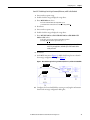
Figure 9 - SLC 500 Ladder Logic for the Control Timeout
Steps 2…5
Steps 6…9
Step 10
11. Configure the General tab fields by entering or verifying the information
shown in the message configuration dialog box.
22
Rockwell Automation Publication 750COM-AT001A-EN-P - August 2012
Configuring the I/O
Chapter 1
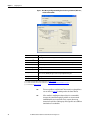
Figure 10 - SLC 500 Message Configuration Dialog Boxes for the Control Timeout
General Tab: This Controller
Setting
Communication Command
This setting is dimmed (unavailable) and is established when the message is created in the ladder rung.
Data Table Address (1)
N20:0. An unused controller data table address containing the control timeout value to be written.
Size in Elements (2)
1. Number of elements (words) to be transferred. Each element size is a 16-bit integer.
Channel
1. Controller port to which the network is connected.
General Tab: Target Device
Setting
Message Timeout
This setting is dimmed (unavailable). Message timeout duration in seconds.
Data Table Address (3)
N42:3. Specific starting address of the destination file in the drive.
MultiHop
Yes. Enables communication to allow network messaging to be routed to the option module/drive. When
‘Yes’ is selected, a MultiHop tab appears on the message configuration dialog box.
MultiHop Tab
Setting
To Address
10.91.100.79. The IP address of the option module connected to the drive.
(1) For details on data table addresses for this example project, see Table 3 on page 43.
(2) For details to determine element size for a specific drive, see Understanding Controller Data Table Addresses on page 42.
(3) For details on setting the control timeout value and its function, see N-Files on page 89. The Control Timeout (N42:3) is stored in RAM. If the EtherNet/IP option
module is power cycled, the Control Timeout Message must be re-sent. If the Control Timeout is not changed from a non-zero value, the control message
(page 26) will error out.
TIP
The Control Timeout (N42:3) must be changed to a non-zero value (5…20
seconds recommended). If the Control Timeout is not changed from a non-zero
value, the control message (page 26) will error out. The Control Timeout is
stored in RAM. If the option module is power cycled, the Control Timeout
Message must be re-sent.
Rockwell Automation Publication 750COM-AT001A-EN-P - August 2012
23
Chapter 1
Configuring the I/O
Create SLC 500 Ladder Logic for the Logic Status, Feedback, and DL from Net Datalinks
1. Insert another separate rung.
2. Double-click the rung to display the rung editor.
3. Enter MSG READ 500CPU LOCAL Nxx:n, where:
xx is an unused data file number (for example, N11:n), and
n is an unused element of the data file chosen for xx (for example, N11:0)
4. Press Enter.
5. Insert another separate rung.
6. Double-click the rung to display the rung editor.
7. Enter BST XIC Nxx:n/13 NXB XIC Nxx:n/12 BND OTU Nxx:n/15,
where:
xx and n must correspond to the assigned data file number and element
(for example, N11:0) for the message created in steps 1…4.
IMPORTANT
The information must be entered with appropriate numbers for ‘xx’
and ‘n’ for your application, and with spaces and forward slashes
exactly as shown.
8. Press Enter.
9. In the MSG instruction (Figure 11), double-click Setup Screen to launch
the message configuration dialog box (Figure 12).
Figure 11 - SLC 500 Ladder Logic for the Logic Status, Feedback, and DL from Net Datalinks
Steps 1…4
Steps 5…8
Step 9
10. Configure the General tab fields by entering or verifying the information
shown in the message configuration dialog box.
24
Rockwell Automation Publication 750COM-AT001A-EN-P - August 2012
Configuring the I/O
Chapter 1
Figure 12 - SLC 500 Message Configuration Dialog Boxes for the Logic Status, Feedback,
and DL from Net Datalinks
General Tab: This Controller
Setting
Communication Command
This setting is dimmed (unavailable) and is established when the message is created in the ladder rung.
Data Table Address (1)
N20:1. An unused controller data table address containing the data to be read from the drive.
Size in Elements (2)
36. Number of elements (words) to be transferred. Each element size is a 16-bit integer.
Channel
1. Controller port to which the network is connected.
General Tab: Target Device
Setting
Message Timeout
This setting is dimmed (unavailable). Message timeout duration in seconds.
Data Table Address (3)
N45:0. Specific starting address of the source file in the drive.
MultiHop
Yes. Enables communication to allow network messaging to be routed to the option module/drive. When
‘Yes’ is selected, a MultiHop tab appears on the message configuration dialog box.
MultiHop Tab
Setting
To Address
10.91.100.79. The IP address of the option module connected to the drive.
(1) For details on data table addresses for this example project, see Table 3 on page 43.
(2) For details to determine element size for a specific drive, see Understanding Controller Data Table Addresses on page 42.
(3) For N-File details, see N-Files on page 89.
Rockwell Automation Publication 750COM-AT001A-EN-P - August 2012
25
Chapter 1
Configuring the I/O
Create SLC 500 Ladder Logic for the Logic Command, Reference, and DL to Net Datalinks
1. Insert another separate rung.
2. Double-click the rung to display the rung editor.
3. Enter MSG WRITE 500CPU LOCAL Nxx:n, where:
xx is an unused data file number (for example, N12:n), and
n is an unused element of the data file chosen for xx (for example, N12:0)
4. Press Enter.
5. Insert another separate rung.
6. Double-click the rung to display the rung editor.
7. Enter BST XIC Nxx:n/13 NXB XIC Nxx:n/12 BND OTU Nxx:n/15,
where:
xx and n must correspond to the assigned data file number and element
(for example, N12:0) for the message created in steps 1…4.
IMPORTANT
The information must be entered with appropriate numbers for ‘xx’
and ‘n’ for your application, and with spaces and forward slashes
exactly as shown.
8. Press Enter.
9. In the MSG instruction (Figure 13), double-click Setup Screen to launch
the message configuration dialog box (Figure 14).
Figure 13 - SLC 500 Ladder Logic for the Logic Command, Reference, and DL to Net
Datalinks
Steps 1…4
Steps 5…8
Step 9
10. Configure the General tab fields by entering or verifying the information
shown in the message configuration dialog box.
26
Rockwell Automation Publication 750COM-AT001A-EN-P - August 2012
Configuring the I/O
Chapter 1
Figure 14 - SLC 500 Message Configuration Dialog Boxes for the Logic Command,
Reference, and DL to Net Datalinks
General Tab: This Controller
Setting
Communication Command
This setting is dimmed (unavailable) and is established when the message is created in the ladder rung.
Data Table Address (1)
N20:37. An unused controller data table address containing the data to be written to the drive.
Size in Elements (2)
36. Number of elements (words) to be transferred. Each element size is a 16-bit integer.
Channel
1. Controller port to which the network is connected.
General Tab: Target Device
Setting
Message Timeout
This setting is dimmed (unavailable). Message timeout duration in seconds.
Data Table Address (3)
N45:0. Specific starting address of the source file in the drive.
MultiHop
Yes. Enables communication to allow network messaging to be routed to the option module/drive. When
‘Yes’ is selected, a MultiHop tab appears on the message configuration dialog box.
MultiHop Tab
Setting
To Address
10.91.100.79. The IP address of the option module connected to the drive.
(1) For details on data table addresses for this example project, see Table 3 on page 43.
(2) For details to determine element size for a specific drive, see Understanding Controller Data Table Addresses on page 42.
(3) For N-File details, see N-Files on page 89.
TIP
This message will error out if the Control Timeout value is not changed from a
non-zero value. See page 22 for writing a value to the Control Timeout.
TIP
If the controller is controlling more than one drive, it is recommended to
intersperse the control I/O messaging for each drive to conserve network
bandwidth and decrease response time. That is, sequence the message
instructions for each drive so that its group of messages will occur at a different
time than those for another drive.
Rockwell Automation Publication 750COM-AT001A-EN-P - August 2012
27
Chapter 1
Configuring the I/O
MicroLogix 1100/1400
Controller Example
After the network communication 20-750-ENETR option module or embedded
EtherNet/IP adapter in a PowerFlex 755 drive is configured, the connected drive
and option module or adapter will be a single node on the network. This section
provides the steps needed to configure a simple DLR topology EtherNet/IP
network (see Figure 15). In our example, we will configure a MicroLogix 1100
controller to communicate with the first drive in the network ring using Logic
Command/Status, Reference/Feedback, and 32 Datalinks (16 to read data and
16 to write data) over the network.
Figure 15 - Example MicroLogix 1100/1400 Controller EtherNet/IP Device-level Ring Network
To Other
EtherNet/IP
Networks
1783-ETAP
IP Address 10.91.96.101 (1st Drive)
PowerFlex 750-Series Drives
(each with a 20-750-ENETR Option Module)
IP Address 10.91.96.80
MicroLogix 1100/1400
Controller
1783-ETAP
1783-ETAP
Computer with
Ethernet Connection
Configuring Parameters for Network I/O
Because the I/O for the drive is message-based, there is no need to configure any
I/O inside the RSLogix 500 project, version 7.00 or later, until using the I/O as
described in Chapter 2.
However, to get the option module or embedded adapter to operate with the I/O
created in Chapter 2, we need to configure the option module to accept the I/O
and drive to point to the appropriate Datalinks.
Because the network communication 20-750-ENETR option module or
embedded EtherNet/IP adapter in a PowerFlex 755 drive always uses the 32-bit
Logic Status and 32-bit Feedback, at least two 32-bit words must be accounted
for in the controller input image. The option module or embedded adapter also
uses the 32-bit Logic Command and 32-bit Reference, requiring at least two 32bit words that must be accounted for in the controller output image. If any or all
of the drive’s sixteen 32-bit Datalinks are used the following applies:
• An additional 32-bit word for ‘each’ [DL From Net xx] Datalink used to
write to drive or peripheral parameters must be accounted for in the
controller input image.
• An additional 32-bit word for ‘each’ [DL To Net xx] Datalink used to read
data must be accounted for in the controller output image.
28
Rockwell Automation Publication 750COM-AT001A-EN-P - August 2012
Configuring the I/O
Chapter 1
Option Module or Embedded Adapter Parameter Settings for
MicroLogix 1100 Controller Example
These option module or embedded adapter settings were used for the example
ladder logic program in this section.
Option Module Host Parameter or
Embedded Adapter Parameter
Value
Description
01 - [DL From Net 01]
370
Points to drive Par. 370 - [Stop Mode A]
02 - [DL From Net 02]
371
Points to drive Par. 371 - [Stop Mode B]
03 - [DL From Net 03]
535
Points to drive Par. 535 - [Accel Time 1]
04 - [DL From Net 04]
536
Points to drive Par. 536 - [Accel Time 2]
05 - [DL From Net 05]
537
Points to drive Par. 537 - [Decel Time 1]
06 - [DL From Net 06]
538
Points to drive Par. 538 - [Decel Time 2]
07 - [DL From Net 07]
539
Points to drive Par. 539 - [Jog Acc Dec Time]
08 - [DL From Net 08]
556
Points to drive Par. 556 - [Jog Speed 1]
09 - [DL From Net 09]
557
Points to drive Par. 557 - [Jog Speed 2]
10 - [DL From Net 10]
571
Points to drive Par. 571 - [Preset Speed 1]
11 - [DL From Net 11]
572
Points to drive Par. 572 - [Preset Speed 2]
12 - [DL From Net 12]
573
Points to drive Par. 573 - [Preset Speed 3]
13 - [DL From Net 13]
574
Points to drive Par. 574 - [Preset Speed 4]
14 - [DL From Net 14]
575
Points to drive Par. 575 - [Preset Speed 5]
15 - [DL From Net 15]
576
Points to drive Par. 576 - [Preset Speed 6]
16 - [DL From Net 16]
577
Points to drive Par. 577 - [Preset Speed 7]
17 - [DL To Net 01]
370
Points to drive Par. 370 - [Stop Mode A]
18 - [DL To Net 02]
371
Points to drive Par. 371 - [Stop Mode B]
19 - [DL To Net 03]
535
Points to drive Par. 535 - [Accel Time 1]
20 - [DL To Net 04]
536
Points to drive Par. 536 - [Accel Time 2]
21 - [DL To Net 05]
537
Points to drive Par. 537 - [Decel Time 1]
22 - [DL To Net 06]
538
Points to drive Par. 538 - [Decel Time 2]
23 - [DL To Net 07]
539
Points to drive Par. 539 - [Jog Acc Dec Time]
24 - [DL To Net 08]
556
Points to drive Par. 556 - [Jog Speed 1]
25 - [DL To Net 09]
557
Points to drive Par. 557 - [Jog Speed 2]
26 - [DL To Net 10]
571
Points to drive Par. 571 - [Preset Speed 1]
27 - [DL To Net 11]
572
Points to drive Par. 572 - [Preset Speed 2]
28 - [DL To Net 12]
573
Points to drive Par. 573 - [Preset Speed 3]
29 - [DL To Net 13]
574
Points to drive Par. 574 - [Preset Speed 4]
30 - [DL To Net 14]
575
Points to drive Par. 575 - [Preset Speed 5]
31 - [DL To Net 15]
576
Points to drive Par. 576 - [Preset Speed 6]
32 - [DL To Net 16]
577
Points to drive Par. 577 - [Preset Speed 7]
TIP
The [DL From Net xx] parameters are inputs into the drive that come from
controller outputs (for example, data to write to a drive parameter). The [DL To
Net xx] parameters are outputs from the drive that go to controller inputs (for
example, data to read a drive parameter).
Rockwell Automation Publication 750COM-AT001A-EN-P - August 2012
29
Chapter 1
Configuring the I/O
Creating RSLogix 500 Project, Version 7 or Later
To transmit (read and write) data between the controller and drive, you must
create message instructions that allocate data table addresses in the controller for
Logic Command/Status, Reference/Feedback, and Datalinks. Note that three
messages need to be configured. The timeout message has to be executed first
before the Logic Command, Reference, and DL To/From Net Datalink messages
will work. For more information on N42:3 and N45 target device data table
addresses, see N-Files on page 89.
Select the Controller
1. Start RSLogix 500 software.
The RSLogix 500 dialog box appears.
2. From the File menu, choose New to display the Select Processor Type
dialog box.
3. Assign a name for the processor.
4. In the list, select the MicroLogix 1100.
5. Choose the appropriate choices for the fields in the dialog box to match
your application.
6. Click OK.
The RSLogix 500 project dialog box appears.
30
Rockwell Automation Publication 750COM-AT001A-EN-P - August 2012
Configuring the I/O
Chapter 1
Create MicroLogix 1100/1400 Ladder Logic for the Control Timeout
1. In the RSLogix 500 project dialog box treeview under Program Files
double-click LAD 2.
2. Insert a ladder rung.
3. Double-click the rung to display the rung editor.
4. Enter MSG MGxx:n, where:
xx is an unused data file number (for example, MG10:n), and
n is an unused element of the data file chosen for xx (for example, MG10:0)
5. Press Enter.
6. Insert another separate rung.
7. Double-click the rung to display the rung editor.
8. Enter BST XIC MGxx:n/DN NXB XIC MGxx:n/ER BND OTU
MGxx:n/EN, where:
xx and n must correspond to the assigned data file number and element
(for example, MG10:0) for the message created in steps 2…5.
IMPORTANT
The information must be entered with appropriate numbers for ‘xx’
and ‘n’ for your application, and with spaces and forward slashes
exactly as shown.
9. Press Enter.
10. In the MSG instruction (Figure 16), double-click Setup Screen to launch
the message configuration dialog box (Figure 17).
Figure 16 - MicroLogix 1100/1400 Ladder Logic for the Control Timeout
Steps 2…5
Steps 6…9
Step 10
11. Configure the General tab fields by entering or verifying the information
shown in the message configuration dialog box.
Rockwell Automation Publication 750COM-AT001A-EN-P - August 2012
31
Chapter 1
Configuring the I/O
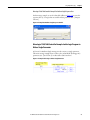
Figure 17 - MicroLogix 1100/1400 Message Configuration Dialog Boxes for the Control
Timeout
General Tab: This Controller
Setting
Channel
1 (integral). Controller port to which the network is connected.
Communication Command
500CPU Write. The controller type and command type for the controller to read or write data.
Because the MicroLogix 1100 is part of the SLC 500 controller family, the ‘500CPU’ controller type was
selected. The ‘Write’ command type was selected to write the control timeout value to the drive.
Data Table Address (1)
N20:0. An unused controller data table address containing the control timeout value to be written.
Size in Elements (2)
1. Number of elements (words) to be transferred. Each element size is a 16-bit integer.
General Tab: Target Device
Setting
Message Timeout
5. Message timeout duration in seconds.
Data Table Address
(3)
N42:3. Specific starting address of the destination file in the drive.
Routing Information File
RI9:0. An unused routing information file for the controller.
MultiHop Tab
Setting
To Address
10.91.100.79. The IP address of the option module connected to the drive.
(1) For details on data table addresses for this example project, see Table 3 on page 43.
(2) For details to determine element size for a specific drive, see Understanding Controller Data Table Addresses on page 42.
(3) For details on setting the control timeout value and its function, see N-Files on page 89. The Control Timeout (N42:3) is stored in RAM. If the EtherNet/IP
option module is power cycled, the Control Timeout Message must be re-sent. If the Control Timeout is not changed from a non-zero value, the control
message (page 35) will error out.
TIP
32
The Control Timeout (N42:3) must be changed to a non-zero value (5…20
seconds recommended). If the Control Timeout is not changed from a non-zero
value, the control message (page 35) will error out. The Control Timeout is
stored in RAM. If the option module is power cycled, the Control Timeout
Message must be re-sent.
Rockwell Automation Publication 750COM-AT001A-EN-P - August 2012
Configuring the I/O
Chapter 1
Create MicroLogix 1100/1400 Ladder Logic for the Logic Status, Feedback, and DL from Net
Datalinks
1. Insert another separate rung.
2. Double-click the rung to display the rung editor.
3. Enter MSG MGxx:n, where:
xx is an unused data file number (for example, MG11:n), and
n is an unused element of the data file chosen for xx (for example, MG11:0)
4. Press Enter.
5. Insert another separate rung.
6. Double-click the rung to display the rung editor.
7. Enter BST XIC MGxx:n/DN NXB XIC MGxx:n/ER BND OTU
MGxx:n/EN, where:
xx and n must correspond to the assigned data file number and element
(for example, MG11:0) for the message created in steps 1…4.
IMPORTANT
The information must be entered with appropriate numbers for ‘xx’
and ‘n’ for your application, and with spaces and forward slashes
exactly as shown.
8. Press Enter.
9. In the MSG instruction (Figure 18), double-click Setup Screen to launch
the message configuration dialog box (Figure 19).
Figure 18 - MicroLogix 1100/1400 Ladder Logic for the Logic Status, Feedback, and DL
from Net Datalinks
Steps 1…4
Steps 5…8
Step 9
10. Configure the General tab fields by entering or verifying the information
shown in the message configuration dialog box.
Rockwell Automation Publication 750COM-AT001A-EN-P - August 2012
33
Chapter 1
Configuring the I/O
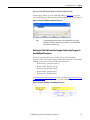
Figure 19 - MicroLogix 1100/1400 Message Configuration Dialog Boxes for the Logic
Status, Feedback, and DL from Net Datalinks
General Tab: This Controller
Setting
Channel
1 (integral). Controller port to which the network is connected.
Communication Command
500CPU Read. The controller type and command type for the controller to read or write data. Because the
MicroLogix 1100 is part of the SLC 500 controller family, the ‘500CPU’ controller type was selected. The ‘Read’
command type was selected to read data from the drive.
Data Table Address (1)
N20:1. An unused controller data table address containing the data to be read from the drive.
Size in Elements (2)
36. Number of elements (words) to be transferred. Each element size is a 16-bit integer.
General Tab: Target Device
Setting
Message Timeout
5. Message timeout duration in seconds.
Data Table Address (3)
N45:0. Specific starting address of the source file in the drive.
Routing Information File
RI9:1. An unused routing information file for the controller.
MultiHop Tab
Setting
To Address
10.91.100.79. The IP address of the option module connected to the drive.
(1) For details on data table addresses for this example project, see Table 3 on page 43.
(2) For details to determine element size for a specific drive, see Understanding Controller Data Table Addresses on page 42.
(3) For N-File details, see N-Files on page 89.
34
Rockwell Automation Publication 750COM-AT001A-EN-P - August 2012
Configuring the I/O
Chapter 1
Create MicroLogix 1100/1400 Ladder Logic for the Logic Command, Reference, and DL to Net
Datalinks
1. Insert another separate rung.
2. Double-click the rung to display the rung editor.
3. Enter MSG MGxx:n, where:
xx is an unused data file number (for example, MG12:n), and
n is an unused element of the data file chosen for xx (for example, MG12:0)
4. Press Enter.
5. Insert another separate rung.
6. Double-click the rung to display the rung editor.
7. Enter BST XIC MGxx:n/DN NXB XIC MGxx:n/ER BND OTU
MGxx:n/EN, where:
xx and n must correspond to the assigned data file number and element
(for example, MG12:0) for the message created in steps 1…4.
IMPORTANT
The information must be entered with appropriate numbers for ‘xx’
and ‘n’ for your application, and with spaces and forward slashes
exactly as shown.
8. Press Enter.
9. In the MSG instruction (Figure 20), double-click Setup Screen to launch
the message configuration dialog box (Figure 21).
Figure 20 - MicroLogix 1100/1400 Ladder Logic for the Logic Command, Reference, and DL
to Net Datalinks
Steps 1…4
Steps 5…8
Step 9
10. Configure the General tab fields by entering or verifying the information
shown in the message configuration dialog box.
Rockwell Automation Publication 750COM-AT001A-EN-P - August 2012
35
Chapter 1
Configuring the I/O
Figure 21 - MicroLogix 1100/1400 Message Configuration Dialog Boxes for the Logic
Command, Reference, and DL to Net Datalinks
General Tab: This Controller
Setting
Channel
1 (integral). Controller port to which the network is connected.
Communication Command
500CPU Write. The controller type and command type for the controller to read or write data.
Because the MicroLogix 1100 is part of the SLC 500 controller family, the ‘500CPU’ controller type
was selected. The ‘Write’ command type was selected to write data to the drive.
Data Table Address (1)
N20:37. An unused controller data table address containing the data to be written to the drive.
Size in Elements (2)
36. Number of elements (words) to be transferred. Each element size is a 16-bit integer.
General Tab: Target Device
Setting
Message Timeout
5. Message timeout duration in seconds.
Data Table Address (3)
N45:0. Specific starting address of the destination file in the drive.
Routing Information File
RI9:2. An unused routing information file for the controller.
MultiHop Tab
Setting
To Address
10.91.100.79. The IP address of the option module connected to the drive.
(1) For details on data table addresses for this example project, see Table 3 on page 43.
(2) For details to determine element size for a specific drive, see Understanding Controller Data Table Addresses on page 42.
(3) For N-File details, see N-Files on page 89.
36
TIP
This message will error out if the Control Timeout value is not changed from a
non-zero value. See page 31 for writing a value to the Control Timeout.
TIP
If the controller is controlling more than one drive, it is recommended to
intersperse the control I/O messaging for each drive to conserve network
bandwidth and decrease response time. That is, sequence the message
instructions for each drive so that its group of messages will occur at a different
time than those for another drive.
Rockwell Automation Publication 750COM-AT001A-EN-P - August 2012
Chapter
2
Using the I/O
This chapter provides information and examples that explain how to control,
configure, and monitor a PowerFlex 750-Series drive using the configured I/O.
Topic
Page
About I/O Messaging
37
Understanding the I/O Image
38
Using Logic Command/Status
39
Using Reference/Feedback
39
Using Datalinks
40
Example Ladder Logic Program Information
41
PLC-5, SLC 500, and MicroLogix 1100/1400 Controller Example
42
ATTENTION: Risk of injury or equipment damage exists. The examples in this
publication are intended solely for purposes of example. There are many
variables and requirements with any application. Rockwell Automation, Inc.
does not assume responsibility or liability (to include intellectual property
liability) for actual use of the examples shown in this publication.
About I/O Messaging
On CIP-based networks, including EtherNet/IP, I/O connections are used to
transfer the data that controls the PowerFlex drive and sets its Reference. I/O can
also be used to transfer data to and from Datalinks in PowerFlex 750-Series drives.
The network communication 20-750-ENETR option module or embedded
EtherNet/IP adapter in a PowerFlex 755 drive includes the Logic Command,
Logic Status, Reference, Feedback, and memory allocation for the Generic
Ethernet module profile (all as 32-bit words) in the controller’s I/O image. This
basic I/O must always be configured in the EtherNet bridge using RSLogix
software. Additional I/O, if needed, can be set using up to 16 Datalinks to write
data and/or up to 16 Datalinks to read data. When using any combination of
these Datalinks, add one 32-bit word for each Datalink to the basic I/O Input
Size and/or Output Size.
Chapter 1, Configuring the I/O, discusses how to configure the option module
or embedded adapter and controller on the network for the required I/O. The
Glossary defines the different options. This chapter discusses how to use I/O
after you have configured the option module or embedded adapter and
controller.
Rockwell Automation Publication 750COM-AT001A-EN-P - August 2012
37
Chapter 2
Using the I/O
Understanding the I/O Image
The terms ‘input’ and ‘output’ are defined from the controller’s point of view.
Therefore, output I/O is data that is produced by the controller and consumed by
the network communication 20-750-ENETR option module or embedded
EtherNet/IP adapter in a PowerFlex 755 drive. Input I/O is status data that is
produced by the option module or embedded adapter and consumed as input by
the controller. The I/O image will vary based on how many of the drive’s 32-bit
Datalinks (DL From Net 01-16 and DL To Net 01-16) are used.
The I/O image for the PLC-5, SLC 500, and MicroLogix 1100/1400 controller
changes depending on how many of the drive’s sixteen 32-bit Datalinks are used.
TIP
Because PLC-5, SLC 500, and MicroLogix 1100/1400 controllers are 16-bit
devices, each 32-bit word for the Logic Command/Status, Reference/Feedback,
and any used Datalinks will consume two contiguous words (Least Significant
Word and Most Significant Word) in the controller’s I/O image. Table 1 shows
the I/O for a drive using all 32-bit Datalinks.
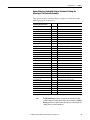
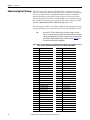
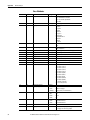
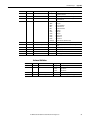
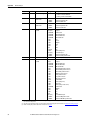
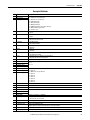
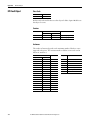
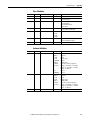
Table 1 - PLC-5, SLC 500, and MicroLogix 1100/1400 Controller I/O Image for PowerFlex 750-Series
Drives (32-bit Logic Command/Status, Reference/Feedback, and Datalinks)
Word
0
1
2
3
4
5
6
7
8
9
10
11
12
13
14
15
16
17
18
19
20
21
22
23
24
25
26
27
28
29
30
38
Output I/O
Logic Command (LSW)
Logic Command (MSW)
Reference (LSW)
Reference (MSW)
DL From Net 01 (LSW)
DL From Net 01 (MSW)
DL From Net 02 (LSW)
DL From Net 02 (MSW)
DL From Net 03 (LSW)
DL From Net 03 (MSW)
DL From Net 04 (LSW)
DL From Net 04 (MSW)
DL From Net 05 (LSW)
DL From Net 05 (MSW)
DL From Net 06 (LSW)
DL From Net 06 (MSW)
DL From Net 07 (LSW)
DL From Net 07 (MSW)
DL From Net 08 (LSW)
DL From Net 08 (MSW)
DL From Net 09 (LSW)
DL From Net 09 (MSW)
DL From Net 10 (LSW)
DL From Net 10 (MSW)
DL From Net 11 (LSW)
DL From Net 11 (MSW)
DL From Net 12 (LSW)
DL From Net 12 (MSW)
DL From Net 13 (LSW)
DL From Net 13 (MSW)
DL From Net 14 (LSW)
Word
0
1
2
3
4
5
6
7
8
9
10
11
12
13
14
15
16
17
18
19
20
21
22
23
24
25
26
27
28
29
30
Rockwell Automation Publication 750COM-AT001A-EN-P - August 2012
Input I/O
Logic Status (LSW)
Logic Status (MSW)
Feedback (LSW)
Feedback (MSW)
DL To Net 01 (LSW)
DL To Net 01 (MSW)
DL To Net 02 (LSW)
DL To Net 02 (MSW)
DL To Net 03 (LSW)
DL To Net 03 (MSW)
DL To Net 04 (LSW)
DL To Net 04 (MSW)
DL To Net 05 (LSW)
DL To Net 05 (MSW)
DL To Net 06 (LSW)
DL To Net 06 (MSW)
DL To Net 07 (LSW)
DL To Net 07 (MSW)
DL To Net 08 (LSW)
DL To Net 08 (MSW)
DL To Net 09 (LSW)
DL To Net 09 (MSW)
DL To Net 10 (LSW)
DL To Net 10 (MSW)
DL To Net 11 (LSW)
DL To Net 11 (MSW)
DL To Net 12 (LSW)
DL To Net 12 (MSW)
DL To Net 13 (LSW)
DL To Net 13 (MSW)
DL To Net 14 (LSW)
Using the I/O
Word
31
32
33
34
35
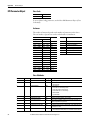
Using Logic Command/Status
Output I/O
DL From Net 14 (MSW)
DL From Net 15 (LSW)
DL From Net 15 (MSW)
DL From Net 16 (LSW)
DL From Net 16 (MSW)
Word
31
32
33
34
35
Chapter 2
Input I/O
DL To Net 14 (MSW)
DL To Net 15 (LSW)
DL To Net 15 (MSW)
DL To Net 16 (LSW)
DL To Net 16 (MSW)
The ‘Logic Command’ is a 32-bit word of control data produced by the
controller and consumed by the network communication 20-750-ENETR
option module or embedded EtherNet/IP adapter in a PowerFlex 755 drive. The
‘Logic Status’ is a 32-bit word of status data produced by the option module and
consumed by the controller.
For a PLC-5, SLC 500 or MicroLogix 1100/1400 controller, the Logic
Command word is always words 0 (Least Significant Word) and 1 (Most
Significant Word) in the output image and the Logic Status word is always words
0 (least Significant Word) and 1 (Most Significant Word) in the input image.
This manual contains the bit definitions for compatible products available at the
time of publication in Appendix B, Logic Command/Status Words: PowerFlex
750-Series Drives.
Using Reference/Feedback
The ‘Reference’ is a 32-bit REAL (floating point) piece of control data produced
by the controller and consumed by the network communication 20-750-ENETR
option module or embedded EtherNet/IP adapter in a PowerFlex 755 drive. The
‘Feedback’ is a 32-bit REAL (floating point) piece of status data produced by the
option module or embedded adapter and consumed by the controller.
For a PLC-5, SLC 500 or MicroLogix 1100/1400 controller, the 32-bit REAL
Reference word is always words 2 (Least Significant Word) and 3 (Most
Significant Word) in the output image and the 32-bit REAL Feedback is always
words 2 (Least Significant Word) and 3 (Most Significant Word) in the input
image.
The Reference and Feedback 32-bit REAL value represents drive speed. The
scaling for the speed Reference and Feedback are dependent on drive Parameter
300 - [Speed Units]. For example, if Parameter 300 is set to Hz, a 32-bit REAL
Reference value of ‘30.0’ would equal a Reference of 30.0 Hz. If Parameter 300 is
set to RPM, a 32-bit REAL Reference value of ‘1020.5’ would equal a Reference
of 1020.5 RPM. Note that the commanded maximum speed can never exceed the
value of drive Parameter 520 - [Max Fwd Speed]. Table 2 shows example
References and their results for a PowerFlex 755 drive that has the following:
• Parameter 300 - [Speed Units] set to Hz.
• Parameter 37 - [Maximum Freq] set to 130 Hz.
• Parameter 520 - [Max Fwd Speed] set to 60 Hz.
Rockwell Automation Publication 750COM-AT001A-EN-P - August 2012
39
Chapter 2
Using the I/O
When Parameter 300 - [Speed Units] is set to RPM, the other parameters are also
in RPM.
Table 2 - PowerFlex 750-Series Drive Example Speed Reference/Feedback Scaling
Network Reference Value
Speed Command Value (2)
Output Speed
Network Feedback Value
130 Hz
60 Hz
(3)
60.0
65.0
65 Hz
60 Hz (3)
60.0
32.5
32.5 Hz
32.5 Hz
32.5
0.0
0 Hz
0 Hz
0.0
-32.5 (1)
32.5 Hz
32.5 Hz
32.5
130.0
(1) The effects of values less than 0.0 depend on whether the PowerFlex 750-Series drive uses a bipolar or unipolar direction mode. See
the drive documentation for details.
(2) For this example, drive Parameter 300 - [Speed Units] is set to Hz.
(3) The drive runs at 60 Hz instead of 130 Hz or 65 Hz because drive Parameter 520 - [Max Fwd Speed] sets 60 Hz as the maximum
speed.
Using Datalinks
A Datalink is a mechanism used by PowerFlex drives to transfer data to and from
the controller. Datalinks allow a drive parameter value to be read or written to
without using an Explicit Message. When enabled, each Datalink occupies two
16-bit words in a PLC-5, SLC 500 or MicroLogix 1100/1400 controller.
The following rules apply when using PowerFlex 750-Series drive Datalinks:
• The target of a Datalink can be any ‘Host’ parameter, including those of a
peripheral. For example, drive parameter 535 - [Accel Time 1] can be the
target of any or all option modules installed in the drive.
• The data passed through the drive’s Datalink mechanism is determined by
the settings of ‘Host’ Parameters 01…16 - [DL From Net 01-16] and
‘Host’ Parameters 17…32 - [DL To Net 01-16].
IMPORTANT
A reset is always required after configuring Datalinks so that the
changes take effect.
• When an I/O connection that includes Datalinks is active, those Datalinks
being used are locked and cannot be changed until that I/O connection
becomes idle or inactive.
• When you use a Datalink to change a value, the value is not written to the
Nonvolatile Storage (NVS). The value is stored in volatile memory and
lost when the drive loses power. Thus, use Datalinks when you need to
change a value of a parameter frequently.
Datalinks for PowerFlex 750-Series drive peripherals (embedded EtherNet/IP
adapter on PowerFlex 755 drives only and option modules such as an encoder or a
communication module) are locked when the peripheral has an I/O connection
with a controller. When a controller has an I/O connection to the drive, the drive
does not allow a reset to defaults, configuration download or anything else that
40
Rockwell Automation Publication 750COM-AT001A-EN-P - August 2012
Using the I/O
Chapter 2
could change the makeup of the I/O connection in a running system. The I/O
connection with the controller must first be disabled to allow changes to the
respective Datalinks.
Depending on the controller being used, the I/O connection can be disabled by
doing the following:
• Inhibiting the module in RSLogix software
• Putting the controller in Program mode
• Placing the scanner in idle mode
• Disconnecting the drive from the network
DeviceLogix Datalinks are also locked while the DeviceLogix program is
running. The DeviceLogix program must first be disabled to allow changes to the
Datalinks. Set DeviceLogix parameter 53 - [DLX Operation] to ‘DisableLogic’
to disable the logic (the parameter value will then change to ‘LogicDisabld’).
TIP
Example Ladder Logic
Program Information
A COP (Copy) instruction or a UDDT is needed—for REAL parameters, speed
Reference, and speed Feedback only—to copy the DINT data into a REAL word
for input data conversion. For output data conversion, a COP (Copy) instruction
or UDDT is needed—for REAL parameters, speed Reference, and speed
Feedback only—to copy the REAL data into a DINT word. To determine
whether a parameter is a 32-bit integer (DINT) or a REAL data type, see the
Data Type column in the chapter containing parameters in the PowerFlex 750Series AC Drives Programming Manual (publication 750-PM001).
The example ladder logic programs in this chapter are intended for and operate
PowerFlex 750-Series drives.
Functions of the Example Programs
The example programs enable you to do the following:
• Receive Logic Status information from the drive.
• Send a Logic Command to control the drive (for example, start, stop).
• Send a Reference to the drive and receive Feedback from the drive.
• Send/receive Datalink data to/from the drive.
Logic Command/Status Words
These examples use the Logic Command word and Logic Status word for
PowerFlex 750-Series drives. See Appendix B, Logic Command/Status Words:
PowerFlex 750-Series Drives, to view details.
Rockwell Automation Publication 750COM-AT001A-EN-P - August 2012
41
Chapter 2
Using the I/O
PLC-5, SLC 500, and
MicroLogix 1100/1400
Controller Example
The information in this section is common for and applies to PLC-5, SLC 500,
and MicroLogix 1100/1400 controllers.
Option Module or Embedded Adapter Parameter Settings
For option module or embedded adapter settings used for the example ladder
logic program in this section, see the following pages.
Controller
See Table on
PLC-5
page 11
SLC 500
page 20
MicroLogix 1100/1400
page 29
Understanding Controller Data Table Addresses
Because PLC-5, SLC 500, and MicroLogix 1100/1400 controllers are 16-bit
platforms being used with the 32-bit EtherNet/IP option module, the data will
be transposed from the least significant word (LSW) to the most significant
word (MSW) in the controller.
When the I/O was configured (Chapter 1), an available data table file (N20) was
used. Figure 22 shows the entire data file address structure for this example.
Figure 22 - Data File Table for Example Ladder Logic Program
IMPORTANT
42
The N20:0 data table address in this example is used to set a control timeout
value (in seconds), which determines how long it will take the option module
to detect a communication loss. Enter a valid value (1…32767) for N20:0. A
value of zero (0) is not valid, because it disables the timeout and all I/O
messages (Logic Command/Status, Reference/Feedback, and Datalinks)
intended for the drive will not execute. A timeout value of 5…20 seconds is
recommended.
Rockwell Automation Publication 750COM-AT001A-EN-P - August 2012
Using the I/O
Chapter 2
Table 3 shows the I/O definitions as they relate to the N20 data table file
(Figure 22) being used in this example.
For PowerFlex 750-Series drives, which contain both DINT (32-bit format) and
REAL (floating point format) data types, you will always first read from and
write to the LSW data table address in the controller. Then if the data value
exceeds 16 bits, the remaining value will be in the MSW data table address.
Table 3 - PLC-5, SLC 500, and MicroLogix 1100/1400 Controller Data Table Addresses for PowerFlex
750-Series Drives
Data Table Address
N20:0
N20:1
N20:2
N20:3
N20:4
N20:5
N20:6
N20:7
N20:8
N20:9
N20:10
N20:11
N20:12
N20:13
N20:14
N20:15
N20:16
N20:17
N20:18
N20:19
N20:20
N20:21
N20:22
N20:23
N20:24
N20:25
N20:26
N20:27
N20:28
N20:29
N20:30
N20:31
N20:32
N20:33
N20:34
N20:35
N20:36
N20:37
N20:38
N20:39
Description
Control Timeout
Logic Status (LSW, see Appendix B)
Logic Status (MSW, see Appendix B)
Speed Feedback LSW
Speed Feedback MSW
Value of parameter assigned to option module Host Parameter 17 [DL To Net 01] LSW
Value of parameter assigned to option module Host Parameter 17 [DL To Net 01] MSW
Value of parameter assigned to option module Host Parameter 18 [DL To Net 02] LSW
Value of parameter assigned to option module Host Parameter 18 [DL To Net 02] MSW
Value of parameter assigned to option module Host Parameter 19 [DL To Net 03] LSW
Value of parameter assigned to option module Host Parameter 19 [DL To Net 03] MSW
Value of parameter assigned to option module Host Parameter 20 [DL To Net 04] LSW
Value of parameter assigned to option module Host Parameter 20 [DL To Net 04] MSW
Value of parameter assigned to option module Host Parameter 21 [DL To Net 05] LSW
Value of parameter assigned to option module Host Parameter 21 [DL To Net 05] MSW
Value of parameter assigned to option module Host Parameter 22 [DL To Net 06] LSW
Value of parameter assigned to option module Host Parameter 22 [DL To Net 06] MSW
Value of parameter assigned to option module Host Parameter 23 [DL To Net 07] LSW
Value of parameter assigned to option module Host Parameter 23 [DL To Net 07] MSW
Value of parameter assigned to option module Host Parameter 24 [DL To Net 08] LSW
Value of parameter assigned to option module Host Parameter 24 [DL To Net 08] MSW
Value of parameter assigned to option module Host Parameter 25 [DL To Net 09] LSW
Value of parameter assigned to option module Host Parameter 25 [DL To Net 09] MSW
Value of parameter assigned to option module Host Parameter 26 [DL To Net 10] LSW
Value of parameter assigned to option module Host Parameter 26 [DL To Net 10] MSW
Value of parameter assigned to option module Host Parameter 27 [DL To Net 11] LSW
Value of parameter assigned to option module Host Parameter 27 [DL To Net 11] MSW
Value of parameter assigned to option module Host Parameter 28 [DL To Net 12] LSW
Value of parameter assigned to option module Host Parameter 28 [DL To Net 12] MSW
Value of parameter assigned to option module Host Parameter 29 [DL To Net 13] LSW
Value of parameter assigned to option module Host Parameter 29 [DL To Net 13] MSW
Value of parameter assigned to option module Host Parameter 30 [DL To Net 14] LSW
Value of parameter assigned to option module Host Parameter 30 [DL To Net 14] MSW
Value of parameter assigned to option module Host Parameter 31 [DL To Net 15] LSW
Value of parameter assigned to option module Host Parameter 31 [DL To Net 15] MSW
Value of parameter assigned to option module Host Parameter 32 [DL To Net 16] LSW
Value of parameter assigned to option module Host Parameter 32 [DL To Net 16] MSW
Logic Command (LSW, see Appendix B)
Logic Command (MSW, see Appendix B)
Speed Reference LSW
Rockwell Automation Publication 750COM-AT001A-EN-P - August 2012
43
Chapter 2
Using the I/O
Table 3 - PLC-5, SLC 500, and MicroLogix 1100/1400 Controller Data Table Addresses for PowerFlex
750-Series Drives (Continued)
Data Table Address
N20:40
N20:41
N20:42
N20:43
N20:44
N20:45
N20:46
N20:47
N20:48
N20:49
N20:50
N20:51
N20:52
N20:53
N20:54
N20:55
N20:56
N20:57
N20:58
N20:59
N20:60
N20:61
N20:62
N20:63
N20:64
N20:65
N20:66
N20:67
N20:68
N20:69
N20:70
N20:71
N20:72
TIP
44
Description
Speed Reference MSW
Value of parameter assigned to option module Host Parameter 01 [DL From Net 01] LSW
Value of parameter assigned to option module Host Parameter 01 [DL From Net 01] MSW
Value of parameter assigned to option module Host Parameter 02 [DL From Net 02] LSW
Value of parameter assigned to option module Host Parameter 02 [DL From Net 02] MSW
Value of parameter assigned to option module Host Parameter 03 [DL From Net 03] LSW
Value of parameter assigned to option module Host Parameter 03 [DL From Net 03] MSW
Value of parameter assigned to option module Host Parameter 04 [DL From Net 04] LSW
Value of parameter assigned to option module Host Parameter 04 [DL From Net 04] MSW
Value of parameter assigned to option module Host Parameter 05 [DL From Net 05] LSW
Value of parameter assigned to option module Host Parameter 05 [DL From Net 05] MSW
Value of parameter assigned to option module Host Parameter 06 [DL From Net 06] LSW
Value of parameter assigned to option module Host Parameter 06 [DL From Net 06] MSW
Value of parameter assigned to option module Host Parameter 07 [DL From Net 07] LSW
Value of parameter assigned to option module Host Parameter 07 [DL From Net 07] MSW
Value of parameter assigned to option module Host Parameter 08 [DL From Net 08] LSW
Value of parameter assigned to option module Host Parameter 08 [DL From Net 08] MSW
Value of parameter assigned to option module Host Parameter 09 [DL From Net 09] LSW
Value of parameter assigned to option module Host Parameter 09 [DL From Net 09] MSW
Value of parameter assigned to option module Host Parameter 10 [DL From Net 10] LSW
Value of parameter assigned to option module Host Parameter 10 [DL From Net 10] MSW
Value of parameter assigned to option module Host Parameter 11 [DL From Net 11] LSW
Value of parameter assigned to option module Host Parameter 11 [DL From Net 11] MSW
Value of parameter assigned to option module Host Parameter 12 [DL From Net 12] LSW
Value of parameter assigned to option module Host Parameter 12 [DL From Net 12] MSW
Value of parameter assigned to option module Host Parameter 13 [DL From Net 13] LSW
Value of parameter assigned to option module Host Parameter 13 [DL From Net 13] MSW
Value of parameter assigned to option module Host Parameter 14 [DL From Net 14] LSW
Value of parameter assigned to option module Host Parameter 14 [DL From Net 14] MSW
Value of parameter assigned to option module Host Parameter 15 [DL From Net 15] LSW
Value of parameter assigned to option module Host Parameter 15 [DL From Net 15] MSW
Value of parameter assigned to option module Host Parameter 16 [DL From Net 16] LSW
Value of parameter assigned to option module Host Parameter 16 [DL From Net 16] MSW
Remember that most of the parameters in the drive being read/written with
the Datalinks are REAL (floating point) data types. Therefore, use a COP (Copy)
instruction to convert the least significant word and most significant word
values to a single floating point register (Fx:x).
Rockwell Automation Publication 750COM-AT001A-EN-P - August 2012
Using the I/O
Chapter 2
You can use the controller data table addresses to directly control and monitor
the drive without creating any ladder logic program. However, if you intend to
use Human Machine Interface devices (PanelView, and so forth) to operate the
drive and view its status, you may want to create alternate controller data table
addresses (Table 4 and Table 5) and a ladder logic program that will pass that data
to the data table addresses used for messaging.
Table 4 - Controller and Program Data Table Address Descriptions for Example Logic Status/
Feedback Ladder Logic Program
Description
Drive Ready
Drive Active
Actual Direction Forward (XIO)
Actual Direction Reverse (XIC)
Drive Faulted
Drive At Speed
Speed Feedback
Controller Data
Table Address
N20:1/0
N20:1/1
N20:1/3
N20:1/3
N20:1/7
N20:1/8
N20:3
Description
Status Ready
Status Active
Status Forward
Status Reverse
Status Faulted
Status At Speed
Speed Feedback
Program Data
Table Address
B3:1/0
B3:1/1
B3:1/3
B3:1/4
B3:1/7
B3:1/8
B30:3
Table 5 - Program and Controller Data Table Address Descriptions for Example Logic Command/
Reference Ladder Logic Program
Description
Command Stop
Command Start
Command Jog
Command Clear Faults
Command Forward Reverse (XIO)
Command Forward Reverse (XIC)
Speed Reference
Program Data
Table Address
B3:20/0
B3:20/1
B3:20/2
B3:20/3
B3:20/4
B3:20/4
N30:22
Description
Drive Stop
Drive Start
Drive Jog
Drive Clear Faults
Drive Forward
Drive Reverse
Speed Reference
Controller Data
Table Address
N20:20/0
N20:20/1
N20:20/2
N20:20/3
N20:20/4
N20:20/5
N20:22
An example ladder logic program that uses these alternate controller data table
addresses is shown in Figure 23 and Figure 24.
Rockwell Automation Publication 750COM-AT001A-EN-P - August 2012
45
Chapter 2
Using the I/O
Figure 23 - PLC-5, SLC 500, and MicroLogix 1100/1400 Controller Example Ladder Logic Program
for Logic Status/Feedback
IMPORTANT
46
This ladder does not include logic for Datalinks. However, if Datalinks are
required and they are assigned to parameters that are a REAL (floating point)
data type, a data conversion must be used. For MicroLogix 1100/1400
controllers only, use a CPW (Copy Word) instruction as shown in the example
ladder. For PLC-5 and SLC 500 controllers, use a COP (Copy) instruction.
Rockwell Automation Publication 750COM-AT001A-EN-P - August 2012
Using the I/O
Chapter 2
Figure 24 - PLC-5, SLC 500, and MicroLogix 1100 Controller Example Ladder Logic Program for
Logic Command/Reference
IMPORTANT
This ladder does not include logic for Datalinks. However, if Datalinks are
required and they are assigned to parameters that are a REAL (floating point)
data type, a data conversion must be used. For MicroLogix 1100/1400
controllers only, use a CPW (Copy Word) instruction as shown in the example
ladder. For PLC-5 and SLC 500 controllers, use a COP (Copy) instruction.
Rockwell Automation Publication 750COM-AT001A-EN-P - August 2012
47
Chapter 2
Using the I/O
Notes:
48
Rockwell Automation Publication 750COM-AT001A-EN-P - August 2012
Chapter
3
Using Explicit Messaging
This chapter provides information and examples that explain how to use Explicit
Messaging to configure and monitor the option module and connected
PowerFlex 750-Series drive.
Topic
Page
About Explicit Messaging
50
Performing Explicit Messaging
51
PLC-5 Controller Examples
52
SLC 500 Controller Examples
56
MicroLogix 1100/1400 Controller Examples
71
ATTENTION: Risk of injury or equipment damage exists. The examples in this
publication are intended solely for purposes of example. There are many
variables and requirements with any application. Rockwell Automation, Inc.
does not assume responsibility or liability (to include intellectual property
liability) for actual use of the examples shown in this publication.
ATTENTION: Risk of equipment damage exists. If Explicit Messages are
programmed to write parameter data to Nonvolatile Storage (NVS) frequently,
the NVS will quickly exceed its life cycle and cause the drive to malfunction. Do
not create a program that frequently uses Explicit Messages to write parameter
data to NVS. Datalinks do not write to NVS and should be used for frequently
changed parameters.
See Chapter 2 for information about the I/O Image, using Logic Command/
Status, Reference/Feedback, and Datalinks.
Rockwell Automation Publication 750COM-AT001A-EN-P - August 2012
49
Chapter 3
Using Explicit Messaging
About Explicit Messaging
Explicit Messaging is used to transfer data that does not require continuous
updates. With Explicit Messaging, you can configure and monitor a slave device’s
parameters on the network.
IMPORTANT
When an explicit message is performed, by default no connection is made
because it is an ‘unconnected’ message. When timing of the message transaction
is important, you can create a dedicated message connection between the
controller and drive by checking the ‘Connected’ box on the Communications tab
message configuration dialog box during message setup. These message
connections are in addition to the I/O connection. However, the trade off for more
message connections is decreased network performance. If your application
cannot tolerate this, do not check the ‘Connected’ box, which is recommended.
TIP
To message to another device in a different drive port, see the Instance table in
Appendix C:
• DPI Parameter Object section on page 94 for ‘Device’ parameters.
• Host DPI Parameter Object section on page 108 for ‘Host’ parameters.
In the Message Configuration dialog box, set the Instance field to an appropriate
value within the range listed for the port in which the device resides.
IMPORTANT
PowerFlex 750-Series drives have explicit messaging limitations. Table 6 shows
the EtherNet/IP Object Class code compatibilities for these drives.
Table 6 - Explicit Messaging Class Code Compatibility with PowerFlex 750-Series Drive
EtherNet/IP Object Class Code
Compatibility
Explicit Messaging Function
Parameter Object 0x0F
No
Single parameter reads/writes
DPI Parameter Object 0x93
Yes (1) with limitations
Single and scattered parameter reads/writes
Host DPI Parameter Object 0x9F
Yes (2) with limitations
Single and scattered parameter reads/writes
(1) Enables access to drive parameters (Port 0), DPI device parameters (Ports 1…6 only), and Host parameters (Ports 7…14 only). For
example, DPI Parameter Object Class code 0x93 can access a Safe Speed Monitor option module in Port 6. However, Class code 0x93
cannot access, for example, the Host parameters in a 24V I/O option module in Port 5. See DPI Parameter Object on page 94 for
instance (parameter) numbering.
(2) Enables access to drive parameters (Port 0) and Host parameters for all ports (1…14). Host DPI Parameter Object Class code 0x9F
cannot access DPI (device) parameters. For example, if a 20-750-DNET option module is in Port 4, its Host parameters can be
accessed, but not its DPI (device) parameters. See Host DPI Parameter Object on page 108 for instance (parameter) numbering.
50
Rockwell Automation Publication 750COM-AT001A-EN-P - August 2012
Using Explicit Messaging
Performing Explicit
Messaging
Chapter 3
There are five basic events in the Explicit Messaging process. The details of each
step will vary depending on the type of controller being used. See the
documentation for your controller.
IMPORTANT
There must be a request message and a response message for all Explicit
Messages, whether you are reading or writing data.
Figure 25 - Explicit Message Process
➊
➎
Complete Explicit
Message
➍
Retrieve Explicit
Message Response
Set up and send Explicit
Message Request
Network
➌
➋
Network
Event
Description
➊
You format the required data and set up the ladder logic program to send an Explicit Message request to the
scanner or bridge module (download).
➋
The scanner or bridge module transmits the Explicit Message Request to the slave device over the network.
➌
The slave device transmits the Explicit Message Response back to the scanner. The data is stored in the
scanner buffer.
➍
The controller retrieves the Explicit Message Response from the scanner’s buffer (upload).
➎
The Explicit Message is complete.
For information on the maximum number of Explicit Messages that can be
executed at a time, see the documentation for the bridge or scanner and/or
controller that is being used.
Rockwell Automation Publication 750COM-AT001A-EN-P - August 2012
51
Chapter 3
Using Explicit Messaging
PLC-5 Controller Examples
IMPORTANT
The PLC-5 must be Series E (Rev. D.1 or later) to support the MultiHop feature
that routes messaging to the drive.
IMPORTANT
Due to inherent limitations with the PCCC N-File method, only contiguous
multiple parameters can be read or written in one explicit message.
For explicit messaging, the N150 N-Files must be used because they are already
mapped to specific parameters in the drive and its connected peripherals. This
enables direct access to any parameter.
IMPORTANT
Explicit messaging with N150 N-Files is supported by the embedded EtherNet/
IP adapter in PowerFlex 755 drives, but is not supported by 20-750-ENETR
Dual-port EtherNet/IP network communication option modules in PowerFlex
750-Series drives.
IMPORTANT
When performing a write parameter message, the data will always be written
to the drive’s Nonvolatile Storage (NVS). Over time, continuous writes will
exceed the EEPROM life cycle and cause the drive to malfunction.
For PCCC N150 N-File information, see page 90.
PLC-5 Controller Example Ladder Logic Program to Read a Single
Parameter
A read message is used to read a single parameter. The specific N150:14 address
shown in this read message example reads the value of the 32-bit REAL (floating
point) parameter 007 - [Output Current] in a PowerFlex 750-Series drive.
Figure 26 - Example Ladder Logic to Read a Single Parameter
52
Rockwell Automation Publication 750COM-AT001A-EN-P - August 2012
Using Explicit Messaging
Chapter 3
Three COP (Copy) instructions are required to convert the 16-bit integer data
table addresses N40:0 (Least Significant Word) and N40:1 (Most Significant
Word) to a 32-bit REAL (floating point) data table address F102:0 for correct
presentation. The first two COP instructions swap the LSW and MSW, and the
third COP instruction correctly presents the 32-bit REAL (floating point) value.
PLC-5 Controller – Formatting a Message to Read a Single Parameter
Figure 27 - Read Single Message Configuration Dialog Boxes
The following table identifies the data that is required in each box to configure a
message to read a single parameter.
General Tab
Example Value
Description
Communication Command
Data Table Address
PLC-5 Typed Read
N40:0
Size in Elements
Port Number
Data Table Address
MultiHop
2 (1)
2
N150:14 (2)
Yes
Controller type and command type for controller to read data from the drive.
An unused controller data table address containing the message instruction. This
address is the starting word of the destination file.
Number of elements (words) to be transferred. Each element size is a 16-bit integer.
Controller port to which the network is connected.
Specific starting address of the source file in the drive (see page 90).
Enables communication to allow network messaging to be routed to the drive.
MultiHop Tab
Example Value
Description
To Address
10.91.100.79
IP address of the option module connected to the drive.
(1) Because the N-Files used for the data transfer occupies two contiguous 16-bit words, the Size in Elements must always be set to 2 regardless of whether the
parameter being read is a 16-bit parameter or 32-bit parameter.
(2) See page 90 for N-File addressing.
Rockwell Automation Publication 750COM-AT001A-EN-P - August 2012
53
Chapter 3
Using Explicit Messaging
PLC-5 Controller Example Single Read Response Data
In this specific N150:14 message example, we use the data table address in
Figure 28 to store the response value (2.401775 amps) that was read from drive
parameter 007 - [Output Current].
Figure 28 - Example Single Read Response Data File
PLC-5 Controller Example Ladder Logic Program to Write a Single
Parameter
A write message is used to write to a single parameter. The specific N154:70
address shown in this write message example writes a value to the 32-bit REAL
(floating point) parameter 535 - [Accel Time 1] in a PowerFlex 750-Series drive.
Figure 29 - Example Ladder Logic to Write a Single Parameter
Three COP (Copy) instructions are required to convert the 16-bit integer data
table addresses N50:0 (Least Significant Word) and N50:1 (Most Significant
Word) to a 32-bit REAL (floating point) data table address F103:0 for correct
presentation. The first COP instruction correctly writes the 32-bit REAL
(floating point) value. The second and third COP instructions swap the LSW
and MSW.
54
Rockwell Automation Publication 750COM-AT001A-EN-P - August 2012
Using Explicit Messaging
Chapter 3
PLC-5 Controller – Formatting a Message to Write a Single Parameter
Figure 30 - Write Single Message Configuration Dialog Boxes
The following table identifies the data that is required in each box to configure a
message to write a single parameter.
General Tab
Example Value
Description
(1)
Communication Command
Data Table Address
PLC-5 Typed Write
N50:0
Size in Elements
Port Number
Data Table Address
MultiHop
2 (2)
2
N154:70 (3)
Yes
Controller type and command type for controller to write data to the drive.
An unused controller data table address containing the message instruction. This
address is the starting word of the source file.
Number of elements (words) to be transferred. Each element size is a 16-bit integer.
Controller port to which the network is connected.
Specific starting address of the destination file in the drive (see page 90).
Enables communication to allow network messaging to be routed to the drive.
MultiHop Tab
Example Value
Description
To Address
10.91.100.79
IP address of the option module connected to the drive.
(1) Important: PCCC N150 N-File write messages are written to the drive’s EEPROM. Be very cautious as the EEPROM may quickly exceed its life cycle and cause the drive to
malfunction.
(2) Because the N154 file used for the data transfer occupies two contiguous 16-bit words, the Size in Elements must always be set to 2 regardless of whether the
parameter being written to is a 16-bit parameter or 32-bit parameter.
(3) See page 90 for N-File addressing.
Rockwell Automation Publication 750COM-AT001A-EN-P - August 2012
55
Chapter 3
Using Explicit Messaging
PLC-5 Controller Example Single Write Request Data
In this specific N154:70 message example, we use the data table address in
Figure 31 to store the request value (10.1 sec.) that was written to drive parameter
535 - [Accel Time 1].
Figure 31 - Example Single Write Request Data File
TIP
To verify that the parameter value was successfully written, use the HIM,
DriveExplorer software, or DriveExecutive software to access the parameter
and view its newly written value.
PLC-5 Controller Reading/Writing Multiple Parameters
You can read or write only contiguous parameters. Scattered read/write
messaging is not supported. Also, the range of contiguous parameters must be
contained in the same N-File. Two elements (words) are required for each
parameter being read or written. For example, to read 5 contiguous parameters,
10 elements (words) must be used.
SLC 500 Controller Examples
When using RSLogix 500 software, version 7.10 or earlier, explicit messaging
must be performed using the PCCC N-File method. For RSLogix 500 software,
version 7.20 or later, the CIP messaging method has been added along with the
PCCC N-File method. However, it is recommended to use the CIP method
because it is easier to use and understand. For this reason, only instructions for
the CIP method are provided. If you must use the PCCC N-File method, see the
PLC-5 Controller Examples on page 52.
The CIP messaging method provides a Generic Get/Set Attribute Service, which
can be used to perform single parameter read or write and multiple parameter
read or write explicit messages. Also, the Generic Set Attribute Service offers the
choice of writing the data to the drive’s Nonvolatile Storage (NVS) or the drive’s
Random Access Memory (RAM; for Generic Set Attribute Single service only,
see page 60). Note that when selecting the data to be written to RAM, the data
will be lost if the drive loses power.
For supported classes, instances, and attributes, see Appendix A, EtherNet/IP
Objects.
56
Rockwell Automation Publication 750COM-AT001A-EN-P - August 2012
Using Explicit Messaging
Chapter 3
SLC 500 Controller Example Ladder Logic Program to Read a Single
Parameter
A Generic Get Attribute Single message is used to read a single parameter. This
read message example reads the value of the 32-bit REAL (floating point)
parameter 007 - [Output Current] in a PowerFlex 750-Series drive.
Figure 32 - Example Ladder Logic to Read a Single Parameter
Three COP (Copy) instructions are required to convert the 16-bit integer data
table addresses N40:0 (Least Significant Word) and N40:1 (Most Significant
Word) to a 32-bit REAL (floating point) data table address F102:0 for correct
presentation. The first two COP instructions swap the LSW and MSW, and the
third COP instruction correctly presents the 32-bit REAL (floating point) value.
Rockwell Automation Publication 750COM-AT001A-EN-P - August 2012
57
Chapter 3
Using Explicit Messaging
SLC 500 Controller – Formatting a Message to Read a Single
Parameter
Figure 33 - Generic Get Attribute Single Message Configuration Dialog Boxes
The following table identifies the data that is required in each box to configure a
message to read a single parameter.
General Tab
Example Value
(3)
Description
Size in Words
Data Table Address
2
N40:0
Service (1)
Class
Instance (2)
Attribute
Generic Get Attribute Single
93 or 9F (Hex.) (4)
7 (Dec.)
9 (Dec.)
Number of words to be transferred. Each word size is a 16-bit integer.
An unused controller data table address containing the message
instruction. This address is the starting word of the response file.
Code for the requested service.
Class ID for the DPI Parameter Object.
Instance number is the same as the parameter number.
Attribute number for the Parameter Value attribute.
MultiHop Tab
Example Value
Description
To Address
10.91.100.79
IP address of the option module connected to the drive.
(1) The default setting for Service is ‘Custom’, enabling entry of a Service Code not available from the Service pull-down menu. When choosing a Service
other than ‘Custom’ from the pull-down menu, an appropriate Hex. value is automatically assigned to the Service Code box that is dimmed (unavailable).
(2) The instance is the parameter number in the drive (Port 0). For example, to read parameter 4 of a peripheral in Port 5 of a PowerFlex 755 drive, the
instance would be 21504 + 4 = 21508. See DPI Parameter Object on page 94 (Class code 0x93) or Host DPI Parameter Object on page 108 (Class code
0x9F) to determine the instance number.
(3) In this example, Output Current is a 32-bit REAL (floating point) parameter. If the parameter being read is a 32-bit integer parameter, the Size in Words
would also be set to 2. When the parameter being read is a 16-bit parameter, the Size in Words would be set to 1. See the drive documentation to
determine the size of the parameter and its data type.
(4) See Table 6 on page 50 for limitations of PowerFlex 750-Series drives when using DPI Parameter Object Class code 0x93 or Host DPI Parameter Object
Class code 0x9F for explicit messaging.
58
Rockwell Automation Publication 750COM-AT001A-EN-P - August 2012
Using Explicit Messaging
Chapter 3
SLC 500 Controller Example Get Attribute Single Response Data
In this message example, we use the data table address in Figure 34 to store the
response value (1.771247 amps) that was read from drive parameter 007 [Output Current].
Figure 34 - Example Get Attribute Single Response Data File
SLC 500 Controller Example Ladder Logic Program to Write a Single
Parameter
A Generic Set Attribute Single message is used to write to a single parameter.
This write message example writes a value to the 32-bit REAL (floating point)
parameter 535 - [Accel Time 1] in a PowerFlex 750-Series drive.
Figure 35 - Example Ladder Logic to Write a Single Parameter
Three COP (Copy) instructions are required to convert the 16-bit integer data
table addresses N50:0 (Least Significant Word) and N50:1 (Most Significant
Word) to a 32-bit REAL (floating point) data table address F103:0 for correct
presentation. The first COP instruction correctly writes the 32-bit REAL
(floating point) value. The second and third COP instructions swap the LSW
and MSW.
Rockwell Automation Publication 750COM-AT001A-EN-P - August 2012
59
Chapter 3
Using Explicit Messaging
SLC 500 Controller – Formatting a Message to Write a Single
Parameter
Figure 36 - Generic Set Attribute Single Message Configuration Dialog Boxes
The following table identifies the data that is required in each box to configure a
message to write a single parameter.
General Tab
Example Value
Description
Size in Words
Data Table Address
2 (4)
Service (1)
Class
Instance (2)
Attribute (3)
Generic Set Attribute Single
93 or 9F (Hex.) (5)
535 (Dec.)
9 or 10 (Dec.)
Number of words to be transferred. Each word size is a 16-bit integer.
An unused controller data table address containing the message
instruction. This address is the starting word of the request file.
Code for the requested service.
Class ID for the DPI Parameter Object.
Instance number is the same as the parameter number.
Attribute number for the Parameter Value attribute.
MultiHop Tab
Example Value
Description
To Address
10.91.100.79
IP address of the option module connected to the drive.
N50:0
(1) The default setting for Service is ‘Custom’, enabling entry of a Service Code not available from the Service pull-down menu. When choosing a Service other
than ‘Custom’ from the pull-down menu, an appropriate Hex. value is automatically assigned to the Service Code box that is dimmed (unavailable).
(2) The instance is the parameter number in the drive (Port 0). For example, to read parameter 4 of a peripheral in Port 5 of a PowerFlex 755 drive, the
instance would be 21504 + 4 = 21508. See DPI Parameter Object on page 94 (Class code 0x93) or Host DPI Parameter Object on page 108 (Class code
0x9F) to determine the instance number.
(3) Setting the Attribute value to ‘9’ will write the parameter value to the drive’s Nonvolatile Storage (EEPROM) memory, so the parameter value will remain
even after the drive is power cycled. Important: When set to ‘9’, be very cautious as the EEPROM may quickly exceed its life cycle and cause the drive to
malfunction. Setting the Attribute value to ‘A’ (10 decimal) will write the parameter value to temporary memory, so the parameter value will be lost after
the drive is power cycled. It is recommended to use the ‘A’ (10 decimal) setting when frequent write messages are required.
(4) In this example, Accel Time 1 is a 32-bit REAL (floating point) parameter. If the parameter being written to is a 32-bit integer parameter, the Size in Words
would also be set to 2. When the parameter being written to is a 16-bit parameter, the Size in Words would be set to 1. See the drive documentation to
determine the size of the parameter and its data type.
(5) See Table 6 on page 50 for limitations of PowerFlex 750-Series drives when using DPI Parameter Object Class code 0x93 or Host DPI Parameter Object Class
code 0x9F for explicit messaging.
60
Rockwell Automation Publication 750COM-AT001A-EN-P - August 2012
Using Explicit Messaging
Chapter 3
SLC 500 Controller Example Set Attribute Single Request Data
In this message example, we use the data table address in Figure 37 to store the
request value (10.1 sec.) that was written to drive parameter 535 - [Accel Time 1].
Figure 37 - Example Set Attribute Single Request Data File
TIP
To verify that the parameter value was successfully written, use the HIM,
DriveExplorer software, or DriveExecutive software to access the parameter
and view its newly written value.
SLC 500 Controller Example Ladder Logic Program to Read Multiple
Parameters
A Custom scattered read message is used to read the values of multiple
parameters. This read message example reads the values of these five 32-bit REAL
(floating point) parameters in a PowerFlex 750-Series drive:
• Parameter 001 - [Output Frequency]
• Parameter 007 - [Output Current]
• Parameter 008 - [Output Voltage]
• Parameter 009 - [Output Power]
• Parameter 011 - [DC Bus Volts]
See DPI Parameter Object on page 94 (Class code 0x93) or Host DPI Parameter
Object on page 108 (Class code 0x9F) for parameter numbering.
Figure 38 - Example Ladder Logic to Read Multiple Parameters
Rockwell Automation Publication 750COM-AT001A-EN-P - August 2012
61
Chapter 3
Using Explicit Messaging
For each parameter being read, three COP (Copy) instructions are required to
convert the 16-bit integer data table addresses, for example N60:2 (Least
Significant Word) and N60:3 (Most Significant Word) for the first parameter, to
a 32-bit REAL (floating point) data table address F104:0 for correct
presentation. The first two COP instructions swap the LSW and MSW, and the
third COP instruction correctly presents the 32-bit REAL (floating point) value.
62
Rockwell Automation Publication 750COM-AT001A-EN-P - August 2012
Using Explicit Messaging
Chapter 3
SLC 500 Controller – Formatting a Message to Read Multiple
Parameters
Figure 39 - Custom Scattered Read Message Configuration Dialog Boxes
The following table identifies the data that is required in each box to configure a
message to read multiple parameters.
General Tab
Size in Words
Receive Data
Send Data
Data Table Address
Receive Data
Send Data
Service (1)
Service Code
Class
Instance
Attribute
Example Value
Description
N60:0
N70:0
Custom
4D (Hex.)
93 or 9F (Hex.) (3)
0 (Dec.)
0 (Dec.)
Each word size is a 16-bit integer.
Number of words to be received.
Number of words to be sent.
An unused controller data table address containing the message instruction.
This address is the starting word of the response file.
This address is the starting word of the request file.
Required for scattered messages.
Code for the requested service.
Class ID for the DPI Parameter Object.
Required for scattered messages.
Required for scattered messages.
MultiHop Tab
Example Value
Description
To Address
10.91.100.79
IP address of the option module connected to the drive.
20 (2)
20 (2)
(1) The default setting for Service is ‘Custom’, enabling entry of a Service Code not available from the Service pull-down menu. When choosing a
Service other than ‘Custom’ from the pull-down menu, an appropriate Hex. value is automatically assigned to the Service Code box that is dimmed
(unavailable).
(2) In this example, we are reading five 32-bit REAL (floating point) parameters. Each parameter being read requires four contiguous 16-bit words.
Scattered read messages always assume that every parameter being read is a 32-bit parameter, regardless of its actual size. The data structure
format is shown on page 70. Maximum length is 128 words, which equates to 32 parameters. For parameter numbering, see DPI Parameter Object
on page 94 (Class code 0x93) or Host DPI Parameter Object on page 108 (Class code 0x9F).
(3) See Table 6 on page 50 for limitations of PowerFlex 750-Series drives when using DPI Parameter Object Class code 0x93 or Host DPI Parameter
Object Class code 0x9F for explicit messaging.
Rockwell Automation Publication 750COM-AT001A-EN-P - August 2012
63
Chapter 3
Using Explicit Messaging
SLC 500 Controller Example Scattered Read Request Data
In this message example, we use the data table addresses in Figure 40 to store the
request values to be read from these five 32-bit REAL (floating point) parameters
in a PowerFlex 750-Series drive:
• Parameter 001 - [Output Frequency]
• Parameter 007 - [Output Current]
• Parameter 008 - [Output Voltage]
• Parameter 009 - [Output Power]
• Parameter 011 - [DC Bus Volts]
Figure 40 - Example Scattered Read Request Data File
SLC 500 Controller Example Scattered Read Response Data
In this message example, we use the data table addresses in Figure 41 to store the
response values that were read from the requested drive parameters. These values
have been converted using a CPW (Copy Word) instruction for correct
presentation.
Figure 41 - Example Scattered Read Response Data File
In this example, the parameters have the following values:
64
PowerFlex 750-Series Drive Parameter
Address
Read Value
1 - [Output Frequency]
F104:0
60.42523 Hz
7 - [Output Current]
F104:1
2.391804 Amp
8 - [Output Voltage]
F104:2
208.921V AC
9 - [Output Power]
F104:3
0.2091006 kW
11 - [DC Bus Voltage]
F104:4
283.1714V DC
Rockwell Automation Publication 750COM-AT001A-EN-P - August 2012
Using Explicit Messaging
Chapter 3
SLC 500 Controller Example Ladder Logic Program to Write Multiple
Parameters
A Custom scattered write message is used to write to multiple parameters. This
write message example writes the following values to these five 32-bit REAL
(floating point) parameters in a PowerFlex 750-Series drive:
PowerFlex 750-Series Drive Parameter
Write Value
536 - [Accel Time 2]
11.1 Sec
538 - [Decel Time 2]
22.2 Sec
575 - [Preset Speed 5]
33.3 Hz
576 - [Preset Speed 6]
44.4 Hz
577 - [Preset Speed 7]
55.5 Hz
See DPI Parameter Object on page 94 (Class code 0x93) or Host DPI Parameter
Object on page 108 (Class code 0x9F) for parameter numbering.
IMPORTANT
If the explicit message scattered write must be written continuously, then use
a separate Generic Set service explicit message single write for each parameter
using DPI Parameter Object Class code 0x93 or Host DPI Parameter Object Class
code 0x9F and attribute A (10 decimal; see page 60). Attribute A writes to
RAM—not NVS (EEPROM) memory. This example scattered write message
using attribute 0 writes to NVS. Over time, continuous writes will exceed the
EEPROM life cycle and cause the drive to malfunction.
Figure 42 - Example Ladder Logic to Write Multiple Parameters
Rockwell Automation Publication 750COM-AT001A-EN-P - August 2012
65
Chapter 3
Using Explicit Messaging
For each parameter being written to, three COP (Copy) instructions are required
to convert the 16-bit integer data table addresses, for example N100:2 (Least
Significant Word) and N100:3 (Most Significant Word) for the first parameter,
to a 32-bit REAL (floating point) data table address F105:0 for correct
presentation. The first COP instruction correctly writes the 32-bit REAL
(floating point) value. The second and third COP instructions swap the LSW
and MSW.
66
Rockwell Automation Publication 750COM-AT001A-EN-P - August 2012
Using Explicit Messaging
Chapter 3
SLC 500 Controller – Formatting a Message to Write Multiple
Parameters
Figure 43 - Custom Scattered Write Multiple Message Configuration Dialog Boxes
The following table identifies the data that is required in each box to configure a
message to write multiple parameters.
General Tab
Size in Words
Receive Data
Send Data
Data Table Address
Receive Data
Send Data
Service (1)
Service Code
Class
Instance
Attribute
Example Value
Description
N90:0
N100:0
Custom
4E (Hex.) (3)
93 or 9F (Hex.) (4)
0 (Dec.)
0 (Dec.)
Each word size is a 16-bit integer.
Number of words to be received.
Number of words to be sent.
An unused controller data table address containing the message instruction.
This address is the starting word of the response file.
This address is the starting word of the request file.
Required for scattered messages.
Code for the requested service.
Class ID for the DPI Parameter Object.
Required for scattered messages.
Required for scattered messages.
MultiHop Tab
Example Value
Description
To Address
10.91.100.79
IP address of the option module connected to the drive.
20 (2)
20 (2)
(1) The default setting for Service is ‘Custom’, enabling entry of a Service Code not available from the Service pull-down menu. When choosing a
Service other than ‘Custom’ from the pull-down menu, an appropriate Hex. value is automatically assigned to the Service Code box that is
dimmed (unavailable).
(2) In this example, we are writing to five 32-bit REAL (floating point) parameters. Each parameter being written to requires four contiguous 16-bit
words. Scattered write messages always assume that every parameter being written to is a 32-bit parameter, regardless of its actual size. The
data structure format is shown on page 70. Maximum length is 128 words, which equates to 32 parameters. For parameter numbering, see DPI
Parameter Object on page 94 (Class code 0x93) or Host DPI Parameter Object on page 108 (Class code 0x9F).
(3) Service Code 4E write messages are written to the drive’s Nonvolatile Storage (EEPROM) memory, so the parameter value will remain even after
the drive is power cycled. Important: Be very cautious as the EEPROM may quickly exceed its life cycle and cause the drive to malfunction.
(4) See Table 6 on page 50 for limitations of PowerFlex 750-Series drives when using DPI Parameter Object Class code 0x93 or Host DPI Parameter
Object Class code 0x9F for explicit messaging.
Rockwell Automation Publication 750COM-AT001A-EN-P - August 2012
67
Chapter 3
Using Explicit Messaging
SLC 500 Controller Example Scattered Write Request Data
In this message example, we use the F105: data table addresses to store the request
values to be written to these 32-bit REAL (floating point) parameters:
PowerFlex 750-Series Drive Parameter
Address
Write Value
536 - [Accel Time 2]
F105:0
11.1 Sec
538 - [Decel Time 2]
F105:1
22.2 Sec
575 - [Preset Speed 5]
F105:2
33.3 Hz
576 - [Preset Speed 6]
F105:3
44.4 Hz
577 - [Preset Speed 7]
F105:4
55.5 Hz
See DPI Parameter Object on page 94 (Class code 0x93) or Host DPI Parameter
Object on page 108 (Class code 0x9F) for parameter numbering.
Figure 44 shows the parameter values which, in this example, have been
converted using a CPW (Copy Word) instruction—one for each value—to
correctly write their values. The CPW instruction separates the 32-bit REAL
(floating point) value (for example, F105:0 that contains 11.1 seconds) into two
16-bit integers (for example N100:2 and N100:3). While the values in the 16-bit
integer registers represent the actual values being written in the 32-bit floating
point registers, they will not appear correct, but the message will properly decode
them.
Figure 44 - Example Scattered Write Request Unconverted Data File
To complete message configuration, the numbers of the parameters being written
to must now be entered in the appropriate N100: data table registers as shown in
Figure 45 for this example.
Figure 45 - Example Scattered Write Request Unconverted Data File with Entered Parameters
68
Rockwell Automation Publication 750COM-AT001A-EN-P - August 2012
Using Explicit Messaging
Chapter 3
SLC 500 Controller Example Scattered Write Response Data
In this message example, we use the data table addresses in Figure 46 to store the
response values that were written to the requested drive parameters. Values of ‘0’
indicate no errors occurred.
Figure 46 - Example Scattered Write Response Data File
TIP
To verify that the parameter values were successfully written, use the HIM,
DriveExplorer software, or DriveExecutive software to access the parameters
and view their newly written values.
Rockwell Automation Publication 750COM-AT001A-EN-P - August 2012
69
Chapter 3
Using Explicit Messaging
SLC 500 Controller – Explanation of Request and Response Data for
Read/Write Multiple Messaging
The data structures in Figure 47 use 32-bit words and can accommodate up to 32
parameters in a single message. In the Response Message, a parameter number
with Bit 15 set indicates that the associated parameter value field contains an
error code (parameter number in response data will be negative).
Figure 47 - Data Structures for Scattered Read/Write Messages
Word 0
1
2
3
4
5
6
7
8
9
10
11
12
13
14
15
16
17
18
19
20
21
22
23
24
25
26
27
28
29
30
31
32
33
34
35
124
125
126
127
Parameter Number (LSW)
Parameter Number (MSW)
Parameter Value (LSW)
Parameter Value (MSW)
124
125
126
127
70
Response (Destination Data)
Parameter Number (LSW)
Parameter Number (MSW)
Parameter Value (LSW)
Parameter Value (MSW)
Parameter Number (LSW)
Parameter Number (MSW)
Parameter Value (LSW)
Parameter Value (MSW)
Parameter Number (LSW)
Parameter Number (MSW)
Parameter Value (LSW)
Parameter Value (MSW)
Parameter Number (LSW)
Parameter Number (MSW)
Parameter Value (LSW)
Parameter Value (MSW)
Parameter Number (LSW)
Parameter Number (MSW)
Parameter Value (LSW)
Parameter Value (MSW)
Parameter Number (LSW)
Parameter Number (MSW)
Parameter Value (LSW)
Parameter Value (MSW)
Parameter Number (LSW)
Parameter Number (MSW)
Parameter Value (LSW)
Parameter Value (MSW)
Parameter Number (LSW)
Parameter Number (MSW)
Parameter Value (LSW)
Parameter Value (MSW)
Parameter Number (LSW)
Parameter Number (MSW)
Parameter Value (LSW)
Parameter Value (MSW)
...
Request (Source Data)
Parameter Number (LSW)
Parameter Number (MSW)
Parameter Value (LSW)
Parameter Value (MSW)
Parameter Number (LSW)
Parameter Number (MSW)
Parameter Value (LSW)
Parameter Value (MSW)
Parameter Number (LSW)
Parameter Number (MSW)
Parameter Value (LSW)
Parameter Value (MSW)
Parameter Number (LSW)
Parameter Number (MSW)
Parameter Value (LSW)
Parameter Value (MSW)
Parameter Number (LSW)
Parameter Number (MSW)
Parameter Value (LSW)
Parameter Value (MSW)
Parameter Number (LSW)
Parameter Number (MSW)
Parameter Value (LSW)
Parameter Value (MSW)
Parameter Number (LSW)
Parameter Number (MSW)
Parameter Value (LSW)
Parameter Value (MSW)
Parameter Number (LSW)
Parameter Number (MSW)
Parameter Value (LSW)
Parameter Value (MSW)
Parameter Number (LSW)
Parameter Number (MSW)
Parameter Value (LSW)
Parameter Value (MSW)
...
Word 0
1
2
3
4
5
6
7
8
9
10
11
12
13
14
15
16
17
18
19
20
21
22
23
24
25
26
27
28
29
30
31
32
33
34
35
Parameter Number (LSW)
Parameter Number (MSW)
Parameter Value (LSW)
Parameter Value (MSW)
Rockwell Automation Publication 750COM-AT001A-EN-P - August 2012
Using Explicit Messaging
MicroLogix 1100/1400
Controller Examples
Chapter 3
When using RSLogix 500 software, version 7.10 or earlier, explicit messaging
must be performed using the PCCC N-File method. For RSLogix 500 software,
version 7.20 or later, the CIP messaging method has been added along with the
PCCC N-File method. However, the CIP method is recommended because it is
easier to use and understand. For this reason, only instructions for the CIP
method are provided.
IMPORTANT
Due to inherent limitations with the PCCC N-File method, only contiguous
multiple parameters can be read or written in one explicit message.
For explicit messaging using the PCCC N-File method, the N150 N-Files must
be used because they are already mapped to specific parameters in the drive and
its connected peripherals. This enables direct access to any parameter.
For PCCC N150 N-File information, see page 90.
The CIP messaging method provides a Generic Get/Set Attribute Service, which
can be used to perform single parameter read or write and multiple parameter
read or write explicit messages. Also, the Generic Set Attribute Service offers the
choice of writing the data to the drive’s Nonvolatile Storage (NVS) or the drive’s
Random Access Memory (RAM; for Generic Set Attribute Single service only,
see page 74). Note that when selecting the data to be written to RAM, the data
will be lost if the drive loses power.
For supported classes, instances, and attributes, see Appendix A, EtherNet/IP
Objects.
MicroLogix 1100/1400 Controller Example Ladder Logic Program to
Read a Single Parameter
A Generic Get Attribute Single message is used to read a single parameter. This
read message example reads the value of the 32-bit REAL (floating point)
parameter 007 - [Output Current] in a PowerFlex 750-Series drive.
Figure 48 - Example Ladder Logic to Read a Single Parameter
Rockwell Automation Publication 750COM-AT001A-EN-P - August 2012
71
Chapter 3
Using Explicit Messaging
MicroLogix 1100/1400 Controller – Formatting a Message to Read a
Single Parameter
Figure 49 - Generic Get Attribute Single Message Configuration Dialog Boxes
The following table identifies the data that is required in each box to configure a
message to read a single parameter.
General Tab
Example Value
Description
Channel
Comm… Command
Data Table Address
1
CIP Generic
F40:0 (3)
Size in Bytes
Extended Routing…
Service (1)
Class
Instance (2)
Attribute
4 (4)
RIX15:0
Generic Get Attribute Single
93 or 9F (Hex.) (5)
7 (Dec.)
9 (Dec.)
Controller port to which the network is connected.
Used to access the DPI Parameter Object in the option module.
An unused controller data table address containing the message
instruction. This address is the starting word of the response file.
Number of bytes to be transferred. Each byte size is an 8-bit integer.
An unused routing information file for the controller.
Code for the requested service.
Class ID for the DPI Parameter Object.
Instance number is the same as the parameter number.
Attribute number for the Parameter Value attribute.
MultiHop Tab
Example Value
Description
To Address
10.91.100.79
IP address of the option module connected to the drive.
(1) The default setting for Service is ‘Custom’, enabling entry of a Service Code not available from the Service pull-down menu. When selecting a Service other
than ‘Custom’ from the pull-down menu, an appropriate Hex. value is automatically assigned to the Service Code box that is dimmed (unavailable).
(2) The instance is the parameter number in the drive (Port 0). For example, to read parameter 4 of a peripheral in Port 5 of a PowerFlex 755 drive, the
instance would be 21504 + 4 = 21508. See DPI Parameter Object on page 94 (Class code 0x93) or Host DPI Parameter Object on page 108 (Class code
0x9F) to determine the instance number.
(3) In this example, Output Current is a 32-bit REAL (floating point) parameter. Therefore, set the Data Table Address to ‘F’ type (floating point). If the
parameter being read is a 32-bit integer, the Data Table Address type would be set to ‘L’ (long word).
(4) In this example, Output Current is a 32-bit REAL (floating point) parameter. If the parameter being read is a 32-bit integer parameter, the Size in Bytes
would also be set to 4. When the parameter being read is a 16-bit parameter, the Size in Bytes would be set to 2. See the drive documentation to
determine the size of the parameter and its data type.
(5) See Table 6 on page 50 for limitations of PowerFlex 750-Series drives when using DPI Parameter Object Class code 0x93 or Host DPI Parameter Object Class
code 0x9F for explicit messaging.
72
Rockwell Automation Publication 750COM-AT001A-EN-P - August 2012
Using Explicit Messaging
Chapter 3
MicroLogix 1100/1400 Controller Example Get Attribute Single Response Data
In this message example, we use the data table address in Figure 50 to store the
response value (1.77 amps) that was read from drive parameter 007 - [Output
Current].
Figure 50 - Example Get Attribute Single Response Data File
MicroLogix 1100/1400 Controller Example Ladder Logic Program to
Write a Single Parameter
A Generic Set Attribute Single message is used to write to a single parameter.
This write message example writes a value to the 32-bit REAL (floating point)
parameter 535 - [Accel Time 1] in a PowerFlex 750-Series drive.
Figure 51 - Example Ladder Logic to Write a Single Parameter
Rockwell Automation Publication 750COM-AT001A-EN-P - August 2012
73
Chapter 3
Using Explicit Messaging
MicroLogix 1100/1400 Controller – Formatting a Message to Write a
Single Parameter
Figure 52 - Generic Set Attribute Single Message Configuration Dialog Boxes
The following table identifies the data that is required in each box to configure a
message to write a single parameter.
General Tab
Example Value
Description
Channel
Comm… Command
Data Table Address
1
CIP Generic
F50:0 (4)
Size in Bytes
Extended Routing…
Service (1)
Class
Instance (2)
Attribute (3)
4 (5)
RIX16:0
Generic Set Attribute Single
93 or 9F (Hex.) (6)
535 (Dec.)
9 or 10 (Dec.)
Controller port to which the network is connected.
Used to access the DPI Parameter Object in the option module.
An unused controller data table address containing the message
instruction. This address is the starting word of the request file.
Number of bytes to be transferred. Each byte size is an 8-bit integer.
An unused routing information file for the controller.
Code for the requested service.
Class ID for the DPI Parameter Object.
Instance number is the same as the parameter number.
Attribute number for the Parameter Value attribute.
MultiHop Tab
Example Value
Description
To Address
10.91.100.79
IP address of the option module connected to the drive.
(1) The default setting for Service is ‘Custom’, enabling entry of a Service Code not available from the Service pull-down menu. When selecting a Service other
than ‘Custom’ from the pull-down menu, an appropriate Hex. value is automatically assigned to the Service Code box that is dimmed (unavailable).
(2) The instance is the parameter number in the drive (Port 0). For example, to read parameter 4 of a peripheral in Port 5 of a PowerFlex 755 drive, the instance
would be 21504 + 4 = 21508. See DPI Parameter Object on page 94 (Class code 0x93) or Host DPI Parameter Object on page 108 (Class code 0x9F) to
determine the instance number.
(3) Setting the Attribute value to ‘9’ will write the parameter value to the drive’s Nonvolatile Storage (EEPROM) memory, so the parameter value will remain
even after the drive is power cycled. Important: When set to ‘9’, be very cautious as the EEPROM may quickly exceed its life cycle and cause the drive to
malfunction. Setting the Attribute value to ‘10’ will write the parameter value to temporary memory, so the parameter value will be lost after the drive is
power cycled. It is recommended to use the ‘10’ setting when frequent write messages are required.
(4) In this example, Accel Time 1 is a 32-bit REAL (floating point) parameter. Therefore, set the Data Table Address to ‘F’ type (floating point). If the parameter
being written to is a 32-bit integer, the Data Table Address type would be set to ‘L’ (long word).
(5) In this example, Accel Time 1 is a 32-bit REAL (floating point) parameter. If the parameter being written to is a 32-bit integer parameter, the Size in Bytes
would also be set to 4. When the parameter being written to is a 16-bit parameter, the Size in Bytes would be set to 2.
(6) See Table 6 on page 50 for limitations of PowerFlex 750-Series drives when using DPI Parameter Object Class code 0x93 or Host DPI Parameter Object Class
code 0x9F for explicit messaging.
74
Rockwell Automation Publication 750COM-AT001A-EN-P - August 2012
Using Explicit Messaging
Chapter 3
MicroLogix 1100/1400 Controller Example Set Attribute Single Request Data
In this message example, we use the data table address in Figure 53 to store the
request value (10.1 sec.) that was written to drive parameter 535 - [Accel Time 1].
Figure 53 - Example Set Attribute Single Request Data File
TIP
To verify that the parameter value was successfully written, use the HIM,
DriveExplorer software, or DriveExecutive software to access the parameter
and view its newly written value.
MicroLogix 1100/1400 Controller Example Ladder Logic Program to
Read Multiple Parameters
A Custom scattered read message is used to read the values of multiple
parameters. This read message example reads the values of these five 32-bit REAL
(floating point) parameters in a PowerFlex 750-Series drive:
• Parameter 001 - [Output Frequency]
• Parameter 007 - [Output Current]
• Parameter 008 - [Output Voltage]
• Parameter 009 - [Output Power]
• Parameter 011 - [DC Bus Volts]
See DPI Parameter Object on page 94 (Class code 0x93) or Host DPI Parameter
Object on page 108 (Class code 0x9F) for parameter numbering.
Figure 54 - Example Ladder Logic to Read Multiple Parameters
Rockwell Automation Publication 750COM-AT001A-EN-P - August 2012
75
Chapter 3
Using Explicit Messaging
MicroLogix 1100/1400 Controller – Formatting a Message to Read
Multiple Parameters
Figure 55 - Custom Scattered Read Message Configuration Dialog Boxes
The following table identifies the data that is required in each box to configure a
message to read multiple parameters.
General Tab
Example Value
Description
Channel
Comm… Command
Data Table Address
Receive
Send
Size in Bytes
Receive
Send
Extended Routing…
Service (1)
Service Code
Class
Instance
Attribute
1
CIP Generic
40 (2)
40 (2)
RIX19:0
Custom
4D (Hex.)
93 or 9F (Hex.) (3)
0 (Dec.)
0 (Dec.)
Controller port to which the network is connected.
Used to access the DPI Parameter Object in the option module.
An unused controller data table address containing the message instruction.
This address is the starting word of the response file.
This address is the starting word of the request file.
Each byte size is an 8-bit integer.
Number of bytes to be received.
Number of bytes to be sent.
An unused routing information file for the controller.
Required for scattered messages.
Code for the requested service.
Class ID for the DPI Parameter Object.
Required for scattered messages.
Required for scattered messages.
MultiHop Tab
Example Value
Description
To Address
10.91.100.79
IP address of the option module connected to the drive.
N60:0
N70:0
(1) The default setting for Service is ‘Custom’, enabling entry of a Service Code not available from the Service pull-down menu. When choosing a Service
other than ‘Custom’ from the pull-down menu, an appropriate Hex. value is automatically assigned to the Service Code box that is dimmed
(unavailable).
(2) In this example, we are reading five 32-bit REAL (floating point) parameters. Each parameter being read requires four contiguous 16-bit words.
Scattered read messages always assume that every parameter being read is a 32-bit parameter, regardless of its actual size. Therefore, the Size in
Bytes must be set to 40. The data structure format is shown on page 82. Maximum message length is 128 words (256 bytes), which equates to 32
parameters. For parameter numbering, see DPI Parameter Object on page 94 (Class code 0x93) or Host DPI Parameter Object on page 108 (Class code
0x9F).
(3) See Table 6 on page 50 for limitations of PowerFlex 750-Series drives when using DPI Parameter Object Class code 0x93 or Host DPI Parameter Object
Class code 0x9F for explicit messaging.
76
Rockwell Automation Publication 750COM-AT001A-EN-P - August 2012
Using Explicit Messaging
Chapter 3
MicroLogix 1100/1400 Controller Example Scattered Read Request Data
In this message example, we use the data table addresses in Figure 56 to store the
request values to be read from these five 32-bit REAL (floating point) parameters
in a PowerFlex 750-Series drive:
• Parameter 001 - [Output Frequency]
• Parameter 007 - [Output Current]
• Parameter 008 - [Output Voltage]
• Parameter 009 - [Output Power]
• Parameter 011 - [DC Bus Volts]
See DPI Parameter Object on page 94 (Class code 0x93) or Host DPI Parameter
Object on page 108 (Class code 0x9F) for parameter numbering.
Figure 56 - Example Scattered Read Request Data File
MicroLogix 1100/1400 Controller Example Scattered Read Response Data
In this message example, we use the data table addresses in Figure 57 to store the
response values that were read from the requested drive parameters. These values
have been converted using a CPW (Copy Word) instruction for correct
presentation.
Figure 57 - Example Scattered Read Response Data File
In this example, the parameters have the following values:
PowerFlex 750-Series Drive Parameter
Address
Read Value
1 - [Output Frequency]
F100:0
60.42899 Hz
7 - [Output Current]
F100:1
2.392873 Amp
8 - [Output Voltage]
F100:2
208.9161V AC
9 - [Output Power]
F100:3
0.2103399 kW
11 - [DC Bus Voltage]
F100:4
283.0867V DC
Rockwell Automation Publication 750COM-AT001A-EN-P - August 2012
77
Chapter 3
Using Explicit Messaging
MicroLogix 1100/1400 Controller Example Ladder Logic Program to
Write Multiple Parameters
A Custom scattered write message is used to write to multiple parameters. This
write message example writes the following values to these five 32-bit REAL
(floating point) parameters in a PowerFlex 750-Series drive:
PowerFlex 750-Series Drive Parameter
Write Value
536 - [Accel Time 2]
11.1 Sec
538 - [Decel Time 2]
22.2 Sec
575 - [Preset Speed 5]
33.3 Hz
576 - [Preset Speed 6]
44.4 Hz
577 - [Preset Speed 7]
55.5 Hz
See DPI Parameter Object on page 94 (Class code 0x93) or Host DPI Parameter
Object on page 108 (Class code 0x9F) for parameter numbering.
Figure 58 - Example Ladder Logic to Write Multiple Parameters
IMPORTANT
78
If the explicit message scattered write must be written continuously, then use
a separate Generic Set service explicit message single write for each parameter
using DPI Parameter Object Class code 0x93 or Host DPI Parameter Object Class
code 0x9F and attribute A (10 decimal; see page 74). Attribute A writes to
RAM—not NVS (EEPROM) memory. This example scattered write message
using attribute 0 writes to NVS. Over time, continuous writes will exceed the
EEPROM life cycle and cause the drive to malfunction.
Rockwell Automation Publication 750COM-AT001A-EN-P - August 2012
Using Explicit Messaging
Chapter 3
MicroLogix 1100/1400 Controller – Formatting a Message to Write
Multiple Parameters
Figure 59 - Custom Scattered Write Multiple Message Configuration Dialog Boxes
The following table identifies the data that is required in each box to configure a
message to write multiple parameters.
General Tab
Example Value
Description
Channel
Comm… Command
Data Table Address
Receive
Send
Size in Bytes
Receive
Send
Extended Routing…
Service (1)
Service Code
Class
Instance
Attribute
1
CIP Generic
40 (2)
40 (2)
RIX21:0
Custom
4E (Hex.) (3)
93 or 9F (Hex.) (4)
0 (Dec.)
0 (Dec.)
Controller port to which the network is connected.
Used to access the DPI Parameter Object in the option module.
An unused controller data table address containing the message instruction.
This address is the starting word of the response file.
This address is the starting word of the request file.
Each byte size is an 8-bit integer.
Number of bytes to be received.
Number of bytes to be sent.
An unused routing information file for the controller.
Required for scattered messages.
Code for the requested service.
Class ID for the DPI Parameter Object.
Required for scattered messages.
Required for scattered messages.
MultiHop Tab
Example Value
Description
To Address
10.91.100.79
IP address of the option module connected to the drive.
N80:0
N90:0
(1) The default setting for Service is ‘Custom’, enabling entry of a Service Code not available from the Service pull-down menu. When choosing a Service
other than ‘Custom’ from the pull-down menu, an appropriate Hex. value is automatically assigned to the Service Code box that is dimmed
(unavailable).
(2) In this example, we are writing to five 32-bit REAL (floating point) parameters. Each parameter being written to requires four contiguous 16-bit words.
Scattered write messages always assume that every parameter being written to is a 32-bit parameter, regardless of its actual size. Therefore, the Size in
Bytes must be set to 40. The data structure format is shown on page 82. Maximum length is 128 words (256 bytes), which equates to 32 parameters. For
parameter numbering, see DPI Parameter Object on page 94 (Class code 0x93) or Host DPI Parameter Object on page 108 (Class code 0x9F).
(3) Service Code 4E write messages are written to the drive’s Nonvolatile Storage (EEPROM) memory, so the parameter value will remain even after the
drive is power cycled. Important: Be very cautious as the EEPROM may quickly exceed its life cycle and cause the drive to malfunction.
(4) See Table 6 on page 50 for limitations of PowerFlex 750-Series drives when using DPI Parameter Object Class code 0x93 or Host DPI Parameter Object
Class code 0x9F for explicit messaging.
Rockwell Automation Publication 750COM-AT001A-EN-P - August 2012
79
Chapter 3
Using Explicit Messaging
MicroLogix 1100/1400 Controller Example Scattered Write Request Data
In this message example, we use the F101: data table addresses to store the request
values to be written to these 32-bit REAL (floating point) parameters:
PowerFlex 750-Series Drive Parameter
Address
Write Value
536 - [Accel Time 2]
F101:0
11.1 Sec
538 - [Decel Time 2]
F101:1
22.2 Sec
575 - [Preset Speed 5]
F101:2
33.3 Hz
576 - [Preset Speed 6]
F101:3
44.4 Hz
577 - [Preset Speed 7]
F101:4
55.5 Hz
Figure 60 shows the parameter values, which, in this example, have been
converted using a CPW (Copy Word) instruction—one for each value—to
correctly write their values. The CPW instruction separates the 32-bit REAL
(floating point) value (for example, F101:0 that contains 11.1 seconds) into two
16-bit integers (for example N90:2 and N90:3). While the values in the 16-bit
integer registers represent the actual values being written in the 32-bit floating
point registers, they will not appear correct, but the message will properly decode
them.
Figure 60 - Example Scattered Write Request Unconverted Data File
To complete message configuration, the numbers of the parameters being written
to must now be entered in the appropriate N90: data table registers as shown in
Figure 61 for this example.
Figure 61 - Example Scattered Write Request Unconverted Data File with Entered Parameters
80
Rockwell Automation Publication 750COM-AT001A-EN-P - August 2012
Using Explicit Messaging
Chapter 3
MicroLogix 1100/1400 Controller Example Scattered Write Response Data
In this message example, we use the data table addresses in Figure 62 to store the
response values that were written to the requested drive parameters. Values of ‘0’
indicate no errors occurred.
Figure 62 - Example Scattered Write Response Data File
TIP
To verify that the parameter values were successfully written, use the HIM,
DriveExplorer software, or DriveExecutive software to access the parameters
and view their newly written values.
Rockwell Automation Publication 750COM-AT001A-EN-P - August 2012
81
Chapter 3
Using Explicit Messaging
MicroLogix 1100/1400 Controller – Explanation of Request and
Response Data for Read/Write Multiple Messaging
The data structures in Figure 63 use 32-bit words and can accommodate up to 32
parameters in a single message. In the Response Message, a parameter number
with Bit 15 set indicates that the associated parameter value field contains an
error code (parameter number in response data will be negative).
Figure 63 - Data Structures for Scattered Read/Write Messages
Word 0
1
2
3
4
5
6
7
8
9
10
11
12
13
14
15
16
17
18
19
20
21
22
23
24
25
26
27
28
29
30
31
32
33
34
35
124
125
126
127
Parameter Number (LSW)
Parameter Number (MSW)
Parameter Value (LSW)
Parameter Value (MSW)
124
125
126
127
82
Response (Destination Data)
Parameter Number (LSW)
Parameter Number (MSW)
Parameter Value (LSW)
Parameter Value (MSW)
Parameter Number (LSW)
Parameter Number (MSW)
Parameter Value (LSW)
Parameter Value (MSW)
Parameter Number (LSW)
Parameter Number (MSW)
Parameter Value (LSW)
Parameter Value (MSW)
Parameter Number (LSW)
Parameter Number (MSW)
Parameter Value (LSW)
Parameter Value (MSW)
Parameter Number (LSW)
Parameter Number (MSW)
Parameter Value (LSW)
Parameter Value (MSW)
Parameter Number (LSW)
Parameter Number (MSW)
Parameter Value (LSW)
Parameter Value (MSW)
Parameter Number (LSW)
Parameter Number (MSW)
Parameter Value (LSW)
Parameter Value (MSW)
Parameter Number (LSW)
Parameter Number (MSW)
Parameter Value (LSW)
Parameter Value (MSW)
Parameter Number (LSW)
Parameter Number (MSW)
Parameter Value (LSW)
Parameter Value (MSW)
...
Request (Source Data)
Parameter Number (LSW)
Parameter Number (MSW)
Parameter Value (LSW)
Parameter Value (MSW)
Parameter Number (LSW)
Parameter Number (MSW)
Parameter Value (LSW)
Parameter Value (MSW)
Parameter Number (LSW)
Parameter Number (MSW)
Parameter Value (LSW)
Parameter Value (MSW)
Parameter Number (LSW)
Parameter Number (MSW)
Parameter Value (LSW)
Parameter Value (MSW)
Parameter Number (LSW)
Parameter Number (MSW)
Parameter Value (LSW)
Parameter Value (MSW)
Parameter Number (LSW)
Parameter Number (MSW)
Parameter Value (LSW)
Parameter Value (MSW)
Parameter Number (LSW)
Parameter Number (MSW)
Parameter Value (LSW)
Parameter Value (MSW)
Parameter Number (LSW)
Parameter Number (MSW)
Parameter Value (LSW)
Parameter Value (MSW)
Parameter Number (LSW)
Parameter Number (MSW)
Parameter Value (LSW)
Parameter Value (MSW)
...
Word 0
1
2
3
4
5
6
7
8
9
10
11
12
13
14
15
16
17
18
19
20
21
22
23
24
25
26
27
28
29
30
31
32
33
34
35
Parameter Number (LSW)
Parameter Number (MSW)
Parameter Value (LSW)
Parameter Value (MSW)
Rockwell Automation Publication 750COM-AT001A-EN-P - August 2012
Appendix
A
EtherNet/IP Objects
This appendix presents information about the EtherNet/IP objects that can be
accessed using Explicit Messages. For information on the format of Explicit
Messages and example ladder logic programs, see Chapter 3, Using Explicit
Messaging.
Object
Page
Hex.
Dec.
Identity Object
0x01
1
84
Assembly Object
0x04
4
Register Object
0x07
PCCC Object
Object
Class Code
Page
Hex.
Dec.
DPI Alarm Object
0x98
152
102
85
DPI Diagnostic Object
0x99
153
104
7
86
DPI Time Object
0x9B
155
106
0x67
103
87
Host DPI Parameter Object
0x9F
159
108
DPI Device Object
0x92
146
91
TCP/IP Interface Object
0xF5
245
114
DPI Parameter Object
0x93
147
94
Ethernet Link Object
0xF6
246
116
DPI Fault Object
0x97
151
100
TIP
Supported Data Types
Class Code
See the EtherNet/IP specification for more information about EtherNet/IP
objects. Information about the EtherNet/IP specification is available on the
ODVA website (http://www.odva.org).
Data Type
Description
BOOL
8-bit value -- low bit is true or false
BOOL[x]
Array of n bits
CONTAINER
32-bit parameter value - sign extended if necessary
DINT
32-bit signed integer
INT
16-bit signed integer
LWORD
64-bit unsigned integer
REAL
32-bit floating point
SHORT_STRING
Struct of: USINT length indicator (L); USINT[L] characters
SINT
8-bit signed integer
STRINGN
Struct of: UINT character length indicator (W); UINT length indicator (L); USINT[W x L] string data
STRING[x]
Array of n characters
STRUCT
Structure name only - no size in addition to elements
TCHAR
8 or 16-bit character
UDINT
32-bit unsigned integer
UINT
16-bit unsigned integer
USINT
8-bit unsigned integer
Rockwell Automation Publication 750COM-AT001A-EN-P - August 2012
83
Appendix A
EtherNet/IP Objects
Identity Object
Class Code
Hexadecimal
0x01
Decimal
1
Services
Implemented for:
Class
No
Yes
Yes
Service Code
0x05
0x0E
0x01
Instance
Yes
Yes
Yes
Service Name
Reset
Get_Attribute_Single
Get_Attributes_All
Instances
The number of instances depends on the number of components in the device
connected to the option module. This number of components can be read in
Instance 0, Attribute 2.
Instance
0
1
2…15
Description
Class
Host
Peripherals on Ports 1…14
Class Attributes
Attribute ID
2
Access Rule
Get
Name
Max Instance
Data Type
UINT
Description
Total number of instances
Data Type
UINT
UINT
UINT
STRUCT of:
USINT
USINT
UINT
Description
1 = Allen-Bradley
142
Number identifying product name and rating
UDINT
SHORT_STRING
Instance Attributes
Attribute ID
1
2
3
4
84
Access Rule
Get
Get
Get
Get
5
Get
Name
Vendor ID
Device Type
Product Code
Revision:
Major
Minor
Status
6
7
Get
Get
Serial Number
Product Name
Rockwell Automation Publication 750COM-AT001A-EN-P - August 2012
Value varies
Value varies
Bit 0 = Owned
Bit 8 = Minor recoverable fault
Bit 10 = Major recoverable fault
Unique 32-bit number
Product name and rating
EtherNet/IP Objects
Assembly Object
Appendix A
Class Code
Hexadecimal
0x04
Decimal
4
Services
Implemented for:
Class
Instance
Yes
Yes
Yes
Yes
Service Code
0x0E
0x10
Service Name
Get_Attribute_Single
Set_Attribute_Single
Instances
Instance
1
2
Description
All I/O data being read from the DPI device (read-only)
All I/O data written to the DPI device (read/write)
Class Attributes
Attribute ID
1
2
100
Access Rule
Get
Get
Set
Name
Revision
Max Instance
Control Timeout
Data Type
UINT
UINT
UINT
Description
2
2
Control timeout in seconds
Name
Number of Members
Member List
Data Type
UINT
ARRAY of STRUCT:
UINT
UINT
Packed EPATH
Array of Bits
UINT
Description
1
Instance Attributes
Attribute ID
1
2
3
4
Access Rule
Get
Get
Conditional (1)
Get
Data
Size
Size of member data
Size of member path
Member path
Data to be transferred
Size of assembly data in bits
(1) For instance 1, access rule for the data attribute is Get. For instance 2, it is Get/Set.
IMPORTANT
Setting an assembly object attribute can be done only when the Control
Timeout (class attribute 100) has been set to a non-zero value.
Rockwell Automation Publication 750COM-AT001A-EN-P - August 2012
85
Appendix A
EtherNet/IP Objects
Register Object
Class Code
Hexadecimal
0x07
Decimal
7
Services
Service Code
Implemented for:
Class
Instance
Yes
Yes
Yes
Yes
0x0E
0x10
Service Name
Get_Attribute_Single
Set_Attribute_Single
Instances
…
Description
All I/O data being read from the option module (read-only)
All I/O data written to the option module (read/write)
Logic Status and Feedback data (read-only)
Logic Command and Reference data (read/write)
DL To Net 01 (input data from option module to scanner) (read only)
DL From Net 01 (output data from scanner to option module) (read/write)
…
Instance
1
2
3
4
5
6
35
36
37
38
39
40
41
42
DL To Net 16 (input data from option module to scanner) (read only)
DL From Net 16 (output data from scanner to option module) (read/write)
Logic Status and Feedback data (read-only)
Masked Logic Command (1) (read/write)
Logic Status data (read-only)
Logic Command data (read/write)
Feedback data (read-only)
Reference data (read/write)
(1) The mask command DWORD is set to the value of the first DWORD of the data where there are ones in the second
DWORD of the data. Only the bits of the Logic Command that have the corresponding mask bit set are applied.
Class Attributes
Attribute ID
1
2
3
100
Access Rule
Read
Read
Read
Read/Write
Description
Revision
Maximum Instance
Number of Instances
Timeout
Instance Attributes
Attribute ID Access Rule
1
Get
Name
Bad Flag
Data Type
BOOL
2
Get
Direction
BOOL
3
4
Get
Conditional (1)
Size
Data
UINT
ARRAY of BITS
Description
If set to 1, then attribute 4 may contain invalid data.
0 = good
1 = bad
Direction of data transfer
0 = Producer Register (drive to network)
1 = Consumer Register (network to drive)
Size of register data in bits
Data to be transferred
(1) For this attribute, the Access Rule is Get if Direction = 0. The Access Rule is Set if Direction = 1.
86
Rockwell Automation Publication 750COM-AT001A-EN-P - August 2012
EtherNet/IP Objects
PCCC Object
Appendix A
Class Code
Hexadecimal
0x67
Decimal
103
Services
Service Code
0x4B
0x4C
Implemented for:
Class
Instance
No
Yes
No
Yes
Service Name
Execute_PCCC
Execute_DH+
Instances
Supports Instance 1.
Class Attributes
Not supported.
Instance Attributes
Not supported.
Message Structure for Execute_PCCC
Request
Name
Length
Vendor
Serial Number
Other
CMD
STS
TNSW
FNC
PCCC_params
Data Type
USINT
UINT
UDINT
Product Specific
USINT
USINT
UINT
USINT
ARRAY of USINT
Description
Length of requestor ID
Vendor number of requestor
ASA serial number of requestor
Identifier of user, task, etc. on the requestor
Command byte
0
Transport word
Function code. Not used for all CMDs.
CMD/FNC specific parameters
Response
Name
Length
Vendor
Serial Number
Other
CMD
STS
TNSW
EXT_STS
PCCC_results
Data Type
USINT
UINT
UDINT
Product Specific
USINT
USINT
UINT
USINT
ARRAY of USINT
Rockwell Automation Publication 750COM-AT001A-EN-P - August 2012
Description
Length of requestor ID
Vendor number of requestor
ASA serial number of requestor
Identifier of user, task, etc. on the requestor
Command byte
Status byte
Transport word. Same value as the request.
Extended status. Not used for all CMDs.
CMD/FNC specific result data
87
Appendix A
EtherNet/IP Objects
Message Structure for Execute_DH+
Request
Name
DLink
DSta
DUser
SLink
SSta
SUser
CMD
STS
TNSW
FNC
PCCC_params
Data Type
UINT
USINT
USINT
UINT
USINT
USINT
USINT
USINT
UINT
USINT
ARRAY of USINT
Description
Destination Link ID
Destination Station number
Destination ‘User’ number
Source Link ID
Source Station number
Source User number
Command byte
0
Transport word
Function code; not used for all CMDs
CMD/FNC specific parameters
Response
Name
DLink
DSta
DUser
SLink
SSta
SUser
CMD
STS
TNSW
EXT_STS
PCCC_results
Data Type
UINT
USINT
USINT
UINT
USINT
USINT
USINT
USINT
UINT
USINT
ARRAY of USINT
Description
Destination Link ID
Destination Station number
Destination ‘User’ number
Source Link ID
Source Station number
Source User number
Command byte
Status byte
Transport word. Same value as the request.
Extended Status; not used for all CMDs
CMD/FNC specific result data
The EtherNet/IP option module supports the following PCCC command types:
CMD
0x06
0x0F
0x0F
0x0F
0x0F
0x0F
0x0F
0x0F
0x0F
0x0F
FNC
0x03
0x67
0x68
0x95
0xA2
0xAA
0xA1
0xA9
0x00
0x01
Description
Identify host and some status
PLC-5 typed write
PLC-5 typed read
Encapsulate other protocol
SLC 500 protected typed read with 3 address fields
SLC 500 protected typed write with 3 address fields
SLC 500 protected typed read with 2 address fields
SLC 500 protected typed write with 2 address fields
Word range read
Word range write
For more information regarding PCCC commands, see DF1 Protocol and
Command Set Reference Manual, publication 1770-6.5.16.
88
Rockwell Automation Publication 750COM-AT001A-EN-P - August 2012
EtherNet/IP Objects
Appendix A
N-Files
N-File
N42
N42:3
N42:7
N42:8
N45
N45:0
N45:1
N45:2
N45:3
N45:4
N45:5
N45:6
N45:7
N45:8
N45:9
N45:10
N45:11
N45:12
N45:13
N45:14
N45:15
N45:16
N45:17
N45:18
N45:19
N45:20
N45:21
N45:22
N45:23
N45:24
N45:25
N45:26
N45:27
N45:28
N45:29
N45:30
N45:31
N45:32
N45:33
N45:34
N45:35
Description
This N-file lets you read and write some values configuring the port.
Time-out (read/write): Time (in seconds) allowed between messages to the N45 file. If the option
module does not receive a message in the specified time, it performs the fault action configured in its
[Comm Flt Action] parameter. A valid setting is between 1 and 32767 seconds (5…20 seconds is
recommended).
Option module Port Number (read only): Drive port in which option module resides.
Peer Option Modules (read only): Bit field of devices with peer messaging capabilities.
This N-file lets you read and write control I/O messages. You can write control I/O messages only when
all of the following conditions are true:
• The option module is not receiving I/O from a scanner. For example, there is no scanner on the
network, the scanner is in idle (program) mode, the scanner is faulted, or the option module is not
mapped to the scanner.
• The option module is not receiving Peer I/O from another option module.
• The value of N42:3 is set to a non-zero value.
Write
Read
Logic Command (least significant)
Logic Status (least significant)
Logic Command (most significant)
Logic Status (most significant)
Reference (least significant)
Feedback (least significant)
Reference (most significant)
Feedback (most significant)
DL From Net 01 (least significant)
DL To Net 01 (least significant)
DL From Net 01 (most significant)
DL To Net 01 (most significant)
DL From Net 02 (least significant)
DL To Net 02 (least significant)
DL From Net 02 (most significant)
DL To Net 02 (most significant)
DL From Net 03 (least significant)
DL To Net 03 (least significant)
DL From Net 03 (most significant)
DL To Net 03 (most significant)
DL From Net 04 (least significant)
DL To Net 04 (least significant)
DL From Net 04 (most significant)
DL To Net 04 (most significant)
DL From Net 05 (least significant)
DL To Net 05 (least significant)
DL From Net 05 (most significant)
DL To Net 05 (most significant)
DL From Net 06 (least significant)
DL To Net 06 (least significant)
DL From Net 06 (most significant)
DL To Net 06 (most significant)
DL From Net 07 (least significant)
DL To Net 07 (least significant)
DL From Net 07 (most significant)
DL To Net 07 (most significant)
DL From Net 08 (least significant)
DL To Net 08 (least significant)
DL From Net 08 (most significant)
DL To Net 08 (most significant)
DL From Net 09 (least significant)
DL To Net 09 (least significant)
DL From Net 09 (most significant)
DL To Net 09 (most significant)
DL From Net 10 (least significant)
DL To Net 10 (least significant)
DL From Net 10 (most significant)
DL To Net 10 (most significant)
DL From Net 11 (least significant)
DL To Net 11 (least significant)
DL From Net 11 (most significant)
DL To Net 11 (most significant)
DL From Net 12 (least significant)
DL To Net 12 (least significant)
DL From Net 12 (most significant)
DL To Net 12 (most significant)
DL From Net 13 (least significant)
DL To Net 13 (least significant)
DL From Net 13 (most significant)
DL To Net 13 (most significant)
DL From Net 14 (least significant)
DL To Net 14 (least significant)
DL From Net 14 (most significant)
DL To Net 14 (most significant)
DL From Net 15 (least significant)
DL To Net 15 (least significant)
DL From Net 15 (most significant)
DL To Net 15 (most significant)
DL From Net 16 (least significant)
DL To Net 16 (least significant)
DL From Net 16 (most significant)
DL To Net 16 (most significant)
Rockwell Automation Publication 750COM-AT001A-EN-P - August 2012
89
Appendix A
EtherNet/IP Objects
N-File
N150…N199
...
...
N150:0…1
N150:2…249
N151:0…249
N152:0…249
N153:0…249
N199:0…249
N201…N212
Drive parameters 6125…6249
These N-files let you read and write parameter values in DPI Peripherals (for example, a HIM or option
module) as 32-bit double words. You can interpret the data in various ways (for example, 32-bit real,
32-bit integer) To read a parameter, you need to send a message with two elements. For example, to
read parameter 1 in the peripheral connected to DPI port 1, read two elements beginning at N201:2.
As another example, to read parameters 2…6 in the peripheral connected to DPI port 5 (the option
module), read ten elements beginning at N209:4.
Number of parameters in the DPI peripheral at DPI port 1
Parameters 1…124 in the DPI peripheral at DPI port 1
Parameters 125…249 in the DPI peripheral at DPI port 1
Number of parameters in the DPI peripheral at DPI port 2
Parameters 1…124 in the DPI peripheral at DPI port 2
Parameters 125…249 in the DPI peripheral at DPI port 2
Number of parameters in the DPI peripheral at DPI port 3
Parameters 1…124 in the DPI peripheral at DPI port 3
Parameters 125…249 in the DPI peripheral at DPI port 3
Number of parameters in the DPI peripheral at DPI port 4
Parameters 1…124 in the DPI peripheral at DPI port 4
Parameters 125…249 in the DPI peripheral at DPI port 4
Number of parameters in the DPI peripheral at DPI port 5
Parameters 1…124 in the DPI peripheral at DPI port 5
Parameters 125…249 in the DPI peripheral at DPI port 5
Number of parameters in the DPI peripheral at DPI port 6
Parameters 1…124 in the DPI peripheral at DPI port 6
Parameters 125…249 in the DPI peripheral at DPI port 6
Number of parameters in the DPI peripheral at DPI port 7
Parameters 1…124 in the DPI peripheral at DPI port 7
Parameters 125…249 in the DPI peripheral at DPI port 7
Number of parameters in the DPI peripheral at DPI port 8
Parameters 1…124 in the DPI peripheral at DPI port 8
Parameters 125…249 in the DPI peripheral at DPI port 8
Number of parameters in the DPI peripheral at DPI port 9
Parameters 1…124 in the DPI peripheral at DPI port 9
Parameters 125…249 in the DPI peripheral at DPI port 9
Number of parameters in the DPI peripheral at DPI port 10
Parameters 1…124 in the DPI peripheral at DPI port 10
Parameters 125…249 in the DPI peripheral at DPI port 10
Number of parameters in the DPI peripheral at DPI port 11
Parameters 1…124 in the DPI peripheral at DPI port 11
Parameters 125…249 in the DPI peripheral at DPI port 11
Number of parameters in the DPI peripheral at DPI port 12
Parameters 1…124 in the DPI peripheral at DPI port 12
Parameters 125…249 in the DPI peripheral at DPI port 12
Number of parameters in the DPI peripheral at DPI port 13
Parameters 1…124 in the DPI peripheral at DPI port 13
Parameters 125…249 in the DPI peripheral at DPI port 13
Number of parameters in the DPI peripheral at DPI port 14
Parameters 1…124 in the DPI peripheral at DPI port 14
Parameters 125…249 in the DPI peripheral at DPI port 14
N201:0…1
N201:2…249
N202:0…249
N203:0…1
N203:2…249
N204:0…249
N205:0…1
N205:2…249
N206:0…249
N207:0…1
N207:2…249
N208:0…249
N209:0…1
N209:2…249
N210:0…249
N211:0…1
N211:2…249
N212:0…249
N213:0…1
N213:2…249
N214:0…249
N215:0…1
N215:2…249
N216:0…249
N217:0…1
N217:2…249
N218:0…249
N219:0…1
N219:2…249
N220:0…249
N221:0…1
N221:2…249
N222:0…249
N223:0…1
N223:2…249
N224:0…249
N225:0…1
N225:2…249
N226:0…249
N227:0…1
N227:2…249
N228:0…249
90
Description
These N-files let you read and write parameter values in the PowerFlex 750-Series drive as 32-bit
double words. You can interpret the data in various ways (for example, 32-bit real, 32-bit integer) To
read a parameter, you need to send a message with two elements. For example, to read parameter 1,
read two elements beginning at N150:2. As another example, to read parameters 2…6, read ten
elements beginning at N150:4.
Number of parameters in the drive
Drive parameters 1…124
Drive parameters 125…249
Drive parameters 250…374
Drive parameters 375…499
Rockwell Automation Publication 750COM-AT001A-EN-P - August 2012
EtherNet/IP Objects
Class Code
Hexadecimal
0x92
Decimal
146
Services
Service Code
0x0E
0x10
Implemented for:
Class
Instance
Yes
Yes
Yes
Yes
Service Name
Get_Attribute_Single
Set_Attribute_Single
Instances
The number of instances depends on the number of components in the device.
The total number of components can be read in Instance 0, Class Attribute 4.
Example
Description
Host Drive
Option Module
Port 1
Port 2
Port 3
Port 4
Port 5
Port 6
Port 7
Port 8
Port 9
Port 10
Port 11
Port 12
Port 13
Port 14
0
1
2
Class Attributes (Drive)
Drive Component 1
Drive Component 2
Rockwell Automation Publication 750COM-AT001A-EN-P - August 2012
…
Device
16384
16385
Class Attributes (Option Module)
Option Module Component 1
…
(Dec.)
0…16383
16384…17407
17408…18431
18432…19455
19456…20479
20480…21503
21504…22527
22528…23551
23552…24575
24576…25599
25600… 26623
26624…27647
27648…28671
28672…29695
29696…30719
30720…31743
…
Instances
(Hex.)
0x0000…0x3FFF
0x4000…0x43FF
0x4400…0x47FF
0x4800…0x4BFF
0x4C00…0x4FFF
0x5000…0x53FF
0x5400…0x57FF
0x5800…0x5BFF
0x5C00…0x5FFF
0x6000…0x63FF
0x6400…0x67FF
0x6800…0x6BFF
0x6C00…0x6FFF
0x7000…0x73FF
0x7400…0x77FF
0x7800…0x7BFF
…
DPI Device Object
Appendix A
91
Appendix A
EtherNet/IP Objects
Class Attributes
Attribute ID
0
Access Rule Name
Get
Family Code
Data Type
USINT
1
2
Get
Set
Family Text
Language Code
STRING[16]
USINT
3
Get
Product Series
USINT
4
Get
Number of Components
USINT
5
6
7
8
9
11
12
13
Set
Get
Get
Get
Get
Get
Get
Get
User Definable Text
Status Text
Configuration Code
Configuration Text
Brand Code
NVS Checksum
Class Revision
Character Set Code
STRING[16]
STRING[12]
USINT
STRING[16]
UINT
UINT
UINT
USINT
14
15
Get
Get
Product Option Support
Languages Supported
BOOL[64]
STRUCT of:
USINT
USINT[n]
STRUCT of:
UINT
USINT
USINT
STRUCT of:
USINT
USINT
UDINT
USINT
16
17
18
19
92
Get
Get
Get
Set
Date of Manufacture
Product Revision
Serial Number
Language Selected
Description
0x00 = DPI Peripheral
0x90 = PowerFlex 750-Series Drive
0xA0 = 20-750-xxxx Option Module
0xFF = HIM
Text identifying the device.
0 = English
1 = French
2 = Spanish
3 = Italian
4 = German
5 = Japanese
6 = Portuguese
7 = Mandarin Chinese
8 = Russian
9 = Dutch
10 = Korean
1=A
2=B…
Number of components (for example, main control board, I/O
boards) in the device.
Text identifying the device with a user-supplied name.
Text describing the status of the device.
Identification of variations.
Text identifying a variation of a family device.
0x0001 = Allen-Bradley
Checksum of the Nonvolatile Storage in a device.
2 = DPI
0 = SCANport HIM
1 = ISO 8859-1 (Latin 1)
2 = ISO 8859-2 (Latin 2)
3 = ISO 8859-3 (Latin 3)
4 = ISO 8859-4 (Latin 4)
5 = ISO 8859-5 (Cyrillic)
6 = ISO 8859-6 (Arabic)
7 = ISO 8859-7 (Greek)
8 = ISO 8859-8 (Hebrew)
9 = ISO 8859-9 (Turkish)
10 = ISO 8859-10 (Nordic)
255 = ISO 10646 (Unicode)
Number of Languages
Language Codes (see Class Attribute 2)
Year
Month
Day
Major Firmware Release
Minor Firmware Release
Value between 0x00000000 and 0xFFFFFFFF
0 = Default (HIM will prompt at startup)
1 = Language was selected (no prompt)
Rockwell Automation Publication 750COM-AT001A-EN-P - August 2012
EtherNet/IP Objects
Attribute ID
20
Access Rule Name
Set
Customer-Generated Firmware
Data Type
STRING[36]
30
31
Get
Get/Set
International Status Text
International User Definable Text
STRINGN
STRINGN
34
Get
Key Information
35
38
Get
Set
NVS CRC
ADC Configuration Signature
STRUCT of:
UDINT
UDINT
UINT
UINT
UINT
USINT
USINT
USINT
USINT
USINT
USINT[16]
UDINT
USINT[16]
39
128
129
130
Get
Get
Get
Get
SI Driver Code
Customization Code
Customization Revision Number
Customization Device Text
UINT
UINT
UINT
STRING[32]
Appendix A
Description
GUID (Globally Unique Identifier) identifying customer firmware
upgraded into the device.
Text describing the status of device with support for Unicode.
Text identifying the device with a user-supplied name with
support for Unicode.
Rating Code
Device Serial Number
Customization Code
Customization Revision
Brand Code
Family Code
Config Code
Language Code
Major Revision
Minor Revision
Customer-Generated Firmware UUID
A 32-bit CRC of the Nonvolatile Storage in a device.
Value stored by the device and zeroed if its configuration
changes.
Code identifying the protocol between the device and host.
Code identifying the customized device.
Revision of the customized device.
Text identifying the customized device.
Instance Attributes
Attribute ID
3
4
8
9
Access Rule Name
Get
Component Name
Get
Component Firmware Revision
Get
Get
Component Serial Number
International Component Name
Data Type
STRING[32]
STRUCT of:
USINT
USINT
UDINT
STRINGN
Rockwell Automation Publication 750COM-AT001A-EN-P - August 2012
Description
Name of the component
Major Revision
Minor Revision
Value between 0x00000000 and 0xFFFFFFFF
Name of the component with support for Unicode.
93
Appendix A
EtherNet/IP Objects
DPI Parameter Object
Class Code
Hexadecimal
0x93
Decimal
147
To access ‘Host Config’ parameters, use the Host DPI Parameter Object (Class
Code 0x9F).
Instances
The number of instances depends on the number of parameters in the device.
The total number of parameters can be read in Instance 0, Attribute 0.
Device
Example Description
Host Drive
Option Module
Port 1
Port 2
Port 3
Port 4
Port 5
Port 6
Port 7
Port 8
Port 9
Port 10
Port 11
Port 12
Port 13
Port 14
0
1
2
…
16384
16385
Class Attributes (Option Module)
Option Module Parameter 1 Attributes
…
Class Attributes (Drive)
Drive Parameter 1 Attributes
Drive Parameter 2 Attributes
…
(Dec.)
0…16383
16384…17407
17408…18431
18432…19455
19456…20479
20480…21503
21504…22527
22528…23551
23552…24575
24576…25599
25600…26623
26624…27647
27648…28671
28672…29695
29696…30719
30720…31743
…
Instances
(Hex.)
0x0000…0x3FFF
0x4000…0x43FF
0x4400…0x47FF
0x4800…0x4BFF
0x4C00…0x4FFF
0x5000…0x53FF
0x5400…0x57FF
0x5800…0x5BFF
0x5C00…0x5FFF
0x6000…0x63FF
0x6400…0x67FF
0x6800…0x6BFF
0x6C00…0x6FFF
0x7000…0x73FF
0x7400…0x77FF
0x7800…0x7BFF
Class Attributes
94
Attribute ID
0
1
Access Rule Name
Get
Number of Instances
Set
Write Protect Password
Data Type
UINT
UINT
2
Set
NVS Command Write
USINT
3
4
5
Get
Get
Get
NVS Parameter Value Checksum
NVS Link Value Checksum
First Accessible Parameter
UINT
UINT
UINT
7
8
Get
Get
Class Revision
First Parameter Processing Error
UINT
UINT
9
Set
Link Command
USINT
Description
Number of parameters in the device
0 = Password disabled
n = Password value
0 = No Operation
1 = Store values in active memory to NVS
2 = Load values in NVS to active memory
3 = Load default values to active memory
4 = Partial defaults
5 = System defaults
Checksum of all parameter values in a user set in NVS
Checksum of parameter links in a user set in NVS
First parameter available if parameters are protected by passwords. A ‘0’
indicates all parameters are protected.
2 = DPI
The first parameter that has been written with a value outside of its range.
A ‘0’ indicates no errors.
0 = No Operation
1 = Clear All Parameter Links (This does not clear links to function blocks.)
Rockwell Automation Publication 750COM-AT001A-EN-P - August 2012
EtherNet/IP Objects
Appendix A
Instance Attributes
Attribute ID
6
7
Access Rule Name
Get
DPI Offline Read Full
Get
DPI Online Read Full
8
9
10
11
Get
Get/Set
Get/Set
Get/Set
DPI Descriptor
DPI Parameter Value
DPI RAM Parameter Value
DPI Link
12
13
Get
Get
Help Object Instance
DPI Read Basic
14
15
Get
Get
DPI Parameter Name
DPI Parameter Alias
Data Type
STRUCT of:
BOOL[32]
CONTAINER
CONTAINER
CONTAINER
STRING[16]
STRING[4]
UINT
UINT
UINT
UINT
UINT
UINT
UINT
USINT
USINT
UINT
UINT
CONTAINER
UINT
UNIT
UNIT
INT
STRUCT of:
BOOL[32]
CONTAINER(1)
CONTAINER
CONTAINER
CONTAINER
UINT
UINT
STRING[4]
UINT
UINT
UINT
INT
USINT[3]
USINT
STRING[16]
BOOL[32]
Various
Various
USINT[3]
UINT
STRUCT of:
BOOL[32]
CONTAINER
CONTAINER
CONTAINER
CONTAINER
STRING[16]
STRING[4]
STRING[16]
STRING[16]
Description
Descriptor
Offline Minimum value
Offline Maximum value
Offline Default value
Parameter name
Offline parameter units
Online minimum parameter instance
Online maximum parameter instance
Online default parameter instance
Multiplier parameter instance
Divisor parameter instance
Base parameter instance
Offset parameter instance
Formula number
Pad byte (always zero)
Help instance
Pad word (always a value of zero)
Parameter value
Multiplier
Divisor
Base
Offset
Descriptor (see page 97)
Parameter value
Minimum value
Maximum value
Default value
Next parameter
Previous parameter
Units (for example, Amps, Hz)
Multiplier (2)
Divisor (2)
Base (2)
Offset (2)
Link (source of the value) (0 = no link)
Always zero (0)
Parameter name
Descriptor (see page 97)
Parameter value in NVS. (3)
Parameter value in temporary memory. Valid only for DPI drives.
Link (parameter or function block that is the source of the value)
(0 = no link)
ID for help text for this parameter
Descriptor (see page 97)
Parameter value
Minimum value
Maximum value
Default value
Parameter name
Units (for example, Amps, Hz)
Parameter name
Customer-supplied parameter name.
Rockwell Automation Publication 750COM-AT001A-EN-P - August 2012
95
Appendix A
EtherNet/IP Objects
Attribute ID
16
Access Rule Name
Data Type
Get
Parameter Processing Error USINT
18
Get
19
20
21
22
Get
Get
Get
Get
International DPI Offline
Parameter Text
International DPI Online
Parameter Text
International DPI Online
Read Full
DPI Extended Descriptor
International DPI Offline
Read Full
Struct of:
STRINGN
STRINGN
Struct of:
STRINGN
STRINGN
Struct of:
BOOL[32]
CONTAINER
CONTAINER
CONTAINER
CONTAINER
UINT
UINT
UINT
UINT
UINT
INT
USINT[3]
USINT
BOOL[32]
STRINGN
STRINGN
UDINT
Struct of:
BOOL
CONTAINER
CONTAINER
CONTAINER
UINT
UINT
UINT
UINT
UINT
UINT
UINT
USINT
USINT
UINT
UINT
CONTAINER
UINT
UINT
UINT
INT
BOOL[32]
STRINGN
STRINGN
Description
0 = No error
1 = Value is less than the minimum
2 = Value is greater than the maximum
International parameter name
International offline units
International parameter name
International online units
Descriptor
Parameter value
Online minimum value
Online maximum value
Online default value
Next
Previous
Multiplier
Divisor
Base
Offset
Link
Pad word (always zero)
Extended descriptor
International parameter name
International online parameter units
Extended Descriptor (see page 98)
Descriptor
Offline minimum value
Offline maximum value
Offline default value
Online minimum parameter instance
Online maximum parameter instance
Online default parameter instance
Multiplier parameter instance
Divisor parameter instance
Base parameter instance
Offset parameter instance
Formula number
Pad word (always zero)
Help instance
Pad word (always a value of zero)
Parameter value
Multiplier
Divisor
Base
Offset
Extended DPI descriptor
International DPI parameter name
International DPI offline parameter units
(1) A CONTAINER is a 32-bit block of data that contains the data type used by a parameter value. If signed, the value is sign extended. Padding is used in the CONTAINER
to be sure that it is always 32-bits.
(2) This value is used in the formulas used to convert the parameter value between display units and internal units. See Formulas for Converting on page 99.
(3) Do NOT continually write parameter data to NVS. See the attention on page 49.
96
Rockwell Automation Publication 750COM-AT001A-EN-P - August 2012
EtherNet/IP Objects
Appendix A
Descriptor Attributes
Bit
0
1
2
3
4
5
6
7
8
9
10
11
12
13
14
15
16
17
18
19
20
21
22
23
24
25
26
27
28
29
30
31
Name
Data Type (Bit 1)
Data Type (Bit 2)
Data Type (Bit 3)
Description
Right bit is least significant bit (0).
000 = USINT used as an array of Boolean
001 = UINT used as an array of Boolean
010 = USINT (8-bit integer)
011 = UINT (16-bit integer)
100 = UDINT (32-bit integer)
101 = TCHAR ((8-bit (not Unicode) or 16-bits (Unicode))
110 = REAL (32-bit floating point value)
111 = Use bits 16, 17, 18
Sign Type
0 = unsigned
1 = signed
Hidden
0 = visible
1 = hidden
Not a Link Sink
0 = May be the sink end of a link
1 = May not be the sink end of a link
Not Recallable
0 = Recallable from NVS
1 = Not Recallable from NVS
ENUM
0 = No ENUM text
1 = ENUM text
Writable
0 = Read only
1 = Read/write
Not Writable When Enabled 0 = Writable when enabled (for example, drive running)
1 = Not writable when enabled
Instance
0 = Parameter value is not a Reference to another parameter
1 = Parameter value refers to another parameter
Uses Bit ENUM Mask
This parameter instance supports the Bit ENUM Mask attribute. For more information, see the definition of the attribute.
Decimal Place (Bit 0)
Number of digits to the right of the decimal point.
0000 = 0
Decimal Place (Bit 1)
1111 = 15
Decimal Place (Bit 2)
Decimal Place (Bit 3)
Extended Data Type (Bit 4) Bit 16 is the least significant bit.
Extended Data Type (Bit 5) 000 = Reserved
Extended Data Type (Bit 6) 001 = UDINT used as an array of Boolean
010 = Reserved
011 = Reserved
100 = Reserved
101 = Reserved
110 = Reserved
111 = Reserved
Parameter Exists
Used to mark parameters that are not available to network tools.
Not Used
Reserved
Formula Links
Indicates the Formula Data is derived from other parameters.
Access Level (Bit 1)
A 3-bit field used to control access to parameter data.
Access Level (Bit 2)
Access Level (Bit 3)
Writable ENUM
ENUM text: 0 = Read Only, 1 = Read/Write
Not a Link Source
0 = May be the source end of a link
1 = May not be the source end of a link
Enhanced Bit ENUM
Parameter supports enhanced bit ENUMs.
Enhanced ENUM
Parameter supports enhanced ENUMs.
Uses DPI Limits Object
Parameter uses the DPI Limits Object.
Intelligent offline tools make use of the Limits Object to select limits and units.
Extended Descriptor
Parameter uses Extended Descriptor bits, which can be obtained by reading the DPI Extended Descriptor attribute for this parameter.
Always Upload/Download Parameter shall always be included in uploads and downloads.
Rockwell Automation Publication 750COM-AT001A-EN-P - August 2012
97
Appendix A
EtherNet/IP Objects
Extended Descriptor Attributes
Bit
0
Name
Indirect Mode
1
2
3
4
5
6
7
8
9
10
11
12
13
14
15
16
17
18
19
20
Indirect Type 0
Indirect Type 1
Indirect Type 2
Indirect Type 3
Indirect Type 4
Indirect Type 5
Indirect Type 6
Indirect Type 7
Indirect Type 8
Indirect Type 9
Indirect Type 10
Indirect Type 11
Indirect Type 12
Indirect Type 13
Indirect Type 14
FP Max Decimals Bit 0
FP Max Decimals Bit 1
FP Max Decimals Bit 2
FP Max Decimals Bit 1
Extended Parameter
Reference
21
22
23
24
25
26
27
98
Description
0 = Analog (selects entire parameters)
1 = Digital (selects individual bits within parameters)
Analog input list (Instance 0xFFFF)
Digital input list (Instance 0xFFFE)
Feedback list (Instance 0xFFFD)
Analog output list (Instance 0xFFFC)
Digital output list (Instance 0xFFFB)
Undefined (Instance 0xFFFA)
Undefined (Instance 0xFFF9)
Undefined (Instance 0xFFF8)
Undefined (Instance 0xFFF7)
Undefined (Instance 0xFFF6)
Undefined (Instance 0xFFF5)
Undefined (Instance 0xFFF4)
Undefined (Instance 0xFFF3)
Undefined (Instance 0xFFF2)
Parameter-specific list
These four bits are used on REAL parameters only. They indicate the maximum number of decimal places to be
displayed for small values. A value of 0 indicates to not limit the number of decimal places used.
0 = Not an Extended Parameter Reference
1 = Extended Parameter Reference
An Extended Parameter Reference contains a reference to another parameter. The value is formatted the same as
an analog mode Indirect Selector parameter (SSpppp, where SS = slot number of device to which this Extended
Parameter Reference is pointing, and pppp = number of the parameter or diagnostic item to which this Extended
Parameter Reference is pointing). Note that an Extended Parameter Reference can only select parameters unlike
an Indirect Selector. An Extended Parameter Reference could be used to configure a Datalink or show the source of
a Reference (among other uses).
Uses Rating Table Object This parameter has rating-dependent defaults and limits that can be obtained from the Rating Table Object. The
Offline Read Full will include the default value for the smallest rating and limits that will accommodate the full
range of values allowed in the family of devices using this particular combination of Family Code and Config Code.
The Online Read Full will include the rating-dependent default and limit values for this particular combination of
Family Code, Config Code, and Rating Code.
Writable Referenced
This bit must be zero unless the parameter is an Extended Parameter Reference. If the parameter is an Extended
Parameter
Parameter Reference, then:
0 = The referenced parameter may be read-only or writable.
1 = The referenced parameter must always be writable (including while running).
Disallow Zero
This bit must be zero unless the parameter is an Indirect Selector or Extended Parameter Reference. If the
parameter is an Indirect Selector or Extended Parameter Reference, then:
0 = Allow zero
1 = Disallow zero
If this bit is cleared (indicating that a value of zero is allowed), the device must support the ‘Zero Text’ parameter
attribute so that a software tool or HIM can obtain text from the Zero Text parameter attribute.
If this bit is set (indicating that a value of zero is disallowed), a software tool or HIM will not allow the user to enter
a value of zero.
Datalink Out
This bit is used by offline tools and indicates that this is a Datalink Out parameter. Bit 20 must also be set.
Datalink In
This bit is used by offline tools and indicates that this is a Datalink In parameter. Bits 20 and 22 must also be set.
This parameter cannot be written if the I/O data being exchanged between the Host and the peripheral is valid.
Not Writable While IO
Active
Command Parameter
This parameter commands the drive to take an action, such as ‘Reset Defaults’ or ‘Autotune’, and then returns to a
value of zero. Offline software tools will not allow setting this parameter to anything other than a value of zero. If
an offline file contains a Command Parameter with a non-zero value, the offline software tool will change the
value to zero. Note that command parameters cannot have values that do not return to zero.
Rockwell Automation Publication 750COM-AT001A-EN-P - August 2012
EtherNet/IP Objects
Appendix A
Bit
28
Name
Description
Current Value Is Default This bit identifies a parameter that will not change if a ‘Reset Defaults’ is commanded. For example, if a drive
contains a Language parameter that is set to German, setting defaults will leave the parameter set to German.
Likewise, if the parameter is set to French, setting defaults will leave the parameter set to French.
29
Use Zero Text
If the ‘Disallow Zero’ bit is set, this bit must be cleared. If the ‘Disallow Zero’ bit is cleared, then:
0 = Use Disabled Text parameter class attribute.
1 = Use Zero Text parameter instance attribute.
30-31 Reserved
Reserved
Formulas for Converting
Display Value = ((Internal Value + Offset) x Multiplier x Base) / (Divisor x 10 Decimal Places))
Internal Value = ((Display Value x Divisor x 10 Decimal Places) / (Multiplier x Base)) - Offset
Common Services
Service Code
0x0E
0x10
Implemented for:
Class
Instance
Yes
Yes
Yes
Yes
Service Name
Get_Attribute_Single
Set_Attribute_Single
Object Specific Services
Service Code
0x4D
0x4E
Implemented for:
Class
Instance
Yes
No
Yes
No
Service Name
Get_Attributes_Scattered
Set_Attributes_Scattered
Allocation Size (in bytes)
Par. Number Par. Value
4
4
4
4
The table below lists the parameters for the Get_Attributes_Scattered and
Set_Attributes_Scattered object-specific service:
Name
Parameter Number
Parameter Value
Data Type
UDINT
UDINT
Description
Parameter to read or write
Parameter value write (zero when reading)
The response data appears in the following format:
Name
Parameter Number
Parameter Value
Data Type
UDINT
UDINT
Description
Parameter read or write (1)
Parameter value read (zero when writing) (2)
(1) If an error occurred, bit 15 will be turned on in the response.
(2) If an error occurred, the error code will appear instead of the value.
Rockwell Automation Publication 750COM-AT001A-EN-P - August 2012
99
Appendix A
EtherNet/IP Objects
DPI Fault Object
Class Code
Hexadecimal
0x97
Decimal
151
Products such as PowerFlex drives use this object for faults. Option Modules use
this object for events.
Services
Service Code
0x0E
0x10
Implemented for:
Class
Instance
Yes
Yes
Yes
Yes
Service Name
Get_Attribute_Single
Set_Attribute_Single
Instances
The number of instances depends on the maximum number of faults or events
supported in the queue. The maximum number of faults/events can be read in
Instance 0, Attribute 2.
100
Description
Host Drive
Option Module
Port 1
Port 2
Port 3
Port 4
Port 5
Port 6
Port 7
Port 8
Port 9
Port 10
Port 11
Port 12
Port 13
Port 14
0
1
2
Class Attributes (Drive)
Most Recent Drive Fault
Second Most Recent Drive Fault
Rockwell Automation Publication 750COM-AT001A-EN-P - August 2012
…
Example
16384
16385
Class Attributes (Option Module)
Most Recent Option Module Event
…
Device
…
(Dec.)
0…16383
16384…17407
17408…18431
18432…19455
19456…20479
20480…21503
21504…22527
22528…23551
23552…24575
24576…25599
25600…26623
26624…27647
27648…28671
28672…29695
29696…30719
30720…31743
…
Instances
(Hex.)
0x0000…0x3FFF
0x4000…0x43FF
0x4400…0x47FF
0x4800…0x4BFF
0x4C00…0x4FFF
0x5000…0x53FF
0x5400…0x57FF
0x5800…0x5BFF
0x5C00…0x5FFF
0x6000…0x63FF
0x6400…0x67FF
0x6800…0x6BFF
0x6C00…0x6FFF
0x7000…0x73FF
0x7400…0x77FF
0x7800…0x7BFF
EtherNet/IP Objects
Appendix A
Class Attributes
Attribute ID
1
2
Access Rule Name
Get
Class Revision
Get
Number of Instances
Data Type
UINT
UINT
3
Set
Fault Command Write
USINT
4
Get
Fault Trip Instance Read
UINT
5
Get
Fault Data List
6
Get
Number of Recorded Faults
STRUCT of:
USINT
USINT
UINT[n]
UINT
7
Get
Fault Parameter Reference
UINT
Description
Revision of object
Maximum number of faults/events that the device
can record in its queue
0 = No Operation
1 = Clear Fault/Event
2 = Clear Fault/Event Queue
3 = Reset Device
Fault that tripped the device. For Option Modules,
this value is always 1 when faulted.
Reserved
Number of faults/events in the queue. A ‘0’
indicates the fault queue is empty.
Reserved
Instance Attributes
Attribute ID
0
Access Rule Name
Get
Full/All Information
1
Get
Basic Information
2
Get
International Fault Text
Data Type
STRUCT of UINT
STRUCT of:
USINT
USINT
STRING[16]
STRUCT of:
LWORD
BOOL[16]
Description
Fault code
Fault source
DPI port
DPI Device Object
Fault text
Fault time stamp
Timer value (0 = timer not supported)
BOOL[0]: (0 = invalid data, 1 = valid data)
BOOL[1]: (0 = elapsed time, 1 = real time)
BOOL[2…15]: Not used
UINT
Reserved
CONTAINER[n] Reserved
STRUCT of UINT Fault code
STRUCT of:
Fault source
USINT
DPI port
USINT
DPI Device Object
STRUCT of:
Fault time stamp
LWORD
Timer value (0 = timer not supported)
BOOL[16]
BOOL[0]: (0 = invalid data, 1 = valid data)
BOOL[1]: (0 = elapsed time, 1 = real time)
BOOL[2…15]: Not used
STRINGN
Text describing the fault with support for Unicode.
Rockwell Automation Publication 750COM-AT001A-EN-P - August 2012
101
Appendix A
EtherNet/IP Objects
DPI Alarm Object
Class Code
Hexadecimal
0x98
Decimal
152
Products such as PowerFlex drives use this object for alarms or warnings. Option
Modules do not support this object.
Services
Service Code
Implemented for:
Class
Instance
Yes
Yes
Yes
Yes
0x0E
0x10
Service Name
Get_Attribute_Single
Set_Attribute_Single
Instances
Device
Example
Description
Host Drive
0
1
2
Class Attributes (Drive)
Most Recent Alarm
Second Most Recent Alarm
…
Instances
(Hex.)
(Dec.)
0x0000…0x3FFF 0…16383
Only host devices can have alarms.
…
The number of instances depends on the maximum number of alarms supported
by the queue. The maximum number of alarms can be read in Instance 0,
Attribute 2.
Class Attributes
102
Attribute ID Access Rule Name
1
Get
Class Revision
2
Get
Number of Instances
Data Type
UINT
UINT
3
Set
Alarm Command Write
USINT
4
Get
Fault Data List
5
Get
Number of Recorded Alarms
STRUCT of:
USINT
USINT
UINT[n]
UINT
Rockwell Automation Publication 750COM-AT001A-EN-P - August 2012
Description
Revision of object
Maximum number of alarms that the
device can record in its queue
0 = No Operation
1 = Clear Alarm
2 = Clear Alarm Queue
3 = Reset Device
Reserved
Number of alarms in the queue. A ‘0’
indicates the alarm queue is empty.
EtherNet/IP Objects
Appendix A
Instance Attributes
Attribute ID Access Rule Name
0
Get
Full/All Information
1
Get
Basic Information
2
Get
International Alarm Text
Data Type
STRUCT of UINT
STRUCT of:
USINT
USINT
STRING[16]
STRUCT of:
LWORD
BOOL[16]
UINT
CONTAINER[n]
STRUCT of UINT
STRUCT of:
USINT
USINT
STRUCT of:
LWORD
BOOL[16]
STRINGN
Rockwell Automation Publication 750COM-AT001A-EN-P - August 2012
Description
Alarm code
Alarm source
DPI port
DPI Device Object
Alarm text
Alarm time stamp
Timer value (0 = timer not supported)
BOOL[0]: (0 = invalid data, 1 = valid data)
BOOL[1]: (0 = elapsed time, 1 = real time)
BOOL[2…15] Reserved
Reserved
Reserved
Alarm code
Alarm source
DPI port
DPI Device Object
Alarm time stamp
Timer value (0 = timer not supported)
BOOL[0]: (0 = invalid data, 1 = valid data)
BOOL[1]: (0 = elapsed time, 1 = real time)
BOOL[2…15] Reserved
Text describing the alarm with support for Unicode.
103
Appendix A
EtherNet/IP Objects
DPI Diagnostic Object
Class Code
Hexadecimal
0x99
Decimal
153
Services
Service Code
0x0E
0x10
Implemented for:
Class
Instance
Yes
Yes
Yes
Yes
Service Name
Get_Attribute_Single
Set_Attribute_Single
Instances
The number of instances depends on the maximum number of diagnostic items
in the device. The total number of diagnostic items can be read in Instance 0,
Attribute 2.
Description
Host Drive
Option Module
Port 1
Port 2
Port 3
Port 4
Port 5
Port 6
Port 7
Port 8
Port 9
Port 10
Port 11
Port 12
Port 13
Port 14
0
1
2
Class Attributes (Drive)
Drive Diagnostic Item 1
Drive Diagnostic Item 2
…
Example
16384
16385
Class Attributes (Option Module)
Option Module Diagnostic Item 1
…
Device
…
(Dec.)
0…16383
16384…17407
17408…18431
18432…19455
19456…20479
20480…21503
21504…22527
22528…23551
23552…24575
24576…25599
25600…26623
26624…27647
27648…28671
28672…29695
29696…30719
30720…31743
…
Instances
(Hex.)
0x0000…0x3FFF
0x4000…0x43FF
0x4400…0x47FF
0x4800…0x4BFF
0x4C00…0x4FFF
0x5000…0x53FF
0x5400…0x57FF
0x5800…0x5BFF
0x5C00…0x5FFF
0x6000…0x63FF
0x6400…0x67FF
0x6800…0x6BFF
0x6C00…0x6FFF
0x7000…0x73FF
0x7400…0x77FF
0x7800…0x7BFF
Class Attributes
Attribute ID
1
2
3
104
Access Rule
Get
Get
Get
Name
Class Revision
Number of Instances
ENUM Offset
Data Type
UINT
UINT
UINT
Rockwell Automation Publication 750COM-AT001A-EN-P - August 2012
Description
1
Number of diagnostic items in the device
DPI ENUM object instance offset
EtherNet/IP Objects
Appendix A
Instance Attributes
Attribute ID
0
1
2
3
Access Rule Name
Get
Full/All Information
Get/Set
Get
Get
Value
International Diagnostic
Item Text
International Full Read All
Data Type
STRUCT of:
BOOL[32]
CONTAINER (1)
CONTAINER
CONTAINER
CONTAINER
UINT
UINT
STRING[4]
UINT
UINT
UINT
INT
UDINT
STRING[16]
Various
Struct of:
STRINGN
STRINGN
STRUCT of:
BOOL[32]
CONTAINER
CONTAINER
CONTAINER
CONTAINER
UINT
UINT
UINT
UINT
UINT
INT
UDINT
BOOL[32]
STRINGN
STRINGN
Description
Descriptor (see page 97)
Value
Minimum value
Maximum value
Default value
Pad Word
Pad Word
Units (for example, Amps, Hz)
Multiplier (2)
Divisor (2)
Base (2)
Offset (2)
Link (source of the value) (0 = no link)
Diagnostic name text
Diagnostic item value
Diagnostic name text
Diagnostic units text
Descriptor
Value
Minimum
Maximum
Default
Pad word
Pad word
Multiplier
Divisor
Base
Offset
Pad
Extended descriptor
Diagnostic name text
Diagnostic units text
(1) A CONTAINER is a 32-bit block of data that contains the data type used by a value. If signed, the value is sign extended. Padding is used in the
CONTAINER to be sure that it is always 32-bits.
(2) This value is used in the formulas used to convert the value between display units and internal units. See Formulas for Converting on
page 99.
Rockwell Automation Publication 750COM-AT001A-EN-P - August 2012
105
Appendix A
EtherNet/IP Objects
Class Code
DPI Time Object
Hexadecimal
0x9B
Decimal
155
Services
Service Code
0x0E
0x10
Implemented for:
Class
Instance
Yes
Yes
Yes
Yes
Service Name
Get_Attribute_Single
Set_Attribute_Single
Instances
Instances
(Hex.)
0x0000…0x3FFF
0x4000…0x43FF
Device
Example
Description
(Dec.)
0…16383
16384…17407
Host Drive
Option Module
0
1
0x4400…0x47FF
0x4800…0x4BFF
0x4C00…0x4FFF
0x5000…0x53FF
0x5400…0x57FF
0x5800…0x5BFF
0x5C00…0x5FFF
0x6000…0x63FF
0x6400…0x67FF
0x6800…0x6BFF
0x6C00…0x6FFF
0x7000…0x73FF
0x7400…0x77FF
0x7800…0x7BFF
17408…18431
18432…19455
19456…20479
20480…21503
21504…22527
22528…23551
23552…24575
24576…25599
25600…26623
26624…27647
27648…28671
28672…29695
29696…30719
30720…31743
Port 1
Port 2
Port 3
Port 4
Port 5
Port 6
Port 7
Port 8
Port 9
Port 10
Port 11
Port 12
Port 13
Port 14
2
3
Class Attributes (Drive)
Real Time Clock (Predefined)
(not always supported)
Timer 1
Timer 2
…
…
The number of instances depends on the number of timers in the device. Instance
1 is always reserved for a real time clock although a device may not support it.
The total number of timers can be read in Instance 0, Attribute 2.
Class Attributes
106
Attribute ID
1
2
Access Rule Name
Get
Class Revision
Get
Number of Instances
Data Type
UINT
UINT
3
4
Get
Set
First Device Specific Timer
Time Command Write
UINT
USINT
5
6
7
Get
Get
Get/Set
Number of Supported Time Zones
Time Zone List
Active Time Zone ID
UINT
STRUCT
UINT
Description
Revision of object
Number of timers in the object, excluding the real time clock that is
predefined.
Instance of the first timer that is not predefined.
0 = No Operation
1 = Clear all timers (Does not clear real time clock or read only timers)
Number of time zones described in the Time Zone List attribute.
Identifies a time zone.
The ID field of the Time Zone List structure for the desired time zone.
Rockwell Automation Publication 750COM-AT001A-EN-P - August 2012
EtherNet/IP Objects
Attribute ID
8
9
Access Rule Name
Get
Active Time Zone Data
Get/Set
Custom Time Zone Data
Data Type
Struct of:
INT
USINT
USINT
USINT
USINT
USINT
USINT
INT
USINT
USINT
USINT
USINT
USINT
USINT
Struct of:
INT
USINT
USINT
USINT
USINT
USINT
USINT
INT
USINT
USINT
USINT
USINT
USINT
USINT
Appendix A
Description
Standard bias
Standard month
Standard day of week
Standard week
Standard hour
Standard minute
Standard second
Daylight offset
Daylight month
Daylight day of week
Daylight week
Daylight hour
Daylight minute
Daylight second
Standard bias
Standard month
Standard day of week
Standard week
Standard hour
Standard minute
Standard second
Daylight offset
Daylight month
Daylight day of week
Daylight week
Daylight hour
Daylight minute
Daylight second
Instance Attributes
Attribute ID
0
Access Rule Name
Get
Read Full
1
2
Get
Get/Set
Timer Text
Timer Value
3
Get
Timer Descriptor
4
Get
International Read Full
5
6
8
9
10
Get
Get
Get/Set
Get
Get/Set
International Timer Text
Clock Status
Number of Leap Seconds
Clock Options
Clock Options Enable
Data Type
STRUCT of:
STRING[16]
LWORD or STRUCT
BOOL[16]
STRING[16]
LWORD -orSTRUCT of:
UINT
USINT
USINT
USINT
USINT
USINT
USINT
BOOL[16]
Struct of:
STRINGN
STRUCT
BOOL[16]
STRINGN
BOOL[32]
INT
BOOL[32]
BOOL[32]
Description
Name of the timer
Elapsed time in milliseconds unless timer is a real time clock (see attribute 2)
See Attribute 3
Name of the timer
Elapsed time in milliseconds unless the timer is a real time clock.
Real Time Clock Data:
Milliseconds (0…999)
Seconds (0…59)
Minutes (0…59)
Hours (0…23)
Days (1…31)
Months (1 = January, 12 = December)
Years (since 1972)
BOOL[0]: (0 = invalid data, 1 = valid data)
BOOL[1]: (0 = elapsed time, 1 = real time)
BOOL[2…15]: Not used
International timer text
Timer value
Timer descriptor
Name of this timer
Identifies clock status
Identifies the current number of Leap Seconds.
Identifies the optional functionality available in the device's System Clock.
Identifies which of the clock's options are enabled.
Rockwell Automation Publication 750COM-AT001A-EN-P - August 2012
107
Appendix A
EtherNet/IP Objects
Host DPI Parameter Object
Class Code
Hexadecimal
0x9F
Decimal
159
To access ‘Device’ parameters, use the DPI Parameter Object (Class Code 0x93).
Instances
The number of instances depends on the number of parameters in the device.
The total number of parameters can be read in Instance 0, Attribute 0.
Description
Reserved
Option Module
Port 1
Port 2
Port 3
Port 4
Port 5
Port 6
Port 7
Port 8
Port 9
Port 10
Port 11
Port 12
Port 13
Port 14
16384
16385
16386
Class Attributes (Option Module)
Option Module Parameter 1 Attributes
Option Module Parameter 2 Attributes
…
Example
17408
17409
17410
Class Attributes (HIM)
HIM Parameter 1 Attributes
HIM Parameter 2 Attributes
…
Device
…
(Dec.)
0…16383
16384…17407
17408…18431
18432…19455
19456…20479
20480…21503
21504…22527
22528…23551
23552…24575
24576…25599
25600…26623
26624…27647
27648…28671
28672…29695
29696…30719
30720…31743
…
Instances
(Hex.)
0x0000…0x3FFF
0x4000…0x43FF
0x4400…0x47FF
0x4800…0x4BFF
0x4C00…0x4FFF
0x5000…0x53FF
0x5400…0x57FF
0x5800…0x5BFF
0x5C00…0x5FFF
0x6000…0x63FF
0x6400…0x67FF
0x6800…0x6BFF
0x6C00…0x6FFF
0x7000…0x73FF
0x7400…0x77FF
0x7800…0x7BFF
Class Attributes
108
Attribute ID
0
1
Access Rule Name
Get
Number of Instances
Set
Write Protect Password
Data Type
UINT
UINT
2
Set
NVS Command Write
USINT
3
4
5
Get
Get
Get
NVS Parameter Value Checksum
NVS Link Value Checksum
First Accessible Parameter
UINT
UINT
UINT
7
8
Get
Get
Class Revision
First Parameter Processing Error
UINT
UINT
9
Set
Link Command
USINT
Description
Number of parameters in the device
0 = Password disabled
n = Password
0 = No Operation
1 = Store values in active memory to NVS
2 = Load values in NVS to active memory
3 = Load default values to active memory
Checksum of all parameter values in a user set in NVS
Checksum of parameter links in a user set in NVS
First parameter available if parameters are protected by passwords. A ‘0’
indicates all parameters are protected.
2 = DPI
The first parameter that has been written with a value outside of its range.
A ‘0’ indicates no errors.
0 = No Operation
1 = Clear All Parameter Links (This does not clear links to function blocks.)
Rockwell Automation Publication 750COM-AT001A-EN-P - August 2012
EtherNet/IP Objects
Appendix A
Instance Attributes
Attribute ID
6
7
Access Rule Name
Get
DPI Offline Read Full
Get
DPI Online Read Full
8
9
10
11
Get
Get/Set
Get/Set
Get/Set
DPI Descriptor
DPI Parameter Value
DPI RAM Parameter Value
DPI Link
12
13
Get
Get
Help Object Instance
DPI Read Basic
14
15
Get
Get
DPI Parameter Name
DPI Parameter Alias
Data Type
STRUCT of:
BOOL[32]
CONTAINER
CONTAINER
CONTAINER
STRING[16]
STRING[4]
UINT
UINT
UINT
UINT
UINT
UINT
UINT
USINT
USINT
UINT
UINT
CONTAINER
UINT
UNIT
UNIT
INT
STRUCT of:
BOOL[32]
CONTAINER(1)
CONTAINER
CONTAINER
CONTAINER
UINT
UINT
STRING[4]
UINT
UINT
UINT
INT
USINT[3]
USINT
STRING[16]
BOOL[32]
Various
Various
USINT[3]
UINT
STRUCT of:
BOOL[32]
CONTAINER
CONTAINER
CONTAINER
CONTAINER
STRING[16]
STRING[4]
STRING[16]
STRING[16]
Description
Descriptor
Offline Minimum value
Offline Maximum value
Offline Default value
Parameter name
Offline parameter units
Online minimum parameter instance
Online maximum parameter instance
Online default parameter instance
Multiplier parameter instance
Divisor parameter instance
Base parameter instance
Offset parameter instance
Formula number
Pad byte (always zero)
Help instance
Pad word (always a value of zero)
Parameter value
Multiplier
Divisor
Base
Offset
Descriptor (see page 111)
Parameter value
Minimum value
Maximum value
Default value
Next parameter
Previous parameter
Units (for example, Amps, Hz)
Multiplier (2)
Divisor (2)
Base (2)
Offset (2)
Link (source of the value) (0 = no link)
Always zero (0)
Parameter name
Descriptor (see page 111)
Parameter value in NVS. (3)
Parameter value in temporary memory. Valid only for DPI drives.
Link (parameter or function block that is the source of the value)
(0 = no link)
ID for help text for this parameter
Descriptor (see page 111)
Parameter value
Minimum value
Maximum value
Default value
Parameter name
Units (for example, Amps, Hz)
Parameter name
Customer supplied parameter name.
Rockwell Automation Publication 750COM-AT001A-EN-P - August 2012
109
Appendix A
EtherNet/IP Objects
Attribute ID
16
Access Rule Name
Data Type
Get
Parameter Processing Error USINT
18
Get
19
20
21
22
Get
Get
Get
Get
International DPI Offline
Parameter Text
International DPI Online
Parameter Text
International DPI Online
Read Full
DPI Extended Descriptor
International DPI Offline
Read Full
Struct of:
STRINGN
STRINGN
Struct of:
STRINGN
STRINGN
Struct of:
BOOL[32]
CONTAINER
CONTAINER
CONTAINER
CONTAINER
UINT
UINT
UINT
UINT
UINT
INT
USINT[3]
USINT
BOOL[32]
STRINGN
STRINGN
UDINT
Struct of:
BOOL
CONTAINER
CONTAINER
CONTAINER
UINT
UINT
UINT
UINT
UINT
UINT
UINT
USINT
USINT
UINT
UINT
CONTAINER
UINT
UINT
UINT
INT
BOOL[32]
STRINGN
STRINGN
Description
0 = No error
1 = Value is less than the minimum
2 = Value is greater than the maximum
International parameter name
International offline units
International parameter name
International online units
Descriptor
Parameter value
Online minimum value
Online maximum value
Online default value
Next
Previous
Multiplier
Divisor
Base
Offset
Link
Pad word (always zero)
Extended descriptor
International parameter name
International online parameter units
Extended Descriptor (see page 112)
Descriptor
Offline minimum value
Offline maximum value
Offline default value
Online minimum parameter instance
Online maximum parameter instance
Online default parameter instance
Multiplier parameter instance
Divisor parameter instance
Base parameter instance
Offset parameter instance
Formula number
Pad word (always zero)
Help instance
Pad word (always a value of zero)
Parameter value
Multiplier
Divisor
Base
Offset
Extended DPI descriptor
International DPI parameter name
International DPI offline parameter units
(1) A CONTAINER is a 32-bit block of data that contains the data type used by a parameter value. If signed, the value is sign extended. Padding is used in the CONTAINER
to be sure that it is always 32-bits.
(2) This value is used in the formulas used to convert the parameter value between display units and internal units. See Formulas for Converting on page 113.
(3) Do NOT continually write parameter data to NVS. See the attention on page 49.
110
Rockwell Automation Publication 750COM-AT001A-EN-P - August 2012
EtherNet/IP Objects
Appendix A
Descriptor Attributes
Bit
0
1
2
Name
Data Type (Bit 1)
Data Type (Bit 2)
Data Type (Bit 3)
3
Sign Type
4
Hidden
5
Not a Link Sink
6
Not Recallable
7
ENUM
8
Writable
9
Not Writable When Enabled
10
Instance
11
12
13
14
15
16
17
18
Uses Bit ENUM Mask
Decimal Place (Bit 0)
Decimal Place (Bit 1)
Decimal Place (Bit 2)
Decimal Place (Bit 3)
Extended Data Type (Bit 4)
Extended Data Type (Bit 5)
Extended Data Type (Bit 6)
19
20
21
22
23
24
25
26
Parameter Exists
Not Used
Formula Links
Access Level (Bit 1)
Access Level (Bit 2)
Access Level (Bit 3)
Writable ENUM
Not a Link Source
27
28
29
Enhanced Bit ENUM
Enhanced ENUM
Uses DPI Limits Object
30
31
Extended Descriptor
Always Upload/Download
Description
Right bit is least significant bit (0).
000 = USINT used as an array of Boolean
001 = UINT used as an array of Boolean
010 = USINT (8-bit integer)
011 = UINT (16-bit integer)
100 = UDINT (32-bit integer)
101 = TCHAR ((8-bit (not Unicode) or 16-bits (Unicode))
110 = REAL (32-bit floating point value)
111 = Use bits 16, 17, 18
0 = unsigned
1 = signed
0 = visible
1 = hidden
0 = May be the sink end of a link
1 = May not be the sink end of a link
0 = Recallable from NVS
1 = Not Recallable from NVS
0 = No ENUM text
1 = ENUM text
0 = Read only
1 = Read/write
0 = Writable when enabled (for example, drive running)
1 = Not writable when enabled
0 = Parameter value is not a Reference to another parameter
1 = Parameter value refers to another parameter
This parameter instance supports the Bit ENUM Mask attribute. For more information, see the definition of the attribute.
Number of digits to the right of the decimal point.
0000 = 0
1111 = 15
Bit 16 is the least significant bit.
000 = Reserved
001 = UDINT used as an array of Boolean
010 = Reserved
011 = Reserved
100 = Reserved
101 = Reserved
110 = Reserved
111 = Reserved
Used to mark parameters that are not available to network tools.
Reserved
Indicates the Formula Data is derived from other parameters.
A 3-bit field used to control access to parameter data.
ENUM text: 0 = Read Only, 1 = Read/Write
0 = May be the source end of a link
1 = May not be the source end of a link
Parameter supports enhanced bit ENUMs.
Parameter supports enhanced ENUMs.
Parameter uses the DPI Limits Object.
Intelligent offline tools make use of the Limits Object to select limits and units.
Parameter uses Extended Descriptor bits, which can be obtained by reading the DPI Extended Descriptor attribute for this parameter.
Parameter shall always be included in uploads and downloads.
Rockwell Automation Publication 750COM-AT001A-EN-P - August 2012
111
Appendix A
EtherNet/IP Objects
Extended Descriptor Attributes
Bit
0
Name
Indirect Mode
1
2
3
4
5
6
7
8
9
10
11
12
13
14
15
16
17
18
19
20
Indirect Type 0
Indirect Type 1
Indirect Type 2
Indirect Type 3
Indirect Type 4
Indirect Type 5
Indirect Type 6
Indirect Type 7
Indirect Type 8
Indirect Type 9
Indirect Type 10
Indirect Type 11
Indirect Type 12
Indirect Type 13
Indirect Type 14
FP Max Decimals Bit 0
FP Max Decimals Bit 1
FP Max Decimals Bit 2
FP Max Decimals Bit 1
Extended Parameter Reference 0 = Not an Extended Parameter Reference
1 = Extended Parameter Reference
An Extended Parameter Reference contains a reference to another parameter. The value is formatted the same as
an analog mode Indirect Selector parameter (SSpppp, where SS = slot number of device to which this Extended
Parameter Reference is pointing, and pppp = number of the parameter or diagnostic item to which this Extended
Parameter Reference is pointing). Note that an Extended Parameter Reference can only select parameters unlike
an Indirect Selector. An Extended Parameter Reference could be used to configure a Datalink or show the source of
a Reference (among other uses).
Uses Rating Table Object
This parameter has rating-dependent defaults and limits that can be obtained from the Rating Table Object. The
Offline Read Full will include the default value for the smallest rating and limits that will accommodate the full
range of values allowed in the family of devices using this particular combination of Family Code and Config Code.
The Online Read Full will include the rating-dependent default and limit values for this particular combination of
Family Code, Config Code, and Rating Code.
Writable Referenced
This bit must be zero unless the parameter is an Extended Parameter Reference. If the parameter is an Extended
Parameter
Parameter Reference, then:
0 = The referenced parameter may be read-only or writable.
1 = The referenced parameter must always be writable (including while running).
Disallow Zero
This bit must be zero unless the parameter is an Indirect Selector or Extended Parameter Reference. If the
parameter is an Indirect Selector or Extended Parameter Reference, then:
0 = Allow zero
1 = Disallow zero
If this bit is cleared (indicating that a value of zero is allowed), the device must support the ‘Zero Text’ parameter
attribute so that a software tool or HIM can obtain text from the Zero Text parameter attribute.
If this bit is set (indicating that a value of zero is disallowed), a software tool or HIM will not allow the user to enter
a value of zero.
Datalink Out
This bit is used by offline tools and indicates that this is a Datalink Out parameter. Bit 20 must also be set.
Datalink In
This bit is used by offline tools and indicates that this is a Datalink In parameter. Bits 20 and 22 must also be set.
Not Writable While IO Active This parameter cannot be written if the I/O data being exchanged between the Host and the peripheral is valid.
Command Parameter
This parameter commands the drive to take an action, such as ‘Reset Defaults’ or ‘Autotune’, and then returns to a
value of zero. Offline software tools will not allow setting this parameter to anything other than a value of zero. If
an offline file contains a Command Parameter with a non-zero value, the offline software tool will change the
value to zero. Note that command parameters cannot have values that do not return to zero.
21
22
23
24
25
26
27
112
Description
0 = Analog (selects entire parameters)
1 = Digital (selects individual bits within parameters)
Analog input list (Instance 0xFFFF)
Digital input list (Instance 0xFFFE)
Feedback list (Instance 0xFFFD)
Analog output list (Instance 0xFFFC)
Digital output list (Instance 0xFFFB)
Undefined (Instance 0xFFFA)
Undefined (Instance 0xFFF9)
Undefined (Instance 0xFFF8)
Undefined (Instance 0xFFF7)
Undefined (Instance 0xFFF6)
Undefined (Instance 0xFFF5)
Undefined (Instance 0xFFF4)
Undefined (Instance 0xFFF3)
Undefined (Instance 0xFFF2)
Parameter-specific list
These four bits are used on REAL parameters only. They indicate the maximum number of decimal places to be
displayed for small values. A value of 0 indicates to not limit the number of decimal places used.
Rockwell Automation Publication 750COM-AT001A-EN-P - August 2012
EtherNet/IP Objects
Bit
28
Name
Current Value Is Default
29
Use Zero Text
Appendix A
Description
This bit identifies a parameter that will not change if a ‘Reset Defaults’ is commanded. For example, if a drive
contains a Language parameter that is set to German, setting defaults will leave the parameter set to German.
Likewise, if the parameter is set to French, setting defaults will leave the parameter set to French.
If the ‘Disallow Zero’ bit is set, this bit must be cleared. If the ‘Disallow Zero’ bit is cleared, then:
0 = Use Disabled Text parameter class attribute.
1 = Use Zero Text parameter instance attribute.
Reserved
30-31 Reserved
Formulas for Converting
Display Value = ((Internal Value + Offset) x Multiplier x Base) / (Divisor x 10 Decimal Places))
Internal Value = ((Display Value x Divisor x 10 Decimal Places) / (Multiplier x Base)) - Offset
Common Services
Service Code
0x0E
0x10
Implemented for:
Class
Instance
Yes
Yes
Yes
Yes
Service Name
Get_Attribute_Single
Set_Attribute_Single
Object Specific Services
Service Code
0x4D
0x4E
Implemented for:
Class
Instance
Yes
No
Yes
No
Service Name
Get_Attributes_Scattered
Set_Attributes_Scattered
Allocation Size (in bytes)
Par. Number
Par. Value
4
4
4
4
The table below lists the parameters for the Get_Attributes_Scattered and
Set_Attributes_Scattered object-specific service:
Name
Parameter Number
Parameter Value
Data Type
UDINT
UDINT
Description
Parameter to read or write
Parameter value write (zero when reading)
The response data appears in the following format:
Name
Parameter Number
Parameter Value
Data Type
UDINT
UDINT
Description
Parameter read or write (1)
Parameter value read (zero when writing) (2)
(1) If an error occurred, bit 15 will be turned on in the response.
(2) If an error occurred, the error code will appear instead of the value.
Rockwell Automation Publication 750COM-AT001A-EN-P - August 2012
113
Appendix A
EtherNet/IP Objects
Class Code
TCP/IP Interface Object
Hexadecimal
0xF5
Decimal
245
Services
Service Code
0x0E
0x10
Implemented for:
Class
Instance
Yes
Yes
No
Yes
Service Name
Get_Attribute_Single
Set_Attribute_Single
Instances
The adapter supports one instance of the TCP/IP Interface object.
Number
0
1
Description
Class Attributes
Object Attributes
Class Attributes
Attribute ID
1
Access Rule
Get
Name
Revision
Data Type
UINT
Description
The revision of this object
Instance Attributes
Attribute ID
1
114
Access Rule Name
Data Type
Get
Status of TCP/IP Network UDINT
Interface
Rockwell Automation Publication 750COM-AT001A-EN-P - August 2012
Description
Bit | Value
0…3 = Configuration status
0 = Not configured
1 = Configured using BOOTP, DHCP, or parameters
2 = Configured using Node Address switches
3…15 = Reserved
4 = Reserved
5 = Configuration pending
6 = Duplicate IP address
7…15 = Reserved
EtherNet/IP Objects
Attribute ID
2
Access Rule Name
Data Type
Get
Configuration Capability UDINT
3
Set
Configuration Control
UDINT
4
Get
Physical Link Object
STRUCT of:
UINT
Padded EPATH
STRUCT of:
UDINT
UDINT
UDINT
UDINT
UDINT
STRING
STRING
BOOL
STRUCT of:
USINT
USINT[6]
USINT[28]
5
6
10
11
Get
Get
Set
Set
Interface Configuration
Host Name
Select ACD
Last Conflict Detected
Rockwell Automation Publication 750COM-AT001A-EN-P - August 2012
Appendix A
Description
Bit | Value (0 = False, 1 = True)
0 = Supports BOOTP
1 = DNS Client (able to resolve host names by query
to DNS server)
2 = DHCP Client (able to obtain network
configuration through DHCP)
3 = DHCP-DNS Update (able to send its host name in
the DHCP request)
4 = Configuration Settable (able to set the network
configuration via TCP/IP object)
5 = Hardware Configurable (able to set the network
configuration via the Node Address switches)
6 = Configuration change requires reset
7 = Address Conflict Detection (ACD) capable
8…31 = Reserved
Bit | Value
0…3 = Startup configuration
0 = Use configuration saved in NVS
1 = Obtain configuration via BOOTP
2 = Obtain configuration via DHCP
3…15 = Reserved
4 = DNS Enabled (resolves host names by query to
DNS server)
5…31 = Reserved
Path size
Path
Option module IP address
Option module subnet mask
Option module gateway address
Primary name server
Secondary name server
Default domain name
Host name when using DHCP
Activates the use of ACD
ACD Activity
Remote MAC
ARP PDU
115
Appendix A
EtherNet/IP Objects
Class Code
Ethernet Link Object
Hexadecimal
0xF6
Decimal
246
Services
Service Code
0x0E
0x4C
0x10
Implemented for:
Class
Yes
No
No
Service Name
Instance
Yes
Yes
Yes
Get_Attribute_Single
Get_and_Clear
Set_Attribute_Single
Instances
The adapter supports the following instance of the TCP/IP Interface object.
Number
0
1
2
Description
Class Attributes
ENET1 network port
ENET2 network port
Class Attributes
Attribute ID
1
Access Rule
Get
Name
Revision
Data Type
UINT
Description
The revision of this object
Instance Attributes
116
Attribute ID
1
2
Access Rule Name
Get
Interface Speed
Get
Interface Flags
Data Type
UDINT
UDINT
3
Get
Physical Address
USINT[6]
4
Get
Interface Counters
STRUCT of:
UDINT
UDINT
UDINT
UDINT
UDINT
UDINT
UDINT
UDINT
UDINT
UDINT
UDINT
Description
Speed in megabits per second (Mbs)
Bit | Value
0 = Link status (0 = inactive, 1 = active)
1 = Duplex (0 = half duplex, 1 = full duplex)
2…31 = Reserved
MAC address (XX-XX-XX-XX-XX-XX)
The first octet (USINT[0]) is on the left.
Octets received
Unicast packets received
Non-unicast packets received
Inbound packets received but discarded
Inbound packets with errors (not discarded)
Inbound packets with unknown protocol
Octets sent
Unicast packets sent
Non-unicast packets sent
Outbound packets discarded
Outbound packets with errors
Rockwell Automation Publication 750COM-AT001A-EN-P - August 2012
EtherNet/IP Objects
Attribute ID
5
Access Rule Name
Get
Media Counters
6
Set
7
10
Get
Get
Interface Control
Interface Type
Interface Label
Data Type
STRUCT of:
UDINT
UDINT
UDINT
UDINT
UDINT
UDINT
UDINT
UDINT
UDINT
UDINT
UDINT
UDINT
STRUCT of:
WORD
UINT
USINT
SHORT_STRING
Appendix A
Description
RX = Received, TX = Transmitted
RX frames not having integral number of octets long
RX frames not passing FCS check
TX frames having one collision
TX frames having multiple collisions
Number of times of SQE test error message
TX Frames delayed first attempt by busy medium
Collisions detected later than 512 bit-times in trans.
TX frames failing due to excessive collisions
TX frames failing due to intern MAC sublayer TX error
Times of carrier sense condition loss during trans
RX frames exceeding the maximum frame size
RX frames failing due to intern MAC sublayer RX error
Control bits
Forced interface speed
Type of interface; 2 = twisted-pair
‘1’ = ENET1 network port
‘2’ = ENET2 network port
Rockwell Automation Publication 750COM-AT001A-EN-P - August 2012
117
Appendix A
EtherNet/IP Objects
Notes:
118
Rockwell Automation Publication 750COM-AT001A-EN-P - August 2012
Appendix
B
Logic Command/Status Words: PowerFlex
750-Series Drives
This appendix presents the definitions of the Logic Command and Logic Status
words that are used for PowerFlex 750-Series drives.
Logic Command Word
Logic Bits
31 30 29 28 27 26 25 24 23 22 21 20 19 18 17 16 15 14 13 12 11 10 9
8
7
6
5
4
3
2
1
x
x
x
x
x
x
x
x
x
x
x
x
x
x
x
x
x
x
x
x
x
x
x
x
x
x
x
x
x
x
x
(1)
(2)
(3)
(4)
0 Command
x Normal Stop
Start (1)
Jog 1 (2)
Clear Fault (3)
Unipolar Direction
Manual
Reserved
Accel Time
Decel Time
Ref Select 1
Ref Select 2
Ref Select 3
Reserved
Coast Stop
Current Limit Stop
Run (4)
Jog 2 (2)
Description
0 = Not Normal Stop
1 = Normal Stop
0 = Not Start
1 = Start
0 = Not Jog 1 (Par. 556)
1 = Jog 1
0 = Not Clear Fault
1 = Clear Fault
00 = No Command
01 = Forward Command
10 = Reverse Command
11 = Hold Direction Control
0 = Not Manual
1 = Manual
00 = No Command
01 = Use Accel Time 1 (Par. 535)
10 = Use Accel Time 2 (Par. 536)
11 = Use Present Time
00 = No Command
01 = Use Decel Time 1 (Par. 537)
10 = Use Decel Time 2 (Par. 538)
11 = Use Present Time
000 = No Command
001 = Ref A Select (Par. 545)
010 = Ref B Select (Par. 550)
011 = Preset 3 (Par. 573)
100 = Preset 4 (Par. 574)
101 = Preset 5 (Par. 575)
110 = Preset 6 (Par. 576)
111 = Preset 7 (Par. 577)
0 = Not Coast to Stop
1 = Coast to Stop
0 = Not Current Limit Stop
1 = Current Limit Stop
0 = Not Run
1 = Run
0 = Not Jog 2 (Par. 557)
1 = Jog 2
Reserved
Reserved
Reserved
Reserved
Reserved
Reserved
Reserved
Reserved
Reserved
Reserved
Reserved
Reserved
A Not Stop condition (logic bit 0 = 0) must first be present before a 1 = Start condition will start the drive.
A Not Stop condition (logic bit 0 = 0) must first be present before a 1 = Jog 1/Jog 2 condition will jog the drive. A transition to a ‘0’ will stop the drive.
To perform this command, the value must switch from ‘0’ to ‘1’.
A Not Stop condition (logic bit 0 = 0) must first be present before a 1 = Run condition will run the drive. A transition to a ‘0’ will stop the drive.
Rockwell Automation Publication 750COM-AT001A-EN-P - August 2012
119
Appendix B
Logic Command/Status Words: PowerFlex 750-Series Drives
Logic Status Word
Logic Bits
31 30 29 28 27 26 25 24 23 22 21 20 19 18 17 16 15 14 13 12 11 10 9
8
7
6
5
4
3
2
1
x
x
x
x
x
x
x
x
x
x
x
x
x
x
x
x
x
x
x
x
Active
Command Direction
Actual Direction
Accelerating
Decelerating
Alarm
Fault
At Setpt Spd
Manual
Spd Ref ID 0
Spd Ref ID 1
Spd Ref ID 2
Spd Ref ID 3
Spd Ref ID 4
Reserved
Running
Jogging
Stopping
DC Brake
DB Active
x
Speed Mode
x
Position Mode
x
Torque Mode
x
At Zero Speed
x
At Home
x
At Limit
x
Current Limit
x
Bus Freq Reg
x
Enable On
x
Motor Overload
x
120
0 Command
x Run Ready
Regen
Rockwell Automation Publication 750COM-AT001A-EN-P - August 2012
Description
0 = Not Ready to Run
1 = Ready to Run
0 = Not Active
1 = Active
0 = Reverse
1 = Forward
0 = Reverse
1 = Forward
0 = Not Accelerating
1 = Accelerating
0 = Not Decelerating
1 = Decelerating
0 = No Alarm (Par. 959 & 960)
1 = Alarm
0 = No Fault (Par. 952 & 953)
1 = Fault
0 = Not at Setpoint Speed
1 = At Setpoint Speed
0 = Manual Mode Not Active
1 = Manual Mode Active
00000 = Reserved
00001 = Auto Ref A (Par. 545)
00010 = Auto Ref B (Par. 550)
00011 = Auto Preset Speed 3 (Par. 573)
00100 = Auto Preset Speed 4 (Par. 574)
00101 = Auto Preset Speed 5 (Par. 575)
00110 = Auto Preset Speed 6 (Par. 576)
00111 = Auto Preset Speed 7 (Par. 577)
01000 = Reserved
01001 = Reserved
01010 = Reserved
01011 = Reserved
01100 = Reserved
01101 = Reserved
01110 = Reserved
01111 = Reserved
10000 = Man Port 0
10001 = Man Port 1
10010 = Man Port 2
10011 = Man Port 3
10100 = Man Port 4
10101 = Man Port 5
10110 = Man Port 6
10111 = Reserved
11000 = Reserved
11001 = Reserved
11010 = Reserved
11011 = Reserved
11100 = Reserved
11101 = Man Port 13 (Embedded ENET)
11110 = Man Port 14 (Drive Logix)
11111 = Alternate Man Ref Sel
0 = Not Running
1 = Running
0 = Not Jogging (Par. 556 & 557)
1 = Jogging
0 = Not Stopping
1 = Stopping
0 = Not DC Brake
1 = DC Brake
0 = Not Dynamic Brake Active
1 = Dynamic Brake Active
0 = Not Speed Mode (Par. 309)
1 = Speed Mode
0 = Not Position Mode (Par. 309)
1 = Position Mode
0 = Not Torque Mode (Par. 309)
1 = Torque Mode
0 = Not at Zero Speed
1 =At Zero Speed
0 = Not at Home
1 = At Home
0 = Not at Limit
1 = At Limit
0 = Not at Current Limit
1 = At Current Limit
0 = Not Bus Freq Reg
1 = Bus Freq Reg
0 = Not Enable On
1 = Enable On
0 = Not Motor Overload
1 = Motor Overload
0 = Not Regen
1= Regen
Glossary
The following terms and abbreviations are used throughout this manual.
For definitions of terms not listed here, see the Allen-Bradley Industrial
Automation Glossary, publication AG-7.1.
Bridge A network device that can route messages from one network to another. A bridge
also refers to a communication module in a ControlLogix controller that
connects the controller to a network. See also scanner.
CIP (Common Industrial Protocol) CIP is the transport and application layer protocol used for messaging over
EtherNet/IP, ControlNet, and DeviceNet networks. The protocol is used for
implicit messaging (real-time I/O) and explicit messaging (configuration, data
collection, and diagnostics).
Controller A controller, also called programmable logic controller, is a solid-state control
system that has a user-programmable memory for storage of instructions to
implement specific functions such as I/O control, logic, timing, counting, report
generation, communication, arithmetic, and data file manipulation. A controller
consists of a central processor, input/output interface, and memory. See also
Scanner.
Datalinks A Datalink is a type of pointer used by PowerFlex 750-Series drives to transfer
data to and from the controller. Datalinks allow specified parameter values to be
accessed or changed without using explicit messages. When active, each 32-bit
Datalink in a PowerFlex 750-Series drive consumes 4 bytes in the input image
table and/or 4 bytes in the output image table of the controller.
Device-level Ring (DLR) An Ethernet topology that consist of multiple devices configured in a circle-style
connection, implemented at the device level, and with no additional switches
required.
DriveExplorer Software A tool for monitoring and configuring Allen-Bradley products and network
communication option modules. It can be run on computers running various
Microsoft Windows operating systems. DriveExplorer software, version 6.xx or
later, can be used to configure this option module and PowerFlex drive.
Information about DriveExplorer software and a free lite version can be accessed
at http://www.ab.com/drives/driveexplorer.
DriveTools SP Software A software suite designed for running on various Microsoft Windows operating
systems. This software suite provides a family of tools, including DriveExecutive
software, that you can use to program, monitor, control, troubleshoot, and
maintain Allen-Bradley products. DriveTools SP can be used with PowerFlex
drives. Information about DriveTools SP can be accessed at http://www.ab.com/
drives/drivetools.
EDS (Electronic Data Sheet) Files Simple text files that are used by network configuration tools to describe products
so that you can easily commission them on a network. EDS files describe a
product device type and revision. EDS files for many Allen-Bradley products can
be found at http://www.ab.com/networks/eds.
Rockwell Automation Publication 750COM-AT001A-EN-P - August 2012
121
Glossary
EtherNet/IP Network EtherNet/IP (Industrial Protocol) is an open producer-consumer
communication network based on the Ethernet standard (IEEE 802.3), TCP/IP,
UDP/IP, and CIP. Designed for industrial communication, both I/O and
explicit messages can be transmitted over the network. Each device is assigned a
unique IP address and transmits data on the network. The number of devices that
an EtherNet/IP network can support depends on the class of IP address. For
example, a network with a Class C IP address can have 254 nodes.
General information about EtherNet/IP and the EtherNet/IP specification are
maintained by the Open DeviceNet Vendor’s Association (ODVA). ODVA is
online at http://www.odva.org.
Explicit Messaging Explicit messages are used to transfer data that does not require continuous
updates. They are typically used to configure, monitor, and diagnose devices over
the network.
Gateway A device on a network that connects an individual network to a system of
networks. When a node needs to communicate with a node on another network,
a gateway transfers the data between the two networks. You need to configure the
address for the gateway device in the option module if you want the option
module to communicate with devices that are not on its network.
Hardware Address Each Ethernet device has a unique hardware address (sometimes called a MAC
address) that is 48 bits. The address appears as six digits separated by colons (for
example, xx:xx:xx:xx:xx:xx). Each digit has a value between 0 and 255 (0x00 and
0xFF). This address is assigned in the hardware and cannot be changed. It is
required to identify the device if you are using a BOOTP/DHCP server.
I/O Data I/O data, sometimes called ‘implicit messages’ or ‘input/output’, is time-critical
data such as a Logic Command and Reference. The terms ‘input’ (To Net) and
‘output’ (From Net) are defined from the controller’s point of view. Output is
produced by the controller and consumed by the network communication 20750-ENETR option module or embedded EtherNet/IP adapter in a PowerFlex
755 drive. Input is produced by the option module or embedded adapter and
consumed by the controller.
122
Rockwell Automation Publication 750COM-AT001A-EN-P - August 2012
Glossary
IP Addresses A unique IP address identifies each node on an EtherNet/IP network. An IP
address consists of 32 bits that are divided into four segments of one byte each. It
appears as four decimal integers separated by periods (xxx.xxx.xxx.xxx). Each
‘xxx’ can have a decimal value from 0 to 255. For example, an IP address could be
192.168.0.1.
An IP address has two parts: a network ID and a host ID. The class of network
determines the format of the address.
0 1
0 Network ID
7
Class A
0 1
1 0 Network ID
7
Class B
0 1 2
1 1 0 Network ID
7
Class C
15
23
31
23
31
Host ID
15
Host ID
15
23
31
Host ID
The number of devices on your EtherNet/IP network will vary depending on the
number of bytes that are used for the network address. In many cases you are
given a network with a Class C address, in which the first three bytes contain the
network address (subnet mask = 255.255.255.0). This leaves 8 bits or 256
addresses on your network. Because two addresses are reserved for special uses (0
is an address for the network usually used by the router, and 255 is an address for
broadcast messages to all network devices), you have 254 addresses to use on a
Class C address block.
To be sure that each device on the Internet has a unique address, contact your
network administrator or Internet Service Provider for unique fixed IP addresses.
You can then set the unique IP address for the option module by using its rotary
address switches, a DHCP or BOOTP server, or by manually configuring
parameters in the option module. The option module reads the values of these
parameters only at power-up.
Logic Command/Logic Status The Logic Command is used to control the PowerFlex 750-Series drive (for
example, start, stop, direction). It consists of one 32-bit word of output to the
option module from the network. The definitions of the bits in this word are
shown in Appendix B.
The Logic Status is used to monitor the PowerFlex 750-Series drive (for example,
operating state, motor direction). It consists of one 32-bit word of input from the
option module to the network. The definitions of the bits in this word are shown
in Appendix B.
NVS (Nonvolatile Storage) NVS is the permanent memory of a device. Devices such as the option module
and drive store parameters and other information in NVS so that they are not lost
when the device loses power. NVS is sometimes called ‘EEPROM’.
Option Module Devices such as drives, controllers, and computers usually require a network
communication option module to provide a communication interface between
them and a network such as EtherNet/IP. An option module reads data on the
Rockwell Automation Publication 750COM-AT001A-EN-P - August 2012
123
Glossary
network and transmits it to the connected device. It also reads data in the device
and transmits it to the network.
The 20-750-ENETR Dual-port EtherNet/IP option module connects
PowerFlex 750-Series drives to an EtherNet/IP network. Option modules are
sometimes also called ‘adapters’, ‘cards’, ‘embedded communication options’, and
‘peripherals’. On PowerFlex 750-Series drives, option modules can also be I/O
modules, encoder modules, safety modules, and so forth.
PCCC (Programmable Controller PCCC is the protocol used by some controllers to communicate with devices on
Communications Command) a network. Some software products (for example, DriveExplorer software and
DriveExecutive software) also use PCCC to communicate.
Ping A message that is sent on the network to determine if a node exists.
PowerFlex 750-Series (Architecture Allen-Bradley PowerFlex 750-Series drives are part of the PowerFlex 7-Class
Class) Drives family of drives.
Reference/Feedback The Reference is used to send a setpoint (for example, speed, frequency, torque)
to the drive. It consists of one 32-bit word of output to the option module from
the network.
Feedback is used to monitor the speed of the drive. It consists of one 32-bit word
of input from the option module to the network.
RSLogix 5 Software and RSLogix software is a tool for configuring and monitoring controllers to
RSLogix 500 Software communicate with connected devices. It is a 32-bit application that runs on
various Windows operating systems. Information about RSLogix software can be
found at http://www.software.rockwell.com/rslogix.
Scanner A scanner is a separate module (of a multi-module controller) or a built-in
component (of a single-module controller) that provides communication with
Option Modules connected to a network. See also Controller.
Subnet Mask An extension to the IP addressing scheme that lets you use a single network ID
for multiple physical networks. A bit mask identifies the part of the address that
specifies the network and the part of the address that specifies the unique node
on the network. A ‘1’ in the subnet mask indicates the bit is used to specify the
network. A ‘0’ in the subnet mask indicates that the bit is used to specify the
node.
For example, a subnet mask on a network may appear as follows: 11111111
11111111 11111111 11000000 (255.255.255.192). This mask indicates that 26
bits are used to identify the network and 6 bits are used to identify devices on
each network. Instead of a single physical Class C network with 254 devices, this
subnet mask divides it into four networks with up to 62 devices each.
Switches Network devices that provide virtual connections that help to control collisions
and reduce traffic on the network. They are able to reduce network congestion by
transmitting packets to an individual port only if they are destined for the
124
Rockwell Automation Publication 750COM-AT001A-EN-P - August 2012
Glossary
connected device. In a control application, in which real time data access is
critical, network switches may be required in place of hubs.
TCP (Transmission Control EtherNet/IP uses this protocol to transfer Explicit Messaging packets using IP.
Protocol) TCP guarantees delivery of data through the use of retries.
UDP (User Datagram Protocol) EtherNet/IP uses this protocol to transfer I/O packets using IP. UDP provides a
simple, but fast capability to send I/O messaging packets between devices. This
protocol verifies that option modules transmit the most recent data because it
does not use acknowledgements or retries.
UDDT (User-Defined Data Type) A structure data type that you define during the development of an application
(for example, to convert 32-bit REAL parameter data for written and read values
to correctly display them in human readable format).
Zero Data When communication is disrupted (for example, a cable is disconnected), the
option module and drive can respond with zero data. Zero data results in the
drive receiving zero as values for Logic Command, Reference, and Datalink data.
If the drive was running and using the Reference from the option module, it will
stay running but at zero Reference.
Rockwell Automation Publication 750COM-AT001A-EN-P - August 2012
125
Glossary
Notes:
126
Rockwell Automation Publication 750COM-AT001A-EN-P - August 2012
Index
A
Assembly object 85
B
bit definitions of Logic Command/Status word
for PowerFlex 750-Series drives 119
bridge 121
explicit messaging
about 50
configuring for
MicroLogix 1100/1400 controller 71
PLC-5 controller 52
SLC 500 controller 56
definition 122
performing 51
F
C
CIP (Common Industrial Protocol) 121
classes of IP addresses 123
communication card, see option module
compatible products, documentation for 6
controller 121
firmware revision 5
G
gateway 122
H
D
Datalinks (parameters DL From Net 01-16 and
DL To Net 01-16)
definition 121
in I/O image 38
using 40
device-level ring (DLR) 121
documentation for compatible products 6
DPI Alarm object 102
DPI Device object 91
DPI Diagnostic object 104
DPI Fault object 100
DPI Parameter object 94
DPI Time object 106
DriveExecutive software - definition/website
121
DriveExplorer software - definition/website
121
drives, see PowerFlex 750-Series (Architecture
Class) drives
DriveTools SP software 121
E
EDS (Electronic Data Sheet) files - definition/
website 121
EEPROM, see Nonvolatile Storage (NVS)
Ethernet Link object 116
EtherNet/IP
example network for
MicroLogix 1100/1400 controller 28
PLC-5 controller 10
SLC 500 controller 19
network definition 122
objects 83-117
specification 122
hardware address 122
Host DPI Parameter object 108
host IDs 123
I
I/O
about 37
configuring for
MicroLogix 1100/1400 controller 28
PLC-5 controller 10
SLC 500 controller 19
definition 122
limitations using a PLC-5, SLC 500, or
MicroLogix 1100/1400 controller
9
understanding the I/O image 38
using with
MicroLogix 1100/1400 controller 42
PLC-5 controller 42
SLC 500 controller 42
Identity object 84
IP address - definition/classes 123
L
Logic Command/Status
bit definitions for PowerFlex 750-Series drives
119
definition 123
in I/O image for PLC-5, SLC 500, and
MicroLogix 1100/1400 controllers
38
using 39
M
manual
conventions 5
related documentation 6
website 6
Rockwell Automation Publication 750COM-AT001A-EN-P - August 2012
127
Index
messages, see explicit messaging or I/O
MicroLogix 1100/1400 controller
configuring the I/O 28
explicit messaging 71
limitations when using the I/O 9
using the I/O 42
N
network IDs 123
Nonvolatile Storage (NVS)
definition 123
in drive 40
O
objects - list of 83-117
ODVA EtherNet/IP specification 122
option module 123
RSLinx Classic software
documentation 6
using 7
RSLogix 5 software and RSLogix 500 software
124
S
scanner 124
SLC 500 controller
configuring the I/O 19
explicit messaging 56
limitations when using the I/O 9
using the I/O 42
specifications
EtherNet/IP address 122
EtherNet/IP subnet mask 124
subnet mask 124
switches 124
T
P
parameters - convention used 5
PCCC (Programmable Controller
Communications Command) 124
PCCC object 87
ping 124
PLC-5 controller
configuring the I/O 10
explicit messaging 52
limitations when using the I/O 9
using the I/O 42
PowerFlex 750-Series (Architecture Class)
drives 124
processor, see controller
programmable logic controller, see controller
R
Reference/Feedback
definition 124
in I/O image for PLC-5, SLC 500, and
MicroLogix 1100/1400 controllers
38
using 39
Register object 86
related documentation 6
TCP (Transmission Control Protocol) 125
TCP/IP Interface object 114
technical support 5
U
UDDT (User-Defined Data Type) 125
UDP (User Datagram Protocol) 125
uploading the EDS file 8
W
website for
DriveExecutive software 121
DriveExplorer software 121
DriveTools SP software 121
EDS files 121
EtherNet/IP 122
ODVA (Open DeviceNet Vendor’s Association)
122
related documentation 6
RSLogix 5 software and RSLogix 500 software
124
Z
zero data
definition 125
128
Rockwell Automation Publication 750COM-AT001A-EN-P - August 2012
Rockwell Automation Support
Rockwell Automation provides technical information on the Web to assist you in using its products.
At http://www.rockwellautomation.com/support/, you can find technical manuals, a knowledge base of FAQs, technical and
application notes, sample code and links to software service packs, and a MySupport feature that you can customize to
make the best use of these tools.
For an additional level of technical phone support for installation, configuration, and troubleshooting, we offer
TechConnectSM support programs. For more information, contact your local distributor or Rockwell Automation
representative, or visit http://www.rockwellautomation.com/support/.
Installation Assistance
If you experience a problem within the first 24 hours of installation, review the information that is contained in this
manual. You can contact Customer Support for initial help in getting your product up and running.
United States or Canada
1.440.646.3434
Outside United States or Canada
Use the Worldwide Locator at http://www.rockwellautomation.com/support/americas/phone_en.html, or contact your local Rockwell
Automation representative.
New Product Satisfaction Return
Rockwell Automation tests all of its products to ensure that they are fully operational when shipped from the
manufacturing facility. However, if your product is not functioning and needs to be returned, follow these procedures.
United States
Contact your distributor. You must provide a Customer Support case number (call the phone number above to obtain one) to your
distributor to complete the return process.
Outside United States
Please contact your local Rockwell Automation representative for the return procedure.
Documentation Feedback
Your comments will help us serve your documentation needs better. If you have any suggestions on how to improve this
document, complete this form, publication RA-DU002, available at http://www.rockwellautomation.com/literature/.
Rockwell Otomasyon Ticaret A.Ş., Kar Plaza İş Merkezi E Blok Kat:6 34752 İçerenköy, İstanbul, Tel: +90 (216) 5698400
www.rockwel lautomation.com
Power, Control and Information Solutions Headquarters
Americas: Rockwell Automation, 1201 South Second Street, Milwaukee, WI 53204-2496 USA, Tel: (1) 414.382.2000, Fax: (1) 414.382.4444
Europe/Middle East/Africa: Rockwell Automation NV, Pegasus Park, De Kleetlaan 12a, 1831 Diegem, Belgium, Tel: (32) 2 663 0600, Fax: (32) 2 663 0640
Asia Pacific: Rockwell Automation, Level 14, Core F, Cyberport 3, 100 Cyberport Road, Hong Kong, Tel: (852) 2887 4788, Fax: (852) 2508 1846
Publication 750COM-AT001A-EN-P - August 2012
-
Copyright © 2012 Rockwell Automation, Inc. All rights reserved. Printed in the U.S.A.