1
astrium
Space Infrastructure
Dok.Nr./Doc. No.: CGS–RIBRE–SUM–0001
Ausgabe/Issue:
Überarbtg./Rev.:
Seite/Page:
1
B
7–19
Datum/Date:
Datum/Date:
von /of:
19.10.2001
02.08.2002
7–205
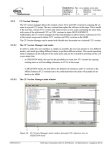
Figure 7–2 : The TSCV main window
The ’Main Window’ contains a set of menus used to control the application, and some panel items showing
TSCV data and CGS status. Subwindows are opened when the user activates menu items where the label
ends with three dots. The subwindows are in general unique for the function associated with the menu item
that brings them up. Some exceptions do however exist:
Copyright per DIN 34