1
PVR - Recording and Playing back
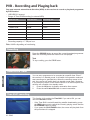
You must connect external hard disk drive (HDD) to this receiver to record or play back programme
Basic
Function
by PVR function.
-
USB HDD 2.0 support
Range of Time Shift/Recording (in external HDD)
Disk free size
-
Time shift size
Recording size
below 200MB
0
0
200MB~700MB
disk free size
0
700MB~10GB
500MB
remain
10GB~20GB
1GB
remain
20GB~40GB
2GB
remain
40GB~80GB
4GB
remain
More than 80GB
8GB
remain
Recording capacity: 1.7 GB per hour
Note: It differs depending on broadcasting.
Recording
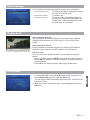
Press the RECORD button to record the current broadcast programme.
When the recording starts the Record icon is displayed.
Note
To stop recording, press the STOP button.
Reservation Timer
ENGLISH
You can set a programme to be recorded at a specific time. Even if
the receiver is in standby mode, it will switch into operation mode and
start recording at a specified time. When the recording comes to the
end, the receiver will switch back into standby mode again. However,
if you press any button on the remote control or on the front panel, the
receiver will not switch into standby mode.
1.
Press the OK button to display reservation timer screen.
2.
Press the ▲/▼/◄/►/OK button to record reservation.
Time Shift recording
This function is for setting the Time Shift. If you set to ON, you can
use the Time Shift function.
- If the Time Shift is set while watching satellite broadcasting, press
the REW button once to rewind the currently playing screen and the
PLAY/PAUSE button to pause.
- If you press the PLAY/PAUSE button, the screen will play back from
the point where it is stopped.
10 - ENG