1
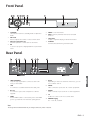
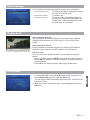
Front Panel
1
2
3
4
2
5
6
7
8
3
1. STANDBY
Switches the receiver to Standby Mode or Operation
Mode
5. MENU To see main menu.
2. VOL ◄/►
Press to adjust the volume or select a menu item.
7. SEG. DISP.
4-digit 7-segment display channel information.
3. CH ▲/▼( Program ▲/▼)
Channel Up/Down or select item of sub-menu.
8. USB Port
Connect the USB memory with USB cable.
6. EXIT Exit from parameter and cancel selected
function.
4. OK
To select a program, a highlighted line or parameter
value.
Rear Panel
1
2
3
4
5
6
7
8
9
1. LOOP THROUGH
Loop through Signal O/P to connect to other STB
using co-axial cable.
5. 0/12V
Depending on the user’s antenna switch box, you can
choose either 0V/12V.
2. LNB
To connect to a satellite antenna and cable jacks.
6. VIDEO
Video connection port to the TV or other equipment.
3. RS-232
To connect to a personal computer for software
upgrade.
7. AUDIO
Audio connection port to the TV or other equipment.
4. HDMI
Use the HDMI cable to connect this jack to the HDMI
jack on your television for the best quality picture.
8. TV
TV OUT To connect a TV via a coaxial cable.
9. POWER Supply
90 ~ 250V AC, 50/60Hz.
Note
The design of the Front/Rear Panel may be changed without any notice in advance.
ENG - 3
ENGLISH
Made by Kaonmedia