1
Risk Management Tools
User Manual
10/27/2014
Disclaimer
Futures trading is not suitable for all investors, and involves the risk of loss. Futures are a leveraged investment, and because
only a percentage of a contract’s value is required to trade, it is possible to lose more than the amount of money deposited for
a futures position. Therefore, traders should only use funds that they can afford to lose without affecting their lifestyles. And
only a portion of those funds should be devoted to any one trade because they cannot expect to profit on every trade.
All references to options refer to options on futures.
CME Group is a trademark of CME Group Inc. The Globe Logo, CME, Chicago Mercantile Exchange, Globex, iLink, E-mini, CME
EOS Trader, Galax-C, FirmSoft, CME DataSuite, and CME DataMine are trademarks of Chicago Mercantile Exchange Inc. New
York Mercantile Exchange, NYMEX, miNY, and ClearPort are registered trademarks of the New York Mercantile Exchange, Inc.
COMEX is a trademark of Commodity Exchange, Inc.
FIX™ and FAST™ are trademarks of FIX Protocol Limited. FIX/FASTsm is a service mark of FIX Protocol Limited.
Dow Jonessm, Dow Jones AIG Commodity Indexsm, The Dow sm, Dow Jones Industrial Averagesm, and DJIAsm are service
marks of Dow Jones & Company, Inc. and American International Group, Inc. (AIG) and have been licensed for use for certain
purposes by the Board of Trade of the City of Chicago, Inc (CBOT®). CBOT futures and options on futures contracts based on the
Dow Jones Industrial Averagesm are not sponsored, endorsed, sold or promoted by Dow Jonessm, and Dow Jonessm makes no
representation regarding the advisability of trading such product(s).
BM&FBOVESPA™ is a trademark of BM&FBOVESPA, KRX™ is a trademark of Korea Exchange, DME™ is a trademark of Dubai
Mercantile Exchange, BMD™ is a trademark of Bursa Malaysia, BMV™ is a trademark of Bolsa Mexicana De Valores.
All other trademarks are the property of their respective owners.
The information within this document has been compiled by CME Group for general purposes only. CME Group assumes no
responsibility for any errors or omissions. Additionally, all examples in this brochure are hypothetical situations, used for
explanation purposes only, and should not be considered investment advice or the results of actual market experience.
All matters pertaining to rules and specifications herein are made subject to and are superseded by official CME, CBOT, and
NYMEX rules. Current rules should be consulted in all cases concerning contract specifications.
Copyright © 2014 CME Group Inc. All rights reserved.
Table of Contents
Table of Contents
CME Group Risk Management Tools
Obtain Access
Login and Logout
Login
Logout
Additional Resources
What's New
CME Globex Credit Controls (GC2)
Time Frame for Changes
GC2 Window
Set Up the Credit Control Parameters
Set Exposure Limits and/or Max Quantity Limits
Advanced Settings
Add, Update or Delete Email Address for Notifications
To Update an Email Address
To Delete an Email Address
Email Notification Messages
Manage Executing Firm ID - Exchange Groups
Modify a Group
Set Up a New Group
GC2 Reports
Limits by Legal Clearing Entity
Max Positions by Exchange Firm
Partner Exchange
Dynamic Clip Size
Prior to Trading
During Trading
Dynamic Clip Size Parameters
Dynamic Clip Size Example
Prior to Trading
During Trading
Position Calculations
Spread Order Calculations
Spread Adjustment Factor
Conditions for Spread Adjustment Factor Application
Working Order Spread Calculation
Working Summary
Spread Calculation Examples
Terminology
Risk Management Interface (RMI)
Unblock Accounts
Block Accounts
Manage Pending Blocks
Instruction History
5
6
6
6
6
6
7
9
10
10
12
13
14
16
17
17
17
18
19
22
24
24
24
25
26
26
26
26
27
27
27
29
30
30
30
31
31
32
34
37
38
40
42
43
User Manual - 3 -
Table of Contents
RMI Reports
DSF Access Manager
Permission Accounts
View Active Permissions
Revoke Active Permissions
Account Rules
Kill Switch
Primary Features
Access Kill Switch
Enforcing Kill Switch
Administrators
Administrator Permissioning
Additional Rules
Message Impact
Blocked Messages
Non-Blocked Messages
iLink Kill Switch Messages
Execution Firm
Dashboard
Execution Firm Kill / Unkill
Kill Switch Execution Firm Reports
Legal Clearing Entity
Dashboard
Legal Clearing Entity Kill / Unkill
Kill Switch Legal Clearing Entity Reports
- 4 - User Manual
45
46
46
48
48
50
51
51
51
52
53
53
54
55
55
55
56
57
57
58
58
60
60
61
61
Risk Management Tools
Please submit user experience feedback about this help system.
CME Group Risk Management Tools
CME Group Risk Management Tools is a browser-based application that is permissioned by account for access to the following:
CME Globex Credit Controls (GC2), the Risk Management Interface (RMI), Deliverable Swap Futures (DSF) and Kill Switch.
Depending on permissioning, administrators may not have access to all tools. Risk administrators are issued a SMART Click ID
and password to log into the application. A CME Clearing Member Firm (CMF)1 or exchange partner Clearing administrator
authorizes access to the risk administrator for one or more of the following functions:
l
CME Globex Credit Controls (GC2) - set pre-execution credit control limits on futures and options.
l
Risk Management Interface (RMI) - block/prevent and unblock/allow orders and cross-requests from being entered or
modified by Execution Firm accounts. Also, view and generate reports for blocked, unblocked, and cancelled orders.
l
Deliverable Swap Futures (DSF) Access Manager - positively permission accounts so DSF products may be traded during
the DSF pre-settlement blocked window.
l
Kill Switch - provides a Globex Orders Kill function for the following levels: Legal Clearing Entity, Execution Firm and
Sender Comp.
Access the Risk Management Tools login: https://risktools.cmegroup.com/
Note: Only versions of Chrome and Internet Explorer released in the most recent 12-month period will be certified and
supported.
Note: If you receive a message from the browser indicating that this file is restricted, click the message and select Allow
Blocked Content.
Learn about any of the following functions:
l
CME Globex Credit Controls (GC2)
l
Risk Management Interface (RMI)
l
DSF Access Manager
l
Kill Switch
1The CME Group Class A Clearing Member Firm
- 5 - User Manual
Risk Management Tools
Obtain Access
Only authorized CME Group Clearing Firm or partner exchange Clearing Firm administrators will have the capability to authorize
access for new risk administrators. Risk administrators will need a SmartClick ID to access CME Group Risk Management Tools.
Obtain Access to CME Group Risk Management Tools:
1. A clearing firm or partner exchange clearing administrator completes the Exhibit C of the Schedule 6 of the Customer
Connection Agreement and faxes or emails the form to your Global Account Manager.
Note: Executing Firms will need to have their clearing firm(s) submit a Schedule 6 Exhibit F on their behalf to access
Kill Switch.”
3. The Global Account Manager verifies the paperwork and coordinates across CME Group departments to ensure processing of the request.
4. The Global Account Manager contacts the clearing firm or partner exchange clearing firm when the new user has been
granted access.
Login and Logout
If you forget a username or password, request for it to be retrieved through the SMART Click online application.
The account is locked out after more than five login attempts, and administrators must contact the CME Group Global
Command Center (GCC) for a username and password reset.
Additional SMARTClick information:
SMARTClick instructions at: http://www.cmegroup.com/tools-information/webhelp/smart-click/Default.html.
Note: Click the following link to view a video that describes the SMART Click registration and access process:
SMART Click Video
Note: For SMART Click support and troubleshooting, contact Enterprise Application & System Entitlements (EASE). If
changes are required to your SMARTClick password or ID, access SMARTClick with your current login information, or, if
you have forgotten your ID or password, follow the appropriate links on the page.
Login
To login:
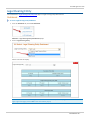
Access CME Group Risk Management Tools at https://risktools.cmegroup.com/ using the SMART Click ID and password.
Logout
Closing the CME Group Risk Management Tools window will NOT terminate the session. Risk Administrators must log out of the
application.
To log out:
From the Risk Management Tools window, click Logout.
Additional Resources
l
l
Client Systems Wiki
Risk Management Video
User Manual - 6 -
Risk Management Tools
What's New
The following content has been updated or added to the Risk Management Tools Help system:
Date
Author
Topic
Description
10/27/14 JK
1. CME Group Risk Management Tools
1. Updated Login section with SmartClick update information.
4/28/14
1. Globex Credit Controls
1. Exposure limits added to newly created firms or exchanges will
take effect at 16:45 CST each weeknight or upon Sunday start-up.
2. Enforcing Kill Switch
2. Added: The SenderCompID (FIX Tag 49) is made up of Session ID
(first three characters), Firm ID (second three characters), and
Fault Tolerance (last character).
JK
4/15/14
JK
All
Updated links and edited to meet Help standards.
3/2/14
JK
Set Exposure Limits and/or
Max Quantity Limits
Updates for Exposure Limit:.
l
Minimum Exposure Limit level is $0.5M.
l
Increase from $0.5M in $0.1M increments.
l
Only one decimal place to the right is recognized.
12/13/13 JK
CME Group Risk
Management Tools
Roles of RMI Risk Admin and GC2 Risk Admin are combined.
10/18/13 JK
DSF Access Manager (new) Added content for DSF Access Manager and Kill Switch topics.
Kill Switch (new)
Added Kill Switch Reports.
Partner Exchange report
Added Partner Exchange report.
Updated images on various pages.
8/26/13
JK
CME Globex Credit
Controls (GC2)
Updated "Newly created execution firms..." and "Newly added
exchanges..." bullet points.
6/21/13
JK
CME Globex Credit
Controls
See "Dynamic Clip Size"
Advanced Settings
Updated text / table header on CME GC2 page (GC2 Features / Time
Frame for Changes)
Updated text on Dynamic Clip Size page (Prior to Trading).
Updated images on Advanced Settings page.
4/30/13
NU
Regroup Exchanges
CME Globex Credit
Controls (GC2)
Updated warning that required changes are effective upon the next
Sunday start-up.
8/11/12
NU
Basics of Position
Calculations
Instruction History
RMI Reports
Global
Updated example.
Added Filter functionality.
Added topic.
Streamlined topics and expanded What's New section.
3/23/12
NU
General/Instruction
History
- 7 - User Manual
l
Updated RMI sections to rename Pending Block tab to Create
Block tab.
l
Added Export to Excel description to RMI Instruction History.
Risk Management Tools
Date
Author
Topic
2/24/12
NU
General/Risk Management
Interface Basics
Description
l
Incorporated Risk Management Interface (RMI) functionality,
including a new RMI section.
l
The Risk Management Tools GUI was renamed from
CME Globex Credit Controls to now support both CME Globex
Credit Controls (GC2) and a new Risk Management Interface
(RMI). All graphics updated to reflect renaming of Credit Controls tab.
User Manual - 8 -
Risk Management Tools
CME Globex Credit Controls (GC2)
CME Globex Credit Controls (GC2) is a front-end application that provides pre-execution risk controls that enable Clearing Firm
or Partner Exchange Clearing Firm risk administrators to set exposure limits for order and trade activity transacted
on CME Globex and cleared by CME Clearing. The Clearing firm or partner exchange Clearing firm risk administrators can
choose a set of real-time actions to follow if specified limits are breached, including e-mail notifications, order blocking, and
order cancellation.
GC2 Features include:
l
Exposure Limits - set Exposure Limits for Futures and Options. GC2 exposure limits are applied to:
l
Exposure Limit Futures Long
l
Exposure Limit Futures Short
l
Exposure Limit Options Long
l
Exposure Limit Options Short
The Exposure Limit entered in the Exposure Limit field is applied to both Long and Short.
l
Max Quantity Limits - in addition to Exposure Limits, the risk administrator can enter the optional Max Quantity Limit
Clip Size for Buy/Sell Futures and/or Buy/Sell Options for the grouping.
l
Open and Filled Position Calculations - open and filled positions are calculated for a product complex per Executing
Firm ID / Exchange group.
l
Advanced Settings - used to set a reference margin rate.
l
Newly created execution firms will have a “0” exposure limit. This means that the firm is blocked. The clearing firm
admin must enter a value to enable trading.
l
Newly added exchanges will have a “0” exposure limit and will appear in a separate tab. This means that the firm is
blocked for the newly added exchanges. The clearing firm admin must enter a value to enable trading.
l
Exposure limits added to newly created firms or exchanges will take effect at 16:45 CST each weeknight or upon
Sunday start-up.
l
If the customer wishes to re-group the exchanges, the change will take place upon the next Sunday start-up.
For detailed information about GC2 calculations, see:
l
Dynamic Clip Size
l
Position Calculations
- 9 - User Manual
Risk Management Tools
Time Frame for Changes
The following table summarizes when various types of changes take effect for CME Globex Credit Controls (GC2).
l
Clearing firms have the ability to apply exposure limits to Executing Firm IDs created on or transferred mid-week. Limits are applied by 16:45 CST.
l
Filled positions are not carried over between trading days and are reset to zero at 16:30 Central Standard Time (CST).
Type of Change
Realtime
16:30-16:45 each week
night or upon Sunday
start-up
Exposure Limits
X
Max Quantity Limits
X
Executing Firm ID / Exchange
Regroupings
Next Sunday Start-up
X
New Firms
X
Clearing Mapping Relationships
X
GC2 Window
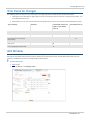
The GC2 window incorporates Execution Firm ID / Exchange group functionality, whereby predefined groups display on the
tabs and the associated credit control parameters display for the selected active tab. The GC2 Risk Administrator uses this
window to establish the parameters for CME Globex Credit Controls.
To access this screen:
1. Login to GC2.
2. From the GC2 tab, click Manage Limits.
User Manual - 10 -
Risk Management Tools
To select a firm:
From the GC2 tab, select the Legal Clearing Firm and Execution Firms from the drop-down lists.
This window has four sections.
Window Section
Description
Credit Controls Management
Area
The GC2 Risk Administrator must enter the appropriate Exposure Limit for Futures and
Options for the Executing Firm ID / Exchange group.
Note: Uncheck the No Max Limit checkbox to enter Max Quantity Limits.
In addition to the Exposure Limits, the GC2 Risk Administrator can enter the Max
Quantity Limit Clip Size for Buy/Sell Futures or Buy/Sell Options for the group.
Note: If both Exposure Limits and Max Quantity Limits are set, the most conservative
value is used.
The Exposure Limit for futures and options and Max Quantity Limit Clip Size must be set
for each respective Executing Firm ID / Exchange group.
Current Position Area
Total Futures Long = Sum of all weighted quantity open long futures orders + Sum of all
weighted long fills – Sum of all weighted short fills.
Total Futures Short = Sum of all weighted quantity open short futures orders + Sum of
all weighted short fills – Sum of all weighted long fills
Total Options Long= Sum of all weighted quantity open long options orders + Sum of all
weighted long fills – Sum of all weighted short fills.
Total Options Short = Sum of all weighted quantity open short options orders + Sum of
all weighted short fills – Sum of all weighted long fills.
Note: Click the Refresh button to update the Current Positions area.
Notifications
This area identifies the 3 threshold percentages when notifications occur. The area also
identifies the email address(es) of the recipient(s) of the alerts when the 100%
threshold is reached. These percentages are selected by the GC2 Risk Administrator.
Note: At least one email address must be entered per Executing Firm ID / Exchange
group.
Credit Control Alerts
Displays the alerts based on the current position(s) and threshold percentage.
Note: In addition, this window has a Kill Trading button, an emergency switch that blocks all subsequent order entry at the
Legal Clearing Entity and Executing Firm ID.
- 11 - User Manual
Risk Management Tools
Set Up the Credit Control Parameters
To set up CME Globex Credit Controls, follow these steps:
1. Select the Firm.
2. Manage the Executing Firm ID / Exchange Groupings.
3. Enter the Exposure Limits and/or Max Quantity Limits.
4. Set Notification Percentages.
5. Add, Update or Delete an Email Address for Notifications.
Click the following links to learn more:
l
Dynamic Clip Size
l
Position Calculations
User Manual - 12 -
Risk Management Tools
Set Exposure Limits and/or Max Quantity Limits
There are two sections to this panel. The GC2 Risk Administrator may enter an Exposure Limit for futures Long/Short and
options Long/Short and/or Max Quantity Limit for both Buy/Sell Futures and Buy/Sell Options.
To Modify the Exposure Limit:
1. Enter the Futures and Options Exposure Limit.
Note: Minimum Exposure Limit level is $0.5M. Increase from $0.5M in $0.1M increments.
Note: Exposure Limit field recognizes only one decimal point to the right (for example, 1.3M).
2. Click Save if there are no other changes.
To Modify the Max Quantity Limit:
1. Uncheck the No Max Limit checkboxes.
2. Enter the Buy Max Quantity Limit for Futures.
3. Enter the Sell Max Quantity Limit for Futures.
4. Enter the Buy Max Quantity Limit for Options.
5. Enter the Sell Max Quantity Limit for Options.
6. Click Save when finished.
- 13 - User Manual
Risk Management Tools
Advanced Settings
To set advanced settings:
1. Click Advanced Settings on the GC2 window.
The Advanced Settings pop-up displays.
User Manual - 14 -
Risk Management Tools
2. Select the Futures Margin Rate from the drop-down list.
3. Select the Options Margin Rate from the drop-down list.
4. Click Save when finished.
To set notification percentage:
1. Select the Notification percentages for up to three levels.
2. Click Save when finished.
- 15 - User Manual
Risk Management Tools
Add, Update or Delete Email Address for Notifications
GC2 allows you to manage email addresses to be notified when the percentage of exposure limit is reached.
To add an Email address:
1. Select up to three percentage threshold check boxes.
2. Click Add .
3. Type the Email Address and click OK.
4. Click Save when finished.
Proceed to one of the following procedures to modify the email address:
l
Update an Email Address
l
Delete an Email Address
User Manual - 16 -
Risk Management Tools
To Update an Email Address
1. Select the check box next to the Email Address that requires updating.
2. Click Update.
3. Modify the email Address and click OK.
4. Click Save when finished.
To Delete an Email Address
1. Select the check box next to the Email Address that needs to be deleted.
2. Click Delete .
3. Click OK .
4. Click Save when finished.
Email Notification Messages
The following figure displays an example email notification from CME Group.
- 17 - User Manual
Risk Management Tools
Manage Executing Firm ID - Exchange Groups
Regroup exchanges, modify a group, or set up a new group.
Regroup exchanges
Modify a group
Set up a new group
Use the Regroup Exchanges function to create or modify an Executing Firm ID/Exchange group.
To navigate to the Regroup Exchanges Window:
1. From the GC2 menu, click Regroup Exchanges.
Warning: If modifications are required, changes are effective upon the next Sunday start-up.
The two current groups in the figure correspond to the tabs on the GC2 main window.
2. From this window, the GC2 Risk Administrator can modify or set up a new group. Select the appropriate link:
l
To Modify a Group
l
To Set Up a New Group
User Manual - 18 -
Risk Management Tools
Modify a Group
To modify a group:
1. Drag the exchange button to a different group. In this example, the MGE exchange was moved to the second group.
2. Click Next when all exchanges have been moved to the correct group(s).
3. Verify or modify the following for the Current Group:
l
Exposure Limits for Futures and Options
l
Max Quantity Limit Buy and Sell for Futures and Options.
l
Notification Percentages
l
Email Addresses for Notifications
- 19 - User Manual
Risk Management Tools
4. Click Next Tab.
User Manual - 20 -
Risk Management Tools
5. Verify or modify the following for the Current Group:
l
Exposure Limits for Futures and Options
l
Max Quantity Limit Buy and Sell for Futures and Options
l
Notification Percentages
l
Email Addresses for Notifications
Note: For every Executing Firm ID / Exchange tab, there must be Exposure Limits and/or Max Quantity Limits set. In
addition, there must be at least one email address for notification alerts.
6. Click Add in the Email Addresses area and enter the email address.
7. Click Save when finished.
GC2 displays a message that the modifications were successfully made.
8. Click OK.
9. Click OK on the GC2 window.
The following message displays.
10. Click OK to respond to this message.
Note: Click the Cancel button to revert to the previous settings.
- 21 - User Manual
Risk Management Tools
Set Up a New Group
To set up a new group:
1. Navigate to the Regroup Exchanges window.
2. Click the New Group button at the bottom of the window.
3. Drag the appropriate exchanges from the Current Group (first) to the New Group (second). In this example, COMEX,
KCB and MGE were moved to the New Group.
4. Click the Next button.
User Manual - 22 -
Risk Management Tools
5. Verify or modify the following for the Current Group (first):
l
Exposure Limits for Futures and Options
l
Max Quantity Limit Buy and Sell for Futures and Options
l
Notification Percentages
l
Email Addresses for Notifications
6. Click the Next button when finished.
7. Enter the following for the New Group (second):
l
Exposure Limits for Futures and Options
l
Max Quantity Limit Buy and Sell for Futures and Options
l
Notification Percentages
l
Email Addresses for Notifications
Warning: You are required to enter Exposure Limits and/or Max Quantity Limits. In addition at least one email
address must be entered for the notification alerts.
8. Click Save when finished or click Cancel to revert to the existing group settings.
GC2 displays a message that the modifications were successfully made.
9. Click OK to respond to this message.
10. Click Next Tab when finished.
- 23 - User Manual
Risk Management Tools
GC2 Reports
To run a GC2 report:
From the CME Group Risk Management Tools window, point to Reports, then GC2.
Select one of the following options:
l
Limits by Legal Clearing Entity
l
Max Positions by Exchange Firm
l
Partner Exchange
Limits by Legal Clearing Entity
To run a Limits by Legal Clearing Entity report:
1. Select Reports >GC2> Limits by Legal Clearing Entity.
2. From the Legal Clearing Entity drop-down box, select a firm.
3. Click Run Report.
4. Depending on the browser being used, the file either automatically downloads or a dialog box displays with open / save
file options. If dialog box displays, take actions as appropriate.
Max Positions by Exchange Firm
User Manual - 24 -
Risk Management Tools
To run a Max Postions by Exchange Firm report:
1. Select Reports > GC2 > Max Positions by Exchange Firm.
2. Select the Legal Clearing Entity and the Execution Firm.
3. Enter the From Date and To Date.
4. Click Run Report.
5. Depending on the browser being used, the file either automatically downloads or a dialog box displays with open / save
file options. If dialog box displays, take actions as appropriate.
Partner Exchange
Generates the partner exchange limits that have been set.
To run a Partner Exchange report:
1. Select Reports >GC2> Partner Exchange >, and then select one of the following:
l
BMD
l
KRX
l
MGE
2. Click Run Report.
3. Depending on the browser being used, the file either automatically downloads or a dialog box displays with open / save
file options. If dialog box displays, take actions as appropriate.
- 25 - User Manual
Risk Management Tools
Dynamic Clip Size
Credit controls are enforced by means of maximum allowable order, known as "clip size." Clip size is dynamically calculated
based on real-time fill and open order calculations and a weighted average margin rate.
Note: In addition to dynamic clip size, the Risk Administrator has the ability to set a static maximum quantity limit. If the GC2
Risk Administrator sets this value, GC2 compares its dynamic calculation against the static limit, and enforces the smaller value,
as shown in this example.
Prior to Trading
At the beginning of the weekly trading session, prior to market open, GC2 requires an Initial Margin Reference Rate to
calculate an initial clip size.
For this calculation, if the GC2 Risk Administrator has set the reference margin rate, this value will be used for the initial clip size
calculation; otherwise, GC2 will use a default reference margin rate from a highly liquid product,for example, Eurodollars.
The initial clip size is calculated as:
(Exposure Limit - Current Calculated Position in USD) / Risk Administrator selected Reference Margin Rate (or default
Reference Margin Rate)
During Trading
During trading, GC2 calculates a Weighted Average Margin Rate based on the order/trade activity for the related Legal
Clearing Entity. The larger value of either the Weighted Average Margin Rate or the selected Margin Rate is used to calculate
the dynamic clip size, resulting in the selection of whichever generates the smaller clip size.
Clip Size = (Exposure Limit - Current Calculated Position in USD) / Risk Administrator selected Margin Rate
OR:
Clip Size = (Exposure Limit - Current Calculated Position in USD) / Weighted Reference Margin Rate
Tip: Weighted Reference Margin Rate = (Σ Quantity per instrument x Rate per Instrument) / (Σ Quantity per instrument)
Dynamic Clip Size Parameters
GC2 Calculates dynamic clip size according to the following formulae where:
Dynamic
Clip Size
= Exposure Limit
Futures Long
Exposure Limit
Futures Short
(minus)
Total Futures Long Margin
Total Futures Long Margin
= sum of long futures
order margins + sum of
long futures fill margins–
sum of short futures fill
margins
Total Futures Short Margin
Total Futures Short Margin
= sum of short futures
order margins + sum of
short futures fill margins –
sum of long futures fill
/
(divided by)
Futures Long Weighted Avg
Margin Rate
Total Futures Long Weighted
Avg. Margin Rate = Weighted
average sum of open long
futures orders + long futures
fills - short futures fills
Futures Short Weighted Avg
Margin Rate
Total Futures Short Weighted
Avg. Margin Rate = Weighted
average sum of open short
futures orders + short futures
User Manual - 26 -
Risk Management Tools
Exposure Limit
Options Long
Exposure Limit
Options Short
margins
fills – long futures fills
Total Options Long Margin
Options Long Weighted Avg
Margin Rate
Total Options Short Margin
= sum of short options
order margins + sum of
short options fill margins –
sum of long options fill
margins
Total Options Short Margin
Total Options Short Margin
= sum of short options
order margins + sum of
short options fill margins –
sum of long options fill
margins
Total Options Long Weighted
Avg. Margin Rate = Weighted
average sum of all open long
option orders + long option
fills – short option fills
Options Short Weighted Avg
Margin Rate
Total Options Short Weighted
Avg. Margin Rate = Weighted
average sum of all open short
options orders + short option
fills – long option fills
For Option Put orders, the side of that order is reversed for clip size position calculations and static clip sizes:
o
Long calls and Short puts are both applied against long option position calculations
o
Short call and Long puts are applied toward short option position calculations
Example:
The GC2 Risk Administrator sets the options long max qty limit=200, options short limit=100
Incoming new buy order 105 put options.
The order is rejected because it exceeds the options short limit of 100.
Dynamic Clip Size Example
This example depicts a $1,000,000 exposure limit distributed across three products.
Prior to Trading
Assume:
l
No reference margin rate selected by GC2 Risk Administrator. GC2 default is the Eurodollar Futures initial margin rate
of $750.
l
GC2 Risk Administrator sets a Max Quantity Limit (clip size) of 100
Initial clip size = $1,000,000 / 750 ($/contract)
= 1333 contracts
During Trading
When trading activity begins, GC2 calculates the dynamic clip size according to quantity and margin rate per product.
- 27 - User Manual
Risk Management Tools
Instrument Quantity Total
Quantity
Instrument
Total Trans- Total
Margin Rate action Mar- Long
gin
Margin
Long
Weighted
Avg
Margin Rate
Initial Clip Size Calculation
GC2
Dynamic
Clip Size
(1,000,000 –
0) / 750 =
1333
Eurodollar
futures
10
10
$750
$7500
$7500
7500 / 10 =
750
(1,000,0007500) / 750
= 1323
e-Mini Dow
$5 futures
2
12
$5200
$10,400
$17,900
17,900 / 12=
1491
(1,000,000 17,900) /
1491= 658
Gold futures 8
20
$1100
$8800
$26,700
26,700 / 20 =
1,335
(1,000,000 26,700) /
$1335 = 729
Eurodollar
futures
5
25
$750
$3750
$30,450
30,450 / 25 =
1218
(1,000,000 –
30,450) /
1218 = 796
Eurodollar
Futures
112
e-Mini Dow
$5 futures
12
37
$5200
$62,400
$92,850
92,850 / 37 =
2509
(1,000,000 –
92,850) /
2509 = 361
Gold futures 15
52
$1100
$16,500
$109,350
109,350 / 52
= 2102
(1,000,000 –
109,350) /
2102 = 423
e-Mini Dow
$5 futures
47
$5200
$26,000
$83,350
83,350 / 47=
1773
(1,000,000 –
83,350) /
1773 = 517
Gold futures 74
121
$1100
$81,400
$164,750
164,750 / 121
= 1361
(1,000,000 –
164,750) /
1361 = 613
e-Mini Dow
$5 futures
74
195
$5200
$384,800
$549,550
549,550 / 195
= 2817
(1,000,000 –
549,550) /
2817 = 159
e-Mini Dow
$5 futures
74
269
$5200
$384,800
$934,350
3473
(1,000,000 –
934,350) /
3473 = 19
Eurodollar
futures
25
CANCEL
5
Risk
Admin
Max
Limit
$750
$750
100
ORDER REJECTED – Max Quantity Limit
Exceeded
ORDER REJECTED – Clip Limit Exceeded
User Manual - 28 -
Risk Management Tools
Position Calculations
Current position totals are calculated as overall long and short positions for both futures and options per Executing Firm ID. The
current position totals are defined as the margin rate multiplied by the number of contracts which is an aggregate of open
orders and fills per product complex. Product complex values are then aggregated to the total overall position.
l
Quotes (Mass Quotes) are not included in open position calculations, but fills resulting from quotes are included in the
filled and total position.
l
The following are included in the filled and total position, but not the open position.
l
User Defined Spreads (UDS) covered instruments
l
Positions are maintained separately for each futures product complex and for each options product complex. Then
futures product complex positions are aggregated and options product complex positions are aggregated.
l
Positions are calculated continuously. Filled Positions are reset at the end of each trade day at 16:30 CST.
Note: Good 'til Cancel (GTC) and Good 'til Day (GTD) orders are included in the position calculation for the given
Executing Firm ID / Exchange group at the beginning of the trading week.
l
Submitted orders that trigger a violation at 100% of the limit will not be rejected as long as the order does not violate
the dynamic clip size. Any subsequent orders will be rejected.
Click this link to learn more about Spread Order Calculations.
- 29 - User Manual
Risk Management Tools
Spread Order Calculations
GC2 nets out the working exposure for both positions as long as both Buy/Sell sides exist for the spread, and applies a Spread
Adjustment Factor to all working spread orders.
Spread Adjustment Factor
The Spread Adjustment Factor is a single percentage value applied to all qualifying spreads and only applicable to working
spread orders. The spread’s working margin value is “unwound”, or recalculated, if the spread order’s open quantity matches
partially. (See Example 4 below). The Spread Adjustment Factor:
l
is calculated to a maximum of two decimals places
l
is always a positive value
l
is configurable by designated Exchange personnel only
l
if the Spread Adjustment Factor value is reconfigured, the new value is applied to incoming spread orders at the start
of the next day’s trading session
Conditions for Spread Adjustment Factor Application
All of the following conditions must be valid before the Spread Adjustment Factor is applied:
1. The spread legs are in the same Product Complex. Current Product Complexes include Agriculture, Energy, Environmental, Equity Index, FX, Interest Rates , Metals, and Weather.
2. The spread legs are all within the same Product Type, which is either "all futures" or "all options".
l
The Spread Adjustment Factor is not applied to spread types that have both Futures and Options, for example
Covereds.
3. For futures spreads, the spread contains at least one buy leg and one sell leg.
4. For options spreads, the spread contains at least one buy leg and one sell leg and/or one call and one put.
5. All the spread legs are within the same Control Group. Control Group is the product/Legal Clearing Entity relationship
defined by the Risk Administrator.
6. In conditions where a spread has some legs which qualify for the Spread Adjustment Factor and some leg(s) do not:
l
For the legs which do qualify, the Spread Adjustment Factor and the resulting working margin will be applied to
the associated group, Executing Firm ID / Exchange.
l
For the leg(s) which do not qualify, GC2 applies the full margin rates to the associated group, Executing Firm ID /
Exchange.
Spread Adjustment Factor Application and Exception Examples
Intra-Commodity Future Spread
For a Eurodollar bundle, the Spread Adjustment Factor does not apply because all the
future legs are on the same side.
Intra-Commodity Covered (single
option leg and single future leg)
For 10-yr Note option call covered by the 10-yr Note future, the Spread Adjustment
Factor does not apply because the spread crosses over futures and options Product
Types.
Inter-Exchange Future Spread
across Control Groups
For DME/NYMEX energy future calendar spread, the Spread Adjustment Factor does
not apply if the Risk Admin defined the DME and NYMEX across two Control Groups. If
the Risk Admin has grouped them in the same Control Group, then the Spread
Adjustment Factor would apply.
Intra-Commodity Covered (two
option legs and single future leg)
For Eurodollar Put Vertical covered with a Eurodollar future, the Put Vertical – by
definition – includes two different option legs (same month but different strikes). In this
User Manual - 30 -
Risk Management Tools
Spread Adjustment Factor Application and Exception Examples
case, the entire spread will not qualify for the Spread Adjustment Factor because at
least two of the legs cross over Product Types (i.e. the spread is not “all futures” or “all
options”).
Intra-Commodity Option Spread
across Control Groups
Assume a 10-leg generic UDS is created wherein 6 of the legs are CBOT option
products (buy call and put options) and the other 4 legs are CME option products (sell
put options). The Risk Admin has CBOT and CME products in separate Control Groups.
The 6 CBOT option legs will have the Spread Adjustment Factor applied because the call
and put options offset. The resulting working margin will be applied to the CBOT Control
Group.
The 4 CME option legs will not have the Spread Adjustment Factor applied because the
put options do not offset. Each of the four options’ full margin rates will be applied to
the CME’s Control Group’s working margin.
Note: GC2 enforces Inter-Exchange Spreads (IES) at the leg-level. Breach of the exposure limit on one or more of the exchange
groups, results in the rejection of the IES order.
Working Order Spread Calculation
When a spread meets the criteria specified above, the following calculations are applied:
Calculate Value A = Spread’s total margin
Calculate Value B = Spread's total margin in absolute value
terms
Value A is the sum of:
l
the spread order quantity (+/- for buy/sell)
l
multiplied by each leg’s buy/sell ratio (+/- for
buy/sell)
l
multiplied by each leg’s margin rate as seeded from
the ref file
Value B is the sum of:
l
the spread order quantity
l
multiplied by each leg’s buy/sell leg Ratio
l
multiplied by each leg’s margin rate
l
If Value A is positive then the working long value is
Value A + Value C
l
If Value A is zero or negative then the working long
value is Value C
l
If Value A is negative then the working short value is
Value A - Value C
l
If value A is zero or positive then the working short
value is -1 multiplied by Value C
Calculate Value C = Value B multiplied by the Spread
Adjustment Factor
Determine the spread’s working long value
Determine the spread’s working short value
Working Summary
- 31 - User Manual
Risk Management Tools
Working Long
Working Short
If Value A is positive
Value A + Value
C
-1 * Value C
If Value A is negative
Value C
Value A – Value
C
If Value A is zero
Value C
-1 * Value C
Spread Calculation Examples
Example 1 - Inter-Commodity Futures Spread
BUY 1 CORN vs WHEAT Future Calendar Spread (+2:-1) Ratio
CORN Margin = $1500, WHEAT Margin = $2500
Value A = Corn (1 order qty * 1500 margin * 2 leg ratio) - Wheat (1 order qty * 2500 margin * -1 leg ratio)
(3000 - 2500) <or> 500
Value B = abs (1 order qty * 1500 margin * 2 leg ratio) + abs (1 order qty * 2500 margin * -1 leg ratio)
Value C = (Value B * Spread Adjustment Factor) <or> (5500 * 0.10) <or> 550
Determine working long value
Since Value A is positive then working long for Corn is equal to (Value A + Value C) or (500 + 550) or 1050
Determine working short value
Since Value A is positive then working short for Wheat is equal to (-1 * Value C) or (-1 * 550) or -550
Example 2 - Intra-Commodity Futures Spread
Sell 3 CORN Future vs CORN Futures Calendar Spread (1:-1) Ratio
CORN Margin $2000
Value A = Corn (-3 * 2000 * 1) + Corn (-3 * 2000 * -1) = 0
Value B = abs (3 * 2000 * -1) + abs (3 * 2000 * 1) = 12000
Value C = Value B * Spread Adjustment Factor <or> (12000 * 0.10) = 1200
Determine working long value
Since Value A is zero then the working long value is Value C or $1200
Determine working short value
Since Value A is zero then the working short value is (-1 * Value C) or (-1 * $1200) or -1200
Example 3 - Intra-Commodity Options Spread
Buy 100 eMini S&P Strangles (1put: 1call ratio)
Put Margin = -$280; Call Margin = $200
Value A = Put (100 * -280 * 1) + Call (100 * 200 * 1) = -8000
User Manual - 32 -
Risk Management Tools
Value B = abs (100 * -280 * 1) + abs (100 * 200 * 1) = 48000
Value C = Value B * Spread Adjustment Factor <or> (48000 * 0.10) = 4800
Determine working long value
Since Value A is negative then the working long value is Value C or $4800
Determine working short value
Since Value A is negative then working short value is (Value A - Value C) or (-8000 – 4800) or -12800
Example 4 - Unwinding a Partially Matched Futures Spread
1. Assume the margin results of Example 3:
-A buy order of 100 eMini S&P Strangles is resting on the book
-Working Long = 4800 and Working Short = -12800
Buy 100 eMini S&P Strangles
Total Long ---------Total Short
4800 ----------------- -12800
2. An incoming 25-lot order matches. 25 strangles fill and 75 strangles remain.
Value A = Put (75* -280 * 1) + Call (75 * 200 * 1) = -6000
Value B = abs (75* -280 * 1) + abs (75* 200 * 1) = 36000
Value C = Value B * Spread Adjustment Factor <or> (36000 * 0.10) = 3600
Determine working long value
Since Value A is negative then the working long value is Value C or $3600
Determine working short value
Since Value A is negative then working short value is (Value A - Value C) or (-6000 – 3600) or -9600
Calculate Longs:
-Call = 25 qty* 200=5000
Calculate Shorts:
-Put =25 qty * 280-7000
Total Long = Working Long + Longs - Shorts
-Total Long = 3600 + 5000 - 7000
-Total Long = $1600
Total Short = Working Short + Shorts - Longs
-Total Short = 9600 + 7000 - 5000
-Total Short = 11600
Buy 75 eMini S&P 500 Strangles
Bought 25 Calls
Bought 25 Puts
Total Long --------- Total Short
1600 --------------- -11600
- 33 - User Manual
Risk Management Tools
Terminology
Term
Provided By
Risk
Administrator
Definition
Buy Futures
Y
The Buy Futures area on the GC2 window that enables the GC2
Risk Administrator to set Max Quantity Limit for a futures "buy"
order.
Buy Options
Y
The Buy Options area on the GC2 window that enables the GC2
Risk Administrator to set Max Quantity Limit for an options "buy"
order.
Clip Size
Y
Maximum quantity per order.
CME Globex API ID
N
Also called Executing Firm ID.
Clearing Firm
N
The CME Group or partner exchange Clearing member firm.
Clearing Firm Administrator
N
Individual at the Clearing firm who has the capability to enter
and change risk parameters for GC2.
Control Group
N
Logical grouping of Executing Firm ID / Exchange within a Legal
Clearing Entity (LCE).
Covered Spread
N
Buying and selling option(s) and future(s) to achieve delta
neutrality (i.e. insulate the option leg(s) from price risk) .
Example: Buying 10 50-delta eMini S&P Dec call options and
selling 5 eMini S&P Dec futures.
Credit Control Alerts
Y
GC2 displays exposure limit and clip size alerts.
Current Positions - Futures
N
The area on the GC2 window which details the long and short
futures positions. The position is based on the margin rate and
defined in U.S. dollars.
Current Positions - Options
N
The area on the GC2 window which details the long and short
options positions. The position is based on the margin rate
defined in U.S. dollars.
Dynamic Clip Size
N
The maximum order quantity which is dynamically calculated by
the tool.
Exchange
N
An organization, incorporated or unincorporated, that
constitutes, maintains, or provides a marketplace or facilities for
bringing together purchasers and sellers of securities or futures.
Examples: CBOT, CME, NYMEX, COMEX and KCBT.
Exchange Defined Spread (EDS)
N
Spreads whose legs are defined by the Exchange. EDS is the only
way by which future spreads are defined. There is no EDS for
options.
Executing Firm ID
N
A logical entity allowed to trade products in accordance with its
User Manual - 34 -
Risk Management Tools
Term
Provided By
Risk
Administrator
Definition
clearing relationships. The Executing Firm ID is three digits long
and is alphanumeric or just numeric. Sometimes this coincides
with the Clearing Firm ID. Executing Firm ID is synonymous with:
Executing Firm, CME Globex API / CME Globex API ID, Trading
Member Firm (TMF) / Trading Firm, and Badge Firm.
Exposure Limit
Y
The GC2 Risk Administrator must set the exposure limits per
Executing Firm ID / Exchange for:
l
Futures overall exposure limit in USD (no default, a value
must be set)
l
Options overall exposure limit in USD (no default, a value
must be set)
If a position reaches the exposure limit at 100%, CME Globex
rejects all new orders and cancel/replace messages on the
exceeding side. A cancel message is accepted.
Inter-Exchange Spread
N
Buying and selling the same future but on different Exchanges
Example: NYMEX July Wheat vs KCBT Oct Wheat
Inter-Market Spread
N
All legs are in a similar underlying asset. Buying one future in a
given delivery month and selling a different future in the same
delivery month.
Example: Crack Spread = Crude Oil vs.Unleaded Gasoline and
Heating Oil
Example: Crush spread = Soybeans vs Soybean Oil and Soybean
Meal
Intra-Commodity Spread
N
Buying and selling the same future but for different months
Example: Buy July Wheat and sell Dec Wheat .
Legal Clearing Entity (LCE)
N
GC2 Entity is defined as the Clearing firm which legally
guarantees trades executed for a single Executing Firm on CME
Globex. The clearing firm may clear products from a single or
multiple exchanges.
GC2 Entity is defined as the combination of Legal Clearing Entity
+ Executing Firm ID + Exchange
Max Quantity Limits
Y
In addition to entering the Exposure Limits, the risk
administrator can enter the optional Max Quantity Limit Clip Size
for Buy/Sell Futures and/or Buy/Sell Options for the grouping.
Notifications
Y
The Clearing Firm or partner exchange risk administrator can
specify the percentage of utilized limit at which to receive a
credit control alert.
Product Complex
N
Describes a group of products belonging to a given economic
sector or market segment which include: Agriculture, Credit,
Economic Events, Energy, Equity Index, FX, Interest Rates or
- 35 - User Manual
Risk Management Tools
Term
Provided By
Risk
Administrator
Definition
Metals.
Reference Margin Rate
Y
A contract of reference is selected on GC2 to determine the
initial reference margin rate using in calculating the dynamic clip
size.
Risk Administrator
N
Defines the daily exposure limits per Executing Firm ID/
Exchange group using GC2.
Sell Futures
Y
The Sell Futures area on the CME Globex Credit Controls
window where the GC2 Risk Administrator sets Max Quantity
Limit for a futures "sell" order.
Sell Options
Y
The Sell Options area on the GC2 window where the GC2 Risk
Administrator sets Max Quantity limit for an options "sell" order.
Spread Adjustment Factor
N
A positive single percentage value that is universally applied for
all qualifying spreads.
User Defined Spread (UDS)
N
Spreads whose legs are defined by the client.
UDS are the only way by which option spreads and Covereds
can be created. There are no UDS for futures.
Weighted Margin Rate
N
This value is dynamically calculated by GC2 based on all the
contracts the Executing Firm ID / Exchange group is trading.
User Manual - 36 -
Risk Management Tools
Risk Management Interface (RMI)
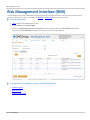
The Risk Management Interface (RMI) allows authorized Clearing Firm risk administrators to manage market exposure of their
respective execution firms, at the account level, by Blocking or Unblocking the entry of all new orders.
To view or manage blocks:
1. Login to CME Group Risk Management Tools.
2. From the RMI tab, click Block/Unblock.
3. Select the Legal Clearing Entity and Execution Firm from the drop-down boxes. The Active Blocks tab populates.
The bottom of the Active Blocks tab displays the number of results and page navigation:
To manage active or pending blocks, proceed to one of the following topics:
l
Unblock Accounts
l
Block Accounts
l
Manage Pending Blocks
- 37 - User Manual
Risk Management Tools
Unblock Accounts
Trading member firms can resume trading only if the Clearing firm risk administrator unblocks the account through RMI.
To unblock actively blocked accounts:
1. From the RMI tab, click Block/Unblock.
2. Select the Legal Clearing Firm and Execution Firms from the drop-down lists.
3. From the Active Blocks tab, select the check box for the Account(s) to Unblock. By default, all currently active blocks
for all accounts belonging to the selected execution firm are populated in the list, regardless of which system or user
applied the blocks. The total number of blocks and page navigation display at the bottom of this tab.
To narrow an account search, click Filters, select search criteria, then click Apply:
Note: To clear the check box selections and to refresh the screen view, click
as needed.
3. Click Unblock.
User Manual - 38 -
Risk Management Tools
4. A pop-up message confirms the unblock. Click OK to proceed.
5. A pop-up message indicates the unblock was successful. Click OK.
Unblocking an account removes the criteria from the Risk Management Interface. Active blocks will never appear on
the Create Blocks tab, as they are independent of one another.
To block another account, refer to Block Accounts.
- 39 - User Manual
Risk Management Tools
Block Accounts
The RMI Risk Administrator can set order entry blocks from a specific Execution Firm account, defined by Product Type
(Options or Futures), Product, and Side (Buy or Sell) restrictions.
To block an account:
1. From the RMI tab, click Block/Unblock.
2. Select the Legal Clearing Firm and Execution Firms from the drop-down lists.
3. From the Create Blocks tab, either add a new account name or select one from the Account List box.
To enter a new account, from the Account box, type an Account name, then click
.
The Account name copies to the Account List box, where it remains until RMI session logout.
3. From the Account List box, click the account name for which to set block criteria.
4. Filter the block criteria as needed by clicking any of the following drop-down boxes:
l
Exchange
l
Derivative Type- All Derivative Types, Futures, Options. Selecting a Derivative Type without selecting a Product
blocks all Products for the selected type.
l
Complex Type - All Complex Types, Commodities, Energy, Equities, Interest Rate CBOT, Interest Rate CME
l
l
Product - Click a product to block. Select multiple products by pressing either Ctrl + click, or Shift + click. Side- All Sides, Buy, Sell.
If you do not select any criteria, ALL is selected by default.
5. Click Add. The selection appears in the Pending Blocks section of the screen.
User Manual - 40 -
Risk Management Tools
6. Select the check box next to the account to block, then click Block.
7. A pop-up message confirms the block. Click OK to proceed.
8. A pop-up message indicates the block was successful. Click OK.
When an account is Blocked, it appears in the list on the Active Blocks tab, where it can then be Unblocked.
To make any changes to a selected pending block, proceed to Manage Pending Block.
- 41 - User Manual
Risk Management Tools
Manage Pending Blocks
The Create Blocks tab of RMI lists all accounts that have not yet been blocked from activity.
After setting block criteria and adding the selected accounts to the Pending Blocks section, RMI Risk Administrators can use the
following buttons to manage any of the accounts for which they have selected check boxes:
Button
Description
Clears all selected check boxes for accounts in the Pending Blocks section.
Removes accounts with selected check boxes from the Pending Blocks section.
Removes all accounts from the Pending Blocks section, even if check boxes are not selected.
For additional information, see how to Block or Unblock an account.
User Manual - 42 -
Risk Management Tools
Instruction History
The RMI Instruction History function allows the RMI Risk Administrator to view, filter, and export the last 10 days of blocked,
unblocked and cancel activity within the Risk Management Interface (RMI).
To view Instruction History:
1. From the RMI tab, click Instruction History.
Note: When the number of results exceeds 5000 rows, click the Next or Previous buttons to navigate the result pages.
2. Select the Legal Clearing Firm and Execution Firms from the drop-down lists.
Perform any of the following actions to filter or sort the activity information:
l
To narrow an account search, click Filters, select search criteria, then click Apply:
- 43 - User Manual
Risk Management Tools
l
Click the From Date and To Date drop-down boxes to filter activity by specific dates within the last 10 days. After setting the date range, click Reload to update the search results.
l
Click any column heading to sort the results.
l
Click Refresh at any time to clear all sort/filter criteria and view most recent activity.
To export the activity information to Excel:
1. Click the Export to Excel icon. The File Download window appears, prompting to Open or Save the file.
2. Save the file in a desired location or Open the file to view the output:
User Manual - 44 -
Risk Management Tools
RMI Reports
To run an RMI report:
1. From the CME Group Risk Management Tools window, select Reports>RMI>Active Blocks by Legal Clearing Entity.
The following window displays:
1. From the Legal Clearing Entity drop-down box, select a firm.
2. Click Run Report.
3. Depending on the browser being used, file either automatically downloads or a dialog box displays with open / save file
options. If dialog box displays, take actions as appropriate.
- 45 - User Manual
Risk Management Tools
DSF Access Manager
Deliverable Swap Futures (DSF) contracts settle up with the delivery of the underlying swap from one clearing firm to another.
Globex accounts at Clearing Firms are blocked by CME Group from entering new buy or sell orders for deliverable swap futures
seven (7) calendar days before settlement of each contract. Use DSF Access Manager to positively permission accounts so
these products may be traded during the blocked window.
Note:
l
Not all deliverable products can be accessed during the blocked trading window. Use DSF Access Manager to view
products that are eligible for this feature.
l
All current and future Globex Credit Controls (GC2) administrators are automatically permissioned for the DSF Access
Manager. Both GC2 administrator rights and DSF Access Manager rights are granted simultaneously.
l
DSF Access Manager only blocks new buy and sell orders from getting to the matching engine during the blackout window. DSF Access Manager does not keep a record of any open orders or start of day positions. All open positions and
open working orders remain on the engine and in clearing until acted upon or expiration of the contract.
Use DSF Access Manager to:
l
Permission Accounts
l
View Active Permissions
l
Revoke Active Permissions
Permission Accounts
Permission accounts by entering account and selecting applicable products.
Note: Selected account and product information remains populated for the current session only.
To add permissions to an account:
1. From the DSF Access Manager tab, click Grant/Revoke Permission. DSF Access Manager - Grant/Revoke Permission
page displays.
2. Select Legal Clearing Entity and Execution Firm from the respective lists.
3. Click the Permission Account tab. Permission Account sections display.
User Manual - 46 -
Risk Management Tools
4. Enter Account.
l
To retain account information between Legal Clearing Entity / Execution Firm selections or to permission multiple accounts at once, click Copy to List, and repeat for as many accounts as needed.
Note: Accounts added to the Account List persist across different LCE and Execution Firm combinations only through
the duration of the DSF Access Manager’s current login. They are lost if browser is closed or DSF Access Manager logs
off. Account list is unique to the DSF Access Manager’s instance and is not shared across login session at the same time.
5. Select an Exchange.
6. Select one or more products, either:
l
Click one product to select that product.
l
Click one product and then use Click/CTRL to select non-continuous products.
l
Click one product and then use Click/Shift to select continuous products.
7. Select accounts (only needed for accounts have been moved to the account list), either:
l
Click one account to select that account.
l
Click one account and then use Click/CTRL to select non-continuous accounts.
l
Click one account and then use Click/Shift to select continuous accounts.
8. Click Add. Selected account / product combinations display in the Pending Permissions section.
Note: It may be necessary to scroll down to see options at the bottom of the page.
9. Do one of the following:
l
Click boxes adjacent to Account ID, and then click Grant to grant permissions for selected accounts to corresponding products. Click OK on confirmation page.
l
Click Select All and then click Grant to grant permission for all accounts to corresponding products. Click OK on
confirmation page.
l
Click Clear Selected to clear checked boxes.
l
Click Remove Selected to remove checked boxes from list.
l
Click Remove All to clear list.
Note: Once Grant has been clicked, selected accounts have access to trade immediately.
- 47 - User Manual
Risk Management Tools
View Active Permissions
To view active permissions:
1. From the DSF Access Manager tab, click Grant/Revoke Permission. DSF Access Manager - Grant/Revoke Permission
page displays.
2. Select Legal Clearing Entity and Execution Firm from the respective lists.
Active permissions display in the Active Permissions tab.
3. (Optional) To filter by criteria, click Filters, select appropriate criteria, and click Apply. Filtered rows are removed from
list and a message displays indicating filters are applied.
l
To cancel active filters, click Filters, click Cancel and then click Refresh. All active permissions display.
Revoke Active Permissions
To revoke active permissions:
1. From the DSF Access Manager tab, click Grant/Revoke Permission. DSF Access Manager - Grant/Revoke Permission
page displays.
2. Select Legal Clearing Entity and Execution Firm from the respective lists.
Active permissions display in the Active Permissions tab.
Note: It may be necessary to scroll down to see options at the bottom of the page.
User Manual - 48 -
Risk Management Tools
3. Do one of the following:
l
Click boxes adjacent to the accounts and corresponding products for which permissions are to be revoked.
l
Click Select All at the bottom of the page.
4. Click Revoke. Confirmation message appears.
5. Click OK. Selected accounts are removed from the Active Permissions list.
Note: Once Revoke has been clicked, selected accounts will not have access to trade immediately.
Note: If incorrect rows have been selected, click Cancel and Clear Selected at the bottom of the page.
- 49 - User Manual
Risk Management Tools
Account Rules
Note the following when creating accounts:
l
Permission is only granted to the account exactly as it is entered.
l
These special characters are not permitted: $ # % & ! * +
Same Account
Different Accounts
ABC1
ABBC1
#ABC1
ABC
$ABC
(ABC1
%ABC1
(-ABC1
&ABC1
1ABC
!ABC1
@ABC1
*ABC1
^ABC1
+ABC1
ACB1
abc1
ABC11
User Manual - 50 -
Risk Management Tools
Kill Switch
Kill Switch provides a Globex Orders Kill function for the following levels: Legal Clearing Entity, Execution Firm and Sender
Comp.
Use Kill Switch to shut down trading and influence conditions such as:
l
Extreme trading events
l
Market disruption
l
Market fairness
l
Systemic risks that runaway algorithms could pose
See Enforcing Kill Switch for more detailed information.
Primary Features
Kill Switch functionality includes:
l
Day Orders and Good Till messages are blocked when Kill Switch is invoked, however, Kill Switch will not cancel resting
Good Till or Day Orders when a market is “closed” or in the final “30 seconds” prior to an open.
l
Impacted customers are prevented from submitting any message other than what is required to keep alive the connection with the exchange (session management).
l
Only orders intended for CME core match engines are supported.
l
Customers receive a reject message with entity level and administrator role information.
l
Blocking takes less than one second, though the cascading cancellations may extend beyond this time frame.
See Message Impact for more detailed information.
Access Kill Switch
Kill Switch may be activated by the following administrator roles:
l
Legal Clearing Entity Admin
l
Execution Firm Admin
l
CME Admin
See Administrators on the Enforcing Kill Switch page for more detailed information on Administrator roles and permissions.
Access Kill Switch using:
l
Execution Firm
l
Legal Clearing Entity
- 51 - User Manual
Risk Management Tools
Enforcing Kill Switch
CME Kill Switch tool enables Legal Clearing Entity (LCE) risk administrators and Execution Firm risk administrators to
immediately block all new order entry and cancel all working orders.
The kill switch has three levels of kills that are enforced independently.
l
Sender Comp is the most granular level. The SenderCompID (FIX Tag 49) is made up of Session ID (first three characters), Firm ID (second three characters), and Fault Tolerance (last character).
l
Execution Firm (EF) is the next highest level and contains one or more Sender Comps assigned to an execution firm.
l
Legal Clearing Entity (LCE) is the highest level and contains one or more EFs which in turn contain one or more Sender
Comps.
Legal Clearing Entity 1
Execution Firm 1
Execution Firm 2
EF1 -
EF1 -
EF1 -
EF2 -
EF2 -
EF2 -
EF2 -
SenderComp1
SenderComp2
SenderComp3
SenderComp1
SenderComp2
SenderComp3
SenderComp4
These levels act as a hierarchy where higher level kills will affect all levels below. Examples from the table above:
l
IF EF1 - SenderComp1 is killed, all new order entry is prevented and all working orders are canceled for EF1 - SenderComp1.
l
If Execution Firm 1 is killed, all new order entry is prevented and all working orders are canceled for EF1-SenderComp1 through EF1-SenderComp3.
l
If Legal Clearing Entity 1 is killed, all new order entry is prevented and all working orders are canceled for all Execution Firms and Sender Comps that are cleared by Legal Clearing Entity 1.
User Manual - 52 -
Risk Management Tools
Administrators
The kill switch has three levels of risk administrators that can send kill/unkill instructions.
l
l
l
Execution Firm risk administrators can be granted access to Kill Switch by their LCEs.
l
Once permissioned, EF risk admins can send kill/unkill instructions for all Sender Comps under their Executing
firms. Kill/unkill instructions impact only exchanges to which the execution firm has access.
l
Multiple EF risk administrators can be permissioned for the same Execution Firm, in which case a kill applied by one
administrator can be removed by another.
l
EF risk administrators can view kills that are put on by LCE administrators or CME administrators but do not have
permission to change these kills/unkill instructions.
Legal Clearing Entity (LCE) GC2 risk administrators are automatically granted access to Kill Switch. They have permissions to kill/unkill the LCE, all Execution Firms that the LCE clears, and all Sender Comps that the LCE clears.
l
An LCE risk administrator is only able to kill/unkill activity at these levels for exchanges that the LCE clears.
l
If an Execution Firm clears CME at LCE 1 but clears CBT at LCE 2, a kill instruction sent by the risk admin at LCE 1
would only affect trading for CME.
l
LCE administrators are able to view kill/unkill status placed by EF administrators and CME administrators but not
change that status.
CME administrators have the ability to act as both EF administrators and LCE administrators.
l
When impersonating risk admins, CME risk administrators have identical rights as the role they are impersonating.
l
CME risk administrators have the ability to view kill/unkill status placed by EF risk administrators and LCE risk administrators but not change that status.
Administrator Permissioning
Administrator
Legal Clearing Entity (LCE)
Admin
Execution Firm Admin
CME Admin
- 53 - User Manual
May Clear:
l
Legal Clearing Entity
l
Execution Firm
l
Sender Comp
l
Execution Firm
l
Sender Comp
l
Legal Clearing Entity
l
Execution Firm
l
Sender Comp
Permissioned to:
l
Kill their own LCE for permissioned exchanges across all
EFs and Sender Comps.
l
Kill Execution Firms and Sender Comps orders that have
been Guaranteed by that LCE.
Kill Execution Firms and Sender Comps under their Executing
firms.
l
Kill any Legal Clearing Entity, Execution Firm and or Sender
Comp.
l
Kill all guaranteed exchanges for EFs and Sender Comps.
l
Use the Kill functions on behalf of any other Initiator (can
impersonate a CM or EF risk admin).
Risk Management Tools
Additional Rules
l
Kill states at different levels by different roles are independent of each other.
l
Multiple kills can be in place at the same time, however, an administrator cannot kill more than one entity at the same
level at the same time. For example, if three Sender Comps are to be killed, each requires a separate kill instruction.
l
An EF can put a kill on a single Sender Comp, multiple Sender Comps, or the entire EF.
l
An LCE can place kills on specific Sender Comps, the entire EF, or the entire LCE.
l
If there are multiple kills on a Sender Comp, they will have to be removed at each level before that Sender Comp is
completely unkilled.
l
A kill instruction placed at the Sender Comp level will remain in place until it is unkilled at the Sender Comp level;
regardless of whether kill/unkill instructions have been placed at other levels.
l
A kill instruction placed at the EF level will remain in place until it is unkilled at the EF level; regardless of whether
kill/unkill instructions have been placed at other levels.
l
A kill instruction placed at the LCE level will remain in place until it is unkilled at the LCE level; regardless of whether
kill/unkill instructions have been placed at other levels.
User Manual - 54 -
Risk Management Tools
Message Impact
Blocked Messages
The following message types are blocked when a kill is being enforced:
l
New Order
l
Cancel Replace
l
New Order Cross
l
Cancel
l
Order Status
l
Quote Request
l
Security Definition Request (to create a UDS – determine exchange ID based on first leg since although there could be
multiple groups there are no inter-exchange UDS)
l
Mass Quote (determine exchange ID based on first leg since there is only one exchange ID per instrument group)
l
Quote Cancel (applies only to cancel quotes for a specific instrument & instrument group)
l
Mass Cancel (applies only to cancel orders for a specific instrument & instrument group)
If a message is blocked due to kill switch, an order reject message will be generated for the customer.
Non-Blocked Messages
These messages will not be blocked since they could potentially encompass an exchange which is not supposed to be blocked:
l
Quote Cancel (cancel all quotes)
l
l
This message covers the entire options market. It is not possible to block this message based on a Kill Switch invocation of any one exchange or group of exchanges since the market maker could have working quotes belonging to
exchanges which do not come under the domain of that particular Kill Switch command.
Mass Cancel (cancel all orders for a market segment ID [match engine])
l
Market segments potentially envelope multiple exchanges. It is therefore not possible to block the Mass Cancel message based on a Kill Switch invocation for one exchange or group of exchanges, as a segment could be hosting other
exchanges which do not fall within the domain of that particular Kill Switch command.
Administrative messages which the trading entity uses to maintain its connection to Globex are allowed (for example,
heartbeat, sequence reset, resend).
- 55 - User Manual
Risk Management Tools
iLink Kill Switch Messages
iLink messages that may be used when Kill Switch is invoked.
Message
Example
Order reject because of Execution 8=FIX.4.29=15535=334=739369=83652=20131009Firm level block placed by CME
22:16:11.30549=CME50=G56=U17985N57=DUMMY143=US,IL45=83658=Kill Switch
enforced by CME for Executing Firm 9851028=Y10=202
Order reject because of Sender
Comp level block placed by
Execution Firm Admin
8=FIX.4.29=15535=334=739369=83652=2013100922:16:11.30549=CME50=G56=U17985N57=DUMMY143=US,IL45=83658=Kill Switch
enforced by EF for Sender Comp ID U179851028=Y10=202
Order reject because of LCE level
block placed by LCE Admin
8=FIX.4.29=15735=334=3498369=276752=2013101001:41:19.67549=CME50=G56=ZU8650N57=DUMMY143=US,IL45=276758=Kill Switch
enforced by LCE for Executing Firm 6501028=N10=022
Order Cancel ack
8=FIX.4.29=30935=834=734369=83252=2013100922:14:45.10949=CME50=G56=U17985N57=0J070143=US,IL1=123456=011=verylongo
rderID1314=017=82305:137870520=037=8210361888638=1
39=440=241=044=962048=80704754=155=GE59=060=2013100922:14:45.107107=GEZ8150=4151=0167=FUT
378=106432=201310101028=Y9717=ERIC110=079
Note: For Order Cancel ack the cancel type indicator(tag 378) is same as RMI(106).
User Manual - 56 -
Risk Management Tools
Execution Firm
View Dashboard or Execution Firm Kill/Unkill page as an Execution Firm Administrator.
Dashboard
To access Execution Firm Dashboard:
1. From the Kill Switch tab, select Firm Dashboard.
Kill Switch - Execution Firm Dashboard displays.
2. Select an Execution Firm.
Kills for selected Execution Firm display.
- 57 - User Manual
Risk Management Tools
Execution Firm Kill / Unkill
Use this page to Kill or Unkill Legal Exchanges at the Execution Firm and Sender Comp levels.
To utilize Execution Firm Kill/Unkill page:
1. From the Kill Switch tab, select Firm Kill/Unkill.
Kill Switch - Execution Firm Kill/Unkill page displays.
2. Select an Execution Firm from the list. Selected Execution Firm and associated Sender Comps display.
Note: The Sender Comps that display will depend on Administrator role.
3. Do one or more of the following:
l
Click Kill or Unkill for Execution Firm, and click the confirmation message.
l
Click Kill or Unkill for one or more Sender Comps, and click the respective confirmation messages.
Note: A kill can be made at the Execution Firm level by one administrator with the appropriate permissions, and one
or more Sender Comps can be killed by a different administrator with the appropriate permissions. Kills at all levels
must be cleared before the Execution Firm or Sender Comp can trade again.
Kill Switch Execution Firm Reports
Kill switch reports show all firms killed for an Execution Firm.
Note: If an execution firm has been selected previously in the Dashboard or Firm Kill/Unkill page, the report will automatically
populate with kills for that execution firm.
To run a Kill Switch report for an execution firm:
1. From the CME Group Risk Management Tools window, select Reports>Kill Switch> Firm Kill Switch, The Kill Switch - Execution Firm Report page displays.
User Manual - 58 -
Risk Management Tools
2. Select a firm from the Execution Firm drop-down box. Report populates.
l
To view active blocks only, click Active Blocks Only.
l
To export to an Excel spreadsheet, click the
- 59 - User Manual
icon.
Risk Management Tools
Legal Clearing Entity
View Dashboard or Legal Clearing Entity Kill/Unkill page as a Legal Clearing Entity Administrator.
Dashboard
To access Legal Clearing Entity Dashboard:
1. From the Kill Switch tab, select LCE Dashboard.
Kill Switch - Legal Clearing Entity Dashboard displays.
2. Select a Legal Clearing Entity.
Kills for selected LCE display.
Note: To Kill the LCE and all underlying Execution Firms and Sender Comps from this page, click the red Kill LCE in the
upper right of the page, and click OK on the confirmation pop-up.
User Manual - 60 -
Risk Management Tools
Legal Clearing Entity Kill / Unkill
Use this page to Kill or Unkill Legal Exchanges at the Legal Clearing Entity (LCE), Execution Firm, and Sender Comp levels.
To utilize the Legal Clearing Entity Kill/Unkill page:
1. From the Kill Switch tab, select LCE Kill/Unkill.
Kill Switch - Legal Clearing Entity Kill/Unkill page displays.
2. Select a Legal Clearing Entity from the list. Legal Clear Entity, Execution Firms and Sender Comps display for the selected LCE.
Note: The Execution Firms and Sender Comps that display will depend on Administrator Role.
3. Select an Execution Firm from the list (Optional). View is restricted by to selected Execution Firm.
4. Do one or more of the following:
l
Click Kill or Unkill for the Legal Clearing Entity, and click the confirmation message.
l
Click Kill or Unkill for one or more Execution Firms, and click the respective confirmation messages.
l
Click Kill or Unkill for one or more Sender Comps, and click the respective confirmation messages.
Kill Switch Legal Clearing Entity Reports
Kill switch reports show all firms killed for a Legal Clearing Entity (LCE).
Note: If an LCE has been selected previously in any section of Risk Management Tools, the report will automatically populate
with kills for that LCE.
To run a Kill Switch report for an execution firm:
1. From the CME Group Risk Management Tools window, select Reports>Kill Switch> Firm Kill Switch, - 61 - User Manual
Risk Management Tools
The Kill Switch - Legal Clearing Entity page displays.
2. Select a firm from the Legal Clearing Entity drop-down box. Report populates.
l
To view active blocks only, click Active Blocks Only.
l
To export to an Excel spreadsheet, click the
icon.
User Manual - 62 -