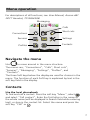
1
A short press on
or
before answering a call, silences
the ring signal.
Turn the microphone on/off during a call
Press “More”, select “Microphone on/off“, press “Select“. It is
also possible to turn the microphone on/off by a long press on
or
.
Lock/Unlock the keypad manually
Press
to lock/unlock and then soft key "Lock” or
Yes”. The icon
indicates a locked keypad.
Change the volume during a Call
Press
to increase the volume, and
to decrease the
volume. Or, use
and
on the Navigation key to adjust the
volume.
Charge the battery
Charging is done in a desktop charger or in a charging rack.
An orange LED on the handset indicates charging and when
the battery is fully charged, the LED is green and the icon
is
displayed.
While in a desktop charger, the handset is fully operational.
The handset does not vibrate in charger.
The battery can also be charged in a separate battery pack
charger.
Note: Charging below 5°C will harm the battery and shorten
the lifetime. It is NOT permitted to charge any battery in EX
classified areas.
Remove the battery
It is recommended to switch off the handset before removing
the battery.
6