1
Menu operation
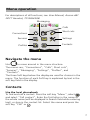
For descriptions of all functions; see User Manual, Ascom d81
DECT Handset, TD 92644GB.
Messaging
Calls
Connections
Short cuts
Services
Settings
Profiles
Contacts
Navigate the menu
Use
to move around in the menu structure.
The menus are; “Connections”, “Calls”, Short cuts”,
“Services”, “Messaging”, “Settings”, “Profiles”, and
“Contacts”.
The three Soft keys below the display are used for choices in the
menu. The function of each Soft key is explained by text in the
soft key field in the display.
Contacts
Use the local phonebook
To find and call a contact: Press the soft key “Menu“, select
,
and select “Call contact”. Enter the first letter in the name or
the whole name (will be displayed in Search field while entering
text), or step in the contact list. Select the name and press the
soft key “Call” or
.
7