1
i41CX+ Global Settings
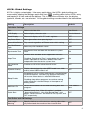
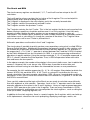
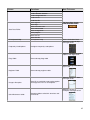
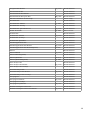
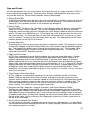
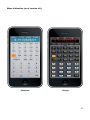
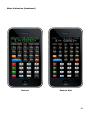
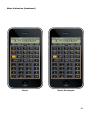
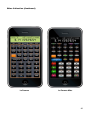
i41CX+ is highly customizable. Like many applications, the i41CX+ global settings are
accessed by tapping the Settings application icon (
), scrolling down to the i41CX+ entry
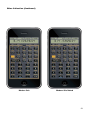
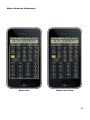
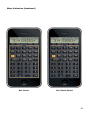
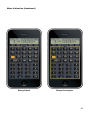
and tapping it to view and edit the options. This is where the calculator skin, the display
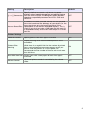
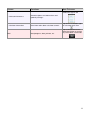
typeface, sounds, etc. are selected. All the global settings are described in the table below.
Setting
Description
Default
Skin
Select calculator skin
Neo Classic
LCD Display
Select display character style
Classic Normal
Stack Display
Show mini displays of Y, Z, T, and L registers
OFF
Key Press Glow
Show glow effect when pressing keys
OFF
Ignore Mute Switch
Play sounds regardless of iPhone mute switch setting
OFF
Key Click Sound
Type
Select key click feedback sound
New
Synchronize Time
Synchronize time and date with the device’s system
clock
ON
Calculator Settings
Maintain time and date across application launches.
Keep Time
Disabling “Synchronize Time” and enabling this option
makes it possible to maintain a different time zone
independent from the device system time.
ON
CV Calculator
Mode
Function as HP-41CV rather than HP-41CX
OFF
Dynamic Overlay
Display selected overlay when USER mode is on, hide
overlay when USER mode is off
OFF
Suspend all i41CX+ activity while device is locked/asleep
to conserve power. Activities (e.g. program execution)
will resume when device is unlocked/awakened.
Sleep Enable
ON
Disabling sleep allows programs to continue running
while the device is locked/asleep, at the expense of
battery power.
Mail Items To
Default email address to use when emailing data and
programs
Enter address
here
Quick Start
Reduce launch time. When this option is enabled,
“Ignore Mute Switch”, “Key Click Sound Type”, and
printer “Volume Control” are forced to OFF, System, and
OFF, respectively.
OFF
Text Editor and CAS Settings
Line Length
Warning
Specify whether to set the text to a warning color when
any line exceeds the maximum line character limit.
OFF
2