1
Exchanging data and programs
The 41 was so loved by the user community that people were doubling the clock speed and
adding all kinds of peripherals and memory. Using the HP-IL interface, the HP-41 could drive
any number of peripherals from line printers, to monitors, to tape printers, card readers,
barcode wands, tape memory cartridges and other custom devices. There seemed to be no
end to the number of riggings and devices associated with the little hand held computer.
Today, with the iPhone/iPod, in an even smaller format much of that capability can still be
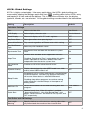
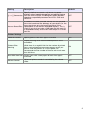
realized. i41CX+ supports an adjustable calculator speed and has flexible support for
exchanging information with other users and devices. It is possible to send and receive
emails with data or programs, transfer the printouts to a computer to create actual paper
printouts, download data, programs, overlays, modules, etc. from the web and even import
data and programs from the iPhone clipboard.
The ability to share data and programs via email would be extremely useful in a classroom
setting whereby the teacher could email the students some data and/or programs or vice
versa for handing in work. Of course, this could also become a conduit for cheating but
that's true of any modern device with communication capabilities... For example, let’s
suppose that you have a program entered into the calculator and wish to send it to another
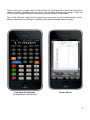
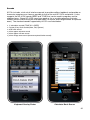
i41CX+ user. This is very simple with i41CX+. Just go to the back of the calculator and tap
the "Save Data" button. Scroll down to the label of the program that you wish to share and
tap the "Mail" button. A mail window with the program will pop up. Enter the destination
email address and send it.
Receiving data and programs from other users is even simpler. Suppose that you received an
email with i41CX+ data or program. Open the email that you received with the iPhone Mail
application and scroll down to the bottom and tap the "send to i41CX +" icon (the image with
an arrow pointing down to the i41CX+ icon). This will launch i41CX+ and you'll be asked to
confirm saving the program. If confirmed, it will show up in the "Load Data" picker from
where it can be loaded into the calculator's memory. An alternative way to accomplish this is
to email the program or data in an email, copy the program or data in the email on your
device, and use the "Import from clipboard..." item in the "Load Data" picker to save the
clipboard contents as a program or data file that you can then load into the calculator's
memory. This is useful to exchange data or programs with non-i41CX+ users or desktop
programs. Overlays can be imported in a similar fashion using the overlay picker.
Of course, i41CX+ also supports copy and paste of stack registers, Alpha register, printer
output, flags table, and registers table contents. Double tapping the main display provides
access to copy/paste operations from/to the X and Alpha registers depending on the status
of Alpha mode. Double tapping the printer paper roll, flags table, or registers table provides
the option to copy their contents. Double tapping the mini stack area provides access to
copypaste operations from/to the stack registers. Copy and paste operations are also
programmatically supported via the COPYA, COPYFLG, COPYPRT, COPYSTK, COPYX,
PASTEA, PASTER, and PASTEX functions.
All in all the i41CX+ elevates the iPhone/iPod Touch into being a serious calculating machine
capable of performing a virtually unlimited number of calculation tasks. Imagine going
through school and generating programs of each and every formula that is of importance as
you travel though your courses. They will always be available to you in the future with a
simple download.
19