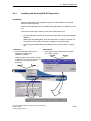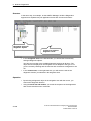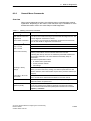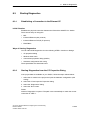
1
Preface, Contents
SIMATIC NET
S7-CPs for Industrial Ethernet
Configuring and Commissioning
Manual
Part A - General Application
Communication in S7 Stations
1
Characteristics of the Ethernet
CPs
2
Commissioning an Ethernet CP
3
SEND/RECEIVE
interface
4
Configuring Connections
5
Programmed Connections
6
FCs (Functions) and FBs
7
NCM S7 Diagnostics
8
Firmware Loader
9
Appendix A - E / Index
Release 09/2007
C79000 - G8976 - C182 - 08
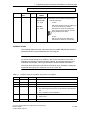
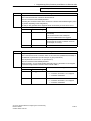
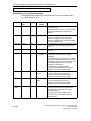
Classification of Safety-Related Notices
This manual contains notices which you should observe to ensure your own
personal safety, as well as to protect the product and connected equipment. These
notices are highlighted in the manual by a warning triangle and are marked as
follows according to the level of danger:
!
!
!
Danger
indicates that death or severe personal injury will result if proper precautions are
not taken.
Warning
indicates that death or severe personal injury can result if proper precautions are
not taken.
Caution
with warning triangle indicates that minor personal injury can result if proper
precautions are not taken.
Caution
without warning triangle indicates that damage to property can result if proper
precautions are not taken.
Notice
indicates that an undesirable result or status can occur if the relevant notice is
ignored.
Note
highlights important information on the product, using the product, or part of the
documentation that is of particular importance and that will be of benefit to the
user.
A-2
S7-CPs for Industrial Ethernet Configuring and Commissioning
Release 09/2007
C79000-G8976-C182-08
Trademarks
SIMATIC, SIMATIC HMI and SIMATIC NET are registered trademarks of
SIEMENS AG.
Third parties using for their own purposes any other names in this document which
refer to trademarks might infringe upon the rights of the trademark owners.
Safety Instructions Regarding your Product:
Before you use the product described here, read the safety instructions below
thoroughly.
Qualified Personnel
Only qualified personnel should be allowed to install and work on this equipment.
Qualified persons are defined as persons who are authorized to commission, to
ground, and to tag circuits, equipment, and systems in accordance with
established safety practices and standards.
Correct Usage of Hardware Products
Note the following
!
Warning
This device and its components may only be used for the applications described in
the catalog or the technical description, and only in connection with devices or
components from other manufacturers which have been approved or
recommended by Siemens.
This product can only function correctly and safely if it is transported, stored, set
up, and installed correctly, and operated and maintained as recommended.
Before you use the supplied sample programs or programs you have written
yourself, make certain that no injury to persons nor damage to equipment can
result in your plant or process.
EU Directive: Do not start up until you have established that the machine on which
you intend to run this component complies with the directive 89/392/EEC.
Correct Usage of Software Products
Note the following
!
Warning
This software may only be used for the applications described in the catalog or the
technical description, and only in connection with software products, devices, or
components from other manufacturers which have been approved or
recommended by Siemens.
Before you use the supplied sample programs or programs you have written
yourself, make certain that no injury to persons nor damage to equipment can
result in your plant or process.
S7-CPs for Industrial Ethernet Configuring and Commissioning
Release 09/2007
C79000-G8976-C182-08
A-3
Prior to Startup
Before putting the product into operation, note the following warning:
Caution
Prior to startup you must observe the instructions in the relevant documentation.
For ordering data of the documentation please refer to the catalogs or contact your
local SIEMENS representative.
Copyright Siemens AG 2001- 2007 All rights reserved
Disclaimer of Liability
The reproduction, transmission or use of this document or its contents is not
permitted without express written authority. Offenders will be liable for
damages. All rights, including rights created by patent grant or registration of
a utility model or design, are reserved.
We have checked the contents of this manual for agreement with the
hardware and software described. Since deviations cannot be precluded
entirely, we cannot guarantee full agreement. However, the data in this
manual are reviewed regularly and any necessary corrections included in
subsequent editions. Suggestions for improvement are welcomed.
Siemens AG
Automation and Drives
Industrial Communication
Postfach 4848, 90327 Nürnberg Germany
A-4
Siemens Aktiengesellschaft
S7-CPs
fortoIndustrial
Ethernet Configuring and Commissioning
Subject
technical change.
Release 09/2007
G79000- G8976- C182- 08
C79000-G8976-C182-08
This manual...
... supports you when commissioning your SIMATIC NET CP modules in an S7
station.
... supports you so that your applications can communicate successfully and
efficiently over the SIMATIC NET CPs.
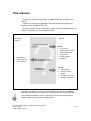
... in tandem with the “Primer” description, provides you with all the information you
require to implement your communications tasks:
Description
“Primer”
Manual
Operating S7 CPs with
STEP 7
familiarization
testing interfaces
commissioning
Learning from the
example
Installation /
commissioning
Part A
CP overviews
Communication services
Network attachment
Configuration
Program interface
Diagnostics
Part B
Characteristics
Operator controls/
displays
Operating instructions
Technical specifications
These two descriptions of your S7 CPs and NCM S7 are both on the SIMATIC
NET Manual Collection and on the paper version that can be ordered separately.
The examples described in “Primer” can also be found in the project folder for
sample programs after you have installed STEP 7.
S7-CPs for Industrial Ethernet Configuring and Commissioning
Release 09/2007
C79000-G8976-C182-08
A-5
This manual...
Audience
This manual is intended for personnel responsible for installing and programming
STEP 7 programs and for service personnel.
Scope of this Manual
This manual applies to version V5.x and higher of the NCM S7 configuration
software and to version V5.x and higher of the STEP 7 software.
Notice
If functions are described that require higher versions, this is indicated by an
additional icon.
Example:
Apart from various adaptations to the currently available devices, the following
topics are also included:
Additional information in the block description
New blocks for user programs of the CP 443-1:
- FC53 AG_SSEND
- FC63 AG_SRECV
With CPs of the S7-400, that support PROFINET communication in conjunction
with CPUs as of version 5.1, data can be transmitted at a higher transmission
rate using the FCs AG_SSEND and AG_SRECV.
Note
You should also check the History for this manual in Appendix F.
Notice
Please note that the availability of new functions depends on the device type you
are using. You can check which functions your module supports in the description
in the Properties dialog in STEP 7 and in the catalog in HW Config.
A-6
S7-CPs for Industrial Ethernet Configuring and Commissioning
Release 09/2007
C79000-G8976-C182-08
This manual...
The Documentation in the “S7-CPs / NCM S7” Documentation Package and on
the Internet
You can order this manual along with other documents in a manual package:
Order no. - German:
Order no. - English:
6GK7080-0AA01 8AA0
6GK7080-0AA01 8BA0
The following table provides you with an overview of the content and the
addresses for downloading from the Web.
Title
Configuring and
Commissioning S7-CPs
for Industrial Ethernet
Manual
Content / Web Addresses
This is available on the Web at:
General section:
http://support.automation.siemens.com/WW/view/en/8777865
Device descriptions:
CP 343-1 Lean (CX00):
*)
http://support.automation.siemens.com/WW/view/en/19308657
CP 343-1 Lean (CX10):
http://support.automation.siemens.com/WW/view/en/23643456
CP 343-1 (EX21):
*)
http://support.automation.siemens.com/WW/view/en/22259495
CP 343-1 (EX30):
http://support.automation.siemens.com/WW/view/en/24485272
CP 343-1 Advanced:
http://support.automation.siemens.com/WW/view/en/20736149
CP 343-1 (EX20/EX11): *)
http://support.automation.siemens.com/WW/view/en/8777308
CP 343-1 PN:
*)
http://support.automation.siemens.com/WW/view/en/8776538
CP 343-1 IT:
*)
http://support.automation.siemens.com/WW/view/en/8776544
CP 443-1 (EX11):
http://support.automation.siemens.com/WW/view/en/8776219
CP 443-1 (EX20):
http://support.automation.siemens.com/WW/view/en/26417141
CP 443-1 IT:
*)
http://support.automation.siemens.com/WW/view/en/8776322
CP 443-1 Advanced (EX40):
http://support.automation.siemens.com/WW/view/en/
19308871
CP 443-1 Advanced (EX41):
http://support.automation.siemens.com/WW/view/en/
23643789
IE/PB Link:
*)
http://support.automation.siemens.com/WW/view/en/
7851748
IE/PB Link PN IO:
http://support.automation.siemens.com/WW/view/en/
19299692
IWLAN/PB Link PN IO:
http://support.automation.siemens.com/WW/view/en/
21379908
S7-CPs for Industrial Ethernet Configuring and Commissioning
Release 09/2007
C79000-G8976-C182-08
A-7
This manual...
Title
Content / Web Addresses
NCM S7 for SIMATIC
NET S7-CPs
Primer
This is available on the Web at:
http://support.automation.siemens.com/WW/view/en/1172503
Information Technology This manual serves as instructions and as a reference for working with the CP
in SIMATIC S7 with CPs functions of Internet technology.
f S7
for
S7-300
300 and
d S7-400
S7 400
This is available on the Web at:
Manual
http://support.automation.siemens.com/WW/view/en/1172744
Commissioning PC
Stations
Manual and Quick Start
Commissioning PC
Stations
Manual and Quick Start
Configuring and
Commissioning S7-CPs
for PROFIBUS
The manual supports you and helps you to make efficient use of
communications with your PC applications in conjunction with the SIMATIC
NET modules. It shows you how to configure PC modules and the steps
required in project engineering with NCM S7.
This is available on the Web at:
http://support.automation.siemens.com/WW/view/en/13542666
You will find the Web addresses of the current documents of this manual at the
address shown below for the Version History.
Manual
NCM S7 for
PROFIBUS/FMS
This is available on the Web at:
http://support.automation.siemens.com/WW/view/en/1158418
*) Document is not part of the manual package
CP Documentation in the Manual Collection (Order no. A5E00069051)
The SIMATIC NET Manual Collection ships with each S7-CP. This DVD is
updated at regular intervals; this means that the DVD contains the latest device
manuals and descriptions available at the time the DVD was written.
Version History/Current Downloads for the SIMATIC NET S7-CPs
In the “Version History/Current Downloads for the SIMATIC NET S7-CPs”, you will
find information on all previously available CPs for SIMATIC S7 (Ind. Ethernet,
PROFIBUS and IE/PB Link).
You will find the latest release of these documents at:
http://support.automation.siemens.com/WW/view/en/
9836605
A-8
S7-CPs for Industrial Ethernet Configuring and Commissioning
Release 09/2007
C79000-G8976-C182-08
This manual...
Information on the Current Block Versions (FCs/FBs)
Please use the latest block versions for new user programs. You will find
information on the current block versions and can download the blocks from the
Internet at:
http://support.automation.siemens.com/WW/view/en/8797900
If you require replacements, please follow the instructions in the device-specific
Part B of this manual.
SIMATIC NET Quick Start CD: Samples covering all aspects of communication
The Quick Start CD that can be ordered separately is a
treasure-trove of sample programs and configurations.
You can order this directly over the Internet at:
http://support.automation.siemens.com/WW/view/en/21827955
Additional Information on SIMATIC S7 and STEP 7
The additional documentation on the basic software STEP 7 of the SIMATIC
programmable controllers is included in electronic format in your STEP 7
installation.
You will also find information on SIMATIC programmable controllers on the Quick
Start CD and from the Customer Support Online services at:
http://www.siemens.en/simatic-net General information
or
http://www.ad.siemens.de/csi/net Product information and downloads
S7-CPs for Industrial Ethernet Configuring and Commissioning
Release 09/2007
C79000-G8976-C182-08
A-9
This manual...
Symbols Used in this Manual
Unless indicated otherwise, the functions described in this manual assume the use
of STEP 7. This symbol is used to indicate functions that require a specific version
of STEP 7 or higher, for example Version V5.2.
This symbol appears in the margin to draw your attention to useful tips.
This symbol indicates recommended documentation.
Where you see this symbol, you should also refer to additional information in the
basic help system of STEP 7.
F1
This symbol indicates where detailed context-sensitive help is available. You can
display these help texts with the F1 key or by clicking on the “Help” button in the
relevant dialog.
Conventions
References to other manuals and documentation are indicated by numbers in
slashes /.../. These numbers refer to the titles of manuals listed in the References
section of the Appendix.
A-10
S7-CPs for Industrial Ethernet Configuring and Commissioning
Release 09/2007
C79000-G8976-C182-08
Contents
Contents
Contents - Part A
1
Communication via Ethernet CPs in S7 Stations . . . . . . . . . . . . . . . . . . . . . . . . .
1.1
Industrial Ethernet . . . . . . . . . . . . . . . . . . . . . . . . . . . . . . . . . . . . . . . . . . . .
A -16
1.2
1.2.1
1.2.2
1.2.3
SIMATIC S7 Communication with S7 Ethernet CPs . . . . . . . . . . . . . . .
Types of Communication . . . . . . . . . . . . . . . . . . . . . . . . . . . . . . . . . . . . . .
The Communication Services of Ethernet CPs . . . . . . . . . . . . . . . . . . .
Operation Using a Configured or Programmed Database . . . . . . . . . .
A -17
A -17
A -20
A -22
1.3
1.3.1
1.3.2
PG/OP Communication via Industrial Ethernet . . . . . . . . . . . . . . . . . . .
PG Communication with STEP 7 over Industrial Ethernet . . . . . . . . . .
OP Operation: Connecting Operator Interface Devices via Industrial
Ethernet . . . . . . . . . . . . . . . . . . . . . . . . . . . . . . . . . . . . . . . . . . . . . . . . . . . .
A -23
A -25
1.4
S7 Communication on Industrial Ethernet . . . . . . . . . . . . . . . . . . . . . . . .
A -27
1.5
S5-compatible Communication (SEND/RECEIVE Interface) ) . . . . . . .
A -31
1.6
FETCH/WRITE Services (Server) . . . . . . . . . . . . . . . . . . . . . . . . . . . . . .
A -34
1.7
1.7.1
1.7.2
Networking Stations with STEP 7 . . . . . . . . . . . . . . . . . . . . . . . . . . . . . . .
Network/Project Variant: One Subnet - One Project . . . . . . . . . . . . . . .
Network/Project Variant: SIMATIC S5 and Non-SIMATIC Devices on
the Subnet . . . . . . . . . . . . . . . . . . . . . . . . . . . . . . . . . . . . . . . . . . . . . . . . . .
Network/Project Variant: Two or More Subnets - One Project . . . . . .
Network/Project Variant: One Subnet - More Than One (Sub)Project
Network/Project Variant: Several Subnets in Several (Sub) Projects .
Network/Project Variant: Connections between Subnets (TCP/IP) . . .
A -35
A -37
A -38
A -39
A -40
A -43
A -45
Characteristics of the Ethernet CPs . . . . . . . . . . . . . . . . . . . . . . . . . . . . . . . . . . . . .
A-46
1.7.3
1.7.4
1.7.5
1.7.6
2
A-15
A -26
2.1
Communications Processors for S7-300 . . . . . . . . . . . . . . . . . . . . . . . . .
A -46
2.2
Communications Processors for S7-400 . . . . . . . . . . . . . . . . . . . . . . . . .
A -47
2.3
2.3.1
2.3.2
2.3.3
2.3.4
2.3.5
Slot Rules for SIMATIC S7-300 . . . . . . . . . . . . . . . . . . . . . . . . . . . . . . . .
Permissible Slots . . . . . . . . . . . . . . . . . . . . . . . . . . . . . . . . . . . . . . . . . . . . .
Number of SIMATIC NET CPs . . . . . . . . . . . . . . . . . . . . . . . . . . . . . . . . .
Multicomputing . . . . . . . . . . . . . . . . . . . . . . . . . . . . . . . . . . . . . . . . . . . . . . .
Removing / Inserting (Replacing Modules) . . . . . . . . . . . . . . . . . . . . . . .
Note on the S7-300 CPU: Connection Resources . . . . . . . . . . . . . . . . .
A -48
A -48
A -48
A -48
A -49
A -49
2.4
2.4.1
2.4.2
2.4.3
2.4.4
2.4.5
Slot Rules for SIMATIC S7-400 . . . . . . . . . . . . . . . . . . . . . . . . . . . . . . . .
Permissible Slots . . . . . . . . . . . . . . . . . . . . . . . . . . . . . . . . . . . . . . . . . . . . .
Number of SIMATIC NET CPs . . . . . . . . . . . . . . . . . . . . . . . . . . . . . . . . .
Multicomputing . . . . . . . . . . . . . . . . . . . . . . . . . . . . . . . . . . . . . . . . . . . . . . .
Removing / Inserting (Replacing Modules) . . . . . . . . . . . . . . . . . . . . . . .
Note on the S7-400 CPU: Connection Resources . . . . . . . . . . . . . . . . .
A -50
A -50
A -50
A -50
A -51
A -51
S7-CPs for Industrial Ethernet Configuring and Commissioning
Release 09/2007
C79000-G8976-C182-08
A-11
Contents
3
4
5
Operating the Ethernet CP with STEP 7/NCM S7 . . . . . . . . . . . . . . . . . . . . . . . . . .
A-52
3.1
How to Commission an Ethernet CP . . . . . . . . . . . . . . . . . . . . . . . . . . . .
A -53
3.2
General Information on STEP 7 / NCM S7 . . . . . . . . . . . . . . . . . . . . . . .
A -54
3.3
3.3.1
3.3.2
3.3.3
3.3.4
3.3.5
3.3.6
Configuring - Follow the Steps Below . . . . . . . . . . . . . . . . . . . . . . . . . . .
Creating an Industrial Ethernet Subnet . . . . . . . . . . . . . . . . . . . . . . . . . .
Entering an Ethernet CP in the Hardware Configuration . . . . . . . . . . .
Displaying the Network Attachments of a Station . . . . . . . . . . . . . . . . .
Setting Further CP Properties . . . . . . . . . . . . . . . . . . . . . . . . . . . . . . . . . .
“Substitute Objects” in the STEP 7 Project . . . . . . . . . . . . . . . . . . . . . . .
Configuring Communication Services . . . . . . . . . . . . . . . . . . . . . . . . . . .
A -55
A -56
A -59
A -62
A -64
A -74
A -77
3.4
3.4.1
3.4.2
Assigning Addresses for the First Time (Applies to Latest CPs) . . . . .
Addressing by Selecting the Target System in the SIMATIC Manager
Addressing using the Properties Dialog in HW Config or NetPro . . . .
A -78
A -79
A -81
3.5
Downloading the Configuration Data to the Target System . . . . . . . . .
A -82
SEND/RECEIVE Interface in the User Program . . . . . . . . . . . . . . . . . . . . . . . . . . . .
A-85
4.1
How the SEND/RECEIVE Interface Works on the CPU . . . . . . . . . . . .
A -86
4.2
Programming the SEND/RECEIVE Interface . . . . . . . . . . . . . . . . . . . . .
A -87
4.3
Data Exchange S7 CPU <-> Ethernet CP . . . . . . . . . . . . . . . . . . . . . . .
A -90
4.4
4.4.1
4.4.2
Additional Information . . . . . . . . . . . . . . . . . . . . . . . . . . . . . . . . . . . . . . . . .
Programming Data Transfer on TCP Connections . . . . . . . . . . . . . . . .
Recommendations for Use with a High Communications Load . . . . . .
A -92
A -92
A -93
Configuring Communication Connections . . . . . . . . . . . . . . . . . . . . . . . . . . . . . . .
A-94
A-12
5.1
Procedure . . . . . . . . . . . . . . . . . . . . . . . . . . . . . . . . . . . . . . . . . . . . . . . . . . .
A -95
5.2
Possible Connection Configurations . . . . . . . . . . . . . . . . . . . . . . . . . . . . .
A -96
5.3
5.3.1
5.3.2
5.3.3
5.3.4
Connections . . . . . . . . . . . . . . . . . . . . . . . . . . . . . . . . . . . . . . . . . . . . . . . . .
New Connection . . . . . . . . . . . . . . . . . . . . . . . . . . . . . . . . . . . . . . . . . . . . .
Connections to Partners in Other Projects . . . . . . . . . . . . . . . . . . . . . . .
Further Functions . . . . . . . . . . . . . . . . . . . . . . . . . . . . . . . . . . . . . . . . . . . .
Connections Without Assignment . . . . . . . . . . . . . . . . . . . . . . . . . . . . . . .
A -98
A -101
A -103
A -106
A -107
5.4
5.4.1
5.4.2
5.4.3
5.4.4
Configuring ISO Transport Connections . . . . . . . . . . . . . . . . . . . . . . . . .
Specifying the Local Connection Endpoint . . . . . . . . . . . . . . . . . . . . . . .
Specifying ISO Transport Addresses . . . . . . . . . . . . . . . . . . . . . . . . . . . .
Specifying ISO Transport Dynamic Properties . . . . . . . . . . . . . . . . . . . .
Checking ISO Transport Connection Properties . . . . . . . . . . . . . . . . . .
A -110
A -111
A -113
A -116
A -118
5.5
5.5.1
5.5.2
5.5.3
Configuring ISO-on-TCP Connections Properties . . . . . . . . . . . . . . . . .
Specifying the Local Connection Endpoint . . . . . . . . . . . . . . . . . . . . . . .
Specifying ISO-on-TCP Addresses . . . . . . . . . . . . . . . . . . . . . . . . . . . . .
Checking ISO-on-TCP Connection Properties . . . . . . . . . . . . . . . . . . . .
A -119
A -120
A -122
A -125
5.6
5.6.1
5.6.2
5.6.3
Configuring TCP Connection Properties . . . . . . . . . . . . . . . . . . . . . . . . .
Specifying the Local Connection Endpoint . . . . . . . . . . . . . . . . . . . . . . .
Specifying TCP Addresses . . . . . . . . . . . . . . . . . . . . . . . . . . . . . . . . . . . .
Checking TCP Connection Properties . . . . . . . . . . . . . . . . . . . . . . . . . . .
A -126
A -127
A -129
A -133
5.7
5.7.1
Configuring UDP Connection Properties . . . . . . . . . . . . . . . . . . . . . . . . .
Specifying the Local Connection Endpoint . . . . . . . . . . . . . . . . . . . . . . .
A -134
A -135
S7-CPs for Industrial Ethernet Configuring and Commissioning
Release 09/2007
C79000-G8976-C182-08
Contents
6
7
5.7.2
5.7.3
5.7.4
5.7.5
Specifying UDP Addresses . . . . . . . . . . . . . . . . . . . . . . . . . . . . . . . . . . . .
UDP with Broadcast and Multicast . . . . . . . . . . . . . . . . . . . . . . . . . . . . . .
Checking the Properties of a UDP Connection . . . . . . . . . . . . . . . . . . . .
Free UDP Connection . . . . . . . . . . . . . . . . . . . . . . . . . . . . . . . . . . . . . . . . .
A -137
A -141
A -147
A -148
5.8
FETCH/WRITE Mode . . . . . . . . . . . . . . . . . . . . . . . . . . . . . . . . . . . . . . . . .
A -149
5.9
Routing to Distribute Load . . . . . . . . . . . . . . . . . . . . . . . . . . . . . . . . . . . . .
A -153
Programmed Communication Connections . . . . . . . . . . . . . . . . . . . . . . . . . . . . . .
A-154
6.1
Overview . . . . . . . . . . . . . . . . . . . . . . . . . . . . . . . . . . . . . . . . . . . . . . . . . . . .
A -155
6.2
Procedure . . . . . . . . . . . . . . . . . . . . . . . . . . . . . . . . . . . . . . . . . . . . . . . . . . .
A -157
6.3
Configuration Data Block . . . . . . . . . . . . . . . . . . . . . . . . . . . . . . . . . . . . . .
A -158
6.4
Parameter Field for System Data
(CP Networking) . . . . . . . . . . . . . . . . . . . . . . . . . . . . . . . . . . . . . . . . . . . . .
A -162
6.5
6.5.1
6.5.2
6.5.3
6.5.4
6.5.5
Parameter Fields for Connection Types . . . . . . . . . . . . . . . . . . . . . . . . .
Parameter Field for TCP Connection . . . . . . . . . . . . . . . . . . . . . . . . . . . .
Parameter Field for a UDP Connection . . . . . . . . . . . . . . . . . . . . . . . . . .
Parameter Field for an ISO-on-TCP Connection . . . . . . . . . . . . . . . . . .
Parameter Field for an E-Mail Connection . . . . . . . . . . . . . . . . . . . . . . .
Parameter field for FTP connection . . . . . . . . . . . . . . . . . . . . . . . . . . . . .
A -164
A -165
A -166
A -167
A -168
A -170
6.6
Subfield types . . . . . . . . . . . . . . . . . . . . . . . . . . . . . . . . . . . . . . . . . . . . . . .
A -171
Programming FCs (Functions) and FBs for S7 Ethernet CPs . . . . . . . . . . . . . .
A-174
7.1
General Notes on FCs / FBs . . . . . . . . . . . . . . . . . . . . . . . . . . . . . . . . . . .
A -175
7.2
7.2.1
7.2.2
7.2.3
Setting Parameters for FC Calls . . . . . . . . . . . . . . . . . . . . . . . . . . . . . . .
Parameters for CP and Connection Assignment (input parameters) .
Parameters for Specifying a CPU Data Area (input parameters) . . . .
Status Information (output parameters) . . . . . . . . . . . . . . . . . . . . . . . . . .
A -178
A -178
A -179
A -180
7.3
7.3.1
7.3.2
FCs for the SEND/RECEIVE Interface . . . . . . . . . . . . . . . . . . . . . . . . . .
FC5 AG_SEND / FC50 AG_LSEND / FC53 AG_SSEND . . . . . . . . . .
FC6 AG_RECV / FC60 AG_LRECV / FC63 AG_SRECV . . . . . . . . . .
A -181
A -186
A -194
7.4
7.4.1
7.4.2
FCs for Access Coordination with FETCH/WRITE . . . . . . . . . . . . . . . .
FC7 AG_LOCK . . . . . . . . . . . . . . . . . . . . . . . . . . . . . . . . . . . . . . . . . . . . . .
FC8 AG_UNLOCK . . . . . . . . . . . . . . . . . . . . . . . . . . . . . . . . . . . . . . . . . . .
A -202
A -204
A -207
7.5
FC 10 AG_CNTRL . . . . . . . . . . . . . . . . . . . . . . . . . . . . . . . . . . . . . . . . . . .
A -209
7.6
FB55 IP_CONFIG for Programmed Communication Connections . . .
A -220
7.7
FB88 PN_InOut / FB90 PN_InOut_Fast blocks for PROFINET CBA .
A -227
7.8
7.8.1
7.8.2
7.8.3
7.8.4
7.8.5
7.8.6
7.8.7
FCs and FBs for PROFINET IO . . . . . . . . . . . . . . . . . . . . . . . . . . . . . . . .
FC11 PNIO_SEND . . . . . . . . . . . . . . . . . . . . . . . . . . . . . . . . . . . . . . . . . . .
FC12 PNIO_RECV . . . . . . . . . . . . . . . . . . . . . . . . . . . . . . . . . . . . . . . . . . .
General Response of the FCs for PROFINET IO . . . . . . . . . . . . . . . . .
Data Consistency . . . . . . . . . . . . . . . . . . . . . . . . . . . . . . . . . . . . . . . . . . . .
Substitute Values . . . . . . . . . . . . . . . . . . . . . . . . . . . . . . . . . . . . . . . . . . . . .
FB 52 PNIO_RW_REC . . . . . . . . . . . . . . . . . . . . . . . . . . . . . . . . . . . . . . .
FB 54 PNIO_ALARM . . . . . . . . . . . . . . . . . . . . . . . . . . . . . . . . . . . . . . . . .
A -233
A -234
A -239
A -244
A -245
A -246
A -247
A -252
7.9
Configuration limits / Resources Required by the FCs and FBs . . . . .
A -257
S7-CPs for Industrial Ethernet Configuring and Commissioning
Release 09/2007
C79000-G8976-C182-08
A-13
Contents
8
9
A
NCM S7 Diagnostics . . . . . . . . . . . . . . . . . . . . . . . . . . . . . . . . . . . . . . . . . . . . . . . . . . .
A-258
8.1
Overview . . . . . . . . . . . . . . . . . . . . . . . . . . . . . . . . . . . . . . . . . . . . . . . . . . . .
A -259
8.2
8.2.1
8.2.2
Functions of NCM S7 Diagnostics . . . . . . . . . . . . . . . . . . . . . . . . . . . . . .
Installing and Starting NCM S7 Diagnostics . . . . . . . . . . . . . . . . . . . . . .
General Menu Commands . . . . . . . . . . . . . . . . . . . . . . . . . . . . . . . . . . . . .
A -260
A -261
A -263
8.3
8.3.1
8.3.2
8.3.3
8.3.4
8.3.5
8.3.6
Starting Diagnostics . . . . . . . . . . . . . . . . . . . . . . . . . . . . . . . . . . . . . . . . . .
Establishing a Connection to the Ethernet CP . . . . . . . . . . . . . . . . . . . .
Starting Diagnostics from the CP Properties Dialog . . . . . . . . . . . . . . .
Starting Diagnostics from the Windows Start Menu . . . . . . . . . . . . . . .
Using a Gateway . . . . . . . . . . . . . . . . . . . . . . . . . . . . . . . . . . . . . . . . . . . . .
Using the PC Station - Setting a Gateway with “PC internal” . . . . . . .
Other Ways of Starting Diagnostics . . . . . . . . . . . . . . . . . . . . . . . . . . . . .
A -265
A -265
A -265
A -266
A -268
A -270
A -271
8.4
How to Use Diagnostics . . . . . . . . . . . . . . . . . . . . . . . . . . . . . . . . . . . . . . .
A -272
8.5
Starting Diagnostic Functions Explicitly . . . . . . . . . . . . . . . . . . . . . . . . . .
A -273
8.6
8.6.1
8.6.2
Checklist for “Typical Problems” in a System . . . . . . . . . . . . . . . . . . . . .
Checklist for General CP Functions . . . . . . . . . . . . . . . . . . . . . . . . . . . . .
Communication Connections Checklist . . . . . . . . . . . . . . . . . . . . . . . . . .
A -275
A -276
A -277
Firmware Loader . . . . . . . . . . . . . . . . . . . . . . . . . . . . . . . . . . . . . . . . . . . . . . . . . . . . . . .
A-278
9.1
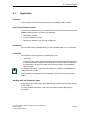
Application . . . . . . . . . . . . . . . . . . . . . . . . . . . . . . . . . . . . . . . . . . . . . . . . . .
A -279
9.2
Loading Firmware . . . . . . . . . . . . . . . . . . . . . . . . . . . . . . . . . . . . . . . . . . . .
A -280
Pinout . . . . . . . . . . . . . . . . . . . . . . . . . . . . . . . . . . . . . . . . . . . . . . . . . . . . . . . . . . . . . . . .
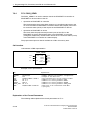
A-281
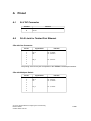
A.1
24 V DC Connector . . . . . . . . . . . . . . . . . . . . . . . . . . . . . . . . . . . . . . . . . . .
A -281
A.2
RJ-45 Jack for Twisted Pair Ethernet . . . . . . . . . . . . . . . . . . . . . . . . . . . .
A -281
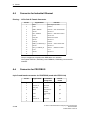
A.3
Connector for Industrial Ethernet . . . . . . . . . . . . . . . . . . . . . . . . . . . . . . .
A -282
A.4
Connector for PROFIBUS . . . . . . . . . . . . . . . . . . . . . . . . . . . . . . . . . . . . .
A -282
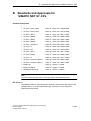
B
Standards and Approvals for SIMATIC NET S7-CPs . . . . . . . . . . . . . . . . . . . . . .
A-283
C
References and Literature . . . . . . . . . . . . . . . . . . . . . . . . . . . . . . . . . . . . . . . . . . . . . .
A-289
D
Glossary . . . . . . . . . . . . . . . . . . . . . . . . . . . . . . . . . . . . . . . . . . . . . . . . . . . . . . . . . . . . . .
A-293
D.1
General Section . . . . . . . . . . . . . . . . . . . . . . . . . . . . . . . . . . . . . . . . . . . . . .
A -293
D.2
Industrial Ethernet . . . . . . . . . . . . . . . . . . . . . . . . . . . . . . . . . . . . . . . . . . . .
A -298
D.3
PROFINET . . . . . . . . . . . . . . . . . . . . . . . . . . . . . . . . . . . . . . . . . . . . . . . . . .
A -300
E
Linking to Other Systems with FETCH/WRITE . . . . . . . . . . . . . . . . . . . . . . . . . . .
A-302
F
Document History . . . . . . . . . . . . . . . . . . . . . . . . . . . . . . . . . . . . . . . . . . . . . . . . . . . . . .
A-306
Index . . . . . . . . . . . . . . . . . . . . . . . . . . . . . . . . . . . . . . . . . . . . . . . . . . . . . . . . . . . . . . .
A-310
A-14
S7-CPs for Industrial Ethernet Configuring and Commissioning
Release 09/2007
C79000-G8976-C182-08
1
Communication via Ethernet CPs in S7
Stations
The Ethernet CP for SIMATIC S7 provides a series of communications services for
different tasks.
This chapter explains the following:
The types of communication possible with the Ethernet CP on Industrial
Ethernet
The tasks handled by the Ethernet CP for the various services
How to create the conditions for your communications requirements
You will find further information in the following sources:
When installing the Ethernet CP, please refer to the instructions in the manual
/2/ supplied with the Ethernet CP. This also contains further information about
the performance of the Ethernet CP .
For the functions and use of the STEP 7 configuration software, some of which
is used to configure the CP (such as hardware configuration), please refer to
/6/.
For using, structuring and handling Industrial Ethernet, you will find detailed
information in /10/.
For a general introduction to local area networks with TCP/IP refer to /12/ and
/13/.
S7-CPs for Industrial Ethernet Configuring and Commissioning
Release 09/2007
C79000-G8976-C182-08
A-15
1
Communication via Ethernet CPs in S7 Stations
1.1
Industrial Ethernet
Definition
Within the open, heterogeneous SIMATIC NET communication system, Industrial
Ethernet is the network for the management and cell level. Physically, Industrial
Ethernet is an electrical network that uses a shielded coaxial cable or twisted pair
or an optical network with fiber-optic cables.
Industrial Ethernet is defined by the international standard IEEE 802.3 (see /10/).
All-Round Communication in the Industrial Sector
Industrial Ethernet is integrated in the SIMATIC NET concept that allows
comprehensive networking of the management, cell and field levels in conjunction
with PROFINET / PROFIBUS and the AS-interface (AS-i).
Industrial
Ethernet
(IEEE 802.3)
PROFINET
PROFIBUS
(EN 50170 Vol. 2 PROFIBUS)
AS-Interface
(AS-i, Actuator-Sensor Interface)
Figure 1-1
Industrial Ethernet in the SIMATIC NET Concept
Network Access
Industrial Ethernet is accessed using the CSMA/CD (Carrier Sense Multiple
Access with Collision Detection) network access technique specified in
IEEE 802.3.
A-16
S7-CPs for Industrial Ethernet Configuring and Commissioning
Release 09/2007
C79000-G8976-C182-08
1
1.2
1.2.1
Communication via Ethernet CPs in S7 Stations
SIMATIC S7 Communication with S7 Ethernet CPs
Possible Types of Communication
The Ethernet CP for SIMATIC S7 supports the following types of communication
depending on the CP type:
Ethernet CP
Ethernet CP
S7-400
S7-300
Interfaces / Services /
Protocols
Possible types of communication
PG/OP communication
S7 communication
with the protocols
S5-compatible communication
with the SEND / RECEIVE interface and the protocols
-
ISO
-
TCP/IP (RFC 1006)
-
ISO Transport
-
ISO-on-TCP (TCP/IP with RFC 1006)
-
TCP
-
UDP
-
E-mail
with FETCH / WRITE services and the protocols
PROFINET IO
and
PROFINET CBA
HTML process control with
Web browser
File management and file
access with FTP
S7-CPs for Industrial Ethernet Configuring and Commissioning
Release 09/2007
C79000-G8976-C182-08
-
ISO Transport
-
ISO-on-TCP
-
TCP
with the protocols
-
TCP
-
RT (PROFINET IO and CBA)
-
IRT (PROFINET IO)
-
DCOM (PROFINET CBA)
with the protocols
-
HTTP / IP protocol
with the protocols
-
FTP / IP protocol
A-17
1
Communication via Ethernet CPs in S7 Stations
PG/OP communication
PG/OP communication is used to download programs and configuration data,
to run tests and diagnostic functions, and to control and monitor a plant from
OPs.
S7 communication
S7 communication forms a simple and efficient interface between SIMATIC S7
stations and PGs/PCs using communication function blocks.
S5-compatible communication with SEND/RECEIVE interface
Depending on the CP type, the SEND/RECEIVE interface allows
program-controlled communication on a configured connection from a SIMATIC
S7 PLC to another SIMATIC S7 PLC, to a SIMATIC S5 PLC, to PCs/PGs, and
to any other station.
Depending on the CP type, the following communications services are available
on the SEND/RECEIVE interface:
- ISO Transport
optimized for top performance at the self-contained manufacturing level
- TCP/IP for internetwork communication with
ISO-on-TCP connections (RFC 1006), TCP connections and
UDP datagram service (including broadcast / multicast).
- sending E-mails
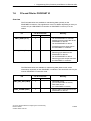
The controller is capable of sending messages triggered by process events
(refer to the IT-CP manual for details /5/).
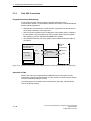
S5-compatible communication with FETCH/WRITE services (server)
The FETCH/WRITE services (server) allow direct access to the system
memory areas on the SIMATIC S7 CPU from SIMATIC S5, SIMATIC PC
stations, or from devices of other ranges.
Depending on the CP type, the following communications services are available
for FETCH/WRITE access:
- ISO Transport
optimized for top performance at the self-contained manufacturing level
- TCP/IP for internetwork communication with
ISO-on-TCP connections (RFC 1006), TCP connections.
PROFINET IO
PROFINET is a standard of the PROFIBUS Users organization defining a
heterogeneous communications and engineering model.
- PROFINET IO Controller
The S7-CPs that support the PROFINET IO controller mode allow direct
access to IO devices over Industrial Ethernet.
- PROFINET IO device
A-18
S7-CPs for Industrial Ethernet Configuring and Commissioning
Release 09/2007
C79000-G8976-C182-08
1
Communication via Ethernet CPs in S7 Stations
With the S7-CPs that support the PROFINET IO device mode, you can
operate S7 stations as “intelligent” PROFINET IO devices on Industrial
Ethernet.
For more detailed information on PROFINET CBA, refer to /20/ and /21/
For PROFINET IO communication, TCP connections are used to assign
parameters and RT (real time) or IRT (isochronous real time) for cyclic IO data
traffic.
PROFINET CBA
- PROFINET CBA
An S7 station equipped with a CP capable of PROFINET CBA can be
interconnected as a PROFINET CBA component in SIMATIC iMap.
For more detailed information on PROFINET CBA, refer to /19/
In PROFINET CBA, interconnections are used with acyclic and cyclic
transmission.
HTML process control
With the CPs with IT functionality, you use the supplied functions and HTML
pages to query important system data using a Web browser (refer to the IT-CP
manual for more information /5/)).
File management and file access with FTP
The CPs with IT functionality (S7-400 / S7-300) provide additional functions for
FTP services.
You can use your S7 station both as an FTP client and as an FTP server (refer
to the manual of the IT-CP /5/).
- S7 Station as FTP Client
You can transfer data blocks from or to a file server.
- S7 Station as FTP Server
Another station, for example, a PC transfers data blocks to or from the S7
station the file system on the CP with IT functionality.
S7-CPs for Industrial Ethernet Configuring and Commissioning
Release 09/2007
C79000-G8976-C182-08
A-19
1
Communication via Ethernet CPs in S7 Stations
1.2.2
The communication Services of the Ethernet CPs
Depending on the module type, the S7-CPs support the following communications
options:
Automation system
Supported functions
PG/OP
S7
Module
S7/C7-300
/
S7-400/
S7 400H
S7-400H
4)
S5compatible
tibl
PROFINET
IT
CBA
IO
-
1)
-
CP 343 -1 Lean
CP 343 -1
3)
-
CP 343 -1
Advanced
2)
CP 443-1
-
2)
-
CP 443-1 IT
-
CP 443 -1
Advanced
2)
1) PROFINET IO device
2) PROFINET IO controller
3) PROFINET IO device or PROFINET IO controller
4) Server only
A-20
S7-CPs for Industrial Ethernet Configuring and Commissioning
Release 09/2007
C79000-G8976-C182-08
1
Communication via Ethernet CPs in S7 Stations
Possibilities for Communication between Device Types
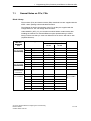
The possible communication available with the types of communication listed
above is shown in the following table:
PC station
S7-400
S7-300
S7-300
S5-115 to -155U/H
S7 communication
S7 communication
SEND/RECEIVE
SEND/RECEIVE
SEND/RECEIVE
FETCH/WRITE
PROFINET CBA
PROFINET CBA
PROFINET IO
PROFINET IO 2)
PG/OP
communication1)
S7 communication1)
SEND/RECEIVE
FETCH/WRITE
HTML process
monitoring
PROFINET CBA
PROFINET IO
FTP services
S7 -400
S7 communication
S7 communication
SEND/RECEIVE
SEND/RECEIVE
SEND/RECEIVE
FETCH/WRITE
PROFINET CBA
PROFINET CBA
PROFINET IO
2)
FTP services
PG/OP
communication1)
S7 communication1)
SEND/RECEIVE
FETCH/WRITE
PROFINET CBA
PROFINET IO
HTML process
monitoring
FTP services
1) PC only as client
2) S7 -400 as PROFINET IO controller and S7 -300 as PROFINET IO device or controller
S7-CPs for Industrial Ethernet Configuring and Commissioning
Release 09/2007
C79000-G8976-C182-08
A-21
1
Communication via Ethernet CPs in S7 Stations
1.2.3
Operation Using a Configured or Programmed Database
Configuration and Diagnostics
To connect and configure the Ethernet CP, you require the STEP 7 configuration
software and the SIMATIC NET NCM S7 option.
NCM S7 is installed as a STEP 7 option automatically and is therefore integrated in
STEP 7.
NCM S7 for Industrial Ethernet also provides a wide range of diagnostic functions
for the various types of communication.
When configuring PROFINET communication, you also use the engineering tool
SIMATIC iMap; for detailed information on SIMATIC iMap, refer to the manual
Component based Automation - Configuring Plants with SIMATIC iMap /19/.
Programmed Communication Connections
V 5.2.1
In some situations, it is an advantage to set up communication connections not
over the configuration interface of STEP 7 but program-controlled by specific
applications.
As of STEP 7 V5.2 SP1, a function block is available for these applications that
allows flexible transfer of data blocks with configuration data to an Ethernet CP.
A-22
S7-CPs for Industrial Ethernet Configuring and Commissioning
Release 09/2007
C79000-G8976-C182-08
1
1.3
Communication via Ethernet CPs in S7 Stations
PG/OP Communication via Industrial Ethernet
Application
PG/OP communication provides functions that are already integrated in every
SIMATIC S7/M7/C7 device.
A distinction must be made between the following two types of function:
PG communication
PG communication with STEP 7 PLCs on Industrial Ethernet means the
following:
- You can use the complete range of functions of STEP 7 on Industrial
Ethernet.
- You can use programming, diagnostic, operating and monitoring functions on
all modules in the SIMATIC S7 PLC via Industrial Ethernet.
OP Operation
PG/OP communication on Industrial Ethernet allows the operation and
monitoring of all modules in a SIMATIC S7 PLC using operator interface
systems (TD/OP).
The Ethernet CP acts as a “communications relay” that relays the PG/OP
communication via Industrial Ethernet.
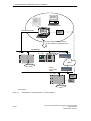
The following schematic illustrates how PG/OP communication can be used locally
or remotely:
Local over Ethernet modules in the PG
Remote over Ethernet modules in the PG and over routers;
(the option of a PG-PLC remote link with TeleService over a TS adapter is also
shown)
S7-CPs for Industrial Ethernet Configuring and Commissioning
Release 09/2007
C79000-G8976-C182-08
A-23
1
Communication via Ethernet CPs in S7 Stations
Operator
Interface
functions
PC with Ethernet CP
OP
STEP 7
NCM S7
Ethernet attachment
Modem /
ISDN
Create configuration data for every
CP and download to the Ethernet CPs
Ind. Ethernet
S7 - 400
S7 - 300
Ethernet CP
Router
(for example ISDN)
WAN *
Ethernet CP
Router
(for example
ISDN)
Ind. Ethernet
S7 - 400
Modem /
ISDN
TS adapter
Ethernet CP
* over TCP/IP
Figure 1-2
A-24
Configuration for PG/OP Operation - Local and Remote
S7-CPs for Industrial Ethernet Configuring and Commissioning
Release 09/2007
C79000-G8976-C182-08
1
1.3.1
Communication via Ethernet CPs in S7 Stations
PG Communication with STEP 7 over Industrial Ethernet
Requirements for PG Communication
PG communication is possible when the following requirements are met:
An Ethernet CP is installed in the PG or engineering station or there is a
modem/ISDN interface for remote access.
The Ethernet CP must have an address (default MAC address or set the IP
address).
Networking the PG / Engineering Station
Depending on the configuration of the PG or Engineering Station, the following two
situations are possible when using PG communication:
PG / Engineering Station in the Configured Mode
If you select this configuration when you commission the PG / engineering
station, the interfaces of the communication modules you are using are already
known. The option in “Set PG/PC Interface” is automatically set to
“PC-internal”.
Once you have downloaded this configuration to your PG / engineering station,
you can exchange PG functions with the accessible nodes in the network with
STEP 7 without requiring any further settings.
PG / Engineering Station in PG Operation
If your PG or engineering station is configured for this mode, you must specify the
interface on the PG or engineering station explicitly with “Set PG/PC Interface”.
Follow the steps outlined below:
1. Open the “Set PG/PC Interface” dialog box in the Windows Control Panel.
2. Set the PG/PC interface according to the CPs available on your PG and
according to the bus attachment (interface parameter assignment used).
For more detailed information on the topic of PG operation and engineering station,
refer to /4/.
S7-CPs for Industrial Ethernet Configuring and Commissioning
Release 09/2007
C79000-G8976-C182-08
A-25
1
Communication via Ethernet CPs in S7 Stations
1.3.2
OP Operation: Connecting Operator Interface Devices via
Industrial Ethernet
Requirements
Operation allowing operator interface functions is possible when the following
conditions are met:
The following are installed in the operator control and monitoring device:
- an Ethernet CP
- SOFTNET S7 for Ind. Ethernet or software from the SIMATIC NET CD.
The CPs in the S7 stations are supplied with a MAC/IP address (use the default
MAC address or set an IP address).
Procedure
To be able to use S7 communication, address the required module in the SIMATIC
S7 PLC on your operator interface system.
For more detailed information, please refer to the description of your operator
control and monitoring devices and in /4/.
A-26
S7-CPs for Industrial Ethernet Configuring and Commissioning
Release 09/2007
C79000-G8976-C182-08
1
1.4
Communication via Ethernet CPs in S7 Stations
S7 Communication on Industrial Ethernet
Application
S7 communication via Industrial Ethernet allows program-controlled
communication using communication SFBs/FBs via configured S7 connections.
Per job, up to 64 Kbytes of user data can be transmitted.
The Ethernet CP acts as an “S7 communication relay” by passing on the S7
functions via Industrial Ethernet. Depending on the configuration of the Ethernet
CP, data transfer is on the basis of the ISO transport or the ISO-on-TCP protocol
(TCP/IP with RFC 1006).
From the perspective of the user, S7 communication is identical over PROFIBUS
and Industrial Ethernet.
Nodes
Two situations must be distinguished depending on device type and plant
configuration:
Client and server functionality at both ends
S7 connections can be operated between the following nodes with the entire
functionality of S7 communication:
- between S7 stations S7-300 and S7-400;
- between S7 stations and PC/PG stations with an Ethernet CP.
S7 - 400
Ethernet CP
S7 - 300
Ethernet CP
M7
Ethernet
WAN *
PUT / GET
BSEND / BRECV
USEND / URECV
* only TCP/IP
PC/PG with Ethernet CP
Figure 1-3
S7 - 300 / 400
Nodes Communicating on S7 Connections over Industrial Ethernet
S7-CPs for Industrial Ethernet Configuring and Commissioning
Release 09/2007
C79000-G8976-C182-08
A-27
1
Communication via Ethernet CPs in S7 Stations
Client and server functionality at one end only (S7 connections
configured at one end)
In the following situations, write and read functions can be implemented with
PUT / GET on one-ended S7 connections:
- S7 communication over router
PG/PC stations can access S7 stations if the PG/PC stations are connected
to a different subnet or subnet type (PROFIBUS / Ethernet) via routers (for
example, an IE/PB Link); in this case, S7 stations are servers.
S7 communication is possible over a gateway.
S7 - 400
Ethernet CP
S7 - 300
Ethernet CP
PUT / GET
Ethernet
PC/PG Station
Ethernet
IE/PB Link
PC/PG Station
PROFIBUS
PUT / GET
Figure 1-4
PC/PG station communicates over a gateway with S7 stations on an underlying PROFIBUS
or Ethernet
For more detailed information on the features supported by your Ethernet CP, refer
to the device-specific part of this manual /2/.
A-28
S7-CPs for Industrial Ethernet Configuring and Commissioning
Release 09/2007
C79000-G8976-C182-08
1
Communication via Ethernet CPs in S7 Stations
Configuring S7 Connections
Create S7 connections to use S7 communication for data exchange between two
SIMATIC S7 stations.
For more detailed information, refer to the STEP 7 Description /6/.
Notice
S7 connections via routers are supported only within a STEP 7 project but not
between partners in different STEP 7 projects of a multiproject!
Interface in the User Program of the S7 Station
You use SFBs (for S7-400) and FBs (for S7-300) in the user program.
Block Type
Client
Server
x
-
SFB / FB12
BSEND
SFB / FB13
BRCV
SFB / FB15
PUT
x
- 1)
SFB / FB14
GET
x
- 1)
SFB / FB8
USEND
x
-
SFB / FB9
URCV
-
x
SFC / FC62
CONTROL (S7-400) /
C_CNTRL (S7-300)
x
x 2)
x
1)
you do not need to configure a connection on the server
2)
for S7 -300
Described in
STEP 7
D
Documentation
t ti /8/
Notice
Please remember the following points regarding data consistency in your user
program:
In the CPU of the S7 station, the read or written information is taken from the S7
user program into the operating system or copied from the operating system to the
S7 user program in blocks of 8 or 32 bytes (depending on the firmware version).
If information in the word or double-word format is located across such
boundaries, data inconsistency may arise during transmission using S7
communication!
For more detailed information, refer to the STEP 7 documentation /8/.
S7-CPs for Industrial Ethernet Configuring and Commissioning
Release 09/2007
C79000-G8976-C182-08
A-29
1
Communication via Ethernet CPs in S7 Stations
Notes on S7 communication between PC/PG station and S7 station
Applications in a PC/PG station communicate with the S7 station over an OPC
interface or SAPI-S7 interface for operator intervention, monitoring and control.
The S7 stations use the integrated communication SFBs/FBs (client and server
functionality at both ends).
The following general requirements must be met by a PC/PG station for S7
communication:
The following are installed in the PC/PG:
- an Ethernet CP
- there is an interface for S7 communication installed: SOFTNET S7 for Ind.
Ethernet or software from the SIMATIC NET CD.
The CPs in the S7 stations are supplied with a MAC/IP address (use the default
MAC address or set an IP address).
To use S7 communication with the SIMATIC S7 PLC from a PC, address the
required CPU module in the SIMATIC S7 PLC that you want to communicate with
in your PC application.
S7 communication via routers (one-ended client and server functionality)
It is possible to reach the S7 station from an application (OPC server) of the
PC/PG station that is attached to another subnet. The subnets must be connected
over a router such as the IE/PB Link. An S7 station or a PC connected to both
subnets can also serve as a router.
In this configuration, the S7 station can only be addressed by the PC/PG station as
a communications server on S7 connections configured at one end.
The requirements for the configuration of the PC/PG station are identical to those
for operation in the same subnet (see above); the CP in the PC/PG station must
also have routing capability.
In this situation, configure a one-ended S7 connection to the S7 station in the
other subnet for the PC/PG station in STEP 7 NetPro. You can then read and write
data in the S7 station in your user program using the services for S7
communication
A-30
S7-CPs for Industrial Ethernet Configuring and Commissioning
Release 09/2007
C79000-G8976-C182-08
1
1.5
Communication via Ethernet CPs in S7 Stations
S5-compatible Communication (SEND/RECEIVE
Interface) 1)
Application
Using the SEND/RECEIVE interface, your S7 user program has access to
S5-compatible communication with configured transport connections.
Data transmission over a configured transport connection is suitable for the
following types of transmission:
the reliable transmission of related blocks of data between two Ethernet nodes
using
- TCP (see /13/) with ISO-on-TCP connection (see /14/) or TCP connection;
- ISO transport connection (not with PROFINET CBA).
simple (unacknowledged) transfer of related blocks of data (datagram service)
between two Ethernet nodes with UDP (User Datagram Protocol) on IP.
The SEND/RECEIVE interface is also suitable for sending E-mail (refer to the
manual for the IT-CP /5/.
For TCP applications, there is an active network with IP protocol (see /16/)
ISO Transport Connection
ISO transport provides services for the reliable transfer of data on configured
connections. Due to segmentation (packet-oriented segmentation - the
completeness of the message is detected) large amounts of data can be
transmitted.
Transmission reliability is extremely high due to automatic repetition and additional
field check mechanisms. The communications partner confirms reception of data
and the sender receives a return value on the SEND/RECEIVE interface.
ISO transport is operated only on Industrial Ethernet and is optimized for
high-performance operation at the self-contained manufacturing level.
1
The previous name of the SEND/RECEIVE interface was S5S5 connections
S7-CPs for Industrial Ethernet Configuring and Commissioning
Release 09/2007
C79000-G8976-C182-08
A-31
1
Communication via Ethernet CPs in S7 Stations
IP (Internet Protocol)
For internetwork data transmission, the following services are available with
suitable CPs such as the CP 443-1:
ISO-on-TCP connection
ISO-on-TCP is intended for reliable, internetwork data transmission.
The ISO-on-TCP service corresponds to the TCP/IP standard (Transmission
Control Protocol/Internet Protocol) with the RFC 1006 extension according to
layer 4 of the ISO reference model (see /18/).
RFC 1006 extends the TCP protocol by allowing the transmission of blocks of
data (“messages”) assuming that both partners support RFC 1006.
Transmission reliability is extremely high due to automatic repetition and
additional field check mechanisms. The communications partner confirms
reception of data and the sender receives a return value on the
SEND/RECEIVE interface.
TCP connection
When using the SEND/RECEIVE interface on TCP connections, the Ethernet
CP supports the socket interface (for example, Winsock.dll) to TCP/IP found on
almost every system (PC or other system).
TCP is intended for reliable internetwork data transmission.
The TCP service complies with the TCP/IP standard (Transmission Control
Protocol/Internet Protocol; see /18/).
UDP connection
UDP is intended for simple internetwork data transmission without confirmation.
If the connection is suitably configured, broadcast and multicast frames can
also be sent on UDP connections.
To avoid overload due to high broadcast load, the CP does not allow reception
of UDP broadcasts. As an alternative, use the multicast function over a UDP
connection. This allows you to register the CP as a node in a multicast group.
SEND/RECEIVE interface
Data transfer is triggered by the user program. The interface to the user program in
the SIMATIC S7 is formed by special SIMATIC S7 blocks of the type FC
(functions).
A-32
S7-CPs for Industrial Ethernet Configuring and Commissioning
Release 09/2007
C79000-G8976-C182-08
1
Communication via Ethernet CPs in S7 Stations
Stations
The SEND/RECEIVE interface allows program-controlled communication on
Industrial Ethernet between the SIMATIC S7 PLC and the following:
SIMATIC S7 PLC with Ethernet CP
SIMATIC S5 PLC with Ethernet CP
PC/PG with Ethernet CP
Other station with Industrial Ethernet attachment
S7 - 400
Ethernet CP
S7 - 300
Ethernet CP
Ethernet
SIMATIC S5
with Ethernet CP
Other station with
Ethernet attachment
PG/PC with Ethernet
attachment
WAN
only TCP/IP
Internet
Router
Figure 1-5
SIMATIC S7 PLC with Possible Communications Partners on the SEND/RECEIVE Interface
S7-CPs for Industrial Ethernet Configuring and Commissioning
Release 09/2007
C79000-G8976-C182-08
A-33
1
Communication via Ethernet CPs in S7 Stations
1.6
FETCH/WRITE Services (Server)
Application
In addition to the SEND/RECEIVE interface, the FETCH/WRITE functionality
provides further services for S5-compatible communication on configured transport
connections.
The FETCH/WRITE interface is used primarily to attach SIMATIC S7 to SIMATIC
S5 and to other non-S7 stations (for example PCs).
FETCH
The partner on the connection (SIMATIC S5 or non-S7 station) can read
system data on the SIMATIC S7 PLC.
WRITE
The partner on the connection (SIMATIC S5 or non-S7 station) can write
system data on the SIMATIC S7 PLC.
From the point of view of the SIMATIC S7 PLC, this is a passive communication
function that simply needs to be configured, the communications partner initiates
the connection establishment.
For further information, refer to the system documentation of the SIMATIC S5 PLC
or the non-S7 station you are using.
Connection Types
To access a station with FETCH or WRITE functions, a FETCH passive or WRITE
passive connection must be configured on the SIMATIC S7 CPU. The following
types are possible:
ISO Transport
ISO-on-TCP
TCP
Coordinating Access Using the User Program
You can use the FCs AG_LOCK and AG_UNLOCK to coordinate access.
With these FCs, you can coordinate access to system data areas by enabling and
disabling the connections so that no inconsistent data is created and transferred.
SIMATIC S5
On the SIMATIC S5 station, the FETCH/WRITE services are configured and
started by READ ACTIVE/PASSIVE and WRITE ACTIVE/PASSIVE.
A-34
S7-CPs for Industrial Ethernet Configuring and Commissioning
Release 09/2007
C79000-G8976-C182-08
1
1.7
Communication via Ethernet CPs in S7 Stations
Networking Stations with STEP 7
Configuring
To allow stations to communicate with each other the networks must be configured
in the STEP 7 projects.
Configuring a network or subnet involves the following:
1. You create one or more subnets of the required subnet type in the project.
2. You select the properties of the subnet. Normally the default settings are
adequate.
3. You connect the station “logically” to the subnet.
4. You set up connections for communication.
Networking in a Multiproject
STEP 7 as of Version V5.2 supports configuration in a multiproject.
Using a multiproject, for example, you can create a project for distributed editing by
various editors and distribute the stations to the projects according to their editors.
To allow this, functions are available for branching and merging (sub) projects.
Interproject subnets and connections can be created.
Tools
The SIMATIC Manager provides convenient tools for configuring and documenting
networks (also graphically with NetPro).
The chapter describing network configuration in /6/ and the online help system also
contain information about configuring SIMATIC S7 networks.
S7-CPs for Industrial Ethernet Configuring and Commissioning
Release 09/2007
C79000-G8976-C182-08
A-35
1
Communication via Ethernet CPs in S7 Stations
Variants
Before configuring networks with STEP 7, you should be aware of the various
configurations possible in the STEP 7 project. The following configurations are
typical for stations networked with CPs:
Characteristics/Configuration
Variant (examples)
1
1 subnet - 1 project
2
Additional SIMATIC S5 stations and stations with equipment of other vendors
3
2 or more subnets - 1 project
4
1 subnet - more than one project
5
More than one subnet - more than one project
6
Internetwork connections (TCP)
These variants will be used as a basis to illustrate how real configurations can be
created in STEP 7 projects.
A-36
S7-CPs for Industrial Ethernet Configuring and Commissioning
Release 09/2007
C79000-G8976-C182-08
1
1.7.1
Communication via Ethernet CPs in S7 Stations
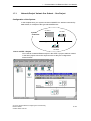
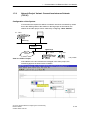
Network/Project Variant: One Subnet - One Project
Configuration of the System
In the simplest case, your system consists of SIMATIC S7 stations connected by
one subnet, for example of the type Industrial Ethernet.
S7-400/1
S7-300/1
System
“Production”
Ethernet (1)
S7-300/2
View in a STEP 7 Project
You create an Industrial Ethernet object in the STEP 7 project. Stations created
in the same project refer to this object as soon as they are configured as
network nodes.
S7-CPs for Industrial Ethernet Configuring and Commissioning
Release 09/2007
C79000-G8976-C182-08
A-37
1
Communication via Ethernet CPs in S7 Stations
1.7.2
Network/Project Variant: SIMATIC S5 and Non-SIMATIC Devices
on the Subnet
Configuration of the System
In addition to SIMATIC S7 stations, SIMATIC S5 stations and non-SIMATIC
devices can be included in your system.
S7-400/1
System
“Production”
S7-300/1
Non-SIMATIC
Ethernet (1)
SIMATIC S5
S7-300/2
View in a STEP 7 Project
SIMATIC S5 stations you intend to include in the communication can be
selected directly. Non-SIMATIC devices must be entered in the configuration as
Other stations.
A-38
S7-CPs for Industrial Ethernet Configuring and Commissioning
Release 09/2007
C79000-G8976-C182-08
1
1.7.3
Communication via Ethernet CPs in S7 Stations
Network/Project Variant: Two or More Subnets - One Project
Configuration of the System
Due to the different tasks of the stations or due to the extent of the system it may
be necessary to operate more than one network.
S7-400/1
System
“Production and
Management Level”
Ethernet (1)
Ethernet CP
S7-400/2
PROFIBUS CP
PROFIBUS (1)
S7-300/1
S7-300/2
View in a STEP 7 Project
You can create the subnets in one STEP 7 project and configure the stations for
communication.
This representation illustrates the following:
More than one subnet can be managed in one project.
Each station is created once in the project.
Each station can be assigned to more than one subnet by assigning its CPs to
different subnets.
S7-CPs for Industrial Ethernet Configuring and Commissioning
Release 09/2007
C79000-G8976-C182-08
A-39
1
Communication via Ethernet CPs in S7 Stations
1.7.4
Network/Project Variant: One Subnet - More Than One
(Sub)Project
Configuration of the System
In complex networked systems, during configuration it is sometimes more efficient
to manage plant sections in different (sub) projects.
The situation can arise that communication takes place over an interproject subnet
and that interproject connections must then also be created.
Example:
System section
“Production 2”
System section
“Production 1”
S7-400/2
S7-400/1
Ethernet (1)
S7-300/1
S7-300/2
S7 -300/3
Organization in a Multiproject
User-friendly and consistent configuration of such communication is supported in
STEP 7 as of Version V5.2 with the multiproject.
The functions for multiprojects in STEP 7 allow the following:
Several projects can be managed in one multiproject and edited separately
Projects can be branched and merged
Two different strategies can be distinguished in a multiproject:
Several employees work at the same time on a multiproject in a networked
environment. The projects of the multiproject are in different network folders. In
this case, all connection partners are available for configuring connections.
One employee manages the multiproject centrally. This person creates the
structures for projects (when necessary locally) and contracts individual projects
out for external editing. The central configuration engineer then returns these
projects to the multiproject and synchronizes the interproject data with system
support and where necessary the executes the required interproject functions.
In this case, agreement is necessary, for example, regarding the assignment of
connection names because it will be far easier when synchronizing the projects
to bring connections with identical connection names together.
A-40
S7-CPs for Industrial Ethernet Configuring and Commissioning
Release 09/2007
C79000-G8976-C182-08
1
Communication via Ethernet CPs in S7 Stations
The topic of multiprojects is dealt with in detail in the STEP 7 basic help.
Here, you will find information on the following topics:
Requirements for interproject functions
How to create multiprojects
How to create a new project in a multiproject
How to separate a project from a multiproject
How to include projects in the multiproject
How to synchronize projects in a multiproject
Moving stations within a multiproject (when a station is moved from one project
of a multiproject to another project of the same multiproject (for example using
drag & drop), the interproject connections are retained).
Possible problems in distributed projects and tips on how to avoid them
Possibilities for stations outside the current project
The addition of the multiproject functionality means that the following situations can
arise:
Connection to a partner in an unknown project
The new multiproject functionality allows you to create a connection to a partner
in an unknown project. In this case, you can specify a connection name as a
reference in the properties dialog of the connection. When the projects are
merged, STEP 7 then supports you with automatic synchronization of the
separately configured connections.
The connection remains unspecified until the projects have been merged and
the connections synchronized. Only following this synchronization can the
configuration data be downloaded to the local station without inconsistencies.
You should therefore use this variant when you know that the projects will be
merged in a multiproject.
Specified connections with representative objects
To allow you to create specified connections to stations in a different project (for
example production 2) or that are not managed with STEP 7, you can configure
these stations as other stations(example in the project production 1).
This allows you to create consistent, fully specified configuration data and to
download it to the local station.
It is also possible to create specified connections between these stations in
different, independent projects. The stations can then communicate
immediately over the created connections after the configuration data have
been downloaded.
Use this variant when you want to operate projects separately due to the
complexity.
Stations of the type SIMATIC S5 function in just the same way as
representative objects.
S7-CPs for Industrial Ethernet Configuring and Commissioning
Release 09/2007
C79000-G8976-C182-08
A-41
1
Communication via Ethernet CPs in S7 Stations
Merging projects in the multiproject:
If you have used the multiproject functions allowing you to use connections to a
partner in an unknown project, STEP 7 will automatically attempt to synchronize
two separately configured connections.
If you have configured projects with representative objects and want to merge
these projects into a multiproject, you have the following options:
A-42
You can leave the representative objects with the configured connections
unchanged.
You can reassign the connection partner and then delete the representative
objects.
S7-CPs for Industrial Ethernet Configuring and Commissioning
Release 09/2007
C79000-G8976-C182-08
1
1.7.5
Communication via Ethernet CPs in S7 Stations
Network/Project Variant: Several Subnets in Several (Sub)
Projects
Configuration of the System
If several network types need to be used and if these need to be managed in
different projects due to the different tasks of the stations or due to the large span
of the plant, stations can be created as follows:
Using (sub) projects in the “multiproject”
by configuring “Other stations / SIMATIC S5” in the other project.
Ethernet (1)
Cell level = (sub)project 1
S7 - 400/1
Ethernet CP
PROFIBUS CP
Cell level = (sub)project 2
PROFIBUS (1)
S7 - 300/1
S7 - 300/2
S7-CPs for Industrial Ethernet Configuring and Commissioning
Release 09/2007
C79000-G8976-C182-08
A-43
1
Communication via Ethernet CPs in S7 Stations
Organization in a Multiproject
If you use a multiproject organization, follow the steps below to connect the
S7-400/1 station to the PROFIBUS (1) subnet:
Create a subnet of the type PROFIBUS in both subprojects and merge these two
subnets in NetPro.
Representative Objects for Stations Outside the Current Project
If you do not want to use the multiproject functions, you can fall back on the use of
representative objects as used previously.
To be able to network the representative objects, you must once again create a
subnet of the type PROFIBUS in both projects as shown in the example here.
A-44
S7-CPs for Industrial Ethernet Configuring and Commissioning
Release 09/2007
C79000-G8976-C182-08
1
1.7.6
Communication via Ethernet CPs in S7 Stations
Network/Project Variant: Connections between Subnets
(TCP/IP)
Configuration of the System
If connections are required to stations on network structures connected by routers
due to the differing tasks of the stations or the large span of the network, the
stations in the other project can be reached by configuring “Other Stations”.
S7 - 400/1
Ethernet CP
Ethernet (1)
Router *
Ethernet (2)
WAN
Internet *
S7 - 400/2
S7 - 300/1
Ethernet CP
View in a STEP 7 Project
* only TCP/IP
If the stations in the two networks are managed in the same project, the
networking appears as shown below in NetPro.
S7-CPs for Industrial Ethernet Configuring and Commissioning
Release 09/2007
C79000-G8976-C182-08
A-45
2
Characteristics of the Ethernet CPs
2.1
Communications Processors for S7-300
The modules are designed to match the components of the S7-300/C7-300
programmable logic controller and have the following features:
Compact modules (single or double width) for simple installation on the S7
standard rail
Can be used in central or expansion racks
The operator controls and displays are all located on the front panel
No fan necessary
Direct backplane bus connection via the supplied bus connector
Wide design: 8-pin RJ-45 female connector for connecting the CP to twisted
pair Ethernet
Narrow design: 2 x 8-pin RJ-45 jacks as 2-port switch for connecting the CP to
twisted pair Ethernet
The project engineering of the CP is possible over MPI or LAN/Industrial
Ethernet. The version of STEP 7 released for the device type is necessary.
LED displays
TP port:
2 x 8 -pin RJ -45 socket
(beneath the front panel)
X = Placeholder for hardware
version
Figure 2-1
A-46
Example: Front View of the CP 343 -1 Lean
S7-CPs for Industrial Ethernet Configuring and Commissioning
Release 09/2007
C79000-G8976-C182-08
2
2.2
Characteristics of the Ethernet CPs
Communications Processors for S7-400
The modules are designed to match the components of the S7-400 / S7-400H
programmable logic controller and have the following features:
Single-width modules for simple installation in the S7-400 / S7-400H rack
Can be used in central or expansion racks
The operator controls and displays are all located on the front panel
No fan necessary
8-pin RJ-45 jack for attachment of the CP to twisted pair Ethernet
and
15-pin sub-D female connector with slide locking mechanism for attachment of
the CP to Industrial Ethernet (depending on the module type, automatic
switchover between AUI interface and Industrial Twisted Pair interface when the
cable, AUI or ITP, is connected)
or
4 x 8-pin RJ-45 jack for attachment of the CP to twisted pair Ethernet
The project engineering of the CP is possible over MPI or LAN/Industrial
Ethernet. The version of STEP 7 released for the device type is necessary.
C -PLUG
LED displays
Mode selector
Port 1
Ind. Ethernet interface:
4 x 8 -pin RJ -45 Socket
Port 2
Port 3
Port 4
MAC address label
Figure 2-2
Example: Front View of a CP 443-1 Advanced
S7-CPs for Industrial Ethernet Configuring and Commissioning
Release 09/2007
C79000-G8976-C182-08
A-47
2
Characteristics of the Ethernet CPs
2.3
2.3.1
Slot Rules for SIMATIC S7-300
Permissible Slots
In the SIMATIC S7-300, there is no set slot assignment for the SIMATIC NET CPs.
Slots 4 to 11 are permissible (1, 2 and 3 cannot be used for CPs).
The SIMATIC NET CPs can be installed both in the central rack and in an
expansion rack, linked to the central rack via an IM 360/IM 361 (K-bus connection).
2.3.2
Number of SIMATIC NET CPs
The number of SIMATIC NET CPs that can be operated is not limited by the
system (for example S7-300 CPU, slot rules etc.), but by the application
(maximum cycle time of the application). The following components must be added
into the calculation of the cycle time on top of the existing S7 user program:
Execution time of the FCs:
For communication between the S7-300 CPU and SIMATIC NET CPs, blocks
(FCs/FBs) are necessary. How often these blocks are called depends on the
number of connections or the number of SIMATIC NET CPs. Depending on the
amount of data transmitted, every block call extends the time required by the
user program.
Data conversion:
It may also be necessary for the information to be converted before
transmission or after reception.
Please refer to the information in the relevant device manual.
2.3.3
Multicomputing
This functionality is not supported by the SIMATIC S7-300.
A-48
S7-CPs for Industrial Ethernet Configuring and Commissioning
Release 09/2007
C79000-G8976-C182-08
2
2.3.4
Characteristics of the Ethernet CPs
Removing / Inserting (Replacing Modules)
Note
Removing and inserting the SIMATIC NET CPs for the SIMATIC S7-300 while the
power is on is not permitted.
You should also remember that by removing a module from the rack, all modules
on the other side of it will be disconnected from the CPU.
A PG is required to download the configuration after replacing a module. If the CP
supports the option of saving the configuration data on the CPU, it is also possible
to replace a module without a PG (see CP-specific description).
2.3.5
Note on the S7-300 CPU: Connection Resources
Note that when using older S7-300 CPUs (≤ CPU 316), a maximum of four S7 type
connections for CP communication are supported. Of these four connections, one
is reserved for a PG and another for an OP (HMI = Human Machine Interface).
The newer CPUs (from 10/99 onwards) support twelve and the CPU 318-2DP
supports sixteen S7 connections.
As a result, the older S7-300 CPUs have only two “free” S7 connections available.
These two connections can be used for S7 communication, for PROFIBUS-FMS,
for longer data, or FETCH, WRITE and TCP connections with Industrial Ethernet.
Notice
Removing and inserting the SIMATIC NET CPs for the SIMATIC S7-300 while the
power is on not permitted.
You should also remember that by removing a module from the rack, all modules
on the other side of it will be disconnected from the CPU.
S7-CPs for Industrial Ethernet Configuring and Commissioning
Release 09/2007
C79000-G8976-C182-08
A-49
2
Characteristics of the Ethernet CPs
2.4
2.4.1
Slot Rules for SIMATIC S7-400
Permissible Slots
An S7-400 CP can be inserted both in the central rack and in the expansion rack
with a K bus interface. For the total number of CPs you can install, please refer to
the information on the relevant CP in the “Properties” chapter.
In the SIMATIC S7-400, there is no set slot assignment for the SIMATIC NET CPs.
Slots 2 to 18 are permissible. Note, however, that depending on the power supply
module installed, slot 1 may also occupy slots 2-3 (4 during redundant operation).
2.4.2
Number of SIMATIC NET CPs
The number of SIMATIC NET CPs that can be operated simultaneously is limited
by the specific characteristics of the CPU. The exact number can be found in the
CP-specific section of this manual.
2.4.3
Multicomputing
The communication load can be distributed by installing several SIMATIC NET
CPs (distribution of load). If, however, you want to increase the number of
available connection resources, you can insert several CPUs in a rack
(multicomputing). All S7-400 CPUs in a rack can communicate via one or more
SIMATIC NET CPs.
The following communication services support multicomputing:
A-50
ISO transport connections
ISO-on-TCP connections
S7 functions
TCP connections
UDP connections
E-mail connections
S7-CPs for Industrial Ethernet Configuring and Commissioning
Release 09/2007
C79000-G8976-C182-08
2
2.4.4
Characteristics of the Ethernet CPs
Removing / Inserting (Replacing Modules)
Removing and inserting the SIMATIC NET CPs for the S7-400 while the power is
on is possible without damaging the modules.
If a CP is replaced with a new CP with the same order number, the configuration
data simply needs to be downloaded again if it is not stored on the CPU (see also
CP-specific sections of this manual).
2.4.5
Note on the S7-400 CPU: Connection Resources
Note that in the S7-400 CPU, one S7 connection is reserved for a PG and a further
one for an OP (HMI = Human Machine Interface).
Attaching the PG over MPI:
To execute ONLINE functions (for example module diagnostics) from a PG on
an S7-400 CP via the MPI interface, two connection resources (addressing of
the interface and the K-bus) are necessary on the S7-400 CPU. These two
connection resources should be taken into account in the number of S7
connections.
Example: The CPU 412-1 has sixteen free resources for S7 functions available.
If a PG is to be used for diagnostics on the S7-400 CP and is connected to the
MPI interface, two connection resources are required on the S7-400 CPU, so
that 14 connection resources remain available.
PG connection via PROFIBUS or Industrial Ethernet
If the PG is connected to the LAN (PROFIBUS or Industrial Ethernet), in order
to execute PG functions on the S7-400 CPU and diagnostics on an S7-400 CP,
only one connection resource on the S7-400 CPU is necessary.
S7-CPs for Industrial Ethernet Configuring and Commissioning
Release 09/2007
C79000-G8976-C182-08
A-51
3
Operating the Ethernet CP with
STEP 7/NCM S7
To attach a SIMATIC station to Industrial Ethernet via the Ethernet CP, configure
the CP with the NCM S7 configuration software. The chapter explains the
following:
How the CP is configured in the STEP 7 project
How the various network configurations are managed (setting up access to
other systems)
How to control and supply the CP with data using NCM S7
You will find further information in the following sources:
When installing the Ethernet CP, please read the instructions in the
device-specific Part B of this manual. This also contains further information
about the performance of the Ethernet CP .
For more information about the functions and applications of STEP 7 in which
the NCM S7 option is integrated, please read the following topics:
- For using the help functions, read the section Working with STEP 7 in /6/.
- Configuring and assigning parameters to modules in /6/
- Configuring networks in /6/. You will find this information in the online help
with integrated in STEP 7 by selecting Help Contents.
A-52
You will find examples of configurations in the Primer.
S7-CPs for Industrial Ethernet Configuring and Commissioning
Release 09/2007
C79000-G8976-C182-08
3
3.1
Operating the Ethernet CP with
How to Commission an Ethernet CP
The essential steps in commissioning an Ethernet CP are shown in the following
overview:
Notice
The chart below shows the basic steps. Please read the device-specific
instructions in “Installation and Commissioning” in the description of your CP
(Manual Part B).
Installation and Commissioning
Configuring / Programming
S7 - 300 / 400
Install the CP on the S7 standard rail
(S7-300) or in the S7 rack (S7-400).
Install the STEP 7 configuration
software on a PG/PC.
Connect the power supply.
Configure the Ethernet CP:
by configuring in the
or
Connect the CP to Industrial Ethernet.
project engineering
see Section 3.3
by programming
see Section6
Turn on the S7 station.
Download the configuration data and the user programs to
the S7 station and/or CP.
Use the diagnostic functions during commissioning
and to analyze problems.
S7-CPs for Industrial Ethernet Configuring and Commissioning
Release 09/2007
C79000-G8976-C182-08
A-53
3
Operating the Ethernet CP with
3.2
General Information on STEP 7 / NCM S7
Installation
The functions of NCM S7 are available automatically immediately after installing
STEP 7.
Functions
NCM S7 consists of the following:
CP-specific index dialogs that you call using the properties dialog box of the
modules.
Dialogs for the connection configuration
Diagnostic functions that you obtain as follows:
- Using the “Diagnostics” tab in the properties dialog
- Using the standard Start menu of Windows with which you can call the
SIMATIC program group
Functions displayed with SIMATIC
NCM... in the Start menu of Windows:
- Diagnostics
- Help for functions (FCs)
- “Readme” file with current information about NCM
- Firmware loader
Access to Online Help of STEP 7 and NCM S7
With the online help, you can obtain the following information:
F1
You can display the contents of the STEP 7 basic help system with the Help ->
Contents menu command.
Context-sensitive help on the selected object using the Help ->
Context-Sensitive Help menu command, the F1 key or the question mark in
toolbar.
You can then access further information relating to the current topic.
Glossary for all STEP 7 applications by clicking the “Glossary” button
Please note that each STEP 7 application has its own contents and
context-sensitive help.
A-54
S7-CPs for Industrial Ethernet Configuring and Commissioning
Release 09/2007
C79000-G8976-C182-08
3
3.3
Operating the Ethernet CP with
Configuring - Follow the Steps Below
A CP is managed in an S7 project just as the other modules. You use STEP 7 to
configure the hardware and create and manage the user software (see /6/).
Configuring a CP involves the following steps (the broken lines indicate options):
Create the Industrial Ethernet subnet (see 3.3.1)
Check or set the network properties
Enter the Ethernet CP in the hardware configuration
(see 3.3.2)
Attach the Ethernet CP to the Ethernet subnet
(see 3.3.2)
Display the network attachments of a station (see 3.3.3)
Make further CP settings (see 3.3.4)
Configuring communication connections (Chap. 5)
- S7 connections /6/
- ISO transport connections
alternative:
- ISO-on-TCP connections
Program communication
- TCP connections
connections
- UDP
(see Chapter 6)
Configuration data in
the STEP 7 project
Programming the
SEND/RECEIVE interface
(see Section 4)
User programs in the
STEP 7 project
Download the configuration to the PLC (see 3.5).
S7-CPs for Industrial Ethernet Configuring and Commissioning
Release 09/2007
C79000-G8976-C182-08
A-55
3
Operating the Ethernet CP with
3.3.1
Creating an Industrial Ethernet Subnet
Aims
To be able to attach the SIMATIC stations to a subnet, you create the subnet in
your project. This means that all the parameters for the entire subnet are managed
centrally.
Procedure
It is advisable to create the subnet before you configure the stations since the
assignment of the SIMATIC stations is then performed largely automatically.
It is also possible to create the subnet at a later point in time when configuring a
CP. This is explained in more detail later in the chapter.
Follow the steps outlined below:
1. Select the project in the SIMATIC Manager.
2. Select Insert
"
Subnet
Industrial Ethernet.
Result: An object of the type network is created in the project. This allows all
the SIMATIC stations created in the project to be attached to this subnet.
Figure 3-1
A-56
Project with Assigned Ethernet Network
S7-CPs for Industrial Ethernet Configuring and Commissioning
Release 09/2007
C79000-G8976-C182-08
3
Operating the Ethernet CP with
3. If you prefer a NetPro graphic network display, select the network object
“Ethernet” and confirm with Edit " Open Object.
Figure 3-2
Graphic Network Representation (here showing stations not yet networked)
From this graphic representation, you can also activate all the functions for
networking and configuring connections with the Ethernet CPs.
You can also create the subnets in NetPro! Open the catalog using the menu
command Insert " Network Objects.
Organization in a Multiproject
If you use the multiproject form of organization, this has the following effects when
creating subnets.
You create subnets initially in the subprojects as described above. To be able to
network S7 stations, you will, for example, need to create a suitable subnet of the
type Industrial Ethernet in each subproject.
If this is physically a subnet that extends beyond the boundaries of the subproject,
you should first merge the subnets before configuring the communication
connections between the S7 stations.
If you do not merge the subnets, NetPro assumes that you are connecting the
subnets via routers and displays warning messages to this effect.
Properties of Merged Subnets (Multiproject)
When you merge subnets, transferable subnet properties such as the subnet ID of
the master subnet will be transferred to the other subnets of the group.
Some parameters relate specifically to a subproject and remain unchanged; these
include, for example, descriptive parameters such as the name, author, and any
comments.
S7-CPs for Industrial Ethernet Configuring and Commissioning
Release 09/2007
C79000-G8976-C182-08
A-57
3
Operating the Ethernet CP with
Notice
Preserving Consistency in Merged Subnets
After merging the subnets, you should check the consistency throughout the
multiproject using the menu command Network > Check Interproject Consistency
in NetPro to make sure that there is consistency throughout the multiproject. This
check detects, for example, S7 subnet IDs that are not unique within the
multiproject.
A-58
S7-CPs for Industrial Ethernet Configuring and Commissioning
Release 09/2007
C79000-G8976-C182-08
3
3.3.2
Operating the Ethernet CP with
Entering an Ethernet CP in the Hardware Configuration
Procedure
By installing and assigning the Ethernet CP in the rack of a SIMATIC station, you
establish the logical attachment between the Internet CP and the subnet.
1. Select the station in your project that you want to attach to Industrial Ethernet
using an Ethernet CP.
2. Select the CP in the hardware configuration just like any other module by
selecting it in the hardware catalog and then selecting the slot in the rack.
You select CPs in the hardware catalog using a short text and the order
number. Once you have installed NCM S7, the CPs are available in the catalog.
Result: The CP is assigned to the SIMATIC station.
For information about the permitted slots, refer to /2/.
How to configure a module with STEP 7 is described in detail in /6/.
Subnet Attachment
To allow you to activate the network attachment of the Ethernet CP, the SIMATIC
Manager displays the following dialog:
S7-CPs for Industrial Ethernet Configuring and Commissioning
Release 09/2007
C79000-G8976-C182-08
A-59
3
Operating the Ethernet CP with
Note
You can open the dialog for setting the interface at any time from the Properties
dialog of the CP in the “General” tab.
1. If you have not yet created a subnet in the project or have not yet created the
selected subnet, you can now create a subnet. To do this, select the “New”
button.
Result: An object of the type network is created in the project.
2. Check the addresses and if necessary change them. The system enters the
next free address automatically.
You will find detailed information on the address ranges in the online help.
Please note the following additional information:
- MAC address
The latest Ethernet CPs are supplied with a default MAC address (address
printed on the module). To be sure that you have a unique address
assignment, do not enter a MAC address in the configuration (the option is
deactivated). This means that the module automatically uses the factory-set
address. If you want to use ISO services, we recommend that you enter the
address printed on the module in the configuration.
A-60
S7-CPs for Industrial Ethernet Configuring and Commissioning
Release 09/2007
C79000-G8976-C182-08
3
Operating the Ethernet CP with
Note
The “IP address” and “Subnet mask” input fields have no significance for ISO
transport (option “IP protocol being used”).
3. Select the required subnet type in the “Subnet” list box.
4. You can display the properties dialog box for the selected subnet by clicking the
Properties button.
5. Enter information specific to the subnet node in the “General” tab.
6. You must finally confirm your input with OK, otherwise the networking is not
entered (refer to Point 3.).
Result: The CP is now configured as a network node for the corresponding S7
station.
Setting Addresses in the Configuration and Addressing for the First Time
The address settings described here are made on the CP only after you download
the configuration data.
With the latest Ethernet CPs, the situation is as follows:
To be able to reach the CP using these addresses before you download the
configuration data, you can address the CP using its default MAC address and
then supply it with project-specific address information.
This procedure of assigning an address the first time is described in Section 3.4.
S7-CPs for Industrial Ethernet Configuring and Commissioning
Release 09/2007
C79000-G8976-C182-08
A-61
3
Operating the Ethernet CP with
3.3.3
Displaying the Network Attachments of a Station
Procedure
You can easily get an overview of the network attachment configurations of a
SIMATIC station in one of the following ways:
A graphic overview in NetPro;
An overview in table form in the Properties dialog of the station
Graphic Overview in NetPro
The NetPro view provides you with a good overview of the networked stations:
Follow the steps below:
1. Double-click one of the network objects, for example Ethernet in your project in
the SIMATIC Manager.
Figure 3-3
A-62
NetPro View of a Subnet of the Type Industrial Ethernet
S7-CPs for Industrial Ethernet Configuring and Commissioning
Release 09/2007
C79000-G8976-C182-08
3
Operating the Ethernet CP with
Overview in Table Form
The table view in the Properties dialog of the station provides a detailed overview
of the components used for network attachment.
Follow the steps below:
1. Using the SIMATIC Manager, select the station in your project that you want to
check.
2. Select the object properties using the menu command Edit
Properties or by double-clicking on the station symbol.
"
Object
3. Select the “Interfaces” tab.
Result:
Figure 3-4
“Interface” Tab in the “SIMATIC 300/400” Properties Dialog Box
In the displayed dialog, you can see the subnet attachments that were configured
for the SIMATIC station.
S7-CPs for Industrial Ethernet Configuring and Commissioning
Release 09/2007
C79000-G8976-C182-08
A-63
3
Operating the Ethernet CP with
3.3.4
Setting Further CP Properties
Overview
In addition to the network attachment, you can also make further settings for the
specific module or you can call functions.
1. Select the Ethernet CP in the hardware configuration.
2. Select Edit Object Properties. Depending on the type of CP you are using,
the dialog includes other tabs in addition to the “General” tab described in
Section 3.3.2:
Tabs
Settings for
General
Interface
Addresses
Interface parameters for the user program
Options
Time-of-day synchronization
Data transfer
Replace module without PG
Ethernet profile for fault-tolerant connections
Individual network settings
Send keepalives for connections
Multiplex OP connections / reserve internal CPU
connection resources
Time-of-day synchronization
SIMATIC mode
NTP mode (NTP: Network Time Protocol)
User
Specify user permissions for IT functions
Symbols
Symbolic access to variables using IT
functions
DNS parameters
Specify the address for the domain name
server for E-mail services
Diagnostics
Call NCM diagnostics (special diagnostics /
module diagnostics)
Addressing
Select the station to initialize
Assign configured IP parameters
A-64
IP Access Protection
Edit the IP access list
IP Configuration
Set the IP address
Port Parameters
Individual network settings
FTP
Create / modify file allocation table
PROFINET
Specify properties for PROFINET IO and
PROFINET CBA
S7-CPs for Industrial Ethernet Configuring and Commissioning
Release 09/2007
C79000-G8976-C182-08
3
F1
Operating the Ethernet CP with
Please read the description of the Properties dialog of the CP in the integrated
help. The functions are explained in detail there.
Addresses Tab
The Addresses tab displays the address at which the module can be addressed by
the user program. You require this address when calling the FCs for transport
connections -> see Chapter 7).
Notice
Please note the following notes on S7-300 stations:
If you selected the “Update OB1 process image cyclically” option in the CPU
configuration (default), you must set the module base address of the Ethernet CP
outside the process image (base addresses in the “Addresses” tab).
Example: If the size of the process image selected for the CPU is 1024 (0...1023),
the address for the Ethernet CP must be set equal to or higher than 1024.
Options Tab
Depending on the CP type, you can make the following settings:
Table 3-1
Settings in the “Options” Tab
Meaning / Effect
Option
Time-of-day synchronization
Here, you decide whether the CP passes on time-of-day frames or
not. You require this function if you have several CPs in a station
since only one CP (on the same network) is permitted to forward the
time synchronization messages.
Note
The time-of-day synchronization function does not exist for all module
types.
Data transfer > 240 bytes
With this option, you specify whether or not the CP will support jobs
with a data length of more than 240 bytes (for S7-300 stations).
Notes
The transfer of more than 240 bytes of data is supported by
newer version CPs. Please note the information in the product
information bulletin / manual of the Ethernet CP.
Please note the information in Section 7.1 on the
newer CP types.
Remember that with this configuration on an S7-300, one
connection resource (free connection for S7 functions) of the
S7-300 CPU is used. CPU connection resources are also used,
for example, by S7-300 CPs, in the FMS mode or by PGs and
OPs. For more detailed information about the maximum
connection resources, refer to /1/.
S7-CPs for Industrial Ethernet Configuring and Commissioning
Release 09/2007
C79000-G8976-C182-08
A-65
3
Operating the Ethernet CP with
Table 3-1
Settings in the “Options” Tab , continued
Option
Replace module without PG
Meaning / Effect
With this option, you can have the configuration data of the CP stored
on the CPU. If you then replace CP, the configuration data for the
new CP are downloaded automatically from the CPU when the CP is
started up.
If you select this option, the configuration data are stored long-term
on the CPU instead of in the EPROM of the CP. Remember, however,
that long-term storage on the CPU is only safe from power outages if
the CPU is protected by battery backup or by using an S7 Memory
Card.
Note
If you store the configuration data on the CPU, please read the note
below.
The following functions do not modify the configuration data on the
CPU:
Reset module memory
Resetting to factory settings
Assigning an IP address1) (using the target system selection in
the SIMATIC Manager or the properties dialog in HW Config or
NetPro)
If you subsequently upload the configuration data from the CPU to a
PG you will always object the configuration data that were previously
on the CP (with parameters, connections, IP address).
1) Note: You should only use the assign IP address function during
commissioning; in other words, before downloading the configuration
data.
Ethernet profile for
fault-tolerant connections
Select this profile if you use fault-tolerant communication in your
system. Fault-tolerant communication means that Industrial Ethernet
is designed with redundancy and that you have configured
fault-tolerant S7 connections.
If you select the Ethernet profile for fault-tolerant connections here,
the time response of the S7 connections is adapted. As a result,
breakdowns of a connection are detected more quickly and the
failover to redundant connections is faster.
Note
Select the Ethernet profile for fault-tolerant connections only when
you actually use fault-tolerant S7 connections. Otherwise you must
expect your system to be more susceptible to problems since, for
example, the number of transfer or connection establishment
attempts is reduced compared with non-redundant systems.
Individual network settings
Here, you can make fixed network settings, when necessary. As
default, “Automatic Setting” is selected and this setting generally
guarantees problem-free communication in most situations.
If problems occur in communication (for example, when connections
are not established or when there are often disturbances on the
network), the reason may be that the selected or automatic network
settings are not suitable. You can then select a network setting to suit
your network configuration.
A-66
S7-CPs for Industrial Ethernet Configuring and Commissioning
Release 09/2007
C79000-G8976-C182-08
3
Table 3-1
Operating the Ethernet CP with
Settings in the “Options” Tab , continued
Option
Send keepalives for
connections
Meaning / Effect
Here, you can set the interval at which keepalives are sent to the
partner of a communications connection. This setting decides the
latest time after which the failure of a communications partner is
detected.
For all connection-oriented services, the Ethernet CP is configured so
that keepalives are sent. This guarantees that connections are
closed if a communications partner fails and that the connection
resources are released. The setting made here applies to all TCP
and ISO-on-TCP connections operated via the CP; a
connection-oriented setting is not possible.
Possible values:
Default Setting:
30 seconds
Turn keepalives off
0 seconds
Maximum value:
65535 seconds
Notes / Recommendations:
Remember that the keepalive mechanism can keep underlying
connections established (for example, an ISDN telephone
connection) although no user data are actually being transmitted. If
this is not required, set the interval so high that the underlying
connection is closed down when no further user data are sent before
a keepalive is sent.
Multiplex OP connections /
reserve internal CPU
connection resources
To attach TD/OPs or HMI devices, you can optimize the connection
resources on the S7-300 CPU by having up to 16 of these devices
communication on a single CPU connection resource (multiplex
mode).
If you do not use this option, the number of operable TD/OPs or HMI
devices depends on the number of available connection resources of
the CPU you are using.
As default, this option is deactivated. This means that a CPU
connection resource is used for multiplex only when necessary.
Configured S7 connections over the CP use the same multiplex
channel as you use for multiplexing the HMI connections. If you
configure S7 connections, this means that one CPU connection
resource is already used.
Please note: PG connections do not use the multiplexer; if you use a
PG, one connection resource is always occupied.
Note on Programming:
When you use the multiplex mode, you must specify the rack/slot
assignment of the CP for addressing on TD/OP/HMI connections
instead of the rack/slot assignment of the CPU!
Applications (for example ProAgent) that require block-related
messages (Alarm_S: SFC17-19) are not supported in the multiplex
mode.
S7-CPs for Industrial Ethernet Configuring and Commissioning
Release 09/2007
C79000-G8976-C182-08
A-67
3
Operating the Ethernet CP with
Time-of-day Synchronization Tab
In this tab, you can make the settings for one of the two synchronization modes
explained below:
SIMATIC mode
If the CP receives MMS time-of-day frames, its local time is synchronized
providing the NTP mode was not configured (MMS = Manufacturing Message
Specification).
The advantage of this mode is the accuracy that is generally higher than
achieved with the NTP mode.
NTP mode (NTP: Network Time Protocol)
In the NTP mode, the CP sends time queries (in the client mode) at regular
intervals to the NTP server in the subnet (LAN). Based on the replies from the
server, the most reliable and most accurate time is calculated and the time of
day on the station is synchronized.
The advantage of this mode is that the time of day can be synchronized beyond
the boundaries of the subnet.
Some CPUs allow the time to be requested automatically from an NTP server.
If you make use of this option on the CPU, you should disable forwarding of the
time to the station by the CP. This prevents the time on the CPU obtained
directly from the NTP server being overwritten by the time on the CP.
Forwarding over the CP could result in less accuracy.
Diagnostics Tab
In the “Diagnostics” tab, you can startNCM S7 Diagnostics.
See Chapter 8 Diagnostics for a description of the diagnostic functions themselves.
Addressing Tab
In the “Addressing” tab, you can assign the previously configured IP address and
IP parameters to the CP.
This is necessary before the configuration data can be downloaded to the CP over
Ethernet.
For a detailed description, refer to Section 3.4.
IP Access Protection Tab
V 5.2.1
Using IP access protection gives you the opportunity of restricting communication
over the CP of the local S7 station to partners with specific IP addresses. Partners
you have not authorized cannot access data of the S7 station over the CP using
the IP protocol (S7 connections).
In this tab, you can activate or deactivate IP access protection and can enter IP
addresses in an IP access control list (IP-ACL).
A-68
S7-CPs for Industrial Ethernet Configuring and Commissioning
Release 09/2007
C79000-G8976-C182-08
3
Operating the Ethernet CP with
Attempted access that was blocked is registered on the CP. You can view these
entries with NCM Diagnostics in the “IP access protection” object. If the CP has
IT functionality, an archive file (LOG file) is also created in the file system of the CP
and you can view this with a WEB browser. You will find the LOG file as an HTML
file in the file system of the CP in the following folder:
- ram/security/IPLogFile.htm
As default, IP access protection is deactivated.
IP access protection for configured connections with specified partners
If you want to restrict access to the precise set of partners you specify during
connection configuration, you simply need to activate access protection. In this
case, you do not need to enter IP addresses in the list.
Remember, however, that on unspecified connections, all other IP addresses
(unconfigured in the project engineering) are unauthorized and are rejected.
This automatic restriction to configured IP addresses does not apply to the
programmed connections mode.
IP access protection relates to all connection types handled using the IP
protocol (TCP, ISO-on-TCP, UDP)
IP access protection for partners with specific IP addresses
To allow IP access for specific IP addresses, enter these IP addresses in the IP
access control list.
The IP addresses you specify when you configure the connection always
belong to the permitted IP addresses and do not, therefore, need to be entered
explicitly in the IP-ACL. This also applies to IP addresses obtained dynamically
over an E-mail connection from a DNS server.
IP access protection for partners with unspecified connections
Passive connection establishment functions only with remote nodes that are
entered in the IP-ACL.
Notice
You can view the IP-ACl with NCM Diagnostics.
When IP access protection is activated, remember that in the following special
case, the IP-ACL is displayed as being empty and IP access protection as being
deactivated:
There is no connection configured and
there is no fixed IP address entered in the IP-ACL and
and no dynamic IP address is currently being obtained.
As soon as an IP address is entered, for example dynamically, IP access
protection is displayed as activated again.
S7-CPs for Industrial Ethernet Configuring and Commissioning
Release 09/2007
C79000-G8976-C182-08
A-69
3
Operating the Ethernet CP with
IP Configuration Tab
In this tab, you can decide the route and the method with which the IP address of
the local S7 station is obtained and assigned.
V 5.2.1 With the options available here, it is also possible to assign IP addresses
dynamically outside the STEP 7 configuration.
Table 3-2
Options in the “IP Configuration” Tab
Meaning / Effect
Option
Set IP address in the
“Properties - Ethernet
Interface” dialog
This option is the default.
It means that the IP address is set during the networking of the
Ethernet CP. The IP address of the CP is therefore fixed in the
configuration.
You must select this option if you want to configure specified
connections.
Obtain an IP address from a
DHCP server
If you select this option, the IP address is obtained from a DHCP
server when the S7 station starts up.
The DHCP server is informed of the MAC address of the CP or the
client ID that you can enter here.
Requirement / Restriction:
If you select this option, it is initially not possible to create a fully
specified connection in the STEP 7 project because the local IP
address is not known.
You must therefore select “unspecified” with passive connection
establishment as the connection type.
Please not the following:
If the connections are configured over the interface in the user
program, you must use the option “Set IP address in the user
program” as described below. This also applied if the IP address is
obtained from a DHCP server.
Set IP address in the user
program
With this option, you specify that the IP address is set over a user
program interface (function block IP_CONFIG). This allows the IP
address to be supplied dynamically during operation.
In this situation, communication connections are created only over
the user program interface; configuring connections using STEP 7 is
not possible (relates to connections over IP: TCP, ISO-on-TCP, UDP).
This setting does not preclude the IP address being obtained from a
DHCP server. It is possible for the user program to instruct the
module to obtain an IP address in this way.
Further information:
Read the section “Programmed Communication Connections” and
refer to the example in the appendix of the manual.
Set IP address using a
different method
With this option, you specify that the IP address is set by other
services outside STEP 7.
In this situation, configuring connections using STEP 7 is not possible
(relates to connections over IP: TCP, ISO-on-TCP, UDP ).
A-70
S7-CPs for Industrial Ethernet Configuring and Commissioning
Release 09/2007
C79000-G8976-C182-08
3
Operating the Ethernet CP with
Note
You can query the IP address actually being used with NCM S7 Diagnostics.
“Port Parameters” Tab
Here, you can, when necessary, make fixed network settings for the transmission
properties of every available port. As default, “Automatic Setting” is selected and
this setting generally guarantees problem-free communication in most situations.
If problems occur in communication (for example, when connections are not
established or when there are often disturbances on the network), the reason may
be that the selected or automatic network settings are not suitable. You can then
select a network setting to suit your network configuration.
S7-CPs for Industrial Ethernet Configuring and Commissioning
Release 09/2007
C79000-G8976-C182-08
A-71
3
Operating the Ethernet CP with
“FTP” tab
In this dialog, you can create / modify a file allocation table.
With the information in the file allocation table, it is possible to address data blocks
in one or more CPUs (up to 4) in an S7 station.
Ethernet CP as FTP server for S7 CPU data
To transfer data with FTP, create data blocks in the CPU of your S7 station; due to
their special structure, these are known here as file DBs.
When it receives an FTP command, the Ethernet CP as FTP server obtains the
information about how the data blocks used in the S7 station for file transfer are
mapped to files from a file allocation table (file file_db.txt).
You can create the file allocation table as follows and transfer it to the CP:
By entering it in the “FTP” folder described here;
The file allocation table is then downloaded to the CP automatically along with
the project engineering data.
By creating a file_db.txt file directly.
You must then download the file allocation table created in this way to the CP.
The file allocation table file_db.txt is stored in the file system of the Ethernet CP in
the /config folder.
“PROFINET” tab
Here, you specify the properties of the Ethernet CP for PROFINET IO and
PROFINET CBA.
A-72
S7-CPs for Industrial Ethernet Configuring and Commissioning
Release 09/2007
C79000-G8976-C182-08
3
Table 3-3
Operating the Ethernet CP with
Options / Input Areas in the “PROFINET” Tab
Meaning / Effect
Option / Input Area
Mode
Depending on the type of CP device, you can select the possible
modes here in which the S7 station can be operated on PROFINET.
PROFINET IO Controller
With this option you decide whether or not the Ethernet CP is
operated as a PROFINET IO controller.You can also make this
setting by assigning a PROFINET IO system to the CP in HW
Config using the context menu.
PROFINET IO device
With this option you decide whether or not the Ethernet CP is
operated as a PROFINET IO device. In a further step, you will
also need to assign the CP to the PROFINET IO system as a
PROFINET IO device.
Device Name
Name of the device (according to DNS conventions). The device
name must be unique on the Ethernet subnet. If the CP is operating
as PROFINET IO controller, the device name is derived from the
short identifier.
STEP 7 gives you the option of adding the name of the IO system as
part of the device name automatically. To use this feature, select the
option ”Use name in device/controller” in the properties of the
PROFINET IO system”.
CBA communication
To be able to use the S7 -station with PROFINET CBA, specify the
CP to be used for the componentization for PROFINET CBA or
SIMATIC iMap.
S7-CPs for Industrial Ethernet Configuring and Commissioning
Release 09/2007
C79000-G8976-C182-08
A-73
3
Operating the Ethernet CP with
3.3.5
“Substitute Objects” in the STEP 7 Project
Overview
Communication connections can be configured fully when the communications
partners are available in the current project. For the stations on the Ethernet
subnet, whose configuration data were not created in STEP 7 or whose
configuration data are not managed in the currently active project, the following
substitute objects can be created in the project:
SIMATIC S5 stations
PG/PC
Other stations
- for devices of other manufacturers
- for SIMATIC S7 stations in another project (not necessary in a multiproject)
Note
Instead of creating substitute objects, you can also configure unspecified
connections for connections to the stations listed above.
In the Properties dialog of these connections, you must then specify the full
partner address. These partners do not appear in the NetPro plant view.
Plant
”Production 2”
Plant
”Production 1”
S7-400/1
S7-400/2
PC/PG
S7-400/4
Third-party
device
Ethernet subnet (1)
S7-400/3
A-74
S7-400/5
SIMATIC S5
S7-CPs for Industrial Ethernet Configuring and Commissioning
Release 09/2007
C79000-G8976-C182-08
3
Operating the Ethernet CP with
Procedure
To enter a substitute object in the project, following the steps below:
1. Select the project in the SIMATIC Manager.
2. Select Insert " Station " and then as necessary
Other Station, PG/PC or SIMATIC S5
Possible result: the selected object is created in the project.
Figure 3-5
Project With Substitute Objects Configured
Attaching Non-S7 Stations to the Subnet
The next step is to assign the substitute objects to the subnet, as follows:
1. Select the required object in the project and select
Edit Object Properties.
2. In the Properties dialog box that is displayed select the “Interfaces” tab and
click the “New” button (for example “Other Station”.
Result: The New Interface - Type Selection dialog box is displayed.
S7-CPs for Industrial Ethernet Configuring and Commissioning
Release 09/2007
C79000-G8976-C182-08
A-75
3
Operating the Ethernet CP with
Figure 3-6
Selecting the Subnet Type for “Other Station” (Example)
3. Select a subnet.
Result: The “Properties - Ethernet Interface” dialog is displayed. Here, you can
select the subnet, connect the station to the network and set the address (MAC,
IP). All the SIMATIC stations in the project can establish communication
relationships to this substitute object.
The addresses (MAP/IP) configured for the substitute object here must also be set
on the station using the appropriate tool, for example COM 1430.
A-76
S7-CPs for Industrial Ethernet Configuring and Commissioning
Release 09/2007
C79000-G8976-C182-08
3
3.3.6
Operating the Ethernet CP with
Configuring Communication Services
Setting Up Connections
You must set up connections for the connection-oriented services supported by the
Industrial Ethernet CP, see also the Table in Section 1.2.
S7 connections
see the STEP 7 user manual /6/
ISO transport connections
see Section 5.4
ISO-on-TCP connections
see Section 5.5
TCP connections
see Section 5.6
Connections for UDP
see Section 5.7
E-mail connections
see manual for CPs with IT functionality /5/
Interconnections for PROFINET CBA communication
see manual Component based Automation - configuring plants with SIMATIC
iMap/19/
The information in the STEP 7 user manual /6/ in the chapter “Creating
Communication Connections Between Two Programmable Modules” also applies
to the additional types of connection possible with the CPs.
You will find this information in the online help with integrated in STEP 7 by
selecting Help Contents. Select the topic “Configuring Connections and Data
Exchange.
S7-CPs for Industrial Ethernet Configuring and Commissioning
Release 09/2007
C79000-G8976-C182-08
A-77
3
Operating the Ethernet CP with
3.4
Assigning Addresses for the First Time (Applies to
Latest CPs)
Meaning of the Address Assignment - MAC Address and IP Address
The CP ships with a factory-set MAC address. Without further configuration, the
device can only be accessed over the Ethernet port using this MAC address.
In its original state, you can already use the following functions via the CP using
the ISO protocol and the factory-set MAC address:
Download the defined configuration to the CP or CPU
Run diagnostics on the CP or CPU
Before you can download defined configuration data to the device using an IP
address, you must first assign an IP address to the CP.
Assigning the Address - Options and Recommendations
There are three ways of assigning this address in STEP 7:
Addressing by selecting the target system in the SIMATIC Manager
This option allows you to assign the address without having to set up a STEP 7
project. This is useful, for example, if you want to download defined
configuration data you created offline to the S7 station.
This is described in Section 3.4.1.
Addressing using the properties dialog in HW Config or NetPro
This option assumes that the CP was networked in STEP 7. The advantage of
this method is that the IP parameters set during configuration in STEP 7 /
NetPro can be used.
In the “Addressing” tab, you assign the previously configured IP address and IP
parameters to the CP.
This is necessary before the configuration data can be downloaded to the CP
over Ethernet.
This is described in Section 3.4.2.
Downloading configuration data using the ISO protocol
A further variant is to download project engineering data with a defined IP
address over the ISO protocol (see above); this applies to CPs that support the
ISO protocol.
A-78
S7-CPs for Industrial Ethernet Configuring and Commissioning
Release 09/2007
C79000-G8976-C182-08
3
Operating the Ethernet CP with
Requirements
Before you can use the addressing described here, the CP must be obtainable
online, which means:
An attachment to the Ethernet LAN must already exist; there must be no
routers between subnets in the path.
The Ethernet port of your PG/PC must be accessible to STEP 7.
Notice
The options for assigning an address as described here are available only if you
have a module that can be reached using the default MAC address; such modules
must support the PST (Primary Setup Tool) function. Please refer to the
information in the relevant manual /2/.
3.4.1
Addressing by Selecting the Target System in the SIMATIC
Manager
Follow the steps below to assign the IP address the first time:
1. Open the SIMATIC Manager
2. Select the menu command PLC
Assign Ethernet Address.
3. Start a network search for available modules by selecting the “Browse...”
button.
4. Select the CP with the matching MAC address from the components listed.
5. Enter the required IP parameters and assign them to the CP.
Result:
The CP is now accessible on Industrial Ethernet using the IP address.
Note
You will find further detailed information on this procedure in the STEP 7 online
help.
S7-CPs for Industrial Ethernet Configuring and Commissioning
Release 09/2007
C79000-G8976-C182-08
A-79
3
Operating the Ethernet CP with
Alternative Procedure
You can also follow the steps outlined below in the SIMATIC Manager:
1. Use the menu command PLC Display Accessible Nodes to display the
nodes that you can access over Industrial Ethernet.
2. Select the required node in the list displayed.
3. Then select the menu command PLC Ethernet Address.
Result: The previously selected node is entered directly into the “Addressing”
dialog. You cannot modify the MAC address of the node.
4. Enter the required IP parameters and assign them to the CP (see above under
STEP 5.).
Result:
The CP is now accessible on Industrial Ethernet using the IP address.
A-80
S7-CPs for Industrial Ethernet Configuring and Commissioning
Release 09/2007
C79000-G8976-C182-08
3
3.4.2
Operating the Ethernet CP with
Addressing using the Properties Dialog in HW Config or NetPro
Follow the steps below to assign the IP address the first time:
1. Open the SIMATIC Manager.
2. Define the configuration of your S7 station with the appropriate components in
HW Config in an existing or newly created project.
3. When you create the CP, network it with an Industrial Ethernet subnet.
When you create the CP in HW Config, the necessary dialog is displayed in
which you can network the device and assign the IP address.
4. Select the “Addressing” tab in the properties dialog of the CP you want to
address.
The tab displayed is identical to the dialogs illustrated in Section 3.4.1.
5. Start a network search for available modules by selecting the “Browse...”
button.
6. Select the CP with the matching MAC address from the components listed.
7. Assign the IP parameters taken from the networking to the CP by clicking the
relevant button.
Result:
The CP is now accessible on Industrial Ethernet using the IP address.
Note
You will find further detailed information on this procedure in the STEP 7 online
help.
S7-CPs for Industrial Ethernet Configuring and Commissioning
Release 09/2007
C79000-G8976-C182-08
A-81
3
Operating the Ethernet CP with
3.5
Downloading the Configuration Data to the Target
System
Principle
The configuration data of the Ethernet CP are downloaded from the hardware
configuration. All the configuration data of the S7 station are downloaded including
the central configuration, all relevant DP master systems and all parameter
settings.
The data of the configured connections must also be downloaded, see below.
Type of Interface
You can download the configuration data to the S7 station on the following paths
(interfaces):
MPI interface
You can use this interface to download configuration data or when assigning a
MAC/IP address for the first time (node initialization - for details, refer to the
manual /2/ “Assigning Addresses for the First Time”).
Industrial Ethernet
Here, you use the PG mode of the Ethernet CP in the S7 station (see also
Section 1.3).
Depending on the PG/PC interface used by the station on which you create
your configuration, you can download the defined configuration data to the S7
station over the TCP/IP interface or over the ISO interface of STEP 7.
- When you download over the IP interface, the CP must already have been
assigned an IP address; refer to Chapter 3.4.
- When you download over the ISO interface, you can use the preset MAC
address. However, please note the following:
Note
If you want to download the configuration data over the ISO interface to a CP with
an unchanged, factory-set MAC address and you have configured a different MAC
address in your STEP 7 project, you must start the download in NetPro or HW
Config; this is the only way you will be prompted to enter the current MAC
address. The SIMATIC Manager, on the other hand, aborts the download if the
target station cannot be reached.
A-82
S7-CPs for Industrial Ethernet Configuring and Commissioning
Release 09/2007
C79000-G8976-C182-08
3
Operating the Ethernet CP with
Procedure
To download the configuration data to the S7 station, follow the steps outlined
below:
1. Open the “Set PG/PC Interface” dialog box in the Windows Control Panel.
2. Set the PG/PC interface according to the CPs available on your PG and
according to the bus attachment (interface parameter assignment used).
F1
For more detailed information, refer to the integrated help system.
3. Change the CPU to the STOP mode (regardless of the type of interface - see
above).
4. Select the menu command PLC
"
Download to Module.
STEP 7 then guides you through dialog boxes. Note the additional information in
the “STEP 7 User Manual”, Chapter “Configuring and Assigning Parameters to
Modules” /6/.
Deactivating the MAC Address in the Configuration
If you deactivate the use of the MAC address when you are configuring the CP, the
CP can be reached via the preset MAC address, however you cannot define any
ISO transport connections or S7 connections over ISO connections in your
configuration.
Non-volatile storage of the project engineering data (on CPs with data
management)
You can download the configuration data step-by-step or all at once. If you
download step-by-step, you will be prompted to start the download function
separately for each module. You must select this method if you want to save the
configuration data in non-volatile memory on the Ethernet CP. In this case, select
the “Copy to ROM” button in the “Download” dialog for the CP.
Downloading the Configured Connections
To download configured connections, you use a corresponding download function
in the connection configuration (NetPro).
Notice
If you have assigned a new address to the Ethernet CP or have configured
connections, you must always download the connection configuration again.
Remember that you also make suitable address adaptations for the other stations
or “substitute objects”.
S7-CPs for Industrial Ethernet Configuring and Commissioning
Release 09/2007
C79000-G8976-C182-08
A-83
3
Operating the Ethernet CP with
Relocating the CP in the Hardware Configuration
If you are using communication services with configured connections, the
connection IDs also identify the slot of the CP. If you “drag” a CP you have already
configured to a different slot, note the following:
Notice
If you drag the CP to a different slot, the data of the connection configuration are
automatically updated. The data of the connection configuration must, however, be
downloaded again!
A-84
S7-CPs for Industrial Ethernet Configuring and Commissioning
Release 09/2007
C79000-G8976-C182-08
4
SEND/RECEIVE Interface in the User Program
This chapter explains the following:
How to send and receive data.
Which data areas can be used on the S7 CPU.
How to program the SEND/RECEIVE interface in the user program.
You will find further information in the following sources:
For programming and configuring nodes for connections (for example a
SIMATIC S5 PLC with the CP 1430 TCP, PC with CP 1613), please refer to the
appropriate manuals.
The FCs for programming connections are described in Section 7.3.
Configuring the Ethernet CP with NCM S7 is described in Chapter 5.
Programming communication connections over the interface in the user
program is described in Chapter 6.
Sample programs:
Sample configurations and programs are available for the SEND/RECEIVE
interface described here:
In the sample project PROJECT_ETHERNET that you can start immediately
after installing NCM S7; for a description, refer to the Primer.
On the Internet as downloadable sample projects; refer to the information in
Appendix C “Support and Training”.
The Quick Start CD that can be ordered separately is a
treasure-trove of sample programs and configurations.
You can order this directly over the Internet at:
http://www4.ad.siemens.de/WW/news/en/21827955
S7-CPs for Industrial Ethernet Configuring and Commissioning
Release 09/2007
C79000-G8976-C182-08
A-85
4
SEND/RECEIVE Interface in the User Program
4.1
How the SEND/RECEIVE Interface Works on the CPU
Functions (FCs)
The following functions (FCs) are available for handling communication on
connections:
AG_SEND/AG_LSEND/AG_SSEND
This block takes the user data from the specified user data area and transfers it
to the Ethernet CP.
AG_RECV/AG_LRECV/AG_SRECV
This block transfers received user data to the user data area specified in the
call.
The diagram below illustrates the situation. Using the FCs AG_SEND /
AG_LSEND / AG_SSEND and AG_RECV / AG_LRECV / AG_SRECV, the user
program instructs the Ethernet CP to send or receive data on the configured
connection.
Ethernet station SIMATIC S7
CPU
Ethernet CP
CP
database
STEP 7
user program
User data
buffer
User data areas
Figure 4-1
AG_SEND
send
AG_RECV
receive
Communication
connection
Interaction of the CPU and Ethernet CP on Connections
Amounts of Data
The Ethernet CP can transfer the amounts of data shown in the table below per job
on one connection:
Table 4-1
A-86
ISO Transport
ISO-on-TCP
TCP
UDP
Sending
8192 bytes
8192 bytes
8192 bytes
2048 bytes
Receiving
8192 bytes
8192 bytes
8192 bytes
2048 bytes
S7-CPs for Industrial Ethernet Configuring and Commissioning
Release 09/2007
C79000-G8976-C182-08
4
4.2
SEND/RECEIVE Interface in the User Program
Programming the SEND/RECEIVE Interface
Principle of Job and Data Transfer
The user program triggers the transfer of the user data areas with FC calls and
monitors the transfer by evaluating the return codes of the FCs.
The following parameters are transferred when the FCs are called:
The number of the connection (ID)
The location of the user data area in the CPU
For detailed information about the call interface see Chapter 7.
Purpose of the FCs
Calling the function blocks has the following effects:
The user data area is transferred to the Ethernet CP or received from the
Ethernet CP.
The execution of the job is confirmed positively or negatively in a status
message.
Procedure
Program the SEND/RECEIVE interface in the user program as follows:
1. Use the following functions (FCs) for data transmission on connections:
- AG_SEND / AG_LSEND / AG_SSEND for transferring the user data area to
the Ethernet CP
- AG_RECV / AG_LRECV / AG_SRECV for entering data received from the
Ethernet CP in the user data area
2. Evaluate the following bits in the FCs:
- for AG_SEND / AG_LSEND / AG_SSEND the parameters DONE, ERROR,
STATUS
- for AG_RECV / AG_LRECV / AG_LRECV the parameters NDR, ERROR,
STATUS
Notice
Connection numbers (IDs) must be taken from the configuration when
programming.
To ensure correct parameter settings for the block calls, The LAD/STL/FBD editor
in STEP 7 provides you with the option of accepting all the relevant parameters
from the hardware configuration (HW Config) and from the connection
configuration. For more information, refer to Section 7.2
S7-CPs for Industrial Ethernet Configuring and Commissioning
Release 09/2007
C79000-G8976-C182-08
A-87
4
SEND/RECEIVE Interface in the User Program
Calling FCs in the CPU Program
One possible sequence for FCs in conjunction with the organization and program
blocks in the CPU cycle is illustrated in the following diagram.
Read in the received
data of the
connection
Read PII
OB
User program
AG_RECV
Communication
connection
ÇÇÇÇÇÇÇÇ
ÇÇÇÇÇÇÇÇ
AG_RECV
ÇÇÇÇÇÇÇ
ÇÇÇÇÇÇÇ
ÇÇÇÇÇÇÇ
ÇÇÇÇÇÇÇ
ÍÍÍÍÍÍÍÍ
ÍÍÍÍÍÍÍÍ ÍÍÍÍÍÍÍ
ÍÍÍÍÍÍÍ
ÍÍÍÍÍÍÍ
ÍÍÍÍÍÍÍÍÍ
ÍÍÍÍÍÍÍ
ÍÍÍÍÍÍÍÍÍ ÍÍÍÍÍÍÍ
ÇÇÇÇÇÇÇÇÇ
ÇÇÇÇÇÇÇÇÇ
ÇÇÇÇÇÇÇÇÇ
Communication
connection
AG_SEND
AG_RECV
Communication
connection
AG_SEND
Transfer send data
for the connection
AG_SEND
Write PIQ
Legend:
Figure 4-2
ÍÍ
ÇÇ
ÍÍÇÇ
Sequence of the CPU cycle
The different shading shows which
connections and FC blocks belong
together.
Typical Sequence of Function Calls in the CPU Cycle
The following points are illustrated by the diagram:
A-88
The user program consisting of any number of blocks (OBs, FBs or FCs -> see
also /6/ accesses several connections (Figure 4-2 illustrates three connections).
S7-CPs for Industrial Ethernet Configuring and Commissioning
Release 09/2007
C79000-G8976-C182-08
4
SEND/RECEIVE Interface in the User Program
At various points (event and program-controlled) the user program sends data
on a connection using the AG_SEND call.
At various points in the CPU cycle, the user program accepts the data received
on the connection using an AG_RECV call.
Note
The blocks can also be called more than once in a cycle for the same
communication connection.
S7-CPs for Industrial Ethernet Configuring and Commissioning
Release 09/2007
C79000-G8976-C182-08
A-89
4
SEND/RECEIVE Interface in the User Program
4.3
Data Exchange S7 CPU <-> Ethernet CP
The Ethernet CP processes the send and receive jobs independent of the CPU
cycle and requires one transmission time. The interface to the user program with
the FCs is synchronized by an acknowledgment. Two situations must be
distinguished:
The CPU cycle is faster than the transmission time.
The CPU cycle is slower than the transmission time.
Note
Please refer to the sequence charts for the FCs in Chapter 7. These charts show
how to handle the SEND/RECEIVE interface in the user program for problem-free
data exchange.
Remember the points below about the CPU cycle and transmission time.
FC Calls Faster than the Transmission Time
If a block is called again in the user program before data were transferred or
received, the procedure is as follows on the interface of the FCs:
A-90
AG_SEND/AG_LSEND/AG_SSEND:
No further job is accepted until the transmission of the data on the connection
has been acknowledged by the Ethernet station. During this time, the user
program receives the message “job active” until the Ethernet CP can accept the
next job on the same connection.
AG_RECV/AG_LRECV:
The job is acknowledged with the message “no data available yet” if there are
no received data on the Ethernet CP. The user program receives this message
in the CPU cycle until the Ethernet CP has received data again on the
connection.
S7-CPs for Industrial Ethernet Configuring and Commissioning
Release 09/2007
C79000-G8976-C182-08
4
SEND/RECEIVE Interface in the User Program
FC Calls Slower than the Transmission Time
If a block is called again before the data were completely transferred or received,
the procedure is as follows on the interface of the FC blocks:
AG_SEND/AG_LSEND/AG_SSEND:
The job is positively acknowledged. The Ethernet CP is ready to receive a new
send job (at the earliest however with the next call).
AG_RECV/AG_LRECV/AG_SRECV:
The job is acknowledged with “New Data Received” when the data have been
transferred to the user program. Following this, the FC call can be repeated.
Notice
Remember that resource shortages can occur if the processing speeds on the
sender and receiver are not the same (sender faster than receiver).
The sender receives a message from the FCs if problems occur (“No resources on
the destination station”). (not with AG_SRECV)
S7-CPs for Industrial Ethernet Configuring and Commissioning
Release 09/2007
C79000-G8976-C182-08
A-91
4
SEND/RECEIVE Interface in the User Program
4.4
4.4.1
Additional Information
Programming Data Transfer on TCP Connections
Purpose of TCP Connections
TCP connections should be used above all for connections to systems of a
different type if they do not support RFC1006.
For communication between devices of the SIMATIC family, you should use the
more convenient ISO-on-TCP connections! The following sections explain certain
special points to note.
Special Features
Block types (FC calls)
Use only the following functions (FCs) for data transmission:
- With the older S7-CPs for S7-300, you must use FCs AG_LSEND (FC 50)
and AG_LRECV (FC 60) on TCP connections!
- With the latest S7-CPs for S7-300, you also use FCs AG_SEND (FC 5) and
AG_RECV (FC 6) for TCP connections.
Frame length
On the TCP connections, the protocol contains no information about the end of
a message and start of a new message.
The receiving station must therefore know how many bytes belong to a
message and transfer an ANY pointer corresponding exactly to this length when
FC AG_LRECV is called. (Example: if 100 bytes of data are always transferred,
the ANY pointer could appear as: P#DB100.DBX 0.0 Byte 100)
If you want to receive data with a variable length, follow the steps below:
Include information on the length of the user data in the frame before the actual
user data. Initially, you should only evaluate the length information on the
receiving station. Fetch the appropriate length of user data in another receive
job by specifying an ANY pointer of the required length on the FC interface for
fetching the actual user data.
A-92
S7-CPs for Industrial Ethernet Configuring and Commissioning
Release 09/2007
C79000-G8976-C182-08
4
4.4.2
SEND/RECEIVE Interface in the User Program
Recommendations for Use with a High Communications Load
Overview
The points below will help you to avoid overload situations on your CPU when
using the Ethernet CPs.
In particular when you replace an older CP with a newer CP and are then
confronted with overload problems, you should check your application for the
pitfalls outlined below.
Known Problems
The functions for sending and receiving (FC5/FC6, FC50/FC60 or FC53/63) are
often called cyclically in OB1. This leads to constant communication between
the CPU and CP. As a result, other types of communication such as PG
functions cannot be executed or only very slowly.
HMI systems access data of the CPU too often using S7 functions. This slows
down communication generally and there may be a lack of resources when
SEND/RECEIVE FCs are called cyclically in OB1.
Remedy
The recommendations below will help to avoid these situations:
Do not call communication blocks cyclically in OB1!
Communication should be called time-controlled in a suitable cyclic-interrupt
OB. The call interval of this OB should be significantly higher than the average
cycle time of your program.
You should set a minimum cycle time that is higher than the average runtime of
OB1. This frees resources for communication on the CPU. This is, for example,
a remedy for existing applications when communication already takes place
cyclically in OB1.
If necessary, reduce the time taken for communication processing on the CPU
by changing the parameters set for “cyclic load due to communication” in the
properties dialog of the CPU.
S7-CPs for Industrial Ethernet Configuring and Commissioning
Release 09/2007
C79000-G8976-C182-08
A-93
5
Configuring Communication Connections
This chapter explains the following:
The general aspects of configuring communication connections
How to configure ISO transport, ISO-on-TCP, UDP and TCP connections
How to use the connection configuration functions to specify communication
partners that exchange data via UDP
You will find a description of the connection-specific properties dialogs in the
following sections:
ISO transport connections see Section 5.4
ISO-on-TCP connections see Section 5.5
TCP connections see Section 5.6
UDP see Section 5.7
You will find further information in the following sources:
A-94
For the properties of the configurable connection types, refer to Section 1.5
There are situations in which communication connections are not set up over
the configuration interface of STEP 7 but program-controlled by certain
applications; see also Chapter 6.
For the properties of the configurable connection type E-mail, refer to /5/.
You will find information on the numbers of connections and amounts of data in
Section 4.1.
For information on configuring connections, refer to the online help of STEP 7
by selecting Help Contents.
S7-CPs for Industrial Ethernet Configuring and Commissioning
Release 09/2007
C79000-G8976-C182-08
5
5.1
Configuring Communication Connections
Procedure
Initial Situation
The steps described here assume the following:
1. You have created the local S7 station and the required partner stations in your
STEP 7 projects (refer to the description in Chapter 3).
2. You have clarified the other station types with which connections must be
established. You create substitute objects for these station types in your
STEP 7 projects.
Setting up Connections and Using Them in the User Program
The following steps are necessary to operate connections on the SIMATIC S7 PLC
with the Ethernet CP:
Configuring
Programming
Create new connections.
(see Section 5.3.1)
Program the SEND/RECEIVE
interface in the user program.
(Refer to Section 4.2 and the detailed
FC description in Chapter 7).
Configure connection properties.
(see Sections 5.4 to 5.4)
Download connection configurations
and user programs to the S7 station.
Legend:
S7-CPs for Industrial Ethernet Configuring and Commissioning
Release 09/2007
C79000-G8976-C182-08
necessary steps
optional steps
A-95
5
Configuring Communication Connections
5.2
Possible Connection Configurations
Communication connections are possible between the communication partners
shown in the diagram below.
The communication partners can be in the same project or distributed in the
subprojects of a multiproject.
Connections to communication partners outside a project are configured using the
STEP 7 object “Partner other project” or using substitute objects such as ”Other
stations” or SIMATIC S5.
Ethernet CP
Ethernet CP
S7 - 300
Ethernet CP
S7 - 400
Ethernet /IT-CP
S7 - 400
Subnet 1
Ethernet CP
WAN*
LAN *
only TCP/IP
PG/PC with Ethernet CP
SIMATIC S5
Subnet 2
S7 - 400
Ethernet CP
Other station with
Ethernet attachment
Figure 5-1
A-96
Possible Connections
S7-CPs for Industrial Ethernet Configuring and Commissioning
Release 09/2007
C79000-G8976-C182-08
5
Configuring Communication Connections
Organization in a Multiproject
If interproject subnets are configured, you can also configure connections over
such subnets using STEP 7 V5.2. The endpoints of these connections can be
located in different projects.
STEP 7 supports you both when creating interproject connections within a
multiproject as well as when synchronizing connections that were configured
without a multiproject context.
S7-CPs for Industrial Ethernet Configuring and Commissioning
Release 09/2007
C79000-G8976-C182-08
A-97
5
Configuring Communication Connections
5.3
Connections
Characteristics of a Connection
A communication connection allows program-controlled communication between
two nodes on Industrial Ethernet with the following characteristics:
The data transfer is bi-directional, in other words, it is possible to transmit and
receive on the connection simultaneously.
Both stations have the same rights, in other words, each station can trigger the
send and receive procedures in response to events.
The address of the communication partner is specified in the configuration.
Exceptions to this are:
- free UDP connections
Here, the address is specified at the FC interface in the user program.
- programmed communication connections (see Chapter 6)
SIMATIC S7 station
with EthernetEthernet
CP
CP
send
receive
Ethernet
node
Communication
connection
receive
send
Ethernet
node
send
receive
Figure 5-2
A-98
Communication
connection
receive
send
Sending and Receiving via one Communication Connection
S7-CPs for Industrial Ethernet Configuring and Commissioning
Release 09/2007
C79000-G8976-C182-08
5
Configuring Communication Connections
Note
The term “connection” is also used here for UDP. Reason: During configuration
(just as in TCP) the communication partners are assigned to each other and
therefore logically “connected”. In actual fact, with UDP there is no explicit
connection establishment between communication partners.
Amounts of Data
Refer to the manual /2/ supplied with the Ethernet CP for the number of
communication connections supported by the Ethernet CP. The number of
connections per station can be increased by adding more CPs.
The Ethernet CP can transfer the amounts of data shown in the table below per job
on one connection:
Table 5-1
ISO Transport
ISO-on-TCP
TCP
UDP
Sending
8192 bytes
8192 bytes
8192 bytes
2048 bytes
Receiving
8192 bytes
8192 bytes
8192 bytes
2048 bytes
Notice
The transfer of more than 240 bytes of data is supported by the current CPs.
Older version CPs support data transfer with a data length of up to 240 bytes.
Please note the information in Section 7 and in the manual of the Ethernet CP.
S7-CPs for Industrial Ethernet Configuring and Commissioning
Release 09/2007
C79000-G8976-C182-08
A-99
5
Configuring Communication Connections
Tasks of the Ethernet CP
When handling the data transfer on a connection, the Ethernet CP has the
following tasks:
When receiving
Receiving data from Ethernet and transferring it to the user data area on the
CPU.
When sending
Taking data from the user data area on the CPU and sending the data via
Ethernet.
The connection is established automatically as soon as the partner is obtainable.
For a free UDP connection, the following functions are also necessary in addition
to those above:
When receiving
Entry of the sender of the message in the job header.
When sending
Evaluation of the job header and addressing the partner
Requirements for Configuring Connections
The Ethernet CP was entered in the hardware configuration and connected to the
subnet.
As a bus node, the Ethernet CP has an address.
Notice
All stations not in the STEP 7 project must be configured with substitute objects
(for example as “SIMATIC S5” or “Other stations”).
or
Use the “unspecified” partner type when you create the connection.
A -100
S7-CPs for Industrial Ethernet Configuring and Commissioning
Release 09/2007
C79000-G8976-C182-08
5
5.3.1
Configuring Communication Connections
New Connection
Principle
When you create new connections, you start from entered and networked stations.
A connection is then configured starting from a station or CPU in the current S7
project and then selecting a destination station.
Due to the networking, the node addresses (MAC or IP addresses) of the two
stations are already decided. The local/remote TSAPs (Transport Service Access
Point) or ports at both ends of the connection are automatically assigned default
values.
If the partner station is a station outside the current project or a non-S7 station, the
remote TSAPs (Transport Service Access Point) or ports must be specified in the
Properties dialog of the connection.
The endpoint of the connection to a SIMATIC S7 station is always a CPU. A
separate connection table is created for each CPU and displays the connection
partner and types of connections.
Creating a New Connection
To configure a new connection, the stations and their CPs must be configured and
networked in the S7 project. To create a new connection, follow the steps below:
In NetPro, follow the steps below:
1. In NetPro, select the station or the CPU in the station from which you want to
establish the connection.
2. Select the menu command Insert
right mouse button!)
New Connections (also available with the
Result: The following dialog appears on the screen.
S7-CPs for Industrial Ethernet Configuring and Commissioning
Release 09/2007
C79000-G8976-C182-08
A -101
5
Configuring Communication Connections
Figure 5-3
Layout of the “New Connection” Dialog (Example of an ISO Transport Connection)
3. Select the partner station to which you want to establish a connection (if several
CPUs exist, please select the required CPU).
4. Select the connection type you want to use (for example ISO transport
connection) in the “Type” box
When you confirm your input with Apply, the new connection is created and the
”New Connection” dialog box remains open. This allows you to create further
connections without needing to reopen the dialog box. The connection table is
updated at the same time.
When you click OK, the connection is entered in the list, the dialog is terminated
and the display in the main dialog is updated.
If you click Cancel, the dialog is terminated and the connection is not entered in
the list.
A -102
S7-CPs for Industrial Ethernet Configuring and Commissioning
Release 09/2007
C79000-G8976-C182-08
5
Configuring Communication Connections
Handling Connections in a Multiproject
Interproject connections to a specified partner (for example, a CPU) are created in
the same way as connections within a project (identical procedure). The dialog for
selecting the connection partner has been extended and allows you not only to
select the endpoint (module) but also the project within a multiproject to which the
endpoint belongs.
The consistency of interproject connections is retained when you work with the
projects of the multiproject:
Interproject connections within a multiproject are implicitly broken when a
project is taken out of the multiproject for distributed editing and the connection
partner is located in the removed project.
When the removed project is returned to the multiproject, STEP 7 automatically
merges the broken connections consistently.
Connections to Non-S7 Stations using Substitute Objects
If you want to configure connections to devices or stations that are not S7 stations,
select a station of the type “SIMATIC S5”, “PC/PG” or “Other Station” as the
destination station.
By creating these stations in NetPro and networking them, you have already
specified the node addresses (MAC or IP addresses) of the two stations. You must
specify the TSAP (Transport Service Access Point) for the destination station.
Notice
Connections to non-S7 stations (for example SIMATIC S5) are generated as
incompletely specified connections; in other words, the remote TSAP or port is
empty. These connections must be specified in the Properties dialog.
5.3.2
Connections to Partners in Other Projects
There are various ways of creating connections to partners configured in other
STEP 7 projects or with other tools outside the current STEP 7 project:
Connections using substitute objects such as “SIMATIC S5”, “PC/PG” ,
“SIMATIC PC Station” or “Other Station”.
This method is described in the section above.
Unspecified connections
STEP 7 object ”Partner in other project” (multiproject)
With this method, a connection is reserved in both subprojects that can be
synchronized later by the system when the partner project is included in the
multiproject.
S7-CPs for Industrial Ethernet Configuring and Commissioning
Release 09/2007
C79000-G8976-C182-08
A -103
5
Configuring Communication Connections
In both projects, the same connection name must be configured in the
properties of the connection. The connection name is used as a textual
reference when the projects are merged. Based on the connection name it is
possible to assign the connection partner and synchronize the connection
properties.
Before the projects are merged, such connections are ”unspecified
connections” in terms of addressing; in other words, the partner addresses
remain empty.
Unspecified Connections
Connections to an as yet unknown device (for example a diagnostic unit) are
configured as “unspecified” connections. They can be specified later in the
Properties dialog.
You can create an unspecified connection simply by selecting station “unspecified”
for the connection partner when you create the connection. The unspecified
connection can be used in three ways (explained below based on the example of
an ISO-on-TCP connection (ISO transport and TCP connections are analogous):
Declare readiness for communication - passive connection establishment
The connection establishment is then set to passive (see settings in the
General tab).
The address setting for the ISO-on-TCP connection is then as follows:
The remote IP address and the remote TSAP are empty, in other words, they
are not relevant for the CP. When the connection is established, any partner is
accepted (partner = connection name that addresses the CP with the correct IP
address and TSAP).
It is also possible to use a partial specification; in other words, communication
is permitted with any partner that matches the specified TSAP.
Connection to a specific station in any project
The address setting for the ISO-on-TCP connection is then as follows:
You can specify the remote IP address and the port of any destination station.
The destination station can be in the current STEP 7 project or in another
project.
Use this method if you have not created a substitute object for the partner
station, for example SIMATIC S5, in the current project.
V 5.2.1
A -104
IP Address Assignment over DHCP
If you select the option to obtain the IP address from a DHCP server, it is
initially not possible to create a fully specified connection in the STEP 7 project
because the local IP address is not known. You must therefore select
”unspecified” with passive connection establishment as the connection type.
S7-CPs for Industrial Ethernet Configuring and Commissioning
Release 09/2007
C79000-G8976-C182-08
5
Configuring Communication Connections
The following table lists the possible options.
Table 5-2
Meaning for Connection
Establishment
IP Address /
MAC Address
TSAP / Port
Possible Connection
Establishment
by any partner
empty
empty
passive
by any partner via specific TSAP
empty
specified
passive
specified
specified
active / passive
to or by a specific partner
The free UDP connection is another variant. With this type of connection, the
address of the connection partner is left open during configuration. The
communication nodes are identified by address information in the communication
job in the user program.
For further information, refer to the sections dealing with specific connections.
Notice
The number of connections possible per Ethernet CP can be found in the manual
/2/supplied with the CP. If several CPs are installed in one station, the next CP is
automatically selected if the limit is exceeded. The connections can be routed in
the Properties dialog of the connection.
S7-CPs for Industrial Ethernet Configuring and Commissioning
Release 09/2007
C79000-G8976-C182-08
A -105
5
Configuring Communication Connections
5.3.3
Further Functions
Toolbar
In the toolbar of the connection configuration dialog the following functions are
available:
Save
To save the configured connection, select the Save function or click the save
button.
Print
You can print the entire connection table or individual sections of it by selecting
the Print function or clicking the print button.
The following print options are available:
Overview of all connections (complete connection table)
Overview of the selected connections (selected area)
Detailed printout of all connections (details of all connections)
Detailed printout of the selected connections (details of the selected area)
Change Connection
Partners
You assign a new partner station to the selected connection.
Insert Connection
You create a new entry in the connection table.
Download
You download the connection table to the PLC. For more detailed information
call up the integrated help function.
Help
If you require help or more information, select the Help function or click the
help button.
The help button provides you with context-related help. Using the help function
you call a help dialog familiar from other Windows applications.
Important!
Remember that this also changes the partner ID on connections of the
SEND/RECEIVE interface. You may need to adapt your user program.
Print Function in the “Overview” Tab
An additional function for printing the configured connections and configuration
status is available in the “Overview” tab of the properties dialog of the connection.
A -106
S7-CPs for Industrial Ethernet Configuring and Commissioning
Release 09/2007
C79000-G8976-C182-08
5
5.3.4
Configuring Communication Connections
Connections Without Assignment
Overview
This section explains the actions that can lead to a configured connection losing its
assignment to the CP or being deleted.
Caution
Remember that in contrast to the S7 connections, the connections of the
SEND/RECEIVE interface are assigned a CP-dependent ID. The actions below
may require the ID to be modified so that the interface information in the user
program must also be adapted.
Notice
If you replace one CP with another, this must provide at least the same services
and have at least the same version. This is the only way to ensure that the
connections configured over the CP remain consistent and can be used.
Table 5-3
Actions That Can Cause Changes to Configured Connections
Action
The CP (module) is
moved to a different
location in the hardware
configuration (drag and
drop)
Consequences for the
Connections
How to Establish the Connection
Again
The connections are retained.
The connection IDs are
automatically updated.
The CP (module) is
deleted in the hardware
configuration.
The connections remain without
assignment to a CP in the
connection table. In the
You receive the message “Overview” tab of the Properties
“CP has n connections;
dialog, the connections are
the assignment will be lost
identified with “!”.
in the connection table”.
Once you have placed a CP in the
hardware configuration and networked it:
1. Assign the CP in the connection
properties dialog in the “Addresses”
tab.
or
Reassign the connection using the
menu option Edit " Connection
Partner....
2. Check the module start address and
if necessary adapt it in the user
program
3. Adapt the connection ID in the user
program.
4. Download the connection
configuration to the CP again.
S7-CPs for Industrial Ethernet Configuring and Commissioning
Release 09/2007
C79000-G8976-C182-08
A -107
5
Configuring Communication Connections
Table 5-3
Actions That Can Cause Changes to Configured Connections, continued
Action
Deleting the SIMATIC S7
station.
Consequences for the
Connections
All the connections to this station
are deleted within the project.
How to Establish the Connection
Again
Reconfigure the station and
connections.
Note:
The does not apply to
connections to a partner that
uses a router.
Deleting a remote station.
The connections of the stations
in the project to remote stations
remain without assignment in
the connection table. In the
“Overview” tab of the Properties
dialog, the connections are
identified with “!”.
Reassign a remote station (or even a
local station) using the menu option Edit
" Connection Partner....
Changing the subnet
assignment of the CP.
The connections that were
assigned via the CP remain
without an assignment in the
connection table. In the
“Overview” tab of the Properties
dialog, the connections are
identified with “!”.
Note:
Reassign the connections using the
menu option Edit " Connection
Partner... or in the “Addresses” tab of
the properties dialog for the connection.
The does not apply to
connections if a router is used.
A -108
S7-CPs for Industrial Ethernet Configuring and Commissioning
Release 09/2007
C79000-G8976-C182-08
5
Configuring Communication Connections
Display (Example)
The status of connections is displayed in the “Properties ISO Transport
Connection” dialog in the “Overview” tab.
Figure 5-4
Status of the Connections in the “Overview” Tab (Example of ISO Transport Connections)
S7-CPs for Industrial Ethernet Configuring and Commissioning
Release 09/2007
C79000-G8976-C182-08
A -109
5
Configuring Communication Connections
5.4
Configuring ISO Transport Connections
Introduction
When you create a connection in the New dialog, you specify the connection type
and, as far as possible, the connection partner.
When necessary, you can adapt other connection partners that are set as default
when you create a new connection as described below.
Opening the Dialog
To call the dialog for special connection properties, follow the steps outlined below:
1. Select the required connection in the connection table.
2. Select the menu option Edit
"
Object Properties
Result: The “Properties ISO Transport Connection” dialog appears.
Tabs
The following tabs are available for ISO transport connections:
A-110
General
Displays parameters that identify the connection.
Addresses
Displays the local and remote address information.
Dynamics
Displays the relevant timers and counters.
Options
Here, you can decide whether or not you want to use the connection for one of
the access types FETCH or WRITE.
Overview
This is an overview of all the configured ISO transport connections of the
selected station with their parameters and the status of the connection.
Status Information
This tab displays the current status information for the connection (valid at the
time the dialog is opened). This information corresponds to the NCM
Diagnostics display and is only available when the station can be reached
online.
S7-CPs for Industrial Ethernet Configuring and Commissioning
Release 09/2007
C79000-G8976-C182-08
5
5.4.1
Configuring Communication Connections
Specifying the Local Connection Endpoint
General Tab
This tab of the Properties dialog displays general connection parameters that
identify the local connection endpoint.
Figure 5-5
Layout of the Properties Dialog for the “General” Tab (ISO Transport Connections)
S7-CPs for Industrial Ethernet Configuring and Commissioning
Release 09/2007
C79000-G8976-C182-08
A-111
5
Configuring Communication Connections
Attributes
Description
Access
ID
The entry is identical to the Local ID parameter in the connection
table.
Selectable
Name
When you create the connection, a name is proposed here for the
connection endpoint along with a connection number as suffix.
Modifiable
Local Endpoint
With unspecified connections, use this box to identify the partner.
Via CP
If the station contains more than one CP of the same type connected
to the same subnet, you can select the connection route. -> “Route”
button see Section 5.9.
Display only
If no CP is assigned (for example because the CP was previously
deleted) “none” is displayed here.
Active Connection
Establishment
With this option, you specify whether the connection is established by Modifiable
this S7 station. This is the default setting when the address of the
partner is specified.
ON: the connection is established actively.
OFF: the connection is established by the partner.
If you selected partner “unspecified” when you created the
connection, the option is deselected as default. If you activate the
option, you must also specify the address of the partner in the
“Addresses” tab.
Note:
Please note the effects on the mode. If you want to use the FETCH
or WRITE mode (refer to the ”Options” tab), the mode must be set to
”Passive” for the S7 station.
Block Parameters
ID
This value must be entered as a block call parameter ID for calling
the FC in the user program to identify the connection. The ID
changes if the local ID is changed.
Display only
LADDR
This value must be entered as a block call parameter ID for calling
the FC in the user program to identify the connection.
Display only
Connection Name (Reference) - Only in Multiproject
If you create a connection to a partner in another project that has not yet been
merged with the current multiproject, you must specify a connection name as a
reference (not to be confused with the name of the connection endpoint described
above). Interproject connections can then be joined up based on this reference. As
soon as the connections have been joined, the connection name (reference) is no
longer relevant and is no longer displayed.
A-112
S7-CPs for Industrial Ethernet Configuring and Commissioning
Release 09/2007
C79000-G8976-C182-08
5
5.4.2
Configuring Communication Connections
Specifying ISO Transport Addresses
Address Parameters
An ISO transport connection is specified by the local and remote connection
endpoint.
Local addresses:
Local MAC address and local TSAP
(Transport Service Access Point)
Remote addresses:
Remote MAC address and remote TSAP
Ethernet station A
Remote
TSAP
Local
TSAP
Ethernet station B
MAC
address A
Figure 5-6
Local
TSAP
ISO transport
connection
Remote
TSAP
MAC
address B
Sending and Receiving on One ISO Transport Connection
Notice
The TSAPs of an ISO transport connection must match as follows:
Remote TSAP (on Ethernet CP) = local TSAP (in destination station);
Local TSAP (on Ethernet CP) = remote TSAP (in destination station);
S7-CPs for Industrial Ethernet Configuring and Commissioning
Release 09/2007
C79000-G8976-C182-08
A-113
5
Configuring Communication Connections
Addresses Tab
The addresses tab displays proposed values for the relevant local and remote
address information. When connecting to non-S7 stations, you can set the TSAP
addresses individually.
Figure 5-7
Layout of the “Addresses” Tab of the Properties Dialog with Default TSAPs
TSAP Format
ISO transport connections have a TSAP length of 1 to 16 bytes. When you are
entering values, the current length is displayed automatically (visible display: 16
ASCII characters). Local and remote TSAPs can be input as hexadecimal values
or as ASCII strings. If you make your entries in ASCII, the characters you enter are
also displayed in hexadecimal format. If you make your entries in hexadecimal,
printable characters are displayed in ASCII (8 hexadecimal values are visible). If
you enter nonprintable characters, the ASCII display is gray (no further ASCII
entries possible) and the nonprintable characters are displayed as periods.
Local and Remote TSAPs
Remote and local TSAPs can be identical since the connection is uniquely
identified by the different MAC addresses. If you require more than one connection
between two stations, the TSAPs must also be different.
A-114
S7-CPs for Industrial Ethernet Configuring and Commissioning
Release 09/2007
C79000-G8976-C182-08
5
Configuring Communication Connections
Default TSAPs
When configuring the local and remote TSAPs, there is a default value “ISO-1” for
the first connection between the two partners (can be changed). For a new
connection between the two partners, the default value “ISO-2” is proposed. With a
new connection to a new partner, the value ISO-1 is used again.
Addresses Tab - Unspecified ISO transport connection
If you select the partner type as “unspecified”, depending on your task, you can
enter address information about the communication partner here. The options
available to you are explained in detail in Section 5.3.1.
The Addresses tab shown here illustrates the situation in which the MAC address
and the remote TSAP were not specified. If you do not make any further settings,
this means that you are willing to accept a connection establishment request from
any communication partner.
Figure 5-8
Layout of the “Addresses” Tab of the Properties Dialog for an Unspecified Connection
S7-CPs for Industrial Ethernet Configuring and Commissioning
Release 09/2007
C79000-G8976-C182-08
A-115
5
Configuring Communication Connections
5.4.3
Specifying ISO Transport Dynamic Properties
Dynamics Tab
The Dynamics tab displays the relevant timers and counters of this connection.
You can normally accept these default values.
If necessary, for example with connections to non-Simatic systems, you can set
the timers and counters individually and influence the dynamic response of the
connection.
Figure 5-9
Layout of the “Dynamics” Tab of the Properties Dialog
Attributes
Description
Access
The retransmission time specifies the interval after
which an unsuccessful connection establishment
attempt can be triggered again (1 -60 s, default 5 s)
- if connection establishment is active
- if connection establishment is passive ( -> irrelevant)
Modifiable
-----
Connection Establishment
Retransmission Time
Data Transfer
Retransmission time
A-116
This parameter specifies the interval after which an
unsuccessful transmission attempt can be triggered
again (100 -30000 ms, default 1000 ms).
Modifiable
S7-CPs for Industrial Ethernet Configuring and Commissioning
Release 09/2007
C79000-G8976-C182-08
5
Attributes
Configuring Communication Connections
Description
Max. CMax. Count is the
number of attempted
transmissions including the
first (1-100, default 5).ount
Access
Modifiable
Inactivity Time
The inactivity time specifies the interval after which the
connection is terminated if no sign of life is received
from the partner (6 -180 s, default 30 s).
Modifiable
Window Time
The window time specifies the interval at which sign of
life frames are sent. For SIMATIC NET CPs, the
window time is set to 1/3 of the inactivity time (2 -60 s,
default 10 s). Sign of life frames are sent to check the
connection when there is no data traffic.
Display only
Notice
Window Time and Inactivity Time
The partner responds to a sign of life frame with a frame. They are therefore sent
to the partner at the intervals of the window time. To avoid unwanted connection
termination, the inactivity time should be at least three times as long as the
window time.
S7-CPs for Industrial Ethernet Configuring and Commissioning
Release 09/2007
C79000-G8976-C182-08
A-117
5
Configuring Communication Connections
5.4.4
Checking ISO Transport Connection Properties
Overview Tab
The Overview tab displays all previously configured ISO transport connections and
their parameters for this station (information only).
For an example of this display, refer to Section 5.3.4.
Parameter
Local ID
Description
S7 Station: This is the connection ID of the ISO transport connection;
PC Station: Identification number for the connection.
Name
Name entered for the connection endpoint.
CPU / Applications
If you display all the ISO transport connections being operated in this station
in the multiprocessor mode (with PC stations: multiple applications), the
CPU/application that is the endpoint of the particular connection is specified
here.
R/S or via CP
With S7-CPs: Rack/slot of the local CP via which the connection is
established.
With PC stations: Display of the CP over which the connection is
maintained.
Remote
address
Specifies the remote MAC address of the connection on the Ethernet
subnet.
Local TSAP
Transport Service Access Point for the local connection endpoint.
Partner TSAP
Transport Service Access Point for the remote connection endpoint.
Mode
Displays the mode configured in the ”Options” tab.
Status
Indicates the current configuration of the connection.
“Connections without assignment” are indicated by “No local CP/No remote
CP” in the status column and a “!” character at the end of the“Local ID” (for
example: 0002 A000!).
Connections you are currently editing are also indicated by “!” at the end of
the local ID.
You can set the column widths in the “Overview” tab individually.
Connection Overview with Multiple CPUs in an S7 Station
If you operate more than one CPU in your S7 station, you can click the button to
extend the overview to the connections on all CPUs.
A-118
S7-CPs for Industrial Ethernet Configuring and Commissioning
Release 09/2007
C79000-G8976-C182-08
5
5.5
Configuring Communication Connections
Configuring ISO-on-TCP Connections Properties
Introduction
When you create a connection in the New dialog, you specify the connection type
and, as far as possible, the connection partner.
When necessary, you can adapt other connection partners that are set as default
when you create a new connection as described below.
Opening the Dialog
To call the dialog for special connection properties, follow the steps outlined below:
1. Select the required connection in the connection table.
2. Select the menu option Edit
"
Object Properties
Result: The “Properties ISO-on-TCP Connection” dialog appears.
Tabs
The following tabs are available for ISO-on-TCP connections:
General
Displays parameters that identify the connection.
Addresses
Displays the local and remote address information.
Options
Here, you can decide whether or not you want to use the connection for one of
the access types FETCH or WRITE.
Overview
This is an overview of all the configured ISO-on-TCP connections of the
selected S7 station with their parameters and the status of the connection.
Status Information
This tab displays the current status information for the connection (valid at the
time the dialog is opened). This information corresponds to that displayed by
NCM diagnostics.
S7-CPs for Industrial Ethernet Configuring and Commissioning
Release 09/2007
C79000-G8976-C182-08
A-119
5
Configuring Communication Connections
5.5.1
Specifying the Local Connection Endpoint
General Tab
This tab of the Properties dialog displays general connection parameters that
identify the local connection endpoint.
Figure 5-10
A -120
Layout of the “General” Tab in the Properties Dialog for ISO-on-TCP Connections
S7-CPs for Industrial Ethernet Configuring and Commissioning
Release 09/2007
C79000-G8976-C182-08
5
Parameter
Configuring Communication Connections
Description
Access
ID
The entry is identical to the Local ID parameter in the
connection table.
Selectable
Name
When you create the connection, a name is proposed here
along with a connection number as suffix.
Modifiable
Local Endpoint
With unspecified connections, use this box to identify the
partner.
Via CP
If the station contains more than one CP of the same type
connected to the same subnet, you can select the connection
route. -> “Route” button see Section 5.9.
Display only
If no CP is assigned (for example because the CP has been
deleted) “none” is displayed here.
Active Connection
Establishment
With this option, you specify whether the connection is
established by this S7 station. This is the default setting when
the address of the partner is specified.
Modifiable
ON: the connection is established actively.
OFF: the connection is established by the partner.
If you selected partner “unspecified” when you created the
connection, the option is deselected as default. If you activate
the option, you must also specify the address of the partner in
the “Addresses” tab.
Note:
Please note the effects on the mode. If you want to use the
FETCH or WRITE mode (refer to the ”Options” tab), the mode
must be set to ”Passive” for the S7 station.
Block Parameters
ID
This value must be entered as a block call parameter ID for
calling the FC in the user program to identify the connection.
The ID changes if the local ID is changed.
Display only
LADDR
This value must be entered as a block call parameter ID for
calling the FC in the user program to identify the connection.
Display only
Connection Name (Reference) - Only in Multiproject
If you create a connection to a partner in another project, that has not yet been
merged with the current multiproject, you must enter a connection name as
reference. Interproject connections can then be joined up based on this reference.
As soon as the connections have been brought together, the connection name
(reference) can no longer be entered.
S7-CPs for Industrial Ethernet Configuring and Commissioning
Release 09/2007
C79000-G8976-C182-08
A -121
5
Configuring Communication Connections
5.5.2
Specifying ISO-on-TCP Addresses
Address Parameters
A connection is specified by the local and remote connection endpoint.
Local addresses:
Local IP address and local TSAP
(Transport Service Access Point)
Remote addresses:
Remote IP address and remote TSAP
Ethernet station A
Remote
TSAP
Local
TSAP
Ethernet station B
ISO-on-TCP
connection
MAC
address A
Figure 5-11
Local
TSAP
Remote
TSAP
IP
address B
Sending and Receiving on One ISO-on-TCP Connection
The address parameters are configured with NCM S7 and saved in the CP
database. Modifications and extensions to the Industrial Ethernet network topology
do not therefore have any effect on the CPU user program.
Notice
When you configure the Ethernet CP and the Ethernet destination station, the
TSAPs of an ISO-on-TCP connection must cross match:
Remote TSAP (in Ethernet CP) = local TSAP (in destination station)
Local TSAP (in Ethernet CP) = remote TSAP (in destination station)
A -122
S7-CPs for Industrial Ethernet Configuring and Commissioning
Release 09/2007
C79000-G8976-C182-08
5
Configuring Communication Connections
Addresses Tab
The addresses tab displays proposed values for the relevant local and remote
address information. If necessary, you can set the TSAP addresses individually.
Figure 5-12
Layout of the “Addresses” Tab of the Properties Dialog with Default TSAPs for ISO-on-TCP
Connections
TSAP Format
ISO-on-TCP connections have a TSAP length of 1 to 16 bytes. When you are
entering values, the current length is displayed automatically (visible display: 16
ASCII characters). Local and remote TSAPs can be input as hexadecimal values
or as ASCII strings. If you make your entries in ASCII, the characters you enter are
also displayed in hexadecimal format. If you make your entries in hexadecimal,
printable characters are displayed in ASCII (8 hexadecimal values are visible). If
you enter nonprintable characters, the ASCII display is gray (no further ASCII
entries possible) and the nonprintable characters are displayed as periods.
Local and Remote TSAPs
Remote and local TSAPs can be identical since the connection is uniquely
identified by the different MAC addresses. If you require more than one connection
between two stations, the TSAPs must also be different.
S7-CPs for Industrial Ethernet Configuring and Commissioning
Release 09/2007
C79000-G8976-C182-08
A -123
5
Configuring Communication Connections
Default TSAPs
When configuring the local and remote TSAPs, there is a default value “TCP-1” for
the first connection between the two partners (can be changed). For a new
connection between the two partners, the default value “TCP-2” is proposed. With
a new connection to a new partner, the value TCP-1 is used again.
Addresses Tab - Unspecified ISO-on-TCP Connection
If you select the partner type as “unspecified”, depending on your task, you can
enter address information about the communication partner here. The options
available to you are explained in detail in Section 5.3.1.
The Addresses tab shown here illustrates the situation in which the remote IP
address and the remote TSAP were not specified. If you make no further entries,
you are accepting connection establishment from any communication partner.
Figure 5-13
A -124
Layout of the “Addresses” Tab of the Properties Dialog for an Unspecified Connection
S7-CPs for Industrial Ethernet Configuring and Commissioning
Release 09/2007
C79000-G8976-C182-08
5
5.5.3
Configuring Communication Connections
Checking ISO-on-TCP Connection Properties
Overview Tab
The overview shows all the configured ISO-on-TCP connections and their
parameters (cannot be modified here).
You can adjust the width of the columns in the table.
For an example of this display, refer to Section 5.3.4 (the ISO transport
connection).
Description
Parameter
Local ID
This is the connection ID of the ISO-on-TCP connection (STEP 7 connection
configuration; DWORD)
Name (loc.
endpoint)
Entered connection name. This identifies the ISO-on-TCP connection.
CPU /
Applications
If you display all the ISO transport connections being operated in this station in the
multiprocessor mode (with PC stations: multiple applications), the CPU/application that
is the endpoint of the particular connection is specified here.
R/S or via CP
With S7-CPs: Rack/slot of the local CP via which the connection is established.
With PC stations: Display of the CP over which the connection is maintained.
Specifies the remote IP address of the connection.
Partner
address
Local TSAP
Local Transport Service Access Point (8 characters default)
Remote TSAP
Remote transport service access point (8 characters default).
Mode
Displays the mode configured in the ”Options” tab.
Status
Indicates the current configuration of the connection.
“Connections without assignment” are indicated by “No local CP/No remote CP” in the
status column and a “!” character at the end of the“Local ID” (for example: 0002 A000!).
Connections you are currently editing are also indicated by “!” at the end of the local ID.
Connection Overview with Multiple CPUs in an S7 Station
If you operate more than one CPU in your S7 station, you can click the button to
extend the overview to the connections on all CPUs.
S7-CPs for Industrial Ethernet Configuring and Commissioning
Release 09/2007
C79000-G8976-C182-08
A -125
5
Configuring Communication Connections
5.6
Configuring TCP Connection Properties
Introduction
When you create a connection in the New dialog, you specify the connection type
and, as far as possible, the connection partner.
When necessary, you can adapt other connection partners that are set as default
when you create a new connection as described below.
Opening the Dialog
To call the dialog for special connection properties, follow the steps outlined below:
1. Select the required connection in the connection table.
2. Select the menu option Edit
"
Object Properties
Result: The “Properties - TCP Connection” dialog appears.
Tabs
The following tabs are available for TCP connections:
A -126
General
Displays parameters that identify the connection.
Addresses
Displays the local and remote address information.
Options
Here, you can decide whether or not you want to use the connection for one of
the access types FETCH or WRITE.
Overview
This is an overview of all the configured TCP connections of the selected S7
station with their parameters and the status of the connection.
Status Information
This tab displays the current status information for the connection (valid at the
time the dialog is opened). This information corresponds to that displayed by
NCM diagnostics.
S7-CPs for Industrial Ethernet Configuring and Commissioning
Release 09/2007
C79000-G8976-C182-08
5
5.6.1
Configuring Communication Connections
Specifying the Local Connection Endpoint
General Tab
This tab of the Properties dialog displays general connection parameters that
identify the local connection endpoint.
Figure 5-14
Layout of the “General” Tab in the Properties Dialog for TCP Connections
S7-CPs for Industrial Ethernet Configuring and Commissioning
Release 09/2007
C79000-G8976-C182-08
A -127
5
Configuring Communication Connections
Attributes
Description
Access
ID
The entry is identical to the Local ID parameter in the
connection table.
Selectable
Name
When you create the connection, a name is proposed here
along with a connection number as suffix.
Modifiable
Local Endpoint
With unspecified connections, use this box to identify the
partner.
Via CP
If the station contains more than one CP of the same type
connected to the same subnet, you can select the connection
route -> “Route”, see Section 5.9.
Display only
If no CP is assigned (for example because the CP has been
deleted) “none” is displayed here.
Active Connection
Establishment
With this option, you specify whether the connection is
established by this S7 station. This is the default setting when
the address of the partner is specified.
Modifiable
If you selected partner “unspecified” when you created the
connection, the option is deselected as default. If you activate
the option, you must also specify the address of the partner in
the “Addresses” tab.
ON: the connection is established actively.
OFF: the connection is established by the partner.
Use for FTP protocol
Selecting the option has the following effects:
Modifiable
The TCP connection is now used as an FTP connection.
”Addresses” tab: The addresses are specified automatically
(Port=21)
”Options” tab: The mode is set permanently to FTP.
The ”Active connection establishment” option is irrelevant
and cannot be set.
Configuration limits: see /2/
Precondition: The option can only be selected for an
unspecified TCP connection.
Block Parameters
ID
This value must be entered as a block call parameter ID for
calling the FC in the user program to identify the connection.
The ID changes if the local ID is changed.
Display only
LADDR
This value must be entered as a block call parameter ID for
calling the FC in the user program to identify the connection.
Display only
A -128
S7-CPs for Industrial Ethernet Configuring and Commissioning
Release 09/2007
C79000-G8976-C182-08
5
Configuring Communication Connections
Connection Name (Reference) - Only in Multiproject
If you create a connection to a partner in another project, that has not yet been
merged with the current multiproject, you must enter a connection name as
reference. Interproject connections can then be joined up based on this reference.
As soon as the connections have been brought together, the connection name
(reference) can no longer be entered.
5.6.2
Specifying TCP Addresses
Address Parameters and Connection Types
With TCP, the communication partners are addressed by the local and remote
endpoints as follows:
Local addresses:
Local IP address and local port
Remote addresses:
Remote IP address and remote port
Ethernet station A
remote
port
local
port
Ethernet station B
MAC
address A
Figure 5-15
local
port
TCP
connection
remote
port
IP
address B
Sending and Receiving on One TCP Connection
Depending on the required connection type, the remote address parameters are
either specified or left open during configuration.
Specified TCP connection
You specified a destination station when you created the connection.
Unspecified TCP connection
You entered “unspecified” for the connection partner when you created the
connection.
S7-CPs for Industrial Ethernet Configuring and Commissioning
Release 09/2007
C79000-G8976-C182-08
A -129
5
Configuring Communication Connections
Addresses Tab - Specified TCP Connection
The addresses tab displays proposed values for the relevant local and remote
address information. You can change the port settings individually.
Figure 5-16
Layout of the Properties Dialog in the “Addresses” tab with DEFAULT Ports for TCP
Connections
Ports
The ports or port addresses define the access point to the user program within the
station / CPU. They must be unique within the station / CPU!
The following table shows the range of values:
Table 5-4
Application / Note
Fixed, must not be used!
0
Assigned as default, should not be used (well-known ports)
A -130
Port Addresses
1 to 1024
S7-CPs for Industrial Ethernet Configuring and Commissioning
Release 09/2007
C79000-G8976-C182-08
5
Table 5-4
Configuring Communication Connections
, Fortsetzung
Application / Note
Port Addresses
Range used by NCM in which a free port address is
searched for and assigned.
from 2000 to 5000
You can set any port address within this range.
Port addresses higher than 5000 are used by the system!
from 5000...65535
Note:
If you want to use these port addresses, please contact
your system administrator.
The following port numbers are reserved; you should not use these for other
purposes in the connection project engineering.
Table 5-5
Reserved Port Numbers
Protocol
Port Number
TCP
20, 21
TCP
25
SMTP
TCP
80
HTTP
TCP
102
RFC1006
TCP
135
RPC -DCOM
UDP
161
SNMP_REQUEST
UDP
34964
PN IO
UDP
65532
NTP
UDP
65533
NTP
UDP
65534
NTP
UDP
65535
NTP
S7-CPs for Industrial Ethernet Configuring and Commissioning
Release 09/2007
C79000-G8976-C182-08
Service
FTP
A -131
5
Configuring Communication Connections
Addresses Tab - Unspecified TCP Connection
If you select the partner type as “unspecified”, depending on your task, you can
enter address information about the communication partner here. The options
available to you are explained in detail in Section 5.3.1.
The Addresses tab shown here illustrates the situation in which the remote port but
not the IP address was specified. If you make no further entries, you are accepting
connection establishment with any communication partner that uses the specified
port.
Figure 5-17
A -132
S7-CPs for Industrial Ethernet Configuring and Commissioning
Release 09/2007
C79000-G8976-C182-08
5
5.6.3
Configuring Communication Connections
Checking TCP Connection Properties
Overview Tab
The overview shows all the previously configured TCP connections and their
parameters (cannot be modified here).
You can adjust the width of the columns in the table.
For an example of this display, refer to Section 5.3.4 (the ISO transport
connection).
Description
Parameter
ID
This is the connection ID of the TCP connection (STEP 7 connection
configuration; DWORD).
Name (loc. endpoint)
Entered connection name. It identifies the TCP connection (8
character double width).
CPU / Applications
If you display all the ISO transport connections being operated in this
station in the multiprocessor mode (with PC stations: multiple
applications), the CPU/application that is the endpoint of the
particular connection is specified here.
R/S or via CP
With S7-CPs: Rack/slot of the local CP via which the connection is
established.
With PC stations: Display of the CP over which the connection is
maintained.
Partner address
Specifies the remote IP address of the connection.
Local port
Local port (8 characters default length)
Remote port
Remote port (8 characters default width)
Mode
Displays the mode configured in the ”Options” tab.
Status
Indicates the current configuration of the connection.
“Connections without assignment” are indicated by “No local CP/No
remote CP” in the status column and a “!” character at the end of
the“Local ID” (for example: 0002 A000!).
Connections you are currently editing are also indicated by “!” at the
end of the local ID.
Connection Overview with Multiple CPUs in an S7 Station
If you operate more than one CPU in your S7 station, you can click the button to
extend the overview to the connections on all CPUs.
S7-CPs for Industrial Ethernet Configuring and Commissioning
Release 09/2007
C79000-G8976-C182-08
A -133
5
Configuring Communication Connections
5.7
Configuring UDP Connection Properties
Introduction
When you create a connection in the New dialog, you specify the connection type
and, as far as possible, the connection partner.
When necessary, you can adapt other connection partners that are set as default
when you create a new connection as described below.
Opening the Dialog
To call the dialog for special connection properties, follow the steps outlined below:
1. Select the required connection in the connection table.
2. Select the menu option Edit
"
Object Properties
Result The “Properties - UDP Connections“ dialog appears.
Tabs
The following tabs are available for UDP connections:
A -134
General
Displays parameters that identify the connection.
Addresses
Displays the local and remote address information.
Overview
Overview of all configured UDP connections of the selected S7 station with
corresponding parameters and the status of the connection.
Status Information
This tab displays the current status information for the connection (valid at the
time the dialog is opened). This information corresponds to that displayed by
NCM diagnostics.
S7-CPs for Industrial Ethernet Configuring and Commissioning
Release 09/2007
C79000-G8976-C182-08
5
5.7.1
Configuring Communication Connections
Specifying the Local Connection Endpoint
General Tab
This tab of the Properties dialog displays general connection parameters that
identify the local connection endpoint.
Figure 5-18
Layout of the “General” Tab in the Properties Dialog for UDP Connections
S7-CPs for Industrial Ethernet Configuring and Commissioning
Release 09/2007
C79000-G8976-C182-08
A -135
5
Configuring Communication Connections
Attributes
Description
Access
ID
The entry is identical to the Local ID parameter in the
connection table.
Selectable
Name
When you create the connection, a name is proposed here
along with a connection number as suffix.
Modifiable
Local Endpoint
With unspecified connections, use this box to identify the
partner.
Via CP
If the station contains more than one CP of the same type
connected to the same subnet, you can select the connection
route -> “Route”, see Section 5.9.
Display only
If no CP is assigned (for example because the CP has been
deleted) “none” is displayed here.
Block Parameters
ID
This value must be entered as a block call parameter ID for
calling the FC in the user program to identify the connection.
The ID changes if the local ID is changed.
Display only
LADDR
This value must be entered as a block call parameter ID for
calling the FC in the user program to identify the connection.
Display only
Connection Name (Reference) - Only in Multiproject
If you create a connection to a partner in another project, that has not yet been
merged with the current multiproject, you must enter a connection name as
reference. Interproject connections can then be joined up based on this reference.
As soon as the connections have been brought together, the connection name
(reference) can no longer be entered.
A -136
S7-CPs for Industrial Ethernet Configuring and Commissioning
Release 09/2007
C79000-G8976-C182-08
5
5.7.2
Configuring Communication Connections
Specifying UDP Addresses
Address Parameters and Connection Types
With UDP, the communication partners are addressed using the local and remote
endpoint, as follows.
Local addresses:
Local IP address and local port
Remote addresses:
Remote IP address and remote port
Note
The term “connection” is also used here for UDP. Reason:
During configuration (just as in TCP) the communication partners are assigned to
each other and therefore logically “connected”. In actual fact, with UDP there is no
explicit connection establishment between communication partners.
Ethernet station A
remote
port
local
port
Ethernet station B
MAC
address A
Figure 5-19
local
port
UDP
connection
remote
port
IP
address B
Sending and Receiving on One UDP Connection
Depending on the required connection type, the remote address parameters are
either specified or left open during configuration.
Specified UDP connection
You specified a destination station when you created the connection.
Configuring broadcast or multicast provides you with a further option (see
Section 5.7.3 below).
Unspecified UDP connection
You entered “unspecified” for the connection partner when you created the
connection.
S7-CPs for Industrial Ethernet Configuring and Commissioning
Release 09/2007
C79000-G8976-C182-08
A -137
5
Configuring Communication Connections
Addresses Tab - Specified UDP Connections
The addresses tab displays proposed values for the relevant local and remote
address information. You can make the settings for the ports individually.
Figure 5-20
Layout of the Properties Dialog in the “Addresses” tab with DEFAULT Ports for UDP
Connections
Ports
The ports or port addresses define the access point to the user program within the
station / CPU. They must be unique within the station / CPU!
The following table shows the range of values:
Table 5-6
Application / Note
Fixed, must not be used!
0
Assigned as default, should not be used (well-known ports)
Range used by NCM in which a free port address is
searched for and assigned.
A -138
Port Addresses
1 to 1024
2000... onwards
S7-CPs for Industrial Ethernet Configuring and Commissioning
Release 09/2007
C79000-G8976-C182-08
5
Configuring Communication Connections
The following port numbers are reserved; you should not use these for other
purposes in the connection project engineering.
Table 5-7
Reserved Port Numbers
Protocol
Port Number
TCP
20, 21
TCP
25
SMTP
TCP
80
HTTP
TCP
102
RFC1006
TCP
135
RPC -DCOM
UDP
161
SNMP_REQUEST
UDP
34964
PN IO
UDP
65532
NTP
UDP
65533
NTP
UDP
65534
NTP
UDP
65535
NTP
S7-CPs for Industrial Ethernet Configuring and Commissioning
Release 09/2007
C79000-G8976-C182-08
Service
FTP
A -139
5
Configuring Communication Connections
Addresses Tab - Unspecified UDP Connection
An unspecified UDP connection can be used in two ways:
Free UDP Connection
To configure a free UDP connection, select the “Address assignment in block”
check box. The input boxes for the remote IP address and the remote port are
then deactivated since the destination addresses are now specified by the user
program.
Connection to a remote station in a different project
You can specify the remote IP address and the port for any destination station.
The destination station can be in the current STEP 7 project or in another
project.
Please note:
Since no connection is actually established with UDP (datagram service),
communication on the configured UDP connection is only possible when the
partner addresses (IP address and port ) are specified.
Figure 5-21
A -140
Layout of the Properties Dialog in the “Addresses” Tab for the “Free UDP Connection” Mode
S7-CPs for Industrial Ethernet Configuring and Commissioning
Release 09/2007
C79000-G8976-C182-08
5
5.7.3
Configuring Communication Connections
UDP with Broadcast and Multicast
Application
When you select the connection partner, you have the following two extra options
on UDP connections:
Connection to all Broadcast Nodes
If you select the “all broadcast nodes”, you specify that UDP frames are sent to
all obtainable broadcast nodes.
Notice
When using broadcast, you can only send with S7-CPs; reception is not possible
(see below)!
Connection to all Multicast Nodes
If you select “all multicast nodes” as the partner, you specify that UDP frames
are sent to all nodes of a multicast group and that multicast frames can be
received.
Multicast is a special, configurable connection option that is supported by
Industrial Ethernet CPs only on UDP connections.
The frames are sent without acknowledgment because the UDP protocol has no
provision for acknowledgments. This is designed to avoid floods of data resulting
from the acknowledgments. If, for example, frames are sent to 100 partners, 100
acknowledgments (1 per partner) will arrive at the same time. The sending module
would not be able to evaluate such a flurry of data.
When to Use Multicast instead of Broadcast?
To allow the simultaneous transmission of a frame to a number of partners, the
connection option Multicast for UDP connections was introduced.
In contrast to the broadcast connection option, it is also possible to receive frames
sent to several nodes in the multicast group on this connection type.
By specifying a particular group of recipients (multicast group), load on recipients
for which the message is not intended is prevented. Multicast therefore represents
a better solution than broadcast when frames are sent to groups of partner
stations.
S7-CPs for Industrial Ethernet Configuring and Commissioning
Release 09/2007
C79000-G8976-C182-08
A -141
5
Configuring Communication Connections
Why Does an S7-CP Prevent Reception on Broadcast Connections?
It is often necessary for one station to send frames to a number of partner stations.
It is important that the frames are sent at the same time and arrive and practically
the same time. Sending and receiving broadcast frames is always required. A
broadcast message is received by all nodes in the network.
A typical application is the sending of broadcast frames to find a MAC address for
an IP address (ARP request).
For this reason, a communications module must accept broadcast frames and
evaluate them in its software. The major disadvantage of this is that network
performance sinks significantly if there are too many broadcast frames because
each individual module needs to process all the broadcast frames to find out
whether the frames were intended for it.
To avoid these disadvantages, S7-CPs handle broadcast as follows:
A -142
Following reception, the broadcast frames are filtered out with high priority by all
Ethernet CPs. This means that frames that cannot be interpreted are discarded
immediately. Only frames that can be interpreted, for example an ARP request,
are passed on over the LAN controller and evaluated. This prevents a negative
influence on the other connections by broadcast frames.
For the application, this means that the S7-CP cannot receive broadcast frames
intended for the transfer of user data. It is, however, possible for the module to
send broadcast frames within the network.
S7-CPs for Industrial Ethernet Configuring and Commissioning
Release 09/2007
C79000-G8976-C182-08
5
Configuring Communication Connections
Addresses Tab - Connection to all Broadcast Nodes
If you select “all broadcast nodes” as the connection partner, you specify that UDP
frames are sent to all obtainable broadcast nodes.
In the “Addresses” tab, a valid broadcast address in the network is proposed for
the partner under the IP address (IP).
You must enter a PORT address suitable for all partners you want to reach under
PORT.
Figure 5-22
Layout of the Properties Dialog “Addresses” Tab for the “Broadcast” Mode
S7-CPs for Industrial Ethernet Configuring and Commissioning
Release 09/2007
C79000-G8976-C182-08
A -143
5
Configuring Communication Connections
Addresses Tab - Connection to all Multicast Nodes
By selecting “all multicast nodes” as the connection partner, you specify that
sent UDP frames are delivered to all multicast nodes of the multicast group;
the local device receives multicast frames in the specified multicast group.
The multicast group is specified using the IP address and the port addresses.
In the “Addresses” tab, an IP address in the network valid for multicast groups is
proposed for the partner under IP address (IP). When using multicast, the partner
is always a group of receivers (multicast group).
You must enter a PORT address suitable for all partners you want to reach under
PORT.
In principle, is it possible to address several multicast groups with one IP address.
To achieve this, you can create several UDP connections with the same IP
address but different PORT addresses.
A -144
S7-CPs for Industrial Ethernet Configuring and Commissioning
Release 09/2007
C79000-G8976-C182-08
5
Configuring Communication Connections
Notice
Make sure that the port used for multicast frames is different from the port
addresses used for any configured UDP connections. If a configured UDP
connection uses the same port address, these connections may be terminated by
multicast frames.
Notice
Within a multicast group, you should assign identical PORT addresses for the local
port and the partner port. This is the only way that frames can be sent and also
received by the CP within a multicast group!
Note the following example of three nodes in the multicast group:
Ethernet station A
UDP connection
IP multicast group: 224.0.1.0
PORT local
2001
PORT multicast group
2001
Ethernet station B
Multicast group with
UDP connection
IP address 224.0.1.0
PORT address 2001
IP multicast group: 224.0.1.0
PORT local
2001
PORT multicast group
2001
Ethernet station C
UDP connection
IP multicast group: 224.0.1.0
PORT local
2001
PORT multicast group
2001
Figure 5-23
Sending and Receiving in a Multicast Group using Identical PORT Addresses
S7-CPs for Industrial Ethernet Configuring and Commissioning
Release 09/2007
C79000-G8976-C182-08
A -145
5
Configuring Communication Connections
IP Addresses for IP Multicast
Possible
Values
IP addresses from 224.0.0.0 to 239.255.255.255 can be used for IP multicast.
Since the IP addresses up to 224.0.0.255 are reserved for special purposes, we
recommend that you use IP addresses starting at 224.0.1.0 (default) for IP
multicast.
Identification of the Multicast Group
A multicast group is not identified using the entire IP address; the first
addressed byte and the most significant bit of the second address byte are
ignored. This is an important feature that allows seemingly different IP
addresses to address the same multicast group.
Example:
The following IP addresses address the same multicast group.
IP address
Resulting multicast address
224.0.1.0
0.1.0
225.0.1.0
0.1.0
226.128.1.0
0.1.0
1000 0000
A -146
S7-CPs for Industrial Ethernet Configuring and Commissioning
Release 09/2007
C79000-G8976-C182-08
5
5.7.4
Configuring Communication Connections
Checking the Properties of a UDP Connection
Overview Tab
At the overview level, all the configured UDP connections and their parameters in
this station are displayed (cannot be modified).
You can adjust the width of the columns in the table.
For an example of this display, refer to Section 5.3.4 (the ISO transport
connection).
Description
Parameter
Local ID
This is the connection ID of the UDP connection (STEP 7 connection
configuration; DWORD).
Name (loc. endpoint)
Entered connection name. This identifies the UDP connection (8
characters default length).
CPU / Applications
If you display all the ISO transport connections being operated in this
station in the multiprocessor mode (with PC stations: multiple
applications), the CPU/application that is the endpoint of the
particular connection is specified here.
R/S
Rack/slot of the local CP via which the connection is established.
Partner address
Specifies the remote IP address of the connection.
Local port
Local port (8 characters default length)
Remote port
Remote port (8 characters default width)
Status
Indicates the current configuration of the connection.
“Connections without assignment” are indicated by “No local CP/No
remote CP” in the status column and a “!” character at the end of
the“Local ID” (for example: 0002 A000!).
Connections you are currently editing are also indicated by “!” at the
end of the local ID.
Connection Overview with Multiple CPUs in an S7 Station
If you operate more than one CPU in your S7 station, you can click the button to
extend the overview to the connections on all CPUs.
S7-CPs for Industrial Ethernet Configuring and Commissioning
Release 09/2007
C79000-G8976-C182-08
A -147
5
Configuring Communication Connections
5.7.5
Free UDP Connection
Program-Controlled Addressing
A free UDP connection allows program-controlled addressing of the
communication partner. Communication between two nodes on Industrial Ethernet
has the following properties:
Data transfer is bi-directional; in other words it is possible to send and receive
on the UDP connection at the same time.
The local node is specified in the configuration. The remote node is entered in
the job header of the job buffer by the user program when it calls AG_SEND.
This allows any node on Ethernet/LAN/WAN to be reached.
The IP address and the port of the sender can be read from the job header of
AG_RECV.
Ethernet
node
(unspecified)
SIMATIC S7 station
with Ethernet CP
User data area
Job buffer
Job header
send
receive
unspecified
UDP connection
receive
send
Job
header
User
data
User data
Figure 5-24
Sending and Receiving on an Unspecified UDP Connection with Programmed Addressing
Amounts of Data
Refer to the manual /2/ supplied with the Ethernet CP for the number of UDP
connections supported by the Ethernet CP. The number of connections per station
can be increased by adding more CPs.
Up to 2042 bytes of user data can be transferred per job buffer. The job header
uses an additional 6 bytes.
A -148
S7-CPs for Industrial Ethernet Configuring and Commissioning
Release 09/2007
C79000-G8976-C182-08
5
5.8
Configuring Communication Connections
FETCH/WRITE Mode
FETCH/WRITE
The FETCH/WRITE services allow direct access to the system memory areas on
the SIMATIC S7 CPU from SIMATIC S5, SIMATIC PC stations, or from devices of
other ranges.
FETCH: Read data directly
WRITE: Write data directly
Connection Types
The FETCH/WRITE services can be configured and used in SIMATIC S7 on the
following connection types:
ISO transport connections
ISO-on-TCP connections
TCP connections
Configuration
Depending on the station type, the following modes can be configured for the
connection endpoint:
SIMATIC S7 Station: FETCH PASSIVE / WRITE PASSIVE
If you select the FETCH PASSIVE or WRITE PASSIVE mode for the ISO
transport connection, you can access the system areas on a SIMATIC S7 PLC
from a SIMATIC S5 station or other non-S7 station (unspecified connection).
S7-CPs for Industrial Ethernet Configuring and Commissioning
Release 09/2007
C79000-G8976-C182-08
A -149
5
Configuring Communication Connections
Figure 5-25
Configuring FETCH PASSIVE Based on the Example of an ISO Transport Connection
The connection can then only be used for this mode; sending or receiving with
the FCs AG_SEND/AG_LSEND or AG_RECV/AG_LRECV is then no longer
possible.
The connection is established passively; in other words, only the partner station
(SIMATIC S5 station, a PC station, or a non-SIMATIC station) can establish the
connection. The setting is made automatically in the “General” tab and cannot
be changed.
Notice
Remember that with this configuration on an S7-300, one connection resource
(free connection for S7 functions) of the S7-300 CPU is used. CPU connection
resources are also used, for example, by S7-300 CPs, in the FMS mode or by
PGs and OPs. For more detailed information about the maximum connection
resources, refer to /1/.
SIMATIC PC Station: FETCH ACTIVE / WRITE ACTIVE
If you select the FETCH ACTIVE or WRITE ACTIVE mode for the ISO
transport connection, you can access the system areas on a SIMATIC S7 PLC
or a SIMATIC S5 station from the PC station.
The connection establishment is active; in other words, the partner station must
wait for connection establishment (passive connection establishment on the
partner).
A -150
S7-CPs for Industrial Ethernet Configuring and Commissioning
Release 09/2007
C79000-G8976-C182-08
5
Configuring Communication Connections
“S7 Addressing Mode” Option
When you configure the FETCH ACTIVE / WRITE ACTIVE modes, you can select
the addressing mode. This specifies how the addresses will be interpreted in the
FETCH/WRITE call in the SIMATIC S7 station when accessing DBs:
S7 addressing mode: byte address
S5 addressing mode: word address
This makes it possible for applications to access S5 or S7 stations without needing
to adapt the addresses. This is particularly interesting for existing S5 applications
than can be used unchanged to access S7 stations.
As default, the addressing mode for access to SIMATIC S7 is set (option selected).
System Memory
You can access the following address areas in the system memory on the
SIMATIC S7 PLC using FETCH or WRITE:
Data blocks (DB)
(When accessing DBs, remember that the highest DB number is 255.)
Bit memory (M, MB, MW, MD)
Process image input table (I, IB, IW, ID)
Process image output table (Q, QB, QW, QD)
I/O area inputs (PIW, PID, PIB)
I/O area outputs (PQW, PQD, PQB)
Counters (C)
Timers (T)
Links to Other Systems
The FETCH and WRITE modes supported on ISO transport connections and
ISO-on-TCP or TCP connections can be used with any other device to access the
S7 system memory areas.
To be able to use this type of access, for example for PC applications, you need to
know the PDU structure of the jobs. The required S7 or S5 headers for request
and response frames are 16 bytes long and their structure is described in the
Appendix.
S7-CPs for Industrial Ethernet Configuring and Commissioning
Release 09/2007
C79000-G8976-C182-08
A -151
5
Configuring Communication Connections
Messages in the Diagnostic Buffer
As a result of FETCH/WRITE access, negative acknowledgments from the S7
CPU are possible. This then leads to corresponding connection-oriented entries in
the diagnostic buffer that you can read out with NCM Diagnostics (see Section
8.5).
Table 5-8
Message Coding in the Diagnostic Buffer with FETCH/WRITE
Meaning
Coding
A -152
01H
Hardware fault
03H
Object access is not permitted.
05H
Invalid address (syntax ID, area, type, bit number)
06H
Data type not currently supported
07H
Data type is not consistent.
0AH
The object does not exist or the end of the area has been exceeded.
FFH
Internal protocol error
S7-CPs for Industrial Ethernet Configuring and Commissioning
Release 09/2007
C79000-G8976-C182-08
5
5.9
Configuring Communication Connections
Routing to Distribute Load
Routing to Distribute Load
If more than one CP of the same type exists in a station and is connected to the
same subnet, the route can be selected.
Click the “Route” button in the “General” tab to display the route dialog:
If you have configured a load distribution on two or more Ethernet CPs at the local
or remote end, you can assign the connection to the required route via the CP.
Parameter
Description
Via CP / Local If more than one Ethernet CP exists in the station via which connections operated you
can select route here.
The CPs are only displayed for selection if they are networked.
If no CP is assigned (for example because the CP was deleted previously) “(None)” is
displayed here.
If there is only one CP plugged into the station, no selection is possible.
Via CP /
Partner
(remote)
Depending on the local selection, the possible remote CPs are displayed. All the CPs
connected to the same subnet (networked) and the local CP can be selected.
Alternatives are only available when a connection is established to a remote station
configured in the same project and the remote station has two or more CPs.
If there is no CP assigned on the partner (for example because the CP was deleted
previously) “None” is displayed here.
If there is only one CP in the remote station, no selection is possible.
If the partner is an “other station” or SIMATIC S5 PLC, one or more attachments are
displayed for selection depending on the configuration and networking of the station.
S7-CPs for Industrial Ethernet Configuring and Commissioning
Release 09/2007
C79000-G8976-C182-08
A -153
6
Programmed Communication Connections
6
Programmed Communication Connections
V 5.2.1
In some situations, it is an advantage to set up communication connections not
over the configuration interface of STEP 7 but program-controlled by a specific
application.
Typical users who will find this useful are, for example, mass producers of
machines who want to offer their customers a simple user interface but need to
adapt the communication services to the operator input. The end user should not
need knowledge of STEP 7.
As of STEP 7 V5.2 SP1, a function block is available for these applications that
allows flexible transfer of data blocks with configuration data to an Ethernet CP.
You will find further information in the following sources:
For the properties of the configurable connection types, refer to Section 5.
For the properties of the configurable connection types E-mail connection and
FTP connection, refer to /5/.
After installing STEP 7 and the NCM S7 for Industrial Ethernet option, you will
find a programmed example in the ”Sample projects” tab of the
SIMATIC Manager. This example is described in the appendix.
You will find information on the numbers of connections and amounts of data in
Section 4.1.
Notice
Please note the supported connection types of the used CP-Type /2/ .
A -154
S7-CPs for Industrial Ethernet Configuring and Commissioning
Release 09/2007
C79000-G8976-C182-08
6
6.1
Programmed Communication Connections
Overview
Area of Application
Communication connections can be freely configured controlled by the program.
Interplay between Programming and Configuration
Connections are either configured using STEP 7 or configured by the user program
while the S7 station is running. Mixing these variants on a CP is not possible!
Principle
Configuration data for communication connections can be transferred to the CPU
using the function block called in the user program.
Configuration data block
FB55 CP_CONFIG
System data for CP
Connection 1
Connection 2
Configuration data
transferred to the CP
Connection n *)
*) nmax = 64
The configuration DB can be loaded on the CP at any time. The previously
applicable connections and configuration data (IP address, subnet mask, default
router, NTP time server and other parameters) are overwritten.
The configuration DB can be loaded on the CP at any time. The previously valid
connections are then overwritten.
Based on the configuration data, the Ethernet CP recognizes that the
communication connections must be set up by the user program.
Notice
As soon as the user program transfers the connection data via FB55 IP_CONFIG,
the CPU switches the CP briefly to STOP. The CP accepts the system data (including IP address) and the new connection data and processes it during startup
(RUN).
S7-CPs for Industrial Ethernet Configuring and Commissioning
Release 09/2007
C79000-G8976-C182-08
A -155
6
Programmed Communication Connections
Note
Read the description of FB55 IP_CONFIG in Section 7.6.
Configuration Limits
A maximum of 64 connections can be specified in FB55 CP_CONFIG. The most
important factor, however, is the maximum number of connections supported by
the CP type you are using (see /2/).
Special Features / Restrictions
Consistency check only with STEP 7
The connection configuration in STEP 7 involves consistency checks that are
not possible or only possible with restrictions when using the programmed
configuration!
Connection configuration required on the partner
When configuring specified connections in STEP 7, you implicitly create the
connection for the partner; with a programmed configuration, this is not
possible! In this case, you must configure suitable connections for the partner.
DHCP / DNS is supported
IP address assignment is also possible using DHCP/DNS even if you choose
programmed configuration.
No connection information when uploading
When you upload the S7 station data in STEP 7, this does not contain the data
of the programmed configuration.
A -156
S7-CPs for Industrial Ethernet Configuring and Commissioning
Release 09/2007
C79000-G8976-C182-08
6
6.2
Programmed Communication Connections
Procedure
Initial Situation
The steps described here assume the following:
1. You have created the local S7 station and the required partner stations in your
STEP 7 projects (refer to the description in Chapter 3).
2. You have clarified the other station types with which connections must be
established. You create substitute objects for these station types in your
STEP 7 projects.
Setting up Connections and Using Them in the User Program
Follow the steps outlined below to set up connections on the SIMATIC S7 PLC
using the user program:
Configuring
Set the CP Properties in
the “IP Configuration” tab:
Select the “Set IP
address in user program”
option.
Programming
Create system data and
connections in the configuration
DB
Specify the connection
characteristics in the
Configuration DB.
Program the
SEND/RECEIVE interface in
the user program.
(Refer to Section 4.2 and the
detailed FC description in
Chapter 7).
Program FB interface in the
user program.
Download configurations and user
programs to the S7 station.
Legend:
S7-CPs for Industrial Ethernet Configuring and Commissioning
Release 09/2007
C79000-G8976-C182-08
necessary steps
optional steps
A -157
6
Programmed Communication Connections
6.3
Configuration Data Block
Meaning
The configuration data block (CONF_DB) contains all the connection data and
configuration data (IP address, subnet mask, default router, NTP time server and
other parameters) for an Ethernet CP. The configuration data block is transferred
to the CP with function block FB55.
Block and Data Structure
The graphic below shows the following:
Structure resulting from parameter fields and subfields
- The connections and specific system data are is described by an identically
structured parameter field.
- Individual parameters are characterized by subfields.
Offset range
The CONF_DB can start at any point within a data block as specified by an
offset range.
Configuration data
block
Offset range 0..n
CONF_DB
Parameter field for system data (CP
networking) and connections
DB identifier
System data for CP
Type
ID (for system data = 0)
Connection 1
Number of subfields
Subfield 1
Connection 2
Subfield 2
Connection n *)
Parameter fields are
described below in
Sections 6.4 and 6.5
A -158
Subfield
Individual
parameters
Subfield n
Subfield types are
described below in
Section 6.6
S7-CPs for Industrial Ethernet Configuring and Commissioning
Release 09/2007
C79000-G8976-C182-08
6
Programmed Communication Connections
Example
Below, you will find a sample of a configuration data block with the parameter field
for system data and a parameter field for a TCP connection.
Table 6-1
CONF_DB
STL
Explanation
DATA_BLOCK DB271
TITLE=IP_CONFIG for 1 active nTCP connection,
AUTHOR : Alfred //CP data : IP=200.12.1.144, Router=200.12.1.80
FAMILY : AS300 //Connection data: Destination IP addr=200.12.1.99,
NAME : ipconf //Local port = 4001, remote port = 5001, estab=active
VERSION : 1.0 //07-June-2005
STRUCT
DB_TYP :
INT := 1;
//
// --------------------------------------------------------- System Data -----sys_pb :
sys_id :
sys_sb_cnt:
ip_addr:
ip_netmask:
ip_router:
INT:=0;
INT:= 0;
INT:= 3;
//
//
//
//
SUB_IP_V4;
//
SUB_NETMASK;
//
SUB_DEF_ROUTER; //
Subfield type: System data for CP
System parameter ID, always 0
Number of subfields in
System parameter field
IP address of the CP
Subnet mask of the CP
Default router
// --------------------------------------------------------- tcp VB 01 --------tcp_pb_01
tcp_id_01
tcp_sb_cnt_01
tcp_vb_ip_01
tcp_loc_01
tcp_rem_01
tcp_vb_01_name
tcp_vb_01_kbus
rq_01
:
:
:
:
:
:
:
:
:
INT := 1;
INT := 1;
int := 6;
SUB_IP_V4;
SUB_LOC_PORT;
SUB_REM_PORT;
CON_NAME_L;
SUB_KBUS_ADDR;
ACT_CN_REQ;//
//
//
//
//
//
//
//
//
Subfield type: TCP connection
1. TCP_VB
6 Elements per TCP connection
IP address of the partner
Relevant only for S7-400
// -----------------------------------------------------------------------------END_STRUCT ;
BEGIN
tcp_loc_01.port
:= 4001;
// Definition of ports when value of
tcp_rem_01.port
:= 5001;
// differs from predefinition !
END_DATA_BLOCK
// ------------------------------------------------ end ”IP_CONF_DB_271” -----
S7-CPs for Industrial Ethernet Configuring and Commissioning
Release 09/2007
C79000-G8976-C182-08
A -159
6
Programmed Communication Connections
The type definitions used in the sample DB follow.
Table 6-2
Type Definitions for the System Data Subfield
STL
Explanation
// Data structures IP Config
TYPE ”SUB_IP_V4”
STRUCT
id : int := 1; // ID for IP, V4-Addr.
len: int := 8; // Subfield length
b_3 : BYTE := b#16#C8; // IP_High 200.
b_2 : BYTE := b#16#0C; // IP_ 12.
b_1 : BYTE := b#16#01; // IP_ 1.
b_0 : BYTE := b#16#90; // IP_Low 144
END_STRUCT;
END_TYPE
TYPE ”SUB_NETMASK”
STRUCT
id : int := 2; // ID for subnet mask
len: int := 8; // Subfield length
b_3 : BYTE := b#16#FF; // SNM_High
b_2 : BYTE := b#16#FF; // SNM_
b_1 : BYTE := b#16#FF; // SNM_
b_0 : BYTE := b#16#00; // SNM_Low
END_STRUCT;
END_TYPE
TYPE ”SUB_DEF_ROUTER”
STRUCT
id : int := 8; // ID_4_Router
len: int := 8; // Subfield length
r_3 : BYTE := b#16#C8; // R_High
r_2 : BYTE := b#16#0C; // R_
r_1 : BYTE := b#16#01; // R_
r_0 : BYTE := b#16#50; // R_Low
END_STRUCT;
END_TYPE
A -160
S7-CPs for Industrial Ethernet Configuring and Commissioning
Release 09/2007
C79000-G8976-C182-08
6
Table 6-3
Programmed Communication Connections
Type Definitions for the Subfield TCP Connection
STL
Explanation
TYPE ”SUB_LOC_PORT”
STRUCT
id : int := 9; // ID_4_LOC_PORT
len: int := 6; // Subfield length
port: int := 2001; // Loc. Port
END_STRUCT;
END_TYPE
TYPE ”SUB_REM_PORT”
STRUCT
id : int :=10; // ID_4_REM_PORT
len: int := 6; // Subfield length
port: int := 2002; // Rem. Port
END_STRUCT;
END_TYPE
TYPE ”CON_NAME_L” // 24 characters ( NetPro Max )
STRUCT
id : int := 18; // ID for CON Name
len: int := 28; // 4+len(n[0..x]
c : ARRAY [1..24] of CHAR :=
’V’,’B’,’_’,’N’,’a’,’m’,’e’,’_’,’2’,’4’,’C’,’h’,’a’,’r’,
’a’,’c’,’t’,’e’,’r’,’s’,’_’,’0’,’0’,’1’;
END_STRUCT;
END_TYPE
TYPE ”SUB_KBUS_ADDR”
STRUCT
id : int := 21; // ID for KBUS address
len: int := 5; //
addr: BYTE := B#16#04; // =R0/S4
END_STRUCT
END_TYPE
TYPE ”ACT_CN_REQ”
STRUCT
id : int := 22; // ID for CON REQ mode
len: int := 5; // Subfield length
w : BYTE := b#16#1; // = Active
END_STRUCT;
END_TYPE
Note:
The structures listed here must also be entered in the symbol table.
Example of SUB_IP_V4 entry:
Symbol
SUB_IP_V4
Address
UDT 100
Data type
UDT 100
S7-CPs for Industrial Ethernet Configuring and Commissioning
Release 09/2007
C79000-G8976-C182-08
A -161
6
Programmed Communication Connections
6.4
Parameter Field for System Data
(CP Networking)
Meaning
Below, you can see the subfields that are relevant for networking the CP. These
must be specified in the parameter field for system data.
Some applications do not require all the subfield types - refer to the table for
details.
Structure
Type = 0
ID = 0
Number of subfields = n
Subfield 1
Subfield 2
Subfield n
Usable Subfields
Table 6-4
Parameter
Subfield
ID
Type *)
Special Features / Notes
(Please refer also to the general
description in Table 6-10 Page A -171)
Use
( mandatory
/ optional)
1
SUB_IP_V4
Local IP address
m
2
SUB_NETMASK
-
m
8
SUB_DEF_ROUTER
-
m
4
SUB_DNS_SERV_ADDR
This subfield can occur from 0 to 4 times.
The first entry is the primary DNS server.
o
14
SUB_DHCP_ENABLE
0: No DHCP
o
1: DHCP
15
SUB_CLIENT_ID
-
o
*) The general properties of the subfield types are described below in Section 6.6.
A -162
S7-CPs for Industrial Ethernet Configuring and Commissioning
Release 09/2007
C79000-G8976-C182-08
6
Programmed Communication Connections
Example
Address
Name
Type
Initial Value
Comment
0.0
STRUCT
+0.0
DB_TYP
WORD
+2.0
FIELD_1
STRUCT
+0.0
Type
INT
0
Type of data to be transferred 0 ... 5
+2.0
ID
INT
0
Connection ID (with system parameters 0)
+4.0
Subfield_Cnt
INT
3
Number of subfields belonging to this field
+6.0
Sub_field_1
STRUCT
+0.0
Sub_field_ID
INT
1
// Number of the subfield
+2.0
Sub_field_len
INT
8
// Length of the subfield in bytes
+4.0
STAT9
STRUCT
+0.0
STAT10
BYTE
B#16#C0
+1.0
STAT11
BYTE
B#16#6F
+2.0
STAT12
BYTE
B#16#DE
+3.0
STAT13
BYTE
B#16#6A
=4.0
END_
STRUCT
=8.0
END_
STRUCT
+14.0
Sub_field_2
STRUCT
+0.0
Sub_field_ID
INT
2
// Number of the subfield
+2.0
Sub_field_len
INT
8
// Length of the subfield in bytes
+4.0
Parameter
STRUCT
+0.0
Value_1
BYTE
B#16#FF
+1.0
Value_2
BYTE
B#16#FF
+2.0
Value_3
BYTE
B#16#FF
+3.0
Value_4
BYTE
B#16#0
=4.0
END_
STRUCT
=8.0
END_
STRUCT
+22.0
Sub_field_3
STRUCT
+0.0
Sub_field_ID
INT
8
// Number of the subfield
+2.0
Sub_field_len
INT
8
// Length of the subfield in bytes
+4.0
STAT9
STRUCT
+0.0
STAT10
BYTE
B#16#C0
+1.0
STAT11
BYTE
B#16#6F
+2.0
STAT12
BYTE
B#16#DE
+3.0
STAT13
BYTE
B#16#6A
=4.0
END_
STRUCT
=8.0
END_
STRUCT
W#16#1
Identifier
// Field 1 (here system data field)
// Subfield 1 SUB_IP_V4
// Subfield 2 SUBNET_MASK
SUBNET_MASK
// Subfield 3 default router
S7-CPs for Industrial Ethernet Configuring and Commissioning
Release 09/2007
C79000-G8976-C182-08
A -163
6
Programmed Communication Connections
6.5
Parameter Fields for Connection Types
General
Below, you will see which values need to be entered in the parameter fields and
which subfields are used for the various connection types.
Some applications do not require all the subfield types - refer once again to the
table for details.
Note
Please read the explanations of the configurable connection properties for the
individual connection type in Chapter 5!
Connection ID
The ID parameter that precedes each connection parameter field beside the type
ID is particularly important.
On programmed connections, you can assign this ID freely within the permitted
range of values. You must then use this ID on the call interface of the FCs for the
SEND/RECV interface to identify the connection.
Range of values for the connection ID:
A -164
S7-400: 1,2 through 64
S7-300: 1,2 through 16
S7-CPs for Industrial Ethernet Configuring and Commissioning
Release 09/2007
C79000-G8976-C182-08
6
6.5.1
Programmed Communication Connections
Parameter Field for TCP Connection
Structure
Type = 1
Identifier for the connection type
ID = connection ID
Freely assignable connection reference;
must be specified in AG_SEND / AG_RECV.
No_of_subfields = n
Subfield 1
Range of values for the connection ID:
S7-400: 1,2 through 64
S7-300: 1,2 through 16
Subfield 2
Subfield n
Usable Subfields
Table 6-5
Parameter
Subfield
ID
Type
*)
Special Features / Notes
(Please refer also to the general
description in Table 6-10 Page A -171)
Use
(mandatory /
optional)
m **)
1
SUB_IP_V4
IP address of the partner
9
SUB_LOC_PORT
-
m
10
SUB_REM_PORT
-
m **)
18
SUB_CONNECT_NAME
-
o
19
SUB_LOC_MODE
-
o
21
SUB_KBUS_ADR
This value is always set to 2 for CPs for the m (for S7-400)
S7-300 and does not need to be specified.
22
SUB_CON_ESTABL
-
m
*) The general properties of the subfield types are described below in Section 6.6.
**) Option using passive connection
Note
Please read the description of the configurable connection properties for the TCP
connection in Section 5.6!
S7-CPs for Industrial Ethernet Configuring and Commissioning
Release 09/2007
C79000-G8976-C182-08
A -165
6
Programmed Communication Connections
6.5.2
Parameter Field for a UDP Connection
Structure
Type = 2
Identifier for the connection type
ID = connection ID
Freely assignable connection reference;
must be specified in AG_SEND / AG_RECV.
No_of_subfields = n
Subfield 1
Range of values for the connection ID:
S7-400: 1,2 through 64
S7-300: 1,2 through 16
Subfield 2
Subfield n
Usable Subfields
Table 6-6
Parameter
Subfield
ID
Type
*)
Special Features / Notes
(Please refer also to the general
description in Table 6-10 Page A -171)
Use
(
mandatory /
optional)
1
SUB_IP_V4
IP address of the partner
m
9
SUB_LOC_PORT
-
m
10
SUB_REM_PORT
-
m
18
SUB_CONNECT_NAME
-
o
19
SUB_LOC_MODE
-
o
21
SUB_KBUS_ADR
This value is always set to 2 for CPs for
the S7-300 and does not need to be
specified.
23
SUB_ADDR_IN_DATABLOCK If the “Free UDP connection” is selected
for this parameter, the parameters
SUB_IP_V4 and SUB_REM_PORT are
omitted.
m (for
S7-400)
o
*) The general properties of the subfield types are described below in Section 6.6.
Note
Please read the description of the configurable connection properties for the for
the UDP connection in Section 5.7!
A -166
S7-CPs for Industrial Ethernet Configuring and Commissioning
Release 09/2007
C79000-G8976-C182-08
6
6.5.3
Programmed Communication Connections
Parameter Field for an ISO-on-TCP Connection
Structure
Type = 3
Identifier for the connection type
ID = connection ID
No_of_subfields = n
Subfield 1
Freely assignable connection reference;
must be specified in AG_SEND / AG_RECV.
Range of values for the connection ID:
S7-400: 1,2 through 64
S7-300: 1,2 through 16
Subfield 2
Subfield n
Usable Subfields
Table 6-7
Parameter
Subfield
ID
Type
*)
Special Features / Notes
(Please refer also to the general
description in Table 6-10 Page A -171)
Use
( mandatory
/
optional)
m **)
1
SUB_IP_V4
IP address of the partner
11
SUB_LOC_TSAP
-
m
12
SUB_REM_TSAP
-
m **)
18
SUB_CONNECT_NAME
-
o
19
SUB_LOC_MODE
-
o
21
SUB_KBUS_ADR
This value is always set to 2 for CPs for the
S7-300 and does not need to be specified.
22
SUB_CON_ESTABL
-
m (for
S7-400)
m
*) The general properties of the subfield types are described below in Section 6.6.
**) Option using passive connection
S7-CPs for Industrial Ethernet Configuring and Commissioning
Release 09/2007
C79000-G8976-C182-08
A -167
6
Programmed Communication Connections
6.5.4
Parameter Field for an E-Mail Connection
Meaning
To send E-mails, you must always set up one E-mail connection per IT-CP. The
E-mail connection specifies the mail server, over which all the E-mails sent by the
IT-CP are delivered.
You will find a detailed description of how to use the E-mail function with IT-CPs in
/5/.
Structure
Identifier for the connection type
Type = 4
ID = connection ID
No_of_subfields = n
Subfield 1
Freely assignable connection reference;
must be specified in AG_SEND.
Range of values for the connection ID:
S7-400: 1,2 through 64
S7-300: 1,2 through 16
Subfield 2
Subfield n
Usable Subfields
Table 6-8
Parameter
Subfield
ID
1
Type *)
SUB_IP_V4
Special Features / Notes
(Please refer also to the general
description in Table 6-10 Page A -171)
IP address of the mail server, over which
the E-mails are sent.
Use
( mandatory
/ optional)
m / o **)
The IP address can be specified in
absolute or symbolic form.
The symbolic form assumes that the IT-CP
knows the address of the domain name
server (DNS). This must be entered during
configuration of the IT-CP in HW Config, for
more detailed information, refer to the
online help of HW Config.
3
SUB_DNS_NAME
DNS name of the E-mail server
m / o **)
13
SUB_EMAIL_SENDER
E-mail address of the sender
m
18
SUB_CONNECT_NAME
-
o
A -168
S7-CPs for Industrial Ethernet Configuring and Commissioning
Release 09/2007
C79000-G8976-C182-08
6
Table 6-8
Programmed Communication Connections
, continued
Subfield
Parameter
Type *)
ID
Special Features / Notes
(Please refer also to the general
description in Table 6-10 Page A -171)
Use
( mandatory
/ optional)
21
SUB_KBUS_ADR
This value is always set to 0 for CPs for the
S7-300 and does not need to be specified.
m (for
S7-400)
22
SUB_CON_ESTABL
-
m
*) The general properties of the subfield types are described below in Section 6.6.
**) The parameters SUB_IP_V4 and SUB_DNS_NAMEare mutually exclusive; one or the other must be
specified.
Note
Mail server ports are well-known ports and do not need to be specified.
S7-CPs for Industrial Ethernet Configuring and Commissioning
Release 09/2007
C79000-G8976-C182-08
A -169
6
Programmed Communication Connections
6.5.5
Parameter field for FTP connection
Meaning
To handle an FTP job sequence between the S7 station as FTP client and an FTP
server, the IT-CP must set up a connection to the S7-CPU. This connection is
known in this context as an FTP connection.
FTP connections are TCP connections, with the parameter SUB_LOC_MODE set
to the “FTP” mode.
You will find a detailed description of how to use the FTP function with IT-CPs in
/5/.
Structure
Type = 1
Identifier for the connection type
ID = connection ID
No_of_subfields = n
Subfield 1
Freely assignable connection reference;
must be specified in the FC FTP_**.
Range of values for the connection ID:
S7-400: 1,2 through 64
S7-300: 1,2 through 16
Subfield 2
Subfield n
Usable Subfields
Table 6-9
Parameter
Subfield
ID
Type*)
Special Features / Notes
(Please refer also to the general
description in Table 6-10 Page A -171)
Use
( mandatory
/ optional)
18
SUB_CONNECT_NAME
-
o
19
SUB_LOC_MODE
here: 0x01 = FTP protocol
m
21
SUB_KBUS_ADR
This value is always set to 0 for CPs for the
S7-300 and does not need to be specified.
m (for
S7-400)
*)
The general properties of the subfield types are described below in Section 6.6.
A -170
S7-CPs for Industrial Ethernet Configuring and Commissioning
Release 09/2007
C79000-G8976-C182-08
6
6.6
Programmed Communication Connections
Subfield types
Different parameters are required depending on the parameter field. Each
parameter is described by a subfield. Which subfields are required is explained in
the descriptions of the system data and the connection types in the previous
sections.
Each subfield consists of the specific parameter section and the header (4 Byte).
Example
The following excerpt from a CONF_DB illustrates the structure of a subfield based
on the example of the SUBNET_MASK subfield type.
Address
Header
Parameter
Name
Type
Initial Value
Comment
+14.0
Sub_field_2
STRUCT
+0.0
Sub_field_ID
INT
2
// Subfield 2 type SUBNET_MASK
// Subfield ID
+2.0
Sub_field_len
INT
8
// Total length of the subfield in bytes
+4.0
Parameter
STRUCT
+0.0
Value_1
BYTE
B#16#FF
+1.0
Value_2
BYTE
B#16#FF
+2.0
Value_3
BYTE
B#16#FF
+3.0
Value_4
BYTE
B#16#0
=4.0
END_
STRUCT
=8.0
END_
STRUCT
Parameter range of SUBNET_MASK
In total, the following subfield types are available:
Table 6-10
Subfield
ID 1)
Subfield type
Subfield length
(in bytes)
Meaning of the Parameter
1
SUB_IP_V4
4+4
IP address according to IPv4
2
SUB_NETMASK
4+4
Subnet mask
3
SUB_DNS_NAME
Length of DNS
name + 4
DNS name
4
SUB_DNS_SERV_ADDR
4+4
DNS server address
8
SUB_DEF_ROUTER
4+4
IP address of default router
9
SUB_LOC_PORT
2+4
Local port
10
SUB_REM_PORT
2+4
Remote port, also for E-mail
connections
11
SUB_LOC_TSAP
TSAP length + 4 Local TSAP
S7-CPs for Industrial Ethernet Configuring and Commissioning
Release 09/2007
C79000-G8976-C182-08
A -171
6
Programmed Communication Connections
Table 6-10 , continued
Subfield
ID 1)
Subfield type
Subfield length
(in bytes)
Meaning of the Parameter
12
SUB_REM_TSAP
TSAP length + 4 Remote TSAP
13
SUB_EMAIL_SENDER
Length of the
sender E-mail
address + 4
E-mail address of the sender
14
SUB_DHCP_ENABLE
2+4
Obtain an IP address from a DHCP
server
Possible values:
0 = no DHCP
1 = DHCP
(optional)
15
SUB_CLIENT_ID
Length of the
client ID + 4
(optional)
18
SUB_CONNECT_NAME
Length of the
name + 4
Name of the connection. Possible
values are: a...z, A...Z, 0...9, -, _
19
SUB_LOC_MODE
1+4
Local mode of the connection
Possible values:
0x00 = SEND/RECV
0x01 = FTP protocol (TCP
connection only)
0x10 = S5 addressing mode for
FETCH/WRITE *)
0x80 = FETCH *)
0X40 = WRITE *)
If you do not set the parameter, the
default setting is SEND/RECV.
*) Note:
The specified codings can be can be
combined by ORing them.
20
SUB_REM_MODE
1+4
Setting the mode on the
communication partner.
(not currently supported)
21
SUB_KBUS_ADR
5
KBUS address of the CPU (Relevant
only for S7 -400)
22
SUB_CON_ESTABL
1+4
Type of connection establishment.
With this option, you specify whether
the connection is established by this S7
station.
Possible values:
0 = passive
1 = active
Refer also to Chapter 5 under
”Specifying the local connection
endpoint” for the individual connection
types.
A -172
S7-CPs for Industrial Ethernet Configuring and Commissioning
Release 09/2007
C79000-G8976-C182-08
6
Programmed Communication Connections
Table 6-10 , continued
Subfield
ID 1)
23
Subfield type
Subfield length
(in bytes)
SUB_ADDR_IN_DATABLOCK 1 + 4
Meaning of the Parameter
Select free UDP connection.
The remote node is entered in the job
header of the job buffer by the user
program when it calls AG_SEND. This
allows any node on Ethernet/LAN/WAN
to be reached.
Possible values:
1 = free UDP connection.
0 = otherwise
The parameter is practical only for a
UDP connection.
See also Section 5.7.5
24
SUB_NTP_SERVER
4+4
The sub -block defines an NTP server
from which the CP can obtain its time
via the NTP protocol.
For the situation when one or more
NTP servers are not obtainable, up to 4
sub -blocks of ID 24 can be defined.
The sub -blocks of ID 24 may only be
installed in the system parameter block
type 0 / ID 0 (see Section 6.4).
1)
Note: ID numbers not listed are not currently used.
S7-CPs for Industrial Ethernet Configuring and Commissioning
Release 09/2007
C79000-G8976-C182-08
A -173
7
Programming FCs (Functions) and FBs for S7
Ethernet CPs
The interface to several communication services is implemented by ready-made
program blocks (FCs and FBs). This chapter includes a detailed description of
these blocks.
The description of each FC / FB includes the following sections and these may be
extended by further information specific to the FC / FB:
Meaning
Call Interface
How the Block Works
Explanation of the Formal Parameters
Condition Codes
This chapter provides you with information over and above the general information
available in the online help for the FCs when programming in STEP 7.
You will find further information in the following sources:
The communication FBs (BSEND, BRCV, PUT, GET, USEND, URCV,
C_CNTRL) for programming S7 communication are described in the STEP 7
Documentation /8/).
Sample configurations and programs are available for the SEND/RECEIVE
interface described here:
In the sample project PROJECT_ETHERNET that you can start immediately
after installing NCM S7; for a description, refer to the Primer.
On the Internet as downloadable sample projects; refer to the information in
Appendix C “Support and Training”.
The Quick Start CD that can be ordered separately is a
treasure-trove of sample programs and configurations.
You can order this directly on the Internet at:
http://support.automation.siemens.com/WW/view/en/574211
Entry ID: 574211
A -174
S7-CPs for Industrial Ethernet Configuring and Commissioning
Release 09/2007
C79000-G8976-C182-08
7
7.1
Programming FCs (Functions) and FBs for S7 Ethernet CPs
General Notes on FCs / FBs
Block Library
The functions (FCs) and function blocks (FBs) described here are supplied with the
STEP 7 basic package unless indicated otherwise.
The following list shows the numbers of the FCs as they are supplied with the
configuration tool. You can change these numbers.
Under SIMATIC_NET_CP, you can also see which folders contain blocks after
installing the NCM S7 for Industrial Ethernet option (default setting in STEP 7
Setup). Please note that you must use different FCs for the S7-300 and S7-400
(separate libraries).
Communicatio
n Service
S i /
Functional
Area
Block Type
SIMATIC Manager Library
Described in
SIMATIC_NET_CP
CP 300
CP 400
SEND/RECEIVE FC5
AG_SEND
x
x
Section 7.3
(S5-compatible
communication)
AG_RECV
x
FC6
FC50
FC60
AG_LSEND
AG_LRECV
x
Section 7.3
x
2)
x
Section 7.3
x
2)
x
Section 7.3
3)
Section 7.3
FC53
AG_SSEND
x
FC63
AG_SRECV
x 3)
Section 7.3
SEND/RECEIVE FC7
AG_LOCK
x
x
Section 7.4
(S5-compatible
communication)
FC8
AG_UNLOCK
x
x
Section 7.4
FC10
AG_CNTRL
x
x 3)
Section 7.5
Programmed
communication
connections
FB55
IP_CONFIG
x
x
Section 7.6
S7
communication
i ti
FB12
BSEND
x
FB13
BRCV
x
FB15
PUT
x
FB14
GET
x
FB8
USEND
x
FB9
URCV
x
FC62
C_CNTRL
x
S7-CPs for Industrial Ethernet Configuring and Commissioning
Release 09/2007
C79000-G8976-C182-08
STEP 7
D
Documentation
t ti
/8/
A -175
7
Programming FCs (Functions) and FBs for S7 Ethernet CPs
Communicatio
n Service /
Functional
Area
FTP (IT-CPs)
Block Type
Described in
SIMATIC_NET_CP
CP 300
CP 400
FC40
FTP_CONNECT
x
x
FC41
FTP_STORE
x
x
FC42
FTP_RETRIEVE
x
x
FC43
FTP_DELETE
x
x
FC44
FTP_QUIT
x
x
x 1)
x 1)
Section 7.7
1)
Section 7.7
PROFINET CBA FB88 1)
FB90
PROFINET IO
SIMATIC Manager Library
1)
PN_InOut 1)
PN_InOut_Fast
x
SIMATIC NET
IT CP Manual
IT-CP,
M
l
/5/
FC11
PNIO_SEND
x
Section 7.8
FC12
PNIO_RECV
x
Section 7.8
FB52
PNIO_RW_REC
x
Section 7.8
FB54
PNIO_ALARM
x
Section 7.8
1)
FB88 / FB90 is supplied along with the engineering tool SIMATIC iMap and is entered in the PROFINET
system library when you install the STEP 7 add-on.
2) Not to be used with the current CPs and not part of the current SIMATIC_NET_CP library
3) depending on the CP type
Which Block Version Should I Use?
The following descriptions also include information on differences between the
various block versions. Please take note of the version identifiers of the blocks you
are using.
The SIMATIC Manager block libraries installed with STEP 7 / NCM S7 contain the
block versions that were current at the time of the STEP 7 release.
Note
We recommend that you always use the latest block versions for all module types.
You will find information on the current block versions and the current blocks to
download from the Internet in our customer support.
http://support.automation.siemens.com/WW/view/en/8797900
With the older module types, this recommendation assumes that you are using the
latest firmware for the particular block type.
A -176
S7-CPs for Industrial Ethernet Configuring and Commissioning
Release 09/2007
C79000-G8976-C182-08
7
Programming FCs (Functions) and FBs for S7 Ethernet CPs
Notice
In some sections, this chapter contains information on various CP versions for
S7-300. These sections are indicated by the following symbol:
Newer CP types are CPs / module types with the following versions or higher:
CP 343-1 Lean
6GK7 343-1CX10-0XE0 version 1 or higher / firmware version V1.0 or higher
CP 343-1
6GK7 343-1EX30-0XE0 version 1 / as of firmware version V2.0 or higher
CP 343-1
6GK7 343-1EX21-0XE0 version 1 or higher / firmware version V1.0 or higher
CP 343-1 Advanced
6GK7 343-1GX21 -0XE0 version 1 or higher / firmware version V1.0 or higher
CP 343-1 / CP 343-1 EX20
6GK7 343-1EX11-0XE0 version 1 or higher / firmware version V2.0 or higher
6GK7 343-1EX20-0XE0 version 1 or higher / firmware version V1.0 or higher
CP 343-1 IT / CP 343-1 IT GX20
6GK7 343-1GX11-0XE0 version 1 or higher / firmware version V2.0 or higher
6GK7 343-1GX20 -0XE0 version 1 or higher / firmware version V1.0 or higher
FCs when modules are replaced
Module replacement in this sense means the replacement of a module with
another module that may be a more recent version.
Notice
Please remember that if you replace a module, you must only use the blocks
permitted for the configured CP type in the user program.
This means:
If you replace the module without adapting the configuration data to the
possibly newer module type, you do not need to make any changes to the
blocks used.
If you replace the module and you do adapt the configuration data to the newer
module type, you must use the block versions approved for this module type.
We recommend that you always use the latest block versions for all module types.
With the older module types, this recommendation assumes that you are using the
latest firmware for the particular block type.
You will find more information on replacing blocks in our Customer Support on the
Internet.
The manuals for specific devices /2/ contain information on the compatibility of the
S7-CPs and the corresponding blocks (FCs / FBs).
S7-CPs for Industrial Ethernet Configuring and Commissioning
Release 09/2007
C79000-G8976-C182-08
A -177
7
Programming FCs (Functions) and FBs for S7 Ethernet CPs
7.2
Setting Parameters for FC Calls
Before describing the FCs in detail, a few general comments on calling and setting
parameters for FCs will be useful at this point.
It is possible to make the following general statements about the following
parameter groups that occur in all FCs:
Parameters for CP and connection assignment (input parameters)
Parameters for specifying a CPU data area (input parameters)
Status information (output parameters)
Calling Communication Blocks for an S7-300
Caution
The communication blocks for S7-300 (SIMATIC NET block libraries for S7-300 in
STEP 7) must not be called in more than one priority class! If, for example, you
call a communication block in OB1 and in OB35, block execution could be
interrupted by the higher-priority OB.
If you call blocks in more than one OB, you must write your program so that a
communication block that is currently executing cannot be interrupted by another
communication block (for example by disabling/enabling SFC interrupts).
7.2.1
Parameters for CP and Connection Assignment (input
parameters)
When you call an FC, you transfer the module start address of the Ethernet CP in
the CPLADDR or LADDR parameter. The module start address of the Ethernet CP
can be found in the properties dialog of the CP in the “Address/Input” tab (can be
selected in the SIMATIC Manager or in HW Config).
With connection-oriented jobs, you must also reference the connection to be used
by its connection ID. You will find this in the properties dialog of the connection
under “Block parameters” (refer to the information in NetPro).
A -178
S7-CPs for Industrial Ethernet Configuring and Commissioning
Release 09/2007
C79000-G8976-C182-08
7
Programming FCs (Functions) and FBs for S7 Ethernet CPs
Setting Block Parameters Automatically1)
To ensure correct parameter settings for the block calls, The LAD/STL/FBD editor
in STEP 7 provides you with the option of accepting all the relevant parameters
from the hardware configuration (HW Config) and from the connection
configuration (NetPro).
When assigning the parameters for the block in the user program, follow the steps
outlined below:
1. Select the block call and its block parameters;
2. Right-click and select the menu command “Connections...” .
3. Depending on the block type, you can now select the connection and/or module
intended for the block from a list.
4. Confirm your selection; as far as possible, the available parameter values are
entered in the block call.
Response to Incorrect Addresses
Notice
If you inadvertently address not a CP but another module type, errors occur that
cannot be indicated by the error messages of the FCs themselves.
7.2.2
Parameters for Specifying a CPU Data Area (input parameters)
Specifying the Data Area on the CPU
When you call an FC, you transfer the address and length of the data area on the
CPU in which the user data is available or will be stored or which can contain
further parameter information.
The ANY pointer data type is used to address this area. For more detailed
information on this data type, refer to the STEP 7 online help under the topic
“Format of the Parameter Type ANY”. You will also find a detailed description of
the ANY pointer in /17/.
1).
This function is possible only with the block library ..V5.0 SP3 or later.
S7-CPs for Industrial Ethernet Configuring and Commissioning
Release 09/2007
C79000-G8976-C182-08
A -179
7
Programming FCs (Functions) and FBs for S7 Ethernet CPs
7.2.3
Status Information (output parameters)
For status evaluation, the following parameters must be evaluated in the user
program:
DONE or NDR
These parameters (DONE with send jobs and NDR with receive jobs) signal
(successful) completion of the job.
ERROR
This indicates that the job could not be executed error-free.
STATUS
This parameter supplies detailed information about the execution of the job.
Status codes can be returned during execution of the job (DONE=0 and
ERROR=0).
Evaluating Status Codes
Remember that the status codes DONE, NDR, ERROR, STATUS are updated at
each block call.
Status Codes during CP Startup
With a complete restart or restart of the Ethernet CP (after activating a switch on
the module), the output parameters of the FC are reset as follows:
A -180
DONE = 0
NDR = 0
ERROR = 0
STATUS = 8180H for AG_RECV / AG_LRECV or 8181H for AG_SEND
/AG_LSEND
S7-CPs for Industrial Ethernet Configuring and Commissioning
Release 09/2007
C79000-G8976-C182-08
7
7.3
Programming FCs (Functions) and FBs for S7 Ethernet CPs
FCs for the SEND/RECEIVE Interface
Overview
The following FCs are available for transferring data on the SEND/RECEIVE
interface:
FC
Can be used with 1)
Meaning
S7-300
S7-400
AG_SEND (FC5)
x
x
for sending data
AG_RECV (FC6)
x
x
for receiving data
AG_LSEND (FC50)
x
for sending data
AG_LRECV (FC60)
x
for receiving data
AG_SSEND (FC53)
x
for sending data
AG_SRECV (FC63)
x
for receiving data
1)
Notes on the FCs for an S7-300 and S7-400
S7-300:
With older versions of the Ethernet CPs, the data length per job is restricted to
<=240 bytes (applies up to block version V3.0 of AG_SEND / AG_RECV).
With the latest versions of the Ethernet CPs, only FCs AG_SEND and
AG_RECV are used; due to a new and more efficient internal protocol, the data
up to 8192 bytes can be transferred.
S7-400:
With FCs AG_SEND / AG_RECV the data length per job is restricted to <=240
bytes.
Longer data records (up to 8192 bytes) can be transferred with FCs
AG_LSEND or AG_LRECV.
The FCs AG_SSEND and AG_SRECV are for accelerated transfer of data by
using optimized block communication between CPU and CP in the S7 station.
The fast communication has no effect on LAN communication. These two
blocks are supported as of STEP 7 V5.4 SP3.
Please check the supported data area in the device-specific Part B of this manual
for the S7-CP you are using. You will find an overview of the versions of the
FCs/FBs in the documentation and block history.
Application
The following diagram illustrates the use of the FCs described here for
bi-directional data transfer on one configured connection.
S7-CPs for Industrial Ethernet Configuring and Commissioning
Release 09/2007
C79000-G8976-C182-08
A -181
7
Programming FCs (Functions) and FBs for S7 Ethernet CPs
CPU
Ethernet CP
Ethernet CP
CPU
STEP 7
user program
STEP 7
user program
User data areas
User data areas
AG_SEND
send
receive
AG_RECV
send
AG_SEND
Connection
AG_RECV
receive
Note
Unless specifically stated otherwise, the information on this and the following
pages refers to AG_SEND / AG_LSEND / AG_SSEND or AG_RECV /
AG_LRECV / AG_SRECV.
Sample Programs
Please note that the following sample programs are also available on the Internet.
Sample program for the Send-Receive interface with the blocks FC5
(AG_SEND) and FC6 (AG_RECV) for S7-300:
http://support.automation.siemens.com/WW/view/en/17853532
Sample program for the Send-Receive interface with the blocks FC50
(AG_LSEND) and FC60 (AG_LRECV) for S7-400:
http://support.automation.siemens.com/WW/view/en/18513371
A -182
S7-CPs for Industrial Ethernet Configuring and Commissioning
Release 09/2007
C79000-G8976-C182-08
7
Programming FCs (Functions) and FBs for S7 Ethernet CPs
Specifying the Data Area on the CPU
When you call an FC, you transfer the address and length of the data area in the
CPU. Remember, that the maximum length of the data area depends on the block
type and block version being used.
AG_SEND and AG_RECV
Up to version V3.0 of these blocks, a maximum of 240 bytes could be sent or
received. The current block versions allow a data area of up to 8192 bytes for
an S7-300. With an S7-400, the FCs AG_LSEND / AG_LRECV must still be
used for larger data areas.
AG_LSEND / AG_LRECV
Using the CPs of the S7-400 and with earlier versions of the S7-300, larger
data areas can only be transferred with the FCs AG_LSEND or AG_LRECV.
Please check the length of the data area in the product information.
AG_SSEND / AG_SRECV
With CPs of the S7-400, that support PROFINET communication in conjunction
with CPUs as of version 5.1, data can be transmitted at a higher transmission
rate using the FCs AG_SSEND and AG_SRECV. For information on the CP
types supported by CPUs as of version 5.1, refer to the manual of your CP
(Section “Requirements for Use”).
The following table shows the limit values for the data area of the various
connection types.
Table 7-1
Maximum Data Length for the Various Connection Types
FC
ISO Transport
ISO-on-TCP
TCP
UDP
AG_LSEND
(S7-400)
8192 bytes
8192 bytes
8192 bytes
2048 bytes
AG_SEND
(S7-400)
240 bytes
240 bytes
240 bytes
240 bytes
AG_LRECV
(S7-400)
8192 bytes
8192 bytes
8192 bytes
2048 bytes
AG_RECV
(S7-400)
240 bytes
240 bytes
240 bytes
240 bytes
AG_SSEND
(S7-400)
1452 bytes
1452 bytes
1452 bytes
1452 bytes
AG_SEND
(S7-300)
AG_RECV
(S7-300)
AG_SRECV
(S7-400)
S7-CPs for Industrial Ethernet Configuring and Commissioning
Release 09/2007
C79000-G8976-C182-08
A -183
7
Programming FCs (Functions) and FBs for S7 Ethernet CPs
Note
For information on the length of the data area you can transfer with older versions
of the Ethernet CPs, refer to the product information bulletin / manual of the
Ethernet CP you are using /2/.
UDP connections: Use without a job header
On specified connections, the address and job parameters are specified by the
connection configuration. The user program only provides the user data in the UDP
data area when sending with AG_SEND / AG_LSEND / AG_SSEND or receives
the data with AG_RECV / AG_LRECV / AG_SRECV.
UDP connections: Use with job header
Free UDP connections require a job header in the user data area.
The following schematic illustrates the structure of the job buffer and the meaning
and location of the parameters in the job header.
User data area
Port
Job buffer
IP address
Job header
User data
Figure 7-1
03H (high byte)
8EH
28H
EBH ((low byte)
0BH
23H
Data byte 0
Data byte 1
Data byte 2040
Data byte 2041
Bytes 0,1
Bytes 2,3
Bytes 4,5
Bytes 6,7
Bytes
2046,2047
Sending and Receiving on a Free UDP Connection with Programmed Addresses
In the diagram (entries in hexadecimal) the following IP address is assumed:
142.11.40.35 (example only);
For the port address 1003, the following would be entered: for high byte: 03H;
for low byte: EBH.
The user data area can be up to 2048 bytes long. Up to 2042 bytes of user data
can be transferred. 6 bytes are reserved for the job header.
Please note that the data length specified in the block call (LEN parameter)
must include the header and the user data!
A -184
S7-CPs for Industrial Ethernet Configuring and Commissioning
Release 09/2007
C79000-G8976-C182-08
7
Programming FCs (Functions) and FBs for S7 Ethernet CPs
Change Call Parameters only after Job Confirmation
Notice
Once the job has been triggered, you can only change the call parameters of the
FC call interface of the FCs AG_SEND or AG_RECV after the FC has confirmed
completion of the job with DONE=1 or with ERROR=1.
If you do not keep to this rule, it is possible that the job will be aborted with an
error.
Status display on the FC call interface; Special case with FC versions (only for
S7 - 300) *)
With the FCs AG_SEND (FC5) and AG_RECV (FC6), you will receive the codes
shown below in the following situations:
CP is in STOP;
Connection is not configured
Connection is not established
Connection is aborted;
Codes:
AG_SEND:
DONE=0; ERROR=1; Status=8183H
AG_RECV:
DONE=0; ERROR=0; Status=8180H
or
DONE=0; ERROR=1; Status=8183H
*) applies to FCs as of version 4.0
S7-CPs for Industrial Ethernet Configuring and Commissioning
Release 09/2007
C79000-G8976-C182-08
A -185
7
Programming FCs (Functions) and FBs for S7 Ethernet CPs
7.3.1
FC5 AG_SEND / FC50 AG_LSEND / FC53 AG_SSEND
Meaning of the Block
The FCs AG_SEND / AG_LSEND / AG_SSEND pass data to the Ethernet CP for
transfer over a configured connection.
The selected data area can be a memory bit area or a data block area.
Error-free execution of the function is indicated when the entire user data area
could be sent over Ethernet.
The way in which the FC functions depends on the CP type you are using. Please
note the differences in the following section.
Note:
Unless otherwise stated, all the following information applies to equally to the FCs
AG_SEND, AG_LSEND and AG_SSEND.
Call
Call interface in FBD representation
AG_SEND / AG_LSEND / AG_SSEND
BOOL
ACT
DONE
BOOL
INT
ID
ERROR
BOOL
WORD
LADDR
STATUS
WORD
ANY
SEND
INT
LEN
Example in STL representation
STL
call fc 5
ACT
:=
ID
:=
LADDR :=
SEND
:=
LEN
:=
DONE
:=
ERROR :=
STATUS :=
A -186
Explanation
M 10.0
MW 12
W#16#0100
P#db99.dbx10.0 byte 240
MW 14
M 10.1
M 10.2
MW 16
//AG_SEND block call
//Job triggered by memory bit
//Connection ID acc. to configuration
//=LADDR 256 dec. in HW configuration
//Buffer with send data
//Length for send data
//Execution code
//Error code
//Status code
S7-CPs for Industrial Ethernet Configuring and Commissioning
Release 09/2007
C79000-G8976-C182-08
7
Programming FCs (Functions) and FBs for S7 Ethernet CPs
FC5 AG_SEND / FC50 AG_LSEND / FC53 AG_SSEND - continued
Notice
Please note the following special feature on TCP connections:
With the older S7-CPs for S7-400, you must use FC AG_LSEND on TCP
connections!
With the latest S7-CPs for S7-300, you must also use FC AG_SEND for TCP
connections.
Note
If you want to use FC53 AG_SSEND, you will need to select the “SPEED
SEND/RECV” mode in the ”Options” tab of the properties dialog for the configured
connection in STEP 7 / NetPro.
How the Block Works
The following diagrams illustrate the normal sequence of data transmission
triggered in the user program using AG_SEND.
The way in which the FC functions depends on the CP type you are using.
Case a: Sequence with older CP types
With older CP types, the transfer of the entire data area regardless of its length
is started after the first block call by the CP.
Case b: Sequence with newer CP types (S7-300 only!)
With the newer CP types, data transfer has been optimized. In particular with
longer data records, this allows a much higher data throughput on the interface
between the CPU and CP.
S7-CPs for Industrial Ethernet Configuring and Commissioning
Release 09/2007
C79000-G8976-C182-08
A -187
7
Programming FCs (Functions) and FBs for S7 Ethernet CPs
FC5 AG_SEND / FC50 AG_LSEND / FC53 AG_SSEND - continued
Case a: Sequence with older CP types
The send job is executed as soon as the parameter ACT = 1 is passed.
Following this, the parameter ACT = 0 must be passed in at least one further
call.
The status code in the output parameters DONE, ERROR and STATUS is
updated in each block call and can be evaluated. To update the status code
without starting a new send job, start a new block call with the parameter ACT =
0.
Refer to the sample program at the end of Section 7.3.1.
User program
(CPU cycle)
Ethernet CP
Communications Partner
Supply AG_SEND with
data “X”
ACT = 1
AG_SEND
Job active1)
Transfer
“X”
active over
Ethernet
Supply AG_SEND
ACT = 0
AG_SEND
Job active1)
AG_SEND
Job completed without error1)
Time
Time
Time
Legend:
1) Parameter transfer DONE, ERROR, STATUS
A -188
S7-CPs for Industrial Ethernet Configuring and Commissioning
Release 09/2007
C79000-G8976-C182-08
7
Programming FCs (Functions) and FBs for S7 Ethernet CPs
FC5 AG_SEND / FC50 AG_LSEND / FC53 AG_SSEND - continued
Case b: Sequence with newer CP types (S7-300 only!)
The send job is started as soon as the parameter ACT = 1 is passed.
In contrast to case a, the protocol used here to transfer the data segments
(each 240 bytes of user data) requires the FC to be called again for each
segment.
Depending on the length of the user data, you must therefore continue to call
the FC with ACT=0 until transfer of the entire data record is indicated; at least
one call with ACT=0 is always necessary. The data is transferred to the
communication partner in segments of 240 bytes.
The status code in the output parameters DONE, ERROR and STATUS is
updated in each block call and can be evaluated.
User program
(CPU cycle)
Ethernet CP
Communications Partner
Supply AG_SEND with
data “X”
ACT = 1
AG_SEND
Job active1)
Transfer of field 1 active
over Ethernet
Data record X is
transferred in
segments.
Supply AG_SEND
ACT = 0
AG_SEND
Job active1)
AG_SEND
Job active1)
AG_SEND
Job active1)
Transfer of field 2 active
over Ethernet
Transfer of field n -1 active
over Ethernet
Transfer of field n active
over Ethernet
AG_SEND
Job completed without error1)
Time
Time
Time
Legend:
1) Parameter transfer DONE, ERROR, STATUS
S7-CPs for Industrial Ethernet Configuring and Commissioning
Release 09/2007
C79000-G8976-C182-08
A -189
7
Programming FCs (Functions) and FBs for S7 Ethernet CPs
FC5 AG_SEND / FC50 AG_LSEND / FC53 AG_SSEND - continued
Note
In principle, it is possible to call the FC more than once within the CPU cycle to
speed up the handling of the job. Do not forget, however, that this increases the
load during the CPU cycle (the load differs depending on the CPU type)!
Explanation of the Formal Parameters
The following table explains all the formal parameters for the
AG_SEND / AG_LSEND / AG_SSEND functions.
Parameter Declaration
Type
ACT
BOOL
INPUT
Possible
Values
0,1
Remarks
If an FC is called with ACT=1, LEN bytes are
sent from the ISO transport data area specified
with the SEND parameter.
If an FC is called with ACT = 0, the status
codes DONE, ERROR and STATUS are
updated.
ID
INPUT
INT
1,2...64
(S7-400)
1,2...16
(S7-300)
LADDR
INPUT
WORD
The connection number of the connection is
specified in the parameter ID. (See
Configuration Section 5.3.1)
Module start address
When you configure the CP with STEP 7
hardware configuration, the module start
address is displayed in the configuration table.
Specify this address here.
SEND
INPUT
ANY
Specifies the address and length.
The address of the data area refers to one of
the following:
- Bit memory
- Data block area
A -190
S7-CPs for Industrial Ethernet Configuring and Commissioning
Release 09/2007
C79000-G8976-C182-08
7
Programming FCs (Functions) and FBs for S7 Ethernet CPs
FC5 AG_SEND / FC50 AG_LSEND / FC53 AG_SSEND - continued
Parameter Declaration
Type
LEN
INT
INPUT
Possible
Values
Remarks
On ISO
Transport and
ISO-on-TCP /
TCP:
Number of bytes to be sent from the data area
with this job. The possible values range from 1
to length specified for the SEND parameter.
1,2,
1
2 to 8192 (or
up to “length
specified for
SEND
parameter”)
Note the block type:
-
With older versions of FC AG_SEND
(up to V3.0), the data area is always
restricted to a maximum of 240 bytes.
The current versions allow up to 8192
bytes (2048 bytes for UDP).
On UDP:
1,2,...2048 (or
up to “length
specified for
SEND
parameter”)
S7-300
-
S7-400
With FC AG_SEND, the data area is
restricted to a maximum of 240 bytes.
Note on the S7-400:
Data transfer may be restricted to
LEN<=240 bytes with older versions of the
CP firmware!
For further information, see /2/
Improved performance with shorter data
records:
Transfer of data records up to 240 bytes
results in better performance regardless of
the block type used.
DONE
OUTPUT
BOOL
0: Job active
1: done
This parameter indicates whether or not the job
was completed without errors.
As long as DONE = 0, no further job can be
triggered. DONE is set to 0 by the CP when it
accepts a new job.
For the meaning of this parameter in
conjunction with the ERROR and STATUS
parameters, refer to the following table.
ERROR
OUTPUT
BOOL
0: 1: error
For the meaning of this parameter in
conjunction with the DONE and STATUS
parameters, refer to the following table.
STATUS
OUTPUT
WORD
see following
table
Status code
The following table shows the condition codes
formed by the DONE and ERROR parameters.
S7-CPs for Industrial Ethernet Configuring and Commissioning
Release 09/2007
C79000-G8976-C182-08
A -191
7
Programming FCs (Functions) and FBs for S7 Ethernet CPs
FC5 AG_SEND / FC50 AG_LSEND / FC53 AG_SSEND - continued
Condition Codes
The following table shows the condition codes formed by the DONE, ERROR and
STATUS parameters that must be evaluated by the user program.
Note
For entries coded with 8FxxH in STATUS, refer to the information in the STEP 7
Standard and System Functions reference manual. The chapter describing error
evaluation with the RET_VAL output parameter contains detailed information.
To find out which SFCs are used and are relevant for error evaluation, display the
properties dialog of the FC described here in the “Calls” tab.
Table 7-2
Condition Codes for AG_SEND / AG_LSEND / AG_SSEND
DONE
ERROR
STATUS
Meaning
1
0
0000H
Job completed without error.
0
0
0000H
No job being executed.
0
0
8181H
Job active.
0
1
7000H
This code is possible only with the S7-300: the FC was called
with ACT=0; the job has not yet been processed.
0
1
8183H
No configuration or the ISO/TCP service has not yet started on
the Ethernet CP.
0
1
8184H
Illegal type specified for the SEND parameter.
System error (the source data area is incorrect).
0
1
8185H
LEN parameter longer than SEND source area.
0
1
8186H
ID parameter invalid.
ID != 1,2....16 (S7-300).
ID != 1,2....64.(S7-400)
0
1
8302H
No receive resources on the destination station; the receiving
station cannot process received data quickly enough or has not
prepared any receive resources.
0
1
8304H
The connection is not established. The send job should only be
attempted again after waiting for at least 100 ms.
0
1
8311H
The destination station cannot be obtained under the specified
Ethernet address.
0
1
8312H
Ethernet error on the CP.
0
1
8F22H
Source area invalid, for example:
Area does not exist in the DB
LEN parameter < 0
0
1
8F24H
Area error reading a parameter.
0
1
8F28H
Alignment error reading a parameter.
0
1
8F32H
Parameter contains a DB number that is too high.
A -192
S7-CPs for Industrial Ethernet Configuring and Commissioning
Release 09/2007
C79000-G8976-C182-08
7
Programming FCs (Functions) and FBs for S7 Ethernet CPs
FC5 AG_SEND / FC50 AG_LSEND / FC53 AG_SSEND - continued
Table 7-2
Condition Codes for AG_SEND / AG_LSEND / AG_SSEND
DONE
ERROR
STATUS
Meaning
0
1
8F33H
DB number error.
0
1
8F3AH
Area not loaded (DB).
0
1
8F42H
Timeout reading a parameter from the I/O area.
0
1
8F44H
Address of the parameter to be read is disabled in the accessed
rack.
0
1
8F7FH
Internal error, e.g. illegal ANY reference.
e.g. parameter LEN=0
0
1
8090H
Module with this module start address does not exist.
The FC used does not match the system family being used
(different FCs must be used for S7 -300 and S7 -400).
0
1
8091H
Module start address not at a double word boundary.
0
1
8092H
In the ANY reference, a type other than BYTE is specified.
(S7-400 only)
0
1
80A4H
The communication bus connection between the CPU and CP is
not established. (Only with newer CPU versions)
0
1
80B0H
The module does not recognize the data record.
0
1
80B1H
The specified length (in the LEN parameter) is incorrect.
0
1
80B2H
The communication bus connection between the CPU and CP is
not established.
0
1
80C0H
The data record cannot be read.
0
1
80C1H
The specified data record is currently being processed.
0
1
80C2H
There are too many jobs pending.
0
1
80C3H
CPU resources (memory) occupied.
0
1
80C4H
Communication error (occurs temporarily and a repetition in the
user program will often remedy the problem).
0
1
80D2H
Module start address incorrect.
S7-CPs for Industrial Ethernet Configuring and Commissioning
Release 09/2007
C79000-G8976-C182-08
A -193
7
Programming FCs (Functions) and FBs for S7 Ethernet CPs
7.3.2
FC6 AG_RECV / FC60 AG_LRECV / FC63 AG_SRECV
Meaning of the Block
The AG_RECV / AG_LRECV / AG_SRECV function receives the data transferred
on a configured connection from the Ethernet CP.
The data area specified for the receive data can be a memory bit area or a data
block area.
Error-free execution is indicated when the data could be received from the
Ethernet CP.
Note:
Unless otherwise stated, all the following information applies equally to the FCs
AG_RECV, AG_LRECV and AG_SRECV.
Call
Call interface in FBD representation
AG_RECV / AG_LRECV / AG_SRECV
NDR
BOOL
INT
ID
ERROR
BOOL
WORD
LADDR
STATUS
WORD
ANY
RECV
LEN
INT
Example in STL representation
STL
call fc 6
ID
:=
LADDR :=
RECV
:=
NDR
:=
ERROR :=
STATUS :=
LEN
:=
A -194
Explanation
MW 40
W#16#0100
P#M 0.0 BYTE 100
DB 110.DBX 0.6
DB 110.DBX 0.7
DB 110.DBW 2
DB 110.DBW 4
//AG_RECV block call
//Connection ID acc. to configuration
//=LADDR 256 dec. in hardware configuration
//Buffer for received data
//Received code
//Error code
//Status code
//Received data length
S7-CPs for Industrial Ethernet Configuring and Commissioning
Release 09/2007
C79000-G8976-C182-08
7
Programming FCs (Functions) and FBs for S7 Ethernet CPs
FC6 AG_RECV / FC60 AG_LRECV / FC63 AG_SRECV - continued
Notice
Please note the following special feature on TCP connections:
With the older S7-CPs for S7-300, you must use FC AG_LRECV on TCP
connections!
With the latest S7-CPs for S7-300, you must also use FC AG_RECV for TCP
connections.
Note
If you want to use FC63 AG_SRECV , you will need to select the “SPEED
SEND/RECV” mode in the ”Options” tab of the properties dialog for the configured
connection in STEP 7 / NetPro.
How the Block Works
The following diagram illustrates the normal sequence of data acceptance
triggered by an AG_RECV in the user program.
Each AG_RECV job in the user program is acknowledged by the Ethernet CP with
an entry in the output parameters NDR, ERROR and STATUS.
The way in which the FC functions depends on the CP type you are using.
Case a: Sequence with older CP types
With older CP types, the transfer of the entire data area regardless of its length
is started after the first block call by the CP.
Case b: Sequence with newer CP types (S7-300 only!)
With the newer CP types, optimized data transfer on the SEND/RECEIVE
interface is available. In particular with longer data records, this allows a much
higher data throughput on the interface between the CPU and CP.
S7-CPs for Industrial Ethernet Configuring and Commissioning
Release 09/2007
C79000-G8976-C182-08
A -195
7
Programming FCs (Functions) and FBs for S7 Ethernet CPs
FC6 AG_RECV / FC60 AG_LRECV / FC63 AG_SRECV - continued
Case a: Sequence with older CP types
When the FC is called, the user program prepares the buffer for the received
data and instructs the CP to enter the received data there.
As soon as a data record has been entered fully and consistently in the receive
buffer, this is indicated by the parameter NDR = 1 in one of the next FC calls.
The status code in the output parameters NDR, ERROR, and STATUS is
updated in each block call and can be evaluated.
User program
(CPU cycle)
Ethernet CP
Communications Partner
Transfer
of ’A’
active over
Ethernet
AG_RECV
No data available
yet 1)
AG_RECV
Job completed without error1)
Accept / evaluate
received data “A”
AG_RECV
No data available
Transfer
of “B”
active over
Ethernet
yet 1)
AG_RECV
Job completed
without error1)
Accept / evaluate
received data “B”
Transfer
of “C”
active over
Ethernet
AG_RECV
.
.
.
Time
Time
Time
Legend:
1) Parameter transfer NDR, ERROR, STATUS
A -196
S7-CPs for Industrial Ethernet Configuring and Commissioning
Release 09/2007
C79000-G8976-C182-08
7
Programming FCs (Functions) and FBs for S7 Ethernet CPs
FC6 AG_RECV / FC60 AG_LRECV / FC63 AG_SRECV - continued
Case b: Sequence with newer CP types (S7-300 only!)
When the FC is called, the user program prepares the buffer for the received
data and instructs the CP to enter the received data there.
In contrast to case a, the protocol used here to transfer the data to the receive
buffer requires the FC to be called again for each data segment (240 bytes of
user data).
Depending on the length of the user data, you must therefore continue to call
the FC until transfer of the entire data record is indicated by the parameter NDR
= 1.
The status code in the output parameters NDR, ERROR, and STATUS is
updated in each block call and can be evaluated.
User program (CPU cycle)
Ethernet CP
Communications Partner
AG_RECV
Data record A is
entered segment by
segment in the
buffer.
No data available yet. 1)
AG_RECV
No data available yet. 1)
Transfer
of ’A’ (e.g. 520
bytes)
active over
Ethernet
AG_RECV
Job completed without error1)
Accept / evaluate
received data “A”
AG_RECV
Transfer
of ’B’ (e.g. 240
bytes)
active over
Ethernet
No data available yet.1)
Data record B is
entered in the buffer.
AG_RECV
Job completed without error1)
Accept / evaluate
received data “B”
AG_RECV
.
.
.
Data record C is
entered segment by
segment in the
buffer.
Time
Transfer
of “C”
active over
Ethernet
Time
Time
Legend:
1) Parameter transfer NDR, ERROR, STATUS
S7-CPs for Industrial Ethernet Configuring and Commissioning
Release 09/2007
C79000-G8976-C182-08
A -197
7
Programming FCs (Functions) and FBs for S7 Ethernet CPs
FC6 AG_RECV / FC60 AG_LRECV / FC63 AG_SRECV - continued
Explanation of the Formal Parameters
The following table explains all the formal parameters for the
AG_RECV / AG_LRECV / AG_SRECV function.
Parameter Declaration
Type
ID
INT
INPUT
Possible
Values
1,2...64
(S7-400)
The connection number of the ISO transport
connection is specified in the ID parameter
(See Configuration Section 5.3.1)
1,2...16
(S7-300)
LADDR
INPUT
Remarks
WORD
Module start address
When you configure the CP with STEP 7
hardware configuration, the module start
address is displayed in the configuration table.
Specify this address here.
RECV
INPUT
ANY
Specifies the address and length.
The address of the data area refers to one of
the following:
- Bit memory
- Data block area
Note on length:
Performance is improved when transferring
data records up to 212 bytes if you also restrict
the length to 212 with the RECV parameter.
NDR
OUTPUT
BOOL
0: 1: new data
This parameter indicates whether new data
were received.
For the meaning of this parameter in
conjunction with the ERROR and STATUS
parameters, refer to the following table.
ERROR
OUTPUT
BOOL
0: 1: error
Error code
For the meaning of this parameter in
conjunction with the DONE and STATUS
parameters, refer to the following table.
STATUS
OUTPUT
WORD
see following
table
Status code
For the meaning of this parameter in
conjunction with the NDR and ERROR
parameters, refer to the following table.
A -198
S7-CPs for Industrial Ethernet Configuring and Commissioning
Release 09/2007
C79000-G8976-C182-08
7
Programming FCs (Functions) and FBs for S7 Ethernet CPs
FC6 AG_RECV / FC60 AG_LRECV / FC63 AG_SRECV - continued
Parameter Declaration
Type
LEN
INT
OUTPUT
Possible
Values
On ISO
Transport and
ISO-on-TCP:
1,2...8192
Remarks
Specifies the number of bytes accepted from
the Ethernet CP and entered in the data area.
Note the block type:
-
S7-300
With older versions of FC AG_RECV (up
to V3.0), the data area is always
restricted to a maximum of 240 bytes.
On UDP:
1,2...2048
The current versions allow up to 8192
bytes (2048 bytes for UDP).
-
S7-400
With FC AG_RECV, the data area is
restricted to a maximum of 240 bytes.
Condition Codes
The following table shows the codes formed by the DONE, ERROR and STATUS
parameters that must be evaluated by the user program.
Note
For entries coded with 8FxxH in STATUS, refer to the information in the STEP 7
Standard and System Functions reference manual. The chapter describing error
evaluation with the RET_VAL output parameter contains detailed information.
To find out which SFCs are used and are relevant for error evaluation, display the
properties dialog of the FC described here in the “Calls” tab.
Table 7-3
Condition Codes for AG_RECV / AG_LRECV / AG_SRECV
NDR
ERROR
STATUS
Meaning
1
0
0000H
New data accepted.
0
0
8180H
No data available yet. (not with AG_SRECV)
0
0
8181H
Job active.
0
1
8183H
The configuration is missing;
The ISO transport service has not yet started on the Ethernet
CP;
0
1
8184H
The connection is not established.
Illegal type specified for the RECV parameter;
System error.
0
1
8185H
Destination buffer (RECV) is too short.
S7-CPs for Industrial Ethernet Configuring and Commissioning
Release 09/2007
C79000-G8976-C182-08
A -199
7
Programming FCs (Functions) and FBs for S7 Ethernet CPs
FC6 AG_RECV / FC60 AG_LRECV / FC63 AG_SRECV - continued
Table 7-3
Condition Codes for AG_RECV / AG_LRECV / AG_SRECV
NDR
0
ERROR
1
STATUS
8186H
Meaning
ID parameter invalid.
ID != 1,2....16 (S7-300).
ID != 1,2....64.(S7-400)
0
1
8304H
The connection is not established. The send job should only be
attempted again after waiting for at least 100 ms.
0
1
8F23H
Source area invalid, for example:
Area does not exist in the DB.
0
1
8F25H
Area error writing a parameter.
0
1
8F29H
Alignment error writing a parameter.
0
1
8F30H
Parameter is in the write-protected first current data block.
0
1
8F31H
Parameter is in the write-protected second current data block.
0
1
8F32H
Parameter contains a DB number that is too high.
0
1
8F33H
DB number error.
0
1
8F3AH
Destination area not loaded (DB).
0
1
8F43H
Timeout writing a parameter to the I/O area.
0
1
8F45H
Address of the parameter to be read is disabled in the accessed
rack.
0
1
8F7FH
Internal error, e.g. illegal ANY reference.
0
1
8090H
No module with this address exists or the CPU is in STOP
mode;
The FC used does not match the system family being used
(different FCs must be used for S7 -300 and S7 -400).
0
1
8091H
Module start address not at a double word boundary.
0
1
8092H
In the ANY reference, a type other than BYTE is specified.
(S7-400 only)
0
1
80A0H
Negative acknowledgment reading from the module.
0
1
80A4H
The communication bus connection between the CPU and CP is
not established.
0
1
80B0H
The module does not recognize the data record.
0
1
80B1H
Destination area invalid.
0
1
80B2H
The communication bus connection between the CPU and CP is
not established.
0
1
80C0H
The data record cannot be read.
0
1
80C1H
The specified data record is currently being processed.
0
1
80C2H
There are too many jobs pending.
0
1
80C3H
CPU resources (memory) occupied.
A -200
S7-CPs for Industrial Ethernet Configuring and Commissioning
Release 09/2007
C79000-G8976-C182-08
7
Programming FCs (Functions) and FBs for S7 Ethernet CPs
FC6 AG_RECV / FC60 AG_LRECV / FC63 AG_SRECV - continued
Table 7-3
Condition Codes for AG_RECV / AG_LRECV / AG_SRECV
NDR
ERROR
STATUS
Meaning
0
1
80C4H
Communication error (occurs temporarily and a repetition in the
user program will often remedy the problem).
0
1
80D2H
Module start address incorrect.
S7-CPs for Industrial Ethernet Configuring and Commissioning
Release 09/2007
C79000-G8976-C182-08
A -201
7
Programming FCs (Functions) and FBs for S7 Ethernet CPs
7.4
FCs for Access Coordination with FETCH/WRITE
Overview
The following FCs are available for FETCH/WRITE function to coordinate access:
FC
can be used with:
Meaning
S7-300
S7-400
AG_LOCK (FC7)
x
x
Locks external data access
with FETCH/WRITE.
AG_UNLOCK (FC8)
x
x
Releases external data
access with FETCH/WRITE.
Caution when Configuring
If you use FCs AG_LOCK and AG_UNLOCK, you must specify the following
information for S7-400 stations in the configuration:
in HW Config
In the “Addresses” tab, select the “Address setting for LOCK/UNLOCK” option if
this option is available.
How the Block Works
With these FCs, you can coordinate access to system memory areas so that no
inconsistent data are created and transferred. The control is from the user program
in the S7 CPU that can, if necessary disable an external FETCH/WRITE access
using an AG_LOCK call. After a certain time or after the local write/read access is
completed, an AG_UNLOCK job can be used to enable external access again.
Another advantage is that this access lock only applies to the FETCH/WRITE
connection specified in the call. If more than one FETCH/WRITE connection is
configured, these can, for example, be used for certain specific system areas and
a selective access coordination can be implemented.
The following diagram illustrates the usual chronological sequence of memory
access coordination controlled in the user program with AG_LOCK and
AG_UNLOCK.
A -202
S7-CPs for Industrial Ethernet Configuring and Commissioning
Release 09/2007
C79000-G8976-C182-08
7
Programming FCs (Functions) and FBs for S7 Ethernet CPs
User program
(CPU cycle)
Ethernet CP
AG_LOCK
Cycle n
FETCH/WRITE
access to DB x
active
LOCKED = 0
AG_LOCK
Cycle n+1
Communications Partner
LOCKED = 0
AG_LOCK
LOCKED = 1
FETCH/WRITE
Cycle n+2
FETCH/WRITE rejected
...
Data
processing
in DB x
AG_UNLOCK
Cycle n+m
STATUS = 700x
Time
FETCH/WRITE
access to DB x
active
Time
Time
The lock job must first be monitored in the user program using the code in the
return parameter LOCKED. As long as LOCKED=0 is indicated, it must be
assumed that there is still a FETCH/WRITE access active.
If LOCKED=1 is indicated, this shows that the lock is active; data can now be
modified by the user program.
The status code is updated at each block call.
S7-CPs for Industrial Ethernet Configuring and Commissioning
Release 09/2007
C79000-G8976-C182-08
A -203
7
Programming FCs (Functions) and FBs for S7 Ethernet CPs
7.4.1
FC7 AG_LOCK
Meaning of the Block
Using the AG_LOCK block the data exchange using FETCH or WRITE on the
connection selected with the parameter ID is disabled. The LOCKED output
indicates whether or not the lock was successful. If the lock was not successful,
the job must be triggered again in a later CPU cycle.
The STATUS output indicates the status of the CP for this connection.
Call
Call interface in FBD representation
AG_LOCK
ID
LOCKED
LADDR
STATUS
Example in STL representation
STL
call fc 7
ID
:=
LADDR :=
LOCKED :=
STATUS :=
Explanation
DB 100.DBW 2
W#16#0100
DB 100.DBX 0.6
DB 100.DBW 4
//Block call
//Connection ID acc. to configuration
//=LADDR 256 dec. in hardware configuration
//Status code of access lock
//Status code
Explanation of the Formal Parameters
The following table explains all the formal parameters for the AG_LOCK function:
A -204
S7-CPs for Industrial Ethernet Configuring and Commissioning
Release 09/2007
C79000-G8976-C182-08
7
Programming FCs (Functions) and FBs for S7 Ethernet CPs
FC7 AG_LOCK - continued
Parameter Declaration
Type
ID
INT
INPUT
Possible
Values
1,2...16 for
S7-300
1,2...64 for
S7-400
LADDR
INPUT
WORD
Remarks
The connection number of the connection is
specified in the parameter ID. (See
Configuration Section 5.3.1)
Module start address
When you configure the CP with STEP 7
hardware configuration, the module start
address is displayed in the configuration table.
Specify this address here.
LOCKED
OUTPUT
BOOL
0: not (yet)
locked
1: locked
Shows the status of the access lock requested
on the specified FETCH/WRITE connection.
STATUS
OUTPUT
WORD
see following
table
Status code
For meaning, refer to the table below.
Condition Codes
The following table shows the STATUS code that must be evaluated by the user
program.
Table 7-4
AG_LOCK Condition Codes
STATUS
Meaning
7000H
CP is not processing a job
7001H
FETCH active
7002H
WRITE active
8183H
FETCH/WRITE nor configured for this connection (S7 -400 only)
8186H
ID number not in permitted range (e.g. 1...64 with S7-400 Industrial Ethernet CPs)
80A4H
The communication bus connection between the CPU and CP is not established. (Only
with newer CPU versions)
80B0H
The module does not recognize the data record.
80B1H
The specified length (in the LEN parameter) is incorrect.
80B2H
The communication bus connection between the CPU and CP is not established.
80C0H
The data record cannot be read.
80C1H
The specified data record is currently being processed.
80C2H
There are too many jobs pending.
80C3H
CPU resources (memory) occupied.
S7-CPs for Industrial Ethernet Configuring and Commissioning
Release 09/2007
C79000-G8976-C182-08
A -205
7
Programming FCs (Functions) and FBs for S7 Ethernet CPs
FC7 AG_LOCK - continued
Table 7-4
AG_LOCK Condition Codes, Fortsetzung
STATUS
Meaning
80C4H
Communication error (occurs temporarily and a repetition in the user program will often
remedy the problem).
80D2H
Module start address incorrect.
A -206
S7-CPs for Industrial Ethernet Configuring and Commissioning
Release 09/2007
C79000-G8976-C182-08
7
7.4.2
Programming FCs (Functions) and FBs for S7 Ethernet CPs
FC8 AG_UNLOCK
Meaning of the Block
Using the AG_UNLOCK function, the external access to system areas on the S7
CPU with FETCH or WRITE on the connection specified by the ID parameter is
released.
The next external FETCH/WRITE job to arrive for the CP can then be processed.
The AG_UNLOCK follows an access lock with AG_LOCK.
Call
Call interface in FBD representation
AG_UNLOCK
ID
STATUS
LADDR
Example in STL representation
STL
call fc 8
ID
:=
LADDR :=
STATUS :=
Explanation
DB 100.DBW 2
W#16#0100
DB 100.DBW 4
//Block call
//Connection ID acc. to configuration
//=LADDR 256 dec. in hardware configuration
//Status code
How the Block Works
To release the connection again, the LOCK request bit must be cleared by the FC
again. The FC also shows the current status using error messages.
Explanation of the Formal Parameters
The following table explains all the formal parameters for the AG_UNLOCK
function:
S7-CPs for Industrial Ethernet Configuring and Commissioning
Release 09/2007
C79000-G8976-C182-08
A -207
7
Programming FCs (Functions) and FBs for S7 Ethernet CPs
FC8 AG_UNLOCK - continued
Parameter Declaration
Type
ID
INT
INPUT
Possible
Values
1,2...16 for
S7-300
The connection number of the connection is
specified in the parameter ID. (See
Configuration Section 5.3.1)
1,2...64 for
S7-400
LADDR
INPUT
Remarks
WORD
Module start address
When you configure the CP with STEP 7
hardware configuration, the module start
address is displayed in the configuration table.
Specify this address here.
STATUS
OUTPUT
WORD
see following
table
Status code
For meaning, refer to the table below.
Condition Codes
The following table shows the STATUS code that must be evaluated by the user
program.
Table 7-5
AG_UNLOCK Condition Codes
STATUS
Meaning
7000H
CP is not processing a job
7001H
FETCH active
7002H
WRITE active
8183H
FETCH/WRITE nor configured for this connection (S7 -400 only)
8186H
ID number not in permitted range (e.g. 1...64 with S7-400 Industrial Ethernet CPs)
80A4H
The communication bus connection between the CPU and CP is not established. (Only
with newer CPU versions)
80B0H
The module does not recognize the data record.
80B1H
The specified length (in the LEN parameter) is incorrect.
80B2H
The communication bus connection between the CPU and CP is not established.
80C0H
The data record cannot be read.
80C1H
The specified data record is currently being processed.
80C2H
There are too many jobs pending.
80C3H
CPU resources (memory) occupied.
80C4H
Communication error (occurs temporarily and a repetition in the user program will often
remedy the problem).
80D2H
Module start address incorrect.
A -208
S7-CPs for Industrial Ethernet Configuring and Commissioning
Release 09/2007
C79000-G8976-C182-08
7
7.5
Programming FCs (Functions) and FBs for S7 Ethernet CPs
FC 10 AG_CNTRL
How It Works
With the AG_CNTRL function, you can diagnose connections. When necessary,
you can initialize connection establishment again using the FC.
The following actions are possible by setting commands:
Reading out connection information
Based on status information, you can decide whether or not it would be useful
to reset all or individual connections of the CP.
Resetting configured connections
You can reset individual or all connections of a CP.
The commands of the AG_CNTRL function (FC) are permitted only for
SEND/RECV connections based on the ISO / RFC / TCP / UDP protocols.
Call Interface
Call interface in FBD representation
AG_CNTRL
BOOL
ACT
DONE
BOOL
INT
ID
ERROR
BOOL
WORD
LADDR
STATUS
WORD
INT
CMD
RESULT1
DWORD
RESULT2
DWORD
Example in STL representation
STL
Explanation
call fc 10
//AG_CNTRL block call
ACT
:=
ID
:=
LADDR :=
CMD
:=
DONE
:=
ERROR :=
STATUS :=
RESULT1 :=
RESULT2 :=
M1.0
MW8
W#16#100
MW6
M20.1
M20.2
MW22
MD24
MD28
//Job triggered by memory bit
//Connection ID acc. to configuration
//=LADDR 256 dec. in hardware configuration
//=Command ID
//Execution code
//Error code
//Status code
//Job result 1
//Job result 2
S7-CPs for Industrial Ethernet Configuring and Commissioning
Release 09/2007
C79000-G8976-C182-08
A -209
7
Programming FCs (Functions) and FBs for S7 Ethernet CPs
FC10 AG_CNTRL - Continued
How the Block Works
The following diagram shows a typical sequence of AG_CNTRL jobs in the user
program.
User program
(CPU cycle)
Ethernet CP
An event is detected that makes it
useful to abort and reestablish a
connection.
supply AG_CNTRL for status query:
ACT = 1; CMD=1
ID =1 (connection)
AG_CNTRL (status query)
Status connection ID11)
Status query for connection
1 is acknowledged
supply AG_CNTRL for reset:
ACT = 1; CMD=2
ID =1 (connection)
AG_CNTRL (reset command)
Reset request active:
Acknowledgment of job acceptance:
RESULT1: “connection establishment triggered”1)
Reset ID (bit 15 in
RESULT1) is set
Entry in diagnostic buffer
Connection is terminated
and reinitialized:
Reset ID (bit 15 in
RESULT1) remains set
supply AG_CNTRL for status query:
ACT = 1; CMD=1
ID =1 (connection)
AG_CNTRL (status query)
Status connection ID11)
Acknowledgment:
RESULT1: B095H
“Reset was executed”1)
Time
Status query is
acknowledged;
then the reset ID (bit 15 in
RESULT1) is cleared
Time
Legend:
1) Parameter transfer DONE, ERROR, STATUS and RESULT1/2
The diagram shows how the connection status is initially queried and then, in a
second job, how the connection termination is triggered with the reset command.
A -210
S7-CPs for Industrial Ethernet Configuring and Commissioning
Release 09/2007
C79000-G8976-C182-08
7
Programming FCs (Functions) and FBs for S7 Ethernet CPs
FC10 AG_CNTRL - Continued
The reset ID (bit 15 in RESULT1) is set on the CP. If there is a status query later, it
is therefore clearly recognizable whether the connection has been reset due to a
reset job. The reset ID is cleared on the CP only after this status query (or as a
result of an explicit CN_CLEAR_RESET command)
Notice
The block must be called with ACT = 1; if it is called with ACT=0, there is no
function call and the block is exited again immediately.
Since the job result of FC10 is obtained synchronous to the call, it can be called
again in the same cycle.
Explanation of the Formal Parameters
The following table explains all the formal parameters for the AG_UNLOCK
function:
Parameter
ACT
Declaration
Type
INPUT
BOOL
Possible
Values
0,1
Meaning / Remark
The FC must be called with ACT=1.
If it is called with ACT=0, there is no function
call and the block is exited again immediately.
ID
INPUT
INT
1, 2, .., n,
or
0
The connection number of the connection is
specified in the parameter ID. The connection
number can be found in the configuration. n is
the maximum number of connections and is
dependent on the product (S7 -300 or
S7 -400).(See also Configuration Section
5.3.1)
If the call addresses all connections (_ALL
function with CMD 3 or 4), 0 must be specified
as the ID.
LADDR
INPUT
WORD
Module start address
When you configure the CP with STEP 7
hardware configuration, the module start
address is displayed in the configuration table.
Specify this address here.
CMD
INPUT
INT
See Table 7-7
Command to FC AG_CNTRL.
DONE
OUTPUT
BOOL
0:
Job still being
processed or
not yet
triggered
This parameter indicates whether or not the job
was completed without errors.
1:
Job executed
Note:
S7-CPs for Industrial Ethernet Configuring and Commissioning
Release 09/2007
C79000-G8976-C182-08
For the meaning of this parameter in
conjunction with the ERROR and STATUS
parameters, refer to the following table.
If DONE=1, RESULT can be evaluated
A -211
7
Programming FCs (Functions) and FBs for S7 Ethernet CPs
FC10 AG_CNTRL - Continued
Parameter
ERROR
STATUS
Declaration
Type
OUTPUT
BOOL
OUTPUT
WORD
Possible
Values
Meaning / Remark
0: No error
Error code
1: Error
For the meaning of this parameter in
conjunction with the DONE and STATUS
parameters, refer to the following table 7-6.
See Table 7-6
Status code
For the meaning of this parameter in
conjunction with the DONE and ERROR
parameters, refer to the following table 7-6.
RESULT1
OUTPUT
DWORD
See Table 7-7
Information returned according to the
command sent to FC AG_CNTRL.
RESULT2
OUTPUT
DWORD
See Table 7-7
Only to be evaluated for S7 -400:
Part 2 of information returned according to the
command sent to FC AG_CNTRL.
Condition Codes
The following table 7-6 shows the condition codes formed by the DONE, ERROR
and STATUS parameters that must be evaluated by the user program.
The command results must also be evaluated in the RESULT1/2 parameters
according to Table 7-7.
Table 7-6
AG_CNTRL Codes
DONE
1
ERROR
0
STATUS
0000H
Meaning
A job (CMD) was transferred successfully to the CP (for example
RESET) or a status was read successfully from the CP.
The RESULT1/2 parameters can be evaluated.
0
0
0000H
There has been no block call yet or the block was called with
ACT=0.
0
0
8181H
Job active
The block call must be repeated with the same parameters until
DONE or ERROR is signaled.
0
1
8183H
No configuration or the service has not yet started on the Ethernet
CP.
0
1
8186H
The ID parameter is invalid. The permitted ID depends on the
selected command; see CMD parameter in Table 7-7.
0
1
8187H
The CMD parameter is invalid.
0
1
8188H
Sequence error in the ACT control (Note: this code does not
occur in the product version of the CP / firmware).
A -212
S7-CPs for Industrial Ethernet Configuring and Commissioning
Release 09/2007
C79000-G8976-C182-08
7
Programming FCs (Functions) and FBs for S7 Ethernet CPs
FC10 AG_CNTRL - Continued
Table 7-6
AG_CNTRL Codes
DONE
0
ERROR
1
STATUS
8189H
Meaning
The CP version / firmware used does not support FC10.
The code is set when you call a CP 3431 -EX20 with firmware as
of V1.3.9; with other CP types, the code 80B0H is set instead.
Note: FC10 in version V1.0 is supported by the CPs as of
CP 343 -1 EX21/GX21; this code does not occur with these
modules.
0
1
8090H
No module with this module start address exists.
or
The FC used does not match the system family being used
(different FCs must be used for S7 -300 and S7 -400).
or
The function is not supported by this module.
0
1
8091H
The module start address is not on a double-word boundary.
0
1
80B0H
The module does not recognize the data record.
0
1
80C0H
The data record cannot be read.
0
1
80C1H
The specified data record is currently being processed.
0
1
80C2H
There are too many jobs pending.
0
1
80C3H
CPU resources (memory) occupied.
0
1
80C4H
Communication error
The error occurs temporarily; it is usually best to repeat the job in
the user program.
0
1
80D2H
The module start address is incorrect.
S7-CPs for Industrial Ethernet Configuring and Commissioning
Release 09/2007
C79000-G8976-C182-08
A -213
7
Programming FCs (Functions) and FBs for S7 Ethernet CPs
FC10 AG_CNTRL - Continued
Commands and Evaluating the Job Results
The following table shows you the possible commands and the results that can be
evaluated in the RESULT1/2 parameters.
Table 7-7
Commands to FC AG_CNTRL
Meaning
CMD
0
NOP – no operation
The block executes without a job being sent to the CP.
RESULT (for CMD = 0)
Parameter
Meaning
Hex value/range
RESULT1
0000 0001H
Executed without error
RESULT2
0000 0000H
Default
CMD
1
Meaning
CN_STATUS – connection status
This command returns the status of the connection selected with the ID.
The CP is selected in the LADDR parameter.
If bit 15 (reset ID) is set, this is automatically reset (this action corresponds to the
CN_CLEAR_RESET job - see CMD = 5).
RESULT (for CMD = 1)
Parameter
RESULT1
Hex value/range
Meaning
Bit/valu
e
0000 000*H
Bits 0 -3: Codes for the send direction
(excluded values: 0x2)
A -214
Bit 0
Connection Type
0
1
No send and receive connection
Connection reserved for send and
Bit 1
Status of current job
0
1
No send job being executed
Send job being executed
Bits 2+3
Previous job:
00
No information available on previous
01
Previous send job completed
10
Previous send job not completed
receive jobs
send job
successfully
successfully
S7-CPs for Industrial Ethernet Configuring and Commissioning
Release 09/2007
C79000-G8976-C182-08
7
Programming FCs (Functions) and FBs for S7 Ethernet CPs
FC10 AG_CNTRL - Continued
Meaning
RESULT (for CMD = 1)
Parameter
RESULT1
Hex value/range
Bit/valu
e
0000 00*0H
Bits 4 -7: Codes for the receive direction
(excluded values: 0x2)
RESULT1
Bit 4
Connection Type
0
1
No send and receive connection
Connection reserved for send and
Bit 5
Status of current job
0
1
No receive job being executed
Receive job being executed
Bits 6+7
Previous job:
00
No information available on previous
01
Previous receive job completed
10
Previous receive job not completed
0000 0*00H
receive jobs
receive job
successfully
successfully
Bits 8 -11: Codes for FETCH/WRITE
(excluded values: 0x3,0x7,0x8,0xB,0xF)
Bit 8
Connection type:
0
1
No FETCH connection
Connection reserved for FETCH jobs
Bit 9
Connection type:
0
1
No WRITE connection
Connection reserved for WRITE jobs
Bit 10
Job status (FETCH/WRITE):
0
Job status OK
Job status NOT OK
1
This ID is set in the following situations:
-
The job was acknowledged
negatively by the CPU
-
The job could not be forwarded to
the CPU because the connection
was in the “LOCKED” status.
-
The job was rejected because the
FETCH/WRITE header did not have
the correct structure.
Bit 11
Status of FETCH/WRITE job
0
No job active
Job from LAN active
1
S7-CPs for Industrial Ethernet Configuring and Commissioning
Release 09/2007
C79000-G8976-C182-08
A -215
7
Programming FCs (Functions) and FBs for S7 Ethernet CPs
FC10 AG_CNTRL - Continued
Meaning
RESULT (for CMD = 1)
Parameter
RESULT1
Hex value/range
Bit/valu
e
0000 *000H
Bits 12 -15: General CP information
(excluded values: 0x3,0xB)
Bit 12 +
13
Information on connection status:
00
11
Bit 14
CP information:
0
1
CP in STOP
CP in Run
Bit 15
Reset ID
0
FC10 has not yet reset a connection or
1
The control block has executed a
01
10
RESULT1
**** 0000H
(only available for SEND/RECV
connections based on the ISO/RFC/TCP
protocols, with UDP, the corresponding
internal information is output)
Connection is terminated
Connection establishment active
Connection termination active
Connection is established
the reset ID was cleared.
connection reset.
Bits 16 -31: Reserved
0 – reserved for later expansions
RESULT2
A -216
0000 0000H
- reserved for later expansions
S7-CPs for Industrial Ethernet Configuring and Commissioning
Release 09/2007
C79000-G8976-C182-08
7
Programming FCs (Functions) and FBs for S7 Ethernet CPs
FC10 AG_CNTRL - Continued
CMD
2
Meaning
CN_RESET – connection reset
This command resets the connection selected with ID.
The CP is selected in the LADDR parameter.
Resetting the connection means that a connection is aborted and established again (active
or passive depending on the configuration).
An entry is also generated in the diagnostic buffer in which the job result can be found.
RESULT (for CMD = 2)
Parameter
RESULT1
Meaning
Hex value/range
0000 0001H
The reset job was transferred to the CP
successfully.
The connection abort and subsequent
connection establishment were triggered.
RESULT2
0000 0002H
The reset job could not be transferred to the CP
because the service has not started on the CP
(for example, CP in Stop).
0000 0000H
Default
CMD
3
Meaning
CN_STATUS_ALL – all connections status
This command returns the connection status of all connections (established/terminated) in
the RESULT1/2 parameters (at total of 8 bytes of group information).
The ID parameter must be set to “0” (checked for 0).
The CP is selected in the LADDR parameter.
When necessary, you can obtain detailed information about a terminated or unconfigured
connection using a further connection status call with CMD=1.
RESULT (for CMD = 3)
Parameter
RESULT1
RESULT2
Meaning
Hex value/range
**** ****H
32 bits: Connection 1 - 32
**** ****H
32 bits: Connection 33 - 64
S7-CPs for Industrial Ethernet Configuring and Commissioning
Release 09/2007
C79000-G8976-C182-08
0 – connection terminated / not configured
1 – connection established
0 – connection terminated / not configured
1 – connection established
A -217
7
Programming FCs (Functions) and FBs for S7 Ethernet CPs
FC10 AG_CNTRL - Continued
CMD
4
Meaning
CN_RESET_ALL – all connections reset
This command resets all connections.
The ID parameter must be set to “0” (checked for 0).
The CP is selected in the LADDR parameter.
Resetting the connections means that connections are aborted and established again
(active or passive depending on the configuration).
An entry is also generated in the diagnostic buffer in which the job result can be found.
RESULT (for CMD = 4)
Parameter
Hex value/range
RESULT1
0000 0001H
The reset job was transferred to the CP
successfully. The connection abort and
subsequent connection establishment of all
connections were triggered.
RESULT1
0000 0002H
The reset job could not be transferred to the CP
because the service has not started on the CP
(for example, CP in Stop).
RESULT2
0000 0000H
Default
CMD
5
Meaning
Meaning
CN_CLEAR_RESET – Clear the reset ID
This command resets the reset ID (bit 15 in RESULT1) for the connection selected with ID.
The CP is selected in the LADDR parameter.
This job executes automatically when the connection status is read (CMD=1); the separate
job described here is therefore only required in special situations.
RESULT (for CMD = 5)
Parameter
A -218
Meaning
Hex value/range
RESULT1
0000 0001H
The clear job was transferred to the CP
successfully.
RESULT1
0000 0002H
The clear job could not be transferred to the CP
because the service has not started on the CP
(for example, CP in Stop).
RESULT2
0000 0000H
Default
S7-CPs for Industrial Ethernet Configuring and Commissioning
Release 09/2007
C79000-G8976-C182-08
7
Programming FCs (Functions) and FBs for S7 Ethernet CPs
FC10 AG_CNTRL - Continued
CMD
6
Meaning
CN_DISCON - connection disconnect
This command resets the connection selected with ID and LADDR. The connection reset
is achieved by a connection abort.. Any data in the stack is lost without any message
being displayed. There is then no automatic establishment of the connection. The
connection can be established again by the control job CN_STARTCON. A diagnostic
buffer entry is generated that can be found in the job result.
RESULT (for CMD = 6)
Parameter
Hex value/range
RESULT1
0000 0001H
The job was transferred to the CP successfully.
The connection abort was initiated.
RESULT1
0000 0002H
The connection abort job could not be transferred
to the CP because the service has not started on
the CP (for example, CP in STOP).
RESULT2
0000 0000H
Default
CMD
7
Meaning
Meaning
CN_STARTCON - start connection
This command establishes a connection selected with ID and LADDR and aborted earlier
with the control job CN_DISCON. A diagnostic buffer entry is generated that can be found
in the job result.
RESULT (for CMD = 7)
Parameter
Meaning
Hex value/range
RESULT1
0000 0001H
The connection establishment job was
transferred to the CP successfully. The
connection establishment was initiated.
RESULT1
0000 0002H
The connection establishment job could not be
transferred to the CP because the service has
not started on the CP (for example, CP in STOP).
RESULT2
0000 0000H
Default
S7-CPs for Industrial Ethernet Configuring and Commissioning
Release 09/2007
C79000-G8976-C182-08
A -219
7
Programming FCs (Functions) and FBs for S7 Ethernet CPs
7.6
FB55 IP_CONFIG for Programmed Communication
Connections
Meaning of the Block
Connections can be specified in a DB (configuration DB) and transferred to the CP
with an FB.
You can use this variant of programmed communication connections as an
alternative to connection configuration with STEP 7.
With the function block FB55, a configuration data block (CONF_DB) is transferred
to the CP. The configuration data block contains all the connection data for an
Ethernet CP.
Depending on the size of the configuration DB, the data may be transferred to the
CP in several segments. This means that the FB must continue to be called until
the FB signals complete transfer by setting the DONE bit to 1.
Note
Read the description of the configuration data block CONF_DB in Section 6.
Call
Call interface in FBD representation
IP_CONFIG
BOOL
ACT
DONE
BOOL
WORD
LADDR
ERROR
BOOL
ANY
CONF_DB
STATUS
WORD
INT
LEN
EXT_STATUS
WORD
Example in STL representation
STL
call fb 55
ACT
:=
LADDR :=
CONF_DB :=
LEN
:=
DONE
:=
ERROR :=
STATUS :=
EXT_STATUS :=
A -220
Explanation
M 10.0
W#16#0100
P#db99.dbx10.0 byte 240
MW 14
M 10.1
M 10.2
MW 16
MW 18
//IP_CONFIG block call
//Job initiated by memory bit
//=LADDR 256 dec. in hardware configuration
//Data block with connection data
//Length info for the connection data
//Execution code
//Error code
//Status code
//Cause of error in connection data
S7-CPs for Industrial Ethernet Configuring and Commissioning
Release 09/2007
C79000-G8976-C182-08
7
Programming FCs (Functions) and FBs for S7 Ethernet CPs
FB55 IP_CONFIG - continued
How It Works
The following diagram illustrates the normal sequence of connection configuration
triggered by an IP_CONFIG in the user program.
The job executes as soon as the parameter ACT is transferred with value 1.
Due to the segmented transfer of the CONF_DB, you will need to repeat the job
with ACT = 1 until completion of the job is indicated in the parameters DONE,
ERROR, and STATUS.
If you want to transfer a connection configuration again later, the parameter ACT
must first be transferred with value 0 in at least one further call.
User program
(CPU cycle)
Ethernet CP
Supply CONF_DB with
data
Set ACT = 1
Call IP_CONFIG
0, 0, Job active1)
CP is supplied with system data
(including the IP address);
CONF_DB is
transferred in
segments.
Connections are configured on the
CP.
Call IP_CONFIG
0, 0, Job active1)
Call IP_CONFIG
Job completed without error1)
Set ACT = 0
Call IP_CONFIG
Time
Time
Legend:
1) Parameter transfer DONE, ERROR, STATUS
Notice
The data transferred with the configuration DB are stored in volatile memory on
the CP and must be downloaded to the CP again following a power down!
S7-CPs for Industrial Ethernet Configuring and Commissioning
Release 09/2007
C79000-G8976-C182-08
A -221
7
Programming FCs (Functions) and FBs for S7 Ethernet CPs
FB55 IP_CONFIG - continued
Explanation of the Formal Parameters
The following table explains the formal parameters for the call interface of the
IP_CONFIG function block :
Parameter Declaration
Type
ACT
BOOL
INPUT
Possible
Values
0,1
Remarks
When the FB is called with ACT = 1, the DBxx
is sent to the CP.
If the FB is called with ACT = 0, only the status
codes DONE, ERROR and STATUS are
updated.
LADDR
INPUT
WORD
Module start address
When you configure the CP with STEP 7
hardware configuration, the module start
address is displayed in the configuration table.
Specify this address here.
CONF_DB
INPUT
ANY
The parameter points to the start address of the
configuration data area in a data block (type:
byte).
LEN
INPUT
INT
Length information in bytes for the configuration
data area.
DONE
OUTPUT
BOOL
0: 1: new data
The parameter indicates whether the
configuration data area was completely
transferred.
Remember that it may be necessary to call the
FB several times depending on the size of the
configuration data area (in several cycles) until
the DONE parameter is set to 1 to signal
completion of the transfer.
For the meaning of this parameter in
conjunction with the ERROR and STATUS
parameters, refer to the following table.
ERROR
STATUS
EXT_
STATUS
OUTPUT
OUTPUT
OUTPUT
BOOL
WORD
WORD
0: 1: error
Error code
see following
table
Status code
For the meaning of this parameter in
conjunction with the NDR and STATUS
parameters, refer to the following table.
For the meaning of this parameter in
conjunction with the NDR and ERROR
parameters, refer to the following table.
If an error occurs in the execution of a job, the
parameter indicates which parameter was
detected as the cause of the error in the
configuration DB.
High byte: Index of the parameter field
Low byte: Index of the subfield within the
parameter field
A -222
S7-CPs for Industrial Ethernet Configuring and Commissioning
Release 09/2007
C79000-G8976-C182-08
7
Programming FCs (Functions) and FBs for S7 Ethernet CPs
FB55 IP_CONFIG - continued
Reserved Port Numbers
The following local port numbers are reserved; you should not use these for other
purposes in the connection project engineering.
Table 7-8
Reserved Port Numbers
Protocol
Port number
Service
TCP
20, 21
TCP
25
SMTP
TCP
80
HTTP
TCP
102
RFC1006
TCP
135
RPC -DCOM
UDP
161
SNMP_REQUEST
UDP
34964
PN IO
UDP
65532
NTP
UDP
65533
NTP
UDP
65534
NTP
UDP
65535
NTP
FTP
Condition Codes
The following table shows the condition codes formed by the DONE, ERROR and
STATUS parameters that must be evaluated by the user program.
Table 7-9
Condition Codes for FB55 IP_CONFIG
DONE
ERROR
STATUS
Meaning
General codes relating to job execution
1
0
0000H
Job completed without errors
0
0
8181H
Job active
Errors detected on the interface between CPU and CP.
0
1
80A4H
Communication error on the K -bus
or
Data error: Configuration by the user program is not set.
0
1
80B1H
The amount of data to be sent exceeds the upper limit permitted for this
service. (upper limit = 16 Kbytes)
0
1
80C4H
Communication error
The error can occur temporarily; it is usually best to repeat the job in the
user program.
0
1
80D2H
Configuration error
The module you are using does not support this service.
S7-CPs for Industrial Ethernet Configuring and Commissioning
Release 09/2007
C79000-G8976-C182-08
A -223
7
Programming FCs (Functions) and FBs for S7 Ethernet CPs
FB55 IP_CONFIG - continued
Table 7-9
Condition Codes for FB55 IP_CONFIG, continued
DONE
ERROR
STATUS
Meaning
Errors detected in the evaluation of the FB in the CPU or on the interface between CPU and CP.
0
1
8183H
The CP rejects the requested data record number.
0
1
8184H
System error or illegal parameter type<F 9>. (data type of the ANY
pointer CONF_DB not OK)
(Currently only the byte data type is accepted)
0
1
8185H
The value of the LEN parameter is larger than the CONF_DB less the
reserved header (4 bytes) or the length information is incorrect.
0
1
8186H
Illegal parameter detected
The ANY pointer CONF_DB does not point to a data block.
0
1
8187H
Illegal status of the FB
Data in the header of CONF_DB was possibly overwritten.
Further errors detected on the interface between the CPU and CP.
0
1
8A01H
The status code in the data record is invalid (value is >= 3).
0
1
8A02H
There is no job running on the CP; the FB, however, expected an
acknowledgment for a completed job.
0
1
8A03H
There is no job running on the CP and the CP is not ready; the FB
triggered the first job to read a data record.
0
1
8A04H
There is no job running on the CP and the CP is not ready; the FB
nevertheless expected an acknowledgment for a completed job.
0
1
8A05H
There is a job running, but there was no acknowledgment; the FB
nevertheless triggered the first job for a read data record job.
0
1
8A06H
A job is complete but the FB nevertheless triggered the first job for a
read data record job.
Errors detected when evaluating the FB on the CP.
0
1
8B01H
Communication error
The DB could not be transferred
0
1
8B02H
Parameter error
Double parameter field
0
1
8B03H
Parameter error
The subfield in the parameter field is not permitted.
0
1
8B04H
Parameter error
The length specified in the FB does not match the length of the
parameter fields / subfields.
0
1
8B05H
Parameter error
The length of the parameter field is invalid.
0
1
8B06H
Parameter error
The length of the subfield is invalid.
0
1
8B07H
Parameter error
The ID of the parameter field is invalid.
0
1
8B08H
Parameter error
The ID of the subfield is invalid.
A -224
S7-CPs for Industrial Ethernet Configuring and Commissioning
Release 09/2007
C79000-G8976-C182-08
7
Programming FCs (Functions) and FBs for S7 Ethernet CPs
FB55 IP_CONFIG - continued
Table 7-9
Condition Codes for FB55 IP_CONFIG, continued
DONE
0
ERROR
1
STATUS
8B09H
Meaning
System error
The connection does not exist
0
1
8B0AH
Data error
The content of the subfield is not correct.
0
1
8B0BH
Structure error
A subfield exists twice.
0
1
8B0CH
Data error
The parameter does not contain all the necessary parameters.
0
1
8B0DH
Data error
The CONF_DB does not contain a parameter field for system data.
0
1
8B0EH
Data error / structure error
The CONF_DB type is invalid.
0
1
8B0FH
System error
The CP does not have enough resources to process CONF_DB
completely.
0
1
8B10H
Data error
Configuration by the user program is not set.
0
1
8B11H
Data error
The specified type of the parameter field is invalid.
0
1
8B12H
Data error
Too many connections were specified (either in total or too many for a
specific type; for example, only one E-mail connection is possible).
0
1
8B13H
CP-internal error
Further errors detected on the program interfaces within the CPU (SFC errors).
0
1
8F22H
Area length error reading a parameter (e.g. DB too short).
0
1
8F23H
Area length error writing a parameter (e.g. DB too short).
0
1
8F24H
Area error reading a parameter.
0
1
8F25H
Area error writing a parameter.
0
1
8F28H
Alignment error reading a parameter.
0
1
8F29H
Alignment error writing a parameter.
0
1
8F30H
The parameter is in the write-protected first current data block.
0
1
8F31H
The parameter is in the write-protected second current data block.
0
1
8F32H
The parameter contains a DB number that is too high.
0
1
8F33H
DB number error
0
1
8F3AH
The target area was not loaded (DB).
0
1
8F42H
Timeout reading a parameter from the I/O area.
0
1
8F43H
Timeout writing a parameter to the I/O area.
0
1
8F44H
Address of the parameter to be read is disabled in the accessed rack.
S7-CPs for Industrial Ethernet Configuring and Commissioning
Release 09/2007
C79000-G8976-C182-08
A -225
7
Programming FCs (Functions) and FBs for S7 Ethernet CPs
FB55 IP_CONFIG - continued
Table 7-9
Condition Codes for FB55 IP_CONFIG, continued
DONE
ERROR
STATUS
Meaning
0
1
8F45H
Address of the parameter to be written is disabled in the accessed rack.
0
1
8F7FH
Internal error
For example, an illegal ANY reference was detected.
A -226
S7-CPs for Industrial Ethernet Configuring and Commissioning
Release 09/2007
C79000-G8976-C182-08
7
7.7
Programming FCs (Functions) and FBs for S7 Ethernet CPs
FB88 PN_InOut / FB90 PN_InOut_Fast blocks for
PROFINET CBA
How It Works
The task of function block FB88 / FB90 is to transfer data from the interface DB to
the CP and from the CP to the interface DB. The interface DB itself is the interface
to the user program.
FB88 / FB90 is called cyclically. It is also possible to call FB88 /FB90 more than
once in a cycle.
At its interface, FB88 /FB90 only needs to be supplied with the module address of
the CP.
To ensure data consistency, you can only modify the data to be transferred or start
to read the received data when the job is completed (DONE=1 or ERROR=1).
As soon as DONE=1 or ERROR=1 are set, the transfer is complete or has been
terminated with an error message. Data can now be evaluated or set again. Data
will only be transferred with the next call.
In your user program, make sure that on completion of data transfer FB88 /FB90 is
called again only after all the input data have been read and all output data have
been written to the interface DB.
Calling the FB88 / FB90 blocks time-driven is permitted in principle. Refer to the
notes on this mode later in this chapter.
Differences between FB88 and FB90
The activities of the function blocks FB90 and FB88 on the interface to the user
program are largely identical. You can use FB90 with certain CP/CPU types with
an S7-400; refer to the information in the manual of the CP.
If FB90 is approved for the CP type being used, we recommend that you use it.
This allows you to achieve shorter reaction times than with FB88. However, note
the constraints regarding its use.
The following points apply:
The interface parameters are identical;
For FB90, there are several additional codes in the STATUS parameter;
With some errors, there are different codes in the STATUS parameter of FB88
and FB90;
There are differences in the configuration limits of the interface DB (see
relevant manual).
S7-CPs for Industrial Ethernet Configuring and Commissioning
Release 09/2007
C79000-G8976-C182-08
A -227
7
Programming FCs (Functions) and FBs for S7 Ethernet CPs
FB88 PN_InOut / FB90 PN_InOut_Fast - continued
Note
For more detailed information on handling the interface DB, refer to the SIMATIC
iMap documentation /19/.
Notice
When you reload user program blocks, data consistency is only guaranteed if the
CPU is first changed to STOP.
How supplied - block library
FB88 and FB90 are supplied with SIMATIC iMap. There are different block types
for S7-300 and S7-400.
After installation, the blocks are available in the PROFINET Library under
“PROFINET_System_Library/CP300 or /CP400”.
Call Interface
Call interface in FBD representation
FB88 / FB90
WORD
LADDR
DONE
BOOL
ERROR
BOOL
STATUS
WORD
Call example in STL representation
STL
Explanation
Call FB 88 , DB88
LADDR :=
W#16#0120
DONE
:=
M 99.1
ERROR :=
M 99.0
STATUS :=
MW 104
//Block call with instance DB88
Explanation of the Formal Parameters
The following table explains all the formal parameters for FB88 / FB90:
A -228
S7-CPs for Industrial Ethernet Configuring and Commissioning
Release 09/2007
C79000-G8976-C182-08
7
Programming FCs (Functions) and FBs for S7 Ethernet CPs
FB88 PN_InOut / FB90 PN_InOut_Fast - continued
Parameter
LADDR
Declaration
INPUT
Type
WORD
Remarks
Module start address
When you configure the CP with STEP 7 HW
Config, the module start address is displayed in the
configuration table. Specify this address here.
Do not modify the parameter until the job is
completed (DONE=1 or ERROR=1).
DONE
OUTPUT
BOOL
Reports the (positive) completion of a job.
ERROR
OUTPUT
BOOL
This indicates that the job could not be executed
error-free.
STATUS
OUTPUT
WORD
This parameter supplies detailed information about
the execution of the job. Status codes can be
returned during execution of the job (DONE=0 and
ERROR=0).
Evaluating Status Codes
Remember that the status codes DONE, ERROR, STATUS are updated at each
block call.
The following table shows the condition codes formed by the DONE, ERROR and
STATUS parameters that must be evaluated by the user program.
Table 7-10 Codes for PN_InOut (FB88) and PN_InOut_Fast (FB90)
ERROR
DONE
STATUS
Meaning
1
0
0000H
Job completed without error.
0
0
0000H
No job being processed; the block can be called
0
0
8181H
Job active.
or
(only with FB90) : Connection establishment to addressed
module active (see also information under 8090H ).
0
1
8183H
(S7-300 only)
The service has not yet started; data acceptance is not yet
possible.
0
1
8184H
Bad instance DB, generally triggered by illegal writing of the
instance DB by the user program.
or
(only with FB90)
Bad send or receive job.
0
1
8085H
(only with FB90)
Bad interface DB.
S7-CPs for Industrial Ethernet Configuring and Commissioning
Release 09/2007
C79000-G8976-C182-08
A -229
7
Programming FCs (Functions) and FBs for S7 Ethernet CPs
FB88 PN_InOut / FB90 PN_InOut_Fast - continued
Table 7-10 Codes for PN_InOut (FB88) and PN_InOut_Fast (FB90), continued
DONE
0
ERROR
1
STATUS
8090H
Meaning
(S7-400 only)
Parameter assignment error
An incorrect module address was specified; the address points to
an empty slot.
Note (only with FB90):
In the following cases, the value 8181H is shown in STATUS (job
active); In actual fact, there is no communication:
The address points to a slot that contains a different module
type.
The addressed module is configured for PROFINET CBA
operation.
0
1
80A1H
(only with FB90)
Possible communications errors:
Station-internal connection to addressed module being
terminated;
The configuration limits for connections of the CPU has been
exceeded;
The interface is being reinitialized.
0
1
80B0H
(S7-300 only)
Block error: The data record number is wrong.
This status can also occur after the following actions:
Cold or warm restart after power DOWN/UP
Cold or warm restart on the CPU
0
1
80B1H
(S7-300 only)
Block error: Data record length or offset wrong.
0
1
80B3H
(S7-300 only)
Parameter error: Wrong CP address.
0
1
80C1H
(S7-300 only)
Temporary error: The specified data record is currently being
processed.
0
1
80C2H
(S7-300 only)
Temporary error: There is a job bottleneck; the data record cannot
be read yet.
0
1
80C3H
(S7-300 only)
Temporary error: Resources (memory) in use.
0
1
80C4H
(S7-300 only)
Communication error: occurs temporarily and a repetition in the
user program will often remedy the problem.
0
1
80D0H
(S7-300 only)
Configuration error:
The maximum number of blocks of input and output data has
been exceeded; the interface DB is too large.
A -230
S7-CPs for Industrial Ethernet Configuring and Commissioning
Release 09/2007
C79000-G8976-C182-08
7
Programming FCs (Functions) and FBs for S7 Ethernet CPs
FB88 PN_InOut / FB90 PN_InOut_Fast - continued
Table 7-10 Codes for PN_InOut (FB88) and PN_InOut_Fast (FB90), continued
DONE
0
ERROR
1
STATUS
80D1H
Meaning
(S7-300 only)
Configuration error
Possible Causes:
The interface of the configured component does not match
the one used in the program (outputs).
The wrong module was inserted; The PROFINET service is
not supported.
0
1
80D2H
(S7-300 only)
Configuration error
Possible Causes:
The interface of the configured component does not match
the one used in the program (inputs).
The wrong module was inserted; The PROFINET service is
not supported.
Parameter error: Wrong CP address
0
1
8322H
(only with FB90)
Bad interface DB.
0
1
8332H
(only with FB90)
The number of the interface DB is too high.
0
1
833AH
(only with FB90)
Access to the interface DB is not possible (possibly because the
interface DB was deleted).
0
1
8623H
(only with FB90)
Bad interface DB.
0
1
863AH
(only with FB90)
Access to the interface DB is not possible (possibly because the
interface DB was deleted).
To find out which SFCs are used that are relevant for error evaluation, display the
properties dialog of the FB described here in the “Calls” tab.
Note
For entries with the coding 8FxxH(for S7-300) or 8xxxH (for S7-400) under
STATUS, note the information in the Reference Manual STEP 7 Standard and
System Functions. The chapter describing error evaluation with the RET_VAL
output parameter contains detailed information.
S7-CPs for Industrial Ethernet Configuring and Commissioning
Release 09/2007
C79000-G8976-C182-08
A -231
7
Programming FCs (Functions) and FBs for S7 Ethernet CPs
FB88 PN_InOut / FB90 PN_InOut_Fast - continued
Status Codes during CP Startup
With a complete restart or restart of the PROFINET CP (after activating a switch
on the module), the output parameters of the block are reset as follows:
DONE = 0
ERROR = 0
STATUS = 8181H
Time-driven call - recommendation on application
If your application requires time-driven transfer of the CBA data instead of cyclic or
event-driven processing, we recommend the following procedure to call the FB88 /
FB90 blocks.
If you use a time-driven call, remember that the block must be called repeatedly
after it has been started until the DONE flag is set. To allow the CBA data to be
copied between the CPU and CP without any longer interruptions, the follow-on
calls should be as fast as possible and independent of the timing.
Note the following recommendations for programming:
The timing is provided by a timer OB; The timer OB should only cause the first
call for the PROFINET CBA blocks FB88 or FB90 not by calling the block
directly but, for example, by setting a start flag.
The call of the PROFINET CBA blocks FB88 and FB90 should then always be
made in OB1; OB1 starts the call as soon as the start flag is set by the timer
OB.
After the first block call, this is repeated in OB1 until the DONE bit is set (or
until an error occurs); the start flag must then be reset.
Result:
The CBA user data can be copied between the CPU and CP without any
significant interruption thanks to separating the timer OB from the actual block calls
in OB1. You can select the interval between the first calls depending on the
requirements of your application.
A -232
S7-CPs for Industrial Ethernet Configuring and Commissioning
Release 09/2007
C79000-G8976-C182-08
7
7.8
Programming FCs (Functions) and FBs for S7 Ethernet CPs
FCs and FBs for PROFINET IO
Overview
The FCs listed below are available for transferring data cyclically on the
PROFINET IO interface. The significance of the FCs differs depending on how you
use the CP (as a PROFINET IO controller or PROFINET IO device) in an S7
station.
FC
PNIO_SEND (FC11)
can be used with:
S7-300
S7-400
x
-
Meaning
On the PROFINET IO controller
Sending process output data to the
PROFINET IO devices.
On the PROFINET IO device
Forwarding process input data to
the PROFINET IO controller.
PNIO_RECV (FC12)
x
-
On the PROFINET IO controller
Receiving input data from the
PROFINET IO devices.
On the PROFINET IO device
Receiving process output data from
the PROFINET IO controller.
The FBs listed below are available for transferring data (data records, alarm
information) acyclically on the PROFINET IO interface. The two blocks can only be
used in PROFINET IO controller mode.
FB
PNIO_RW_REC (FB52)
can be used with:
S7-300
S7-400
x
-
Meaning
Read data record
(from a PROFINET IO device)
Write data record
(to a PROFINET IO device)
PNIO_ALARM (FB54)
x
-
S7-CPs for Industrial Ethernet Configuring and Commissioning
Release 09/2007
C79000-G8976-C182-08
Receive alarm information from the
PROFINET IO devices
A -233
7
Programming FCs (Functions) and FBs for S7 Ethernet CPs
7.8.1
FC11 PNIO_SEND
The PNIO_SEND FC is used to transfer data in the PROFINET IO controller or
PROFINET IO device modes of the CP.
Operation as PROFINET IO controller
The block transfers the process data (outputs) of a specified output area to the
CP to be forwarded to PROFINET IO devices and as status display returns the
IO consumer status (IOCS) of the outputs of the PROFINET IO devices.
Operation as PROFINET IO device
The block reads the preprocessed process inputs of the CPU on the
PROFINET IO device and transfers them to the PROFINET IO controller
(configured I addresses); the block also returns the IO Consumer Status (IOCS)
of the PROFINET IO controller as a status display.
The preprocessed process data is available in a DB or bit memory area.
Call Interface
Call interface in FBD representation
PNIO_SEND
WORD
CPLADDR
DONE
INT
LEN
ERROR
BOOL
STATUS
WORD
ANY
SEND
BOOL
IOCS
ANY
CHECK_IOCS
BOOL
Example in STL representation
STL
call fc 11
CPLADDR
LEN
IOCS
DONE
ERROR
STATUS
CHECK_IOCS
SEND
Explanation
:=W#16#0100
:=20
:=P#DB10.DBX20.0 BYTE 3
:=M 70.0
:=M 70.1
:=MW 72
:=M 70.2
:=P#DB10.DBX0.0 BYTE 20
//PNIO_SEND block call
//Module address from hardware configuration
//Length of the data area
//Per send data byte one bit status in DB10
//Address for return parameter DONE
//Address for return parameter ERROR
//Address for return parameter STATUS
//Address for return parameter CHECK_IOCS
//Data area to be transferred from DB10
//(20 bytes)
Explanation of the Formal Parameters
The following table explains all the formal parameters for FC11:
A -234
S7-CPs for Industrial Ethernet Configuring and Commissioning
Release 09/2007
C79000-G8976-C182-08
7
Programming FCs (Functions) and FBs for S7 Ethernet CPs
FC11 PNIO_SEND - continued
Parameter
Declaration
Type
Possible
Values
CPLADDR
INPUT
WORD
-
Module start address
SEND
IN_OUT
ANY (as
VARTYP
E only
BYTE is
permitted
)
The address of
the data area
points to one of
the alternatives:
Specifies the address and length.
Memory bit
area
Data block
area
Remarks
Controller mode:
The length should match the total length of
the distributed IO configured in HW Config,
whereby address gaps are also transmitted.
Device mode:
The data structure results from the order of
the slots of the input modules configured for
this PROFINET IO device on the PROFINET
IO controller line and their length without
address gaps.
(Please note the more extensive
explanations or examples for your CP in the
device-specific Part B of this manual)
Notes:
The block begins to transfer the data at
address 0 regardless of how you
configured the addresses (regardless of
the lowest configured address).
Specifying an I/O area is not permitted
since you must first change the IOCS for
GOOD before data can be accepted in
the I/O.
LEN
INPUT
INT
Value > 0
The maximum
total length of the
data areas to be
transferred can
be found in the
device-specific
Part B of this
manual in the
“Performance
Data” chapter.
They may differ
for controller or
device mode.
Length of the data area to be transferred in
bytes.
The transfer of the data always begins with
address 0 regardless of the configuration.
Please note that the IO address “0” with a
length of 1 is included.
Controller mode:
The highest configured address of the
devices must be specified here. The
individual areas are not grouped
together.
The data is transferred in the order of the
logical addresses (as with PROFIBUS
DP).
Device mode:
The data is transferred in the order of the
slots corresponding to the configuration
of the input modules on the PROFINET
IO controller line for this PROFINET IO
device.
Note
Make sure that the length programmed
here and the configuration of the
PROFINET IO controller are consistent.
The entire data area length including any
gaps is transferred for the device.
S7-CPs for Industrial Ethernet Configuring and Commissioning
Release 09/2007
C79000-G8976-C182-08
A -235
7
Programming FCs (Functions) and FBs for S7 Ethernet CPs
FC11 PNIO_SEND - continued
Parameter
DONE
Declaration
Type
OUTPUT
BOOL
Possible
Values
0: 1: New data
accepted
ERROR
OUTPUT
BOOL
0: -
Remarks
This parameter indicates whether or not the
job was completed without errors.
Error code
1: Error
STATUS
OUTPUT
WORD
-
Status code
See Table 7-11 Page A -237
CHECK_
IOCS
OUTPUT
BOOL
0: All IOCS set to
GOOD
Auxiliary bit that indicates whether or not it is
necessary to evaluate the IOCS status area
1: At least one
IOCS set to BAD
IOCS
OUTPUT
ANY (as
VARTYP
E only
BYTE is
permitted
)
The address of
the data area
points to one of
the alternatives:
Memory bit
area
Data block
area
Length:
For the maximum
value, refer to the
device-specific
Part B of this
manual in the
“Performance
Data” chapter.
This may differ for
controller or
device mode.
A status bit is transferred per byte of user
data.
The length information depends on the
length in the LEN parameter (one bit per
byte)
= (Length LEN + 7/ 8)
Controller mode:
Address gaps are also transferred according
to the SEND parameter.
Address gaps are transferred with the status
GOOD.
Device mode:
Address gaps are not transferred.
The block begins the transfer of the status
for address 0.
Notes:
The minimum length of the ANY pointer
is (length LEN + 7/ 8)
Note
Remember that all output parameters may only be evaluated when the block
signals either DONE = 1 or ERROR = 1.
Notice
You must assume that the returned IOCS status does not arrive time-synchronized
with the data (SEND parameter) but delayed by one user program cycle. This
means: User data and IOCS are not consistent.
A -236
S7-CPs for Industrial Ethernet Configuring and Commissioning
Release 09/2007
C79000-G8976-C182-08
7
Programming FCs (Functions) and FBs for S7 Ethernet CPs
FC11 PNIO_SEND - continued
Condition Codes
The following table shows the condition codes formed by the DONE, ERROR and
STATUS parameters that must be evaluated by the user program.
Note
For entries coded with 8FxxH in STATUS, refer to the information in the STEP 7
Standard and System Functions reference manual. The chapter describing error
evaluation with the RET_VAL output parameter contains detailed information.
To find out which SFCs are used and are relevant for error evaluation, display the
properties dialog of the FC described here in the “Calls” tab.
Table 7-11 Condition Codes PNIO_SEND
DONE
0
ERROR
0
STATUS
8180H
Meaning
Data transfer active;
or
The CP is in STOP mode
1
0
0000H
New data transferred without error.
0
1
8183H
PROFINET IO configuration missing;
or
wrong CPLADDR;
or
The CP is in STOP mode
Extra in device mode:
The connection between PROFINET IO controller and
PROFINET IO device is down,
or
PROFINET IO controller not reachable
or
Total lengths (configuration and LEN parameter) are not
consistent.
0
1
8184H
System error or illegal parameter type<F 9>.
0
1
8185H
LEN parameter longer than SEND source area.
0
1
8F22H
Area length error reading a parameter (e.g. DB too short).
0
1
8F23H
Area length error writing a parameter (e.g. DB too short).
0
1
8F24H
Area error reading a parameter.
0
1
8F25H
Area error writing a parameter.
0
1
8F28H
Alignment error reading a parameter.
0
1
8F29H
Alignment error writing a parameter.
0
1
8F30H
Parameter is in the write-protected 1st act. data block.
S7-CPs for Industrial Ethernet Configuring and Commissioning
Release 09/2007
C79000-G8976-C182-08
A -237
7
Programming FCs (Functions) and FBs for S7 Ethernet CPs
FC11 PNIO_SEND - continued
Table 7-11 Condition Codes PNIO_SEND, continued
DONE
ERROR
STATUS
Meaning
0
1
8F31H
Parameter is in the write-protected 2nd act. data block.
0
1
8F32H
Parameter contains a DB number that is too high.
0
1
8F3AH
Destination area is not loaded (DB).
0
1
8F42H
Timeout reading a parameter from the I/O area.
0
1
8F43H
Timeout writing a parameter to the I/O area.
0
1
8F44H
Address of the parameter to be read is disabled in the accessed
rack.
0
1
8F45H
Address of the parameter to be written is disabled in the
accessed rack.
0
1
8F7FH
Internal error, e.g. illegal ANY reference.
0
1
8090H
Module with this address does not exist.
0
1
80A0H
Negative acknowledgment reading from the module.
0
1
80A1H
Negative acknowledgment writing to the module.
0
1
80B0H
The module does not recognize the data record.
0
1
80B1H
The specified data record length is wrong.
or
The CP changes to STOP.
0
1
80C0H
The data record cannot be read.
0
1
80C1H
The specified data record is currently being processed.
0
1
80C2H
There are too many jobs pending.
0
1
80C3H
Resources occupied (memory).
0
1
80C4H
Communication error: (occurs temporarily and a repetition in the
user program will often remedy the problem).
A -238
S7-CPs for Industrial Ethernet Configuring and Commissioning
Release 09/2007
C79000-G8976-C182-08
7
7.8.2
Programming FCs (Functions) and FBs for S7 Ethernet CPs
FC12 PNIO_RECV
The PNIO_RECV FC is used to accept data in the PROFINET IO controller or
PROFINET IO device CP modes.
Operation as PROFINET IO controller
The block accepts the process data from PROFINET IO devices (inputs of the
controller) and transfers the IO provider status (IOPS) from the PROFINET IO
devices to the specified input areas.
Operation as PROFINET IO device
The block receives the data transferred by the PROFINET IO controller
(configured O addresses) as well as the IO Provider Status (IOPS) of the
PROFINET IO controller and writes them to the data areas on the CPU of the
PROFINET IO device reserved for the process outputs.
Call Interface
Call interface in FBD representation
PNIO_RECV
RECV
ANY
WORD
CPLADDR
NDR
BOOL
INT
LEN
ERROR
BOOL
STATUS
WORD
IOPS
ANY
CHECK_IOPS
BOOL
ADD_INFO
WORD
Example in STL representation
STL
call fc 12
CPLADDR
LEN
IOPS
NDR
ERROR
STATUS
CHECK_IOPS
ADD_INFO
RECV
Explanation
:=W#16#0100
:=7
:=P#DB11.DBX7.0 BYTE 1
:=M 74.0
:=M 74.1
:=MW76
:=M74.2
:=MW 26
:=P#DB11.DBX0.0 BYTE 7
//PNIO_RECV block call
//Module address from hardware configuration
//Length of the data area
//Per receive data byte one status bit in DB11
//Address for return parameter NDR
//Address for return parameter ERROR
//Address for return parameter STATUS
//Address for return parameter CHECK_IOPS
//Diagnostic information
//Received data in DB11 (7 bytes)
S7-CPs for Industrial Ethernet Configuring and Commissioning
Release 09/2007
C79000-G8976-C182-08
A -239
7
Programming FCs (Functions) and FBs for S7 Ethernet CPs
FC 12 PNIO_RECV - continued
Explanation of the Formal Parameters
The following table explains all the formal parameters for FC12:
Parameter
Declaration
Type
Possible
Values
CPLADDR
INPUT
WORD
-
Module start address
RECV
IN_OUT
ANY (as
VARTYPE
only
BYTE is
permitted)
The address of
the data area
points to one of
the alternatives:
Specifies the address and length.
Memory bit
area
Data block
area
Remarks
Controller mode:
The length should match the total length of the
distributed IO configured in HW Config,
whereby address gaps are also transmitted.
Device mode:
The data structure results from the order of
the slots of the output modules configured for
this PROFINET IO device on the PROFINET
IO controller line and their length without
address gaps.
Notes:
The block begins to transfer the data at
address 0 regardless of how you
configured the addresses (regardless of
the lowest configured address).
Specifying an I/O area is not permitted
since you must first change the IOPS for
GOOD before data can be accepted in the
I/O.
A -240
S7-CPs for Industrial Ethernet Configuring and Commissioning
Release 09/2007
C79000-G8976-C182-08
7
Programming FCs (Functions) and FBs for S7 Ethernet CPs
FC 12 PNIO_RECV - continued
Parameter
LEN
Declaration
Type
INPUT
INT
Possible
Values
Value > 0
The maximum
total length of the
data to be
transferred can be
found in the
device-specific
Part B of this
manual in the
“Performance
Data” chapter.
They may differ
for controller or
device mode.
Remarks
Length of the data area to be transferred in
bytes.
The transfer of the data always begins with
address 0 regardless of the configuration.
Please note that the IO address “0” with a
length of 1 is included.
Controller mode:
The highest configured address of the
devices must be specified here. The
individual areas are not grouped together.
The data is transferred in the order of the
logical addresses (as with PROFIBUS
DP).
Device mode:
The data is transferred in the order of the
slots corresponding to the configuration of
the input modules on the PROFINET IO
controller line for this PROFINET IO
device.
Note
Make sure that the length programmed
here and the configuration of the
PROFINET IO controller are consistent.
The entire data area length including any
gaps is transferred for the device.
NDR
ERROR
OUTPUT
OUTPUT
BOOL
BOOL
0: 1: Data accepted
This parameter indicates whether or not the
job was completed without errors.
0: -
Error code
1: Error
STATUS
OUTPUT
WORD
-
Status code
See Table 7-12 Page A -243
CHECK_
IOPS
OUTPUT
BOOL
0: All IOPS set to
GOOD
Auxiliary bit that indicates whether or not it is
necessary to evaluate the IOPS status area.
1: At least one
IOPS set to BAD
S7-CPs for Industrial Ethernet Configuring and Commissioning
Release 09/2007
C79000-G8976-C182-08
A -241
7
Programming FCs (Functions) and FBs for S7 Ethernet CPs
FC 12 PNIO_RECV - continued
Parameter
IOPS
Declaration
Type
OUTPUT
ANY (as
VARTYPE
only
BYTE is
permitted)
Possible
Values
The address of
the data area
points to one of
the alternatives:
Memory bit
area
Data block
area
Length:
For the maximum
value, refer to the
device-specific
Part B of this
manual in the
“Performance
Data” chapter.
This may differ for
controller or
device mode.
ADD_INFO
OUTPUT
WORD
Additional
Diagnostic
Information
Remarks
A status bit is transferred per byte of user
data.
The length information depends on the length
in the RECV parameter (one bit per byte)
= (Length LEN + 7/ 8)
Controller mode:
Address gaps are also transferred according
to the RECV parameter.
Address gaps are transferred with the status
GOOD.
Device mode:
Address gaps are not transferred.
The block begins the transfer of the status for
address 0.
Note:
The minimum length of the ANY pointer is
(length LEN + 7/ 8)
Parameter Expansion
Note:
The ADD_INFO parameter is also updated
In controller mode: when there are no INPUT addresses
configured on the PROFINET IO controller. In
0: No alarm
this case, the PNIO_RECV block is called with
>0: Number of a length LEN > 0 (for example LEN = 1 byte).
pending
It then transfers an address gap of 1 byte.
alarms
The parameter expansion can be used as of
In device mode,
firmware V2.0 of the CP 343 -1. In older
the parameter is
firmware versions, the parameter is reserved.
always = 0.
Note
Remember that all output parameters may only be evaluated when the block
signals either NDR = 1 or ERROR = 1.
Condition Codes
The following table shows the codes formed by the DONE, ERROR and STATUS
parameters that must be evaluated by the user program.
A -242
S7-CPs for Industrial Ethernet Configuring and Commissioning
Release 09/2007
C79000-G8976-C182-08
7
Programming FCs (Functions) and FBs for S7 Ethernet CPs
FC 12 PNIO_RECV - continued
Note
For entries coded with 8FxxH in STATUS, refer to the information in the STEP 7
Standard and System Functions reference manual. The chapter describing error
evaluation with the RET_VAL output parameter contains detailed information.
To find out which SFCs are used and are relevant for error evaluation, display the
properties dialog of the FC described here in the “Calls” tab.
Table 7-12 Condition Codes PNIO_RECV
NDR
0
ERROR STATUS
0
8180H
Meaning
Data acceptance active;
or
The CP is in STOP mode
1
0
0000H
New data accepted without error.
0
1
8183H
PROFINET IO configuration missing;
or
wrong CPLADDR;
or
The CP is in STOP mode
Extra in device mode:
The connection between PROFINET IO controller and PROFINET IO
device is down,
or
PROFINET IO controller not reachable
or
Total lengths (configuration and LEN parameter) are not consistent.
0
1
8184H
System error or illegal parameter type<F 9>.
0
1
8185H
Destination buffer (RECV) is too short.
0
1
8F22H
Area length error reading a parameter (e.g. DB too short).
0
1
8F23H
Area length error writing a parameter (e.g. DB too short).
0
1
8F24H
Area error reading a parameter.
0
1
8F25H
Area error writing a parameter.
0
1
8F28H
Alignment error reading a parameter.
0
1
8F29H
Alignment error writing a parameter.
0
1
8F30H
Parameter is in the write-protected 1st act. data block.
0
1
8F31H
Parameter is in the write-protected 2nd act. data block.
0
1
8F32H
Parameter contains a DB number that is too high.
0
1
8F3AH
Destination area is not loaded (DB).
0
1
8F42H
Timeout reading a parameter from the I/O area.
S7-CPs for Industrial Ethernet Configuring and Commissioning
Release 09/2007
C79000-G8976-C182-08
A -243
7
Programming FCs (Functions) and FBs for S7 Ethernet CPs
FC 12 PNIO_RECV - continued
Table 7-12 Condition Codes PNIO_RECV, continued
NDR
ERROR
STATUS
Meaning
0
1
8F43H
Timeout writing a parameter to the I/O area.
0
1
8F44H
Address of the parameter to be read is disabled in the accessed rack.
0
1
8F45H
Address of the parameter to be written is disabled in the accessed rack.
0
1
8F7FH
Internal error, e.g. illegal ANY reference.
0
1
8090H
Module with this address does not exist.
0
1
80A0H
Negative acknowledgment reading from the module.
0
1
80A1H
Negative acknowledgment writing to the module.
0
1
80B0H
The module does not recognize the data record.
0
1
80B1H
The specified data record length is wrong.
or
The CP changes to STOP.
0
1
80C0H
The data record cannot be read.
0
1
80C1H
The specified data record is currently being processed.
0
1
80C2H
There are too many jobs pending.
0
1
80C3H
Resources occupied (memory).
0
1
80C4H
Communication error: (occurs temporarily and a repetition in the user
program will often remedy the problem).
7.8.3
General Response of the FCs for PROFINET IO
IO Consumer Status (IOCS) and IO Provider Status (IOPS)
The two communication partners - CPU/CP on the one hand and IO device on the
other - both have status information for the data (GOOD or BAD). This status
information is transferred parallel to the data. The status of the partner that sends
the data is called IOPS (IO Provider Status), the status of the receiving partner is
called IOCS (IO Consumer Status).
The IOPS and IOCS status are not necessarily identical. It is, for example,
possible that the S7-300 CPU is in STOP mode (output disable or no PROFINET
IO blocks active). In this case, the CP as PROFINET IO controller transfers the
BAD status to the IO devices.
A -244
S7-CPs for Industrial Ethernet Configuring and Commissioning
Release 09/2007
C79000-G8976-C182-08
7
Programming FCs (Functions) and FBs for S7 Ethernet CPs
Relationship between Block Call and IO Data
Operation as PROFINET IO controller
As a PROFINET IO controller, the CP does not monitor the cyclic calls of the
PNIO_SEND/RECV blocks. If the blocks are not called, the last transferred IO
data and IOCS/IOPS data are taken as valid.
Operation as PROFINET IO device
FC11 and FC12 each have their own watchdog. Depending on the CPU cycle
time, the connection to the PROFINET IO controller is terminated if one of the
two blocks is no longer called following the initialization phase.
Optimizing data transfer (only when operating as PROFINET IO controller)
It is possible to call the blocks with a length (LEN parameter) that is shorter than
the configured total length of the IO data on the PNIO chain.
You can use this so that time-critical data is transferred in every CPU cycle
whereas non critical data is not transferred in every cycle.
Example:
You could, for example, transfer only the first data area (time-critical data) in every
cycle and the total length of the configured IO data in every second cycle. To do
this, you must place the time-critical data in the lower area (starting at IO address
0) during configuration.
7.8.4
Data Consistency
The entire input or output data area of the PNIO controller is always transferred in
its entirety and is therefore consistent.
Operation as PROFINET IO controller
Regardless of this, using the length information in the block call, you can also
read or output an input or output area smaller than the configured area
consistently.
Note: You should, however, bear in mind that in terms of the “IO user data” within a
PROFINET IO system, data consistency can only be guaranteed within the
individual IO slots. This applies regardless of the fact that consistent data transfer
between CPU and IO controller is guaranteed for the blocks described here.
Block call
To guarantee data consistency, you must, however, only access the IO data when
the block has completed free of errors (output parameter NDR = TRUE). You must
also check that the IOCS or IOPS status for the data is GOOD.
S7-CPs for Industrial Ethernet Configuring and Commissioning
Release 09/2007
C79000-G8976-C182-08
A -245
7
Programming FCs (Functions) and FBs for S7 Ethernet CPs
Example
In a normal situation (depending on the total length of the IO data), the block will
run over several user program cycles until the condition code DONE/NDR = 1 is
signaled.
Call the PNIO_RECV block until NDR = 1
Check the IOPS status of the received data (from the
PNIO devices) and, if necessary, start error handling
Edit and process data, prepare new output data
Call the PNIO_SEND block until DONE = 1
Check the IOCS status values received from the PNIO
devices and, if necessary, start error handling
Note: The user program cycle and the cycle of the IO data exchange between the
PNIO controller and PNIO devices are independent of each other.
7.8.5
Substitute Values
The setting of substitute values is supported for the two following operational
situations:
Substitute values during startup (operating mode change on the CPU from
STOP to RUN
Substitute values if problems are detected (remove/insert or station
failure/return)
Substitute Values during Startup
You can initialize the outputs with substitute values by setting a memory bit
(“start-up” memory bit) in the start-up OB. In cyclic mode (OB1), evaluate this
“start-up” memory bit to call the PNIO_SEND block with the initialization values
when appropriate.
A -246
S7-CPs for Industrial Ethernet Configuring and Commissioning
Release 09/2007
C79000-G8976-C182-08
7
Programming FCs (Functions) and FBs for S7 Ethernet CPs
Substitute values if a problem occurs (only when operating as PROFINET IO
controller)
If there is a fault (device/submodule failed), you can find out which submodules
have failed by querying the status information IOCS / IOPS status. You then have
the option of setting substitute values.
7.8.6
FB 52 PNIO_RW_REC
FB52 is used both for the “read data record” and the “write data record” function in
PROFINET IO controller mode. FB52 can only execute one of the functions at any
one time. The “read data record” or “write data record” function is controlled by the
WRITE_REC parameter.
Example: The CP can be informed of the location ID and plant designation using
the “write data record” function. This is done using the maintenance data record
“IM1” with index AFF1H.
You will find details of the supported data records and their structure at the
following Internet address:
http://support.automation.siemens.com/WW/view/en/19289930
Call Interface
Call interface in FBD representation:
PNIO_RW_REC
WORD
BOOL
CPLADDR
WRITE_REC
WORD
ID
WORD
INDEX
INT
ANY
DONE
BOOL
ERROR
BOOL
STATUS
WORD
LEN
RECORD
S7-CPs for Industrial Ethernet Configuring and Commissioning
Release 09/2007
C79000-G8976-C182-08
A -247
7
Programming FCs (Functions) and FBs for S7 Ethernet CPs
Example in STL representation:
STL
Explanation
CALL FB 52, DB 52
// PNIO_RW_REC block call
(read/write data record)
// Module address from hardware configuration
// TRUE: write data record;
FALSE: read data record
// Logical address of the module to be addressed
// Data record number
// Address for return parameter DONE
// Address for return parameter ERROR
// Address for return parameter STATUS
// Length of the data record that was read or
will be written in bytes
// Destination or source of the data record to
be transferred (here max. 80 bytes)
CPLADDR
WRITE_REC
:= W#16#0110
:= M 1.1
ID
INDEX
DONE
ERROR
STATUS
LEN
:=
:=
:=
:=
:=
:=
RECORD
:= P#DB3.DBX0.0 BYTE 80
W#16#86A
W#16#8000
M 1.3
M 1.1
MW 12
MW 16
Explanation of the Formal Parameters
The following table explains all the formal parameters for FB52:
Parameter
Declara- Data
tion
type
Possible
Values
Remarks
CPLADDR INPUT
WORD
-
Module start address
WRITE_
REC
INPUT
BOOL
0: Read data record
Job type;
The parameter must not be changed
while the block is executing.
ID
INPUT
WORD
Index
INPUT
WORD
See vendor information
for the data record
numbers supported by
the module.
Data record number that the user
wants to read or write.
DONE
OUTPUT
BOOL
0: -
This parameter indicates whether or
not the job was completed without
errors.
1: Write data record
Logical address of the PROFINET IO
component (module or submodule).
Bit 15 must be set for an output
module.
(Example of output address 5:
ID:=DW#16#8005).
For a mixed module, the lower of the
two addresses must be specified.
1: Data record
transferred
successfully
ERROR
OUTPUT
BOOL
0: -
Error code
1: Error
A -248
S7-CPs for Industrial Ethernet Configuring and Commissioning
Release 09/2007
C79000-G8976-C182-08
7
Parameter
Declara- Data
tion
type
STATUS
OUTPUT
WORD
Programming FCs (Functions) and FBs for S7 Ethernet CPs
Possible
Values
0: No error
Remarks
Status code
Other value: Error
(see Table 7-13)
LEN
IN_OUT
INT
The maximum length is
480 bytes.
Read data record:
OUTPUT parameter only; after a
successful read, the length of the
read data record is indicated;
otherwise 0.
Write data record:
INPUT parameter only; length of
the data record to be written is
entered here by the user. The
length must match the definition of
the data record.
RECORD
IN_OUT
ANY (as
VARTYPE
, BYTE,
WORD
and
DWORD
are
permitted)
The address of the data
area points to one of the
alternatives:
Memory bit area
Data block area
The length of the any
pointer must be greater
than or equal to the
definition of the data
record.
Read data record:
OUTPUT parameter only; after a
successful read, the data of the
data record is stored here. If the
length of the ANY pointer is too
low, as much data as possible is
transferred.
Write data record:
INPUT parameter only; the data to
be written from the data record is
stored here by the user. The length
of the ANY pointer must be at least
as long as specified by the LEN
parameter.
Condition Codes
The following table shows the condition codes formed by the DONE, ERROR and
STATUS parameters that must be evaluated by the user program.
Note
For entries with the coding 8FxxH note the information under STATUS in the
Reference Manual “STEP 7 - System and Standard Functions for S7-300 and
S7-400”. The chapter describing error evaluation with the RET_VAL output
parameter contains detailed information.
S7-CPs for Industrial Ethernet Configuring and Commissioning
Release 09/2007
C79000-G8976-C182-08
A -249
7
Programming FCs (Functions) and FBs for S7 Ethernet CPs
Table 7-13 PNIO_RW_REC codes
DONE
ERROR STATUS
Meaning
0
0
8180H
Data transfer active
1
0
0000H
Data record transferred successfully
0
1
8183H
No PNIO controller configuration,
wrong CPLADDR
or
CP in STOP mode
0
1
8184H
System error or illegal parameter type
0
1
8185H
Destination buffer (RECORD) is too short.
0
1
8F22H
Area length error reading a parameter (e.g. DB too short)
0
1
8F23H
Area length error writing a parameter (e.g. DB too short)
0
1
8F24H
Area error reading a parameter
0
1
8F25H
Area error writing a parameter
0
1
8F28H
Alignment error reading a parameter
0
1
8F29H
Alignment error writing a parameter
0
1
8F30H
Parameter is in the write-protected first active data block
0
1
8F31H
Parameter is in the write-protected second active data block
0
1
8F32H
Parameter contains a DB number that is too high
0
1
8F3AH
Destination area not loaded (DB)
0
1
8F42H
Timeout reading a parameter from the I/O area
0
1
8F43H
Timeout writing a parameter to the I/O area
0
1
8F44H
Address of the parameter to be read is disabled in the accessed rack
0
1
8F45H
Address of the parameter to be written is disabled in the accessed rack
0
1
8F7FH
Internal error, e.g. illegal ANY reference.
0
1
8090H
Module with this address does not exist
0
1
80A0H
Negative acknowledgment reading from the module
0
1
80A1H
Negative acknowledgment writing to the module
0
1
80A3H
General PROFINET IO context management error
0
1
80A9H
PROFINET IO device or module reports an illegal type
0
1
80B0H
Module does not recognize the data record
0
1
80B1H
The specified data record length is wrong
or
The CP changes to STOP
0
1
80B2H
The logical address or the configured slot is not in use
0
1
80B4H
PROFINET IO device or module signaling access to an illegal area
0
1
80B6H
PROFINET IO device or module denies access
0
1
80B8H
The module is signaling an illegal parameter
A -250
S7-CPs for Industrial Ethernet Configuring and Commissioning
Release 09/2007
C79000-G8976-C182-08
7
Programming FCs (Functions) and FBs for S7 Ethernet CPs
Table 7-13 PNIO_RW_REC codes
DONE
ERROR
STATUS
Meaning
0
1
80C0H
The data record cannot be read
0
1
80C1H
The specified data record is currently being processed
0
1
80C2H
There are too many jobs pending
0
1
80C3H
Resources occupied (memory)
0
1
80C4H
Communication error: (occurs temporarily and a repetition in the user
program will often remedy the problem).
S7-CPs for Industrial Ethernet Configuring and Commissioning
Release 09/2007
C79000-G8976-C182-08
A -251
7
Programming FCs (Functions) and FBs for S7 Ethernet CPs
7.8.7
FB 54 PNIO_ALARM
FB54 is used for alarm evaluation by a CP 343-1 operating as PROFINET IO
controller and should be called in its user program when the ADD_INFO parameter
in FC12 is not equal to 0. After complete and error-free transfer of all OUTPUT
parameters of FB54, the received alarms are acknowledged automatically.
The alarms are forwarded to the user program in the chronological order in which
they were signaled. Older alarms that have not yet been signaled to the user
program and that become invalid due to more recent alarms are not deleted by the
newer alarms.
Note
As long as the block has not yet been called, the alarms are acknowledged
automatically in the CP.
If FB54 has been called (at least) once in the user program, it must continue to be
called to acknowledge pending alarms. This is the situation when FC12 signals a
value not equal to “0” in the ADD_INFO parameter.
If FB54 is no longer called after it has been called once or more in the user
program, alarms are not acknowledged and there is no guarantee that the IO
image will be updated correctly. The can occur, for example, following a station
return alarm. The need to call FB54 can only be reset by restarting the CP (power
cycle).
Call Interface
Call interface in FBD representation
PNIO_ALARM
WORD
A -252
CPLADDR
DONE
BOOL
ERROR
BOOL
NEW
BOOL
DWORD
MODE
STATUS
WORD
ANY
TINFO
ID
WORD
ANY
AINFO
LEN
INT
S7-CPs for Industrial Ethernet Configuring and Commissioning
Release 09/2007
C79000-G8976-C182-08
7
Programming FCs (Functions) and FBs for S7 Ethernet CPs
Example in STL representation:
STL
Explanation
CALL FB 54, DB 54
// PNIO_ALARM block call
(read/write data record)
// Module address from hardware configuration
// Address for return parameter DONE
// Address for return parameter ERROR
// TRUE: A new alarm was received
// Error code of the SFB or PNIO-Ctrl
// Logical base address of the component (module
or submodule) from which an alarm was
received
// Length of the received alarm information
(AINFO)
// RESERVED (value always = 0)
// (task information) Destination area for OB
start information and management information;
fixed length 32 bytes of diagnostic
information
// (alarm information) Destination area for
header information and additional alarm
information
CPLADDR
DONE
ERROR
NEW
STATUS
ID
:=
:=
:=
:=
:=
:=
W#16#0110
M 1.1
M 1.2
M 1.3
MW 12
MW 14
LEN
:= MW 16
MODE
TINFO
:= MD 18
:= P#DB4.DBX0.0 BYTE 32
AINFO
:= P#DB4.DBX32.0 BYTE 532
Explanation of the Formal Parameters
The following table explains all the formal parameters for FB54:
Parameter
Declara- Data
tion
type
Possible
Values
Remarks
CPLADDR INPUT
WORD
-
Start address of the module that
caused the problem
DONE
BOOL
0: 1: Alarm information
transferred
successfully
This parameter indicates whether or
not the job was completed without
errors.
If DONE = 1, the NEW parameter must
also be checked.
0: -
Error code
ERROR
OUTPUT
OUTPUT
BOOL
1: Error
NEW
OUTPUT
BOOL
0: Data transfer active or
no new alarm
If DONE = 1 and NEW = 1, a new
received alarm is signaled.
1: New alarm received
and acknowledged
STATUS
OUTPUT
WORD
0: No error
Status code
Other value: Error
(see Table 7-14)
S7-CPs for Industrial Ethernet Configuring and Commissioning
Release 09/2007
C79000-G8976-C182-08
A -253
7
Programming FCs (Functions) and FBs for S7 Ethernet CPs
Parameter
Declara- Data
tion
type
ID
OUTPUT
Possible
Values
WORD
Remarks
Logical start address of the PNIO
component that triggers the alarm
(module or submodule).
For an output module, bit 15 is set
(example of output address 5:
ID:=DW#16#8005).
For a mixed module, the lower of the
two addresses is specified.
LEN
OUTPUT
INT
MODE
IN_OUT
DWORD
0
Reserved
TINFO
IN_OUT
ANY (as
VARTYPE
, BYTE,
WORD
and
DWORD
are
permitted)
The address of the data
area points to one of the
alternatives:
task information
ANY (as
VARTYPE
, BYTE,
WORD
and
DWORD
are
permitted)
The address of the data
area points to one of the
alternatives:
AINFO
IN_OUT
1)
Length of the received alarm
information (AINFO)
Memory bit area
Data block area
The length of the ANY
pointer must be >= 32
bytes.
Memory bit area
Data block area
The length of the ANY
pointer must be greater
than or equal to the
maximum additional
alarm information that can
be expected, maximum
1432 bytes (see LEN
parameter)
Destination area for the alarm
management information.
The error OB start information (OB
header = byte 0...19 of TINFO) is
reproduced as far as possible by the
CP firmware.
See also 1)
alarm information
Destination area for header
information and additional alarm
information If the ANY pointer AINFO
is too low, the information will be
truncated.
See also 1)
Reference Manual “STEP 7 - System and Standard Functions for S7-300 and
S7-400”, receiving an alarm with SFB54 “RALRM”
Condition Codes
The following table shows the condition codes formed by the DONE, NEW,
ERROR and STATUS parameters that must be evaluated by the user program.
A -254
S7-CPs for Industrial Ethernet Configuring and Commissioning
Release 09/2007
C79000-G8976-C182-08
7
Programming FCs (Functions) and FBs for S7 Ethernet CPs
Note
For entries with the coding 8FxxH note the information under STATUS in the
Reference Manual “STEP 7 - System and Standard Functions for S7-300 and
S7-400”. The chapter describing error evaluation with the RET_VAL output
parameter contains detailed information.
Table 7-14 Condition Codes PNIO_ALARM
NEW
DONE
ERROR STATUS
Meaning
0
0
0
8180H
Data transfer active
1
1
0
0000H
Alarm data successfully transferred and alarm acknowledged
1
0
0
0000H
No alarm data exist
0
0
1
8183H
No PNIO controller configuration,
wrong CPLADDR
or
CP in STOP mode
0
0
1
8184H
System error or illegal parameter type
0
0
1
8185H
Destination buffer (TINFO or AINFO) is too short
0
0
1
8F22H
Area length error reading a parameter (e.g. DB too short)
0
0
1
8F23H
Area length error writing a parameter (e.g. DB too short)
0
0
1
8F24H
Area error reading a parameter
0
0
1
8F25H
Area error writing a parameter
0
0
1
8F28H
Alignment error reading a parameter
0
0
1
8F29H
Alignment error writing a parameter
0
0
1
8F30H
Parameter is in the write-protected first active data block
0
0
1
8F31H
Parameter is in the write-protected second active data block
0
0
1
8F32H
Parameter contains a DB number that is too high
0
0
1
8F3AH
Destination area not loaded (DB)
0
0
1
8F42H
Timeout reading a parameter from the I/O area
0
0
1
8F43H
Timeout writing a parameter to the I/O area
0
0
1
8F44H
Address of the parameter to be read is disabled in the
accessed rack
0
0
1
8F45H
Address of the parameter to be written is disabled in the
accessed rack
0
0
1
8F7FH
Internal error, e.g. illegal ANY reference.
0
0
1
8090H
Module with this address does not exist
0
0
1
80A0H
Negative acknowledgment reading from the module
S7-CPs for Industrial Ethernet Configuring and Commissioning
Release 09/2007
C79000-G8976-C182-08
A -255
7
Programming FCs (Functions) and FBs for S7 Ethernet CPs
Table 7-14 Condition Codes PNIO_ALARM
DONE
NEW
ERROR STATUS
Meaning
0
0
1
80A1H
Negative acknowledgment writing to the module
0
0
1
80B0H
Module does not recognize the data record
0
0
1
80B1H
The specified data record length is wrong
or
The CP changes to STOP
0
0
1
80C0H
The data record cannot be read
0
0
1
80C1H
The specified data record is currently being processed
0
0
1
80C2H
There are too many jobs pending
0
0
1
80C3H
Resources occupied (memory)
0
0
1
80C4H
Communication error: (occurs temporarily and a repetition in
the user program will often remedy the problem).
A -256
S7-CPs for Industrial Ethernet Configuring and Commissioning
Release 09/2007
C79000-G8976-C182-08
7
7.9
Programming FCs (Functions) and FBs for S7 Ethernet CPs
Configuration limits / Resources Required by the FCs
and FBs
Notice
Please note the version information of the blocks. Blocks with other versions have
different resource requirements.
Table 7-15 Information for FCs / FBs with an S7-400
NAME
Version
FC/FB
no.
Load
memory
bytes
Work
memory
bytes
MC7
Local data
Bytes
Bytes
AG_SEND
1.1
FC5
732
576
540
20
AG_RECV
1.1
FC6
656
522
486
20
AG_LOCK
1.0
FC7
272
200
164
6
AG_UNLOCK
1.0
FC8
256
186
150
6
AG_LSEND
3.0
FC50
1044
846
810
52
AG_LRECV
3.0
FC60
1190
992
956
58
AG_SSEND
1.0
FC53
1642
1386
1350
118
AG_SRECV
1.0
FC63
1600
1356
1320
122
PN_InOut
1.3
FB88
2678
2234
2198
48
PN_InOut_Fast
1.0
FB90
2906
2266
2230
48
Table 7-16 Information for FCs / FBs with an S7-300
NAME
Version
FC/FB
no.
Load
memory
bytes
Work
memory
bytes
MC7
Local data
Bytes
Bytes
AG_SEND
4.2
FC5
1976
1664
1628
50
AG_RECV
4.7
FC6
1440
1206
1170
40
AG_LOCK
4.0
FC7
748
636
600
34
AG_UNLOCK
4.0
FC8
712
604
568
32
AG_CNTRL
1.0
FC10
1402
1138
1102
82
IP_CONFIG
1.1
FB55
2478
2056
2020
62
PN_InOut
1.5
FB88
2470
2066
2030
54
PNIO_SEND
1.0
FC11
1272
1058
1022
42
PNIO_RECV
1.0
FC12
1122
928
892
42
PNIO_RW_REC
1.0
FB52
1648
1390
1354
62
PNIO_ALARM
1.0
FB54
1178
970
934
62
S7-CPs for Industrial Ethernet Configuring and Commissioning
Release 09/2007
C79000-G8976-C182-08
A -257
8
NCM S7 Diagnostics
The NCM S7 Diagnostics described here provides dynamic information on the
operating state of the communication functions of online CPs.
This chapter provides a general overview of the individual diagnostic functions.
The following checklist will help you to recognize several typical problems and their
possible causes and shows how you can use the NCM S7 for PROFIBUS
diagnostics tool to remedy the situation.
Further information is available from the following sources:
When you are working with the diagnostic tool, the integrated help system
provides you with context-related support.
You will find detailed information on working with STEP 7 programs in the Help
on STEP 7, which includes the topic “Diagnosing Hardware”
Note
NCM S7 Diagnostics supports not only diagnostics for CPs (communication
modules) but also other module types such as the IE/PB Link. In this chapter, the
term CP is therefore synonymous with all modules with which you can run NCM
S7 diagnostic functions.
A -258
S7-CPs for Industrial Ethernet Configuring and Commissioning
Release 09/2007
C79000-G8976-C182-08
8
8.1
NCM S7 Diagnostics
Overview
Diagnostic Options in STEP 7
STEP 7 provides you with a graded concept allowing you to query information
about the status of your SIMATIC S7 components and functions and to sort out
problems in a variety of different situations. These options cover the following:
Hardware Diagnostics and Troubleshooting with STEP 7
Hardware diagnostics provides dynamic information on the operating mode of
modules including CPs when the S7 station is online.
You can recognize the existence of diagnostic information for a module by the
diagnostics icon in the project window of the SIMATIC Manager. Diagnostic
icons show the status of the corresponding module and also the operating
mode of CPUs.
Detailed diagnostic information is displayed in the “module information” that you
can open by double-clicking a diagnostic icon in the quick view or the diagnostic
view.
Communication Diagnostics with NCM S7 Diagnostics
The NCM S7 Diagnostics described here provides dynamic information on the
operating state of the communication functions of online CPs or modules.
HW Config Provides Static Information
Static information means the configured communication properties of an online
or offline CP and you can display this at any time using the hardware
configuration shown by HW Config.
What You Should Already Know
You should be familiar with the basic information in Chapter 2 on the significance of
NCM 7 and working with it. This means that you know how to connect the Ethernet
CP to the PG and how to control the module using the PG.
Where to Find Further Information
Further information is available from the following sources:
Information about the communication services is available in the appropriate
chapters in this manual.
When you are working with the diagnostic tool, the integrated help system
provides you with context-related support.
You will find detailed information on working with STEP 7 programs in the Help
on STEP 7, which includes the topic “Diagnosing Hardware”.
S7-CPs for Industrial Ethernet Configuring and Commissioning
Release 09/2007
C79000-G8976-C182-08
A -259
8
NCM S7 Diagnostics
8.2
Functions of NCM S7 Diagnostics
Functions
The diagnostic functions can be grouped as follows:
General diagnostic and statistical functions
Type and mode-dependent diagnostic functions
General diagnostic and statistical functions
Regardless of the configured mode of the Ethernet CP, the following diagnostic
functions are possible:
Querying the operating mode on Ethernet
Querying the event messages recorded on the Ethernet CP (diagnostic buffer)
Mode-Dependent Functions
Depending on the configured mode of the Ethernet CP, the following diagnostic
functions are possible:
A -260
Diagnostics of ISO transport connections
Diagnostics of ISO-on-TCP connections
Diagnostics of TCP connections
Diagnostics of UDP connections
Diagnostics of E-mail connections
Diagnostics of TCP connections for PROFInet
S7-CPs for Industrial Ethernet Configuring and Commissioning
Release 09/2007
C79000-G8976-C182-08
8
8.2.1
NCM S7 Diagnostics
Installing and Starting NCM S7 Diagnostics
Installation
NCM S7 Diagnostics is an integrated component of the NCM S7 for Industrial
Ethernet optional package.
NCM S7 Ethernet Diagnostics is installed along with NCM S7 for Ethernet on your
PG.
There are several ways in which you can start the diagnostic tool:
Aus dem Standard-Startmenü von Windows 95/NT über die Programmgruppe
SIMATIC.
Wählen Sie diese Möglichkeit, wenn Sie das STEP 7-Projekt, in dem der CP
konfiguriert wurde, auf Ihrem PG nicht verfügbar ist (Servicezwecke).
Aus dem Eigenschaftendialog des jeweiligen CP von Ihrem STEP 7-Projekt
aus.
Alternative 1
Alternative 2
From the standard Start menu of
From the Properties dialog of the CP within
Windows (program group
SIMATIC"..."NCM).
your STEP 7 project.
Use this method if the STEP 7 project
in which the CP was configured is not
available on your PG (for service
purposes).
S7-CPs for Industrial Ethernet Configuring and Commissioning
Release 09/2007
C79000-G8976-C182-08
A -261
8
NCM S7 Diagnostics
Structure
In the same way, for example, as the SIMATIC Manager, NCM S7 Diagnostics
appears as a separate two-part application window with a menu and toolbar:
Navigation area with
diagnostic objects
Content area with the
diagnostic result
In the navigation area on the left-hand side, you will find the hierarchically
arranged diagnostic objects.
You have an overview of the available diagnostic functions at all times. The
object structure displayed in the navigation area is adapted to the type of CP
you are currently checking and the functions and connections configured for the
CP.
In the content area, on the right-hand side, you will see the result of the
diagnostic function you selected in the navigation area.
By selecting a diagnostic object in the navigation area with the mouse, you
execute the diagnostic function.
Using the menu bar and toolbar, you control the sequence of the diagnostics
with context-sensitive menu commands.
Operation
A -262
S7-CPs for Industrial Ethernet Configuring and Commissioning
Release 09/2007
C79000-G8976-C182-08
8
8.2.2
NCM S7 Diagnostics
General Menu Commands
Overview
When running diagnostic functions, the following menu commands have general
significance. Depending on the context, other functions may be available; for more
detailed information refer to the online help for NCM Diagnostics.
Table 8-1
Meaning of the Menu Commands
Menu
Meaning
Diagnostics"
Open Online Connection...
With this menu command, you can establish a connection to a different CP
you want to check without having to quit and restart the diagnostic tool. The
current diagnostic connection is closed.
Diagnostics"
Close Online Connection...
If you want to use more than one diagnostic connection at the same time,
you can start NCM S7 diagnostics more than once.
Operating Mode"
You can control the CP as follows:
Stop a module
Stops the CP.
Start a module
Starts the CP if the RUN/STOP switch is set to RUN.
Reset module memory
With certain CP types, for example the CP 443-1, you can reset the CP
memory. This function must be confirmed before it is executed.
Following this memory reset, the CP retains the preset MAC address and
the retentive parameters. The CP is therefore immediately ready for
downloads.
The retentive parameters include:
IP address and IP parameters
A newly set MAC address
LAN settings
Resetting to factory
settings
With some modules, it is possible to reset to the factory settings.
Format the C -PLUG for
this module
Here, you will see information on the C -PLUG inserted in the module.
View
Each time you activate this menu command, the displayed diagnostic and
status information is updated once.
"
Update
View "
Update Cyclically
When you reset to the factory settings, the retentive parameters are also
deleted. After this, the module retains only the factory-set MAC address (as
shipped).
The C -PLUG can be deleted and formatted for use in the module.
Using this menu command, you activate and deactivate the automatic
(cyclic off) updating of the displayed diagnostic and status information.
You can set the interval between update points with the menu command
Options Customize.
S7-CPs for Industrial Ethernet Configuring and Commissioning
Release 09/2007
C79000-G8976-C182-08
A -263
8
NCM S7 Diagnostics
Table 8-1
Meaning of the Menu Commands
Menu
Options Customize
"
Meaning
With this menu command, you set the general parameters for the diagnostic
session.
Dialog update time
This sets the interval at which the diagnostic data is updated in a
contents area when cyclic updating is selected.
Maximum size of the diagnostic buffer log file
This sets the maximum size of the file that is created with the menu
command Diagnostic Buffer > Save Cyclically...(specified in Kbytes)
Help"
You can obtain help about the current diagnostic function As an alternative,
you can also press the F1 key.
Remember that you can also call up context-related help for some of the
diagnostic functions. To obtain help, position the cursor on the output field
and press the F1 key.
Note
If the connection to the CP is terminated during the diagnostic session, the
following message is displayed: “The online connection was terminated”.
You can reestablish the connection to the CP with the corresponding
acknowledgment in the dialog. The connection is then automatically reestablished
whenever possible.
A -264
S7-CPs for Industrial Ethernet Configuring and Commissioning
Release 09/2007
C79000-G8976-C182-08
8
8.3
8.3.1
NCM S7 Diagnostics
Starting Diagnostics
Establishing a Connection to the Ethernet CP
Initial Situation
Establish the physical connection between the PG and the SIMATIC S7 Station.
There are two ways of doing this:
MPI
Industrial Ethernet (ISO protocol)
Industrial Ethernet TCP/IP (IP protocol)
PROFIBUS
Ways of Starting Diagnostics
You can start NCM Diagnostics from the following STEP 7 functions or dialogs:
CP properties dialog
Windows Start menu
Connections properties dialog (NetPro)
Hardware configuration HW Config
These possibilities are described below.
8.3.2
Starting Diagnostics from the CP Properties Dialog
If the project data are available on your PG/PC, follow the steps outlined below:
1. Select the S7 station in the project and open the hardware configuration (HW
Config).
2. Select the CP and open the Properties dialog.
3. Select the “Diagnostics” dialog.
4. Select the “Run” button.
Result:
NCM S7 Diagnostics is opened. The path is set automatically to match the current
connection in STEP 7.
S7-CPs for Industrial Ethernet Configuring and Commissioning
Release 09/2007
C79000-G8976-C182-08
A -265
8
NCM S7 Diagnostics
8.3.3
Starting Diagnostics from the Windows Start Menu
If there are no configuration data on your PG/PC, follow the steps outlined below to
start diagnostics with a connected CP:
1. Open the Windows Start menu and select the command SIMATIC
Diagnostics
STEP 7 NCM S7 Diagnostics is started with the message “No online connection to the
CP” in the contents area.
2. In the displayed dialog “NCM S7 Diagnostics”, select the interface to match
your hardware configuration.
Depending on the type of network attachment you have, you will be prompted
to specify an address:
Table 8-2
Possible Settings for the Online Paths - without Parameters for Internetworking
Attachment on
Destination Station
MPI
Node Address
Location of the Module
Rack / Slot
MPI address of the CP if this has its
own MPI address.
Rack/slot no. of the CP to be
checked.
Otherwise specify the MPI address of
the CPU.
If you specify the MPI address of the
CP, you can simply use the default
setting “0/0”.
With this setting, the CP whose
address was specified as the node
address is accessed.
PROFIBUS
PROFIBUS address of the
PROFIBUS CP via which the S7
station is reached.
Rack/slot no. of the CP to be
checked.
Industrial Ethernet
MAC address of the Ethernet CP via
which the S7 station is reached.
Rack/slot no. of the CP to be
checked.
Entered in hexadecimal.
If you specify “0/0”, the CP specified
with the node address is accessed
directly.
IP address of the Industrial Ethernet
CP via which the S7 station is
reached.
Rack/slot no. of the CP to be
checked.
Industrial Ethernet
TCP/IP
Entered in decimal.
Example:
IP address decimal 142.120.9.134
A -266
If you specify “0/0”, the CP specified
with the node address is accessed
directly.
S7-CPs for Industrial Ethernet Configuring and Commissioning
Release 09/2007
C79000-G8976-C182-08
8
NCM S7 Diagnostics
Examples of an Online Path without Gateway
Rack / slot : 0/4
PG/PC
S7 - 300
CP
U
CP
Node address (MAC):
08-00-06-01-02-03
Attachment of target
station: Industrial Ethernet
Figure 8-1
CP requiring diagnostics can be reached directly
Rack / slot : 0/5
PG/PC
S7 - 300
CP
U
C
P
C
P
Node address (MAC):
08-00-06-01-02-03
Attachment of target
station: Industrial Ethernet
Figure 8-2
Network 2
The CP requiring diagnostics is accessible indirectly over another CP
S7-CPs for Industrial Ethernet Configuring and Commissioning
Release 09/2007
C79000-G8976-C182-08
A -267
8
NCM S7 Diagnostics
8.3.4
Using a Gateway
Case a: One gateway
If the CP you want to check with diagnostic functions can only be reached via a
gateway, you must select the device and specify its node address in the local
network.
You must also specify the S7 subnet ID of the destination network:
The subnet ID consists of two numbers separated by a dash:
- One number for the project
- One number for the subnet
You will find the subnet ID in the object properties of the subnet in the STEP 7
project. The subnet ID is also printed out with the network configuration.
Node address (gateway) (MAC):
08-00-06-01-02-03
PG/PC
S7 - 300
CP
U
C
P
C
P
S7 - 300
CP
U
S7 subnet ID of target network:
0001 0001
A -268
C
P
Node address:
PROFIBUS address 9
Attachment of gateway:
Industrial Ethernet
Figure 8-3
Rack / slot : 0/5
Attachment of target
station :
MPI/PROFIBUS/AUTO
Example of the Parameter Settings for the Online Path with one Gateway
S7-CPs for Industrial Ethernet Configuring and Commissioning
Release 09/2007
C79000-G8976-C182-08
8
NCM S7 Diagnostics
Case b: Several Gateways
If the CP requiring diagnostics can only be reached over several gateways, you
only specify the first gateway.
Routing over the other gateways is done automatically.
Node address (gateway) (MAC):
08-00-06-01-02-03
PG/PC
S7 - 300
CP
U
C
P
C
P
Rack / slot : 0/5
Attachment of gateway:
Industrial Ethernet
S7 - 300
CP
U
Routing over other
gateways is done
automatically !
C
P
Node address:
PROFIBUS address 9
Attachment of target
station: MPI/PROFIBUS/AUTO
S7 subnet ID of target network:
0001 0001
Figure 8-4
Example of the Parameter Settings for the Online Path with Several Gateways
S7-CPs for Industrial Ethernet Configuring and Commissioning
Release 09/2007
C79000-G8976-C182-08
A -269
8
NCM S7 Diagnostics
8.3.5
Using the PC Station - Setting a Gateway with “PC internal”
There is a special situation when you use your PC/PG as a PC station and have
therefore set the interface to PC internal (local) in “Setting the PG/PC Interface”.
You must them set parameter values for the gateway, even when you do not need
to go through any other gateway to reach the target station.
Select the following settings:
Gateway attachment: MPI/PROFIBUS/AUTO
Node address (gateway)
Enter the index of the module here.
The index is the virtual slot address of the component (can be displayed using
the Station Configuration Editor). The index is identical to the slot number
selected during configuration of the PC station in STEP 7 HW Config!
S7 subnet ID of destination network:
Follow the same steps as described for setting the gateway.
Tip:
You do not need to make these settings for the gateway if you select one of the
following options:
Start NCM Diagnostics from the Properties dialog of the CP.
When setting up your module, do not select the interface as PC internal (local)
in “Set PG/PC Interface”.
Node address (gateway) : 2
(here, the index of the module!)
Rack / slot : 0/4
PC station
S7 - 300
OPC
serv
er
CP
U
CP
CP
Node address: PROFIBUS
address 12
Attachment of target
station : MPI/PROFIBUS/AUTO
Gateway attachment:
MPI/PROFIBUS/AUTO
S7 subnet ID of target network:
0001 0001
Figure 8-5
A -270
Example of Settings with “PC internal”
S7-CPs for Industrial Ethernet Configuring and Commissioning
Release 09/2007
C79000-G8976-C182-08
8
8.3.6
NCM S7 Diagnostics
Other Ways of Starting Diagnostics
Starting in the properties dialog of the connections:
1. Select the PLCActivate Connection Status menu command to activate
online access.
2. Select the “Special Diagnostics” button in the “Status Information” tab.
Starting in the hardware configuration tool HW Config:
1. With the S7 station online, select the PLCModule Status menu command;
2. Select the “Special Diagnostics” button in the dialog that is opened.
Note
To operate several diagnostic connections at the same time, you can start NCM
S7 Diagnostics more than once.
You can also start NCM S7 Diagnostics twice with an online connection to the
same CP; this can, for example, be useful if you want to monitor the diagnostic
buffer at the same time as running diagnostic functions on a connection.
Requirement: You have an online connection available via the LAN (ISO or
TCP/IP) on the one hand and an online connection via the communication (K) bus
on the other (alternatively via the CPU or via PG channel routing via a further CP).
S7-CPs for Industrial Ethernet Configuring and Commissioning
Release 09/2007
C79000-G8976-C182-08
A -271
8
NCM S7 Diagnostics
8.4
How to Use Diagnostics
Procedure
To use diagnostics efficiently, particularly when working with the diagnostic tool for
the first time, the following procedure can be recommended.
1. Use the sequence shown below as a basis for using diagnostics:
Start NCM S7 Diagnostics:
- Establish the connection to the CP (Section 8.3
- Set the options (Section 8.2.2)
- Identify the Ethernet CP
Query the current status of the CP
“Operating Mode” diagnostic object
If the CP is not
in the RUN mode
If the CP is in the RUN mode
TCP connections
ISO transport connections/
ISO-on-TCP connections
UDP connections
If anything unusual
displayed for
- connection status
- receive status,
- send status
is
View / evaluate the diagnostic buffer to obtain an overview
and detailed explanation of diagnostic events.
If necessary, correct configuration or programming.
2. Clarify your problem or task using the check list in Section 8.6 and select the
diagnostic function based on the recommendation there.
A -272
S7-CPs for Industrial Ethernet Configuring and Commissioning
Release 09/2007
C79000-G8976-C182-08
8
8.5
NCM S7 Diagnostics
Starting Diagnostic Functions Explicitly
The following table shows the diagnostic options that exist in the available
functions.
Table 8-3
General Diagnostic and Statistical Functions
Diagnostic
Functions /
Diagnostic Object
Diagnostic Aims
CP information
The aim is to identify the CP to which
NCM S7 Diagnostics is connected and
to find out the current mode.
Mode
Here, the aim is to find out the current
operating mode of the Ethernet CP as a
module in the S7-300/400 and as a node
on Industrial Ethernet and, if necessary,
to modify the mode (menu command
Operating ModeStop Module / Start
Module / Reset Memory / Reset to
Factory Settings).
Diagnostic buffer
General error diagnostics using
diagnostic buffers
To display and decode event messages
recorded on the CP in detail. The
diagnostic buffer provides you with
detailed information about all the
communication services of the CP.
Special Features
Event messages are recorded on the CP
in a ring buffer. The ring buffer can
contain up to 50 entries.
In NCM S7, on the other hand, up to 500
messages can be saved!
All the CP functions can generate event
messages. When you call the diagnostic
object, the messages are read out and
displayed. The latest message is
displayed in the top line with the highest
consecutive number.
If you double-click a previously selected
event message, you display a help text
explaining the message in greater detail.
Note
The event messages in the ring buffer of the CPs are deleted following power
cycle OFF/ON (S7-CPs) or after booting (PC stations).
When necessary, use the option of logging to a file if you want to see the history of
the event messages later.
For more detailed information, refer to the online help on the “Diagnostic buffer”
diagnostic object.
S7-CPs for Industrial Ethernet Configuring and Commissioning
Release 09/2007
C79000-G8976-C182-08
A -273
8
NCM S7 Diagnostics
Table 8-4
Mode-Dependent Functions
Diagnostic Aims
Diagnostic
Functions /
Diagnostic Object
Special Features
To display and monitor communication connections. You obtain an overview or detailed information in the
contents area depending on the diagnostic object you select.
Connections
Overview of All Connection Types
Connections "
Type
Overview of all the communication
Used
By double-clicking the objects in the
contents area, you can display detailed
information.
connections of a particular type, for
example all TCP connections;
Information on the connection status
Connections "
Type "
Type-connection-n
A -274
Detailed information about the status
of a communication connection.
S7-CPs for Industrial Ethernet Configuring and Commissioning
Release 09/2007
C79000-G8976-C182-08
8
8.6
NCM S7 Diagnostics
Checklist for “Typical Problems” in a System
Meaning
The following lists contain several typical problems and their possible causes and
how you can use the NCM S7 Ethernet Diagnostics tool to remedy the situation.
The checklists deal with the following topics:
1. Checklist for General CP Functions
2. Communication Connections Checklist
Note
In the column “Identifying the Cause and Remedy”, you will see the diagnostic
function recommended for dealing with the problem shown in bold face.
S7-CPs for Industrial Ethernet Configuring and Commissioning
Release 09/2007
C79000-G8976-C182-08
A -275
8
NCM S7 Diagnostics
8.6.1
Checklist for General CP Functions
Table 8-5
Checklist for Typical Problems When Operating a CP in a System
Problem
The Ethernet CP will not
change to the RUN mode.
Possible Cause
Identifying the Cause and Remedy
Invalid configuration
loaded on the Ethernet
CP.
Yellow STOP LED and red SF LED lit
continuously.
Call up the diagnostic buffer in NCM S7
Ethernet Diagnostics.
Example of an entry
CP STOP due to invalid CP parameter
assignment
What to do:
Correct the configuration of the Ethernet CP.
Switch set to STOP on the Query the operating mode in NCM S7
Ethernet CP.
Diagnostics.
Operating mode: STOP, Cause: switch set to
STOP
What to do:
Change the switch to RUN on the Ethernet CP
A -276
S7-CPs for Industrial Ethernet Configuring and Commissioning
Release 09/2007
C79000-G8976-C182-08
8
8.6.2
NCM S7 Diagnostics
Communication Connections Checklist
Table 8-6
Checklist for Typical Problems with ISO Transport / ISO-on-TCP / UDP Connections
Problem
Possible Cause
No data transfer on an
ISO transport connection
/
ISO-on-TCP connection
or only in one direction.
AG-SEND and AG-RECV
are not called in the user
program.
or
Identifying the Cause and Remedy
Check the user program.
Evaluate status bytes in AG-SEND and
AG-RECV.
What to do:
Receive or send buffer too If necessary, configure FC blocks.
small or incorrect.
If necessary, correct ANY pointer.
The connection is not
established.
Evaluate status bytes of the FC blocks or
evaluate diagnostic buffer.
What to do:
Change the address parameters (MAC/IP
address, TSAP).
Data transfer too slow
Receiving device too slow
Evaluate diagnostic buffer.
Entry: “No receive resources on destination
station XX”.
What to do:
Delay the send trigger or check the destination
station and optimize reception.
The complete data field
is not sent on an ISO
transport /
ISO-on-TCP/UDP
connection.
LEN parameter for
AG-SEND is set to the
wrong value.
What to do:
Set the LEN parameter to the required size.
The complete data field
is not sent on an ISO
transport /
ISO-on-TCP/UDP
connection.
The buffer specified with
the ANY pointer is too
small.
What to do:
Correct the LEN parameter and the ANY pointer.
S7-CPs for Industrial Ethernet Configuring and Commissioning
Release 09/2007
C79000-G8976-C182-08
A -277
9
Firmware Loader
This chapter will familiarize you with the uses and handling of the Firmware
Loader.
The Firmware Loader allows you to download more recent firmware versions to the
SIMATIC NET modules.
For more detailed information on the various load options, refer to the integrated
help.
A -278
S7-CPs for Industrial Ethernet Configuring and Commissioning
Release 09/2007
C79000-G8976-C182-08
9
9.1
Firmware Loader
Application
Firmware
Here, firmware means the system programs in the SIMATIC NET modules.
Uses of the Firmware Loader
The Firmware Loader allows you to download more recent firmware versions to the
SIMATIC NET modules. It is used on the following:
PROFIBUS modules
Industrial Ethernet modules
Modules for Gateways (for example, IE/PB Link)
Installation
The firmware loader is available when you have installed NCM S7 on your PG/PC.
Load Files
The Firmware Loader supports the following file types:
<file>.FWL
A file form that contains extra information that can be displayed in the dialogs of
the firmware loader in addition to the information of the LAD file form. Based on
this information, the firmware loader can check the firmware for compatibility
with the device.
For detailed information, read the documentation, for example, the README file
shipped with the load file.
This information is displayed even after reading in the FWL file into the firmware
loader.
Working with the Firmware Loader
Depending on the module type, the downloading is prepared and executed in three
or four steps.
For more detailed information, refer to the next section and the dialog boxes
themselves.
S7-CPs for Industrial Ethernet Configuring and Commissioning
Release 09/2007
C79000-G8976-C182-08
A -279
9
Firmware Loader
9.2
Loading Firmware
Starting the Download
Open the Windows Start menu and select the menu command SIMATIC
NCM S7 Firmware Loader.
STEP 7
Select the Next button and follow the instructions displayed in the dialog box.
!
!
Caution
Make sure that the load file you are using is intended as an update for the version
of the firmware contained on your module. If you are in any doubt, contact your
local Siemens advisor.
Caution
Remember that interrupting the download can lead to an inconsistent state on the
module!
For more information, read the description of the relevant device in Part B of this
manual.
For more detailed information on the various load options, refer to the integrated
help.
A -280
S7-CPs for Industrial Ethernet Configuring and Commissioning
Release 09/2007
C79000-G8976-C182-08
A Pinout
A.1
24 V DC Connector
Terminal
A.2
Function
L+
+24 V
M
Ground
RJ-45 Jack for Twisted Pair Ethernet
CPs with One Connector
Pin No.
Signal Name
Function
1
TD
TP- / Transmit +
2
TD_N
TP- / Transmit -
3
RD
TP- / Receive +
4
-
-
5
-
-
6
RD_N
TP- / Receive -
7
-
-
8
-
-
The pinning of the RJ-45 jack corresponds to the IEEE802.3 twisted pair interface.
CPs with Multiport Switch
Pin No.
Signal Name
Function
1
RD
TP- / Receive +
2
RD_N
TP- / Receive -
3
TD
TP- / Transmit +
4
-
-
5
-
-
6
TD_N
TP- / Transmit -
7
-
-
8
-
-
S7-CPs for Industrial Ethernet Configuring and Commissioning
Release 09/2007
C79000-G8976-C182-08
A -281
A
Pinout
A.3
Connector for Industrial Ethernet
Pinning - 15-Pin Sub-D Female Connector
Pin No.
Signal Name
Function
1
MEXT
External ground, shield
2
CLSN
Collision +
3
TRMT / TPETXD
Transmit + / TPE Transmit Data +
4
Ground
Ground 5 V
5
RCV / TPERXD
Receive + / TPE Receive Data +
6
M 15 V
Ground 15 V
7
TPE_SEL
Switchover AUI/ITP
8
Ground
Ground 5 V
9
CLSN_N
Collision -
10
TRMT_N / TPEXTXD_N
Transmit - / TPE Transmit Data -
11
Ground
Ground 5 V
12
RCV_N / TPERXD_N
Receive - / TPE Receive Data -
13
P15 V
+15 V
14
Ground
Ground 5 V
15
-
-
The pin assignment complies with IEEE 802.3 AUI interface.
The signals TPETXD / TPETXD_N and TPERXD / TPERXD_N form the ITP
interface.
A.4
Connector for PROFIBUS
9-pin D-sub female connector for PROFIBUS (used with IE/PB Link)
Pin No.
1
A -282
Signal Name
PE
PROFIBUS
Designation
Protective earth
Used in
RS485
yes
2
-
-
3
RxD/TxD-P
Data line B
yes
-
4
RTS (AG)
Control-A
-
5
M5V2
Data reference
potential
yes
6
P5V2
Power supply
plus
yes
7
BATT
-
8
RxD/TxD-N
Data line-A
9
-
-
yes
-
S7-CPs for Industrial Ethernet Configuring and Commissioning
Release 09/2007
C79000-G8976-C182-08
B
Standards and Approvals for SIMATIC NET S7-CPs
B Standards and Approvals for
SIMATIC NET S7 - CPs
Product Description:
CP 343-1 Lean (CX00)
Order no.: 6GK7 343-1CX00-0XE0
CP 343-1 Lean (CX10)
Order no.: 6GK7 343-1CX10-0XE0
CP 343-1 (EX11)
Order no.: 6GK7 343-1EX11-0XE0
CP 343-1 (EX20)
Order no.: 6GK7 343-1EX20-0XE0
CP 343-1 (EX21)
Order no.: 6GK7 343-1EX21-0XE0
CP 343-1 (EX30)
Order no.: 6GK7 343-1EX30-0XE0
CP 343-1 Advanced
Order no.: 6GK7 343-1GX21 -0XE0
CP 343-1 IT
Order no.: 6GK7 343-1GX20 -0XE0
CP 343-1 PN
Order no.: 6GK7 343-1HX00-0XE0
CP 443-1 (EX11)
Order no.: 6GK7 443-1EX11-0XE0
CP 443-1 (EX20)
Order no.: 6GK7 443-1EX20-0XE0
CP 443-1 IT
Order no.: 6GK7 443-1GX11-0XE0
CP 443-1 Advanced (EX40)
Order no.: 6GK7 443-1EX40-0XE0
CP 443-1 Advanced (EX41)
Order no.: 6GK7 443-1EX41-0XE0
IE/PB Link
Order no.: 6GK1411-5AA00
IE/PB Link PN IO
Order no.: 6GK1411-5AB00
IWLAN/PB Link PN IO
Order no.: 6GK1417-5AB00
Note
You will find the valid approvals on the type plate of the relevant product.
IEC 61131–2
The SIMATIC NET S7-CPs listed above meet the requirements and criteria of the
standard IEC 61131–2 (Programmable Logic Controllers, Part 2: Equipment
Requirements and Tests).
S7-CPs for Industrial Ethernet Configuring and Commissioning
Release 09/2007
C79000-G8976-C182-08
A -283
B
Standards and Approvals for SIMATIC NET S7-CPs
CE mark
The SIMATIC NET S7-CPs listed above meet the requirements and aims of the
following EU directives and comply with the harmonized European standards (EN)
for programmable logic controllers published in the Official Journal of the European
Communities:
89/336/EEC “Electromagnetic Compatibility“ (EMC Directive)
94/9/EEC „Equipment and Protective Systems for Use in Potentially Explosive
Atmospheres (Explosion Protection Directive)
The EU conformity certificates are available for the responsible authorities
according to the above-mentioned EU directive at the following address:
Siemens Aktiengesellschaft
Bereich A&D
Industrielle Kommunikation SIMATIC NET
Postfach 4848
D-90327 Nuremberg
Germany
EMC Directive
The SIMATIC NET S7-CPs listed above are designed for use in an industrial
environment.
Area of Application
Requirements
Noise emission
Industrial
EN 61000–6–4 : 2001
Noise immunity
EN 61000–6–2 : 2001
Explosion Protection Directive
Complying with EN 60079-15 (Electrical apparatus for potentially explosive
atmospheres; Type of protection „n“)
II 3 G EEx nA II T4
KEMA 03ATEX1225 X
A -284
S7-CPs for Industrial Ethernet Configuring and Commissioning
Release 09/2007
C79000-G8976-C182-08
B
Standards and Approvals for SIMATIC NET S7-CPs
Note
When using (installing) SIMATIC NET products in hazardous area zone 2, make
absolutely sure that the associated conditions are adhered to!
You will find these conditions here:
In the SIMATIC NET Manual Collection
On the Internet at the address
http://support.automation.siemens.com/WW/view/en/13702947
Machinery Directive
The product remains a component in compliance with Article 4(2) of the EC
Machinery Directive 89/392/EEC.
According to the directive on machines, we are obliged to point out that this
product is intended solely for installation in a machine. Before the final product is
started up, it must be established that it conforms to the directive 89/392/EEC.
Installation Guidelines
The product meets the requirements if you adhere to the installation and safety
instructions contained in this manual and in the documentation /1/, /3/ and /4/.
!
Warning
Personal injury and damage to property may occur.
By installing expansions that are not approved for SIMATIC S7 CPs or their target
systems, the requirements and regulations regarding safety and electromagnetic
compatibility may be violated.
Only use expansions approved for the system.
Notice for Australia
The SIMATIC NET S7 CPs listed above meet the requirements of the AS/NZS
2064 standard (Class A).
Notice for Canada
This class A digital device meets the requirements of the Canadian ICES-003
standard.
S7-CPs for Industrial Ethernet Configuring and Commissioning
Release 09/2007
C79000-G8976-C182-08
A -285
B
Standards and Approvals for SIMATIC NET S7-CPs
AVIS CANADIEN
Cet appareil numérique de la classe A est conforme à la norme NMB-003 du
Canada.
UL and CSA Approval
Note
You can recognize which of the following UL/CSA or cULus approvals apply to
your product by the markings on the type plate.
UL Approval
UL Recognition Mark Underwriters Laboratories (UL) according to standard UL
508:
Report E 85972
CSA Approval
CSA Certification Mark Canadian Standard Association (CSA) according to
standard C 22.2 No. 142:
Certification Record 063533–C-000
cULus Approval, Hazardous Location
CULUS Listed 7RA9 IND. CONT. EQ. FOR HAZ. LOC.
Underwriters Laboratories Inc. according to
UL 508 (Industrial Control Equipment)
CSA C22.2 No. 142 (Process Control Equipment)
UL 1604 (Hazardous Location)
CSA–213 (Hazardous Location)
APPROVED for Use in
A -286
Cl. 1, Div. 2, GP. A, B, C, D T4A
Cl. 1, Zone 2, GP. IIC T4
Cl. 1, Zone 2, AEx nC IIC T4
S7-CPs for Industrial Ethernet Configuring and Commissioning
Release 09/2007
C79000-G8976-C182-08
B
!
Standards and Approvals for SIMATIC NET S7-CPs
Warning
Explosion Hazard Do not disconnect while circuit is live unless area is known to be non hazardous.
!
Warning
Explosion Hazard Substitution of components may impair suitability for Class I, Division 2.
Note
This equipment is suitable for use in Class I, Division 2, Group A, B, C, D or
non-hazardous locations only.
Notice
For devices with C-PLUG memory: The C-PLUG memory module may only be
inserted or removed when the power is off.
Note the following information:
Note
The system must be set up according to the regulations of the NEC (National
Electrical Code).
When used in environments corresponding to Class I, Division 2 (see above), the
SIMATIC NET S7 CPs must be installed in an enclosure.
FM Approval
Factory Mutual Approval Standard Class Number 3611, Class I, Division 2, Group
A, B, C, D, T4 or Class I, Zone 2, Group IIC, T4.
S7-CPs for Industrial Ethernet Configuring and Commissioning
Release 09/2007
C79000-G8976-C182-08
A -287
B
Standards and Approvals for SIMATIC NET S7-CPs
!
Warning
Personal injury and damage to property may occur.
In hazardous areas, injury to persons or damage to equipment can result if you
make or break an electrical circuit during operation of a SIMATIC NET S7 CP (for
example with plug-in connectors, fuses, switches).
WARNING - EXPLOSION HAZARD: DO NOT DISCONNECT EQUIPMENT
WHEN A FLAMMABLE OR COMBUSTIBLE ATMOSPHERE IS PRESENT.
When used in hazardous areas (division 2 or zone 2), the device must be installed
in an enclosure.
A -288
S7-CPs for Industrial Ethernet Configuring and Commissioning
Release 09/2007
C79000-G8976-C182-08
C References and Literature
Manuals and Further Information
/1/
For installation and commissioning of the CP
SIMATIC S7
S7-300 Automation System
- Hardware and Installation: Installation manual
- Module Data: Reference manual
Siemens AG
and
SIMATIC S7
S7-400, M7-400 Automation System
- Hardware and Installation: Installation manual
- Module Data: Reference manual
Siemens AG
/2/
For using and configuring the CP
Manual
S7-CPs for Industrial Ethernet - Configuring and Commissioning
Part of
- the manual package NCM S7 for SIMATIC NET CPs
- the online documentation in STEP 7
Siemens AG
/3/
For using and configuring the CP
NCM S7 for SIMATIC NET CPs “Primer”
Part of
- the manual package NCM S7 for PROFIBUS
- the online documentation in STEP 7
Siemens AG
/4/
SIMATIC NET , Instructions
Commissioning PC Stations
Part of
- the manual package for NCM S7 for Industrial Ethernet
- the online documentation in STEP 7
Siemens AG
S7-CPs for Industrial Ethernet Configuring and Commissioning
Release 09/2007
C79000-G8976-C182-08
A -289
C
References and Literature
/5/
SIMATIC NET IT-CP, Instructions
Part of
- the manual package NCM S7 for Industrial Ethernet
- the online documentation in STEP 7 / option NCM S7 for Industrial Ethernet
Siemens AG
/6/
SIMATIC Configuring Hardware and Connections with STEP 7
Part of the STEP 7 documentation package STEP 7 Basic Knowledge
Part of the online documentation of STEP 7
Siemens AG
/7/
SIMATIC - Programming with STEP 7
Part of the STEP 7 documentation package STEP 7 Basic Knowledge
Part of the online documentation of STEP 7
Siemens AG
/8/
SIMATIC STEP 7 reference manuals with manuals for
- LAD / CSF / STL
- System software for S7-300/400 System and Standard Functions
Part of the online documentation in STEP 7
Siemens AG
/9/
For installing and operating an Industrial Ethernet network
SIMATIC NET manual Industrial Twisted Pair Networks
Siemens AG
/10/
Ethernet, IEEE 802.3
(ISO 8802-3)
/11/
For installing and operating an Industrial Ethernet network
SIMATIC NET manual for Triaxial Networks for Industrial Ethernet
/12/
Lokale Netze Kommunikationsplattform der 90er Jahre
Andreas Zenk
Addison-Wesley
ISBN 3-89319-567-X
/13/
TCP/IP
Internet-Protokolle im professionellen Einsatz
Mathias Hein
International Thomson Publishing
ISBN 3-8266-400-4
ITP Online-Center: http://www.ora.de
A -290
S7-CPs for Industrial Ethernet Configuring and Commissioning
Release 09/2007
C79000-G8976-C182-08
C
References and Literature
/14/
RFC1006 (Request For Comment)
/15/
RFC793 (TCP)
/16/
RFC791 (IP)
/17/
On the topic of programming:
Automation with STEP 7 in STL and SCL
User Manual, Programming Manual
Berger, H. / Publicis-MCD-Verlag, 2001
/18/
On project engineering of PROFINET components and systems:
Basic help in the SIMATIC iMap engineering tool
Siemens AG
/19/
On project engineering of PROFINET CBA components and systems:
Component based Automation - Configuring Plants with SIMATIC iMap
Manual
Siemens AG
/20/
On the use and project engineering of PROFINET IO
From PROFIBUS DP to PROFINET IO
Manual
Siemens AG
/21/
On the use and project engineering of PROFINET IO
PROFINET IO System Description
Manual
Siemens AG
/22/
Communication with SIMATIC
System Manual
Siemens AG
S7-CPs for Industrial Ethernet Configuring and Commissioning
Release 09/2007
C79000-G8976-C182-08
A -291
C
References and Literature
Order Numbers
The order numbers for the SIEMENS documentation listed above can be found in
the catalogs “SIMATIC NET Industrial Communication, Catalog IK PI” and
“SIMATIC Programmable Controllers SIMATIC S7 / M7 / C7”.
You can obtain these catalogs and any further information you require from your
local SIEMENS office or national head office.
Some of the documents listed here are also on the Manual Collection CD supplied
with every S7-CP.
A -292
S7-CPs for Industrial Ethernet Configuring and Commissioning
Release 09/2007
C79000-G8976-C182-08
D Glossary
D.1
General Section . . . . . . . . . . . . . . . . . . . . . . . . . . . . . . . . . . . . . . . . . . . . . .
A -293
D.2
Industrial Ethernet . . . . . . . . . . . . . . . . . . . . . . . . . . . . . . . . . . . . . . . . . . . .
A -298
D.3
PROFINET . . . . . . . . . . . . . . . . . . . . . . . . . . . . . . . . . . . . . . . . . . . . . . . . . .
A -300
D.1
General Section
Baud rate
Broadcast
-> transmission rate
A broadcast is like ”calling all stations”: Using one broadcast frame, you can
reach all nodes that are prepared to accept broadcast frames.
Bus segment
Part of a -> subnet. Subnets can consist of bus segments and connectivity
devices such as repeaters and bridges. Segments are transparent for
addressing.
Client
A client is a device or, in general terms, an object that requests a service from a
-> server.
Configuration data
Parameters that determine the modes and functions of a-> CP. They are set and
downloaded using the NCM S7 configuration tool.
CP
CSMA/CD
Frame
Communications Processor. Module for communications tasks.
CSMA/CD (Carrier Sense Multiple Access with Collision Detection); a
transmission technique.
A message from one PROFIBUS/Ethernet station/node to another.
S7-CPs for Industrial Ethernet Configuring and Commissioning
Release 09/2007
C79000-G8976-C182-08
A -293
D
Glossary
Frame header
A frame header consists of an identifier for the -> frame and the source and
destination address.
Frame trailer
A frame trailer consists of a checksum and the end identifier of the -> frame.
Functions (FCs)
STEP 7 code blocks of the type ”function”.
Gateway
Intelligent connectivity device that connects local area-> networks of different
types at the ISO Layer 7 level.
Industrial Ethernet
A LAN system complying with IEEE 802.3 (ISO 8802-2)
Multicast
A multicast is like ”calling all group stations”: Using one multicast frame, you can
reach all the nodes that belong to the multicast group and that are prepared to
receive frames.
NCM S7 for Industrial Ethernet
Configuration software for configuration and diagnostic functions on an Ethernet
CP.
NCM S7 for PROFIBUS
Configuration software for configuration and diagnostic functions on a
PROFIBUS CP.
Network
A -294
A network consists of one or more interconnected -> subnets with any number
of -> nodes. Several networks can exist side by side.
S7-CPs for Industrial Ethernet Configuring and Commissioning
Release 09/2007
C79000-G8976-C182-08
D
PC station
Glossary
PC station means a PC with communications modules and applications. This PC
is intended, for example, to communicate with SIMATIC S7 devices during
process control tasks. These PCs equipped with runtime software are also
known as runtime stations.
The PC station is configured in SIMATIC NCM PC / STEP 7 for communication
with SIMATIC S7 devices.
The required runtime software is available on the PC station after APC
(Advanced PC Configuration) is installed.
PG operation
A mode of the PROFIBUS/Ethernet CP in which the SIMATIC S7-CPU is
programmed, configured or diagnosed over PROFIBUS/Ethernet. This mode is
handled by the S7 functions.
PROFINET
Protocol
Standard of the PROFIBUS Users organization defining a heterogeneous
communications and engineering model.
A set of rules for transferring data. Using these rules, both the formats of the
frames and the data flow are specified.
Process image
The process image is a special memory area in the programmable logic
controller. At the start of the cyclic program, the signal states of the input
modules are transferred to the process input image. At the end of the cyclic
program, the process output image is transferred as a signal state to the output
modules.
Segment
Server
Services
Synonym for -> Bus segment.
A server is a device, or in general terms, an object that provides certain services.
A service is started at the instigation of a -> client.
Services provided by a communication protocol.
S7-CPs for Industrial Ethernet Configuring and Commissioning
Release 09/2007
C79000-G8976-C182-08
A -295
D
Glossary
SIMATIC NET
Siemens SIMATIC Network and Communication. Product name for -> networks
and network components from Siemens. (previously SINEC)
SIMATIC NET Ind. Ethernet
SIMATIC NET LAN system for industrial applications based on Ethernet.
(previously SINEC H1)
SIMATIC NCM PC
SIMATIC NCM PC allows STEP 7-compatible configuration for SIMATIC NET
PC components and replaces the previous PC configuration tools COML S7 and
COM PROFIBUS PC Edition. By sharing a common database with STEP 7, fully
integrated configuration including all protocols is ensured.
SINEC
Previous product name for-> networks and network components from Siemens.
Now: SIMATIC NET
Station
A station is identified by a
MAC address in the Ethernet network
PROFIBUS address in the PROFIBUS network
Subnet
A subnet is part of a -> network whose parameters (for example -> PROFIBUS)
must be matched. The subnet includes bus components and all the attached
stations. Subnets can, for example, be connected together by -> gateways to
form a network.
A -> system consists of several subnets with unique -> subnet numbers. A
subnet consists of several -> stations with unique -> PROFIBUS or MAC
addresses (Industrial Ethernet).
System
A -296
This means all the electrical equipment within a system. A system includes,
among other things, programmable logic controllers, devices for operation and
monitoring, bus systems, field devices, actuators, supply lines.
S7-CPs for Industrial Ethernet Configuring and Commissioning
Release 09/2007
C79000-G8976-C182-08
D
Glossary
Transport layer
The transport layer is layer 4 of the ISO/OSI reference model for open system
interconnection. The purpose of the transport layer is to transfer data reliably
from device to device. Transport connections can be used for the transmission.
Transport interface
The transport interface of a SIMATIC S5 PLC is the access to the
connection-oriented services of the transport layer on the CP. The transport
interface presents itself to the control program in the form of handling blocks
(HDBs).
TSAP
Transport Service Access Point
Transmission rate
According to DIN 44302, this is the number of binary decisions transmitted per
time unit. The unit is bps. he set or selected transmission rate depends on
various conditions, for example the distance across the network.
Watchdog
Mechanism for monitoring operability.
S7-CPs for Industrial Ethernet Configuring and Commissioning
Release 09/2007
C79000-G8976-C182-08
A -297
D
Glossary
D.2
Industrial Ethernet
Base address
Logical address of a module in S7 systems.
For PROFIBUS
The PROFIBUS base address is the address starting at which all addresses
that are calculated automatically in the project are assigned.
For Industrial Ethernet
The base MAC address is the address starting at which all addresses that are
calculated automatically in the project are assigned.
Ind. Ethernet station
A station is identified by a -> MAC address in -> Industrial Ethernet.
ISO - on - TCP
Transport layer connection (layer 4 communication complying with ISO)
simulated on TCP.
On an ISO-on-TCP connection, messages can be exchanged in both directions.
TCP provides the data flow communication without segmenting the data into
messages. ISO, on the other hand, is message-oriented. With ISO-on-TCP, this
mechanism is simulated on TCP. This is described in RFC1006 (Request For
Comment).
ISO-on-TCP connections allow program/event-controlled communication via
Ethernet from a SIMATIC S7 PLC to
A -298
SIMATIC S7 PLC with Ethernet CP
SIMATIC S5 PLC with Ethernet CP
PC/PG with Ethernet CP
any system
S7-CPs for Industrial Ethernet Configuring and Commissioning
Release 09/2007
C79000-G8976-C182-08
D
Glossary
ISO Transport Connection
Communication connection of the transport layer (with the CP/COM 143
previously S5S5 connection).
ISO transport connections allow program/event-controlled communication on
Industrial Ethernet between SIMATIC S7 PLCs and
SIMATIC S7 PLC with Ethernet CP
SIMATIC S5 with an Ethernet CP (e.g. CP 143 or CP 1430)
PC/PG with Ethernet CP (for example CP 1613)
Any system using the ISO transport protocol (ISO 8073)
The transfer of blocks of data on an ISO transport connection is bi-directional.
MAC address
Address to distinguish between different stations connected to a common
transmission medium (Industrial Ethernet).
Media Access Control (MAC)
Mechanisms for controlling access by a station to a common transmission
medium shared with other stations.
RFC1006
see ISO-on-TCP
S5S5 connection
see ISO transport connection
Subnet mask
The subnet mask specifies which parts of an IP address are assigned to the
network number. The bits in the IP address whose corresponding bits in the
subnet mask have the value 1 are assigned to the network number.
Subnet number
A -> system consists of several -> subnets with unique subnet numbers.
TCP/IP
UDP
TCP = Transport Connection Protocol; IP = Internet Protocol
User Datagram Protocol. User Datagram Protocol: datagram service for simple
internetwork transmission without acknowledgment.
S7-CPs for Industrial Ethernet Configuring and Commissioning
Release 09/2007
C79000-G8976-C182-08
A -299
D
Glossary
D.3
PROFINET
Component based Automation
Concept for implementing modular, distributed automation applications on the
basis of open standards and data communication. Component based Automation
is an expansion of Totally Integrated Automation (TIA).
Device
In PROFINET CBA: part of the PROFINET component that contains the
hardware-specific data of the PROFINET component. In SIMATIC iMap, a
device is the software representation of the physical device for which the
PROFINET component was created. It is displayed in the network view of
SIMATIC iMap as an object with one or more bus attachments. The following
distinction is made according to the communication functionality: -> PROFINET
devices and -> PROFIBUS devices.
Interconnection
General: Logical data connection between two objects.
With PROFINET CBA in SIMATIC iMap: Connection between two technological
functions. An output is interconnected with an input of the same type.
Interconnections are represented in SIMATIC iMap by lines.
Network view
With PROFINET CBA: View of the devices and the networks (Ethernet,
PROFIBUS) in SIMATIC iMap.
Plant view
With PROFINET CBA: View of the technological functions of the automation
system and its interconnections in SIMATIC iMap. One chart is displayed in the
plant view.
PROFIBUS device
In PROFINET CBA: A PROFIBUS device has only one PROFIBUS attachment
as a slave. It does not take part directly in PROFINET communication but is
linked using a proxy PROFINET device.
A -300
S7-CPs for Industrial Ethernet Configuring and Commissioning
Release 09/2007
C79000-G8976-C182-08
D
PROFINET
Glossary
Within the framework of Totally Integrated Automation (TIA), PROFINET is the
consistent continuation of:
- PROFIBUS DP, the established fieldbus, and
- Industrial Ethernet, the communications bus for the cell level.
The experience gained in both systems was and is integrated in PROFINET.
PROFINET as an Ethernet-based automation standard from PROFIBUS
International (previously PROFIBUS Users Organization e.V.) defines a
heterogeneous communication, automation and engineering model.
PROFINET device
With PROFINET CBA: A device on Ethernet is a PROFINET device. A
PROFINET device can also have a PROFIBUS attachment as master and proxy
PROFINET device for PROFIBUS devices.
PROFINET device, proxy
A PROFINET device that has the role of the master for PROFIBUS devices. This
allows PROFIBUS slaves to be included in PROFINET communication.
PROFINET IO
Heterogeneous communication and engineering model for real-time
communication between PROFINET components. PROFINET IO, for example,
provides protocol elements for cyclic transfer of productive data.
PROFINET component
With PROFINET CBA: Software representation of a technological module with
defined functionality. An automation system is made up of several PROFINET
components.
A PROFINET component always includes a technological function and the
corresponding device.
SIMATIC IMap
Engineering tool from Siemens for PROFINET CBA. Allows the configuration,
commissioning, and monitoring of modular, distributed automation systems
based on the PROFINET standard.
SIMATIC iMap - STEP 7 AddOn
Software for the SIMATIC iMap interface to STEP 7.
S7-CPs for Industrial Ethernet Configuring and Commissioning
Release 09/2007
C79000-G8976-C182-08
A -301
E
Linking to Other Systems with FETCH/WRITE
The FETCH and WRITE modes supported on ISO transport connections, TCP,
and ISO-on-TCP connections can be used with any other device to access the S7
system memory areas.
To be able to use this type of access, for example for PC applications, you need to
know the PDU structure of the jobs. The required S7 or S5 header for request and
response frames are 16 bytes long and their structure is described in this chapter.
a) Structure of WRITE Frames
The meaning and values of parameters shown without values in the following table
can be found in the section “Parameter Values“.
WRITE request frame
WRITE acknowledgment frame
0 System ID
=”S”
0 System ID
=”S”
1
=”5”
1
=”5”
2 Length of header
=16d.
2 Length of header
=16d.
3 ID OP code
=01
3 ID OP code
=01
4 Length OP code
=03
4 Length OP code
=03
5 OP code
=03
5 OP code
=04
6 ORG field
=03
6 Ack field
=0Fh
7 Length ORG field
=08
7 Length ack field
=03
8 ORG ID
8 Error field
=No
9 DBNR
9 Empty field
=FFh
=07
A Start address
High Byte
A Length empty field
B
Low Byte
B
C Length
High Byte
C
D
Low Byte
D
E Empty field
=FFh.
E
F Length empty field
=02
F
free
Data up to 64 K
A -302
S7-CPs for Industrial Ethernet Configuring and Commissioning
Release 09/2007
C79000-G8976-C182-08
E
Linking to Other Systems with FETCH/WRITE
a) Structure of FETCH Frames
The meaning and values of parameters shown without values in the following table
can be found in the section “Parameter Values“.
FETCH request frame
FETCH response frame
0 System ID
=”S”
0 System ID
=”S”
1
=”5”
1
=”5”
2 Length of header
=16d.
2 Length of header
=16d.
3 ID OP code
=01
3 ID OP code
=01
4 Length OP code
=03
4 Length OP code
=03
5 OP code
=05
5 OP code
=06
6 ORG field
=03
6 Ack field
=0Fh
7 Length ORG field
=08
7 Length ack field
=03
8 ORG ID
8 Error field
=No
9 DBNR
9 Empty field
=FFh
=07
A Start address
High Byte
A Length empty field
B
Low Byte
B
C Length
High Byte
C
D
Low Byte
D
E Empty field
=FFh.
E
F Length empty field
=02
F
free
Data up to 64 K but
only if Error no. =0
S7-CPs for Industrial Ethernet Configuring and Commissioning
Release 09/2007
C79000-G8976-C182-08
A -303
E
Linking to Other Systems with FETCH/WRITE
Parameter Values
ORG ID
A -304
M
DB
S7 Address Area
I
Q
01H
02H
03H
04H
Source/dest.
data from/to
data block in
main memory
Source/dest.
data from/to
flag area
Source/dest.
data from/to
process
image of the
inputs (PII)
Source/dest.
data from/to
process
image of the
outputs (PIQ)
DBNR
DB, from
which the
source data
are taken or
to which the
dest data are
transferred
irrelevant
irrelevant
irrelevant
permitted range
1...255
Start address
DW number,
from which
the data are
taken or
written to
Flag byte no.,
from which
the data are
taken or
written to
Input byte no.,
from which
the data are
taken or
written to
Output byte
no., from
which the
data are
taken or
written to
permitted range
0...2047
0...255
0...127
0...127
Length
Length of the
source/dest.
data field in
words
Length of the
source/dest.
data field in
bytes
Length of the
source/dest.
data field in
bytes
Length of the
source/dest.
data field in
bytes
permitted range
1...2048
1...256
1...128
1...128
S7-CPs for Industrial Ethernet Configuring and Commissioning
Release 09/2007
C79000-G8976-C182-08
E
Linking to Other Systems with FETCH/WRITE
PI/PQ
S7
C
T
Address Area
ORG ID
05H
06H
07H
Source/dest.
data from/to in
I/O modules.
With source
data input
modules, with
dest data
output modules
Source/dest
data from/to
counter cells
Source/dest
data from/to
timer cells
DBNR
irrelevant
irrelevant
irrelevant
Start address
I/O byte no.,
from which the
data are taken
or written to
Number of the
counter cell
from which the
data are taken
or written to
Number of the
timer cell from
which the data
are taken or
written to
permitted range
0...127
0...255
0...255
digital I/Os
128...255
analog I/Os
Length
Length of the
source/dest.
data field in
bytes
Length of the
source/dest.
data field in
words (counter
cell = 1 word)
Length of the
source/dest.
data field in
words (counter
cell = 1 word)
permitted range
1...256
1
1
S7-CPs for Industrial Ethernet Configuring and Commissioning
Release 09/2007
C79000-G8976-C182-08
A -305
F
Document History
This section provides an overview of the previous releases of this manual and the
functional expansions in STEP 7 and NCM S7.
New in release 07 / STEP7 V5.4 SP2 (C79000 - G8976 - C182 - 07)
Apart from various adaptations to the currently available devices, the following
modifications were included:
Configuration of the CP mode PROFINET IO device or controller
Certain CP 343-1 device types can be operated in the PROFINET IO controller
or PROFINET IO device modes.
Additional information in the block description
New blocks for user programs of the CP 343-1 in the PROFINET IO controller
mode:
- FB52 PNIO_RW_REC
- FB54 PNIO_ALARM
Introduction of Web diagnostics for the new CP 343-1 types
New in release 06 / STEP7 V5.4 SP1 (C79000 - G8976 - C182 - 06)
Apart from various adaptations to the currently available devices and the current
version of STEP 7/NCM S7 V5.4 SP1, the following modifications were included:
Configuration of the CP mode PROFINET IO device
Depending on the device type certain CPs can be configured and operated in
the PROFINET IO controller or PROFINET IO device modes.
Corrections and additions to the block description
Corrections and additions have been made to the following FCs/FBs.
- FC11 PNIO_SEND
- FC12 PNIO_RECV
These FCs are now also used for the PROFINET IO device mode of the
CP 343-1 Lean.
New in release 05 / STEP7 V5.4 (C79000 - G8976 - C182 - 05)
Apart from various adaptations to the currently supplied devices and the current
version of STEP 7/NCM S7 V5.4, the following features were included:
New blocks for user programs
- There is a new block FB90 PN_InOut_Fast (previously known as: PN_IO_X)
available for PROFINET CBA.
A -306
Corrections and additions to the block description
S7-CPs for Industrial Ethernet Configuring and Commissioning
Release 09/2007
C79000-G8976-C182-08
F
Document History
Corrections or additions have been made to the following FCs/FBs.
- FB88 PN_InOut / FB90 PN_InOut_Fast
- FB55 IP_CONFIG
- FC11 PNIO_SEND
- FC 12 PNIO_RECV
New in release 04 / STEP7 V5.3 SP3 (C79000 - G8976 - C182 - 03)
Apart from various adaptations to the currently supplied devices and the current
version of STEP 7/NCM S7 V5.4, the following features were included:
New blocks for user programs
- There is a new block FB90 PN_IO_X available for PROFINET CBA.
New in release 03 / STEP 7 V5.3 SP3 (C79000 - G8976 - C182 - 03)
Apart from various adaptations to the currently supplied devices and the current
version of STEP 7/NCM S7 V5.3 SP2/SP3, the following features were included:
New blocks for user programs
- There is a new block FC10 AG_CNTRL available for the SEND/RECEIVE
interface
- There are also detailed sample programs for the SEND/RECEIVE interface
on the Web. You will also find the link in Section 7.
Expanded sample of programmed communication connections in Section 6.
Printed version - General Part A and Device Description Part B separate
Due to the increasing size, the printed version has been divided into two
volumes.
New in release 01 / STEP 7 V5.3 SP0 (C79000 - G8976 - C182 - 01)
New structure of the manual
In this release we have put together the previously separate manuals NCM S7
and S7 CPs in one manual.
This also takes into account that the NCM S7 configuration tool is no longer
installed separately for PROFIBUS and Industrial Ethernet. The functions of
NCM S7 are now installed automatically when STEP 7 is installed.
Range of devices described: S7 CPs and gateways
The devices described in detail in Part B now include not only the CPs for
SIMATIC S7 but also the gateway IE/PB Link. This step was taken in particular
due to the special significance for PROFINET applications.
New in release 07 / STEP 7 V5.2 SP1 (C79000-G8976-C129-07)
S7-CPs for Industrial Ethernet Configuring and Commissioning
Release 09/2007
C79000-G8976-C182-08
A -307
F
Document History
Note
This is the last release before the two manuals “NCM S7 for Ind. Ethernet” and
“Device Manual S7-CPs for Ind. Ethernet” were merged.
This manual also includes specially marked passages that apply specifically to and
require version 5.2 SP1 of the NCM S7for Industrial Ethernet configuration
software and version 5.2 SP1 of the STEP 7 software.
These include new functions for IP configuration:
IP Access Protection
Using IP access protection gives you the opportunity of restricting access to the
local S7 station to partners with specific IP addresses.
Configuring connections from the user program
In some situations, it is an advantage to set up communication connections not
over the configuration interface of STEP 7 but program-controlled by specific
applications.
As of STEP 7 V5.2 SP1, a function block is available for these applications that
allows flexible transfer of data blocks with configuration data to an Ethernet CP.
The description of the configuration for FETCH / WRITE services has been
extended.
New in release 06 / STEP7 V5.2 (C79000 - G8976 - C129 - 06)
S7 communication over routers (single-ended client and server functionality) via
an IE/PB Link or CP.
Multiprojects
With the new multiproject functionality, projects can be split up and distributed
for engineering and then merged again.
New in release 05 / STEP7 V5.1 SP3 (C79000 - G8976 - C129 - 05)
A -308
Configuring multicast and broadcast on UDP connections.
See Chapter 5.
The blocks AG_SEND and AG_RECV can now be used for “long data packets”
with an S7-300. See Chapter 7.
The S7 CPs for Ind. Ethernet are now supplied with a default MAC address
allowing configuration data to be downloaded over Ethernet without a ”node
initialization”.
S7-CPs for Industrial Ethernet Configuring and Commissioning
Release 09/2007
C79000-G8976-C182-08
F
Document History
New in release 04 / up to STEP 7 V5.1 SP2 (C79000 - G8976 - C129 - 04)
The FETCH/WRITE mode is now supported on TCP connections. See
Chapter 5.
The FETCH/WRITE mode can be coordinated in the user program by the new
FCs AG_LOCK and AG_UNLOCK. See Chapter 7.
NCM Diagnostics has a completely revised user interface. See Chapter 8
The description of NCM S7 Diagnostics has been restructured. While this
manual provides you with an overview and checklists, the online help provides
you with detailed information on the diagnostic events.
This was new in release 02 / STEP7 V5.3 SP2 (C79000 - G8900 - C182 - 02)
New blocks for user programs
New FCs and FBs are available for PROFINET services. Descriptions that were
temporarily included in new releases of the specific device manuals are now
included in this general part.
Range of devices described: S7 CPs and gateways
The devices described in detail in Part B now include not only the CPs for
SIMATIC S7 but also the gateway IWLAN/PB Link PN IO. This step was taken
in particular due to the special significance for PROFINET applications.
S7-CPs for Industrial Ethernet Configuring and Commissioning
Release 09/2007
C79000-G8976-C182-08
A -309
A
Connection configuration, A-96
Connection ID, A-164
Access coordination, A-202
range of values, A-164
Address parameters
Connection types, parameter fields for, A-164
Broadcast, A-144
Connector for Industrial Ethernet, Pinning broadcast, A-143
15-Pin Sub-D Female Connector, A-282
unspecified ISO-on-TCP connection, A-124
Connector for PROFIBUS, 9-pin D-sub female
unspecified TCP connection, A-132
connector, A-282
unspecified UDP connection, A-140
CP address, A-175
Approval
CP project engineering data, saving, A-83
CSA, A-286
Creating a subnet, A-56
FM, A-287
CSA, approval, A-286
IEC 61131-2, A-283
CSMA/CD, A-16
standards and approvals, A-283
UL, A-286
AS-interface, A-16
D
B
DHCP server, A-70
Diagnostics. Siehe NCM S7 Diagnostics
Displaying network attachments, A-62
Downloading, A-82
Dynamic properties, A-116
Block library, A-228
Block PN_InOut (FB88)
formal parameters, A-228
status codes, A-229
Block PNIn_SEND (FC11), formal parameters,
E
A -234
Block PNIO_ALARM (FB54), formal
E-mail connection, Parameter field for, A-168
parameters, A-253
Ethernet, overview, A-16
Block PNIO_RECV (FC12), formal parameters, Ethernet CP
A -240
commissioning, steps, A-55
Block PNIO_RW_REC (FB52), formal
further CP properties, A-64
parameters, A-248
time, A-65
Broadcast, with UDP, A-141
C
CE Mark, A-284
Commissioning, A-53
Communication
IT, A-20
PG/OP, A-20
PROFINET, A-20
S5-compatible, A-20
S7, A-20
Communication options, A-17
Communication services, configuring, A-77
CONF_DB, A-221
Siehe auch configuration data block
Configuration data, download to target system,
A-82
Configuration data block, A-155, A-158
Connection, properties, A-98
A -310
F
FB, A-175
CP_CONFIG, A-155
IP_CONFIG, A-220
FCs for access coordination with
FETCH/WRITE, A-202
FETCH/WRITE services
configuration for ISO transport, A-149
overview, A-34
Firmware Loader
application, A-279
loading firmware, A-280
FM, approval, A-287
FTP connection, Parameter field for, A-170
Functions
AG-RECV, A-86, A-87
AG-SEND, A-86, A-87
Functions (FC), typical sequence, A-88
S7-CPs for Industrial Ethernet Configuring and Commissioning
Release 09/2007
C79000-G8976-C182-08
Functions (FCs)
AG -RECV / AG_LRECV / AG_SRECV,
A -194
AG -SEND / AG_LSEND / AG_SSEND,
A -186
AG_LOCK, A-204
AG_LOCK / AG_UNLOCK, A-202
AG_UNLOCK, A-207
block number, A-175
for configured connections, A-181
general notes, A-175
Further functions, A-106
H
Hardware configuration, Ethernet CP, A-59
I
Industrial Ethernet, overview, A-16
Industrial Ethernet; user interface to, A-27
Installation guidelines, A-285
IP access control list, A-69
IP access protection, A-68
IP address
in the “, A-70
obtaining from a DHCP server, A-70
setting in the user program, A-70
IP address assignment over DHCP, A-104
IP configuration, A-70
IP-ACL. Siehe IP access control list
ISO transport connection, A-110
amount of data and number of connections,
A-98
checking, A-118
connection without assignment, A-107
dynamic properties, A-116
printing configured connections, A-106
properties dialog, A-110
addresses, A-114
dynamics, A-116
general, A-111
overview, A-118
save connection, A-106
Unspecified connection, A-115
ISO-on-TCP connection
addresses, A-122
checking, A-125
parameter field for, A-167
properties, A-119
specifying the connection partner, A-120
J
Job header on UDP connections, A-184
M
MAC address, A-83
Module replacement, A-177
Multicast, with UDP, A-141, A-144
Multiproject, A-35, A-40
configuring connections, A-97, A-103
N
NCM S7
general information, A-54
installation, A-54
NCM S7 Diagnostics, A-68
NCM S7 diagnostics, overview, A-259
NCM S7 Diagnostics online path
examples of an online path with gateway,
A -268
Examples of an online path without
gateway, A-267
NCM S7 diagnostics online path, examples of
an online path with ”PC internal”, A-270
NCM S7-Diagnose, A-258
Network access, A-16
New connection, A-101
NTP mode, A-68
O
Operator interface devices, A-26, A-27
Order numbers, A-283
Other station, A-35, A-103
configuring, A-74
connecting a subnet, A-75
P
PC internal, A-270
PG communication
in configured mode, A-25
in PG operation, A-25
with STEP 7 on PROFIBUS, A-25
PG operation, with STEP 7 via Ethernet, A-23
PG/PC interface, A-27
PN_InOut (FB88) block, programming, A-227
PN_IO_X (FB90) block, programming, A-227
S7-CPs for Industrial Ethernet Configuring and Commissioning
Release 09/2007
C79000-G8976-C182-08
A -311
PROFIBUS, A-16
PROFIBUS; user interface to, A-27
PROFINET communication, A-17, A-18
Programmed communication connections,
A-22
Project variant
1 subnet - 1 project, A-37
1 subnet - more than 1 project, A-40
2 or more subnets - 1 project, A-39
several subnets - several projects, A-43
several subnets several projects, A-45
SIMATIC S5 and non-SIMATIC devices,
A-38
R
RJ-45 Jack for Twisted Pair Ethernet, A-281
Routing, A-153
S
S7 communication on Ethernet, A-17, A-27
S7 communication relay, A-17, A-27
S7 functions, A-17
SEND/RECEIVE interface, A-17
CPU cycle, A-90
data exchange, A-86
overview, A-31
user program, A-87
A -312
SIMATIC mode, A-68
SIMATIC NET, A-5, A-16
Subfield types, A-171
System data, parameter field for , A-162
System memory, access using
FETCH/WRITE, A-151
T
TCP Connection, checking properties, A-133
TCP connection, A-126
addresses, A-129
parameter field for, A-165
specifying the connection partner, A-127
Time-of-day synchronization, A-65, A-68
Type of communication, A-17
U
UDP
addresses, A-137
checking, A-147
configuring, A-134
UDP connection
parameter field for, A-166
specifying the connection partner, A-135
UL, approval, A-286
Unspecified connection, A-104
S7-CPs for Industrial Ethernet Configuring and Commissioning
Release 09/2007
C79000-G8976-C182-08