1
OK Output
Remote
Status
Monitoring
The Ring Switch has an OK Output that can be used to signal an error to a PLC, PC or other
supervisory devices. By default, this output is normally ON when both power inputs are
present and there are no ring errors. The output will go OFF if either power input fails, both
power inputs fail or there is a ring break detected. Alternatively, using the Ethernet Switch
Tools you can define which error conditions will cause the OK Output to go OFF.
There are two ways to remotely monitor the status of your Ring Switch network.
The first method is to use the Ethernet Switch Tool’s status display. This display will show
the status of the selected Ring Switch by providing details such as port, power, and ring
states. Find more details about how to use this display by referring to the Ethernet Switch
Tool’s on-line help.
The second method that can be used for determining the state of your Ring Switch network is
via Modbus/TCP or Modbus/UDP. See the Modbus topic below for detailed information
about how to take advantage of this feature.
Modbus over
Ethernet
Through Modbus over Ethernet (UDP or TCP), you can remotely monitor the status of the
Ring Switch. Using the Ethernet Switch Tools, the Ring Switch can be configured as a
Modbus slave station with its own Modbus station number and IP address.
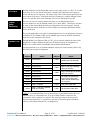
The Ring Switch has a set of predefined Modbus registers for status reporting. Refer to the
table below for the register assignments.
Modbus
Address
Modbus
Address
Status
Status
10001
Link on port 1
10019
Ring 1: Second port is
passing data (not blocked)
10002
Link on port 2
10020
Ring 2 complete
10003
Link on port 3
10004
Link on port 4
10021
Ring 2: First port is passing
data (not blocked)
10005
Link on port 5
10006
Link on port 6
10022
Ring 2 second port is passing
data (not blocked)
10007
Link on port 7
10008
Link on port 8
10030
10009
Link on port 9
OK output ON (no alarms)
Output will be ON if both
power and all enabled rings
are complete.
10017
Ring 1 complete
10031
First power input valid
10018
Ring 1: First port is passing
data (not blocked)
10032
Second power input valid
NOTE: It is recommended that you keep the poll time of your Modbus master driver or
hardware device to a reasonable rate. If you poll a Ring Switch at a rapid rate, the
performance of the switch may be reduced. The fastest poll time you should run will
depend on the application. As a guideline, a poll time of 500 mS or greater should not
adversely affect the performance of your Ring Switch.
Ring Switch User Manual
Page 21 of 29
Last Revised: 11-Jul-06
Amphenol – 948, Promenade de l‘Arve – B.P. 29 p– 74311 THYEZ Cedex – France - +33(0)4.50.89.28.00 -–www.rjswitch.com