1
r
USB
r
data interface
(1) for connecting a
PC
SOS
Press this button, the current video
to transfer data;.
I
(2) for connecting an external power supply to charge the battery or
file
is saved as can
Automatically turn on/off
supplies power to operate;
When connected with car charger, device
!
RESET
turn off and save the last video when car power off.
Select to reset
does not leak seconds
r
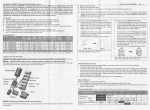
Power Switch: Short press Power ON Press and shutdown; short press
r
emergency locking keys: ln the video mode, short press, can lockthe
boot time
current video file can not be deleted;
Again long press the power button is turned off,
Power lndicator
Note: The recording instrument will be prompted to low battery
low
a camera icon;
flashing red dot, indicating the video work
I
G-sensor
When gravity acceleration up to ?g, the machine will automatically
2G-4G-6G-8G;
out;
Short press ok button to start the camera, the camera icon will appear
Special Function Description
G-sensor can be adjusted in the menu
is
goes
mode
the screen displays
full after the light quench;
MIC:The recording receiver;
save the cu rrent video of the accident, not delete the
REC
the red,light
Short press mode key, switch to camera mode, the upper left corner of
nsert the USB line after the power light light said it was charging, the
is
first boot, the red indicator light lights up at
voltage automatic shutdown when battery
I
Battery charge indicator
battery
r
on/off
Press the power button
I
r
Power
short press to take pictures;
This power indicator lights turned on;
r
willturn on when car start,
REC/photo operation specifications
I
to open or close the infrared night vision light; in the camera mode,
I
not be deleted;
file;
r
I
corner display camera icon, press
i!
OK
/
Power key to take photo, ta ke
pictures when the screen flashes for one time,
l
I
i
4
t$
Camera mode
shortly press mode button to switch to camera mode, in the top left
is
r
it
indicate photographe
completed.
Photo mode
1
,i
!2
13
d