1
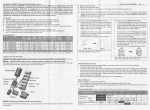
Product Structure
aa
KEY FU NCTION I NSTRUCTION
aa
I
I
a
r
\l
(,
tr &$-:
it
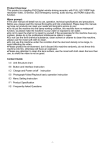
menu button
Short-Press to bring up the feature set menu;Continuous short press
a
a
this button can switch each other between each set;
a
tup
flta
Up to,select the function key menu
options; ; Standby or short video
process click here button can digital zoom adjust;
roK
Video and take pictures to confirm button, the camera mode, short
?.
Jr----'-.
[,-.*--.,.--_-+
liir
!'
\. -
--_
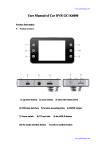
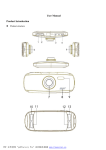
1) AV-ouTporr
3)
5)
7)
9)
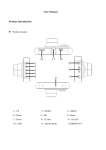
Bracket mounting mouth
power button
menu
speaker
11,) HD lens
13
DOWN
15
Mtc
L7
reset hole
19
indicator
_---.\
press this key to start recording again press stop recording; camera
'ri
mode Short Press to take pictures; menu mode to confirm OK.
--..
2)
+)
6)
8)
r
-./'J
down
ln menu setting, press down shortly to open or close record functions.
After first press the digital zoom f unction keys, the keys into digital
HDMI port
shrink function keys.
use port
mode key
f
Mode
Short Press to switch between each other in the camera / camera
Emergency lock button
10) lnfrared night v;sion light
12) uP
14) oK
15) TF Deck
18) display
/
playback;
Video process short press this key will be on the current screen lock
I
HDMI
r
TF card
HDMI OUT PORT
i
1
I
J
slot