1
Setting the Unattended Auto Lock Feature
To protect against unauthorized access if the drive is unlocked and unattended, the
diskAshur can be set to automatically lock after a pre-set amount of time.
In its default state, the diskAshur Unattended Auto Lock feature is turned off.
The Unattended Auto Lock can be set to activate after 5, 10 or 20 minutes.
To set the Unattended Auto Lock please use the following steps:
1. Enter the Admin mode by pressing and holding
+ 0 for five seconds until
the indicator light flashes RED. This indicates that you can enter the Admin
Password.
2. Enter the Admin Password and press
. The drive is in Admin Mode when the
indicator light has changed to BLUE.
3. Once in Admin mode, press
+ 6. The indicator light should start flashing
RED and BLUE intermittently.
4. Press one of the numbers below that corresponds to amount of time you would
like the drive to lock after no activity:
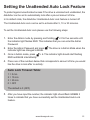
Auto Lock Timeout Table:
1 = 5 min
2 = 10 min
3 = 20 min
0 = OFF
The default is 0 (OFF)
5. After you have input the number, the indicator light should flash GREEN 3
times to indicate that you have successfully set the Unattended Auto Lock
feature.
www.istorage-uk.com
12