1
Entering the Admin Mode
Note: The diskAshur cannot be recognized by the operating system in the Admin
Mode.
To enter the Admin Mode, do the following:
1. Attach the USB cable to an available USB port on your computer. The
diskAshur goes into the Standby Mode, and the indicator light turns RED.
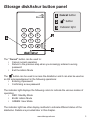
2. Press and hold
+ 0 for five seconds until the indicator light flashes RED.
This indicates that you can enter the Admin Password.
3. Enter the Admin Password and press
. The default Admin Password is
123456. The Secure Hard Drive is in Admin Mode when the indicator light has
changed to BLUE.
Exiting the Admin Mode
To exit the Admin Mode, press the “Cancel” button in the Admin Mode until the
indicator light turns RED. This indicates that you are in the Standby Mode.
Note: If the indicator light flashes RED for a few seconds, indicating the
diskAshur has returned to the Standby Mode, go back to Step 2. This is
due to one of the following conditions:
• You entered an incorrect Admin Password in Step 3.
• No activity was detected within two minutes in the Admin Mode.
www.istorage-uk.com
9