1
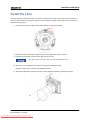
Adjust the Image
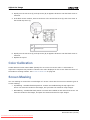
turn, the left and right horizontal cap screws should be turned 1/16 of a turn in the opposite
direction.
5. Check the screen each time an adjustment is made. If the quality of the projected image has
degraded, turn the vertical adjust cap screw 1/8 of turn clockwise. Make sure the left and right
horizontal adjusters are adjusted equally in the opposite direction to correct axial focus.
The 1/8 of a turn is a suggestion only and can be less if needed; however, it should never be
exceeded. Always compensate both left and right horizontal adjustments according to the vertical
adjustment.
6. Check the image after each adjustment. Continue to make adjustments until both top and
bottom are equally sharp. To make sure the lens is in the same relative position, adjust the left
and right horizontal adjusters in the opposite direction at the same time.
7. When the top and bottom of the image are equally in focus lock the set screw to hold it in
position. Recheck the image.
8. If additional adjustment is required, see Adjust Horizontal Boresight on page 23.
Adjust Horizontal Boresight
A boresight adjustment should only be made when the image cannot be focused uniformly
on the screen by aligning the projector to the screen and focusing the lens. When adjusting
boresight, you must maintain the boresight distance from the lens to the prism plane set by
Christie. For example, when you move the top screw outward, turn the bottom two
boresight screws to maintain the overall distance. Failure to comply could result in death or
serious injury.
Only adjust horizontal boresight 1/8 of a turn or less at one time to maintain optimal lens
performance (factory setup of absolute lens distance to the prism). It is critical that you
count each turn of the cap screws to make sure the adjustment is accurate. Failure to
comply could result in minor or moderate injury.
Typically, horizontal boresight does not require adjustment. It should only be adjusted if a large
horizontal angular offset to the screen is required.
1. Tap the Test Patterns button on the Main Panel.
2. Tap All Test Patterns.
3. Tap DC2K Framing.
CP2215 User Manual
020-101225-01 Rev. 1 (01-2014)
Downloaded From projector-manual.com Christie Manuals
23