1
Be142
User's Manual
- August - 2014
page 3
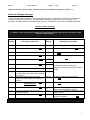
Section 2.0 Mode of operation
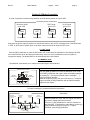
A mode of operation is selected via pushbutton and indicated by means of a green LED:
Operating Modes Pusbuttons
Operating Modes
MANUAL Mode
green LED
MAN
Pushbutton
TEST Mode
green LED
AUTO Mode
green LED
OFF
OFF
TEST
TEST
AUTO
AUTO
Pushbutton
Pushbutton
Pushbutton
Every time the power supply is switched on, the Be142 returns to the “AUTO” operating mode, if the BE142 was
in TEST or AUTO prior to power down. In the other cases, the Be142 will enter the OFF mode.
2.1 OFF mode
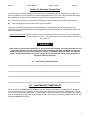
Push the [OFF] pushbutton to enter the OFF mode. OFF mode clears the fault alarms. The Display and LEDs
are turned off and a dot on the display will blink slowly. Push one of the pushbuttons on the front panel to
energize the display. The display will turn off automatically after a few minutes.
2.2 MANUAL mode
The MANUAL mode allows you to manual control the Engine and Contactors.
Instructions
Manual Engine Control
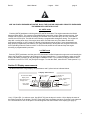
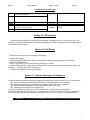
Push the [MAN] pushbutton to select the MANUAL mode. Push
the [START] pushbutton until engine starts; the display indicates
the message [! ! ! !] during the preheat and the message [. . . .]
during the starting attempts.
When the engine is running, the green LED turns on. To stop the
engine, push the [STOP] pushbutton until the [StOP] message
appears on the display.
Engine Running
green LED
START
Pushbutton
STOP
Pushbutton
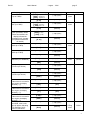
To control manually the contactors follow the instructions:
Contactors Control Panel
Generator
Presence LED
(Green)
KG-closed
indicator
(Green)
KM-closed
indicator
(Green)
KG
Instructions
Mains
Presence LED
(Green)
KM
KM
Pushbutton
(push to close)
KG
Pushbutton
(push to close)
Select the MANUAL mode, start the engine (see above)
and wait for voltage generator presence.
Push the [ I ] (KG) pushbutton to close the contactor of
the Generator. To transfer the Load to Mains, push the [I]
(KM) pushbutton (the [KG] will open). To open a
Contactor, push the [O] pushbutton.
[ O ]Pushbutton
(push to open)
3