1
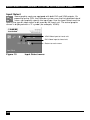
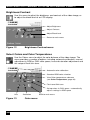
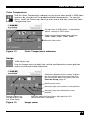
SERVSWITCH BRAND DVI KVM EXTENDER FAMILY Brightness/Contrast Use this menu to adjust the brightness and contrast of the video image, or to adjust the black level of an LCD display. Adjust Brightness Adjust Contrast Adjust Black level Return to main menu Figure 12 Brightness-Contrast menu Select Colors and Color Temperatures Use the Colors menu to adjust the color balance of the video image. The menu provides a number of options including automatic calibration, manual adjustment in RGB or CMY color space, hue and saturation adjustment and the setup of flesh/skin tone. Automatic color calibration Standard RGB color selection View Color temperature submenu (see Color Temperature, page 36) Flesh tone/Skin tone Set up colors in CMY space – automatically adjusts settings in RGB space Hue Figure 13 38 Saturation Color menu Back to main menu