1
6 / 2011
www.klinkmann.com
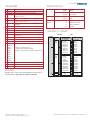
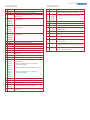
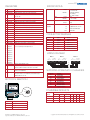
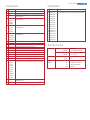
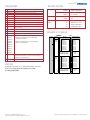
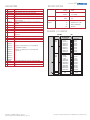
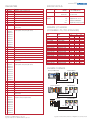
PARAMETERS
SPECIFICATIONS
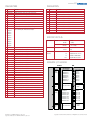
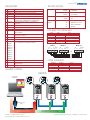
No. Name
Description
Communications
01
Adapter Port
Displays the port to which the adapter is connected.
02
DF1 Addr Cfg
Configures the DF1 address used for the serial converter.
03
DF1 Rate Cfg
Configures the data rate used for the serial port.
04
Comm Flt Action
Sets the action that the module will take if it detects that communications
have been disrupted.
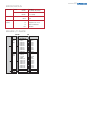
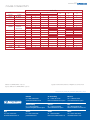
Electrical
Network
Protocol
Drive
9600 - 38400 bps
Protocol
DPI or SCANport
Data Rates
Consumption
DF1
Data Rates
Drive (DPI)
Network
125 or 500 Kbps (DPI only)
130 mA at 12 VDC
N/A
05
Reset Module
Used to reset the adapter or reset defaults.
Regulatory
UL
06
Clear DF1 Counts
Used to clear the DF1 statistical parameters (7-15).
Compliance
cUL
CAN/CSA C22.2 No. 14-1791
07
DF1 Packets Sent Displays the number of DF1 packets sent by the serial converter.
CE
EN50178 and EN61800-3
08
DF1 Packets Rcvd Displays the number of DF1 packets received by the serial converter.
09
Undelivered Msgs Displays the number of DF1 packets sent by the serial converter and
not acknowledged.
CTick
10
ENQs Sent
Displays the number of ENQs sent by the serial converter.
11
ENQs Received
Displays the number of ENQs received by the serial converter.
12
NAKs Received
Displays the number of NAKs received by the serial converter.
13
NAK Bad Packet
Displays the number of NAKs received by the serial converter because of
bad packets.
14
NAK No Memory
Displays the number of NAKs received by the serial converter because of
insufficient buffer memory.
15
Duplicate Msgs
Displays the number of duplicate messages sent by the serial converter.
16
Interface Mode
Selects whether the serial converter will autodetect DPI or SCANport devices
and use the appropriate protocol.
17
DPI Data Rate
Displays the data rate (kilobits per second) used by the drive.
18
DF1 Addr Act
Displays the actual DF1 address used by the serial converter.
19
DF1 Rate Act
Displays the actual data rate used by the serial converter.
20
Ref/Fdbk Size
Displays the size of the Reference/Feedback words.
21
Datalink Size
Displays the size of each Datalink word.
UL508C
AS/NZS 2064, Group 1, Class A
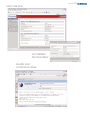
DriveExplorer LITE
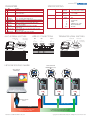
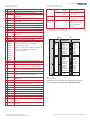
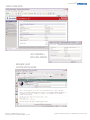
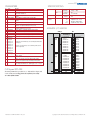
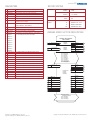
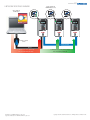
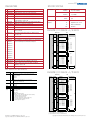
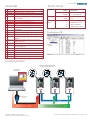
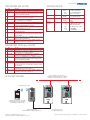
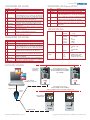
ROUTING DIAGRAM
PowerFlex 70 Drives with 20-COMM-C, 20-COMM-D,
20-COMM-E or 20-COMM-S Adapters (Port 5)
Laptop or Desktop PC
with DriveExplorer
20-COMM-S
SERIES A
FRN AS SHIPPED: V 1.001
SERIAL NUMBER: 402D9423
DEVICE: 5VDC 150mA
LISTED
IND.CONT.EQ.
966X
20-COMM-S
SERIES A
N223
FRN AS SHIPPED: V 1.001
SERIAL NUMBER: 402D9423
DEVICE: 5VDC 150mA
LISTED
IND.CONT.EQ.
966X
NODE ADDRESS
A
SERIES A
COM SHIELD GND
DATA
RATE
TERM
PORT
MOD
NET A
NET B
A
DFI RS485
B
COM SHIELD GND
DATA
RATE
TERM
PORT
0.00 Hz
2.5 Cans/Sec
646.0 Bus/Volt
MOD
NET A
NET B
A
B
COM SHIELD GND
DATA
RATE
PORT
0.00 Hz
2.5 Cans/Sec
646.0 Bus/Volt
MOD
NET A
NET B
STS
0.00 Hz
2.5 Cans/Sec
646.0 Bus/Volt
STS
PC Cable
STS
N223
NODE ADDRESS
DFI RS485
B
FRN AS SHIPPED: V 1.001
SERIAL NUMBER: 402D9423
DEVICE: 5VDC 150mA
LISTED
IND.CONT.EQ.
966X
NODE ADDRESS
DFI RS485
TERM
20-COMM-S
N223
1203-USB or 1203-SSS
Converter
Network
Drive Cable
Use DriveExplorer Lite to connect to a single drive
and configure its installed communication adapter
Publication 20COMM-PP001F-EN-P – May 2008
Supersedes Publication 20COMM-PP001E-EN-P – July 2006
Use DriveExplorer Full to route through DPI to drives connected
directly on ControlNet, DeviceNet, EtherNet/IP or RS485 DF1
Copyright ©2008 Rockwell Automation, Inc. All Rights Reserved. Printed in USA.