1
L-Proxy User Manual
121
LOYTEC
If the static interface of another port has been changed, notify the engineer responsible for
that port. Refer to Section 7.9.16 on how to repair such an interface in the LNS database.
7.11.4 Create Connections from a CSV File
A quick way to perform batch edit on connections is to export and import connections from
the connections CSV file. Each line in the connections CSV file identifies a connection.
The first column is the connection name. The second column specifies the hub data point.
The full path to the data point must be specified using the dot ‘.’ as the folder separator.
The third and following columns specify the target data points.
To Create Connection from a CSV File
1.
Select the menu Tools Æ Export Connections …
2.
Select an appropriate file name and export.
3.
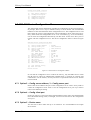
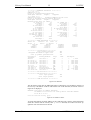
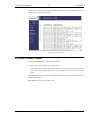
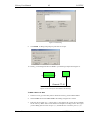
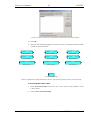
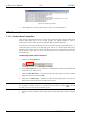
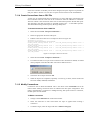
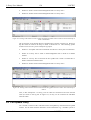
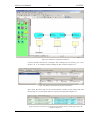
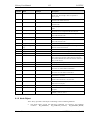
Edit the connections CSV file. An example is shown in Figure 121.
#connection_csv_ver,1
#ConnectionName,HubDPName,TargetDPName
nvoAbs_humid1,L-Proxy.CEA709 Port 1 (FT).abs_humid1,L-Proxy.CEA709
(FT).abs_humid1
nvoAbs_humid2,L-Proxy.CEA709 Port 1 (FT).abs_humid2,L-Proxy.CEA709
(FT).abs_humid2
nvoAbs_humid3,L-Proxy.CEA709 Port 1 (FT).abs_humid3,L-Proxy.CEA709
(FT).abs_humid3
nvoAbs_humid4,L-Proxy.CEA709 Port 1 (FT).abs_humid4,L-Proxy.CEA709
(FT).abs_humid4
Port
2
Port
2
Port
2
Port
2
Figure 121: Example Connection CSV File.
4.
Select the menu Tools Æ Import Connections …
5.
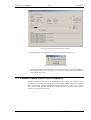
If connections that are not part of the connection CSV file shall be deleted, click Yes
when prompted. Click No if the other connections shall be left as is.
6.
Choose the file to import and click Ok.
7.
When the import has completed, optionally view the log to check, which connections
have been added, modified, and deleted.
7.11.5 Modify Connections
Connections can be edited and deleted. This is also done in the Connections tab of the
main window. Editing connections does not influence the data point configuration. This
means, when deleting a connection or adding/removing data points to/from a connection,
the data points are not deleted.
To Edit a Connection
Version 3.1
1.
Change to the Connections tab of the main window.
2.
Select the connection to edit. Then follow the steps as applied when creating a
connection.
3.
To delete a target, select the target and click on Remove Target(s).
LOYTEC electronics GmbH