1
L-Proxy User Manual
127
LOYTEC
8.2 Binding across Domains
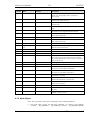
Let’s assume the network configuration from Table 7. We have 3 nodes Node 6, Node 7,
and Node 8, which reside in three different domains. Each of the three nodes has a switch
and a lamp object. The switch object is controlled by a switch connected to the node and
the lamp object turns on and off a lamp.
Node
name
NV name
Domain
Comment
Node 6
NvoSwitch0
4C4F59544543
SNVT_switch output NV
Node 6
NviLampValue0
4C4F59544543
SNVT_switch input NV
Node 7
NvoSwitch0
03
SNVT_switch output NV
Node 7
NviLampValue0
03
SNVT_switch input NV
Node 8
NvoSwitch0
505859
SNVT_switch output NV
Node 8
NviLampValue0
505859
SNVT_switch input NV
Table 7 Network configuration that spans 3 domains.
Let’s assume that Node 6 in Domain 4C4F59544543 (“LOYTEC”) must turn on the lamp
connected to Node 7 in Domain 03 and the lamp connected to Node 8 in Domain 505889
(“PXY”). Furthermore the switch connected to Node 8 must turn on the lamp connected to
Node 6 in Domain 4C4F59544543.
This would require a binding across domains, which is not supported in state-of-the-art
network installations tools. One can use L-Proxy to make the connections between the 3
domains as explained below.
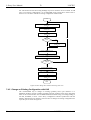
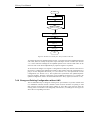
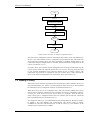
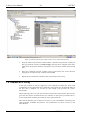
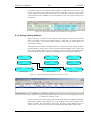
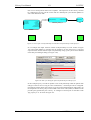
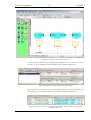
Let’s add L-Proxy1 Port 2 to the network with DomainID 4C4F59544543 as shown in
Figure 133. Next we have to create the dynamic input and output network variables on
L-Proxy Port 2. Now we can bind the output NV nvoSwitch0 on Node 6 to the
corresponding input NV nviSwitch0 on L-Proxy Port 2. We also bind the input NV
nviLampValue0 on Node 6 to the output NV nvoLampValue0 on L-Proxy Port 2.
Version 3.1
LOYTEC electronics GmbH