1
Freescale Semiconductor, Inc.
30
Hitex Target Interface Dialog Boxes
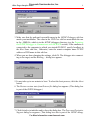
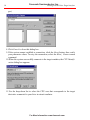
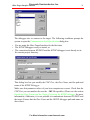
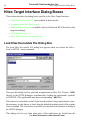
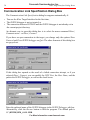
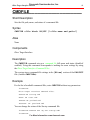
Communication Link Specification Dialog Box
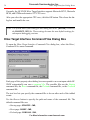
The Communication Link Specification dialog box appears automatically if:
• You use the Hitex Target Interface for the first time,
• The HiTOP debugger is not yet started, or
• The connection between HI-WAVE and the HiTOP debugger is not already set in
the current project directory.
An alternate way to open this dialog box is to select the menu command Hitex |
Communication... or Hitex | Connect.
If you have an open connection to the target, you change only the options Show
Protocol and Close HiTOP debugger on Quit. The other elements of this dialog box
are greyed out.
If this dialog box opened as the result of a failed connection attempt, or if you
selected Hitex | Connect, you can modify the UDP Port, the Host Name, and the
path to the HiTOP Debugger, as well as the check boxes.
.
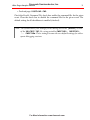
Enter the path and name of the HiTOP debugger in the HiTOP Debugger edit box.
Alternatively, click the Browse button to find the program. The default path is
C:\HITEX\HFW_6812.EXE.
For More Information: www.freescale.com