1
SALTO PPD 200
Page: 4
CONNECTIONS
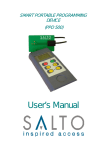
Apart from the keyboard and the display, the PPD has two
communication ports, as described below:
1. Serial port connector: located at the upper right corner , it is a
DB-9 connector used to communicate with the PC through a
serial (RS-232) protocol.
2. RJ11 female phone socket connector: located at the upper
left corner, it is a telephonic connector (RJ11) used to
communicate with the electronic furniture.
• To connect to the Electronic Furniture for data transfer:
Use the SALTO RJ11 connecting cable (provided), and plug the
RJ11 telephone connector end into the PPD. If you look at this cable, you
will see it has an i-button on one end . This I-button is used for the data
transfer when connected to the reader on the Electronic Furniture.
• To connect to the Electronic Furniture for Emergency Opening:
The same RJ11 female phone socket in the PPD is used to
connect the emergency opening cable. This cable has a three pin
connector on one end which when inserted into the three pin connection
port on the Electronic Furniture (below the reader) allows emergency
opening.
• To connect to the computer:
Use the SALTO DB-9 connecting cable (provided), and plug the
female connector into the computer serial port, and plug the male DB-9
connector into the PPD serial port.
4