1
Anti-intrusion control panels
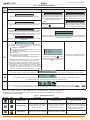
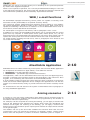
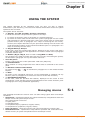
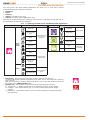
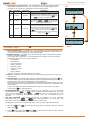
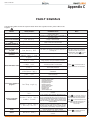
Table 15: Alien menu
Function
Icon/key
Intrusion
Alien keypad
Web browser
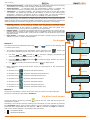
Accesses a section which allows you, where possible, to view and change the status of parts of the intrusion-control system:
• “Partitions” - where it is possible to view and change the status of the partitions.
• “Zones” - where it is possible to view and change the status of the zones.
• “Events Log” - where it is possible to view the events saved to the events memory (after indicating the number of
events you wish to view).
Refer to paragraphs 5-1, 5-2 and 5-5.
•
User code required.
•
Menu
•
Timer
System
48
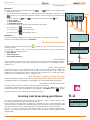
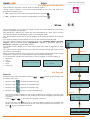
Accesses two sections:
“Actions” - containing a list of the control
panel commands in the event of alarm or
tamper events or requests for teleservice and
overtime. Refer to paragraphs 5-1, 5-11, 5-12
and 5-14.
“Activations” - where it is possible to view and
enable the activations described in paragraph
5-4 Activations.
User code required.
Not present
Camera
Settings
AlienMobile
Not present
•
The “Partitions” section allows you to reset the partition alarm
memory.
The “Events log” section allows you to indicate the number of
events you wish.
Not present
Not present
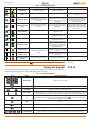
Accesses a section where it is
possible to view the timers and
their status.
Refer to paragraph 5-5 View.
Not present
Not present
Accesses a section which allows
you to view in real-time the video
recording made the camera configured in the “Settings” section
of the Alien Mobile application.
Refer to paragraph 5-5 View.
Available for AlienMobile+ only
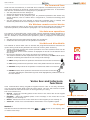
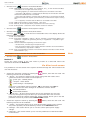
Accesses the sections for the settings of the keypad and the SmartLiving control panel:
• “Alien” - provides information regarding the
setting-up of the Alien touch screen interface
you are using.
It shows the model, firmware revision and the
Accesses a section where it is
address of the keypad and built-in reader.
possible to:
Furthermore, it allows you to modify the
Accesses
a
section
where
it
is
screen by means of the + and - keys.
• change the settings of the
possible to:
Refer to paragraph 5-8 Keypad settings.
AlienMobile application
• “Date/Time”, “Change PIN”, “Tel.Numbers” - • select the language of the • set up a connection with the
web server interface
these sections allow you to change the date
SmartLiving control panel to
and time on the control panel clock, the user • upgrade the web server
be monitored
interface
PINs and the contact phone numbers saved to
• Set the IP address of the
• open an online guide
the memory.
camera viewable in the
Refer to paragraphs 5-7, 5-9 and 5-10.
“Camera” section
• “Installer” - this section allows access to the
installer menu after entry of a valid installer
PIN, thus putting the control panel in
programming mode.
User code required.
Installer code required for the “Installer”.
•
•
•
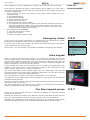
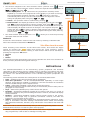
Accesses a section where it is possible to view the system parts:
List of ongoing faults
Power-supply voltage of the control panel
Information relating the GSM communications board
Refer to paragraph 5-5 View.
User code required.
/
Available for AlienMobile+ only
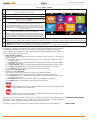
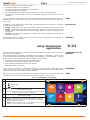
Apps
Accesses the applications of the Alien touch
screen interface:
• “Photo frame” - application that starts a
slideshow of the images contained in the
inserted SD-card (see paragraph 5-22 Photo
frame).
• “Voice functions” accesses a section where it
is possible to activate the control panel voice
board functions or the “Intercom” function.
Refer to paragraph 5-3 Voice box and
intercom functions.
No code requested
Not present
Not present
Twitter
Not present
Link to the Twitter page of INIM Electronics.
Using the system