1
Maintenance
6.4.2 Oil Replenishment (Oil Kit Cat. No. 7724800)
The manufacturer recommends inspecting the oil in the sensor for large air bubbles during the
customer-scheduled service duty cycle, and prior to every installation. Small bubbles (less than ¼in. diameter) of air within the oil do not affect performance. Larger bubbles may minimize the antifouling benefit of the oil.
To replenish sensor oil:
1. If the sensor is new, remove the yellow tape on the sensor.
2. Remove any debris from the sensor.
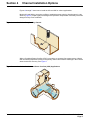
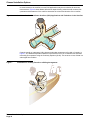
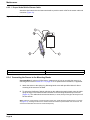
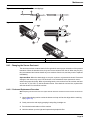
3. Load the oil cartridge into the dispensing gun (Figure 20).
4. Twist the feed tube onto the cartridge and attach the syringe tip to the feed tube (Figure 21).
5. Press the dispenser gun handle to purge any air bubbles from the syringe tip.
6. Remove the set screw in the transducer cover with the supplied 0.035 hex wrench. Retain the
set screw.
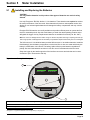
7. Slowly insert the syringe tip into the set screw hole and dispense the oil
(Figure 22). While dispensing the oil, hold the probe at an angle to allow the air to be pushed
out the side port (Figure 22). Continue to dispense the oil until all the air bubbles are removed.
Note: Slowly insert the syringe tip and do not dispense oil during insertion or damage to the transducer may
occur if too much pressure is applied.
8. Continue to dispense the oil while removing the syringe from the set screw hole to prevent air
bubbles. Replace the set screw until it is flush with the transducer cover and remove any
excess oil around the screw hole or on the sensor.
9. Clean the entire probe and place a piece of electrical tape over the side port to prevent oil from
leaking out. Remove the tape from the sensor prior to zeroing and installing the sensor.
Figure 20
Loading the Cartridge into the Dispensing Gun
2
1
1.
Dispensing Gun
Sensor Maintenance
Page 34
2.
Silicone Oil Cartridge