1
HD CAMCORDER
HDW-730
HDW-750
HDW-750P
OPERATION MANUAL
1st Edition (Revised 5)
[English]
WARNING
To reduce the risk of fire or electric shock, do not
expose this apparatus to rain or moisture.
To avoid electrical shock, do not open the cabinet.
Refer servicing to qualified personnel only.
For the customers in the U.S.A.
This equipment has been tested and found to comply with
the limits for a Class B digital device, pursuant to Part 15
of the FCC Rules. These limits are designed to provide
reasonable protection against harmful interference in a
residential installation. This equipment generates, uses,
and can radiate radio frequency energy and, if not installed
and used in accordance with the instructions, may cause
harmful interference to radio communications. However,
there is no guarantee that interference will not occur in a
particular installation. If this equipment does cause harmful
interference to radio or television reception, which can be
determined by turning the equipment off and on, the user
is encouraged to try to correct the interference by one or
more of the following measures:
— Reorient or relocate the receiving antenna.
— Increase the separation between the equipment and
receiver.
— Connect the equipment into an outlet on a circuit
different from that to which the receiver is connected.
— Consult the dealer or an experienced radio/TV
technician for help.
You are cautioned that any changes or modifications not
expressly approved in this manual could void your
authority to operate this equipment.
All interface cables used to connect peripherals must be
shielded in order to comply with the limits for a digital
device pursuant to Subpart B of Part 15 of FCC Rules.
For the State of California, USA only
Perchlorate Material - special handling may apply, See
www.dtsc.ca.gov/hazardouswaste/perchlorate
Perchlorate Material : Lithium battery contains perchlorate.
For the customers in Europe
This product with the CE marking complies with the EMC
Directive issued by the Commission of the European
Community.
Compliance with this directive implies conformity to the
following European standards:
• EN55103-1 : Electromagnetic Interference(Emission)
• EN55103-2 : Electromagnetic Susceptibility(Immunity)
This product is intended for use in the following
Electromagnetic Environments:
E1 (residential), E2 (commercial and light industrial), E3
(urban outdoors), E4 (controlled EMC environment, ex. TV
studio).
The manufacturer of this product is Sony Corporation, 1-71 Konan, Minato-ku, Tokyo, Japan.
The Authorized Representative for EMC and product
safety is Sony Deutschland GmbH, Hedelfinger Strasse
61, 70327 Stuttgart, Germany. For any service or
guarantee matters please refer to the addresses given in
separate service or guarantee documents.
For the customers in the USA and Canada
RECYCLING LITHIUM-ION BATTERIES
Lithium-Ion batteries are recyclable.
You can help preserve our environment by returning your
used rechargeable batteries to the collection and recycling
location nearest you.
For more information regarding recycling of rechargeable
batteries, call toll free 1-800-822-8837, or visit http://
www.rbrc.org/ Caution: Do not handle damaged or leaking
Lithium-Ion batteries.
For the customers in the USA and Canada
RECYCLING NICKEL METAL HYDRIDE BATTERIES
Nickel Metal Hydride batteries are recyclable.
You can help preserve our environment by returning your
used rechargeable batteries to the collection and recycling
location nearest you.
For more information regarding recycling of rechargeable
batteries, call toll free 1-800-822-8837, or visit http://
www.rbrc.org/
Caution: Do not handle damaged or leaking Nickel Metal
Hydride batteries.
For the customers in Taiwan only
Table of Contents
Chapter 1 Overview
1-1
1-2
1-3
Features ..................................................................................... 1-1
1-1-1 Camera Features ............................................................... 1-1
1-1-2 VTR Features .................................................................... 1-4
Precautions ................................................................................ 1-7
Example of System Configuration ........................................ 1-10
Chapter 2 Locations and Functions of Parts and
Controls
2-1
2-2
2-3
2-4
2-5
2-6
2-7
2-8
2-9
Power Supply ............................................................................ 2-1
Accessory Attachments ............................................................ 2-3
Audio Functions ........................................................................ 2-5
Shooting and Recording/Playback Functions ...................... 2-14
Menu Operating Section ........................................................ 2-29
Time Code System .................................................................. 2-33
Warnings and Indications ...................................................... 2-39
Warnings and Indications on the Display Panel .................. 2-42
Indicators on the Viewfinder ................................................. 2-46
Chapter 3 Recording and Playback
3-1
3-2
About Cassettes ......................................................................... 3-1
3-1-1 Loading and Unloading a Cassette .................................. 3-1
3-1-2 Preventing Accidental Erasure ........................................ 3-5
Recording .................................................................................. 3-6
3-2-1 Basic Procedures ............................................................. 3-6
3-2-2 Continuous Recording ................................................... 3-12
3-2-3 Recording Good Shot Markers ...................................... 3-15
3-2-4 Recording a Recording Start Marker ............................ 3-20
3-2-5 Starting a Shoot with a Few Seconds of Pre-Stored Picture
Data (Loop Rec Function) (When Using an HKDW-703
Extension Board) ........................................................... 3-20
(Continued)
Table of Contents
1
3-3
3-4
3-5
3-6
3-2-6 Shooting Pictures at Intervals (Interval Rec Function)
(When Using an HKDW-703) ...................................... 3-28
3-2-7 Continuous Recording on the Previous Cut .................. 3-52
3-2-8 Searching for the Last Recorded Portion and Turning in the
Recording Pause Mode (End Search Function) ............ 3-53
Checking the Recording — Playback ................................... 3-55
3-3-1 Checking the Last Two Seconds of the Recording
— Recording Review .................................................... 3-55
3-3-2 Checking the Recording on the Color Video Monitor
— Playback in Color ..................................................... 3-56
Recording the Recording Start Time Code onto the Memory
Label — Tele-File ................................................................... 3-58
Freezing a Picture during Playback ..................................... 3-63
Setting the Stand-by off Timer During Rec-Pause .............. 3-66
Chapter 4 Adjustments and Settings for
Recording
4-1
4-2
4-3
4-4
4-5
2
Adjusting the Black Balance and the White Balance ............ 4-1
4-1-1 Adjusting the Black Balance ........................................... 4-2
4-1-2 Adjusting the White Balance .......................................... 4-6
Setting the Electronic Shutter ............................................... 4-12
4-2-1 Shutter Modes ............................................................... 4-12
4-2-2 Selecting the Shutter Mode and Speed .......................... 4-14
Changing the Reference Value for Automatic Iris
Adjustment .............................................................................. 4-21
Adjusting the Audio Level ..................................................... 4-28
Setting the Time Data ............................................................. 4-36
4-5-1 Setting the Time Code ................................................... 4-36
4-5-2 Saving the Real Time in the Time Code ....................... 4-38
4-5-3 Setting the User Bits ...................................................... 4-39
4-5-4 Synchronizing the Time Code ....................................... 4-41
Table of Contents
4-6
Menu Display on the Viewfinder Screen .............................. 4-46
4-6-1 Menu Configuration ...................................................... 4-46
4-6-2 Basic Use of the Menu .................................................. 4-49
4-6-3 Editing the USER Menu ................................................ 4-55
4-7 Status Display on the Viewfinder Screen ............................. 4-64
4-7-1 Layout of the Status Display on the Viewfinder
Screen ............................................................................ 4-65
4-7-2 Selecting the Display Items ........................................... 4-70
4-7-3 Display Mode and Setting Change and Adjustment Progress
Messages ....................................................................... 4-73
4-7-4 Setting the Marker Display ........................................... 4-75
4-7-5 Setting the Viewfinder .................................................. 4-78
4-7-6 Recording Superimposed Shot Data in Color Bars ....... 4-81
4-7-7 Setting the Shot ID ........................................................ 4-84
4-7-8 Displaying the Status Confirmation Windows .............. 4-90
4-7-9 Confirming the Image of the Return Video Signal
on the Viewfinder .......................................................... 4-94
4-8 Adjustments and Settings from Menus ................................ 4-98
4-8-1 Setting the GAIN Selector Values ................................ 4-98
4-8-2 Selecting the Output Signals ....................................... 4-101
4-8-3 Setting the Color Temperature Manually .................... 4-104
4-8-4 Specifying an Offset for the Auto White Balance
Setting ......................................................................... 4-106
4-8-5 Assigning Functions to ASSIGN 1/2 Switches ........... 4-109
4-8-6 Setting the Date/Time of the Internal Clock ............... 4-114
4-8-7 Selecting the Lens File ................................................ 4-116
4-9 Saving/Loading User Menu Data to/from
Memory Stick ........................................................................ 4-118
4-9-1 Handling the Memory Stick ........................................ 4-118
4-9-2 Saving/Loading User Menu Data to/from
Memory Stick .............................................................. 4-122
4-10 Resetting USER Menu Settings to the Standard
Settings ................................................................................... 4-133
(Continued)
Table of Contents
3
4-11 Using the Scene Files ............................................................ 4-135
4-11-1 Storing Data in the Scene File ..................................... 4-135
4-11-2 Loading Scene Files .................................................... 4-145
4-11-3 Resetting the Settings of the Camcorder to the Standard
Settings Saved in the Reference File ........................... 4-150
4-12 Jumping to a File-Related Menu Page When Inserting a
Memory Stick ........................................................................ 4-151
Chapter 5 Setting Up the Camcorder
5-1
Power Supply ............................................................................ 5-1
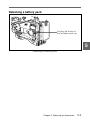
5-1-1 Using a Battery Pack ....................................................... 5-1
5-1-2 Avoiding Breaks in Operation Due to Dead Batteries .... 5-4
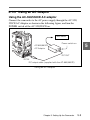
5-1-3 Using an AC Adaptor ...................................................... 5-5
5-1-4 Using the Anton Bauer Ultralight System ...................... 5-6
5-2 Adjusting the Viewfinder ......................................................... 5-7
5-2-1 Adjusting the Viewfinder Position .................................. 5-7
5-2-2 Adjusting the Viewfinder Focus and Screen ................... 5-9
5-2-3 Detaching the Viewfinder ............................................. 5-10
5-2-4 Detaching the Eyepiece ................................................. 5-12
5-3 Mounting the Lens .................................................................. 5-14
5-4 Adjusting the Flange Focal Length ....................................... 5-15
5-5 Audio Input System ................................................................ 5-17
5-5-1 Using the Supplied Microphone .................................... 5-17
5-5-2 Using an External Microphone ..................................... 5-19
5-5-3 Attaching a UHF Portable Tuner (for a UHF Wireless
Microphone System) ..................................................... 5-24
5-5-4 Connecting Line Input Audio Equipment ..................... 5-28
5-6 Tripod Mounting .................................................................... 5-29
5-7 Attaching the Shoulder Strap ................................................ 5-31
5-8 Adjusting the Shoulder Pad Position .................................... 5-33
5-9 Putting On the Rain Cover .................................................... 5-34
5-10 Connecting the Remote Control Unit ................................... 5-36
4
Table of Contents
Chapter 6 Maintenance
6-1
6-2
6-3
6-4
Testing the Camcorder Before Shooting ................................ 6-1
6-1-1 Preparations for Testing .................................................. 6-1
6-1-2 Testing the Camera ......................................................... 6-2
6-1-3 Testing the VTR .............................................................. 6-5
Maintenance ............................................................................ 6-11
6-2-1 Cleaning the Video Heads ............................................. 6-11
6-2-2 Cleaning the Viewfinder ............................................... 6-11
6-2-3 Cleaning the Tape Transport System ............................ 6-13
6-2-4 Performing Maintenance After Use Under Severe
Condition ....................................................................... 6-13
6-2-5 Note About the Battery Terminal .................................. 6-14
Periodic Inspection ................................................................. 6-15
6-3-1 Hours Meter .................................................................. 6-15
6-3-2 List of Parts for the Periodic Inspection ........................ 6-17
Operation Warnings ............................................................... 6-18
Appendix
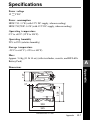
Specifications ..................................................................................... A-1
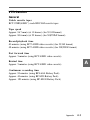
Video Camera Section ............................................................... A-2
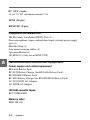
VTR Section .............................................................................. A-3
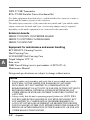
Supplied Accessories ................................................................. A-6
Recommended Additional Equipment ...................................... A-6
Menu List ........................................................................................... A-9
OPERATION Menu List ........................................................... A-9
PAINT Menu List .................................................................... A-19
MAINTENANCE Menu List .................................................. A-31
FILE Menu List ....................................................................... A-46
DIAGNOSIS Menu List .......................................................... A-49
About a “Memory Stick” ................................................................ A-50
Index .................................................................................................... I-1
Table of Contents
5
1-1 Features
1-1-1 Camera Features
The features of the HDW-730/750/750P camera are described below.
• 2/3-type Power HAD sensor CCDs with 2,000,000 picture elements
provide a compact and lightweight unit with excellent image quality.
The HDW-750/750P uses FIT 6)-type CCDs and the HDW-730 uses
IT 7)-type CCDs.
• Existing 2/3-inch lenses can be used.
• A new integrated circuit technology for digital signal processing has
improved picture quality and functionability.
• A setup menu enables you to control features such as status displays,
messages, and markers; to select various types of settings; to toggle
switches; and to operate a Memory Stick 8).
....................................................................................................................................
1) The HDW-730 can operate with either the 59.94I or the 50I format. The HDW750 operates with the 59.94I format. The HDW-750P can operate with either the
50I or the 25PsF format. The descriptions given in this manual apply to all
models, any differences being clearly noted in the text.
2) Power HAD: Power Hole-Accumulated Diode
“Power HAD” is a registered trademark of Sony Corporation.
3) CCD: Charge-Coupled Device
4) ENG: Electronic News Gathering
5) EFP: Electronic Field Production
6) FIT: Frame Interline Transfer
7) IT: Interline Transfer
8) “Memory Stick” is a trademark of Sony Corporation.
Chapter 1
Overview
1-1
1
Overview
The HDW-730/750/750P 1) HD Camcorder combines an HD color video
camera, of which the effective picture elements are 1920(H) × 1080(V)
and which uses 2/3-type Power HAD 2) sensor CCD 3) imagers with
2,000,000 picture elements, with an HDCAM portable videocassette
recorder. Its excellent image quality, sensitivity, portability, and dustand water-proof construction make it ideal as a camcorder for ENG 4)
and EFP 5) in the same way as the earlier BVW-400A/400AP. The
introduction of a new integrated circuit technology (LSI) for processing
HD digital signals improves the image quality even further and
simplifies setup (initialization) operations.
1
• Blur-free shooting is ensured by a built-in, high-performance electronic
shutter that provides a variety of modes, such as ECS 1) mode which
reduces flickering on the monitor screen, and EVS 2) mode for the
HDW-730 and S-EVS 3) mode for the HDW-750/750P 4) which improve
vertical resolution.
• Selectable video gain ensures a noise-free image.
• A simple switch operation enables automatic adjustment of the black
set, black balance, and white balance. Memory functions make it easy
to replicate the white balance setting appropriate for the lighting
conditions.
• The ATW 5) function automatically adjusts the white balance for the
varying lighting conditions during shooting.
• The “TruEye” 6) process is used to ensure naturally colored pictures
even when shooting very bright subject.
• The video gain can be boosted to 42 dB instantly using the TURBO
GAIN button.
• Character display functions on the viewfinder indicate switch settings,
automatic black and white balance adjustment, status indications, and
warnings.
• The warning system uses various types of warning indicators and
sounds to inform you of VTR faults, end of tape, low battery, etc.
• The camcorder is equipped with a dual-wheel filter disk for adjusting
the filter setting to the shooting and lighting conditions.
• Override function which makes fine adjustment of the reference value
for brightness of automatic iris control is provided.
....................................................................................................................................
1) ECS: Extended Clear Scan
2) EVS: Enhanced Vertical definition System
3) S-EVS: Super Enhanced Vertical definition System
4) When the HDW-750P operates with the 25PsF format, neither S-EVS mode nor
EVS mode is availabele
5) ATW: Auto Tracing White balance
6) TruEye: “TruEye” is a registered trademark of Sony Corporation.
1-2
Chapter 1
Overview
• A built-in circuit produces a color bar signal for easy adjustment of the
color monitor.
• The RM-B150 remote control unit (not supplied) controls camera
functions and VTR functions.
• Setup data made on the USER menu, including the various marker
settings, can be stored on a Memory Stick as a user file. After storage,
it can be recalled.
• Setup data specified by video engineers, including the various detail
settings, can be stored in the camcorder itself and on a Memory Stick
as a reference file. After storage it can be loaded. This makes it
possible to shorten setup time by duplicating the stored reference file to
other cameras through the Memory Stick.
• Setup data specified by video engineers, including the video settings,
can be stored in the camcorder itself and on a Memory Stick as a scene
file. This makes it possible to load setup data appropriate for the scene.
• Correction values for lens extenders and individual lenses can be stored
as a lens file. The values can then be recalled. This makes it possible
to shorten adjustment time when the lens is replaced.
• A high-performance viewfinder is adjustable forward, backward, and
sideways, and has a full range of auxiliary equipment.
• The camcorder is provided with the XLR 5-pin connector, which
allows connection of a stereo microphone. The ASSIGN 1/2 switches
allow microphone mode to be switched between stereo and monaural.
• The HD SDI output (corresponding to Embedded Audio) makes it
possible to monitor the camera image and playback image.
• Attaching an HKDW-702 down converter (not supplied) (converting to
a 525i/625i signal 1)) allows the camera image and playback image to
be monitored on an NTSC/PAL monitor. This board makes it possible
to output the SDI signal (corresponding to Embedded Audio).
....................................................................................................................................
1) When an HKDW-702 is attached to an HDW-750 or an HDW-730 which
operates with the 59.94I format, the HD signal is down-converted to a 525i
signal. When an HKDW-702 is attached to an HDW-750P or an HDW-730 with
the 50I format, the HD signal is down-converted to a 625i signal.
Chapter 1
Overview
1-3
1
1
• Three down converter modes are available: SQUEEZE, LETTER BOX
and CROP.
• The camcorder is provided with the LIGHT connector. This feeds
power to the light from a battery or AC adaptor connected to the
camcorder.
• The viewfinder supplied with NTSC/PAL type camcorders, such as the
BVW-400A/400AP, can be attached to HDW-730/750/750P in
emergencies (only when an HKDW-702 (not supplied) is attached).
Some functions are not available with this viewfinder.
• The camcorder has the ASSIGN 1/2 switches, which can be assigned
functions.
1-1-2 VTR Features
The VTR features of this camcorder are described below.
• Use of the HDCAM format allows high performance HD digital
recording and playback while preserving the same ease of use as
conventional camcorder equipment.
• The same cassette size (S size) as Digital BETACAM can be used to
achieve a long recording time of approximately 40 minutes (for 59.94I
format) and 48 minutes (for 50I/25PsF format).
• No playback adaptor is needed to see the color playback image on the
monitor screen.
• The 4 times normal speed search function provides quick positioning
of the tape.
• LTC 1) and VITC 2) recording and LTC playback can be performed.
• It is possible to record recording start markers and good shot markers
on the tape while shooting, and search automatically for required cuts
when editing.
....................................................................................................................................
1) LTC: Longitudinal Time Code
2) VITC: Vertical Interval Time Code
1-4
Chapter 1
Overview
• It is possible to automatically rewind and review the last 2 seconds of
the recording on the tape for a quick check immediately after shooting.
• Compatible with the Tele-File 1) Memory Label system.
By pressing the RET button on the lens while recording, the timecode
valid when you pressed the button is recorded on a MLB-1M-100
memory label (not supplied) attached to the cassette. This is very
helpful for management of the cassette tapes and to improve the
efficiency of the tape editing.
• The built-in time code generator can be synchronized with an external
generator.
• A lithium battery is the back-up power supply for the built-in time code
generator enabling the time code to be held for approximately 5 years
without charging the camcorder power supply.
• Optional long-life battery packs are available.
• Pressing the VTR START button on the camcorder or the VTR button
on the lens ensures recording continuity from the very next frame.
• The time code is displayed in the LCD window screen even when the
power is off. The automatic power shut-off function has three time
code indication settings.
• The camcorder continuously stores a few seconds of the most recent
picture data. Recording is started with this data when the REC button is
pressed. This prevents the loss of picture data (Loop Rec function).
(This feature is available when an HKDW-703 (not supplied) is
attached.)
• The camcorder can shoot pictures at intervals. (This feature is
available when an HKDW-703 (not supplied) is attached.)
• A slot-in UHF portable tuner WRR-855A/855B (not supplied) can be
attached.
....................................................................................................................................
1) Tele-File
The Tele-File system is a non-contact data reading/writing system. It allows a
variety of data to be stored on a 1/2-inch tape label with an non-contact IC
memory.
Chapter 1
Overview
1-5
1
1
• Four channels of analog audio can be converted to 20-bit digital
signals. The converted four channels of digital audio can then be
recorded.
• Connecting an HDCA-901 camera adaptor (not supplied) allows the
input of four audio channels. This also makes it possible for the HDSDI signal to be output.
• When connecting the audio cable to AUDIO IN CH-1/CH-2 connectors
(XLR 3-pin), the audio signals input to the XLR 3-pin are recorded
regardless of the AUDIO IN switch setting. This function is called the
XLR connection automatic detection function.
• The AUDIO OUT connector (XLR 5-pin) allows the camcorder to
output signals from two channels at the same time (stereo recording).
• The camcorder searches for the most recently recorded cut and records
the new cut over it. (RE-TAKE function)
• The camcorder searches for the point most recently recorded on the
tape and automatically switches to paused recording mode (rec pause).
(End Search function)
• The camcorder can record GPS data with the video data on the tape.
(This feature is available when an HKDW-704 GPS UNIT is attached.)
1-6
Chapter 1
Overview
1-2 Precautions
1
Use and Storage
Do not subject the camcorder to severe shocks
The internal mechanism may be damaged or the body warped.
After use
Always turn off the power.
Before storing the camcorder for a long period
Remove the battery pack.
Use and storage locations
Store in a level, ventilated place. Avoid using or storing the camcorder
in the following places.
• Places subject to temperature extremes
• Very damp places
• Places subject to severe vibration
• Near strong magnetic fields
• In direct sunlight or close to heaters for extended periods
To prevent electromagnetic interference from portable
communications devices
The use of portable telephones and other communications devices near
this unit can result in misoperations and interference with audio and
video signals.
It is recommended that the portable communications devices near this
unit be powered off.
Note on laser beams
Laser beams may damage the CCDs. If you shoot a scene that includes a
laser beam, be careful not to let a laser beam become directed into the
lens of the camera.
Chapter 1
Overview
1-7
1
Phenomena specific to CCD image sensors
The following phenomena that may appear in images are specific to
CCD (Charge Coupled Device) image sensors. They do not indicate
malfunctions.
White flecks
Although the CCD image sensors are produced with high-precision
technologies, fine white flecks may be generated on the screen in rare
cases, caused by cosmic rays, etc.
This is related to the principle of CCD image sensors and is not a
malfunction.
The white flecks especially tend to be seen in the following cases:
• when operating at a high environmental temperature
• when you have raised the master gain (sensitivity)
• when operating in Slow-Shutter mode
This product has a compensation function and the problem may be
alleviated by automatic black balance adjustment (see page 4-2).
Vertical smear
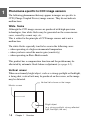
When an extremely bright object, such as a strong spotlight or flashlight,
is being shot, vertical tails may be produced on the screen, or the image
may be distorted.
Vertical tails shown on the image.
Monitor screen
Bright object
(e.g. strong spotlight, strong reflected
light, flashlight, the sun)
1-8
Chapter 1
Overview
Aliasing
When fine patterns, stripes, or lines are shot, they may appear jagged or
flicker.
Phenomena specific to IT-type CCD Image Sensors (HDW-730
only)
When an extremely bright object, such as a strong spotlight or flashlight,
is being shot, cross-type or T-type noise may be produced. This is a
specific phenomenon, called “blooming,” which is related to the
structure of the IT-type CCD and is not a malfunction. Keep such an
characteristics of the IT-type CCD in mind when using this product.
Chapter 1
Overview
1-9
1
1-3 Example of System Configuration
1
The diagram below shows a typical configuration of the camcorder for
ENG and EFP.
For more information about the fittings, connections, or use of additional
equipment and accessories, see Chapter 5 as well as the operation manuals for
the connected equipment.
Viewfinder-related equipment
Fog-proof filter
(Part No. 1-547-341-11)
BKW-401 Viewfinder
Rotation Bracket
Camera adaptor
BKDW-701
Servo filter unit
Video monitor for
color image check
while shooting
Audio signal source
Extension
board
HKDW-703 for
picture cache
HKDW-702 a) for
converting the signal
to 525i/625i signal
HKDW-704 for
recording the GPS
data
HDCA-901 for the input of
the audio channels 3 and
4 and the HD-SDI output
Lens assembly b) (−2.8 D to +2.0 D)
(Part No. A-8262-537-A)
Lens assembly b) (−3.6 D to −0.8 D)
(Part No. A-8262-538-A)
Lens assembly b) (−3.6 D to +0.4 D)
(Part No. A-8267-737-A)
Lens assembly b)
(3 × magnification)
(−2.4 D to +0.5 D)
(Part No. A-8314-798-A)
Power source
Memory Stick
Remote controll
equipment
RM-B150 Remote
Control Unit
Battery
External microphone
C-74, etc.
AC power
supply c)
BC-L120/M50
Battery
Charger
CAC-12 Microphone
Holder
AC-550/
550CE
AC Adaptor
BP-L60A/
M50/M100
Battery Pack
AC-DN2B
AC Adaptor
Audio equipment
WRR- 810A/860A/862A/
862B UHF Portable Tuner
WRR-855A/855B slotin UHF portable tuner
CCXA-53 audio cable
a) Be sure to attach the HKDW-702/1 or higher to the HDW-730/750P.
b) For more information, see “Viewfinder and related equipment” on page A-7.
c) 120 V AC or 220 to 240 V AC
1-10
Chapter 1 Overview
2-1 Power Supply
2
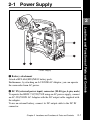
1 Battery attachment
Attach a BP-L60A/M50/M100 battery pack.
Furthermore, by attaching an AC-DN2B AC Adaptor, you can operate
the camcorder from AC power.
2 DC IN (external power input) connector (XLR type, 4-pin, male)
To operate the HDW-730/750/750P using an AC power supply, connect
an AC-550/550CE AC Adaptor with the DC output cable supplied with
the adaptor.
To use an external battery, connect its DC output cable to the DC IN
connector.
Chapter 2 Locations and Functions of Parts and Controls
2-1
Locations and Functions of Parts and Controls
Power supply
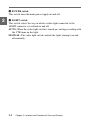
3 POWER switch
This switch turns the main power supply on and off.
2
4 LIGHT switch
This switch selects the way in which a video light connected to the
LIGHT connector is switched on and off.
AUTO: When the video light switch is turned on, starting recording with
the VTR turns on the light.
MANUAL: The video light switch controls the light, turning it on and
off manually.
2-2
Chapter 2 Locations and Functions of Parts and Controls
2-2 Accessory Attachments
2
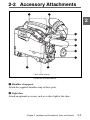
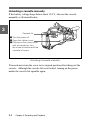
Lens cable clamp
Accessory attachments
1 Shoulder strap posts
Attach the supplied shoulder strap to these posts.
2 Light shoe
Attach an optional accessory such as a video light to this shoe.
Chapter 2 Locations and Functions of Parts and Controls
2-3
2
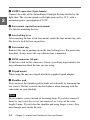
3 LIGHT connector (2-pin, female)
Connect the cable of the Anton Bauer Ultralight System attached to the
light shoe. The system operates with lights powered by 12 V, with a
maximum power consumption of 50 W.
4 Lens mount (special bayonet mount)
Use this for mounting the lens.
5 Lens locking lever
After inserting the lens in the lens mount, rotate the lens mount ring with
this lever to lock the lens in position.
6 Lens mount cap
Remove this cap by pushing up on the lens locking lever. For protection
from dust, always insert this cap when no lens is mounted.
7 LENS connector (12-pin)
Fit the lens cable to this connector. Contact your Sony representative for
more information about the lens you are using.
8 Tripod mount
When using the unit on a tripod, attach the supplied tripod adaptor.
9 Shoulder pad
You can move the shoulder pad forwards or backwards by loosening the
two screws. Do this to ensure the best balance when shooting with the
camcorder on your shoulder.
Note
Do not remove screws instead of loosening them. If you have removed
them, be sure to use the screws you removed, or screws of the same
length (8 mm). If you fasten the shoulder pad using longer screws, they
may damage parts inside the unit.
2-4
Chapter 2 Locations and Functions of Parts and Controls
2-3 Audio Functions
2
Audio functions (1)
1 Microphone
This is a super-cardioid directional stereo microphone with an external
power supply (+48 V) system.
If you assign the Front MIC MONO/STEREO function to either
ASSIGN 1 or 2 switch, you can switch the monaural and stereo outputs.
2 MIC IN (microphone input) connector (XLR type, 5-pin, female)
You can connect a supplied stereo microphone with an external power
supply system. The connector supplies power (+48 V) to the
microphone.
3 MIC LEVEL knob
This knob adjusts the audio level of the microphone connected to the
MIC IN connector.
Chapter 2 Locations and Functions of Parts and Controls
2-5
2
Audio functions (2)
2-6
Chapter 2 Locations and Functions of Parts and Controls
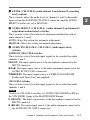
4 LEVEL (CH-1/CH-2) (audio channel 1 and channel 2 recording
level) controls
These controls adjust the audio levels of channels 1 and 2 when audio
input is from the AUDIO IN CH-1/CH-2 connectors and the AUDIO
SELECT switches are set to MANUAL.
5 AUDIO SELECT (CH-1/CH-2) (audio channel-1 and channel-2
adjustment method select) switches
These switches select the audio level adjustment method for each of
audio channels 1 and 2.
AUTO: Select this setting for automatic adjustment.
MANUAL: Select this setting for manual adjustment.
6 AUDIO IN CH-1/CH-2 / CH-3/CH-4 (audio input select)
switches
AUDIO IN CH-1/CH-2 switches
These switches select the audio input signals to be recorded for audio
channels 1 and 2.
FRONT: The input signal source is the microphone connected to the
MIC IN connector.
REAR: The input signal source is the audio equipment connected to the
AUDIO IN CH-1/CH-2 connectors.
WIRELESS: The input signal source is a WRR-855A/855B UHF
Synthesized Tuner Unit (not supplied).
CH-3/CH-4 switches
These switches select the audio input signals to be recorded for audio
channels 3 and 4.
Note
To activate CH-3/CH-4 switches, set AUDIO CH3/4 MODE to SW on
the VTR MODE 1 page of the MAINTENANCE menu.
F (FRONT): The input signal source is the microphone connected to the
MIC IN connector.
R (REAR): The input signal source is the audio equipment connected to
the AUDIO IN CH-1/CH-2 connectors.
Chapter 2 Locations and Functions of Parts and Controls
2-7
2
W (WIRELESS): The input signal source is a WRR-855A/855B UHF
Synthesized Tuner Unit (not supplied).
2
With the HDCA-901 (not supplied) connected to the camcorder, you can
record separate sounds in audio channels 3 and 4.
For detailed information, see “When the HDCA-901 camera adaptor is used” on
page 4-35.
7 CUE IN (cue track input) switch
This switch selects the input signal to be recorded on the cue track.
CH-1: Signal selected by the AUDIO IN CH-1 switch 6
MIX: Mixed signals selected by the AUDIO IN CH-1 and CH-2
switches 6
CH-2: Signal selected by the AUDIO IN CH-2 switch 6
8 AUDIO OUT (audio output) connector (XLR type, 5-pin, male)
This connector outputs the audio signals recorded to audio channels 1
and 2 or audio channels 3 and 4.
The MONITOR CH-1/2 / CH-3/4 switches qd allow you to select the
audio signal to be played back.
Using a CCXA-53 Audio Cable (not supplied), you can convert from a 5-pin
connection to two 3-pin connections.
9 AUDIO IN CH-1/CH-2 (audio channel 1 and channel 2 input)
connectors (XLR type, 3-pin, female) and LINE/MIC/+48 V ON
(line input/microphone input/external power supply +48 V ON)
switches
These are audio input connectors for channels 1 and 2 to which you can
connect audio equipment or a microphone.
The LINE/MIC/+48V ON switches select the audio source of the audio
input signals connected to each of these connectors.
LINE: Line input audio equipment
MIC: Microphone with an internal power supply
+48V ON: Microphone with an external power supply system
0 DC OUT (DC power output) connector
This connector supplies power for a WRR-810A/860A/862A/862B UHF
Portable Tuner (not supplied). Do not connect any equipment other than
the UHF portable tuner.
2-8 Chapter 2 Locations and Functions of Parts and Controls
2
Audio functions (3)
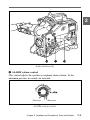
qa ALARM volume control
This control adjusts the speaker or earphone alarm volume. At the
minimum position, no sound can be heard.
Minimum
Maximum
ALARM volume control
Chapter 2 Locations and Functions of Parts and Controls
2-9
The internal volume control can be adjusted so that the alarm is audible
even if the ALARM volume control is at the minimum position.
2
For more information, refer to the Maintenance Manual (not supplied).
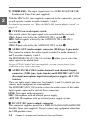
qs MONITOR volume control
This control adjusts the speaker or earphone volume for sounds other
than the alarm sound. At the minimum position, no sound can be heard.
qd MONITOR (audio channel select) switch /CH-1/2 / CH-3/4 (audio
channel 1/2 / audio channel 3/4 select) switch
MONITOR switch
CH-1/2 / CH-3/4 switch
MONITOR switch and CH-1/2 / CH-3/4 switch
CH-1/2 / CH-3/4 switch
This switch decides the audio channel to be selected by the MONITOR
switch.
CH-1/2: Audio channels 1 and 2
CH-3/4: Audio channels 3 and 4
The following settings depend on the CH-1/2 / CH-3/4 switch setting:
• The signal output to the AUDIO OUT connector 8 is switched.
CH-1/2: Audio channels 1 and 2
CH-3/4: Audio channels 3 and 4
• The audio signal indicated by the audio level meter in the display
window is switched.
2-10
Chapter 2 Locations and Functions of Parts and Controls
MONITOR switch
This switch selects the audio output to the speaker or earphone.
CH-1/2 CH-3/4
position
CH-1/2
CH-3/4
MONITOR switch
position
2
Audio output
CH-1
Audio channel 1
MIX
Mix sound of channels 1 and 2
CH-2
Audio channel 2
CH-3
Audio channel 3
MIX
Mix sound of channels 3 and 4
CH-4
Audio channel 4
Chapter 2 Locations and Functions of Parts and Controls
2-11
2
Audio functions (4)
qf Built-in speaker
During recording, the speaker can be used for monitoring the E-E 1)
sound, and during playback for monitoring playback sound. The speaker
also sounds alarms to reinforce visual warnings.
If an earphone is plugged into to the EARPHONE jack, the speaker
sound is automatically cut off.
See “6-4 Operation Warnings” on page 6-18 for information about alarms.
....................................................................................................................................
1) E-E sound (Electric-to-Electric sound)
The term E-E sound refers to an audio signal that has passed through the
amplifier, but has not been recorded on the tape. In other words, you can directly
monitor the recording input signal, as opposed to the simultaneous playback
(output) signal.
2-12
Chapter 2 Locations and Functions of Parts and Controls
qg EARPHONE jacks (minijack)
You can monitor the E-E sound during recording and playback sound
during playback. Plugging an earphone into the jack automatically cuts
off the built-in speaker, and you hear the alarms about the camcorder's
operation and status through the earphone.
The signals output from these jacks are the same. You can connect two
earphones to these jacks at the same time.
Chapter 2 Locations and Functions of Parts and Controls
2-13
2
2-4 Shooting and Recording/
Playback Functions
2
Eyecup
Shooting and recording/playback functions (1)
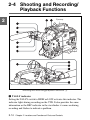
1 TALLY indicator
Setting the TALLY switch to HIGH or LOW activates this indicator. The
indicator lights during recording on the VTR. It also provides the same
information as the REC indicator in the viewfinder: it comes on during
recording and flashes to indicate a problem.
2-14
Chapter 2 Locations and Functions of Parts and Controls
2 BRIGHT (brightness) control
This control adjusts the picture brightness on the viewfinder screen. It
has no effect on the camera output signal.
3 CONTRAST control
This control adjusts the picture contrast on the viewfinder screen. It has
no effect on the camera output signal.
4 PEAKING control
This control adjusts the sharpness of the picture on the viewfinder screen
to make focusing easier. It has no effect on the camera output signal.
5 ZEBRA (zebra pattern) switch
This switch controls the zebra pattern on the viewfinder screen.
ON: The zebra pattern 1) is displayed and stays.
OFF: No zebra pattern is displayed.
MOMENT: The zebra pattern is displayed and stays for 5 to 6 seconds.
The zebra pattern is factory set to indicate picture areas where the
video level is approximately 70%. The setup menu can be used to
specify that areas where the video level is 100% and above are to be
displayed at the same time.
For information about how to set the zebra pattern is to be displayed to indicate
areas of 100% or more, see “4-7-5 Setting the Viewfinder” on page 4-78.
....................................................................................................................................
1) Zebra pattern
The zebra pattern aids in manual iris adjustment by indicating areas of the
picture where the video level is approximately 70% and 100% and above.
Chapter 2 Locations and Functions of Parts and Controls
2-15
2
2
6 TALLY switch
This switch controls the TALLY indicator, setting its brightness (HIGH
or LOW) or turning it off.
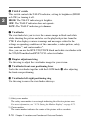
HIGH: The TALLY indicator gets brighter.
OFF: The TALLY indicator does not operate.
LOW: The TALLY indicator gets dimmer.
7 Viewfinder
The viewfinder lets you to view the camera image in black and white
while shooting the picture and also see the playback picture from the
VTR. It also displays various warnings and messages related to the
settings or operating conditions of the camcorder, a zebra pattern, safety
zone marker 1), and center marker 2).
Also, you can use the BVF-V20/V20CE black and white viewfinder with
the 525i/625i method and BVF-VC10 color viewfinder.
8 Diopter adjustment ring
Use this ring to adjust the viewfinder image for your vision.
9 Viewfinder front-rear positioning lever
Locks the viewfinder together with the LOCK knob qd after adjusting
the front-rear positioning.
0 Viewfinder left-right positioning ring
Use this ring to move the viewfinder sideways.
....................................................................................................................................
1) Safety zone marker
The safety zone marker is a rectangle indicating the effective picture area.
For more information, see “4-7-4 Setting the Marker Display” on page 4-75.
2) Center marker
The center marker indicates the center of the picture with a crosshair.
2-16
Chapter 2 Locations and Functions of Parts and Controls
qa Cameraman tally indicator
This indicator lights while the camcorder is operating.
Slide the window open when you shoot, keeping your eye away from the
viewfinder. This indicator flashes when the battery level is running low
or the tape is nearing its end.
qs Viewfinder stopper
Pull up this stopper to detach the viewfinder from the camera.
qd LOCK knob
Locks the viewfinder together with the Viewfinder front-rear positioning
lever 9 after adjusting the front-rear positioning.
Chapter 2 Locations and Functions of Parts and Controls
2-17
2
2
Shooting and recording/playback functions (2)
qf FILTER selector
This selector is a dual knob that selects the most appropriate filter to
match the light source illuminating the subject. The outer knob selects
the color temperature of the CC (Color Conversion) filter, and the inner
knob selects the type of ND (Neutral Density) filter. The white balance is
stored in memory for each CC filter.
Note that if the display mode is set to 3, when this selector is adjusted,
the new setting will be indicated on the viewfinder screen for about 3
seconds. (e.g.: FILTER: 3)
For detailed information on the display mode, see “4-7-3 Display Mode and
Setting Change and Adjustment Progress Messages” on page 4-73.
2-18
Chapter 2 Locations and Functions of Parts and Controls
The relationships between the selector settings and filter selections as
well as examples of filters for different shooting conditions are given
below.
2
FILTER selector (outer) setting and CC filter selection
FILTER selector (outer) setting
CC filter selection
A
Cross filtera)
B
3200K
C
4300K
D
6300K
a) A type of special effect filter. Generates a cross-hair light ray on a highlighted
portion.
FILTER selector (inner) setting and ND filter selection
FILTER selector (inner) setting
ND filter selection
1
Clear
2
1/4 ND
3
1/16 ND
4
1/64 ND
Examples of shooting conditions and appropriate filters
Shooting condition
CC filter
ND filter
Sunrise and sunset;
inside studio
B (3200 K)
1 (clear)
Clear skies
C(4300 K) or
D (6300 K)
2 (1/4 ND) or
3 (1/16 ND)
Cloudy or raining
D (6300 K)
1 (clear) or
2 (1/4 ND)
Very bright conditions
such as snow, at high
altitudes, or at the seashore
C (4300 K) or
D (6300 K)
3 (1/16 ND) or
4 (1/64 ND)
Chapter 2 Locations and Functions of Parts and Controls
2-19
2
qg SHUTTER selector
Set this selector to ON to use the electronic shutter. Set it to SEL to
switch the shutter speed or mode setting within the range that has been
previously set from the setup menu.
When this selector is adjusted, the new setting will be indicated on the
setting change/adjustment progress message display area for about 3
seconds.
For more information about the shutter speed and mode settings, see “4-2 Setting
the Electronic Shutter” on page 4-12.
qh AUTO W/B BAL (automatic white/black balance adjustment)
switch
This switch activates the white balance and black balance automatic
adjustment functions.
WHT: Automatic adjustment of the white balance. If the WHITE BAL
switch is set to A or B, the white balance setting is stored in the
corresponding memory. The memory can store the white balance
setting for each CC filter.
BLK: Automatic adjustment of the black set and black balance.
qj ASSIGN (assignable) switches 1/2
You can assign the desired functions to each of ASSIGN 1 switch (pushtype) and ASSIGN 2 switch (slide-type) on the FUNCTION 1 page of
the USER menu.
For details, see “4-8-5 Assigning Functions to ASSIGN 1/2 Switches” on page 4109.
qk GAIN selector
This selector switches the gain of the video amplifier to match the
lighting conditions during shooting. The gains corresponding to the L,
M, and H settings are selected from the setup menu before use. The
factory settings are L = 0 dB, M = 6 dB, and H = 12 dB.
When this selector is adjusted, the new setting will be indicated on the
2-20
Chapter 2 Locations and Functions of Parts and Controls
setting change/adjustment progress message display area of the
viewfinder screen for about 3 seconds.
For information about setting the gain values, see “4-8-1 Setting the GAIN Selector
Values” on page 4-98.
ql OUTPUT/DCC (output signal/dynamic contrast control) selector
This selector switches the video signal that is output to the VTR,
viewfinder, and video monitor, between the color bar signal and the
camera output.
BARS: Outputs the color bar signal.
CAM: Outputs the camera signal. It also switches DCC 1) on and off
when output from the camera is selected.
BARS, DCC OFF
A color bar signal is output and the DCC
circuit does not operate. For example, use
the setting for the following purposes.
• Adjusting the video monitor
• Recording the color bar signal
CAM, DCC OFF
The video signal from the camera is
output, and the DCC circuit does not
operate.
CAM, DCC ON
The video signal from the camera is
output, and the DCC circuit operates.
OUTPUT/DCC selector
....................................................................................................................................
1) DCC (Dynamic Contrast Control)
Also called automatic knee. Against a very bright background with the iris
opening adjusted to the subject, objects in the background will be lost in the
glare. The DCC function will suppress the high intensity and restore much of the
lost detail and is particularly effective in the following cases.
• Shooting a subject against a bright sky
• Shooting a subject indoors, against a background through a window
• Any high contrast scenes
Chapter 2 Locations and Functions of Parts and Controls
2-21
2
2
w; WHITE BAL (white balance memory) switch
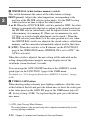
This switch determines the source of the white balance settings.
PRST (preset): Adjusts the color temperature corresponding to the
position of the FILTER selector (outer knob). Use the PRST setting
when you have no time to adjust the white balance.
A or B: When the AUTO W/B BAL switch is pushed to WHT, the white
balance is automatically adjusted according to the current position of
the FILTER selector (outer knob), and the adjusted value is stored in
either memory A or memory B. (There are two memories for each
CC filter, so a total of eight adjustments can be stored.) When the
FILTER selector (outer knob) is at the same position as it was when
this WHITE BAL switch was adjusted, the stored value is called from
memory, and the camcorder automatically adjusts itself to that value.
B (ATW): When this switch is set to B whereas, on the FUNCTION 2
page of the OPERATION menu, WHITE B CH is set to ATW 1), the
ATW is activated.
When this switch is adjusted, the new setting will be indicated on the
setting change/adjustment progress message display area of the
viewfinder screen for about 3 seconds.
You can assign the ATW ON/OFF function to the ASSIGN 1 switch
(push-type) on the FUNCTION 1 page of the USER menu.
For details, see “4-8-5 Assigning Functions to ASSIGN 1/2 Switches” on page
4-109.
wa TURBO GAIN button
When shooting under extremely poor lighting conditions, slide the cover
of this button to the left and press the button once to boost the video gain
to the value preset on the GAIN SW page of the USER menu (up to 42
dB, factory setting: 42 dB). To stop boosting the gain, press the button
once more.
....................................................................................................................................
1) ATW (Auto Tracing White Balance)
The white balance of the picture being shot is adjusted automatically for the
varying lighting conditions.
2-22
Chapter 2 Locations and Functions of Parts and Controls
2
Shooting and recording/playback functions (3)
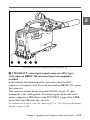
ws VBS/SDI OUT (video signal output) connector (BNC type)
(Only when an HKDW-702 extension board (not supplied) is
installed)
In this manual, the illustration of the camcorder which the BNC
connector is attached is used. If you do not install an HKDW-702, ignore
this connector.
This connector outputs down-converted 525i/625i signals (75-ohm
terminated) to the video monitor. The output signal can be selected as
analog composite or SDI. Refer to the FUNCTION 1 page of the USER
menu. Selecting OFF stops the converter.
For instructions on how to select the output signal, see “4-8-2 Selecting the Output
Signals” on page 4-101.
Chapter 2 Locations and Functions of Parts and Controls
2-23
2
Note
• The down-converted signal (analog composite/SDI signals) is delayed
by several milliseconds, compared with the video signal recorded on
the tape.
• When an HKDW-702 is attached to an HDW-750/HDW-730 which
operates with the 59.94I format, the HD signal is down-converted to
the 525i signal. When an HKDW-702 is attached to an HDW-750P/
HDW-730 with the 50I format, the HD signal is down-converted to the
625i signal.
wd HD SDI OUT (HD SDI output) connector (BNC type)
This connector outputs the HD SDI signal to the video monitor.
For instructions on how to select whether or not the signal is output from
this connector (ON/OFF), refer to the OUTPUT SEL page of the USER
menu.
For details, see “4-8-2 Selecting the Output Signals” on page 4-101.
wf REMOTE (remote control) connector (8-pin)
Connect the RM-B150 Remote Control Unit (not supplied), which makes
VTR control possible.
wg TEST OUT (test output) connector (BNC type)
This connector outputs the HD-Y (black and white) signal.
When an HKDW-702 extension board (not supplied) is installed, the
output signal can be selected as a down-converted analog composite
(color) or HD-Y signal on the OUTPUT SEL page of the USER menu.
Depending on the internal board and menu settings, the menu, time code,
and shot data can be displayed over the image on the monitor. You can
use this connector to synchronize the time code of an external VTR to
the time code of the camcorder.
For instructions on how to select the test output signal when an HKDW-702 is
installed, see “4-8-2 Selecting the Output Signals” on page 4-101.
2-24
Chapter 2 Locations and Functions of Parts and Controls
wh GENLOCK IN (genlock input) connector (BNC type)
This connector inputs an HD reference signal when the camera is to be
genlocked or when the time code is to be synchronized with external
equipment. Use the MAINTENANCE menu to adjust the genlock
H-phase (phase of Horizontal sync signal).
For details, refer to the Maintenance Manual (not supplied).
This connector also inputs the NTSC/PAL composite video signal as the
reference signal when the time code is to be synchronized with external
equipment. In this case, the genlock H-phase cannot be adjusted. Beyond
that, the subcarrier of the down-converted signal (composite video
signal) cannot be synchronized with external equipment when an
HKDW-702 (not supplied) is installed.
Chapter 2 Locations and Functions of Parts and Controls
2-25
2
2
Opening the cover
Press on the tab.
Shooting and recording/playback functions (4)
wj VTR START button
Press this button to start recording. Press it again to stop recording. The
effect is exactly the same as that of the VTR button on the lens.
When the REC SWITCH function is assigned to the ASSIGN 1 (push
type), you can use the ASSIGN 1 switch as the VTR START button.
2-26
Chapter 2 Locations and Functions of Parts and Controls
wk VTR SAVE/STBY (VTR power saving/standby) switch
This switch controls the VTR power mode during pauses in recording
(REC PAUSE).
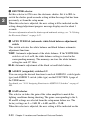
SAVE: Power saving mode. When you press the VTR START button,
there is a short delay before recording starts, but power consumption
is less than in standby mode, and battery life is extended. When the
switch is set to SAVE, the VTR SAVE indicator in the viewfinder
lights.
STBY: Standby mode. Recording starts as soon as you press the VTR
START button. Avoid allowing the camcorder to remain in STBY
(standby) mode for a long time.
Note
Even if the switch is set to the STBY position, the camcorder can
automatically turn to power saving mode when the tape does not run for
a certain period. In such a case, the VTR SAVE indicator in the
viewfinder lights.
This function is effective when a setting other than OFF is selected for
the STILL TIMER item on the VTR MODE 4 page of the
MAINTENANCE menu. The STILL TIMER item also allows you to
select the time until the camcorder turns to power saving mode.
For detailed information, refer to the Maintenance Manual.
wl EJECT (cassette eject) button
Press this button to eject or load a cassette.
e; REW (rewind) button and indicator
Press this button to rewind the tape. The indicator lights during
rewinding.
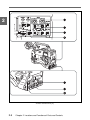
ea F FWD (fast forward) button and indicator
Press this button to fast forward the tape. The indicator lights during fast
forward.
Chapter 2 Locations and Functions of Parts and Controls
2-27
2
2
es PLAY (playback) button and indicator
Press this button to view the recorded picture in the viewfinder or on the
color video monitor. The indicator lights during playback.
The 4 times normal speed search function is provided to make it far
quicker to find a desired location of the tape. Press the REW button or
F FWD button during playback to view the 4 times normal speed search
picture.
ed STOP button
Press this button to stop the tape.
2-28
Chapter 2 Locations and Functions of Parts and Controls
2-5 Menu Operating Section
2
Menu operating section
Chapter 2 Locations and Functions of Parts and Controls
2-29
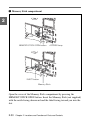
1 Memory Stick compartment
2
MEMORY STICK OPEN button
ACCESS lamp
EJECT button
Memory Stick
Open the cover of the Memory Stick compartment by pressing the
MEMORY STICK OPEN button. Insert the Memory Stick (not supplied)
with the notch facing downward and the label facing toward you into the
slot.
2-30
Chapter 2 Locations and Functions of Parts and Controls
Note
Do not insert/remove a Memory Stick while the ACCESS lamp is lit or
flashing. Doing so may damage the data.
2 MENU knob
Use this knob to change the page selection or a setting within the menu.
Push: If you push this knob when the arrow (t) is placed at the page
title on the menu, the arrow (t) changes to the question mark (?)
and you can change the page.
When the arrow mark is placed at the position other than the page
title, the camcorder turns in mode where you can change the settings
by pushing this knob.
Turn: Turn this knob to change the page or change the settings of the
items.
3 STATUS ON/SEL / OFF (menu display on/paging/display off)
switch
To enable this switch, set the MENU ON/OFF switch to OFF.
Closing the cover automatically sets the MENU ON/OFF switch to OFF.
ON/SEL: Each time this switch is pushed upward, the window to
confirm the menu settings and conditions of the camcorder is
displayed on the viewfinder screen. There are three windows, which
are switched each time the switch is pushed upward. Each window is
displayed for about 10 seconds.
OFF: To clear the page immediately after display, push this switch down
to the OFF position.
You can select the confirmation window to be displayed on the
menu.
For details, see “Display/don’t display status confirmation windows” on page
4-92.
Chapter 2 Locations and Functions of Parts and Controls
2-31
2
2
4 MENU ON/OFF (menu display) switch
To use this switch, open the cover.
This switch is used to display the menu on the viewfinder screen or the
test signal screen. Closing the cover results in automatically setting this
switch to OFF.
ON: Displays the menu on the viewfinder screen or the test signal
screen, at the page which was on the screen when the previous menu
access ended. (When the menu is first used, the first page is
displayed.)
OFF: Removes the menu from the viewfinder screen or the test signal
screen.
5 CANCEL/PRST / ESCAPE (menu setting cancellation/menu
presetting/returning page) switch
To enable this switch, set the MENU ON/OFF switch to ON.
Closing the cover automatically sets the MENU ON/OFF switch to OFF.
CANCEL/PRST: Pushing this switch up to this position displays the
message to confirm whether the previous settings are cancelled or
settings are reset to their initial values, depending on the menu
operating condition.
Pushing this switch up to this position again cancels the previous
settings or resets the settings to their initial values.
ESCAPE: Use this switch when the menu page, which has a hierarchical
structure, is opened. Each time the switch is pushed to this position,
the page returns to one stage higher in the hierarchy.
2-32
Chapter 2 Locations and Functions of Parts and Controls
2-6 Time Code System
2
Time code functions (1)
1 GENLOCK IN (genlock input) connector (BNC type)
• This connector inputs an HD reference signal when the camera is to be
genlocked or when the time code is to be synchronized with external
equipment.
This connector can input an NTSC/PAL analog composite signal as the
reference video signal when the time code is to be synchronized with
external equipment.
Chapter 2 Locations and Functions of Parts and Controls
2-33
2
• This connector also inputs a return video signal. You can display the
image of the return video signal in the viewfinder screen when you set
the RETURN VIDEO to ON on the GENLOCK page of the
OPERATION menu.
You can assign the RETURN VIDEO function to ASSIGN 1 switch.
For details, see “4-8-5 Assigning Functions to ASSIGN 1/2 Switches” on page
4-109.
2 TC IN (time code input) connector (BNC type)
To synchronize the time code with an external time code, connect the
reference time code input here.
3 TC OUT (time code output) connector (BNC type)
To synchronize the time code of an external VTR with that of the
camcorder, connect this connector to the time code input lock connector
of the external VTR.
2-34
Chapter 2 Locations and Functions of Parts and Controls
2
Time code functions (2)
Chapter 2 Locations and Functions of Parts and Controls
2-35
2
4 HOLD (display hold) button
Pressing this button instantly freezes the time data displayed in the
counter display section. (The time code generator continues normal
operation.) Pressing this button again releases the hold. One use of this
feature is to determine the exact time of a particular shot.
When the HOLD button is activated, the time data is displayed in the
following format:
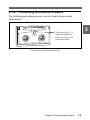
See “2-8 Warnings and Indications on the Display Panel” on page 2-42 for more
information about the counter display.
5 RESET (counter reset) button
This button resets the time data displayed on the counter display section
to “00:00:00:00” and the user bit data to “00000000”.
6 DISPLAY (LCD) switch
CTL: Control signal
TC: Time code
DATA: The item selected by the DATA DISPLAY switch.
For more information, see “Time code displays” on page 2-44.
7 ADVANCE button
For setting the time code, user bits, or real time, each press of this button
increments the flashing digit selected by the SHIFT button.
8 SHIFT button
For setting the time code, user bits, or real time, this button selects the
digit to be changed. The selected digit flashes.
2-36
Chapter 2 Locations and Functions of Parts and Controls
9 PRESET/REGEN/CLOCK (preset/regeneration/clock) switch
This switch selects whether to set a new time code or to match the
existing time code that had been recorded.
PRESET: Starts recording time code values on the tape from the newly
set value.
REGEN: Reads the existing time code on the tape and sets the time code
starting value accordingly. Thus, even when there is an indefinite
break in recording, this setting ensures that time codes on the tape
will be continuous. Regardless of the setting of the F-RUN/SET/
R-RUN switch, the camcorder operates in R-RUN mode.
CLOCK: Makes the time code value coincide with the built-in clock.
Regardless of the F-RUN/SET/R-RUN switch setting, the camcorder
always operates in F-RUN mode.
For more information, see “To make the time code continuous” on page 4-37.
0 F-RUN/SET/R-RUN (free run/set/recording run) switch
This switch selects the operating mode for the internal time code
generator.
F-RUN: The time code generator keeps running, regardless of the
operation state of the VTR. Use this position when matching the time
code to real time or for synchronizing the time code with an external
time code.
SET: Set the switch to this position to set the time code or user bits.
R-RUN: The time code generator runs only while recording. This
produces a tape with consecutive time code value, even when shot
intermittently.
For more information, see “4-5-3 Setting the User Bits” on page 4-38 and “4-5-1
Setting the Time Code” on page 4-35.
Chapter 2 Locations and Functions of Parts and Controls
2-37
2
2
qa DATA DISPLAY switch
U-BIT: Display the user bit value.
SHOT-TIME: Display the date and time from the shot data.
SHOT-NO: Not used.
2-38
Chapter 2 Locations and Functions of Parts and Controls
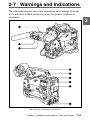
2-7 Warnings and Indications
The camcorder supplies you visual information and warnings by means
of its indicators without you having to use the speaker, earphone or
viewfinder.
2
Warning and indication functions
Chapter 2 Locations and Functions of Parts and Controls
2-39
2
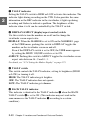
1 TALLY indicator
Setting the TALLY switch to HIGH or LOW activates this indicator. The
indicator lights during recording on the VTR. It also provides the same
information as the REC indicator in the viewfinder; it lights up during
recording and flashes to indicate a problem. The brightness of this
indicator when it is lit can be controlled by the TALLY switch.
2 DISPLAY/ASPECT (display/aspect control) switch
Use this switch to turn the markers on or off and to change the
viewfinder screen aspect ratio.
DISPLAY: When the MARKER is set to ON on the MARKER 1 page
of the USER menu, pushing this switch to DISPLAY toggles the
markers on the viewfinder screen on and off.
Even if the DISPLAY switch is set to OFF, the USER menu appears
by setting the MENU ON/OFF switch is set to ON.
ASPECT: Pushing this switch to ASPECT toggles the viewfinder screen
aspect ratio between 16 : 9 and 4 : 3.
For details, see “4-7-4 Setting the Marker Display” on page 4-75.
3 TALLY switch
This switch controls the TALLY indicator, setting its brightness (HIGH
or LOW) or turning it off.
HIGH: The TALLY indicator gets brighter.
OFF: The TALLY indicator does not operate.
LOW: The TALLY indicator gets dimmer.
4 BACK TALLY indicator
This indicator is identical to the TALLY indicator 1 when the BACK
TALLY switch 5 is set to ON. (This indicator may not work in the
same manner as the TALLY indicator 1 according to a certain
condition.)
2-40
Chapter 2 Locations and Functions of Parts and Controls
5 BACK TALLY switch
This switch turns the BACK TALLY and the REAR TALLY indicators
on and off.
ON: Switches on the BACK TALLY and REAR TALLY indicators.
OFF: Switches off the BACK TALLY and REAR TALLY indicators.
6 LIGHT switch
This switch controls the display panel light.
ON: Turns the panel light on.
OFF: Turns the panel light off.
7 WARNING indicator
This indicator lights up or flashes when there is a fault in the VTR.
See “6-4 Operation Warnings” on page 6-18 for more information about the
relationships between the operation of the indicator and the meanings of the
indications.
8 Display panel
VTR error messages, battery status, tape status, audio level, time data,
and so forth are displayed on this panel.
For more information, see “2-8 Warnings and Indications on the Display Panel”
on page 2-42.
9 REAR TALLY indicator
This indicator is identical to the BACK TALLY indicator 4 when the
BACK TALLY switch is set to ON.
Chapter 2 Locations and Functions of Parts and Controls
2-41
2
2-8 Warnings and Indications
on the Display Panel
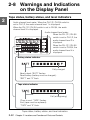
Tape status, battery status, and level indicators
2
Audio channel level meter: When the CH-1/2 / CH-3/4 switch is
set to CH-1/2, the audio channel level 1 is displayed.
When the CH-1/2 / CH-3/4 switch is set to CH-3/4, the audio
channel level 3 is displayed.
Audio channel level meter:
When the CH-1/2 / CH-3/4
switch is set to CH-1/2, the
audio channel level 2 is
displayed.
When the CH-1/2 / CH-3/4
switch is set to CH-3/4, the
audio channel level 4 is
displayed.
Battery status indicator
Fully charged
Nearly dead: “BATT” flashes.
Dead battery (battery must be charged):
“BATT” and “E” flash.
Tape status indicator
Full (at beginning)
Close to end: “TAPE” flashes.
End (tape must be replaced):
“TAPE” and “E” flash.
Tape status, battery status, and level indicators
2-42
Chapter 2 Locations and Functions of Parts and Controls
VTR operation and status indicators
2
Lights during playback.
Warning indicators
RF: Lights if the recording heads are clogged.
SERVO: Lights if the servo motor fails.
HUMID: Lights if condensation is on the drum.
SLACK: Lights if the tape is not winding properly.
For more information, see “6-4 Operation Warnings” on page 6-18.
VTR operation and status indicators
Note
If the tape in the VTR becomes slackened, an error code appears
automatically on the display section of the display panel.
For more information refer to the Maintenance Manual.
Chapter 2 Locations and Functions of Parts and Controls
2-43
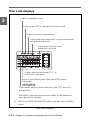
Time code displays
Lights in playback mode.
2
Lights when VITC is selected for the time code.
Lights in non-drop frame mode. a)
Lights when the camcorder is synchronized with
an external time code.
Lights when the time code
generator is on hold.
Lights when the time code, CTL, or
real time is displayed.
Lights in the following way when the HOLD button
is pressed.
Time counter display: Shows the time code, CTL, user bits,
and real time.
The table on the next page lists the details of the displayed
items and switch settings.
a) Only for an HDW-750/HDW-730 which operates with the 59.94I
format
Time code displays
2-44
Chapter 2 Locations and Functions of Parts and Controls
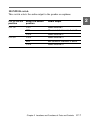
Relationships between the DISPLAY switch and DATA
DISPLAY switch settings and the time counter displays
Except during setting of the time code, the time counter display is
determined by the position of the DISPLAY switch and DATA
DISPLAY switch.
2
For details of setting the time code menu operation, see “4-5-1 Setting the Time
Code” on page 4-35.
Switch settings related to time code and displayed information
DISPLAY
DATA DISPLAY
switch position switch position
Displayed
information
CTL
Any position
CTL
TC
Any position
Time code
DATA
U-BIT
User bits
SHOT-TIME
Data and time from shot data
SHOT-NO
Not used. (currently zero is
displayed)
Chapter 2 Locations and Functions of Parts and Controls
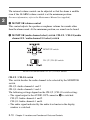
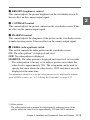
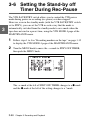
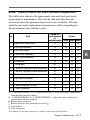
2-45
2-9 Indicators on the
Viewfinder
2
Viewefinder screen
Indicators on the Viewfinder
1 TALLY indicator
This indicator lights in green when the camcorder is in Loop Rec mode.
Also, this indicator blinks in green when the camcorder is in auto
Interval Rec mode or manual Interval Rec mode.
2 REC (recording) indicator
This indicator lights in red during recording. It also warns by flashing.
For more information, see “6-4 Operation Warnings” on page 6-18.
2-46
Chapter 2 Locations and Functions of Parts and Controls
3 BATT (battery) indicator
This indicator starts flashing when the battery connected to the
camcorder has fallen, and stays lit when the battery is exhausted.
To prevent interruption during operation, replace the battery as soon as
this indicator starts flashing.
The level at which the indicator starts flashing can be set on the
BATTERY page of the MAINTENANCE menu.
For details, see the Maintenance Manual.
4 (warning) indicator
This indicator lights up when the camcorder is used under one or more of
the following conditions and if the corresponding items have been set to
ON on the ‘!’ LED page of the USER menu.
• The gain is set to anything but 0 dB.
• The SHUTTER selector is ON.
• The WHITE BAL switch is set to PRST.
• ATW is being used.
• The lens extender is used.
• The FILTER selector is set to anything but ND:1/CC:A.
• The reference value of the auto iris adjustment is anything but the
standard value.
Note
For an HDW-750P which operates with the 25PsF format, this indicator
functions as follows.
For the 1/50 shutter speed, this indicator does not light even when the
SHUTTER selector is set to ON.
For a shutter speed other than 1/50, this indicator lights up when the
SHUTTER selector is set to ON.
5 VTR SAVE indicator
Lights up when the VTR section is set to power save mode by setting the
VTR SAVE/STBY switch to SAVE.
Chapter 2 Locations and Functions of Parts and Controls
2-47
2
3-1 About Cassettes
This section describes the procedure for loading and unloading a
cassette.
See “Specifications VTR Section ”(page A-3) for information about the cassettes
you can use in the camcorder.
3-1-1 Loading and Unloading a Cassette
3
Loading a cassette
Recording and Playback
1
Turn on the POWER switch.
POWER switch
HUMID display
Note
If the interior of the VTR section is damp, the HUMID indicator will
light. If this happens, wait until the indicator goes off before going
on to step 2.
(Continued)
Chapter 3 Recording and Playback
3-1
2
3
Press the EJECT button.
The cassette lid will open.
Cassette lid
3
Check that there is no slack in the tape. Then slide in the cassette
until it clicks into position and close the cassette lid completely by
pressing near the engraved “PUSH”.
Insert the cassette.
Window
outward.
Cassette holder
Push and close the
cassette lid.
3-2
Chapter 3 Recording and Playback
Notes
• To insert the tape correctly, make sure to stand the grip of the
camcorder.
• When inserting the tape, be careful that you don’t hit the tape against
the tape holder.
3
Checking the tape for slack
Pressing in the reels lightly, turn them gently with your fingers in the
directions shown below. If the reels will not move, there is no slack.
Checking the tape for slack
Unloading a cassette
With the power supply on, press the EJECT button to open the cassette
lid. Then take out the cassette. If you are not going to insert another
cassette, close the cassette lid.
It is possible to take out the cassette and close the cassette lid unless the
battery voltage drops below about 10.5 V. Do not repeat this unloading
operation.
Chapter 3 Recording and Playback
3-3
Unloading a cassette manually
If the battery voltage drops below about 10.5 V, take out the cassette
manually as illustrated below.
3
Cassette lid
1 Turn the power off.
2 Open this rubber cover.
3 Pushing on the screw inside
with a screwdriver, turn
the screw clockwise until the
cassette lid opens.
Unloading a cassette manually
You need not return the screw to its original position after taking out the
cassette. Although the cassette lid is not locked, turning on the power
makes the cassette lid operable again.
3-4
Chapter 3 Recording and Playback
3-1-2 Preventing Accidental Erasure
The following procedure prevents cassettes from being recorded
inadvertently.
3
Push the plug in. To
reuse the cassette,
return the plug to its
original position.
Preventing accidental erasure
Chapter 3 Recording and Playback
3-5
3-2 Recording
3-2-1 Basic Procedures
This section describes the basic procedures for shooting and recording.
Before a shooting session, ensure that the camcorder is functioning
properly.
3
For more information, see “6-1 Testing the Camcorder Before Shooting” on page
6-1.
Turning on the camcorder and loading a cassette
Follow the procedure below.
Basic procedure for shooting : from power supply to cassette loading
1
Attach a fully charged battery pack.
For details, see “5-1 Power Supply” on page 5-1.
3-6
Chapter 3 Recording and Playback
2
Set the POWER switch to ON. Check that warnings, such as the
HUMID indicator and so on, do not appear and that the BATT
indicator shows at least five segments.
• If HUMID indicator appears, wait until it disappears.
Note
After turning off the power, check whether the drum is dry (even if
the HUMID indicator is off) when the turning on the power again.
• If the BATT indicator does not show at least five segments,
replace the battery pack with a fully charged one.
For detailed information on warnings, see “6-4 Operation Warnings” on page
6-18.
3
Check that there are no obstructions near the cassette lid. Then press
the EJECT button to open the cassette lid.
4
After checking the points below, load the cassette and close the
cassette lid.
• The cassette is not write-protected.
• There is no slack in the tape.
Chapter 3 Recording and Playback
3-7
3
Basic procedures for shooting: from adjusting the
black balance and white balance to stopping recording
After turning on the power and loading a cassette, set the switches and
selectors as shown below and begin operation.
3
DISPLAY: ON
AUDIO SELECT
CH-1/CH-2:
AUTO
Iris:
Automatic
Zoom:
Automatic
OUTPUT/DCC:
CAM, DCC ON
F-RUN/SET/R-RUN:
F-RUN or R-RUN
(set as needed)
Switch and selector settings before shooting
3-8
Chapter 3 Recording and Playback
Shooting
Follow the procedure below.
3
Basic procedure for shooting: from adjusting the black balance and white
balance to stopping recording
1
Push the AUTO W/B BAL switch to BLK to adjust the black
balance.
For detailed information on how to adjust the black balance, see “4-1-1
Adjusting the Black Balance” on page 4-2.
(Continued)
Chapter 3 Recording and Playback
3-9
2
Select the CC filter and ND filter to match the lighting conditions,
and adjust the white balance.
When the black balance and white balance settings are already
in memory:
Set the WHITE BAL switch to A or B.
3
When the white balance setting is not in memory and you do not
have enough time to adjust the white balance:
Set the WHITE BAL switch to the PRST position. The white
balance is automatically set to 3200 K when the FILTER selector is
set to B, to 4300 K when the FILTER selector is set to C, and to
6300 K when the FILTER selector is set to D.
For more information, see “4-1-2 Adjusting the White Balance”
on page 4-6.
3
Aim the camera at the subject and adjust the focus and zoom.
4
If necessary, set the electronic shutter for an appropriate mode and
speed.
For more information, see “4-2 Setting the Electronic Shutter”
on page 4-12.
5
To start recording, press the VTR START button or the VTR button
on the lens.
Or if the REC BUTTON function is assigned to the ASSIGN 1
switch, this switch functions as VTR START/STOP buttons.
For details, see “4-8-5 Assigning Functions to ASSIGN 1/2 Switches” on page
4-109.
During recording, the REC indicator in the viewfinder goes on.
Perform zooming and focus control, if necessary.
3-10
Chapter 3 Recording and Playback
6
To stop recording, press the VTR START button or the VTR button
on the lens again.
The REC indicator in the viewfinder goes off.
Cassette control buttons
During recording, the cassette control buttons (EJECT, REW, F FWD,
PLAY, STOP) have no effect.
Note on cassettes
When crash-recording without doing continuous recording or recording
by using RE-TAKE function, if you use a recorded tape, the timecode
previously recorded may be displayed for a few seconds, even though the
new video and audio signals have been correctly recorded.
Chapter 3 Recording and Playback
3-11
3
3-2-2 Continuous Recording
If the camcorder is in the recording pause mode, simply pressing the
VTR START button on the camcorder or the VTR button on the lens
continues recording at exactly the next frame.
In other cases, you first need to position the tape at an appropriate point.
3
When the camcorder is in the recording pause mode
Pressing the VTR START button on the camcorder or the VTR button on
the lens positions the tape at the appropriate point automatically.
However, the time taken before recording starts depends on the setting of
the VTR SAVE/STBY switch.
• If the VTR SAVE/STBY switch is in the SAVE position, it takes about
4 seconds before recording starts.
• If the VTR SAVE/STBY switch is in the STBY position, recording
starts immediately. However, just after the switch position is changed
from SAVE to STBY, it takes about 4 seconds before recording starts.
3-12
Chapter 3 Recording and Playback
If you turn off the power during a recording pause
3
Continuous recording after turning off the power during a recording pause
1
Turn on the power again.
2
Press the RET button on the lens.
The camcorder positions the tape at the appropriate point. Note,
however, that this function works only for continuously recorded
material or consecutively joined segments totaling at least 3 seconds
in length.
3
Press the VTR START button on the camcorder or the VTR button
on the lens to start recording.
Chapter 3 Recording and Playback
3-13
Continuous recording in other cases
3
After rewinding or fast forward, after removing the cassette, or on a tape
that has been partially recorded, you can obtain a continuous recording
by following the procedure below.
The End Search function also allows you to continue recording on the
partially recorded tape.
For details, see “3-2-8 Searching for the Last Recorded Portion and Turning in the
Recording Pause Mode (End Search Function)” on page 3-53.
Continuous recording after rewinding or fast forward, after removing the
cassette, or on a tape that has been partly recorded
1
2
Looking in the viewfinder, press the PLAY button to start playback.
3
Press the RET button.
Press the STOP button at the desired point to begin recording. To
continue from the end of recording already on the tape, press the
STOP button immediately after the end of the previous recording
(within 0.5 seconds).
The tape will rewind and will be positioned at the desired point to
continue recording.
4
Press the VTR START button on the camcorder or the VTR button
on the lens to start recording.
3-14 Chapter 3 Recording and Playback
3-2-3 Recording Good Shot Markers
Good shot markers 1 and 2 are recorded to tape when the RET button on
the lens is pressed during recording. Recording shot markers 1) 1 and 2
for scenes containing important images and sounds enables quick access
to the marked points. This increases editing efficiency.
For detailed information on shot marker operations, refer to the manual supplied
with your VTR.
A setting on the VTR MODE 5 page of the MAINTENANCE menu
determines whether or not good shot markers are recorded to the tape.
Recording markers to the tape
Follow the procedures below to perform settings for recording markers.
Cover
MENU knob
MENU ON/OFF switch
....................................................................................................................................
1) Shot marker
Time code of the scene to be used as the editing point when editing.
Chapter 3 Recording and Playback
3-15
3
1
Open the cover, first. Set the MENU ON/OFF switch to ON while
pushing the MENU knob .
The TOP menu appears.
3
2
Turn the MENU knob to move the t mark to MAINTENANCE.
3
Push the MENU knob.
When the MAINTENANCE menu is first used, the CONTENTS
page appears.
Or if you have used the MAINTENANCE menu already, the page
that was on the screen when the last MAINTENANCE menu
operation ended appears on the viewfinder screen.
3-16
Chapter 3 Recording and Playback
4
When the CONTENTS page is displayed, turn the MENU knob to
move the t mark to VTR MODE 5, then push the MENU knob.
When any page of the MAINTENANCE menu is displayed, turn the
MENU knob until the VTR MODE 5 page appears, then push the
MENU knob.
3
The VTR MODE 5 page appears.
5
Turn the MENU knob to move the t mark to LTC UB-MARKER.
6
Push the MENU knob.
The t mark at the left of LTC UB-MARKER changes to a z mark
and the z mark at the left of the setting changes to a ? mark.
(Continued)
Chapter 3 Recording and Playback
3-17
7
Turn the MENU knob clockwise or counterclockwise until the
desired setting appears.
The setting changes in the following sequence: SET y ALL y
OFF.
3
Item
Contents
SET
Determines whether or not markers are recorded for the
items REC START MARK, SHOT MARKER 1 and
SHOT MARKER 2 which appear when you select SET.
ALL
Records the recording start markers, good shot marker
1 and good shot maker 2.
OFF
Does not record any markers.
When you select SET, go to step 8.
When you select ALL or OFF, go to step 9.
8
Set the marker(s) to be recorded to ON.
3-18
Chapter 3 Recording and Playback
1 Turn the MENU knob to move the t mark to the marker to be
set.
3
2 Turn the MENU knob clockwise or counter clockwise until the
desired setting appears.
To record the marker to the tape, select ON.
To not record the marker, select OFF.
3 Push the MENU knob.
4 Perform settings of the remaining markers repeating steps 1,
2 and 3.
9
To end the menu opration, set the MENU ON/OFF switch to OFF,
or close the cover.
The menu disappears from the viewfinder screen and the display
indicating the current status of the camcorder appears along the top
and bottom of the viewfinder.
Recording a shot marker 1
Press the RET button once. On the viewfinder screen, “z” and the time
code of the marked point are displayed for about 3 seconds.
Recording a shot marker 2
Press the RET button twice. On the viewfinder screen, “X” and the time
code of the marked point are displayed for about 3 seconds.
Chapter 3 Recording and Playback
3-19
3-2-4 Recording a Recording Start Marker
You can record a recording start marker at the beginning of the
recording.
Using recording start markers enables quick access to the marked points,
for efficient editing.
3
For detailed information on recording start marker operations, refer to the manual
supplied with your VTR.
You can set whether or not recording start markers are recorded using
the VTR MODE 5 page of the MAINTENANCE menu.
For detailed information on setting whether or not recording start markers are
recorded, see “Recording markers to the tape” on page 3-15.
3-2-5 Starting a Shoot with a Few Seconds of
Pre-Stored Picture Data (Loop Rec
Function) (When Using an HKDW-703
Extension Board)
By installing the optional HKDW-703 extension board (not supplied) in
the camcorder, the camcorder is able to constantly store a few seconds
(up to 7 seconds for the 59.94I format model or up to 8 seconds for the
50I/25PsF format model) worth of the most current picture and sound
data in the board’s memory.
Thus, when you press the VTR START button or the VTR button on the
lens, the recording starts with the data stored a few seconds before.
Setting the Loop Rec time/Loop Rec mode
To record in Loop Rec mode, you need to turn on Loop Rec mode and
set the picture data storage time (Loop Rec time) using the USER menu.
Loop Rec time
The Loop Rec time and VTR SAVE/STBY switch settings determine the
number of seconds of picture data that will be stored in the HKDW703’s memory and recorded when you press the VTR START button or
VTR button on the lens.
3-20 Chapter 3 Recording and Playback
The following table shows the approximate number of seconds worth of
picture data (counting back from the time you begin recording) that will
be recorded from memory. However, when changing from SAVE to
STBY, or under the special situations explained in the notes on this
page, the actual amount of data recorded may be shorter.
Loop Rec time setting and recording start point
Loop Rec time
VTR STBY mode
VTR SAVE mode
7 (seconds)
About 7 seconds before
(for 59.94I format)
8 (seconds)
About 8 seconds before
(for 50I/25PsF
format)
About 4 seconds before
6 (seconds)
About 6 seconds before
About 4 seconds before (for
59.94I format)
About 5 seconds before (for
50I/25PsF format)
5 (seconds)
About 5 seconds before
About 4 seconds before (for
59.94I format)
About 5 seconds before (for
50I/25PsF format)
4 (seconds)
About 4 seconds before
About 4 seconds before
3 (seconds)
About 3 seconds before
About 3 seconds before
2 (seconds)
About 2 seconds before
About 2 seconds before
1 (seconds)
About 1 seconds before
About 1 seconds before
0 (seconds)
About 0 seconds before
About 0 seconds before
About 5 seconds before
Notes
• After selecting the Loop Rec mode, immediately changing the Loop
Rec time or performing playback or recording review, the picture data
stored in memory before this operation are made to be unrecordable.
This means that when you press the VTR START button or VTR
button on the lens, the previously stored picture data will not be
recorded.
Chapter 3 Recording and Playback 3-21
3
• During playback or recording review, the picture data is not stored in
the HKDW-703’s memory. Picture data corresponding to the duration
of playback or recording review will not be in memory and will not be
recorded to tape.
3
To set the Loop Rec mode
Follow the procedure below to turn Loop Rec mode on.
Cover
MENU knob
MENU ON/OFF switch
Switches to be used for settings
1
Open the cover, first. Set the MENU ON/OFF switch to ON.
The page that was on the viewfinder screen when the last menu
operation ended will appear again.
3-22
Chapter 3 Recording and Playback
2
Turn the MENU knob until the FUNCTION 1 page appears.
When the question mark
appears at the left of the
title page, you can
switch the pages.
Turn the MENU knob
clockwise or
counterclockwise to
display the desired
page.
3
The DF/NDF item on the FUNCTION 1 page appears only for a
camcorder which operate with the 59.94I format, that is, HDW-750
and HDW-730 which operates with the 59.94I format.
In this manual, menu operation is explained using the menus of a
camcorder which operates with the 59.94I format.
3
Push the MENU knob.
The t mark appears at the left of the currently selected item and
the z mark appears at the left of the setting.
4
Turn the MENU knob to move the t mark to LOOP/INTVAL
REC.
(Continued)
Chapter 3 Recording and Playback
3-23
5
Push the MENU knob.
The t mark at the left of LOOP/INTVAL REC changes to a z
mark and the z mark at the left of the setting changes to a ? mark.
3
6
Turn the MENU knob clockwise or counterclockwise until LOOP
appears.
If you turn the MENU knob clockwise or counterclockwise, the
setting changes in the following sequence: OFF y LOOP y
A. INT y M. INT.
When LOOP appears, the camcorder is in the Loop Rec mode where
picture, sound, and time code are constantly saved in memory. The
TALLY lamp (green) is on while the picture data is being stored in
the memory.
3-24
Chapter 3 Recording and Playback
7
Push the MENU knob.
The z mark at the left of LOOP/INTVAL REC changes to a t
mark and the ? mark at the left of the setting changes to a z mark.
In this case, you can select another item.
8
Turn the MENU knob to move the t mark to LOOP REC TIME.
9
Push the MENU knob.
The t mark at the left of LOOP REC TIME changes to a z mark
and the z mark at the left of the setting changes to a ? mark.
10 Turn the MENU knob clockwise or counterclockwise until the
desired Loop Rec time appears.
If you turn the MENU knob clockwise or counterclockwise, the
Loop Rec time changes in the following sequence: 0 SEC y 1
SEC y 2 SEC y 3 SEC y 4 SEC y 5 SEC y 6 SEC y 7
SEC (for 59.94I) /8 SEC (for 50 I).
(Continued)
Chapter 3 Recording and Playback
3-25
3
11 Push the MENU knob.
The z mark at the left of LOOP REC TIME changes to a t mark
and the ? mark at the left of the setting changes to a z mark.
3
12 To end the menu opration, set the MENU ON/OFF switch to OFF,
or close the cover.
The menu disappears from the viewfinder screen and the display
indicating the current status of the camcorder appears along the top
and bottom of the viewfinder.
Settings made in Loop Rec mode are maintained until changed.
You can turn the Loop Rec mode on and off by pressing the ASSIGN 1/
2 switch(es) to which the LOOP REC ON/OFF function is assigned.
For detailed information on the ASSIGN 1/2 switches, see “4-8-5 Assigning
Functions to ASSIGN 1/2 Switches” on page 4-109.
Notes
• You can change the Loop Rec mode menu settings while recording;
any changes that you make, however, do not take effect until after the
recording operation is completed.
• When recording in Loop Rec mode, VITC is not recorded when the FRUN/SET/R-RUN switch is set to R-RUN. When it is set to the FRUN position, VITC is recorded.
Camcorder operations in Loop Rec mode
The recording procedure in Loop Rec mode is basically the same as that
for normal recording. Please note, however, the following differences.
• When you record in Loop Rec mode, the picture you shoot is recorded
to tape after the Loop Rec time elapses. For this reason, the tape does
3-26
Chapter 3 Recording and Playback
not stop immediately when you press the VTR START button. After
the VTR START button is pressed, all tape operation buttons (EJECT,
REW, F FWD, PLAY, and STOP) stop functioning until the Loop Rec
time has elapsed. During this time, if you press the VTR START
button or VTR button on the lens, the recording starts again as if there
were no pause in recording
• The time the tape stops after the VTR START button is pressed equals
the Loop Rec time set. However, if you start recording within the set
Loop Rec time immediately after selecting the Loop Rec mode,
changing the Loop Rec time or performing playback or recording
review, the picture data for the duration of the Loop Rec time will not
be stored in memory. Thus, the time the tape stops after the VTR
START button is pressed becomes shorter than the Loop Rec time.
• The time code stops advancing while time data is being set (when the
F-RUN/SET/R-RUN switch is set to SET). For this reason, if you start
recording immediately after switching to F-RUN or R-RUN (i.e., to a
position other than SET), you may overwrite a portion of the
previously recorded time code.
Turning off the camera
• When the power is turned off during recording, the camera will switch
off by itself after the tape has run for a few seconds.
• If you remove the battery, pull out the DC cable, or cut power to the
AC adaptor during recording, recording of picture data ends the instant
the tape is stopped. The recorded picture data is interrupted before the
recording stop point. For this reason, make sure you do not change the
battery while recording.
When the tape runs out during recording
Please note that picture data at the instant the tape stopped is not
recorded if the tape runs out and the camcorder stops. The recorded
picture data is interrupted before the recording stop point.
Chapter 3 Recording and Playback
3-27
3
3-2-6 Shooting Pictures at Intervals (Interval Rec
Function) (When Using an HKDW-703)
3
Inserting an optional HKDW-703 extension board (not supplied) in the
camcorder, enables the camcorder to record pictures intermittently.
There are two kinds of Interval Rec mode:
• Auto Interval Rec mode
In Auto Interval Rec mode, pictures are automatically shot a frame at a
time at the specified interval and stored in memory. To use this
function you must set the total time for shooting (TAKE TOTAL
TIME) and the time to be recorded on the tape (REC TIME) on the
FUNCTION 1 page of the USER menu.
• Manual Interval Rec mode
There are two kinds of Manual Interval Rec mode:
— Single trigger mode
Setting the number of frames to be recorded at one shooting
(NUMBER OF FRAME) enables the camcorder to record the
number of frames preset each time the VTR START button or the
VTR button on the lens is pressed.
— Continuous trigger mode
Pictures are automatically shot by preset frames at preset intervals
by pressing the VTR START button or the VTR button on the
lens.
In the Auto Interval Rec and continuous trigger modes of the Manual
Interval Rec mode, by setting the PRE-LIGHTING function to ON, the
light connected to the LIGHT connector automatically turns on before
recording starts. This allows you to record pictures under the stable light
and color temperature conditions.
3-28
Chapter 3 Recording and Playback
Setting the Auto Interval Rec mode
To record in Auto Interval Rec mode, you need to turn on Auto Interval
Rec and set the total time from starting to finishing shooting (TAKE
TOTAL TIME) and time to be recorded on the tape (REC TIME), using
the USER menu.
Notes
• To make settings for Auto Interval Rec mode, set TAKE TOTAL
TIME first, then REC TIME.
• To turn on the light automatically before starting recording by setting
the PRE-LIGHTING item to ON, be sure to set the LIGHT switch to
AUTO. Also, set the switch of the light connected to the LIGHT
connector to on.
Follow the procedure below to turn on Auto Interval Rec mode
MENU knob
MENU ON/OFF switch
Switches to be used for setting the Auto Interval Rec mode
1
Set the MENU ON/OFF switch to ON.
The page that was on the viewfinder screen when the last menu
operation ended will appear again.
(Continued)
Chapter 3 Recording and Playback
3-29
3
2
Turn the MENU knob until the FUNCTION 1 page appears.
When a question mark
appears at the left of the
title page, you can
switch the pages.
Turn the MENU knob
clockwise or
counterclockwise to
display the desired
page.
3
The DF/NDF item on the FUNCTION 1 page appears only for a
camcorder which operates with the 59.94I format, that is, HDW-750
and HDW-730 which operates with the 59.94I format.
In this manual, menu operation is explained using the menus of a
camcorder which operates with the 59.94I format.
3
Push the MENU knob.
The t mark appears at the left of the currently selected item and
the z mark appears at the left of the setting.
4
Turn the MENU knob to move the t mark to LOOP/INTVAL
REC.
3-30
Chapter 3 Recording and Playback
5
Push the MENU knob.
The t mark at the left of LOOP/INTVAL REC changes to a z
mark and the z mark at the left of the setting changes to a ? mark.
3
6
Turn the MENU knob clockwise or counterclockwise until A. INT
appears.
If you turn the MENU knob clockwise or counterclockwise, the
setting changes in the following sequence: OFF y LOOP y
A. INT y M. INT.
When A. INT appears, the camcorder is in Auto Interval Rec mode.
The TALLY indicator (green) flashes (one flash/second) while the
camcorder is in this mode. Also, TAKE TOTAL TIME, REC TIME
and PRE-LIGHTING appear.
(Continued)
Chapter 3 Recording and Playback
3-31
7
Push the MENU knob.
The z mark at the left of LOOP/INTVAL REC changes to a t
mark and the ? mark at the left of the setting changes to a z mark.
In this case, you can select another item.
3
8
Turn the MENU knob to move the t mark to TAKE TOTAL
TIME.
9
Push the MENU knob.
The t mark at the left of TAKE TOTAL TIME changes to a z
mark and the z mark at the left of the setting changes to a ? mark.
10 Turn the MENU knob clockwise or counterclockwise until the
desired TAKE TOTAL TIME appears.
If you turn the MENU knob clockwise or counterclockwise, TAKE
TOTAL TIME changes in the following sequence: 5M y 10M y
15M y 20M y 30M y 40M y 50M y 1H y 2H y 3H
y 4H y 5H y 7H y 10H y 15H y 20H y 30H y
40H y 50H y 70H y 100H.
where M means minutes (5M is 5 minutes) and H means hours (1H
is one hour).
3-32
Chapter 3 Recording and Playback
11 Push the MENU knob.
The ? mark at the left of setting changes to a z mark and the z
mark at the left of TAKE TOTAL TIME changes to a t mark.
12 Turn the MENU knob to move the t mark to REC TIME.
3
13 Push the MENU knob.
The t mark at the left of REC TIME changes to a z mark and the
z mark at the left of the setting changes to a ? mark.
14 Turn the MENU knob clockwise or counterclockwise until the
desired time to be recorded on the tape appears.
If you turn the MENU knob clockwise or counterclockwise, REC
TIME changes in the following sequence: 5 SEC y 10SEC y
15SEC y 20SEC y 30SEC y 40SEC y 50SEC y 1MIN
y 2MIN y .......38MIN y 39MIN y 40MIN (for 59.94I
fomrat)/48MIN (for 50I format).
where SEC means seconds (5SEC is 5 seconds) and MIN means
minutes (1MIN is one minute).
(Continued)
Chapter 3 Recording and Playback
3-33
3
You cannot set a REC TIME that is more than one thirtieth of
TAKE TOTAL TIME.
For example: When TAKE TOTAL TIME is set to 1H, the
maximum value of REC TIME is 2 MIN. (60 minutes divided by 30
gives 2 minutes.)
The time setting to be displayed when turning the MENU knob
changes within the available setting times.
Be sure to set REC TIME after setting TAKE TOTAL TIME.
15 Push the MENU knob.
The ? mark at the left of setting changes to a z mark and the z
mark at the left of TAKE TOTAL TIME changes to an t mark.
16 Turn the MENU knob to move the t mark to PRE-LIGHTING.
17 Push the MENU knob.
The t mark at the left of PRE-LIGHTING changes to a z mark
and the z mark at the left of the setting changes to a ? mark.
18 Turn the MENU knob clockwise or counterclockwise until the
desired time to turn on the light before starting recording appears.
3-34
Chapter 3 Recording and Playback
If you turn the MENU knob clockwise or counterclockwise, the
PRE-LIGHTING time changes in the following sequence: OFF y
2SEC y 5SEC y 10SEC.
Notes
• To turn on the light automatically before starting recording by
setting the PRE-LIGHTING item to ON, be sure to set the LIGHT
switch to AUTO. Also, set the switch of the light connected to the
LIGHT connector to on.
The light automatically turns on and off in Auto Interval Rec
mode. However, if the duration when the light should be off is less
than 5 seconds, the light is on continuously.
• When the LIGHT switch is set to MANUAL and the switch of the
light is set to ON, the light is always on.
19 Push the MENU knob.
The ? mark at the left of setting changes to a z mark and the z
mark at the left of PRE-LIGHTING changes to an t mark.
20 To end the menu operation, set the MENU ON/OFF switch to OFF,
or close the cover of the menu operating section.
The menu disappears from the viewfinder screen and the message
“AUTO INTERVAL **M**S” indicating Auto Interval Rec mode
appears along the bottom of the viewfinder.
**M**S indicates the shooting interval. For example, when TAKE
TOTAL TIME is set to 1H and REC TIME is set to 30 SEC, the
message “AUTO INTERVAL 00M04S” appears. The shooting
interval is 4 seconds.
The display indicating the current status of the camcorder appears
along the top and bottom of the viewfinder.
Chapter 3 Recording and Playback
3-35
3
3
Note
The settings for Auto Interval Rec mode are maintained until changed.
However, if you switch off the camcorder power, Auto Interval Rec
mode is cleared except for the TAKE TOTAL TIME, REC TIME and
PRE-LIGHTING settings. To use the Auto Interval Rec function again
after switching on the power, perform steps 1 to 6.
Camcorder operation in Auto Interval Rec mode
Follow the procedure below to shoot and record the picture in Auto
Interval Rec mode after turning on Auto Interval Rec mode and making
the required settings.
Note
When you use cassettes on which nothing is recorded, such as brand new
cassettes, be sure to record color bars for more than 2 seconds at the
beginning of a cassette.
1
After performing the basic procedures for shooting and recording,
following the instructions in “3-2-1 Basic Procedures” (page 3-6),
secure the camcorder so that it will not move.
2
Push the VTR START button on the camcorder or the VTR button
on the lens.
The camcorder starts recording in Auto Interval Rec mode.
When you use the PRE-LIGHTING function, the light turns on
when you press the VTR START button. After the preset PRELIGHTING time has elapsed, the camcorder captures the picture.
After the camcorder stores the picture data (for about five seconds)
in memory, and actually records the stored picture data on the tape.
Thus the tape runs intermittently. While recording in Auto Interval
Rec mode, the TALLY indicator (green) in the viewfinder flashes (4
flashes/second) and the message “AUTO INTERVAL **M**S”
3-36
Chapter 3 Recording and Playback
flashes in the viewfinder screen. When the camcorder is capturing
the picture in the memory, the REC indicator (red) in the viewfinder
lights.
After the time to be recorded on the tape (REC TIME) has elapsed,
the camcorder automatically stops shooting and recording.
To continue auto interval recording
Press the VTR START button on the camcorder or the VTR button on
the lens again.
The camcorder starts recording in Auto Interval Rec mode again.
To interrupt auto interval recording
Press the VTR START button or VTR button on the lens. The
camcorder stops recording.
However, the tape may run to record picture data stored in memory until
you interrupt Auto interval recording.
To end auto interval recording
You can clear Auto Interval Rec mode by the following two methods:
• Set the POWER switch to OFF.
• Set LOOP/INTVAL REC to OFF on the FUNCTION 1 page of the
USER menu.
Chapter 3 Recording and Playback
3-37
3
Time required for shooting and time required for
recording on the tape
3
The Auto Interval Rec mode is effective for shooting objects that moves
very slowly. You do, however, need to set the total time for shooting
(TAKE TOTAL TIME) and the time for recording on the tape (REC
TIME).
The time for shooting is the time required to shoot objects that moves
very slowly. The camcorder stores the picture data a frame at a time as it
is shot at the certain specified interval and records the picture data on
tape when up to the picture data for about 5 seconds are stored in
memory.
The time for recording on the tape is the length of recording the picture
data shot during TAKE TOTAL TIME.
The camcorder calculates the shooting interval based on two set values:
TAKE TOTAL TIME and REC TIME.
Total time for shooting (TAKE TOTAL TIME)
Shooting interval
Time for recording on the tape (REC TIME)
3-38
Chapter 3 Recording and Playback
Notes on Auto Interval Rec mode
Take note of the following points.
• Time code
In Auto Interval Rec mode, the internal time code generator runs in RRUN mode regardless of how the F-RUN/SET/R-RUN switch is set.
The real time of the shooting is saved in the user bits.
When you need to set the internal clock, use the TIME DATE page of
the DIAGNOSIS menu.
For details, see “4-8-6 Setting the Date/Time of the Internal Clock” on page 4114.
• Audio
The audio signal is not recorded in Auto Interval Rec mode.
• Cassette control buttons
While recording in Auto Interval Rec mode (the green tally indicator in
the viewfinder flashes (4 flashes/second)), you cannot use cassette
control buttons (EJECT, REW, F FWD, PLAY and STOP). To use the
cassette control buttons, stop Auto interval recording by pressing the
VTR START button or the VTR button on the lens.
• Menu operation
While recording in Auto Interval Rec mode (the green tally indicator in
the viewfinder flashes (4 flashes/second)), you cannot change the
settings of LOOP/INTVAL REC, TAKE TOTAL TIME and REC
TIME. To change the settings, stop Auto interval recording by pressing
the VTR START button or VTR button on the lens.
Chapter 3 Recording and Playback
3-39
3
3
• When the camcorder power is switched off during recording in
Auto Interval Rec mode
• When you set the POWER switch to OFF, the camcorder will switch
off by itself after the tape has run for a few seconds to record the
picture data stored in the memory.
• If you remove the battery, unplug the DC cable, or cut power to the AC
adaptor while auto interval recording, the picture data shot and stored
before recording stops (maximum 5 seconds) will not be recorded. Do
not change the battery during auto interval recording.
• When tape runs out during auto interval recording
Note that the picture data (maximum 5 seconds) shot and stored before
the tape stops is not recorded if the tape runs out and the camcorder
stops.
Setting the Manual Interval Rec mode
There are two kinds of Manual Interval Rec mode:
• Single trigger mode
Setting the number of frames to be recorded at one shooting
(NUMBER OF FRAME) enables the camcorder to record the number
of frames preset each time the VTR START button or the VTR button
on the lens is pressed.
• Continuous trigger mode
Pictures are automatically shot by preset frames at preset intervals by
pressing the VTR START button or the VTR button on the lens.
Setting the single trigger mode
1
Follow the procedure in steps 1 to 5 in “Setting the Auto Interval
Rec mode” on page 3-29 to select LOOP/INTVAL REC on the
FUNCTION 1 page.
3-40
Chapter 3 Recording and Playback
2
Turn the MENU knob clockwise or counterclockwise until M. INT
appears.
3
If you turn the MENU knob clockwise or counterclockwise, the
setting changes in the following sequence: OFF y LOOP y
A. INT y M. INT.
When M. INT appears, the camcorder turns in Manual Interval Rec
mode and the TALLY indicator (green) flashes. NUMBER OF
FRAME, TRIGGER INTERVAL and PRE-LIGHTING appear
under LOOP/INTERVAL REC.
3
Push the MENU knob.
The z mark at the left of LOOP/INTVAL REC changes to a t
mark and the ? mark at the left of the setting changes to a z mark.
In this case, you can select another item.
(Continued)
Chapter 3 Recording and Playback
3-41
4
Turn the MENU knob to move the t mark to NUMBER OF
FRAME.
5
Push the MENU knob.
3
The t mark at the left of NUMBER OF FRAME changes to a z
mark and the z mark at the left of the setting changes to a ? mark.
6
Turn the MENU knob clockwise or counterclockwise until the
desired number of frames to be recorded at shooting appears.
If you turn the MENU knob clockwise or counterclockwise, the
number changes in the following sequence: 1 y 2 y 4 y 8.
7
Push the MENU knob.
The ? mark at the left of setting changes to a z mark and the z
mark at the left of NUMBER OF FRAME changes to a t mark.
3-42
Chapter 3 Recording and Playback
8
Turn the MENU knob to move the t mark to TRIGGER
INTERVAL.
3
9
Push the MENU knob.
The t mark at the left of TRIGGER INTERVAL changes to a z
mark and the z mark at the left of the setting changes to a ? mark.
10 Turn the MENU knob clockwise or counterclockwise to display M.
If you turn the MENU knob clockwise or counterclockwise, the
number changes in the following sequence: M y 1SEC y
2SEC........12H y 24H.
When M appears, the camcorder is in the single trigger mode of the
Manual Interval Rec mode and PRE-LIGHTING disappears.
11 Push the MENU knob.
The ? mark at the left of setting changes to a z mark and the z
mark at the left of TRIGGER INTERVAL changes to a t mark.
(Continued)
Chapter 3 Recording and Playback
3-43
12 To end the menu operation, set the MENU ON/OFF switch to OFF
or close the cover of the menu operating section.
The menu disappears from the viewfinder screen and the message
“MANU INTERVAL *FRAME”, indicating the single trigger mode
of the Manual Interval Rec mode, appears along the bottom of the
viewfinder.
*FRAME indicates the number of frames set in step 6.
3
The display indicating the current status of the camcorder appears
along the top and bottom of the viewfinder.
Note
The settings for the single trigger mode of the Manual Interval Rec mode
are maintained until changed. However, if you switch the camcorder
power off, Manual Interval Rec mode settings are cleared except for the
NUMBER OF FRAME setting and the single trigger mode selection. To
use the single trigger mode of the Manual Interval Rec function again
after switching on the power, perform steps 1 to 2.
Camcorder operation in the single trigger mode of the
Manual Interval Rec mode
Follow the procedure below to shoot a picture in the single trigger mode
of the Manual Interval Rec mode.
Note
When you use cassettes on which nothing is recorded, such as brand new
cassettes, be sure to record color bars for more than 2 seconds at the
beginning of a cassette.
1
After performing the basic procedure for shooting and recording
following the instructions in “3-2-1 Basic Procedures” (page 3-6) ,
secure the camcorder so that it will not move.
3-44
Chapter 3 Recording and Playback
2
Push the VTR START button on the camcorder or the VTR button
on the lens.
The camcorder starts recording in the single trigger mode of the
Manual Interval Rec mode. The TALLY indicator (green) in the
viewfinder flashes (2 flashes/second) and the message “MANU
INTERVAL *FRAME” flashes on the viewfinder screen.
Each time you press the VTR START button or VTR button, the
camcorder captures and stores the picture data of the preset number
of frames. The REC indicator (red) is on while the camcorder is
capturing the picture in the memory. The camcorder stores picture
data (for about 5 seconds) in memory, and actually records the
stored picture data on the tape. The tape runs intermittently.
To stop the recording in the single trigger mode
You can stop the recording in the single triger mode of the Manual Rec
Interval mode using the following two methods. However, the tape may
continue to run to record the picture data stored in the memory at the
instant the tape stopped.
• Press the EJECT button.
• Set the POWER switch to OFF.
Setting the continuous trigger mode
1
Follow the procedure in steps 1 to 9 in “Setting the single trigger
mode” on page 3-40.
(Continued)
Chapter 3 Recording and Playback
3-45
3
2
Turn the MENU knob clockwise or counterclockwise to display the
desired trigger interval.
3
If you turn the MENU knob clockwise or counterclockwise, the
number changes in the following sequence: M y 1SEC y 2SEC
y 3SEC y 4SEC y 5SEC y 6SEC y 7SEC y 8SEC y
9SEC y 10SEC y 15SEC y 20SEC y 30SEC y 40SEC
y 50SEC y 1MIN y 2MIN y 3MIN y 4MIN y 5MIN
y 6MIN y 7MIN y 8MIN y 9MIN y 10MIN y 15MIN
y 20MIN y 30MIN y 40MIN y 50MIN y 1H y 2H
y 3H y 4H y 5H y 6H y 12H y 24H.
When a trigger interval time other than M is displayed, the
camcorder is in continuous trigger mode of the Manual Interval Rec
mode. The TALLY indicator (green) flashes (1 flash/second).
3
Push the MENU knob.
The ? mark at the left of setting changes to a z mark and the z
mark at the left of TRIGGER INTERVAL changes to a t mark.
3-46
Chapter 3 Recording and Playback
4
Turn the MENU knob to move the t mark to PRE-LIGHTING.
3
5
Push the MENU knob.
The t mark at the left of PRE-LIGHTING changes to a z mark
and the z mark at the left of the setting changes to a ? mark.
6
Turn the MENU knob clockwise or counterclockwise until the
desired time interval to turn on the light before recording starts
appears.
If you turn the MENU knob clockwise or counterclockwise, the
PRE-LIGHTING time changes in the following sequence: OFF y
2SEC y 5SEC y 10SEC.
Notes
• To turn on the light automatically before recording starts by
setting the PRE-LIGHTING item to ON, be sure to set the LIGHT
switch to AUTO. Also, set the switch of the light connected to the
LIGHT connector to ON.
The light automatically turns on and off in the continuous trigger
mode of the Manual Interval Rec mode. However, if the duration
when the light should be off is less than 5 seconds, the light is on
continuously.
(Continued)
Chapter 3 Recording and Playback
3-47
• When the LIGHT switch is set to MANUAL and the switch of the
light is set to ON, the light is always on.
7
Push the MENU knob.
The ? mark at the left of setting changes to a z mark and the z
mark at the left of PRE-LIGHTING changes to a t mark.
3
8
To end the menu operation, set the MENU ON/OFF switch to OFF
or close the cover of the menu operating section.
The menu disappears from the viewfinder screen and the message
“INTERVAL *SEC *FRAME”, indicating the continuous trigger
mode of the Manual Interval Rec mode, appears along the bottom of
the viewfinder.
*SEC indicates the trigger interval preset and *FRAME indicates
the number of frames preset.
The display indicating the current status of the camcorder appears
along the top and bottom of the viewfinder.
Note
The settings for the continuos trigger mode of the Manual Interval Rec
mode are maintained until changed. However, if you switch the
camcorder power off, Manual Interval Rec mode settings are cleared
except for the NUMBER OF FRAME, TRIGGER INTERVAL, and
PRE-LIGHTING settings. To use the continuous trigger mode of the
Manual Interval Rec function again after switching on the power,
perform steps 1 to 2 in “Setting the single trigger mode” on page 3-40.
3-48
Chapter 3 Recording and Playback
Camcorder operation in the continuous trigger mode
of the Manual Interval Rec mode
Follow the procedure below to shoot pictures in the continuous trigger
mode of the Manual Interval Rec mode.
Note
When you use cassettes on which nothing is recorded, such as brand new
cassettes, be sure to record color bars for more than 2 seconds at the
beginning of a cassette.
1
After performing the basic procedures for shooting and recording
following the instructions in “3-2-1 Basic Procedures”, (page 3-6),
secure the camcorder so that it will not move.
2
Push the VTR START button on the camcorder or the VTR button
on the lens.
The camcorder starts recording in the continuous trigger mode of the
Manual Interval Rec mode, and the flashing cycle of the TALLY
indicator (green) changes from 1 flash/second to 4 flashes/second,
and the message “INTERVAL *SEC *FRAME” flashes on the
viewfinder screen.
After you press the VTR START button or VTR button, the
camcorder stores preset number of frames at the preset trigger
intervals. However, when you use the PRE-LIGHTING function, the
light turns on when you press the VTR START button. After the
preset PRE-LIGHTING time has elapsed, the camcorder captures the
picture in the memory. The camcorder stores picture data (for about
5 seconds) in memory, and actually records the stored picture data
on the tape. Thus, the tape runs intermittently. The REC indicator
(red) is on while the camcorder is capturing the picture in the
memory.
Chapter 3 Recording and Playback
3-49
3
3
To stop the recording in the continuous trigger mode of the Manual
Interval Rec mode
You can stop the recording in the continuous trigger mode of the Manual
Interval Rec mode using the following two methods. However, the tape
may continue to run to record the picture data stored in the memory at
the instant the tape stopped .
• Press the VTR START button or the VTR button on the lens.
• Set the POWER switch to OFF.
Notes on Manual Interval Rec mode
Take note of the following points which are common to the single trigger
mode and continuous trigger mode. Any differences are clearly noted, if
any.
• Time code
In Manual Interval Rec mode, the internal time code generator runs in RRUN mode regardless of how the F-RUN/SET/R-RUN switch is set.
Also, in the continuous trigger mode of the Manual Interval Rec mode,
the real time of the shooting is saved in the user bits.
• Audio
The audio signal is not recorded in Manual Interval Rec mode.
• Cassette control buttons
While recording in the single trigger mode of the Manual Interval Rec
mode (the green tally flashes (2 flashes/second)), you cannot use cassette
control buttons (REW, F FWD, PLAY and STOP). Note that the
camcorder stops recording in the single trigger mode of the Manual
Interval Rec mode, if you press the EJECT button.
While recording in the continuous trigger mode of the Manual Interval
Rec mode, you cannot use cassette control buttons (EJECT, REW,
F FWD, PLAY and STOP). To stop recording, press the VTR START
button or the VTR button on the lens.
3-50
Chapter 3 Recording and Playback
However, the tape may run to record the picture data stored in the
memory before stopping the manual interval recording.
• Menu operation
In the single trigger mode of the Manual Interval Rec mode, you cannot
change the settings of LOOP/INTVAL REC and NUMBER OF FRAME
on the FUNCTION 1 page after the camcorder starts recording. To
change the settings, stop the recording pressing the EJECT button or
setting the POWER switch to OFF.
In the continuous trigger mode the Manual Interval Rec mode, you
cannot change the settings of LOOP/INTVAL REC, NUMBER OF
FRAME and TRIGGER INTERVAL after the camcorder starts
recording. To change the settings, stop the recording pressing the VTR
START button or VTR button on the lens or setting the POWER switch
to OFF.
• When the camcorder power is switched off during recording in
Manual Interval Rec mode
• When you set the POWER switch to OFF, the camcorder will switch
off by itself after the tape has run for a few seconds to record the
picture data stored in the memory.
• If you remove the battery, unplug the DC cable, or cut the power to the
AC adaptor while manual interval recording, the image currently being
shot on the camcorder (maximum 5 seconds) will not be recorded. Do
not change the battery while recording in Manual Interval Rec mode.
• When tape runs out during recording in Manual Interval Rec
mode
Note that the picture data (maximum 5 seconds) at the instant the tape
stopped is not recorded if the tape runs out and the camcorder stops.
Chapter 3 Recording and Playback
3-51
3
3-2-7 Continuous Recording on the Previous Cut
By assigning the RE-TAKE function to the ASSIGN 1 switch, you can
use the ASSIGN 1 switch to position the tape at the most recent cut,
clear it and record the new cut.
3
For detailed information, see “4-8-5 Assigning Functions to ASSIGN 1/2
Switches” on page 4-109.
Tape running direction
Cut 1
Cut 2
Cut 3
Cut 4
Example: After recording cut 3, clearing cut 3 and recording cut 4 after cut 2
Continuous recording of a new cut after the cut before the
most recent cut
In the above example, with the camcorder in the recording pause mode
after recording cut 3, press the RET switch on the lens while holding the
ASSIGN 1 switch down.
The camcorder automatically positions the tape at the end point of cut 2
and changes to the recording pause mode.
Record cut 4. Cut 4 is recorded after cut 2.
Notes
• When pictures consisting of cuts recorded using the RE-TAKE
function are played back by the VTR for professional use, the
CHANNEL CONDITION indicator, which indicates the condition of
the played back signal of the VTR, may be lit in yellow or noise may
be added to the cue audio for the first 2 or 3 seconds. To avoid this, it
is recommended that you make the first part of the cut (in the above
example, cut 4) about 3 seconds longer.
3-52
Chapter 3 Recording and Playback
• If you use a recorded tape, the timecode previously recorded may be
displayed, even though the new picture and audio are correctly
recorded.
3-2-8 Searching for the Last Recorded Portion
and Turning in the Recording Pause Mode
(End Search Function)
The End Search Function allows the camcorder to search for the end of
the recording on the tape after the recorded portion is rewound and
played back.
To use this function, set the END SEARCH function to ON on the
FUNCTION 1 page of the USER menu.
For detailed information on menu operation, see “4-6-2 Basic Use of the Menu”
on page 4-49.
Tape running direction
Recorded portion
The current tape
position
Blank portion
Searching for the end of the
recorded portion and turning
in recording pause mode
End Search function
Chapter 3 Recording and Playback
3-53
3
3
Searching for the end of the recording, then switching to
recording pause mode
To start the recording again after rewinding the recorded tape, playing it
back and stopping the camcorder, follow the procedure below.
Press the RET button on the Lens.
The tape automatically runs and stops at the end of the recorded portion
of the tape. The camcorder automatically switches to recording pause
mode and is ready to start recording again.
Note
When the STOP KEY FREEZE function is set to become active on the
VTR MODE 4 page of the MAINTENANCE menu, the picture is frozen
once you push the STOP button during playback. To activate the end
search function, push the STOP button again to stop the camcorder and
press the RET button.
3-54
Chapter 3 Recording and Playback
3-3 Checking the Recording
— Playback
By pressing the PLAY button, you can review any length of recording in
the viewfinder in black and white. There are two other ways to review
the recording.
• Recording review: You can view the last 2 seconds of the recording in
the viewfinder in black and white.
• Color playback: You can see the recording in color on a color video
monitor without the need for any external adaptor.
You may also view the picture during searching by rewinding or fast
forwarding by pressing the PLAY + REW button or PLAY + F FWD
button.
See “2-3 Audio Functions” on page 2-5 for information about the switches and
controls used to select the audio output signal and to adjust the audio level.
3-3-1 Checking the Last Two Seconds of the
Recording — Recording Review
If you press the RET button on the lens while recording is paused, the
last two seconds of the tape is automatically rewound, and that segment
is played back on the viewfinder screen. Use this function to check
whether recording went smoothly. If you hold the RET button down
longer, at most 10 seconds of the tape is rewound and played back. After
playback, the camcorder is ready to start recording again.
By assigning the LENS RET function to the ASSIGN 1 switch, you can
use the ASSIGN 1 switch in the same way as the RET button on the lens.
For details, see “4-8-5 Assigning Functions to ASSIGN 1/2 Switches” on page
4-109.
Note
The recording review functions only works if the recording you have
made is at least 3 seconds long.
Chapter 3 Recording and Playback
3-55
3
3-3-2 Checking the Recording on the Color
Video Monitor — Playback in Color
3
Connect an HD color video monitor with the HD SDI input connector to
the HD SDI OUT connector of the camcorder. By pressing the PLAY
button, you can view the recorded picture.
HDW-730/750/750P
HD monitor
HD SDI input
connector
HD SDI OUT
Color playback
Note
If HD SDI OUT is set to OFF on the OUTPUT SEL page of the USER
menu, you cannot view the picture. Set HD SDI OUT to ON.
For detailed information, see “4-8-2 Selecting the Output Signals” on page 4-101.
3-56
Chapter 3 Recording and Playback
When using an HKDW-702 extension board (not supplied) for
down converting
Connect the color video monitor to the TEST OUT connector or VBS/
SDI OUT connector of the camcorder (when an HKDW-702 is
installed). By pressing the PLAY button, you can view the recorded
picture.
The signal output from each connector depends on the menu settings.
For detailed information, see “4-8-2 Selecting the Output Signals” on page 4-101.
NTSC/PAL monitor
HDW-730/750/750P
SDI input
connector or
video input
connector a)
Video input
connector b)
VBS/SDI OUT a)
TEST OUT b)
a) As the output signal from the VBS/SDI OUT connector, when
SDI is selected on the OUTPUT SEL page of the USER
menu, connect to the SDI input connector. When VBS is
selected, connect to the video input connector.
Note
When REAR BNC OUT SEL is set to OFF on the OUTPUT
SEL page of the USER menu, the signal is not output from
the VBS/SDI OUT connector.
For detailed information, see “4-8-2 Selecting the Output
Signals” on page 4-101.
b) When SD is selected as the output signal from the TEST
OUT connector, connect to the video input connector.
Color playback
Chapter 3 Recording and Playback
3-57
3
3-4 Recording the Recording
Start Time Code onto the
Memory Label — Tele-File
3
The VTR section is compatible with the Tele-File memory label system.
This system allows you to record the recording start time code, model
name, serial No. and TAPE format onto the MLB-1M-100 memory label
(not supplied). This is very helpful for management of the cassette tapes
and to improve the efficiency of the tape editing.
The memory label attached to the cassette is automatically detected.
To record the recording start time code onto the memory
label
Follow the procedure below to record the recording start time code.
1
Insert the cassette onto which the MLB-1M-100 memory label has
been attached.
Memory label
Window
outlet
Cassette holder
2
Press the VTR START button or the VTR button on the lens.
3-58
Chapter 3 Recording and Playback
At the instant the recording starts, the time code of the recording
start is recorded on the memory label.
To confirm the remaining capacity on the memory label
1
Set the MENU ON/OFF switch to ON while pushing the MENU
knob .
The TOP menu appears.
2
Turn the MENU knob to move the t mark to FILE.
3
Push the MENU knob.
When the FILE menu is first used, the CONTENTS page appears.
Or if you used the FILE menu already, the page that was on the
screen when the last FILE menu operation ended appears on the
viewfinder screen.
4
When the CONTENTS page is displayed, turn the MENU knob to
move the t mark to TELE FILE, then push the MENU knob.
When any page of the FILE menu is displayed, turn the MENU
knob until the TELE FILE page appears, then push the MENU
knob.
(Continued)
Chapter 3 Recording and Playback
3-59
3
The TELE FILE page appears.
3
The remaining capacity of the memory label is displayed at the
REMAIN column.
You can record the recording start time code about 130 times on the
memory label of 1 Kilobyte.
Note
When the remaining capacity of the memory label becomes 0 %,
you can not record the recording start time code any more.
“0 %” is displayed at the REMAIN column and the message
“MEMORY FULL” is displayed at the STATUS column.
Warnings on the viewfinder screen when the remaining
capacity is 0 %
In the following cases, the message “TELE FILE MEMORY FULL” is
displayed at the setting change and adjustment progress message display
area of the viewfinder.
• When loading the cassette onto which the memory label whose
memory capacity is 0 % is attached.
• When loading the cassette onto which the memory label whose
memory capacity is 0 % is attached and starting /stopping the
recording.
3-60
Chapter 3 Recording and Playback
To clear recorded data
1
Follow steps 1 to 4 in “To confirm the remaining capacity on the
memory label” until the TELE FILE page of the FILE menu is
displayed on the viewfinder screen.
3
The TELE FILE page appears.
2
Turn the MENU knob to move t mark to TELE FILE CLEAR,
then push the MENU knob.
The message “CLEAR DATA OK? YES NO” appears. In this case,
the t mark is displayed on the front of “NO” and “NO” blinks.
(Continued)
Chapter 3 Recording and Playback
3-61
3
Turn the MENU knob to move t mark to YES (“YES” blinks),
then push the MENU knob.
The data recorded on the memory label is cleared.
100 % appears at the REMAIN column.
3
Notes
• When the memory label is protected from accidental erasure, you
cannot clear recorded data.
• The time code data is cleared. However, the memory label ID is not
cleared.
3-62
Chapter 3 Recording and Playback
3-5 Freezing a Picture during
Playback
Pressing the STOP button during playback stops playback and freezes
the picture.
The VTR MODE 4 page of the MAINTENANCE menu allows you to
set the freeze-frame mode where you can view the frozen picture during
playback.
Performing the settings required for freezing the
picture
1
Follow steps 1 to 4 in “Recording markers to the tape” on page
3-15 to display the VTR MODE 4 page of the MAINTENANCE
menu.
(Continued)
Chapter 3 Recording and Playback
3-63
3
2
Turn the MENU knob to move the t mark to STOP KEY
FREEZE, then push the MENU knob.
3
The t mark at the left of STOP KEY FREEZE changes to a z
mark and the z mark at the left of the setting changes to a ? mark.
3
Turn the MENU knob clockwise or counterclockwise until the
desired freeze mode appears.
If you turn the MENU knob clockwise or counterclockwise, the
freeze mode changes in the following sequence: OFF y FRAME
y FIELD.
4
Setting
Contents
OFF
Deactivates the freeze function.
FRAME
Freezes pictures in frame mode. This mode is effective
for freezing pictures of objects that are not moving.
FIELD
Freezes pictures in field mode. This mode is effective
for freezing moving pictures.
Push the MENU knob.
The ? mark at the left of the setting changes to a z mark and the z
mark at the left of STOP KEY FREEZE changes to a t mark.
3-64
Chapter 3 Recording and Playback
5
To end menu operation, set the MENU ON/OFF switch to OFF or
close the cover of the menu operating section.
Viewing frozen pictures
1
Push the PLAY button to start playback.
2
Push the STOP button at the instant when you want to freeze the
picture.
3
The tape stops running and the picture is frozen.
The time code is displayed in the counter display and the PLAY
indicator blinks (one flash/second).
Changing to another mode
To cancel the freeze-frame mode for viewing the frozen picture and
change to another mode, proceed as follows.
To restart playback: Push the PLAY button.
To view the pictures shot by the camcorder: Push the STOP button.
To rewind the tape: Push the REW button.
To fast forward the tape: Push the FF button.
To eject the tape: Push the EJECT button.
Notes
• In the freeze-frame mode, you cannot start recording pictures on the
tape. To start recording the shot pictures again, push the STOP button
to finish playback and then push the VTR START button.
• When changing to the end search mode from the freeze-frame mode,
push the STOP button first, and then push the RET button.
When remotely controlling the camcorder from an RMB150 remote control unit (not supplied)
You can perform the same operation from an RM-B150.
Chapter 3 Recording and Playback
3-65
3-6 Setting the Stand-by off
Timer During Rec-Pause
3
The VTR SAVE/STBY switch allows you to control the VTR power
mode during pauses in recording (rec-pause) or when stopped.
However, even in the standby mode (with the VTR SAVE/STBY switch
set to STBY), you can set the VTR in such a way that the mode is
automatically switched from the standby mode to save mode when the
tape does not run for a preset time, using the VTR MODE 4 page of the
MAINTENANCE menu.
1
Follow steps 1 to 4 in “Recording markers on the tape” on page 3-15
to display the VTR MODE 4 page of the MAINTENANCE menu.
2
Turn the MENU knob to move the t mark to STBY OFF TIMER,
then push the MENU knob.
The t mark at the left of STBY OFF TIMER changes to a z mark
and the z mark at the left of the setting changes to a ? mark.
3-66
Chapter 3 Recording and Playback
3
Turn the MENU knob clockwise or counterclockwise until the
desired STBY OFF TIMER appears.
If you turn the MENU knob clockwise or counterclockwise, STBY
OFF TIMER changes in the following sequence: 60MIN y 30MIN
y 10MIN y 5MIN y OFF.
In order not to enter in the VTR SAVE mode, select OFF.
To enter the VTR SAVE mode, select the desired time.
4
Press the MENU knob.
The z mark at the left of the STBY OFF TIMER changes to an t
mark and the ? mark to the left of the setting changes to the z mark.
5
To end menu operations, set the MENU ON/OFF switch to OFF, or
close the cover.
Chapter 3 Recording and Playback
3-67
3
4-1 Adjusting the Black
Balance and the White
Balance
To always obtain excellent image quality when using this camcorder,
conditions may require that both the black balance and the white balance
be adjusted.
Black balance adjustment
White balance adjustment
Always readjust the white balance when the lighting conditions change.
Viewfinder screen displays
If the black balance or white balance adjustment is started, messages that
report on the progress and results are displayed on the viewfinder screen
when VF DISP MODE is set to 2 or 3 on the VF DISP 1 page of the
USER menu.
Note
Black balance and white balance adjustment values that are
automatically set by the camcorder and the various settings are stored in
the camcorder memory and retained even when the power is turned off.
Chapter 4 Adjustments and Settings for Recording
4-1
4
Adjustments and Settings for Recording
The black balance will require adjustment in the following cases.
• When the camcorder is first used
• When the camcorder is used under conditions in which the surrounding
temperature has changed greatly
• When the camcorder has not been used for a long time
• When the GAIN selector values have been changed by using the USER
menu
It is not usually necessary to adjust the black balance when using the
camcorder after it has been off.
4-1-1 Adjusting the Black Balance
In automatic black balance mode, adjustments are performed in the
following sequence: clamp level, black set, and black balance. Manual
black balance adjustment can be selected from the setup menu.
Follow the procedure below to adjust the black balance.
4
1
Set the OUTPUT/DCC switch to CAM.
2
Push the AUTO W/B BAL switch to BLK and release the switch.
AUTO W/B BAL switch
The switch returns to the center position, and the adjustment is executed.
4-2
Chapter 4 Adjustments and Settings for Recording
During adjustment, the following message is displayed on the viewfinder
screen.
The messages change in
the following sequence :
-BLACK SET- →
-BLACK BAL- 1) →
-CHECK-
4
The black balance adjustment ends in a few seconds with the message
“BLACK:OK” and the adjustment setting is automatically stored in
memory.
Notes
• During the black balance adjustment, the iris is automatically closed.
• During the black balance adjustment, the gain selection circuit is
automatically activated so you may see flickering on the viewfinder
screen, but this is not a fault.
....................................................................................................................................
1) If the existing black balance adjustment is satisfactory, the message “BLACK
BAL” may not appear, that is, the automatic black balance adjustment may be
omitted to save time.
Chapter 4 Adjustments and Settings for Recording
4-3
If automatic black balance adjustment cannot be made
If the black balance adjustment cannot be completed normally, an error
message will appear for about 3 seconds on the viewfinder screen (in
display mode 2 or 3).
Possible messages are listed below.
Black balance adjustment error messages
4
Error message
Meaning
BLACK : NG
IRIS NOT CLOSED
The lens iris did not close; adjustment was
impossible.
BLACK : NG
TIME LIMIT
Adjustment could not be completed within
the standard number of attempts.
BLACK : NG
R (or G or B) : OVERFLOW
The difference between the reference
value and the current value is so great that
it exceeds the range. Adjustment was
impossible.
If any of the above error messages is displayed, retry the black balance
adjustment. Keep pushing the AUTO W/B BAL switch to BLK until BLACK SET- appears after the -CHECK- appears. If the error message
occurs again, an internal check is necessary.
For information about this internal check, refer to “Maintenance Manual”.
Note
If the lens cable is not firmly connected to the lens connector, it may not
be possible to adjust the lens iris. If this happens, the black balance will
be incorrect.
4-4
Chapter 4 Adjustments and Settings for Recording
Black balance memory
Values stored in memory are held until the black balance is next
adjusted.
If a memory error occurs
If the error message “: STORED DATA : NG” flashes on the viewfinder
screen when the camcorder is turned on, the black balance and white
balance memory contents have been lost.
Adjust the black balance and white balance again. Contact your Sony
representative if this message continues to appear even after the black
balance and white balance have been adjusted again.
For more information, refer to “Maintenance Manual.”
Chapter 4 Adjustments and Settings for Recording
4-5
4
4-1-2 Adjusting the White Balance
Follow the procedure below to automatically adjust the white balance.
1
Adjust the switches as shown in the figure below.
FILTER selector
4
GAIN switch:
Set as low as
possible.
OUTPUT/DCC switch:
CAM
WHITE BAL switch:
A or B a)
a) When WHITE SWITCH
<B> is set to MEM on
the FUNCTION 2 page
of the OPERATION
menu
If the setting on the GAIN selector or WHITE BAL switch is changed, a
message reporting the set position appears for about 3 seconds in the
setting change and adjustment progress message display area of the
viewfinder screen.
4-6
Chapter 4 Adjustments and Settings for Recording
2
Adjust the FILTER selector to suit the lighting conditions.
ND filter
CC filter
1
Clear
A
Cross filter
2
1/4 ND
B
3200K
3
1/16 ND
C
4300K
4
1/64 ND
D
6300K
If the setting of the FILTER selector is changed, a message reporting
the set position appears for about 3 seconds in the setting change and
adjustment progress message display area of the viewfinder screen
(in display mode 3).
3
Place a white test card under the same lighting conditions as the
subject to be shot and zoom up to it. Alternately, any white object
such as a cloth or a wall could be used.
The absolute minimum white area is as follows:
Rectangle centered on the
screen. The lengths of the
sides are 70% of the length
or the width of the screen.
The white object must be
within the rectangle and
have an area of at least
10% of the screen.
Note
Make sure there are not bright spots in the rectangle.
(Continued)
Chapter 4 Adjustments and Settings for Recording
4-7
4
4
Adjust the lens iris.
If the lens is manually adjusted, adjust it as appropriate.
If the lens has an automatic iris, set the automatic/manual switch on
the lens to automatic.
5
Push the AUTO W/B BAL switch to WHT and release the switch.
4
AUTO W/B BAL switch
The switch returns to the center position, and the adjustment is executed.
During adjustment, the message “WHITE : OP” is displayed on the
viewfinder screen (in display mode 2 or 3).
4-8
Chapter 4 Adjustments and Settings for Recording
The white balance adjustment ends in a second with the message
“WHITE : OK”, and the adjustment setting is automatically stored in the
memory (A or B) that was selected in step 1.
Approximate color
temperature of the object
Note
If the camera has a zoom lens with an automatic iris, the iris may hunt 1)
during the adjustment. To prevent this, adjust the iris gain knob (marked
with IG, IS, or S) on the lens.
For more information, refer to the lens operation manual.
....................................................................................................................................
1) Hunting
Repeated brightening and darkening of an image, resulting from repeated
response to automatic iris control.
Chapter 4 Adjustments and Settings for Recording
4-9
4
If the automatic white balance adjustment cannot be
made
If the white balance adjustment cannot be completed normally, an error
message will appear for about 3 seconds on the viewfinder screen (in
display mode 2 or 3).
Possible messages are listed below.
White balance adjustment error messages
4
Error message
Meaning
WHITE : NG
LOW LEVEL
The white video level is too low. Either make open
the lens iris or increase the gain.
WHITE : NG
The color temperature is too high. Select a suitable
COLOR TEMP HIGH filter setting.
WHITE : NG
COLOR TEMP LOW
The color temperature is too low. Select a suitable
filter setting.
WHITE : NG
TIME LIMIT
Adjustment could not be completed within the
standard number of attempts.
WHITE : NG
The white area could not be checked.
POOR WHITE AREA
WHITE : NG
LEVEL TOO HIGH
The white video level is too high. Either narrow the
lens iris opening or change the ND filter.
If any of the above error messages is displayed, retry the white balance
adjustment. If the error message occurs again, an internal check is
necessary.
For information about this internal check, refer to “Maintenance Manual”.
4-10
Chapter 4 Adjustments and Settings for Recording
If you have no time to adjust the white balance
Set the WHITE BAL switch to PRST. The white balance is
automatically set to 3200 K when the FILTER selector is in position B,
to C for 4300 K and to D for 6300 K.
For details about setting the white balance manually, see “4-1-2 Adjusting the
White Balance” on page 4-6.
White balance memory
Values stored in memory are held until the white balance is next
adjusted.
There are two sets of white balance memories, A and B, and adjustments
for each of the filters can be automatically stored in the memory
corresponding to the setting (A or B) of the WHITE BAL switch. The
camcorder has four built-in filters, so a total of eight (4 × 2) adjustments
can be stored. The number of memories allocated each A and B can be
limited to one each by setting WHT FILTER INH. to ON on the
FUNCTION 3 page of the MAINTENANCE menu. In this case, the
memory contents are not linked to the filters.
When the WHITE BAL switch is set to B whereas, on the FUNCTION 2
page of the OPERATION menu, “WHITE SWITCH <B>” is set to
ATW, the ATW function is activated to automatically adjust the white
balance of the picture being shot for varying lighting conditions.
If a memory error occurs
If the error message “: STORED DATA : NG” flashes on the viewfinder
screen when the camcorder is turned on, the white balance and black
balance memory contents have been lost.
Adjust the white balance and black balance again. Contact your Sony
representative if this message continues to appear even after the white
balance and black balance have been adjusted again.
For more information, refer to “Maintenance Manual.”
Chapter 4 Adjustments and Settings for Recording
4-11
4
4-2 Setting the Electronic
Shutter
This section describes the shutter modes that can be used with the
electronic shutter of the camcorder, and describes the procedure for
selecting the shutter speed and mode.
4-2-1 Shutter Modes
4
The shutter modes that can be used with the electronic shutter and the
shutter speeds that can be selected are listed below.
Selectable shutter modes and speeds
Mode
Shutter speed
Application
Standard
HDW-730 (59.94I format)/
HDW-750: 1/100, 1/125,
1/250, 1/500, 1/1000,
1/2000 (sec.)
For shooting fast-moving
subjects with little blurring.
HDW-730 (50I format)/
HDW-750P (50I format):
1/60, 1/125, 1/250, 1/500,
1/1000, 1/2000 (sec.)
HDW-750P (25PsF format):
1/33, 1/50, 1/60, 1/100,
1/125, 1/250, 1/500, 1/1000,
1/2000 (sec.)
ECS (Extended HDW-730 (59.94I format):
60.0 to 4300 Hz
Clear Scan)
HDW-730 (50I format): 50.0
to 4700 Hz
For obtaining images with no
horizontal bands of noise
when shooting subjects such
as monitor screens.
HDW-750: 30.0 to 4300 Hz
HDW-750P (50I format):
25.0 to 4700 Hz
HDW-750P (25PsF format):
25.0 to 2100 Hz
4-12
Chapter 4 Adjustments and Settings for Recording
Mode
Shutter speed
Application
EVS a)
(Enhanced
Vertical
HDW-730 (59.94I format)/
HDW-750: 1/60 sec. (fixed)
Improved vertical
resolution. However, the
sensitivity and dynamic
range are reduced.
definition
System)
HDW-730 (50I format)/
HDW-750P (50I fomrat):
1/50 sec. (fixed)
a) For an HDW-750P, operating with the 25PsF format, this function is not
available.
4
Notes
• Whatever the operating mode of the electronic shutter, the sensitivity
of the CCD decreases with increasing shutter speed.
• When the automatic iris is used, the iris opens wider and wider as the
shutter speed increases, thus reducing the depth of field.
• Under artificial light, particularly fluorescent or mercury lamps, the
light intensity may appear to be constant, but the strengths of each of
the R, G and B colors are actually changing in synchronization with the
frequency of the power supply (“flicker”). Using an electronic shutter
under such lighting could make the flicker even worse. Color flicker is
particularly likely to happen when the power supply frequency is 60 Hz
(with the 59.94I format) or 50 Hz (with the 50I format). However, if
the power frequency is 50 Hz (with the 59.94I format) or 60Hz (50I
format), setting the shutter speed to 1/100 or 1/60 can reduce this
flicker.
• When a bright object is shot in EVS mode or ECS mode in such a
manner that it fills the screen, the upper edge of the picture may have
poor quality because of an inherent characteristic of CCD. Before using
EVS mode or ECS mode, check the shooting conditions.
You can turn on or off the EVS mode on the SW STATUS page of the
PAINT menu.
Chapter 4 Adjustments and Settings for Recording
4-13
4-2-2 Selecting the Shutter Mode and Speed
Use the SHUTTER selector to select a shutter mode or a standard-mode
shutter speed. To set the shutter speed in ECS mode, with the SHUTTER
switch set to ON and the ECS mode selected, use the MENU knob for
adjustment.
You can use the SHT ENABLE page of the OPERATION menu to
narrow the range of choice in advance, or to select in advance whether or
not you use ECS.
4
Setting the shutter mode and standard-mode shutter
speed
Once the shutter speed is selected, it is retained even when the
camcorder power is turned off.
1
Follow the procedure described in “4-7-2 Selecting the Display
Items” (page 4-70) to set to VF DISPLAY MODE to 2 or 3 from the
VF DISP 1 page of the USER menu.
4-14
Chapter 4 Adjustments and Settings for Recording
2
Push the SHUTTER selector from ON to SEL.
4
SHUTTER selector
The current shutter setting appears for about 3 seconds in the setting
change and adjustment progress message display area of the
viewfinder screen.
E.g.“: SS : 1/250” or “: ECS : 60.00 Hz”
(Continued)
Chapter 4 Adjustments and Settings for Recording
4-15
3
4
Before the message from step 2 disappears, push the SHUTTER
selector to SEL again and repeat until the desired mode or speed
appears.
Pushing the SHUTTER selector to SEL repeatedly allows you to
cycle through the settings of mode and speed preselected on the SHT
ENABLE page of the OPERATION menu.
Note that all modes and all standard-mode speeds listed in the table
on page 4-12 are preselected using the SHT ENABLE page of the
OPERATION menu.
Standard mode
ECS mode
1/100 for the HDW-730 (59.94I format)/HDW-750
1/60 for the HDW-730 (50I format)/HDW-750P (50I format)
For the HDW-750P (25PsF format), the available shutter
speeds are 1/33, 1/50, 1/60, 1/100, 1/125, 1/250, 1/500,
1/1000, 1/2000 (sec.)
4-16
Chapter 4 Adjustments and Settings for Recording
Setting the shutter speed in ECS mode
Follow the procedure below.
4
1
Set the shutter speed mode to ECS.
ECS (Extended clear scan) page (factory settings)
2
Turn the MENU knob counterclockwise as seen from the front of the
camera to increase the value, or clockwise to decrease the value,
until the desired frequency appears.
(Continued)
Chapter 4 Adjustments and Settings for Recording
4-17
The frequency range can be changed as shown below.
HDW-730 (59.94I format): 60.0 to 4300 Hz
HDW-730 (50I format): 50.0 to 4700 Hz
HDW-750: 30.0 to 4300 Hz
HDW-750P: 25.0 to 2100 Hz
4
When an RM-B150 Remote Control Unit is connected
You can set the shutter speed of ECS with the rotary encoder of the
RM-B150.
Changing the range of choice of shutter mode and speed
settings
You can reduce the time required to select the shutter mode and speed by
narrowing the choice of settings in advance. This can be done by using
the SHT ENABLE page of the OPERATION menu.
Follow the procedure below.
Note
The settings selected on the SHT ENABLE page of the OPERATION
menu become invalid when the RM-B150 Remote Control Unit is
connected to the camcorder.
MENU knob
MENU ON/OFF switch
Changing the range of choice of shutter mode and speed settings
4-18
Chapter 4 Adjustments and Settings for Recording
1
Set the MENU ON/OFF switch to ON while pushing the MENU
knob.
The TOP menu appears.
4
2
Turn the MENU knob to move the t mark to OPERATION.
3
Push the MENU knob.
When the OPERATION menu is first used, the CONTENTS page
appears.
Or if you used the OPERATION menu already, the page that was on
the screen when the last OPERATION menu operation ended
appears on the viewfinder screen.
4
When the CONTENTS page is displayed, turn the MENU knob to
move the t mark to SHT ENABLE, then push the MENU knob.
When any page of the OPERATION menu is displayed, turn the
MENU knob until the SHT ENABLE page appears, then push the
MENU knob.
(Continued)
Chapter 4 Adjustments and Settings for Recording
4-19
The SHT ENABLE page appears, and the current settings are
displayed on the page.
The menu is for a
camcorder which
operates with the 59.94I
format.
4
5
Turn the MENU knob to move the t mark to the mode or shutter
speed you want.
The t mark at the left of the selected item changes to a z mark
and the z mark at the left of the setting changes to a ? mark.
6
Turn the MENU knob until ON appears, then push the MENU knob.
The z mark at the left of the selected item changes to a t mark
and the ? mark at the left of the setting changes to a z mark.
To set another mode or speed continuously, return to step 5.
For only the shutter speed set to ON, you can select the shutter speed
using the SHUTTER switch.
7
To end the menu operation, set the MENU ON/OFF switch to OFF.
Or close the cover of the Menu Operating section.
The menu disappears from the viewfinder screen and the display
indicating the current status of the camcorder appears along the top
and bottom of the viewfinder.
4-20
Chapter 4 Adjustments and Settings for Recording
4-3 Changing the Reference
Value for Automatic Iris
Adjustment
The reference value for automatic iris adjustment can be changed to
enable the shooting of clear pictures of back-lit subjects, or to prevent
white crush from the subject on which a spot light is turned. The
reference value for the lens iris can be set within the following range
with respect to the standard value.
• 0.25: about 0.25 stop further open
• 0.5: about 0.5 stop further open
• 0.75: about 0.75 stop further open
• 1: about 1 stop further open
• –0.25: about 0.25 stop further closed
• –0.5: about 0.5 stop further closed
• –0.75: about 0.75 stop further closed
• –1: about 1 stop further closed
Also you can set the area where light detection occurs.
Changing the reference value
1
Set the MENU ON/OFF switch to ON.
When the USER menu is first used, the CONTENTS page appears.
Or if you used the USER menu already, the page that was on the
screen when the last USER menu operation ended appears on the
viewfinder screen.
2
When the CONTENTS page is displayed, turn the MENU knob to
move t mark to AUTO IRIS, then push the MENU knob.
When any page of the USER menu is displayed, turn the MENU
knob until the AUTO IRIS page appears, then push the MENU
knob.
(Continued)
Chapter 4 Adjustments and Settings for Recording
4-21
4
The AUTO IRIS page appears.
4
3
Turn the MENU knob to move the t mark to IRIS OVERRIDE.
The t mark at the left of the selected item changes to a z mark
and the z mark at the left of the setting changes to a ? mark.
4
Turn the MENU knob until ON appears, then push the MENU knob.
The z mark at the left of the selected item changes to a t mark
and the ? mark at the left of the setting changes to a z mark.
The IRIS OVERRIDE is set to ON.
5
Set the MENU ON/OFF switch to OFF. Or close the cover of the
Menu Operating section.
The AUTO IRIS page disappears from the viewfinder.
6
Turn the MENU knob to change the reference value.
Note
Be sure to confirm that the shutter speed is set to any mode other
than ECS.
The changed reference value is retained until the power of the
camcorder is turned off.
Even if the reference value is changed, it reverts to the standard
value every time the power is turned on. The reference value is
normally set to the standard value.
4-22
Chapter 4 Adjustments and Settings for Recording
To open the iris by 0.25 stop:
Turn the MENU knob further counterclockwise as seen from the
front of the camera.
One bar (s) appears in the upper part to the left of the F number in
the iris indication.
To open the iris by 0.5 stop:
Turn the MENU knob further counterclockwise as seen from the
front of the camera.
One bar (x) appears in the upper part to the left of the F number in
the iris indication.
To open the iris by 0.75 stop:
Turn the MENU knob further counterclockwise as seen from the
front of the camera.
Two bars (sx) appear in the upper part to the left of the F number
in the iris indication.
To open the iris by 1 stop:
Turn the MENU knob counterclockwise as seen from the front of the
camera.
Two bars (xx) appear in the upper part to the left of the F number
in the iris indication.
To close the iris by 0.25 stop:
Turn the MENU knob clockwise as seen from the front of the
camera.
One bar (s) appears in the lower part to the left of the F number in
the iris indication.
To close the iris by 0.5 stop:
Turn the MENU knob clockwise as seen from the front of the
camera.
One bar (x) appears in the lower part to the left of the F number in
the iris indication.
(Continued)
Chapter 4 Adjustments and Settings for Recording
4-23
4
To close the iris by 0.75 stop:
Turn the MENU knob clockwise as seen from the front of the
camera.
Two bars (sx) appear in the lower part to the left of the F number
in the iris indication.
4
To close the iris by 1 stop:
Turn the MENU knob further clockwise as seen from the front of the
camera.
Two bars (xx) appear in the lower part to the left of the F number
in the iris indication.
Opening the lens iris
Iris opened by 0.25 stop
Iris opened by 0.5 stop
Iris opened by 0.75 stop
Iris opened by 1 stop
Closing the lens iris
Iris closed by 0.25 stop
Iris closed by 0.5 stop
Iris closed by 0.75 stop
Iris closed by 1 stop
Opening or closing the lens iris
4-24
Chapter 4 Adjustments and Settings for Recording
When the RM-B150 Remote Control Unit is connected
The IRIS control knob of the RM-B150 can be used for lens iris setting.
The bar display (s) will not appear, however.
Selecting the automatic iris window
1
Follow the procedure of steps 1 and 2 described in “Changing the
reference value” on page 4-21 to display the AUTO IRIS page.
2
Turn the MENU knob to move the t mark to IRIS WINDOW
IND.
4
The t mark at the left of the selected item changes to a z mark
and the z mark at the left of the setting changes to a ? mark.
3
Turn the MENU knob until ON appears, then push the MENU knob.
The z mark at the left of the selected item changes to a t mark
and the ? mark at the left of the setting changes to a z mark.
The setting is executed.
The currently selected auto iris window appears on the viewfinder
screen.
If it is not necessary to display the auto iris window on the
viewfinder, set to OFF.
4
Turn the MENU knob to move the t mark to IRIS WINDOW.
The t mark at the left of the selected item changes to a z mark
and the z mark at the left of the setting changes to a ? mark.
(Continued)
Chapter 4 Adjustments and Settings for Recording
4-25
5
Turn the MENU knob until the desired auto iris window appears,
then push the MENU knob.
The shaded parts in the illustrations indicate the area where
light detection occurs.
4
Auto iris window
The z mark at the left of the selected item changes to a t mark
and the ? mark at the left of the setting changes to a z mark.
If you select VARIABLE, the following items become effective and
you can set the window of the desired size.
Set each item to the desired size.
4-26
Item
Setting
IRIS VAR WIDTH
The width of the window
IRIS VAR HEIGHT
The height of the window
IRIS VAR H POS
The position of the window in the horizontal
direction
IRIS VAR V POS
The position of the window in the vertical
direction
Chapter 4 Adjustments and Settings for Recording
6
Set the MENU ON/OFF switch to OFF. Or close the cover of the
Menu Operating section.
The menu disappears from the viewfinder screen and the display
indicating the current status of the camcorder appears along the top
and bottom of the viewfinder.
To reduce the influence to the auto iris due to shooting a high
luminance subject
When shooting a high luminance subject, the auto iris closes too much
and a white crush may occur on the image. In such a case, you can
reduce the influence to the auto iris by setting CLIP HIGH LIGHT to
ON on the AUTO IRIS page of the USER menu.
Since the level exceeding a certain level is clipped, the influence to the
auto iris is reduced.
Chapter 4 Adjustments and Settings for Recording
4-27
4
4-4 Adjusting the Audio Level
Setting the AUDIO SELECT CH-1/CH-2 switches to AUTO
automatically adjusts the input levels of the audio signal to be recorded
in audio channel CH-1 or CH-2 . You can also adjust the audio level
manually.
4
For the audio level of the signal to be recorded in audio
channel CH-3 or CH-4
Only automatic adjustment of the audio level is available.
When the CH-1/2 / CH-3/4 switch is set to CH-3/4, the audio channel
level meters display the level of the audio signals recorded in audio
channels CH-3 and CH-4. You can select the audio input signals to be
recorded for audio channel CH-3 and 4 by using the AUDIO IN CH-3/
CH-4 switches.
Manually adjusting the audio levels of the audio input
from the AUDIO IN CH-1/CH-2 connectors
Follow the procedure described below to adjust the audio levels of the
audio input from the AUDIO IN CH-1/CH-2 connectors, which are to be
recorded in audio channels CH-1 and CH-2.
Note
When 1 and 2 are not displayed under the audio channel level meters,
the CH-1/2/ CH-3/4 switch is set to the CH-3/4 position. Set this switch
to CH-1/2.
At the factory setting, the XLR connection automatic detection mode of
the AUDIO IN CH-1/CH-2 connectors is set to ON. In this case, start the
operation from step 2.
When the XLR connection automatic detection mode is set to OFF, start
the operation from step 1.
You can set the XLR connection automatic detection mode on the VTR
MODE 1 page of the MAINTENANCE menu.
4-28
Chapter 4 Adjustments and Settings for Recording
4
MIC LEVEL control
Manual adjustment of the audio levels of AUDIO IN CH-1/CH-2
1
Set the AUDIO IN CH-1/CH-2 switch which corresponds to the
channels to be adjusted among input signals connected to AUDIO
IN CH-1/CH-2 connectors to REAR.
To adjust and record both of channels 1 and 2, set the both AUDIO
IN CH-1 and AUDIO IN CH-2 switches to REAR.
2
Set the AUDIO SELECT switch(es) corresponding to the channel
selected in step 1 to MANUAL.
(Continued)
Chapter 4 Adjustments and Settings for Recording
4-29
3
Adjust the LEVEL controls corresponding to the channel selected in
step 1 so that at the maximum sound level, the level meter indicates
-18 dB (segment above 20 segment). The second bar from the top
may turn on occasionally, but do not allow the top bar to go on. If it
goes on, the audio level is too high.
Corresponding peak value
Off
4
Those bars go on.
These bars go on.
Normal input level
Excessive input level
Using the LEVEL (CH-1/CH-2) controls
You can select the audio level controls to be used for adjusting the level
of the audio signals input to the AUDIO IN CH-1/CH-2 connectors on
the VTR MODE-2 page of the MAINTENANCE menu.
At the factory
setting
Example 1
Example 2
Audio level LEVEL (CH-1)
to the CH-1 control
MIC LEVEL
control
The MIC LEVEL control is
linked with LEVEL (CH-1)
control
Audio level LEVEL (CH-2)
to the CH-2 control
MIC LEVEL
control
The MIC LEVEL control is
linked with LEVEL (CH-2)
control
4-30
Chapter 4 Adjustments and Settings for Recording
Note
When you select that the MIC LEVEL control is linked with the LEVEL
(CH-1/CH-2) control(s), if the MIC LEVEL control is turned fully
counterclockwise to 0, the audio signal input to AUDIO IN CH-1/CH-2
connectors cannot be recorded. Before adjusting the audio level using the
LEVEL (CH-1/CH-2) controls, confirm the setting of the MIC LEVEL
control.
Manually adjusting the audio level of the front
microphone
4
You can adjust the audio level input from the front microphone
connected to the MIC IN connector, which is to be recorded in audio
channels CH-1 and CH-2.
Notes
• When 1 and 2 are not displayed under the audio channel level
meters, the CH-1/2 / CH-3/4 switch is set to the CH-3/4 position. Set
this switch to CH-1/2.
• If the XLR connection automatic detection mode is set to ON, when
the cables are connected to the AUDIO IN CH-1/CH-2 connectors, the
camcorder detects the connection to the AUDIO IN CH-1/CH-2
connectors. Thus, the AUDIO IN switch is internally reset to REAR
and the audio signals input to the AUDIO IN CH-1/CH-2 connectors
are automatically selected.
Before adjusting the audio level of the front microphone, confirm that
no cables are connected to the AUDIO IN CH-1/CH-2 connectors.
Or set the REAR XLR AUTO to OFF on the VTR MODE 1 page of
the MAINTENANCE menu.
(Continued)
Chapter 4 Adjustments and Settings for Recording
4-31
4
Microphone audio level manual adjustment (1)
1
To record the stereo sound, set both AUDIO IN CH-1 and CH-2
switches to FRONT.
To record the monaural sound, set the AUDIO IN CH-1 and/or
CH-2 switch(es) corresponding to the channel to be adjusted and
recorded to FRONT.
For detailed information, see “Recording the stereo sound” on page 5-18.
2
Set the AUDIO SELECT switch(es) for the desired channel(s)
selected in step 1 to MANUAL.
4-32
Chapter 4 Adjustments and Settings for Recording
3
Rotate the MIC LEVEL knob to adjust the audio level so that at the
maximum sound level, the level meter indicates -18 dB (segment
above 20 segments).
• The 10 bars from the bottom among 17 bars go on with the normal
input volume.
• The second bar from the top may turn on occasionally, but do not
allow the top bar to go on. If it goes on, the audio level is too high.
Note
You cannot adjust the audio level of the L channel and R channel
separately even if the stereo microphone is connected.
Using the LEVEL controls
You can select the audio level controls to be used to adjust the level of
the audio signals input to the MIC IN connectors on the VTR MODE-2
page of the MAINTENANCE menu.
At the factory
setting
Example 1
Example 2
Audio level MIC LEVEL
to the CH-1 control
LEVEL (CH-1)
control
The LEVEL (CH-1) control
is linked with MIC LEVEL
control
Audio level MIC LEVEL
to the CH-2 control
LEVEL (CH-2)
control
The LEVEL (CH-2) control
is linked with MIC LEVEL
control
Note
When you select that LEVEL (CH-1/CH-2) control(s) is linked with the
MIC LEVEL control, if the LEVEL (CH-1/CH-2) control(s) is turned
fully counterclockwise to 0, the audio signal input to AUDIO IN CH-1/
CH-2 connectors cannot be recorded. Before adjusting the audio level
using the MIC LEVEL control, confirm the setting of the LEVEL (CH-1/
CH-2) controls.
Chapter 4 Adjustments and Settings for Recording
4-33
4
Input level of the audio channels CH-3 and CH-4
The levels of the audio signals recorded in audio channels CH-3 and CH4 are automatically adjusted. You cannot adjust them manually.
You can select the audio signal to be recorded in audio channels CH-3
and CH-4 using the AUDIO IN CH-3/CH-4 switches.
The XLR connector automatic detection function does not affect audio
signals recorded in audio channels CH-3 and CH-4.
4
Note
At the factory setting, since audio signals to be recorded in audio
channels CH-3 and CH-4 are the same as those to be recorded in audio
channels CH-1 and CH-2 (CH-1/CH-2 copy mode), the CH-3/CH-4
switches are not activated.
To activate these switches, change the setting of AUDIO CH3/4 MODE
from CH1/2 to SW on the VTR MODE-1 page of the MAINTENANCE
menu.
The audio signal of the L channel is recorded in
stereo recording, or the monaural sound is
recorded in monaural recording.
The audio signal input to AUDIO IN CH-1
connector is recorded.
The audio signal of the wireless microphone
is recorded.
The audio signal of the R channel is recorded in
stereo recording, or the monaural sound is
recorded in monaural recording.
The audio signal input to AUDIO IN CH-2
connector is recorded.
The audio signal of the wireless microphone
is recorded.
Audio signals to be recorded in audio channels CH-3 and CH-4
4-34
Chapter 4 Adjustments and Settings for Recording
When an HDCA-901 camera adaptor is used
With an HDCA-901 (not supplied) connected to the camcorder, you can
record separate sounds on audio channels 3 and 4. To record external
audio signals from the HDCA-901 on audio channels 3 and 4, change the
setting of CAMERA ADAPTER to ENABL on the VTR MODE 1 page
of the MAINTENANCE menu. In such a case, the external audio signals
are recorded on audio channels 3 and 4 regardless of the settings of
AUDIO CH3/4 on the VTR MODE 1 page of the MAINTENANCE
menu. Adjust the level of the input signal using the level adjustment
knob of the HDCA-901.
Chapter 4 Adjustments and Settings for Recording
4-35
4
4-5 Setting the Time Data
4-5-1 Setting the Time Code
The time code setting range is from 00 : 00 : 00 : 00 to 23 : 59 : 59 : 29
(hour : minute : second : frame).
Follow the procedure below to set the time code.
4
HOLD button
RESET button
Setting the time code
1
Set the DISPLAY switch to TC.
4-36
Chapter 4 Adjustments and Settings for Recording
2
Set the PRESET/REGEN/CLOCK switch to PRESET.
3
4
Set the F-RUN/SET/R-RUN switch to SET.
Using the SHIFT and ADVANCE buttons, set the time code.
SHIFT: Selects a digit to set. Each time you press the button, the
flashing digit moves one column to the right.
Pressing this button while holding down the HOLD button
moves the flashing digit one to the left.
ADVANCE: Increments the value of the flashing digit.
Pressing this button while holding down the HOLD button
decrements the flashing digit.
Resetting a modified numeric value to 00:00:00:00
To reset a numeric value that was modified, press the RESET
button.
5
Set the F-RUN/SET/R-RUN switch to F-RUN or R-RUN.
F-RUN: Free run. The time code generator keeps running,
regardless of the operating state of the VTR.
R-RUN: Recording run. The time code generator runs only while
recording.
Chapter 4 Adjustments and Settings for Recording
4-37
4
To set the drop frame mode/non-drop frame mode (only for
the 59.94I format model, that is, an HDW-750 and an HDW-730
which operates with the 59.94I format)
You can select the drop frame (DF) mode or non-drop frame (NDF)
mode on the FUNCTION 1 page of the USER menu or OPERATION
menu or on the VTR MODE 3 page of the MAINTENANCE menu.
4
To make the time code continuous
When the F-RUN/SET/R-RUN switch is set to R-RUN, recording a
number of scenes on the tape normally produces continuous time codes.
If, however, you take the cassette out at some point, the time code will
no longer be continuous.
To make the time code continuous, follow the procedure below.
1
2
3
Set the PRESET/REGEN/CLOCK switch to REGEN.
4
Press the RET button on the lens.
Use the PLAY buttons to play back.
Watching the playback, find the point of the previous recording on
the tape from which you wish to continue recording, and press the
STOP button.
This reads the previous recording and synchronizes the internal time
code generator, thus allowing the new time code recorded to follow
on consecutively.
4-5-2 Saving the Real Time in the Time Code
Setting the PRESET/REGEN/CLOCK switch to CLOCK saves the real
time in the time code.
When it is necessary to set the real time, use the TIME DATE page of
the DIAGNOSIS menu.
For details, see “4-8-6 Setting the Date/Time of the Internal Clock” on page 4-114.
4-38
Chapter 4 Adjustments and Settings for Recording
4-5-3 Setting the User Bits
By setting the user bits (up to 8 hexadecimal digits), you can record user
information such as the date, time, or scene number on the time code
track.
Follow the procedure below to set the user bits.
4
HOLD button
RESET button
Setting the user bits
1
Set the DISPLAY switch to DATA.
(Continued)
Chapter 4 Adjustments and Settings for Recording
4-39
2
Set the F-RUN/SET/R-RUN switch to SET.
3
Set the DATA DISPLAY switch to U-BIT.
4
Set the user bits by using the SHIFT and ADVANCE buttons.
SHIFT: Selects a digit to set. Each time you press the button, the
flashing digit moves one column to the right.
Pressing this button while holding down the HOLD button
moves the flashing digit one to the left.
ADVANCE: Increments the value of the flashing digit.
Pressing this button while holding down the HOLD button
decrements the flashing digit.
4
Hexadecimal digits A to F are displayed as follows:
Hexadecimal
A
B
C
D
E
F
Display
A
b
C
d
E
F
Resetting a modified numeric value to 00:00:00:00
To reset a numeric value that was modified, press the RESET
button.
5
Set the F-RUN/SET/R-RUN switch to F-RUN or R-RUN,
corresponding to the desired time code run mode.
The specified user bits will be recorded for both LTC and VITC.
To store the user bits in memory
The user bits setting (apart from the real time) is automatically retained
in memory even when the power is turned off.
4-40
Chapter 4 Adjustments and Settings for Recording
4-5-4 Synchronizing the Time Code
You can synchronize the internal time code generator of this camcorder
with an external generator for the regeneration of an external time code.
You can also synchronize the time code generators of external VTRs
with the internal generator of this camcorder.
Connections for time code synchronization
Connect both the reference video signal and the external time code as
illustrated below.
Example 1: Synchronizing with an external time code
GENLOCK IN
TC IN
Reference video signal a)
External time code
a) In addition to the HD-Y signal, the NTSC
composite video signal can be input as the
reference video signal.
Chapter 4 Adjustments and Settings for Recording
4-41
4
Example 2: Interconnecting a number of camcorders for time code
synchronization
TEST OUT a)
TC OUT
Reference camcorder
4
TC IN
GENLOCK IN b)
TC OUT
TEST OUT a)
GENLOCK IN b)
TC IN
TC OUT
TEST OUT a)
To another camcorder to be
synchronized
a) When an HKDW-702 (not supplied) is installed, the down-converted
video signal of the camcorder cannot be used as the reference signal.
When interconnecting a number of camcorders, output the HD analog
component signal (HD-Y signal) from the TEST OUT connector.
For details, see “4-8-2 Selecting the Output Signals” on page 4-101.
b) Set GENLOCK to ON on the GENLOCK page of the MAINTENANCE
menu.
4-42
Chapter 4 Adjustments and Settings for Recording
Procedure for time code synchronization
Follow the procedure below to synchronize the time code.
4
Synchronizing the time code
1
Turn the POWER switch to ON.
2
Set the PRESET/REGEN/CLOCK switch to PRESET.
3
Set the F-RUN/SET/R-RUN switch to F-RUN.
4
Set the DISPLAY switch to TC.
(Continued)
Chapter 4 Adjustments and Settings for Recording
4-43
5
4
Supply the time code and reference video signals that comply with
the SMPTE time code standard and are in the proper phase
relationship to the TC IN connector and to the GENLOCK IN
connector respectively.
This operation synchronizes the internal time code generator with
the external time code. After about 10 seconds, you can disconnect
the external time code without losing the synchronization. However,
the synchronization will be disrupted if you connect or disconnect
the time code during recording.
Notes
• When you finish the above procedure, the time code is immediately
synchronized with the external time code and the counter display will
show the value of the external time code. However, wait for a few
seconds until the sync generator stabilizes before recording.
• If the frequency of the reference video signal is not the same as the
frame frequency of the camcorder, the camera cannot be correctly
genlocked. In such a case, the time code is not correctly synchronized
with the external time code.
• When GENLOCK ON/OFF is set to OFF on the GENLOCK page of
the MAINTENANCE menu, the time code cannot be synchronized
with the reference video signal. In this case, set GENLOCK ON/OFF
to ON on the GENLOCK page of the MAINTENANCE menu.
User bit settings during time code synchronization
When the time code is synchronized, only the time data is synchronized
with the external time code value. Therefore, the user bits can have their
own settings for each camcorder. You can also synchronize the user bits
with external user bit data.
For more information, refer to the Maintenance Manual.
4-44
Chapter 4 Adjustments and Settings for Recording
To release the time code synchronization
First disconnect the external time code, then set the F-RUN/SET/R-RUN
switch to R-RUN.
To change the power supply from the battery pack to an
external power supply during time code synchronization
To maintain a continuous power supply, connect the external power
supply to the DC IN connector before removing the battery pack. You
may lose time code synchronization if you remove the battery pack first.
Camera synchronization during time code synchronization
During time code synchronization, the camera is genlocked to the
reference video signal input from the GENLOCK IN connector.
When the NTSC/PAL composite video signal is input as the reference
video signal, the genlock H-phase cannot be adjusted. Also, subcarrier of
the down-converted signal (composite video signal) of the camcorder
cannot be synchronized with external equipment when an HKDW-702
(not supplied) is installed.
Chapter 4 Adjustments and Settings for Recording
4-45
4
4-6 Menu Display on the
Viewfinder Screen
4-6-1 Menu Configuration
The following shows the configuration of menus that you can use to
make various settings and adjustments.
4
TOP menu
USER MENU CUSTOMIZE sub menu
ALL sub menu
OPERATION sub menu
PAINT sub menu
MAINTENANCE sub menu
FILE sub menu
DIAGNOSIS sub menu
USER sub menu a)
OUTPUT SEL page
FUNCTION 1 page
VF DISP 1 page
VF DISP 2 page
‘!’ LED page
MARKER page
GAIN SW page
VF SETTING page
AUTO IRIS Page
SHOT ID page
SHOT DISP page
SET STATUS page
USER FILE page
LENS FILE page
Just as with the
USER sub menu,
each sub menu is
composed of pages.
On these pages you
can make various
settings and
adjustments. Some
pages have a window
for more settings.
This manual refers to
these sub menus as
the menu.
a) In this manual, the USER menu consisting of items and pages registered at the
factory is used.
You use the USER MENU CUSTOMIZE menu to add or delete pages according
to how the camcorder is being used.
For details, see “4-6-3 Editing the USER Menu” on page 4-55.
4-46
Chapter 4 Adjustments and Settings for Recording
TOP menu
The menus of the camcorder are composed of submenus classified into
categories according to the frequency of use, purpose of use and so on.
The TOP menu allows you to select the desired submenus.
To display the TOP menu screen:
While holding down the MENU knob, set the MENU ON/OFF switch
from the OFF position to the ON position.
4
Note
The display of the TOP menu is inhibited according to AT circuit board
switch settings inside the camcorder.
Refer to the Maintenance Manual for more information.
The TOP menu has the following submenus.
• USER menu:
This menu contains items for making settings or changing the settings
needed to operate the camcorder. This menu is normally displayed when
the MENU ON/OFF switch is changed to ON.
• USER MENU CUSTOMIZE menu:
This menu allows you to add the desired pages or delete them to suit
your needs.
Chapter 4 Adjustments and Settings for Recording
4-47
• ALL menu:
This menu contains all items of the OPERATION menu, PAINT menu,
MAINTENANCE menu, FILE menu and DIAGNOSIS menu.
• OPERATION menu:
This menu contains items for changing settings according to conditions
related to the subject when the camcorder is being operated.
4
• PAINT menu
This menu contains items for making detailed image adjustments while
using a waveform monitor to monitor the waveforms output by the
camera. Support of a video engineer is usually required to use this menu.
Although you can also use an external remote control panel or master
setup unit to set the items on this menu, this menu is effective when
using the camcorder by itself outdoors.
• MAINTENANCE menu
This menu contains items for performing camera maintenance
operations, such as changing the system or using infrequently used paint
items.
• FILE menu
This menu is for performing file operations, such as writing the reference
file.
• DIAGNOSIS menu
This menu enables you to confirm the VTR status or identify a failed
circuit board.
To return to the TOP menu
The following two methods are available:
• Point the arrow (t) to TOP on the right top on each page, then press
the MENU knob.
• Keep pushing the CANCEL/PRST / ESCAPE switch to the ESCAPE
side until the TOP menu appears.
4-48
Chapter 4 Adjustments and Settings for Recording
4-6-2 Basic Use of the Menu
When you open the cover, the MENU ON/OFF switch appears. If the
MENU ON/OFF switch is set to ON, the USER menu is displayed on the
viewfinder screen. Closing the cover automatically sets the MENU ON/
OFF switch to OFF.
This section explains operations on the USER menu. If an HKDW-702
(not supplied) and/or HKDW-703 (not supplied) are not equipped with
your camcorder, some of items on the USER menu pages are not
displayed. But the operations are the same as those on menus other than
the USER menu.
MENU knob
CANCEL/PRST /
ESCAPE switch
MENU ON/OFF switch
Cover
Controls for use of the basic use of the menu
Chapter 4 Adjustments and Settings for Recording
4-49
4
1
Switch the MENU ON/OFF switch from OFF to ON.
The USER menu will be displayed.
4
When the USER menu is first used, the CONTENTS page appears.
Follow the procedure below.
Or if you used the USER menu already, the page that was on the
screen when the last USER menu operation ended appears on the
viewfinder screen. In this case, go to step 2.
1 Turn the MENU knob to move the t mark to desired page.
Scrolls downward.
Scrolls upward.
tmark
4-50
Chapter 4 Adjustments and Settings for Recording
2 Push the MENU knob.
The desired page is displayed. Start step 4.
2
Turn the MENU knob until the desired page appears.
3
Push the MENU knob.
The t mark appears at the left of the item currently selected on the
page.
4
Turn the MENU knob to move the t mark to the desired item.
Turning the MENU knob counterclockwise as seen from the
front of the camera: Moves the t mark up continuously.
Turning the MENU knob clockwise as seen from the front of the
camera: Moves the t mark down continuously.
(Continued)
Chapter 4 Adjustments and Settings for Recording
4-51
4
5
Push the MENU knob.
The t mark at the left of the selected item changes to a z mark
and the z mark at the left of the setting changes to a ? mark.
4
6
Turn the MENU knob to change the settings.
To increase a setting value
Turn the MENU knob counterclockwise as seen from the front of the
camera.
To decrease a setting value
Turn the MENU knob clockwise as seen from the front of the
camera.
As turning the MENU knob, the setting increases or decreases one
step by one step.
If you turn the knob quickly, the numeric value changes rapidly. If
you turn it slowly, you can make minute adjustments.
To toggle a setting on or off
To select the ON setting, turn the MENU knob counterclockwise as
seen from the front of the camera.
To select the OFF setting, turn the MENU knob clockwise as seen
from the front of the camera.
4-52
Chapter 4 Adjustments and Settings for Recording
To cancel the setting/to reset the setting to the initial setting
You can cancel the setting and reset it to its initial value (one set at
the factory, or preset value) by pushing the CANCEL/PRST /
ESCAPE switch to CANCEL/PRST before pushing the MENU
knob in step 7.
When the CANCEL/PRST / ESCAPE switch is set to CANCEL/
PRST, the message “CANCEL?” appears. To cancel the previous
setting, push the CANCEL/PRST / ESCAPE switch to CANCEL/
PRST again.
To reset the setting to the initial value, push the CANCEL/PRST /
ESCAPE switch to CANCEL/PRST a third time. The message
“PRESET?” appears. To reset to the initial setting, push the
CANCEL/PRST / ESCAPE switch to CANCEL/PRST once more.
The action of the CANCEL/PRST function differs for some setting
items. Some items are only affected by PRST. Check the setting
procedure for each item for more information.
To interrupt changing the settings
By setting the MENU ON/OFF switch to OFF, the menu disappears
from the viewfinder screen. By setting the MENU ON/OFF switch
to ON again, the values that were displayed when you interrupted
the setting operations will reappear so you can continue making
settings.
7
Push the MENU knob.
The z mark at the left of the selected item changes to a t mark
and the ? mark at the left of the setting changes to a z mark. The
setting is executed.
8
To continue setting other items in the same page, repeat steps from 4
to 7.
Chapter 4 Adjustments and Settings for Recording
4-53
4
To move to another page
1
4
Turn the MENU knob to move the t mark to the page number,
then push the MENU knob.
Or, when the t mark is placed at a position other than the page
number, push the CANCEL/PRST / ESCAPE switch to ESCAPE.
The ? mark appears in front of the page number. The camcorder is in
page selecting mode.
2
Turn the MENU knob until the desired page appears.
3
Push the MENU knob when the desired page appears.
To end menu operations
You can end menu operations by the following two methods:
• Turn the MENU ON/OFF switch to OFF.
• Close the cover of the Menu Operating Section. When you close the
cover, the MENU ON/OFF switch is set to OFF automatically.
The menu disappears from the viewfinder screen, and the display
indicating the current status of the camcorder appears along the top and
bottom of the viewfinder screen (when the viewfinder DISPLAY switch
is set to ON or the VF DISP item on the VF DISP 1 page of the USER
menu is set to ON).
For detailed information on the viewfinder display , see “4-7-2 Selecting the
Display Items” on page 4-70.
4-54
Chapter 4 Adjustments and Settings for Recording
4-6-3 Editing the USER Menu
The USER MENU CUSTOMIZE menu allows you to configure a USER
menu that consists only of pages and items that you need by adding,
deleting or replacing the pages. The USER 1 to USER 5 pages allow you
to add, delete or replace the items.
Adding a new page
The USER MENU CUSTOMIZE menu allows you to add the new page
to the USER menu.
On the USER 1 page, the items are already set at the factory. USER 2 to
USER 5 pages are blank. You can register up to 10 items, including the
blank row, on each page.
1
While holding down the MENU knob, change the MENU ON/OFF
switch from the OFF position to the ON position.
The TOP menu appears.
2
Turn the MENU knob to move the t mark to USER MENU
CUSTOMIZE, then push the MENU knob.
When the USER MENU CUSTOMIZE menu is first used, the
CONTENTS page appears. Follow the procedure below.
Or if you have already used the USER MENU CUSTOMIZE menu,
the page that was on the screen when the last USER MENU
CUSTOMIZE menu operation ended appears on the viewfinder
screen.
(Continued)
Chapter 4 Adjustments and Settings for Recording
4-55
4
3
When the CONTENTS page is displayed, turn the MENU knob to
move the t mark to one of USER 2 to USER 5, then push the
MENU knob.
When another page is displayed, turn the MENU knob until the
desired page of USER 2 to USER 5 appears, then push the MENU
knob.
Example: When you select the USER 2 page
4
4
After confirming the t mark at the left of Add New Item, push the
MENU knob.
The page on which you can add items appears.
4-56
Chapter 4 Adjustments and Settings for Recording
5
Add the items.
1 Turn the MENU knob until the page that has the desired items
appears, then push the MENU knob.
2 Turn the MENU knob to move the t mark to the desired item,
then push the MENU knob.
The USER 2 page appears again. The newly added item is
displayed and Add New Item is displayed under the new item.
3 Add the remaining items by repeating steps 1 and 2.
You can add up to 10 items on one page. When the 10th item is
registered, Add New Item disappears.
Deleting items from a page
1
Turn the MENU knob to move the t mark to the item that you
want to delete, then push the MENU knob.
2
Push the CANCEL/PRST / ESCAPE switch to CANCEL/PRST.
The message “DELETE ITEM OK?” appears.
3
Push the CANCEL/PRST / ESCAPE switch to CANCEL/PRST
again.
The item is deleted.
Chapter 4 Adjustments and Settings for Recording
4-57
4
Replacing items on the page
1
Turn the MENU knob to move the t mark to the item that you
want to replace, then push the MENU knob.
The t mark at the left of the selected item changes to the z mark.
2
4
Turn the MENU knob to move the t mark to the position where
you want to move the item, then push the MENU knob.
The item selected in step 1 moves to the position that you selected in
step 2.
In the above example, MASTER BLACK is moved to the top and
other items are moved down one at a time.
4-58
Chapter 4 Adjustments and Settings for Recording
Inserting a blank row
Turn the MENU knob to move the t mark to the position where you
want to insert a blank row, and keep pushing the MENU knob for about
1.5 seconds.
A blank row is inserted.
4
Keep pushing
the MENU knob
for about 1.5
seconds.
In the above example, a blank row is inserted between MASTER
BLACK and WHITE <B> CH.
Note
You cannot insert a blank row on a page where 10 items have been
already registered.
Chapter 4 Adjustments and Settings for Recording
4-59
Adding/deleting/replacing pages
You can add a new page to the USER menu, delete a page from the
USER menu or replace pages.
To add a page
1
4
While holding down the MENU knob, set the MENU ON/OFF
switch from the OFF position to the ON position.
The TOP menu appears.
2
Turn the MENU knob to move the t mark to USER MENU
CUSTOMIZE, then push the MENU knob.
When the USER MENU CUSTOMIZE menu is first used, the
CONTENTS page appears. Follow the procedure below.
Or if you have already used the USER MENU CUSTOMIZE menu,
the page that was on the screen when the last USER MENU
CUSTOMIZE menu operation ended appears on the viewfinder
screen.
3
Turn the MENU knob to move the t mark to EDIT PAGE, then
push the MENU knob, when the CONTENTS page is displayed.
When another page is displayed, turn the MENU knob until the
EDIT PAGE appears, then push the MENU knob.
The EDIT PAGE appears.
4-60
Chapter 4 Adjustments and Settings for Recording
4
Turn the MENU knob to move the t mark to Add New Page, then
push the MENU knob.
The REMAIN PAGE where you can select the page to be added
appears.
4
5
Turn the MENU knob to move the t mark to the desired page, then
push the MENU knob.
The selected page is added to the last page of the USER menu.
To cancel adding a page
Turn the MENU knob to move the t mark to ESC at the right top of the
screen, then push the MENU knob.
The EDIT PAGE appears again.
Chapter 4 Adjustments and Settings for Recording
4-61
To delete a page
1
Turn the MENU knob to move the t mark to the page to be
deleted.
2
Push the CANCEL/PRST / ESCAPE switch to CANCEL/PRST.
The message “DELETE PAGE OK?” appears.
4
3
Push the CANCEL/PRST / ESCAPE switch to CANCEL/PRST
again.
In the above example, the VF DISP 2 page is deleted.
4-62
Chapter 4 Adjustments and Settings for Recording
To move a page
1
Turn the MENU knob to move the t mark to the page that you
want to move.
The t mark at the left of the selected page changes to a z mark.
The message “PUSH TO PAGE INSERT” appears at the right top of
the screen.
2
Turn the MENU knob to move the t mark to the position where
you want to move the page selected in step 1.
In the above example, USER 1 is inserted in the 04 position, and the
‘!’ LED page and pages after that move down one at a time after the
operation in the following step 3 is completed.
3
Push the MENU knob.
The page selected in step 1 is moved to the position selected in step
2.
Chapter 4 Adjustments and Settings for Recording
4-63
4
4-7 Status Display on the
Viewfinder Screen
4
The viewfinder screen displays not only the video picture but also
characters and messages indicating the camcorder settings and operating
status, a center marker, a safety zone marker, etc.
When the MENU ON/OFF switch is set to OFF and the DISPLAY
switch is set to ON, the items for which an “ON” setting was made in the
VF DISP1 page of the USER menu or with related switches are
displayed at the top and bottom of the screen. The messages that give
details of the settings and adjustment progress and results can also be
made to appear for about 3 seconds while settings are being changed,
during adjustment, and after adjustment.
For information about the display item selection, see “4-7-2 Selecting the Display
Items” on page 4-70. For information about setting change and adjustment
progress messages, see “4-7-3 Display Mode and Setting Change and Adjustment
Progress Messages” on page 4-73.
For information about marker display, see “4-7-4 Setting the Marker Display” on
page 4-75.
4-64
Chapter 4 Adjustments and Settings for Recording
4-7-1 Layout of the Status Display on the
Viewfinder Screen
All items that can be displayed on the viewfinder screen are shown
below.
4
qh,qj,qk and ql appear only
when color bars are
displayed.
1 Extender
EX is displayed when a lens extender is used.
2 Zoom position indicator 1)
This indicator indicates the approximate position of the variator 2) of the
zoom lens, between wide angle and telephoto.
3 Color temperature
This shows the currently selected color temperature.
4 UHF wireless microphone reception level
This shows reception level of the wireless microphone when the UHF
wireless microphone is attached, using four x which appear at the right
of “W”. When four x are lit, the receiving condition is good.
....................................................................................................................................
1) Zoom position indicator
This indicator appears only when you use a lens that has a zoom position display
function.
2) Variator
A group of lenses that are moved to adjust the focal length.
Chapter 4 Adjustments and Settings for Recording
4-65
4
5 DC IN/battery indicator
This shows the battery voltage of an internal battery pack or an external
battery connected to the DC IN connector.
When the power is supplied from an external battery pack connected to
the DC IN connector, DC IN appears.
When the DISP VOLT item is set to OFF on the VF DISP 2 page of the
USER menu, the battery indicator does not appear, except when the
Anton Bauer battery or BP-M50/M100 battery pack is used. The
remaining battery capacity of those batteries is automatically detected
and the battery indicator shows the detected remaining battery capacity
as a percentage even when the DISP VOLT item is set to OFF. It
changes in units of 10 %. Until the remaining battery capacity is reduced
to 40 %, the indicators MAX, 90 %, 80 %...40 % are displayed for three
seconds on the viewfinder each time the remaining battery capacity
reduces by 10 %. When the remaining battery capacity is less than 40 %,
this battery indicator is displayed all the time. When the remaining
battery capacity is less than 10 % a), the battery indicator blinks. When
the remaining battery capacity is reduced further, the LOW indicator
blinks.
a) This value can be set to either 10 % or 20 % on the FUNCTION 2 page of the
OPERATION menu.
6 Setting change and adjustment progress message display area
For detailed information, see “4-7-3 Display Mode and Setting Change
and Adjustment Progress Message” on page 4-73.
7 Subject illumination indicator
This appears, depending on the setting, to indicate the subject
illumination is inadequate.
8 Iris setting/auto iris override
This indicator indicates the f-stop (iris setting) of the lens.
Also, the auto iris override is displayed using two x which appear in the
upper and lower parts to the left of the F number respectively.
4-66
Chapter 4 Adjustments and Settings for Recording
9 Remaining tape
This indicator indicates the remaining tape recording time (in minutes) of
the VTR.
Example of remaining tape indicator
Display
Tape time remaining
F - 30
Full to 30 minutes
30 - 25
30 to 25 minutes
25 - 20
25 to 20 minutes
20 - 15
20 to 15 minutes
15 - 10
15 to 10 minutes
10 - 5
10 to 5 minutes
5-0
5 to 2 minutes
5 - 0 (flashing)
Less than 2 minutes
4
0 Audio level
These indicators indicate the level of audio channel 1 and channel 2. The
peak indication of the VTR level meter is related as follows to the audio
level when an 1-kHz sine wave is input.
Audio channel 1 level
indicator
Audio channel 2 level
indicator
VTR level meter
indicator
Chapter 4 Adjustments and Settings for Recording
4-67
qa Shutter speed
This indicator indicates the shutter speed or the shutter mode. However,
if the SHUTTER switch is set to OFF, nothing is displayed.
1/33, 1/60, 1/100, 1/125, 1/250, 1/500, 1/1000, 1/2000 Shutter speed (in
seconds): in standard mode. a)
ECS: ECS mode
EVS: S-EVS mode
4
a) The available shutter speeds depend on the model. For details, see
“4-2-1 Shutter Modes” on page 4-12.
qs Gain
This indicator indicates the gain (in dB) of the video amplifier, as set by
the GAIN selector.
qd White balance memory
This indicator indicates the currently selected white balance automatic
adjustment memory.
A: Displayed when the WHITE BAL switch is set to A.
B: Displayed when the WHITE BAL switch is set to B.
P: Displayed when the WHITE BAL switch is set to PRST or when the
preset button on the RM-B150 has been pushed.
T: ATW is being used.
qf Filter
This indicator indicates the currently selected filter types.
qg Time code indicator
This indicates the time code, user bits or other information selected by
the DISPLAY switch and DATA DISPLAY switch settings.
For more information, see “Relationships between the DISPLAY switch and DATA
DISPLAY switch settings and the time counter displays” on page 2-45.
4-68
Chapter 4 Adjustments and Settings for Recording
qh ID number indicator
This indicates the ID number selected from ID 1 to ID 4. This indicator
is displayed when the color bars are displayed and recorded together
with the color bars.
qj Date and time indicator
This shows the date and time of recording. This indicator is displayed
when the color bars are displayed and recorded together with the color
bars.
qk Model name and serial number indicator
This shows the model name and serial number of the camcorder. This
indicator is displayed when the color bars are displayed and recorded
together with the color bars.
ql * indicator
This blinks when the color bars are displayed and is recorded with the
color bars.
Chapter 4 Adjustments and Settings for Recording
4-69
4
4-7-2 Selecting the Display Items
To select the items to be displayed on the viewfinder screen from the VF
DISP 1 and VF DISP 2 pages of the USER menu, turn on or off the
indication next to each item.
Follow the procedure below to select the items to be displayed on the
viewfinder screen.
4
CANCEL/PRST /
ESCAPE switch
MENU knob
1
MENU ON/OFF switch
Set the MENU ON/OFF switch to ON.
The page that was on the screen when the last menu operation ended
appears on the viewfinder screen.
2
Turn the MENU knob until the VF DISP 1 or VF DISP 2 page
appears, and push the MENU knob.
4-70
Chapter 4 Adjustments and Settings for Recording
The VF DISPLAY page appears.
The current settings of items appear to the right of each item.
4
You can select the following items to be displayed on the viewfinder
screen on the VF DISP 1 or VF DISP 2 page.
VF DISP 1 page
Item
Contents
VF DISP
ON or OFF of the viewfinder display a)
VF DISPLAY MODE Selecting the display mode b)
DISP EXTENDER
Extender indicator
DISP FILTER
Types of the ND filter
DISP WHITE
White balance memory indicator
DISP GAIN
Gain indicator
DISP SHUTTER
Shutter speed and ECS mode indicator
DISP AUDIO
Audio level indicator
DISP TAPE
Remaining tape indicator
DISP IRIS
Iris opening indicator
a) The viewfinder display can be also turned on or off by pressing the
DISPLAY switch on the viewfinder.
b) For detailed information on the display mode, see “4-7-3 Display Mode
and Setting Change and Adjustment Progress Messages” on page 4-73.
(Continued)
Chapter 4 Adjustments and Settings for Recording
4-71
VF DISP 2 page
Item
Contents
DISP ZOOM
Zoom position indicator
DISP COLOR TEMP Displays the color temperature.
DISP VOLT a)
Displays the battery voltage of an internal
battery pack or an external battery connected
to the DC IN connector.
DISP DC IN
Displayed when the power is supplied from an
external battery connected to the DC IN
connector.
DISP WRR RF LVL
Displays the reception level of the wireless
microphone.
DISP TIME CODE
Displays the time code.
4
a) When an Anton Bauer Intelligent Battery System or the BP-M50/M100
battery pack is used, the remaining battery capacity of those batteryt is
displayed as a percentage when DISP VOLT is set to OFF.
3
Turn the MENU knob to move the t mark to the item you want to
set, and push the MENU knob.
The t mark at the left of the selected item changes to a z mark
and the z mark at the left of the setting changes to a ? mark.
4
Turn the MENU knob whether the selected item should appear in
the viewfinder display (the “ON” setting), or not appear (the “OFF”
setting), and push the MENU knob.
The z mark at the left of the selected item changes to a t mark
and the ? mark at the left of the setting changes to a z mark.
Note that pushing the CANCEL/PRST / ESCAPE switch to
CANCEL/PRST on this page has no effect.
5
6
To turn the setting of another item ON or OFF, repeat steps 3 and 4.
To end menu operations, set the MENU ON/OFF switch to OFF, or
close the cover.
4-72 Chapter 4 Adjustments and Settings for Recording
4-7-3 Display Mode and Setting Change and
Adjustment Progress Messages
You can limit or suppress the messages that give details of setting
changes and adjustment progress and results by setting a display mode.
The conditions under which messages are displayed and their
correspondence with the display mode are as follows:
Setting change and adjustment progress messages and display modes
Y: Message is displayed.
N: Message is not displayed.
Message
display condition
Message
Display mode
setting
1 2 3
When the filter selection
has been changed
FILTER : n (where n = 1, 2, 3, 4) N N Y
When the gain setting has
been changed
GAIN : n (where n = –3dB, 0dB, N N Y
3dB, 6dB, 9dB,12dB, 18dB,
24dB, 30dB, 36dB, 42dB)
When the setting of the
WHITE BAL switch has
been changed
WHITE : n (where n = A CH, B N N Y
CH, PRESET) or ATW : RUN
When the OUTPUT/DCC
selector has been set to
DCC ON or OFF
DCC : ON (or OFF)
N Y Y
: SS : 1/100 (for the 59.94I or
N Y Y
When the shutter speed
and mode setting has been 25PsF format model), 1/60 (for
the 50I or 25PsF format model),
changed a)
or 1/33 or 1/50 (for 25PsF
format model) (or 1/125, 1/250,
1/500, 1/1000, 1/2000, ECS,
EVS)
(Continued)
Chapter 4 Adjustments and Settings for Recording
4-73
4
Message
display condition
Message
Display mode
setting
1 2 3
When the black or white
E.g. WHITE : OK
N Y Y
balance has been adjusted For more information, see
Section “4-1 Adjusting the Black
Balance and the White Balance”
(page 4-1).
4
a) This is also displayed for about 3 seconds when the SHUTTER selector is set to
ON.
Changing the display mode
The currently set display mode appears on the VF DISP 1 page of the
USER menu. Follow the procedure below to change it.
1
Follow steps 1 to 2 in “4-7-2 Selecting the Display Items” (page
4-70), until the VF DISP 1 page of the USER menu is on the
viewfinder screen.
2
Turn the MENU knob to move the t mark to VF DISPLAY
MODE, and push the MENU knob.
The t mark at the left of the selected item changes to a z mark
and the z mark at the left of the setting changes to a ? mark.
3
Turn the MENU knob until the desired display mode appears, and
push the MENU knob.
The z mark at the left of the selected item changes to a t mark
and the ? mark at the left of the setting changes to a z mark.
4
To end menu operations, set the MENU ON/OFF switch to OFF, or
close the cover.
4-74
Chapter 4 Adjustments and Settings for Recording
4-7-4 Setting the Marker Display
Use the MARKER page of the USER menu to switch the display of the
center and safety zone markers on or off and to select whether the area
indicated by the safety zone marker is 80%, 90% or 100% of the screen
area.
Note
When an HKDW-702 is installed and the NTSC viewfinder and/or the
NTSC monitor are connected, all markers and zebra patterns are not
displayed if DOWN CON MODE is set to CROP on the OUTPUT SEL
page of the USER menu, even if the marker display is set to ON.
CANCEL/PRST /
ESCAPE swtich
MENU knob
1
MENU ON/OFF switch
Set the MENU ON/OFF switch to ON.
The page that was on the screen when the last menu operation ended
appears on the viewfinder screen.
2
Turn the MENU knob until the MARKER page appears, and push
the MENU knob.
(Continued)
Chapter 4 Adjustments and Settings for Recording
4-75
4
The current setting of an item appears to the right of the item.
4
You can select displaying or not-displaying for the following item.
4-76
Item
Contents
MARKER
Not to display all markers, set to OFF.
CENTER
To display the center marker, set to ON.
CENTER MARK
To select the type center marker (1 to 4),
when CENTER is set to ON.
SAFETY ZONE
To display the safety zone, set to ON.
SAFETY AREA
To select the safety zone range (80%, 90%,
92.5 % or 95 %), when SAFETY ZONE is
set to ON.
ASPECT
To display the aspect marker, set to ON.
ASPECT SELECT
To select the aspect mode.
ASPECT MASK
To make the areas out of the selected
aspect marker dimmer, set to ON.
ASPECT MASK LVL
To set the mask level (0 to 8), when the
ASPECT MASK is set to ON.
100 % MARKER
To display the effective pixel area, set to ON.
Chapter 4 Adjustments and Settings for Recording
3
Perform the settings for each item.
1 Turn the MENU knob to move the t mark to the item you
want to set, and push the MENU knob.
The t mark at the left of the selected item changes to a z
mark and the z mark at the left of the setting changes to a ?
mark.
2 Turn the MENU knob to change the desired setting, and push
the MENU knob.
The z mark at the left of the selected item changes to a t
mark and the ? mark at the left of the setting changes to a z
mark.
Note that the CANCEL/PRST / ESCAPE function can be used
for the ASPECT MASK LVL item.
If the CANCEL/PRST / ESCAPE switch is pressed twice to
CANCEL/PRST before pushing the MENU knob in step 2, the
previous setting is canceled. If the switch is pressed twice more
to CANCEL/PRST, the setting is reset to its initial value.
4
To continue setting other items, repeat step 3.
5
To end menu operations, set the MENU ON/OFF switch to OFF, or
close the cover.
Chapter 4 Adjustments and Settings for Recording
4-77
4
4-7-5 Setting the Viewfinder
Use the VF SETTING page of the USER menu to select items related to
the viewfinder.
4
CANCEL/PRST /
ESCAPE swtich
MENU knob
1
MENU ON/OFF switch
Set the MENU ON/OFF switch to ON.
The page that was on the screen when the last menu operation ended
appears on the viewfinder screen.
2
Turn the MENU knob until the VF SETTING page appears, and
push the MENU knob.
4-78
Chapter 4 Adjustments and Settings for Recording
The VF SETTING page appears.
The current setting of an item appears to the right of the item.
4
Item
Content
ZEBRA
Turns the zebra display on or off. a)
ZEBRA SELECT
Selects ZEBRA 1, ZEBRA 2 or BOTH.
ZEBRA 1 DET. LVL
Adjusts the level of the zebra 1 (70%) display.
ZEBRA 2 DET. LVL
Adjusts the level of the zebra 2 (100%)
display.
ASPECT
Turns the aspect MARKER display on or off.
VF DETAIL LEVEL
Adjusts the sharpness in the viewfinder
(–99 to 0 to 99). b)
Turns the VF detail function on or off and
adjusts the level.
VF DTL H LEVEL
Adjusts the VF H detail. b) (–99 to 0 to 99).
VF DTL V LEVEL
Adjusts the VF V detail. b) (–99 to 0 to 99).
a) When you use the viewfinder which is not equipped with the ZEBRA
switch, turns the display on or off using this item. When you use the
viewfinder with the ZEBRA switch, the latest operation between the
ZEBRA switch and this menu operation is effective.
b) The sharpness setting in the viewfinder does not affect the recorded image.
(Continued)
Chapter 4 Adjustments and Settings for Recording
4-79
3
Turn the MENU knob to move the t mark to the item you want to
set, and push the MENU knob.
The t mark at the left of the selected item changes to a z mark
and the z mark at the left of the setting changes to a ? mark.
4
4
Turn the MENU knob to change the desired setting, and push the
MENU knob.
The z mark at the left of the selected item changes to a t mark
and the ? mark at the left of the setting changes to a z mark.
5
To continue setting other items, repeat steps 3 and 4.
6
To end menu operations, turn the MENU ON/OFF switch to OFF, or
close the cover.
4-80
Chapter 4 Adjustments and Settings for Recording
4-7-6 Recording Superimposed Shot Data in
Color Bars
In the SHOT DISP page of the USER menu, you can select which shot
data is recorded superimposed on the color bars. You can also select
which of the shot IDs (1 to 4) set in the SHOT ID page is recorded
superimposed on the picture.
Use the following procedure.
4
CANCEL/PRST /
ESCAPE swtich
MENU knob
MENU ON/OFF switch
Selecting the shot data for superimposed recording
1
Set the MENU ON/OFF switch to ON.
The page that was on the screen when the last menu operation ended
appears on the viewfinder screen.
2
Turn the MENU knob until the SHOT DISP page appears, and push
the MENU knob.
(Continued)
Chapter 4 Adjustments and Settings for Recording
4-81
The SHOT DISP page appears.
The current setting of an item appears to the right of the item.
4
Item
Content
SHOT DATE
Selects whether or not the shot data is
superimposed (ON or OFF).
SHOT TIME
Selects whether or not shot time is superimposed
(ON or OFF).
SHOT MODEL
NAME
Selects whether or not the model name is
superimposed (ON or OFF).
SHOT SERIAL
NO
Selects whether or not the serial number is
superimposed (ON or OFF).
SHOT ID SEL
Selects whether or not the shot ID set in the SHOT
ID page is superimposed (1 to 4 or OFF). a)
SHOT BLINK
CHARA
Selects whether or not the blinking * is
superimposed (ON or OFF).
a)
4-82
To carry out superimposed recording, select the SHOT ID
number (1 to 4). Not to carry out superimposed recording, select
OFF.
Chapter 4 Adjustments and Settings for Recording
3
Turn the MENU knob to move the t mark to the item you want to
set, and push the MENU knob.
The t mark at the left of the selected item changes to a z mark
and the z mark at the left of the setting changes to a ? mark.
4
Turn the MENU knob to select whether or not to record the selected
item superimposed on the picture, and push the MENU knob.
The z mark at the left of the selected item changes to a t mark
and the ? mark at the left of the setting changes to a z mark.
5
To continue setting other items, repeat steps 3 and 4.
6
To end menu operations, turn the MENU ON/OFF switch to OFF, or
close the cover.
To carry out superimposed recording
To actually record the items selected for superimposed recording in the
SHOT DISP page, set the OUTPUT/DCC switch to BARS, DCC OFF.
The items selected for superimposed recording appear in the viewfinder
screen and are recorded superimposed on the picture.
Chapter 4 Adjustments and Settings for Recording
4-83
4
4-7-7 Setting the Shot ID
In the SHOT ID page of the USER menu, you can set a shot ID of up to
12 alphanumeric characters, spaces, and symbols.
When the OUTPUT/DCC switch is set to BARS, DCC OFF, this shot ID
is output with the color bar signal. The shot ID comprises ID1 to ID4,
and the setting can be changed using the SHOT DISP page of the USER
menu.
4
Note
When the menu is displayed, the shot ID is not displayed even if the
color bar signal is output.
Follow the procedure below to set the shot ID.
CANCEL/PRST /
ESCAPE switch
MENU knob
MENU ON/OFF switch
Setting the shot ID
1
Set the MENU ON/OFF switch to ON.
The page that was on the screen when the last menu operation ended
appears on the viewfinder screen.
4-84
Chapter 4 Adjustments and Settings for Recording
2
Turn the MENU knob until the SHOT ID page appears, and push the
MENU knob.
4
3
Turn the MENU knob to move the t mark to the ID (one of ID-1
to ID-4) you want to set, and push the MENU knob.
The window for entering the shot ID appears.
The r mark appears over the top of the character on the character
entry row. You can now enter the characters (character setting
mode).
(Continued)
Chapter 4 Adjustments and Settings for Recording
4-85
4
Enter or change the shot ID.
When you enter the shot ID first, go to step 2.
1 Turn the MENU knob to move the r mark to the character
which you want to change, then push the MENU knob.
The r mark changes to the ? mark and the character table
appears.
The r mark moves to the character table.
4
4-86
Chapter 4 Adjustments and Settings for Recording
2 Turn the MENU knob until the r mark moves to the character
position that you want to select, then push the MENU knob.
Example: To change the “S” to “D”
Move the r mark
to D.
D appears under
the ? mark.
4
Push the MENU
knob.
The ? mark
changes to the r
mark.
(Continued)
Chapter 4 Adjustments and Settings for Recording
4-87
To enter a space
Move the r mark over the INS, then push the MENU knob. The
space is entered in the position under the ? mark on the character
entry row.
When there is a character under the ? mark, the space is entered in
that position, and that and subsequent characters move to the right
one at a time.
4
Move the r mark over
INS.
Push the MENU
knob.
Space
Move the r mark over RET, then push the MENU knob. The ? mark
over the space on the character entry row changes to a r mark.
4-88
Chapter 4 Adjustments and Settings for Recording
To delete a character
Move the r mark over DEL, then push the MENU knob. The
character under the ? mark is deleted and the subsequent characters
move to the left one at a time.
To cancel deleting the character
Move the r mark over RET, then push the MENU knob. The ? mark
on the character entry row changes to a r mark.
4
5
Repeat step 4 to enter remaining characters.
6
When you finish entering characters, turn the MENU knob to move
the r mark over END, then push the MENU knob.
The character setting mode is cleared and the SHOT ID page
appears.
To cancel entering or changing shot ID
Before performing step 6 operations, move the t mark to ESC at top
right of the window, then push the MENU knob.
All changes or entered characters are discarded and the SHOT ID page
appears.
Chapter 4 Adjustments and Settings for Recording
4-89
4-7-8 Displaying the Status Confirmation
Windows
4
You can confirm the settings or status of the camcorder on the
viewfinder screen by displaying the following windows.
• ABNORMAL <!> window
• FUNCTION window
• AUDIO STATUS window
• GPS window (only when an HKDW-704 GPS UNIT is attached)
For detailed information on the GPS window, refer to the OPERATION
MANUAL supplied with an HKDW-704.
ABNORMAL <!> window
This window allows you to confirm why the (warning) indicator lights.
You can use the ‘!’ LED page of the USER menu to set whether or not
the (warning) indicator lights.
4-90
Chapter 4 Adjustments and Settings for Recording
FUNCTION window
This menu is for a
camcorder which
operates with 59.94I
format.
4
This window allows you to confirm the assigned function of the
ASSIGN 1/2 switches, ON/OFF of the Loop Rec function, ON/OFF of
the output, the output signal of BNC connectors (HD SDI connector,
VBS/SDI OUT connector and TEST OUT connectors) and the currently
selected format.
AUDIO STATUS window
This window allows you to confirm the following items related to audio.
• ON/OFF of EMPHASIS, setting conditions of DF/NDF (only for an
HDW-730 operating with 59.94I format and the HDW-750) and
FRONT MIC MONO/STEREO
• Type of input signal to audio channels CH1/CH2/CH3/CH4
• Input level of audio channels CH1/CH2/CH3/CH4
Chapter 4 Adjustments and Settings for Recording
4-91
Display/don’t display status confirmation windows
You can use the SET STATUS page of the USER menu to set whether or
not the status confirmation windows are displayed.
To display the status confirmation windows
You can use the CANCEL/PRST / ESCAPE switch as the STATUS ON/
SEL / OFF switch when the MENU ON/OFF switch is set to OFF (when
the cover is closed, OFF is automatically selected).
4
By pushing the STATUS ON/SEL / OFF
switch up to ON/SEL, the confirmation
window appears.
Each time you push this switch up to
ON/SEL, the window switches. After
10 seconds, the window disappears
automatically.
To disappear the window promptly
after displaying the window, push this
switch down to OFF.
4-92
Chapter 4 Adjustments and Settings for Recording
To disable display of the status confirmation windows
1
Set the MENU ON/OFF switch to ON.
The page that was on the screen when the last menu operation ended
appears on the viewfinder screen.
2
Turn the MENU knob until the SET STATUS page appears, and
push the MENU knob.
4
The SET STATUS page appears.
The current setting of an item appears to the right of the item.
Item
Content
ABNORMAL
Selects whether or not the ABNORMAL window is
displayed (ON or OFF).
FUNCTION
Selects whether or not the FUNCTION window is
displayed (ON or OFF).
STATUS AUDIO Selects whether or not the STATUS AUDIO window
is displayed (ON or OFF).
GPS a)
Selects whether or not the GPS window is displayed
(ON or OFF).
a) When the HKDW-704 (not supplied) is installed, this item appears. For the
GPS window, refer to the Operation Manual supplied with an HKDW-704.
(Continued)
Chapter 4 Adjustments and Settings for Recording
4-93
3
Turn the MENU knob to move the t mark to the item you want to
set, and push the MENU knob.
The t mark at the left of the selected item changes to a z mark
and the z mark at the left of the setting changes to a ? mark.
4
4
Turn the MENU knob to select whether or not to DISPLAY the
selected window, then push the MENU knob.
The z mark at the left of the selected item changes to a t mark
and the ? mark at the left of the setting changes to a z mark.
5
To continue setting other windows, repeat steps 3 and 4.
6
To end menu operations, turn the MENU ON/OFF switch to OFF, or
close the cover.
4-7-9 Confirming the Image of the Return Video
Signal on the Viewfinder
You can set whether or not the image of the return video signal is
displayed on the viewfinder, using the GENLOCK page of the
MAINTENANCE menu.
1
Set the MENU ON/OFF switch to ON while pushing the MENU
knob.
The TOP menu appears.
4-94
Chapter 4 Adjustments and Settings for Recording
2
Turn the MENU knob to move the t mark to MAINTENANCE,
then push the MENU knob.
When the MAINTENANCE menu is first used, the CONTENTS
page appears.
Or if you used the MAINTENANCE menu already, the page that
was on the screen when the last MAINTENANCE menu operation
ended appears on the viewfinder screen.
3
When the CONTENTS page is displayed, turn the MENU knob to
move t mark to GENLOCK, then push the MENU knob.
When any page of the MAINTENANCE menu is displayed, turn the
MENU knob until the GENLOCK page appears, then push the
MENU knob.
The GENLOCK page appears, and the current settings are displayed
on the page.
(Continued)
Chapter 4 Adjustments and Settings for Recording
4-95
4
4
Perform the following setting.
1 Turn the MENU knob to move the t mark to GENLOCK, and
push the MENU knob.
The t mark at the left of GENLOCK setting changes to a z
mark and the z mark at the left of GENLOCK setting changes
to a ? mark.
4
2 Turn the MENU knob until OFF appears, then push the MENU
knob.
The z mark at the left of GENLOCK changes to a t mark and
the ? mark at the left of GENLOCK setting changes to a z
mark.
And the setting is executed.
3 Turn the MENU knob to move the t mark to RETURN
VIDEO, and push the MENU knob.
The t mark changes to a z mark and the z mark changes to a
? mark.
4 Turn the MENU knob until ON appears, then push the MENU
knob.
The z mark changes to the t mark and the ? mark changes to
a z mark.
And the setting is executed.
5
To end the menu operation, set the MENU ON/OFF switch to OFF,
or close the cover.
4-96
Chapter 4 Adjustments and Settings for Recording
To see the image of the return video signal on the viewfinder
screen
Press the RET switch on the lens. The image of the return video signal
input in to the GENLOCK IN connector is displayed on the viewfinder
screen while you are pressing the RETURN switch on the lens.
When the RETURN VIDEO function is assigned to the ASSIGN 1
switch, you can see the image of the return video signal on the
viewfinder screen while you are pressing the ASSIGN 1 switch even if
RETURN VIDEO is set to OFF on the GENLOCK page of the
MAINTENANCE menu.
Note
When any signal is not input to the GENLOCK IN connector, the image
is not changed even if you press the RET switch on the lens.
However, the image is switched while you are pressing the ASSIGN 1
switch to which the RETURN VIDEO function is assigned, even if any
signal is not input to the GENLOCK IN connector.
Chapter 4 Adjustments and Settings for Recording
4-97
4
4-8 Adjustments and Settings
from Menus
The camcorder provides menus for adjustments and settings.
4-8-1 Setting the GAIN Selector Values
Before using the camcorder, use the GAIN SW page of the USER menu
to set the gains corresponding to the L, M, and H positions of the GAIN
selector, which switches the gain of the video amplifier.
4
Follow the procedure below to set the gain.
1
Set the MENU ON/OFF switch to ON.
The page that was on the screen when the last menu operation ended
appears on the viewfinder screen.
2
Turn the MENU knob until the GAIN SW page appears, and push
the MENU knob.
4-98
Chapter 4 Adjustments and Settings for Recording
The GAIN SW page appears.
The current setting of an item appears to the right of the item.
4
Item
Content
GAIN LOW
Sets the gain value corresponding to the L position
of the GAIN selector.
GAIN MID
Sets the gain value corresponding to the M position
of the GAIN selector.
GAIN HIGH
Sets the gain value corresponding to the H position
of the GAIN selector.
GAIN TURBO
Sets the gain value corresponding to TURBO GAIN
button selection.
TURBO
SW IND
OFF: When you operate the GAIN switch after
pressing the TURBO GAIN button once, the
video gain is changed according to the GAIN switch
operation.
ON: When the video gain is boosted to the video
gain to the value preset by pressing the TURBO
GAIN button once, the video gain is not changed
even if you operate the GAIN switch if you do not
press the TURBO GAIN button once more.
(Continued)
Chapter 4 Adjustments and Settings for Recording
4-99
3
Turn the MENU knob to move the t mark to the item you want to
set, and push the MENU knob.
The t mark at the left of the selected item changes to a z mark
and the z mark at the left of the setting changes to a ? mark.
4
4
Turn the MENU knob to change the desired setting, and push the
MENU knob.
The z mark at the left of the selected item changes to a t mark
and the ? mark at the left of the setting changes to a z mark.
Any of –3, 0, 3, 6, 9, 12, 18, 24, 30, 36 or 42 dB can be set for each
of the L, M, and H positions, in any sequence.
For TURBO, any of –3, 0, 3, 6, 9, 12, 18, 24, 30, 36 or 42 dB can be
selected.
To change the gain corresponding to another switch position, return
to step 3.
5
To end menu operations, turn the MENU ON/OFF switch to OFF, or
close the cover.
4-100 Chapter 4
Adjustments and Settings for Recording
4-8-2 Selecting the Output Signals
The OUTPUT SEL page of the USER menu allows you to select the type
of video signals from the VBS/SDI OUT connector and the TEST OUT
connector (these settings are effective only when the HKDW-702 is
installed). You can also set whether or not the video signal is output from
the HD SDI OUT connector.
Follow the procedure below to select the output signal.
1
4
Set the MENU ON/OFF switch to ON.
The page that was on the screen when the last menu operation ended
appears on the viewfinder screen.
2
Turn the MENU knob until the OUTPUT SEL page appears, and
push the MENU knob.
The OUTPUT SEL page appears.
The current setting of an item appears to the right of the item.
(Continued)
Chapter 4 Adjustments and Settings for Recording
4-101
4
Item
Content
HD SDI OUT
Sets whether or not the video signal is output
from the HD SDI OUT connector. When OFF
is selected, the HD SDI circuit is
disconnected, which saves power.
REAR BNC OUT
SEL a)
Selects the type of the video signal to be
output from the VBS/SDI OUT connector (one
of VBS/SDI b) /OFF). When OFF is selected,
the down converter stops. This saves power.c)
TEST OUT SELECT a) Selects the type of the video signal to be
output from the TEST OUT connector. When
HD is selected, the HD-Y signal is output.
When SD is selected, the down-converted
color composite signal is output. d)
DOWN CON MODE a) Selects the conversion mode of the down
converter among SQEZE, LETTR and CROP.
SQEZE: The picture is displayed without
distortion on a monitor with the 16:9 aspect
ratio. On a monitor with the 4:3 aspect ratio,
the picture is distorted horizontally.
LETTR: Displays the picture without distortion
on a monitor with the 4:3 aspect ratio, the
video signal of the 16:9 aspect ratio is output
by adding a blank area (no signal, black) top
and bottom.
CROP e): Cropping both the left and right sides
of a video image with the 16:9 aspect ratio, a
video signal with the 4:3 aspect ratio is output.
a)
When an HKDW-702 (not supplied) is not installed, these items
are not displayed on the OUTPUT SEL page.
4-102 Chapter 4
Adjustments and Settings for Recording
b) When SDI is selected, connect the VBS/SDI OUT connector to
the SDI IN connector of the monitor.
When VBS is selected, connect the VBS/SDI OUT connector to
the VIDEO IN connector of the monitor.
c) If you connect the TEST OUT connector to the monitor by
setting TEST OUT SELECT to SD, the down converter
automatically operates even if REAR BNC OUT SEL is set to
OFF.
d) When no picture is displayed on the monitor with the TEST
OUT connector feeding the monitor, make sure the type of
monitor (HD monitor / NTSC/PAL monitor) and the signal
format of the output signal of the camcorder (1080i/525i/625i)
match.
e) When the NTSC/PAL viewfinder or NTSC/PAL monitor is
connected, the markers and zebra patterns are not displayed
when CROP is selected.
3
Turn the MENU knob to move the t mark to the item you want to
set, and push the MENU knob.
The t mark at the left of the selected item changes to a z mark
and the z mark at the left of the setting changes to a ? mark.
4
Turn the MENU knob to change the desired setting, and push the
MENU knob.
The z mark at the left of the selected item changes to a t mark
and the ? mark at the left of the setting changes to a z mark.
To continue the setting of another output signal, repeat steps 3 and 4.
5
To end menu operations, turn the MENU ON/OFF switch to OFF, or
close the cover.
Chapter 4 Adjustments and Settings for Recording
4-103
4
4-8-3 Setting the Color Temperature Manually
You can adjust the value of the white balance manually by setting the
color temperature.
The WHITE page of the PAINT menu allows you to do this setting.
1
4
Follow the procedure of steps 1 to 3 described in “4-7-9 Confirming
the Image of the Return Video Signal on the Viewfinder” on page 494 to display the WHITE page of the PAINT menu.
The WHITE page appears.
The current setting of an item appears to the right of the item.
4-104 Chapter 4
Adjustments and Settings for Recording
Item
Content
COLOR TEMP <A> Sets the color temperature for the desired value.
Adjust the value while looking at the real image
because error tends to be bigger for adjustment
of high color temperature.
COLOR FINE <A>
Adjusts the value more precisely when the color
temperature adjustment through COLOR TEMP
is not satisfactory.
R GAIN <A>
Only the value of R GAIN is changed.
B GAIN <A>
Only the value of B GAIN is changed.
4
The above table shows the adjustment of the white balance of
channel A.
The items to which <B> is attached are used to adjust the white
balance of channel B.
2
Turn the MENU knob to move the t mark to the item you want to
set, and push the MENU knob.
The t mark at the left of the selected item changes to a z mark
and the z mark at the left of the setting changes to a ? mark.
3
Turn the MENU knob to change the desired setting, and push the
MENU knob.
The z mark at the left of the selected item changes to a t mark
and the ? mark at the left of the setting changes to a z mark.
To continue another setting, repeat steps 2 and 3.
4
To end menu operations, turn the MENU ON/OFF switch to OFF, or
close the cover.
Chapter 4 Adjustments and Settings for Recording
4-105
4-8-4 Specifying an Offset for the Auto White
Balance Setting
By setting an offset for the value of auto white balance, you can make
the picture warmer or colder.
The OFFSET WHT page of the OPERATION menu allows you to do
this setting.
4
1
Follow the procedure of steps 1 to 3 described in “4-7-9 Confirming
the Image of the Return Video Signal on the Viewfinder” on page
4-94 to display the OFFSET WHT page of the OPERATION menu.
The OFFSET WHT page appears.
The current setting of an item appears to the right of the item.
4-106 Chapter 4
Adjustments and Settings for Recording
2
Item
Content
OFFSET WHITE <A>
Turns the setting of the offset for channel A
ON or OFF. ON: Adds the offset adjusted on
this page to the white balance.
WARM-COOL <A>
Sets the offset for the white balance of
channel A, using the color temperature.
Adjust the value while looking at the real
image because error tends to be bigger for
adjustment of high color temperature.
COLOR FINE <A>
Adjusts the value more precisely if the
adjustment by WARM-COOL <A> is not
satisfactory.
OFFSET WHITE <B>
Turns the setting of the offset for channel B
ON or OFF. ON: Adds the offset adjusted on
this page to the white balance.
WARM-COOL <B>
Sets the offset for the white balance of
channel B, using the color temperature.
Adjust the value while looking at the real
image because error tends to be bigger for
adjustment of high color temperature.
COLOR FINE <B>
Adjusts the value more precisely if the
adjustment by WARM-COOL <B> is not
satisfactory.
Set the WHITE BAL switch to the position corresponding to the
desired channel (A or B).
Note
If the WHITE BAL switch is not set to A or B when you operate the
camcorder, the adjustment value will not be reflected in the output
signal.
(Continued)
Chapter 4 Adjustments and Settings for Recording
4-107
4
3
Turn the MENU knob to move the t mark to the item you want to
set, and push the MENU knob.
The t mark at the left of the selected item changes to a z mark
and the z mark at the left of the setting changes to a ? mark.
4
4
Turn the MENU knob to change the desired setting, and push the
MENU knob.
The z mark at the left of the selected item changes to a t mark
and the ? mark at the left of the setting changes to a z mark.
5
To continue another setting , repeat steps 3 and 4.
To continue the settings of the other white balance channel, go back
to step 2.
6
To end menu operations, set the MENU ON/OFF switch to OFF, or
close the cover.
4-108 Chapter 4
Adjustments and Settings for Recording
4-8-5 Assigning Functions to ASSIGN 1/2
Switches
You can assign the desired function to ASSIGN 1 and 2 switches.
1
Set the MENU ON/OFF switch to ON.
The page that was on the screen when the last menu operation ended
appears on the viewfinder screen.
2
Turn the MENU knob until the FUNCTION 1 page appears, and
push the MENU knob.
The FUNCTION 1 page appears.
The current setting of an item appears to the right of the item.
Item
Content
ASSIGN SW 1 Assigns the function to ASSIGN 1 (push-type)
switch.
ASSIGN SW 2 Assigns the function to ASSIGN 2 (slide-type)
switch.
(Continued)
Chapter 4 Adjustments and Settings for Recording
4-109
4
3
Turn the MENU knob to move the t mark to either ASSIGN SW 1
or 2 to which you want to assign the function, and push the MENU
knob.
The ASS <1> or <2> SEL window corresponding to the selected
switch appears.
ASS <1> SEL window
4
Scrolls down on the
window.
ASS <2> SEL window
4-110 Chapter 4
Adjustments and Settings for Recording
Functions to be assigned to the ASSIGN 1 (push-type) switch
Function
Content
OFF
Disables the switch.
F.MIC MONO/STEREO
Assigns the monaural/stereo switch
function when the stereo microphone is
connected to the MIC IN connector.
LOOP REC ON/OFF
Assigns the Loop Rec mode ON or OFF
function.a)
TEST OUT CHARACTER Assigns the function to switch whether or
not the characters are mixed to the video
signal to be output from the TEST OUT
connector.
MARKER ON/OFF
Assigns the ON/OFF function to display all
markers.b)
EZ FOCUS
Assigns the ON/OFF function of the EZ
FOCUS c) function.
RE-TAKE
Assigns the RE-TAKE function to the
switch.
ATW
Assigns the ON/OFF function of autotracing white balance.
RETURN VIDEO
Assigns the ON/OFF function to display
the image of the return video signal on
the viewfinder to the switch.d)
LENS RET
Assigns the same function as that of the
RET switch on the lens to the switch.
REC SWITCH
Assigns the VTR S/S (start/stop) function
to the switch.
TURBO SWITCH
Assigns the turbo gain function to the
switch.
ZEBRA ON/OFF
Assigns the zebra pattern display function
to the switch.
(Continued)
Chapter 4 Adjustments and Settings for Recording
4-111
4
a)
4
When an HKDW-703 is not installed, even though you can
assign this function to the ASSIGN 1 switch on the ASS <1>
SEL window, the ASSIGN 1 switch does not work.
b) Even when MARKER is set to OFF on the MARKER page of
the USER menu, the ASSIGN 1 switch allows you to display or
not to display all markers.
c) EZ FOCUS
When EZ FOCUS is set to ON, the iris stays open and the video
level is automatically adjusted to the proper level by the
electronic shutter when an excessive amount of light passes
through the lens. The depth of field is shallow because the iris
stays open, and it is easy to check whether the object is in clear
focus.
Pressing the switch again sets the EZ FOCUS function to OFF.
This function automatically returns to OFF about 10 seconds
after being set to ON.
d) Even if RETURN VIDEO is set to OFF on the GENLOCK page
of the MAINTENANCE menu, you can use this switch to
display the image of the return video signal on the viewfinder.
Functions to be assigned to the ASSIGN 2 (slide-type) switch
Function
Content
OFF
Disables the switch.
F.MIC MONO/STEREO
Assigns the monaural/stereo switch
function when the stereo microphone is
connected to the MIC IN connector.
LOOP REC ON/OFF
Assigns the Loop Rec mode ON or OFF
function.
TEST OUT CHARACTER Assigns the function to switch whether or
not the characters are mixed to the video
signal to be output from the TEST OUT
connector.
4-112 Chapter 4
Adjustments and Settings for Recording
Function
Content
MARKER ON/OFF
Assigns the ON/OFF function to display all
markers.a)
ZEBRA ON/OFF
Assigns the zebra pattern display function
to the switch.
a) Even when MARKER is set to OFF on the MARKER page of
the USER menu, the ASSIGN 2 switch allows you to display or
not to display all markers.
Note
For functions that are assigned to the ASSIGN 2 switch, you cannot
change those settings using other menus. The function assigned to
ASSIGN 2 switch takes precedence over the menu setting.
4
Turn the MENU knob to move the t mark to the item you want to
set, and push the MENU knob.
To return to the FUNCTION 1 page
Turn the MENU knob to move the t mark to ESC on the right top of
the window and push the MENU knob.
Or push the CANCEL/PRST / ESCAPE switch down to the ESCAPE
side.
To end menu operations
Set the MENU ON/OFF switch to OFF. Or close the cover.
Chapter 4 Adjustments and Settings for Recording
4-113
4
4-8-6 Setting the Date/Time of the Internal Clock
You can set or change the date and time of the internal clock. The date
and time set are stored in the time code.
1
Follow the procedure of steps 1 to 3 described in “4-7-9 Confirming
the Image of the Return Video Signal on the Viewfinder” on page
4-94 to display the TIME/DATE page of the DIAGNOSIS menu.
4
The t mark is placed at ADJUST.
2
Push the MENU knob.
The TIME ADJUST setting window appears.
4-114 Chapter 4
Adjustments and Settings for Recording
Item
3
Contents
HOUR
Sets the hour value.
MIN
Sets the minutes value.
SEC
Sets the seconds value.
YEAR
Sets the year.
MONTH
Sets the month.
DAY
Sets the day.
Turn the MENU knob to move the t mark to the item you want to
set, and push the MENU knob.
The t mark at the left of the selected item changes to a z mark
and the z mark at the left of the setting changes to a ? mark.
4
Turn the MENU knob to display the desired value, and push the
MENU knob.
The z mark at the left of the selected item changes to a t mark
and the ? mark at the left of the setting changes to a z mark.
5
To continue the remaining settings, repeat steps 3 and 4.
6
When you finish the settings, turn the MENU knob to move the t
mark to OK, then push the MENU knob.
The internal clock is set with the date and time set in steps 3 to 5.
The TIME/DATE page of the DIAGNOSIS menu appears again.
The time set on the TIME ADJUST setting window is displayed.
Chapter 4 Adjustments and Settings for Recording
4-115
4
To cancel the setting
Before performing the operation in step 6, move the t mark to ESC on
the right top of the window and push the MENU knob.
Or push the CANCEL/PRST / ESCAPE switch down to the ESCAPE
side.
All settings or changes are discarded and the TIME/DATE page of the
DIAGNOSIS menu appears.
4
4-8-7 Selecting the Lens File
The LENS FILE page of the USER menu allows you to change the lens
file according to the lens in use.
1
Set the MENU ON/OFF switch to ON.
The page that was on the screen when the last menu operation ended
appears on the viewfinder screen.
2
Turn the MENU knob until the LENS FILE page appears, and push
the MENU knob.
The LENS FILE page appears.
The name and the f-stop (iris setting) of the lens currently selected
appears.
4-116 Chapter 4
Adjustments and Settings for Recording
3
Turn the MENU knob to move the t mark to LENS FILE
SELECT, and push the MENU knob.
The t mark at the left of the selected item changes to a z mark
and the z mark at the left of the setting changes to a ? mark.
4
Turn the MENU knob until the lens file No. in use appears, and push
the MENU knob.
The z mark changes to the t mark and the ? mark at the left of the
lens No. changes to a z mark.
The selected lens file is loaded.
5
To end menu operations, set the MENU ON/OFF switch to OFF, or
close the cover.
Chapter 4 Adjustments and Settings for Recording
4-117
4
4-9 Saving/Loading User
Menu Data to/from
Memory Stick
4
The camcorder is equipped with a memory stick drive, which enables
you to save the user file, scene files, lens files, reference files and ALL
files.
This section explains how to handle the Memory Stick and save/load a
user file to/from the Memory Stick. You can use a Memory Stick with
memory capacity of up to 64 MB with the camcorder.
For detailed information on the scene file, see “4-11 Using the Scene Files” on
page 4-135.
For detailed information on the lens files, reference files and ALL files, refer to the
Maintenance Manual.
4-9-1 Handling the Memory Stick
The Memory Stick can be inserted or removed from the camcorder with
the power turned on or off.
Inserting the Memory Stick
1
Push the MEMORY STICK OPEN button.
The cover of the Memory Stick compartment opens.
MEMORY STICK OPEN button
4-118 Chapter 4
Adjustments and Settings for Recording
2
Hold the Memory Stick with the notch facing downward and the
arrow facing toward you, and insert the Memory Stick into the
memory stick insertion slot until it clicks into place. Then, close the
cover.
4
Memory Stick
Inserting the Memory Stick.
Note
If it does not fit into the slot properly or if there is some resistance when
you insert it, the Memory Stick may be turned around or upside down.
Do not force the Memory Stick into the slot. Confirm the direction of the
notch and arrow on the Memory Stick before inserting the Memory
Stick, and then try inserting it again.
Chapter 4 Adjustments and Settings for Recording
4-119
Removing the Memory Stick
Open the cover of the Memory Stick compartment.
Push the eject button after confirming that the ACCESS indicator (access
indicator) is not lit. The Memory Stick pops out.
4
ACCESS indicator
EJECT button
MEMORY STICK OPEN button
Removing the Memory Stick
Note
Do not remove the Memory Stick while the ACCESS indicator is lit. The
camcorder is reading or writing data on the Memory Stick.
Protecting saved data
To prevent accidental erasure of important setup data, use the write
protect switch on the Memory Stick.
Slide the switch right to the write protect position. It is now impossible
to write or delete data on the Memory Stick.
4-120 Chapter 4
Adjustments and Settings for Recording
Write protect switch on the Memory Stick
4
Notes on using and storing the Memory Stick
• Avoid touching the connector of the Memory Stick or contacting it
with a metal object.
• When attaching a label to the Memory Stick, use only the label
supplied for the Memory Stick.
• Do not drop, bend, or submit the Memory Stick to external shock.
• Do not disassemble or modify the Memory Stick.
• Avoid getting liquids on the Memory Stick.
• Avoid using or storing the Memory Stick in a location subject to:
– extremely high temperature such as the hot inside of a car or the
outdoors exposed to a burning sun, or a place near a heater
– direct sunlight
– high humidity
– excessive dust
• When storing and carrying the Memory Stick, keep it in its original
case to ensure protection of important data.
• When carrying the camcorder with the Memory Stick inserted, close
the cover.
• Avoid removing the Memory Stick from the insertion slot while the
ACCESS indicator is lit.
• Do not format the Memory Stick using a PC.
The MEMORY STICK page of the FILE menu allows you to format
the Memory Stick.
For detailed information on how to format, refer to the maintenance manual.
Chapter 4 Adjustments and Settings for Recording
4-121
4-9-2 Saving/Loading User Menu Data to/from
Memory Stick
The section explains the operations to save data to and load it from the
Memory Stick. Operations are done from the USER FILE page of the
USER menu.
You can recreate suitable setup condition rapidly using data in the
Memory Stick.
4
Saving data to the Memory Stick
You can save up to 100 user files in the Memory Stick.
Insert the Memory Stick, then follow the procedure below.
1
Set the MENU ON/OFF switch to ON.
The page that was on the screen when the last menu operation ended
appears on the viewfinder screen.
2
Turn the MENU knob until the USER FILE page appears, and push
the MENU knob.
4-122 Chapter 4
Adjustments and Settings for Recording
If you want to set a file ID for the data to be saved, set the file ID
before going to the step 3.
For detailed information on setting the file ID, see “Setting the file ID” on
page 4-130.
3
Turn the MENU knob to move the t mark to USER FILE SAVE,
and push the MENU knob.
The P00 USER SAVE window appears.
4
The ? mark is displayed to the left of P00 at the top left of the
window. In this case, you can change the page. You can use up to 20
pages, from P00 to P19, to save user files in the Memory Stick. Each
page can hold up to 5 files.
(Continued)
Chapter 4 Adjustments and Settings for Recording
4-123
4
Turn the MENU knob until the page which contains the desired file
number appears, and push the MENU knob.
When P00 page is selected
By pushing the MENU
knob when the ? mark
is placed at the left of
P00, the t mark
moves to DISPLAY
MODE.
4
5
Turn the MENU knob to move the t mark to the desired file No.,
and push the MENU knob.
The file number
indicated as NEW FILE
is vacant.
The file number where
data already has been
saved, the file name is
displayed.
The message “MEMORY STICK ACCESS ” appears and the
ACCESS indicator is on.
The setting data is saved in the Memory Stick as the user file.
When the saving is completed, the message “COMPLETE!” appears
and the ACCESS indicator also goes off.
4-124 Chapter 4
Adjustments and Settings for Recording
If no Memory Stick has been inserted, the message “NO MEMORY
STICK” will appear. Insert a Memory Stick.
When you select the file number where the data has been saved
The message “OVERWRITE OK YES NO” appears. In this case,
the t mark is placed at the left of NO, and NO blinks.
To stop overwriting, press the MENU knob.
To overwrite, move the t mark to YES (YES blinks) and push the
MENU knob.
You can select the contents of the user file to be displayed on the
page.
For details, see “Selecting the display contents” on page 4-132.
To cancel the saving and return to the USER FILE page
Before pushing the MENU knob in step 5, move the t mark to
ESC at the right top of the window by turning the MENU knob and
push the MENU knob.
The USER FILE page appears again and the t mark is placed at
the USER FILE SAVE item.
6
To end menu operations, set the MENU ON/OFF switch to OFF, or
close the cover.
USER menu settings to be saved in the Memory Stick
Settings for items on all pages of the USER menu are saved in the
Memory Stick as a user file. However, you can select the settings which
are not to be saved in the Memory Stick.
For details, see the Maintenance Manual.
Chapter 4 Adjustments and Settings for Recording
4-125
4
If data cannot be saved
If one of the following error messages appears when you push the
MENU knob in step 5 of the procedure in the previous section (page
4-124), then the data was not saved.
Data save error messages
4
Error message
Reason
Action
NO MEMORY
STICK (flashing)
No Memory Stick is
inserted.
Insert or reinsert the
Memory Stick.
MEMORY STICK
LOCKED
The write protect switch on Set the write protect switch
the Memory Stick is set to to the write enable position.
the write protect position.
MEMORY STICK Circuit or Memory Stick
ERROR (flashing) fault.
Check the circuitry, or
replace the Memory Stick .
Loading saved data from a Memory Stick
Follow the procedure below.
1
Set the MENU ON/OFF switch to ON.
The page that was on the screen when the last menu operation ended
appears on the viewfinder screen.
2
Turn the MENU knob until the USER FILE page appears, and push
the MENU knob.
4-126 Chapter 4
Adjustments and Settings for Recording
3
Turn the MENU knob to move the t mark to USER FILE LOAD,
and push the MENU knob.
The P00 USER LOAD window appears.
4
4
Turn the MENU knob until the page which contains the desired file
No. appears, and push the MENU knob.
When P00 page is selected
By pushing the MENU
knob when the ? mark
is placed at the left of
P00, the t mark
moves to DISPLAY
MODE.
(Continued)
Chapter 4 Adjustments and Settings for Recording
4-127
5
Turn the MENU knob to move the t mark to the desired file
number to be loaded, and push the MENU knob.
4
The message “MEMORY STICK ACCESS ” appears and the
ACCESS indicator is on.
When the loading is completed, the message “COMPLETE!”
appears and the ACCESS indicator also goes off.
The setting data is loaded in the camcorder from the Memory Stick.
Note
The data loaded from the Memory Stick overwrite the data saved in
the camcorder.
To cancel the loading and return to the USER FILE page
Before pushing the MENU knob in step 5, move the t mark to
ESC at the right top of the window by turning the MENU knob and
push the MENU knob.
The USER FILE page appears again and the t mark is placed at
the USER FILE LOAD item.
6
To end menu operations, set the MENU ON/OFF switch to OFF, or
close the cover.
4-128 Chapter 4
Adjustments and Settings for Recording
If data cannot be loaded
If one of the following error messages appears when you push the
MENU knob in step 5 (on page 4-128), then the data was not loaded.
Data load error messages
Error message
Reason
Action
NO MEMORY
STICK (flashing)
No Memory Stick is
inserted.
Insert or reinsert the
Memory Stick.
MEMORY STICK
ERROR (flashing)
Circuit or Memory Stick
fault.
Recheck, and consult a
Sony representative.
The Memory Stick contains
data that cannot be loaded
with this camcorder.
Do not try to load data
saved with another
camcorder.
FILE ERROR
(flashing)
Chapter 4 Adjustments and Settings for Recording
4-129
4
Setting the File ID
Before data is saved to a Memory Stick, it is useful to set a file ID for the
Memory Stick to identify it.
When data is saved to a Memory Stick, a file ID is saved to the Memory
Stick together with the data.
1
Turn the MENU knob to move the t mark to F. ID on the USER
FILE page.
2
Push the MENU knob.
4
The F. ID window where you can set the file ID appears.
4-130 Chapter 4
Adjustments and Settings for Recording
3
Follow the procedure of steps 4 and 5 described in “4-7-7 Setting the
Shot ID” on page 4-84 to enter the file ID.
Note
Execute the file ID before saving data in the Memory Stick.
Otherwise, the file ID is not saved with the other data.
4
When you finish entering the file ID, turn the MENU knob to move
the r mark to END, then push the MENU knob.
The USER FILE page appears.
File ID set in step 3
Perform operations from step 3 in “Saving data to the Memory
Stick” on page 4-122.
This file ID is stored in the Memory Stick with data.
Chapter 4 Adjustments and Settings for Recording
4-131
4
Selecting the display contents
You can select the contents of the file to be displayed on the USER
SAVE window and USER LOAD window.
4
1
Turn the MENU knob to move the t mark to DISPLAY MODE,
and push the MENU knob.
2
Turn the MENU knob untile the desired type of the display contents
appears, and then push the MENU knob.
Item
Contents
ALL
File ID (10 characters) and store date (year/month/date)
F.ID
File ID (16 characters)
DATE
Store date (year/month/date/hours/minutes/seconds)
4-132 Chapter 4
Adjustments and Settings for Recording
4-10 Resetting USER Menu
Settings to the Standard
Settings
You can clear all current settings for items of the USER menu and return
settings to the standard settings (factory settings or preset settings).
When you first use the camcorder, the standard settings are the same as
the factory settings. You can change them. The changed data are treated
as preset settings.
4
For detailed information on how to change the factory settings, see the
Maintenance Manual.
Follow the procedure below to reset all settings to the standard setting.
1
Set the MENU ON/OFF switch to ON.
The page that was on the screen when the last menu operation ended
appears on the viewfinder screen.
2
Turn the MENU knob until the USER FILE page appears, and then
push the MENU knob.
(Continued)
Chapter 4 Adjustments and Settings for Recording
4-133
3
Turn the MENU knob to move the t mark to USER PRESET, and
push the MENU knob.
4
The message “PRESET OK? YES NO ” appears. In this case, the t
mark is placed at the left of NO and NO blinks.
4
Turn the MENU knob to move the t mark to YES (YES blinks),
and push the MENU knob.
Settings for all items in the USER menu are reset to the standard
settings.
4-134 Chapter 4
Adjustments and Settings for Recording
4-11 Using the Scene Files
You can save various detail-adjusted data customized to certain shooting
scenes as a scene file. Loading the scene file, you can quickly recreate
setup conditions suitable for the scene.
You can store up to five scene files in the camcorder memory and up to
100 scene files in a Memory Stick.
Beyond that, you can load data stored in the Memory Stick into the
camcorder memory.
Data that can be stored in the scene file
You can store the following data in a scene file:
• Adjusted values using the PAINT menu
4
For detailed information on the PAINT menu, see “PAINT Menu List” on page
A-19.
• Shutter speed settings in the standard mode and ECS mode
• Settings of ND/CC filter knob (when the optional BKDW-701 servo
filter unit is equipped)
• White balance data to be stored or loaded depends on settings of the
SCENE WHITE DATA on the REFERENCE page of the FILE menu.
For details, see “Data of the white balance to be stored in the scene file” on
page 4-140.
4-11-1 Storing Data in the Scene File
Follow the procedure below to store data as the scene file in the
camcorder memory or the Memory Stick.
To store the data as the scene file in the Memory Stick, insert the
Memory Stick before starting the operation.
Chapter 4 Adjustments and Settings for Recording
4-135
1
Follow the procedure of steps 1 to 3 described in “4-7-9 Confirming
the Image of the Return Video Signal on the Viewfinder” on page
4-94 to display the SCENE FILE page of the FILE menu.
The SCENE FILE page appears.
4
If you want to set a file ID for the data to be stored, set the file ID
before going to the step 2.
For detailed information on setting the file ID, see “Setting the file ID” on
page 4-144.
2
Turn the MENU knob to move the t mark to SCENE STORE, and
then push the MENU knob.
4-136 Chapter 4
Adjustments and Settings for Recording
When no Memory Stick has been inserted, the SCENE STORE
window appears.
When a Memory Stick has been inserted, the P00 SCENE STORE
window appears.
SCENE STORE window (When no Memory Stick has been
inserted)
4
P00 SCENE STORE window (When a Memory Stick has been
inserted)
(Continued)
Chapter 4 Adjustments and Settings for Recording
4-137
3
Select the file No.
When no Memory Stick has been inserted:
Turn the MENU knob to move the t mark to the desired file No.,
and push the MENU knob.
4
When the storing is completed, the SCENE FILE page appears
again.
When you select the file number where the data has been stored:
The message “OVERWRITE OK YES NO” appears. In this case,
the t mark is placed at the left of NO, and NO blinks.
To stop overwriting, press the MENU knob.
To overwrite, move the t mark to YES (YES blinks) and push the
MENU knob.
When a Memory Stick has been inserted:
The ? mark is displayed to the left of P00 at the top left of the
window. In this case, you can change the page. You can use up to 20
pages, from P01 to P20, to store scene files in the Memory Stick.
Each page can hold up to 5 files.
4-138 Chapter 4
Adjustments and Settings for Recording
1 Turn the MENU knob until the page which contains the desired
file No. appears, and then push the MENU knob.
4
2 Turn the MENU knob to move the t mark to the desired file
No., and then push tthe MENU knob.
The message “MEMORY STICK ACCESS ” appears.
When the storing is completed, the message “COMPLETE!”
appears, and the ACCESS indicator also goes off.
To cancel the storing and return to the SCENE FILE page:
Before pushing the MENU knob in step 2, move the t mark
to ESC at the right top of the window by turning the MENU
knob and push the MENU knob.
The SCENE FILE page appears again.
(Continued)
Chapter 4 Adjustments and Settings for Recording
4-139
When you select the file No. where the data has been saved:
The message “OVERWRITE OK YES NO” appears. In this
case, the t mark is placed at the left of NO, and NO blinks.
To stop overwriting, press the MENU knob. Repeat step 2.
To overwrite, move the t mark to YES (YES blinks) and push
the MENU knob.
You can select the contents of the user file to be displayed on the
page.
4
For details, see “Selecting the display contents” on page 4-144.
4
To end menu operations, set the MENU ON/OFF switch to OFF, or
close the cover.
To return to the SCENE FILE page
After the message “COMPLETE!” is displayed in step 3, move the
t mark to ESC at the right top of the window by turning the
MENU knob and push the MENU knob.
The SCENE FILE page appears again.
Data of the white balance to be stored in the scene file
Data of the white balance to be stored in the scene file depends on the
setting of SCENE WHITE DATA on the REFERENCE page of the
FILE menu.
4-140 Chapter 4
Adjustments and Settings for Recording
When SCENE WHITE DATA is set to ON:
Data of the white balance selected when you store the scene file is
stored. For example, when the WHITE BAL switch is set to A, the
adjusted values in memory A are stored in the scene file, when the
WHITE BAL switch is set to PRST, the preset value is stored.
When SCENE WHITE DATA is set to OFF:
Data of the white balance is not stored in the scene file.
Saving scene files stored in the camcorder memory to
the Memory Stick
You can save five scene files stored in the camcorder to the Memory
Stick at once.
Follow the procedure below.
1
Turn the MENU knob until the desired SCENE STORE page
appears, and then push the MENU knob.
(Continued)
Chapter 4 Adjustments and Settings for Recording
4-141
4
2
Turn the MENU knob to move the t mark to 5FILE SAVE T
MEM 1-5, and then push the MENU knob.
4
The message “MEMORY STICK ACCESS ” appears.
When the storing is completed, the message “COMPLETE!” appears
and the ACCESS indicator goes off.
To cancel the storing
Before pushing the MENU knob in step 2, move the t mark to
ESC at the right top of the window by turning the MENU knob and
push the MENU knob.
The SCENE STORE page appears again.
3
To end menu operations, set the MENU ON/OFF switch to OFF, or
close the cover.
Note
If files have been stored in the page selected in step 1, those files are
replaced with files loaded from the camcorder memory. For example,
files from 001 to 005 are replaced in the page selected in step 1.
4-142 Chapter 4
Adjustments and Settings for Recording
Setting the file ID
Before the file is saved as a scene file, it is useful to set a file ID to
identify it.
When a file is stored in the camcorder memory or in a Memory Stick, a
file ID is stored in the Memory Stick together with the file.
1
Turn the MENU knob to move the t mark to F. ID on the SCENE
FILE page.
4
2
Push the MENU knob.
The F. ID window where you can set the file ID appears.
(Continued)
Chapter 4 Adjustments and Settings for Recording
4-143
3
Follow the procedure of steps 4 and 5 described in “4-7-7 Setting the
Shot ID” on page 4-84 to enter the file ID.
Note
Execute the file ID before storing the scene file in the Memory Stick
or the camcorder memory. Otherwise, the file ID is not stored with
the other data.
4
4
When you finish entering the file ID, turn the MENU knob to move
the r mark to END, and then push the MENU knob.
The SCENE FILE page appears.
Perform operations from step 2 in “4-11-1 Storing Data in the Scene
File ” on page 4-135.
This file ID is saved in the Memory Stick with data.
Selecting the display contents
You can select the contents of the file to be displayed on the SCENE
STORE window and SCENE RECALL window.
For detailed information on how to select the display contents, see “Selecting the
display contents” on page 4-132.
4-144 Chapter 4
Adjustments and Settings for Recording
4-11-2 Loading Scene Files
Follow the procedure below.
1
Follow the instructions in steps 1 to 3 described in “4-7-9
Confirming the Image of the Return Video Signal on the
Viewfinder” on page 4-94 to display the SCENE FILE page of the
FILE menu.
4
The SCENE FILE page appears.
2
Load the scene file.
To load the scene file stored in the camcorder
Turn the MENU knob to move the t mark to the desired file No.,
and push the MENU knob.
The s which is displayed at the left of the file No. changes to x.
The camcorder is set up according to the loaded scene file.
To cancel the selected scene file
Turn the MENU knob to move the t mark to x, and push the
MENU knob. x changes to s.
The camcorder returns to the settings before selecting the scene file.
(Continued)
Chapter 4 Adjustments and Settings for Recording
4-145
You can load the scene file stored in the camcorder on the SCENE
RECALL window to be displayed in step 1 covered in “To load the
scene file saved in the Memory Stick.”
To load the scene file saved in the Memory Stick
1 Turn the MENU knob to move the t mark to SCENE
RECALL, and push MENU knob.
4
The P00 SCENE RECALL window appears. On the P00 page, the
scene files saved in the camcorder memory are displayed. You can
also recall the scene file stored in the camcorder memory on this
page.
4-146 Chapter 4
Adjustments and Settings for Recording
The ? mark is displayed to the left of P00 at the top left of the
window. In this case, you can change the page.
2 Turn the MENU knob until the page which contains the desired
file No. appears, and push MENU knob.
3 Turn the MENU knob to move the t mark to the desired file
No., and then push the MENU knob.
4
The message “MEMORY STICK ACCESS ” appears.
When the loading is completed, the message “COMPLETE!”
appears. The camcorder is set up according to the loaded scene file.
For the file No. of the file where no data is stored, NO FILE is
displayed in the column of that file.
To cancel the loading
Before pushing the MENU knob in step 3, move the t mark to
ESC at the right top of the window by turning the MENU knob and
push the MENU knob.
The SCENE FILE page appears again.
Chapter 4 Adjustments and Settings for Recording
4-147
Loading the scene file stored in the Memory Stick into
the camcorder memory
You can load up to five scene files stored in the Memory Stick into the
camcorder memory at once.
4
1
Turn the MENU knob until the SCENE RECALL page which
contains the desired scene files appears, and push the MENU knob.
2
Turn the MENU knob to move the t mark to 5FILE LOAD t
MEM 1-5, and then push the MENU knob.
The message “MEMORY STICK ACCESS ” appears.
When loading is complete, the message “COMPLETE!” appears and
the ACCESS indicator goes off.
4-148 Chapter 4
Adjustments and Settings for Recording
Notes
• The scene files loaded from the Memory Stick overwrite data
stored in the camcorder memory.
• To load the scene file stored in the camcorder memory under the
condition where the Memory Stick has been inserted, return to the
P00 SCENE RECALL page and load the desired scene file in the
camcorder memory.
• When there is a file where no data is stored (NO FILE is
displayed), a file that has the same file number is not overwritten
in the camcorder. In the window displayed in step 2, the content of
the scene file 3 in the camcorder memory is not replaced.
To cancel the loading
Before pushing the MENU knob in step 2, move the t mark to ESC at
the right top of the window by turning the MENU knob and push the
MENU knob.
The SCENE FILE page appears again.
Chapter 4 Adjustments and Settings for Recording
4-149
4
4-11-3 Resetting the Settings of the Camcorder to
the Standard Settings Saved in the
Reference File
You can reset the settings of the camcorder to the settings saved in the
reference file (standard settings).
For detailed information on the items subject to the reference file, see the
Maintenance Manual.
4
On the SCENE FILE page, turn the MENU knob to move the t mark to
STANDARD, then push the MENU knob.
The s, which is displayed at the left of STANDARD, changes to x.
When x changes to s, the settings of the camcorder are reset to the
settings stored in the reference file.
If you press the MENU knob again while x is lit, operation is canceled,
and the camcorder returns to the settings before STANDARD was
selected.
4-150 Chapter 4
Adjustments and Settings for Recording
4-12 Jumping to a File-Related
Menu Page When
Inserting a Memory Stick
A Memory Stick enables you to save user files, scene files, lens files,
reference files and ALL files. When you insert a Memory Stick with a
menu opened, a preset menu page related to the desired file from among
five kinds of files is automatically displayed. This allows you to jump to
the file page saved and used in the Memory Stick. You can select the file
page to be displayed using the MEMORY STICK page of the FILE
menu.
1
Follow steps 1 to 3 in “4-7-9 Confirming the Image of the Return
Video Signal on the Viewfinder” on page 4-94 to display the
MEMORY STICK page of the FILE menu.
The MEMORY STICK page appears.
2
Turn the MENU knob to move the t mark to MS IN > JUMP TO,
then push the MENU knob.
The t mark at the left of MS IN > JUMP TO changes to a z mark
and the z mark at the left of the setting changes to a ? mark.
(Continued)
Chapter 4 Adjustments and Settings for Recording
4-151
4
3
4
4
Turn the MENU knob clockwise or counterclockwise until the
desired file page appears.
Item
Contents
OFF
Disables this function.
USER
Jumps to the USER FILE page.
ALL
Jumps to the ALL FILE page.
SCENE
Jumps to the SCENE FILE page.
LENS
Jumps to the LENS FILE 1 page.
REFER
Jumps to the REFERENCE page.
USER 1
Jumps to the USER 1 page.
Press the MENU knob.
The z mark at the left of MS IN > JUMP TO changes to an t
mark and the ? mark at the left of the setting changes to the z mark.
Notes
In the following cases, the camcorder does not jump to the preset page.
• When the power is turned on after you insert a Memory Stick.
• When OFF is selected for the MS IN > JUMP TO item.
• When a file-related menu page has already been displayed.
– When a page related to FILE category, such as the USER FILE page
is displayed.
– When one of the following, MEMORY STICK, USER FILE, ALL
FILE, SCENE FILE, LENS FILE, REFERENCE FILE or ROM
VERSION registered in other categories, is displayed.
4-152 Chapter 4
Adjustments and Settings for Recording
5-1 Power Supply
The following power supplies can be used with the camcorder.
• BP-L60A Lithium-ion Battery Pack
• BP-M50/M100 Nickel Metal Hydride Rechargeable Battery Pack
• AC power using the AC-550/550CE or AC-DN2B AC adaptor
5-1-1 Using a Battery Pack
When a BP-L60A Battery Pack is used, the camcorder will operate
continuously for about 90 minutes. Before use, charge the battery pack
with a BC-L120 Battery Charger. It takes about 2.5 hours to charge one
BP-L60A.
For more information, refer to the BC-L120 manual.
For more information, refer to the BC-M50 manual.
Note on using the battery pack
A warm battery pack may not be able to be fully recharged.
Chapter 5 Setting Up the Camcorder
5-1
5
Setting Up the Camcorder
When a BP-M50 or M100 Battery Pack is used, the camcorder will
operate continuously for about 40 minutes with the BP-M50 and about
120 minutes with the BP-M100. Before use, charge the battery pack with
a BC-M50 Battery Charger. It takes about 2 hours to charge one BP-M50
and about 4 hours to charge one BP-M100.
Attaching a battery pack
1
Press a battery pack against the back of the camcorder, aligning the
side line of a battery pack with the line on the camcorder.
Back of camcorder
BP-L60A/M50/
M100
Align these lines.
5
2
Slide a battery pack down until its “LOCK” arrow points at the
matching line on the camcorder.
“LOCK” arrow
Matching line on
the camcorder
5-2
Chapter 5 Setting Up the Camcorder
Detaching a battery pack
Holding the button in,
pull a battery pack up.
5
Detaching a battery pack
Chapter 5 Setting Up the Camcorder
5-3
5-1-2 Avoiding Breaks in Operation Due to Dead
Batteries
If you use both an internal battery pack and an external battery connected
to the DC IN connector at the same time, you can avoid breaks in
operation due to dead batteries.
When an external battery begins to fail and an internal battery
pack is also used
Remove the DC output cable from the DC IN connector. The power
source will switch to an internal battery pack.
5
When an external battery begins to fail and an internal battery
pack is not used
First load the camcorder with a fully charged internal battery pack, then
remove the DC output cable of an external battery from the DC IN
connector. The power source will switch to the internal battery pack. To
use an external battery again, connect a fully charged external battery to
the DC IN connector before unloading the internal battery pack. The
power source will switch to the external battery.
Continuous operation when operating with only an internal
battery pack
First, connect a fully charged external battery to the DC IN connector,
then change an internal battery.
Notes
• When an internal battery pack is loaded and an external battery is
connected to the DC IN connector, the external battery is always used
as the power source.
• There may be some noise on the video signal at the instant the power
sources are switched.
5-4
Chapter 5 Setting Up the Camcorder
5-1-3 Using an AC Adaptor
Using the AC-550/550CE AC adaptor
Connect the camcorder to the AC power supply through the AC-550/
550CE AC Adaptor as shown in the following figure, and turn the
POWER switch of the AC-550/550CE on.
Wall outlet
AC-550/550CE
AC Adaptor
Power switch on
5
DC OUT
DC IN
DC output cable (supplied with the AC-550/550CE)
Using an AC Adaptor
Chapter 5 Setting Up the Camcorder
5-5
Using the AC-DN2B AC adaptor
Mount an AC-DN2B on the camcorder in the same way as a battery
pack, then connect to the AC power supply. The AC-DN2B can supply
up to 150 W of power.
AC-DN2B
5
to wall outlet
Connecting to an AC power source using the AC-DN2B AC Adaptor
5-1-4 Using the Anton Bauer Ultralight System
By fitting the camcorder with the Anton Bauer Ultralight system, and
setting the LIGHT switch to AUTO, you can switch the light on and off
automatically as you start and stop VTR operation. This system operates
with lights powered by 12 V, with a maximum power consumption of
50 W.
5-6
Chapter 5 Setting Up the Camcorder
5-2 Adjusting the Viewfinder
Caution
When the viewfinder is attached, do not leave the camera (or the
camcorder) with the eyepiece facing the sun. Direct sunlight can enter
through the eyepiece, be focused in the viewfinder and cause fire.
For maximum viewing convenience, you can adjust the viewfinder
position in the left-right and backward-forward directions.
5-2-1 Adjusting the Viewfinder Position
Adjusting the position to the left or right
5
Adjusting the position to the left or right
1
Loosen the viewfinder left-right positioning ring.
2
Slide the viewfinder to the most convenient position.
3
Tighten the viewfinder left-right positioning ring.
Chapter 5 Setting Up the Camcorder
5-7
To store the camcorder in a carrying case
Always store the camcorder with the viewfinder moved fully in the
direction opposite to the barrel and the viewfinder left-right positioning
ring tightened.
Adjusting the position backward or forward
5
Adjusting the position backward or forward
1
Loosen the viewfinder front-rear positioning lever and the LOCK
knob.
2
Slide the viewfinder longitudinally to the most convenient position.
3
Tighten the viewfinder front-rear positioning lever and the LOCK
knob.
5-8
Chapter 5 Setting Up the Camcorder
5-2-2 Adjusting the Viewfinder Focus and
Screen
Adjusting the viewfinder focus
Turn the diopter adjustment ring until the viewfinder image is sharpest.
Diopter adjusting ring
5
Adjusting the viewfinder focus
Adjusting the viewfinder screen
Adjust the brightness, contrast, and peaking of the viewfinder screen
with the control shown below.
BRIGHT control
CONTRAST control
PEAKING control
Adjusting the viewfinder screen
Chapter 5 Setting Up the Camcorder
5-9
5-2-3 Detaching the Viewfinder
Viewfinder stopper
5
Detaching the viewfinder
1
Point the viewfinder barrel up or down.
2
Loosen the viewfinder left-right positioning ring.
3
Holding the viewfinder stopper up, slide the viewfinder in the
direction indicated by the arrow and detach it.
5-10
Chapter 5 Setting Up the Camcorder
4
Remove the viewfinder cable and microphone cable from the clamps
and disconnect them.
The viewfinder rotation bracket
By fitting a BKW-401 Viewfinder Rotation Bracket (not supplied), you
can rotate the viewfinder out of the way so that your right leg does not
hit the viewfinder while you are carrying the camcorder.
For more information, refer to the BKW-401 manual.
5
Using the BKW-401 Viewfinder Rotation Bracket
Chapter 5 Setting Up the Camcorder
5-11
5-2-4 Detaching the Eyepiece
Removing the eyepiece gives a clear view of the screen further away. It
is also easy to remove dust from the viewfinder screen and mirror when
the eyepiece is detached.
1
Turn the eyepiece locking ring fully counterclockwise to line up the
red match mark on the locking ring with the red match mark on the
viewfinder barrel.
Locking ring
5
Locking ring match mark
Match mark on the viewfinder barrel
2
Detach the eyepiece.
5-12
Chapter 5 Setting Up the Camcorder
Refitting the eyepiece
1
Align the match mark on the eyepiece locking ring with that on the
viewfinder barrel.
2
Align the match mark on the end of the eyepiece with that of the
eyepiece locking ring, then insert the eyepiece into the viewfinder
barrel.
5
Match mark on the end of eyepiece
3
Turn the eyepiece locking ring clockwise until its “LOCK”
indication arrow points to the match mark on the viewfinder barrel.
Note
When the eyecup is worn out, replace it with a new one (service part
number 3-723-079-03).
Chapter 5 Setting Up the Camcorder
5-13
5-3 Mounting the Lens
Follow the procedure below to mount the lens.
For information about using the lens, refer to the lens manual.
Lens mount securing
rubber
5
Mounting the lens
1
Push the lens locking lever up and remove the lens mount cap from
the lens mount.
2
Align the center slot in the lens mount with the center pin on the
lens, and insert the lens into the mount.
3
Holding the lens in place, push the lens locking lever down to mount
the lens.
Note
If the lens is not firmly locked, it may come off while the camcorder
is being used. This could cause a serious accident. Make sure the
lens is firmly locked. It is recommended that the lens mount
securing rubber be put on the lens-locking lever as illustrated above.
4
5
Connect the lens cable to the LENS connector.
Secure the lens cable with the cable clamps.
5-14
Chapter 5 Setting Up the Camcorder
5-4 Adjusting the Flange
Focal Length
If the lens does not stay in focus properly as you zoom from telephoto to
wide angle, adjust the flange focal length (the distance from the plane of
the lens mounting flange to the imaging plane). Make this adjustment
after mounting or changing the lens.
Adjusting the flange focal length
The position of the controls for adjusting the flange focal length vary
somewhat from lens to lens. Check the identification of the various
controls in the lens manual.
5
About 3 m (10 ft)
Adjusting the flange focal length
1
Set the iris to manual.
2
Open the iris. Place the flange focal length adjustment chart about 3
m (10 ft) away from the camera, lit well enough to provide a
satisfactory video output level.
3
Loosen the fixing screws on the F.f or F.B ring (flange focal length
adjustment ring).
4
Use manual or power zoom to set the lens to telephoto.
(Continued)
Chapter 5 Setting Up the Camcorder
5-15
5
5
Point the camera at the chart by turning the focus ring and focus on
it.
6
Set the zoom ring to wide angle.
7
Turn the F.f or F.B ring until the chart is in focus, being careful not
to disturb the focus ring.
8
Repeat steps 4 to 7 until the chart stays in focus all the way from
wide angle to telephoto.
9
Tighten the F.f or F.B ring fixing screws.
5-16
Chapter 5 Setting Up the Camcorder
5-5 Audio Input System
5-5-1 Using the Supplied Microphone
The MIC IN connector is the XLR-5-pin (female), so the supplied stereo
microphone attached to the camcorder can be used.
Attaching in the supplied microphone in the
microphone holder
1
Loosen the screw and open the microphone holder clamp.
5
Loosen the screw.
Clamp of the
Microphone holder
Open the clamp.
2
Place the microphone in the microphone holder.
Place the microphone in the
holder so that “UP” is at the top.
Tighten the
screw.
Close the microphone holder.
(Continued)
Chapter 5 Setting Up the Camcorder
5-17
3
Plug the microphone cable into the MIC IN connector, then set the
AUDIO IN switch for the desired recording channel to FRONT or F.
Connect to the MIC IN connector.
5
Recording the stereo sound
You can record either stereo sound or monaural sound using the supplied
stereo microphone.
To record the stereo sound:
To record the L and R audio signals of the stereo sound in channels 1
and 2, set both AUDIO IN CH-1 and CH-2 switches to FRONT.
To record the L and R audio signals of the stereo sound in channels 3
and 4, set both AUDIO IN CH-3 and CH-4 switches to F.
Confirm that the front microphone selection function is set to STEREO.
At the factory, the function of FRONT MIC SELECT is assigned to
ASSIGN 2 (slide type). Slide the ASSIGN 2 switch to the front (lens
side). If you have removed the FRONT MIC SELECT function from the
ASSIGN 2 switch, set FRONT MIC SELECT to STEREO on the
FUNCTION 1 page of the USER menu or OPERATION menu.
To record the monaural sound:
Set the appropriate AUDIO IN CH-1, CH-2, CH-3 and/or CH-4
switch(es) corresponding to the channel(s) to which you want to record
the monaural sound to FRONT or F.
Set the front microphone selection function to MONO.
5-18
Chapter 5 Setting Up the Camcorder
5-5-2 Using an External Microphone
You can connect up to two external monaural microphones using the
AUDIO IN CH-1 and CH-2 connectors. When using a condenser
microphone that requires external power (phantom power), set the LINE/
MIC/+48 V ON switch to +48 V ON.
If the microphone being used does not require external power (dynamic
microphone), set the LINE/MIC/+48 V ON switch to MIC.
Using a detached external microphone
Set the LINE/MIC/+48 V ON
switch to +48 V ON if you use
an external power supply type
microphone. Otherwise, set
the switch to MIC.
Monaural
microphone
AUDIO IN switch: At the factory setting, AUDIO IN CH-1
or CH-2
when the audio cable is connected
to either the AUDIO IN CH-1 or CH-2 connector,
the signal input to the AUDIO IN CH-1 or CH-2 connector is
automatically selected as the signal to be recorded. This is true
regardless of the AUDIO IN switch setting. (This is called XLR
connection automatic detection function.)
When the XLR connection automatic detection function is set to
OFF on the VTR MODE 1 page of the MAINTENANCE menu, set
the AUDIO IN switch corresponding to the channel to which the
microphone is connected to REAR.
Using a detached external microphone
Chapter 5 Setting Up the Camcorder
5-19
5
Note
AUDIO IN CH-1 and CH-2 are female XLR (3-pin) connectors. When
the microphone cable connector is female, use a converting adaptor.
Using an external microphone attached to the
camcorder
5
You can attach an external microphone to the camcorder by using the
CAC-12 Microphone Holder (not supplied). Additionally, by using the
CRS-3P Cradle Suspension (not supplied), you can reduce the
mechanical vibration noise from the VTR, and can also attach a long
microphone. Note, however, that use of the CRS-3P requires a
microphone holder (A) (Part No. 3-680-581-01), which is not supplied
with the CRS-3P.
The procedure for attaching an external microphone using a CAC-12 and
CRS-3P is shown below.
For more information, refer to the manual supplied with the microphone holder or
cradle suspension manual.
1
Assemble the CRS-3P Cradle Suspension and microphone holder
(A) (Part No. 3-680-581-01).
Microphone holder (A)
(Part No. 3-680-581-01)
CRS-3P Cradle Suspension
5-20
Chapter 5 Setting Up the Camcorder
2
Remove the external microphone holder attachment screws.
3
Attach the CAC-12 Microphone Holder.
5
Screws removed
in step 2
CAC-12
(Continued)
Chapter 5 Setting Up the Camcorder
5-21
4
Open the CAC-12 and remove the microphone adaptor.
Open the CAC-12.
Microphone adaptor
Loosen the screw.
5
5
Mount the assembly from step 1 in the CAC-12.
Close the CAC-12.
Tighten the screw.
5-22
Chapter 5 Setting Up the Camcorder
6
Mount the microphone into the cradle suspension.
Microphone
5
7
Connect the microphone cable to the AUDIO IN CH-1 or AUDIO
IN CH-2 connector. Set the corresponding AUDIO IN switch to
REAR.
Set the LINE/MIC/+48V ON switch to +48V ON or MIC in
accordance with the type of the microphone power supply.
If the microphone you connect to AUDIO IN CH-1 or CH-2 is of the
internal batteries type, set the appropriate LINE/MIC/+48V ON
switch to MIC.
If the microphone you connect to AUDIO IN CH-1 or CH-2 is of the
external power supply type, set the appropriate LINE/MIC/+48V
ON switch to +48V ON.
Chapter 5 Setting Up the Camcorder
5-23
5-5-3 Attaching a UHF Portable Tuner (for a UHF
Wireless Microphone System)
To use a Sony UHF wireless microphone system, fit one of the following
UHF portable tuners.
• WRR-855A/855B UHF Synthesized Tuner Unit
• WRR-810A/860A/862A/862B UHF Portable Tuner
For each of these UHF portable tuners, use the following attachment
procedure. (The WRR-860A is taken as an example below.)
Refer to the UHF portable turner manual for more information.
5
Fitting the WRR-855A/855B
You can use the WRR-855A/855B UHF Synthesized Tuner Unit simply
by inserting it into the lot in the camcorder, and fastening the fixing
screws.
1
Undo the four fixing screws holding the cover of the slot, and
remove the cover.
5-24
Chapter 5 Setting Up the Camcorder
2
Insert the WRR-855A/855B, and fasten the four fixing screws.
WRR-855A/
855B
5
Set the AUDIO IN switch to WIRELESS
for the channel to be used.
For the operation of the WRR-855A/855B, refer to the manual supplied with the
WRR-855A/855B.
Note
When the XLR connection automatic detection function is effective,
even if the AUDIO IN switch is set to WIRELESS, the signal input to
the AUDIO IN CH-1 or CH-2 connector is automatically selected when
the audio cable is connected to the AUDIO IN CH-1 or CH-2 connector.
In such a case, set REAR XLR AUTO to OFF on the VTR MODE 1
page of the MAINTENANCE menu.
Chapter 5 Setting Up the Camcorder
5-25
Fitting the WRR-860A (Using a Battery Pack)
1
5
(1) Attach the WRR tuner fitting (not supplied, service part number:
A-8278-057-A) to the back of the camcorder.
1 Pass a screwdriver through the holes and tighten the screws.
2 Loosen the adjustment screws.
3 Adjust the tuner fitting position for a BP-L60A/M50/M100
Battery Pack to be attached, and tighten the adjustment
screws to fix its position.
4 Attach the BETACAM holder kit supplied with the tuner.
(2) Attach the battery pack.
For more information about attaching the BP-L60A/M50/M100 Battery Pack,
see “5-1-1 Using a Battery Pack” on page 5-1.
Back of camcorder
BP-L60A/M50/
M100
Adjustment screws
BETACAM
holder kit
Holes
WRR tuner fitting
5-26
Chapter 5 Setting Up the Camcorder
2
Mount the tuner on the WRR tuner fitting.
WRR-860A
5
3
Connect the tuner power cord to the DC OUT connector of the
camcorder, and the audio output cable to the AUDIO IN CH-1 or
CH-2 connector.
Set the LINE/MIC/
+48 V ON switch
for the channel to
which the audio
out cable is
attached to MIC.
AUDIO IN switch: When the XLR
connection automatic detection function
is set to OFF on the VTR MODE 1 page of
the MAINTENANCE menu, set the AUDIO
IN switch for the channel to which the
audio output cable is connected to REAR.
DC OUT
AUDIO IN for CH-1
or CH-2
Chapter 5 Setting Up the Camcorder
5-27
5-5-4 Connecting Line Input Audio Equipment
Connect the audio output connector of the audio equipment that supplies
the line input signal to the AUDIO IN CH-1 or CH-2 connector.
Set the LINE/MIC/
+48 V ON switch for the
channel to which the
audio signal source is
connected to LINE.
5
Audio equipment
AUDIO IN switch: At the factory setting,
when the audio cable is connected
to either the AUDIO IN CH-1 or CH-2 connector,
the signal input to the AUDIO IN CH-1 or CH-2
connector is automatically selected as the
signal to be recorded. This is true regardless of
the AUDIO IN switch setting. (This is called XLR
connection automatic detection function.)
When the XLR connection automatic detection
function is set to OFF on the VTR MODE 1 page
of the MAINTENANCE menu, set the AUDIO IN
switch corresponding to the channel to which
the audio equipment is connected to REAR.
Line input connection
5-28
Chapter 5 Setting Up the Camcorder
AUDIO IN for CH-1
or CH-2
5-6 Tripod Mounting
You can easily mount and dismount the camcorder on a tripod by using
the VCT-14 tripod adaptor (not supplied).
1
Attach a tripod adaptor to the tripod.
Tripod adaptor
Camera mount
5
2
Mount the camcorder on a tripod adaptor.
Slide the camcorder forward
along the groove in the adaptor
until it clicks.
Chapter 5 Setting Up the Camcorder
5-29
Removing the camcorder from a tripod adaptor
Red button
Lever
While pressing
the red button
against the
lever, move the
lever in the
direction
indicated by
the arrow.
5
Removing the camcorder from a tripod adapter
Note
A tripod adaptor pin may remain in the engaged position even after the
camcorder is removed. If this happens, press the red button against the
lever a second time and move the lever as shown below until the pin
returns to the stowed position. If the pin remains in the engaged
position, you will not be able to mount the camcorder on the tripod
adaptor.
Stowed position
Pin
If the pin remains in the engaged position
5-30
Chapter 5 Setting Up the Camcorder
5-7 Attaching the Shoulder
Strap
Attach the supplied shoulder strap as shown below.
Shoulder strap post
5
Attaching the shoulder strap
Chapter 5 Setting Up the Camcorder
5-31
Attaching
Clip
Pull up the strap to
lock the fitting.
Attaching the shoulder strap
5
Removing
Press here and pull in the
direction shown by the arrow to
release.
Removing the shoulder strap
5-32
Chapter 5 Setting Up the Camcorder
5-8 Adjusting the Shoulder
Pad Position
You can shift the shoulder pad from its center position (factory setting)
backward by up to 10 mm (3/8 inch) or forward by up to 25 mm (1 inch).
This adjustment helps you get the best balance for shooting with the
camcorder on your shoulder.
1,3
5
Bottom
2
Shoulder pad
Adjusting the shoulder pad position
1
Raise the lever in the center of the shoulder pad to unlock the
shoulder pad.
2
Slide the shoulder pad backward or forward until it is in the most
convenient position.
3
Bring down the lever to lock the shoulder pad in the selected
position.
Chapter 5 Setting Up the Camcorder
5-33
5-9 Putting On the Rain Cover
Attach a rain cover as illustrated below. You can operate various
switches and controls, and mount the camcorder on the tripod adaptor
with the rain cover attached.
When a shoulder belt
is not used, cover the
holes on the rain
cover with caps.
When you use a
shoulder belt, use
these holes. For
details, see the
following diagram.
5
Rear
Front
Velcro tape
Drawstring
Pass the shoulder strap post
clearly through this hole on
the rain cover.
5-34
Chapter 5 Setting Up the Camcorder
Insert the viewfinder barrel here with the
eyecup out and fasten the drawings
around the eyecup.
5
Drawstring
Velcro tape
Velcro tape
Chapter 5 Setting Up the Camcorder
5-35
5-10 Connecting the Remote
Control Unit
Connecting the RM-B150 Remote Control Unit (not supplied) enables
remote control of the principal camera functions.
Connecting the remote control unit to the REMOTE connector (8-pin)
automatically puts the camcorder into remote control mode. If you
disconnect the remote control unit, remote control mode is canceled.
RM-B150
5
REMOTE
connector
Remote control cable
Connecting the remote control unit
When connecting the remote control unit to the camcorder
• The following switches on the camcorder will not function:
— GAIN switch
— OUTPUT/DCC switch
— WHITE BAL switch
— AUTO W/B BAL switch
— SHUTTER ON/OFF/SEL switch
— TURBO GAIN button (ASSIGN 1 switch to which the TURBO
GAIN function is assigned)
5-36
Chapter 5 Setting Up the Camcorder
— VTR START button (VTR button on the lens and the ASSIGN 1
switch to which the REC SWITCH function is assigned) (When
the VTR START/STOP item on the FUNCTION 3 page of the
MAINTENANCE menu is set to RM.)
For detailed information on this function, see the following “Function of the
VTR START button when the remote control unit is connected”.
• When you connect the remote control unit, the settings of the paint
adjustment that were in effect the last time the remote control unit was
used are recalled.
Function of the VTR START button when the remote control unit is
connected:
You can select the function of the VTR START button on the camcorder
(also, VTR button on the lens and the ASSIGN 1 switch to which the
REC START/STOP function is assigned) when the remote control unit is
connected, using the VTR START/STOP item on the FUNCTION 3
page of the MAINTENANCE menu.
Not to activate the VTR START button on the camcorder: Select
RM.
To activate the VTR START button on the camcorder: Select CAM.
In this case, the VTR START button on the remote control unit is not
activated.
To activate the VTR START button on both the camcorder and the
remote control unit: Select PARA.
Chapter 5 Setting Up the Camcorder
5-37
5
When removing the remote control unit from the camcorder
The setting of the camcorder returns to the setting in effect before the
remote control unit was connected.
By setting the menu setting, the setting of the paint adjustment made
with the remote control unit can be retained even after the remote
control unit is removed from the camcorder.
For details, see “Structure of the paint adjustment data” on the next page.
5
When connecting the monitor to the MONITOR OUT
connector of the remote control unit
The MONITOR connector of the RM-B150 (BNC type) outputs the
same signal as that from the TEST OUT connector on the camcorder.
When the HKDW-702 is installed, you can also connect an NTSC
monitor.
When you connect the HD monitor, select the HD-Y signal as the output
signal from the TEST OUT connector on the OUTPUT SET page of the
USER menu.
When connecting an NTSC monitor, select the SD signal (analog
composite video).
For details, see “4-8-2 Selecting the Output Signals” on page 4-101.
Use the black cable supplied with the RM-B150 to connect the monitor
to the MONITOR connector on the RM-B150.
5-38
Chapter 5 Setting Up the Camcorder
Structure of the paint adjustment data
Non-volatile memory
Setup
menu of
the
camcorder
RM-B150
Independent data
region
MASTER
BLACK
MASTER
GAMMA
KNEE POINT
DETAIL
LEVEL
R/B GAIN
Remote control
R/B BLACK data region
MASTER BLACK
MASTER GAMMA
KNEE POINT
DETAIL LEVEL
R/B GAIN
R/B BLACK
Hardware of
the camera
5
RM-B150
connected or
not connected
As the illustration above shows, non-volatile memory of the camcorder
consists of two regions: one is the independent data region that becomes
effective when the remote control unit is not connected, and the other is
the remote control data region that becomes effective when the remote
control unit is connected. Paint adjustment data is automatically selected
depending on whether or not the remote control unit is connected to the
camcorder.
Thus, when the remote control unit is connected to the camcorder, the
effective data region is switched to the remote control data region and
the settings of the paint adjustment that were in effect the last time the
remote control unit was used are recalled.
Chapter 5 Setting Up the Camcorder
5-39
5
Settings of the absolute value volume controls 1) and absolute value
switches 2) are overwritten by those on the remote control unit after the
remote control unit is connected.
When the remote control unit is removed from the camcorder, the
independent data region becomes effective. Thus the camcorder will
return to the settings that were in effect before the remote control unit
was connected.
When RM COMMON MEMORY is set to ON on the FUNCTION 3
page of the MAINTENANCE menu, you can use settings of the paint
adjustment data stored in the independent data region even if you
connect the remote control unit. In this case, the settings stored in the
independent data region will be renewed when you change the settings
on the remote control unit. Thus, the settings of the paint data made with
the remote control unit can be retained even if the remote control unit is
removed. However, if the switch position on the remote control unit
differs from the one on the camcorder, the switch position on the
camcorder takes precedence over that on the remote control unit.
Also, it is possible to keep the settings that are in effect before you
connect the remote control unit. In this case, you should set the volume
to the relative mode on the remote control unit.
For details, refer to the instruction manual supplied with the RM-B150.
....................................................................................................................................
1) Absolute value volume control
The data corresponding to the rotation degree (position) of the volume controls
is output. The data corresponding to the rotation amount is called the relative
value volume.
2) Absolute value switch
Like the toggle switches or slide switches (except the momentary switches), the
switches (or controls) whose positions must coincide with their functions are
called absolute value switches.
5-40
Chapter 5 Setting Up the Camcorder
6-1 Testing the Camcorder
Before Shooting
Check the functions of the camcorder before setting out for a shooting
session, preferably by operating the camcorder together with a color
video monitor.
6-1-1 Preparations for Testing
6
Attach a fully charged battery pack.
2
Set the POWER switch to ON and check that the HUMID indicator
does not appear and that the BATT indicator shows at least five
segments.
• If the HUMID indicator appears, wait until it disappears.
• If the BATT indicator does not show at least five segments,
replace the battery pack with a fully charged one.
3
Check that there are no obstructions near the cassette lid, and then
press the EJECT button to open the cassette lid.
4
After checking the points below, load the cassette and close the
cassette lid.
• The cassette is not write-protected.
• There is no slack in the tape.
• Condensation does not form in the tape. Chapter 6 Maintenance 6-1
Maintenance
1
Condensation
If you move the camcorder from a very cold place to a warm place, or
use it in a damp location, condensation may form on the head drum.
Then, if the camcorder is operated in this state, the tape may adhere to
the drum and cause a failure or even permanent damage. Do the
following to prevent this from happening.
• When moving the camcorder from a cold place to a warm place, be
sure no cassette is loaded in the camcorder.
• Whenever you turn on the power, check that the HUMID indicator
does not appear. If it appears, wait until it disappears before loading a
cassette.
For more information, see “3-1-1 Loading and Unloading a Cassette” on page 3-1
and Section “6-4 Operation Warnings” on page 6-18.
6
6-1-2 Testing the Camera
Set the switches and selectors as follows.
Iris: Automatic
Zoom:
SERVO/MAN
VTR SAVE/STBY: SAVE
GAIN: Set as low as possible.
6-2
Chapter 6 Maintenance
WHITE BAL: A or B
OUTPUT/DCC: BARS
Testing the viewfinder
1
2
3
Adjust the position of the viewfinder.
Check that the color bars are displayed in the viewfinder, and adjust
the BRIGHT, CONTRAST, and PEAKING controls to give the best
color bar display.
Check each of the following operations.
• The menu is displayed on the viewfinder screen.
• Turn the MENU knob and check that the menu page changes to
the next page.
• Push the MENU knob and check that settings of each item of the
selected page are displayed.
• Turn the MENU knob and check that the arrow (→) mark moves
within the page.
• Push the MENU knob and check that the arrow (→) mark placed
before the item changes to the circle (z) and the circle (z) placed
before the setting of the item changes to the question mark (?).
• Turn the MENU knob and check that the setting of the selected
item or ON/OFF changes.
4
Set the OUTPUT/DCC switch to CAM, and change the ND FILTER
selector position in the sequence of 1, 2, 3, 4.
Check that the FILTER indicator on the viewfinder screen displays
the correct numbers.
5
Check each of the following operations and make sure that the
indicator lights if the corresponding item has been turned on in the
‘!’ LED page of the USER menu.
• Set the gain to anything but 0 dB by using the GAIN selector and
the GAIN SW page of the OPERATION menu.
• Set the SHUTTER selector to ON.
• Set the WHITE BAL switch to PRST.
(Continued)
Chapter 6 Maintenance
6-3
6
• Use the lens extender.
• Set the ND FILTER selector to anything but “1”.
• Set the reference value of the auto iris to other than the standard
value.
6
6
Push the SHUTTER selector from ON to SEL repeatedly, and check
that the shutter setting changes on the viewfinder screen.
7
Pointing the camera at a suitable subject, focus the camera and
check the picture on the viewfinder screen.
8
Set both of the AUDIO IN switches to FRONT, and check that when
sound is input to a microphone connected to the MIC IN connector
on the front of the camcorder, the audio level indicators appear on
the viewfinder screen.
9
Check that setting the ZEBRA switch to ON and OFF makes the
zebra pattern appear and disappear on the viewfinder screen.
Note
The current display status may inhibit one or more of the displays or
operations mentioned in steps 3 to 9. If this happens, set the desired
items in the VF DISP1 and VF DISP 2 pages of the USER menu.
For details, see “4-7-2 Selecting the Display Items” on page 4-70.
Testing the iris and zoom functions
1
Set the zoom to automatic zoom mode and check that the power
zoom operates correctly.
2
Set the zoom to manual zoom mode and check the zoom functions
manually.
6-4
Chapter 6 Maintenance
3
Set the iris switch on the lens to AUTO and point the camera at
objects of different brightness. Check that the automatic iris
adjustment operates correctly.
4
Set the iris switch on the lens to MANUAL and check that turning
the iris ring manually adjusts the iris correctly.
5
Set the iris switch on the lens back to AUTO and check the
following points when the GAIN selector is moved from L to M to
H.
• For objects of the same brightness, the iris is adjusted to
correspond to the change in setting.
• The gain indicator on the viewfinder screen changes to correspond
to the change in setting.
6
If an extender mechanism is incorporated in your lens, put the
extender lever of the lens into the 2x position and check the
following points.
• EX display appears at the left top on the viewfinder.
• The auto iris functions correctly.
6
6-1-3 Testing the VTR
Perform tests (1) to (7) consecutively.
(1) Testing the tape transport functions
1
Set the VTR SAVE/STBY switch to SAVE and check that the VTR
SAVE indicator in the viewfinder goes on.
2
Set the VTR SAVE/STBY switch to STBY and check that the VTR
SAVE indicator in the viewfinder goes off.
3
Set the F-RUN/SET/R-RUN switch to R-RUN.
(Continued)
Chapter 6 Maintenance
6-5
4
Set the DISPLAY switch to CTL.
5
Press the VTR START button and check the following points.
• The tape reels are turning.
• The counter indication is changing.
• The REC indicator in the viewfinder is on.
• The RF and SERVO indicators on the display panel are off.
6
Press the VTR START button again and check that the tape stops
and that the REC indicator in the viewfinder goes off.
7
Repeat the checks of steps 5 and 6, this time using the VTR button
on the lens.
If the REC SWITCH function is assigned to the ASSIGN 1 switch,
repeats the checks of steps 5 and 6, this time using the ASSIGN 1
button.
8
Press the RESET button and check that the counter display goes to
“00:00:00:00”.
9
Turn on the LIGHT switch and check that the display panel is
illuminated.
6
10 Hold down the REW button to rewind the tape for a while, then
press the PLAY button. Check that the rewind and playback
functions operate normally.
11 Press the STOP button and press the F FWD button. Check that the
fast forward function operates normally.
(2) Testing the automatic audio level adjusting
functions
1
6-6
Set the AUDIO IN CH-1 and CH-2 switches to FRONT.
Chapter 6 Maintenance
2
Set the AUDIO SELECT CH-1 and CH-2 switches to AUTO.
3
Set the CH-1/2 / CH-3/4 switch to CH-1/2.
4
Aim the microphone connected to the MIC IN connector at a
suitable sound source. Check that the level indications for both
channels 1 and 2 correspond to the sound level.
5
Set the AUDIO IN CH-3 and CH-4 switches to F.
6
Set the CH-1/2 / CH-3/4 switch to CH-3/4.
7
Aim the microphone connected to the MIC IN connector at a
suitable sound source. Check that the level indications for both
channels 3 and 4 correspond to the sound level.
8
6
Be sure to reset the CH-1/2 / CH-3/4 switch to CH-1/2 after
checking the channels 3 and 4.
(3) Testing the manual audio level adjusting functions
1
Set the AUDIO IN CH-1 and CH-2 switches to FRONT.
2
Set the AUDIO SELECT CH-1 and CH-2 switches to MANUAL.
3
Turn the MIC LEVEL knob. Check that the audio level meter in the
display panel increases by turning it counterclockwise as seen from
the front of the camera.
(4) Testing the earphone and speaker
1
Turn the MONITOR control and check that the speaker volume
changes accordingly.
Chapter 6 Maintenance
6-7
2
Connect an earphone to one EARPHONE jack. Check that the
speaker sound is cut off and that you can hear the sound from the
microphone in the earphone.
3
Turn the MONITOR control and check that the earphone volume
changes accordingly.
4
Connect the earphone to the other EARPHONE jack. Check the
earphone by repeating step 3.
(5) Testing external microphones
6
1
Connect external microphones to the AUDIO IN CH-1/CH-2
connectors.
2
Set the LINE/MIC/+48V ON switch to +48V ON or MIC in
accordance with the type of the microphone power supply.
If the microphone you connect to AUDIO IN CH-1 or CH-2 is of the
internal batteries type, set the appropriate LINE/MIC/+48V ON
switch to MIC.
If the microphone you connect to AUDIO IN CH-1 or CH-2 is of the
external power supply type, set the appropriate LINE/MIC/+48V
ON switch to +48V ON.
3
Set the AUDIO IN switches to REAR.
4
Aim the microphones at a sound source.
5
Check that the audio level meter in the display panel and the audio
level indicators in the viewfinder reflect the changing sound level.
6-8
Chapter 6 Maintenance
(6) Checking the XLR connection automatic detection
function
Before starting to check, remove the microphone connected to the MIC
IN connector if it is connected.
1
Perform operations of steps 1 and 2 explained in “(5) Testing
external microphones”.
2
Set the AUDIO IN switches to FRONT.
3
Perform operations of steps 4 and 5 explained in “(5) Testing
external microphones”.
When performing the operation of step 5 in “(5) Testing external
microphones”, if the audio level meters in the display panel and
audio level indicators in the viewfinder reflect the changing sound
level, the function of the XLR connection automatic detection works
correctly.
If it does not reflect the changing sound level, the function of the
XLR connection automatic detection is set to OFF. Set REAR XLR
AUTO to ON on the VTR MODE 1 page of the MAINTENANCE
menu.
If it does not reflect even after you set REAR XLR AUTO to ON,
the XLR connection automatic detection function does not work
correctly.
(Continued)
Chapter 6 Maintenance
6-9
6
(7) Checking the functions of the user bits and time
code
1
Set the user bits as required.
For more information see “4-5-3 Setting the User Bits”on page 4-38.
2
Set the time code.
For more information, see “4-5-1 Setting the Time Code” on page 4-35.
6
3
Set the F-RUN/SET/R-RUN switch to R-RUN.
4
Press the VTR START button, and check that the tape starts and
that the counter indication changes.
5
Press the VTR START button again, and check that the tape stops
and that the counter indication also stops changing.
6
Set the F-RUN/SET/R-RUN switch to F-RUN, and check that the
counter indication changes regardless of whether the tape is
running.
7
Set the DISPLAY switch to DATA and the DATA DISPLAY
switch to U-BIT, and check that the user bit value that was set is
displayed.
6-10
Chapter 6 Maintenance
6-2 Maintenance
6-2-1 Cleaning the Video Heads
To clean the video heads, use a Sony BCT-HD12CL Cleaning Cassette.
Follow the instructions given with the cleaning cassette, as incorrect or
excessive use could damage the video heads.
To clean the heads, follow the procedure below.
1
Load the cleaning cassette according to the procedure described in
“Loading a cassette” (page 3-1).
2
After the cleaning cassette is inserted, the tape runs automatically in
PLAY mode for about 3 seconds to clean the head.
3
After the tape runs, the cleaning cassette is automatically ejected.
Note
Do not run the cleaning cassette 5 or more times consecutively.
6-2-2 Cleaning the Viewfinder
Use a dust blower to clean the CRT screen and mirror inside the barrel.
Clean the lens and protecting filter with a commercially available lens
cleaner.
Caution
Never use organic solvents such as thinners.
Chapter 6 Maintenance
6-11
6
Disassembling the eyepiece for cleaning
Viewfinder
barrel
6
1
Eyecup
holder
Protecting
filter
Packing
ring
Eyecup
Detach the eyepiece from the viewfinder barrel.
For the detaching procedure, see the following “5-2-4 Detaching the
Eyepiece” on page 5-12.
2
Remove the eyecup from the eyecup holder.
3
Remove the protecting filter, together with the packing rig, from
inside the eyecup folder.
4
Detach the protecting filter from the packing ring.
6-12
Chapter 6 Maintenance
Fog-proof filter
Depending on the temperature and humidity, the protecting filter may
mist because of vapor or your breath. To ensure that the viewfinder is
always clear, replace the protecting filter with a fog-proof filter (Part No.
1-547-341-11, not supplied).
Fitting the fog-proof filter
Replace the protecting filter on the packing ring with the fog-proof filter.
Be sure to correctly assemble the fog-proof filter, the packing ring, and
the eyecup so that the reassembled eyepiece is waterproof.
Note
When cleaning the fog-proof filter, wipe it very gently with a soft cloth
to avoid impairing the anti-fogging coating.
6
6-2-3 Cleaning the Tape Transport System
In order to utilize the capability and obtain the best performance of the
camcorder and to prolong the life of the camcorder and the cassette tape,
cleaning the tape transport system regularly is recommended.
For details on how and when to clean the tape transport system, contact
your nearest Sony dealer.
6-2-4 Performing Maintenance After Use Under
Severe Condition
After using the camcorder in dusty location, or near beach or hot spring,
or when water has got inside the camcorder due to bad weather or similar
situations, inspection and cleaning is recommended.
For details on inspection and cleaning, contact your nearest Sony dealer.
Chapter 6 Maintenance
6-13
6-2-5 Note About the Battery Terminal
The battery terminal of this unit (the connector for battery packs and AC
adaptors) is a consumable part.
The unit may not operate properly if the pins of the battery terminal are
bent or deformed by shock or vibrations, or if they become corroded due
to prolonged outdoor use.
If you notice bending, deformation, or surface corrosion, contact your
dealer or a Sony service representative as soon as possible to have the
battery terminal replaced.
Periodic inspections are recommended to keep the unit working properly
and to prolong its usable lifetime.
Contact your dealer or a Sony service representative for more
information about inspections.
6
6-14
Chapter 6 Maintenance
6-3 Periodic Inspection
In order to utilize the capability and obtain the best performance of the
camcorder and to prolong the life of the camcorder and the cassette tape,
periodic inspection is recommended.
6-3-1 Hours Meter
To display the hours meter on the viewfinder, proceed as follows.
It is recommended to use the hour meter indication as a guide for
periodic inspection.
1
Set the MENU ON/OFF switch to ON while pushing the MENU
knob.
6
2
Turn the MENU knob to move the b mark to DIAGNOSIS, then
push the MENU knob.
When the DIAGNOSIS menu is used for the first time, the
CONTENTS page appears.
Or, if you have used the DIAGNOSIS menu before, the page that
was on the screen when the last menu operation ended appears.
3
When the CONTENTS page is displayed, push the MENU knob
once, then turn the MENU knob to move the b mark to HOURS
METER, and then push the MENU knob.
Chapter 6 Maintenance
6-15
When any page of the DIAGNOSIS menu is displayed, turn the
MENU knob until the HOURS METER page appears.
The following items are indicated.
Indication
6
Meaning
DRUM RUNNING
XXXXH
Total duration of drum rotation (in
units of hour)
TAPE RUNNING
XXXXH
Total duration of tape transport (in
units of hour)
OPERATION
XXXXH
Total duration of power-on status
(in units of hour)
THREADING
XXXX
Total number of threadings
DRUM RUNNING-2 XXXXH
Duration of drum rotation 1)
TAPE RUNNING-2
XXXXH
Duration of tape transport 1)
OPERATION-2
XXXXH
Duration of power-on status 1)
THREADING-2
XXXX
Number of threadings 1)
1) Resettable
4
To turn off the hours meter, set the MENU ON/OFF switch to OFF.
6-16
Chapter 6 Maintenance
6-3-2 List of Parts for the Periodic Inspection
The table below indicates the approximate time until each part needs
replacement or maintenance. Note that the indicated time does not
necessarily mean the guaranteed period of service condition. The time
when the part needs replacement or maintenance differs depending on
the environment and conditions of use.
No.
Part
Guide for
replacement
Hours
or
maintenance 2000 4000 6000
1
Upper drum assembly
A
R
r
R
2
Slip ring assembly
A
R
r
R
3
Brush assembly
A
R
r
R
4
Total drum assembly
A
—
R
—
5
AHC roller assembly
A
R
R
R
6
CR washer
A
R
R
R
7
Timing belt
B
—
R
—
8
S tension regulator band assembly
B
R
R
R
9
T tension regulator band assembly
B
R
R
R
R
10 Pinch roller assembly
B
R
R
11 Reel drive assemblt
A
O
O
R
12 S tension regulator arm assembly
A
G
G
R
13 S idler assembly (LOW)
A
R
R
R
14 T idler assembly
A
R
R
R
A: “1. DRUM RUNNING” or “5. DRUM RUNNING-2” of the hours meter (duration of
drum rotation (in units of hour)).
B: “2. TAPE RUNNING” or “6. TAPE RUNNING-2” of the hours meter (duration of
tape transport (in units of hour)).
R: Replacement is required.
r : Replaced with the part pointed by the arrow ( r) .
O: Coat with oil.
G: Coat with grease.
For details on periodic inspection, contact your nearest Sony dealer.
Chapter 6 Maintenance
6-17
6
6-4 Operation Warnings
When a problem occurs either at power on or during operation, warnings are given by the WARNING indicator and
TALLY indicator, in the display panel, and in the viewfinder. The speaker and earphone also give audible warnings.
Operation warnings
Display panel
Indicators in the viewfinder
Warning/
Flashing/
:Continuous
:2 flashes/s
Battery
continuous
:1 flash/s
:4 flashes/s
status
WARNING REC/tally BATT
indication
6
RF
Continuousa)
SERVO
Continuous
HUMID
Continuous
Warning sounds
Problem
:4 beeps/s
:1 beep/s
Continuous
TAPEc)
Flashinga)
TAPE and E
Flashing
BATT
Flashing
BATT and E
Flashing
a)
a)
a)
Time
counter f)
a)
b)
c)
d)
During recording
During playback, fast forward, or rewind
Also, “5-0” appears for the tape remaining indication.
During recording or stop mode
6-18
Chapter 6 Maintenance
Corrective action
:
Continuous beep
Video head gap clogged
or problem in recording
circuit.
After clogged head or failure in power supply Clean the heads. If recording is still
system for the drum recorder is detected,
substandard, turn off the power and consult
recording continues but may be substandard. your Sony representative.
Servo lock lost.
Recording continues but is substandard.
Turn off the power and consult your Sony
representative. Note that this indication may
be given momentarily when the tape starts
moving, but this does not indicate a problem.
Condensation on the
head drum.
Recording continues but stops if the tape
sticks to the head drum. Playback, fast
forward, and rewind do not operate.
Stop the tape and wait until the HUMID
indicator disappears.
Failure in the tape
transport mechanism.
VTR stops. An error code appears in the time
code display section of the display panel.
Look up the error code in the Maintenance
Manual.
Remove the cassette by the method
described in the Maintenance Manual. Close
the cassette lid without loading a cassette,
turn off the power, and consult your Sony
representative.
Near the end of tape.
Operation continues.
Be prepared to change the cassette.
End of tape.
Record, playback, and fast forward do
not operate.
Change the cassette or rewind the tape.
Low battery.
Operation continues. e)
Change the battery.
Dead battery.
Operation stops.
Change the battery.
Playback of a tape
recorded with a format
different from that of the
camcorder
Audio is muted even though the picture
is played back.
b)
SLACK
VTR action
d)
e) During auto interval recording mode, once the VTR stops.
f) The current format of the camcorder and the format with which
the tape has been recorded are displayed in turn on the time
counter display.
Operation/error messages
An operation or error message is displayed in the operation/error
message display area in the viewfinder.
Operation/error message
Meaning
AUTO INTERVAL **M**S
Indicates the camera is in the Auto
Interval Rec mode. **M**S indicates the
shooting interval.
MANU INTERVAL *FRAME
Indicates the camera is in the single
trigger mode of the Manual Interval Rec
mode. *FRAME indicates the number of
frames.
INTERVAL **S(M/H)*FRAME
Indicates the camera is in the continuous
trigger mode of the Manual Interval Rec
mode. **S(M/H) indicates the trigger
interval and *FRAME indicates the
number of frames.
LOW LIGHT
Appears, depending on the setting, to
indicate the subject illumination is
inadequate.
TAPE REC INH.
Appears when recording on a writeprotected cassette.
TELE FILE: MEMORY FULL
Appears when you load a cassette with a
full memory label.
TELE FILE: NEAR FULL
Appears when you load a cassette with a
memory label that is nearly full.
Retake Search Failed
Appears when the camcorder fails to
position the tape at recording starting
point when recording using the re-take
function. a)
Humid Disturbed INT REC
Appears when there are portions where
recording has failed due to condensation
while shooting pictures at intervals
(using the interval rec function).
Chapter 6 Maintenance
6-19
6
6
Operation/error message
Meaning
INVALID OPERATION !
Appears when:
• there is only one recorded cut when
recording using the RE-TAKE function.
• the recorded cuts are less than 3 sec.
when recording using the RE-TAKE
function.
• the RE-TAKE function was denied for
some reason, e.g. as Picture Cache
was on.
• when you execute the RE-TAKE
operation before the recording pause
operation has completed.
ON-BOARD BATTERY EMPTY
Appears when the backup battery for the
internal clock has been used up. b)
Full Top Sensor Error
Indicates that the trouble of the full top
sensor c) is detected. Replace the full top
sensor. b)
VTR ERROR! POWER OFF b ON Indicates that the trouble of the MCU for
controlling the VTR section is detected. b)
REC Current ARM
Indicates that the trouble of the power
supply system for the drum recorder is
detected. Recording continues but may
not be substandard. b)
a) In this case, position the tape at the point where you want to start the recording
manually.
b) Contact your nearest Sony dealer.
c) For detailed information on the full top sensor, refer to the Maintenance Manual.
6-20
Chapter 6 Maintenance
Specifications
Power voltage
12 +5.0
–1.0 V DC
Power consumption
HDW-730: 33 W (with 12 V DC supply, when recording)
HDW-750/750P: 34 W (with 12 V DC supply, when recording)
Operating temperature
0°C to +40°C (32°F to 104°F)
Operating humidity
25% to 85% (relative humidity)
Storage temperature
–20°C to +60°C (–4°F to +140°F)
Mass
Approx. 5.4 kg (11 lb 14 oz) (with viewfinder, cassette, and BP-L60A
Battery Pack)
A
Dimensions
127
Appendix
269
206
37
308
345
Dimensions in mm
Appendix
A-1
Video Camera Section
General
Imager
2/3-type CCD with 2,000,000 pixels
Effective picture elements
1920 (H) × 1080 (V)
Imager Configuration
RGB 3 CCDs
Spectral system
F1.4 prism system (with quartz filter)
A
Built-in filters
CC filter
A: Cross filter
B: 3200K
C: 4300K
D: 6300K
ND filter
1: Clear
2: 1/4 ND
3: 1/16 ND
4: 1/64 ND
Lens mount
Special bayonet type
Sensitivity
89.9% reflection chart, 2000 lx (F10 standard)
A-2
Appendix
VTR Section
General
Usable cassette tapes
BCT-22HD/40HD 1/2-inch HDCAM cassette tapes
Tape speed
Approx. 96.7 mm/s (at 30 frames) (for 59.94I format)
Approx. 80.6 mm/s (at 25 frames) (for 50I/25PsF format)
Record/playback time
40 minutes (using BCT-40HD video cassette) (for 59.94I format)
48 minutes (using BCT-40HD video cassette) (for 50I/25PsF format)
Fast forward time
Approx. 5 minutes (using BCT-40HD video cassette)
Rewind time
Approx. 5 minutes (using BCT-40HD video cassette)
A
Continuous recording time
Approx. 90 minutes (using BP-L60A Battery Pack)
Approx. 40 minutes (using BP-M50 Battery Pack)
Approx. 120 minutes (using BP-M100 Battery Pack)
Appendix
A-3
Digital video
Digital video signal
Sampling frequency
Y
74.25 MHz
PB /PR
37.125 MHz
Quantization
10 bits/sample
(8 bits/sample for compression processing)
Compression
Coefficient recording system
Channel coding
S-NRZI PR-IV
Error correction
Reed-Solomon code
Error concealment
Adaptive three dimensional
Audio (with standard playback machine)
Frequency response
A
20 Hz to 20 kHz +0.5
–1.0 dB
Dynamic range
85 dB min. (emphasis ON)
Distortion
0.08% max.
Cross talk
–70 dB max.
Wow and flutter
Below measurable limit
Input/output connectors
Signal inputs
AUDIO IN CH-1/CH-2 (XLR, 3-pin, female)
–60 dBu/+4 dBu
(0 dBu = 0.775 Vrms.)
MIC IN (XLR, 5-pin, female)
–50 dBu
A-4
Appendix
GENLOCK IN (BNC type)
1.0 Vp-p, 75 Ω
TC IN (BNC type)
0.5 V to 18 Vp-p, 10 k Ω
Signal outputs
TEST OUT (BNC type)
1.0 Vp-p, 75 Ω, unbalanced
VBS/SDI OUT (BNC type) (only when an HKDW-702 is installed)
75 Ω, unbalanced
VBS OUT: 1.0 Vp-p
SDI OUT: 0.8 Vp-p
HD SDI OUT (BNC type)
0.8 Vp-p, 75 Ω, unbalanced
A
AUDIO OUT (XLR, 5-pin, male)
0 dBm
TC OUT (BNC type)
1.0 Vp-p, 75 Ω
EARPHONE (minijack)
8 Ω, –∞ to –18 dBs variable
Others
DC IN (XLR, 4-pin, male)
11 to 17 V DC
Appendix
A-5
DC OUT (4-pin)
11 to 17 V DC, maximum current 0.1 A
LENS (12-pin)
REMOTE (8-pin)
Supplied Accessories
HD Electronic Viewfinder (HDVF-20A) (1)
Stereo microphone (super cardioid directional, external power supply
type) (1)
Shoulder Strap (1)
Lens mount securing rubber (1)
Operation Manual (1)
CD-ROM (1) (Only for an HDW-750P)
A
Recommended Additional Equipment
Power supply and related equipment
BP-L60A Battery Pack
BC-L120 Battery Charger (for BP-L60A Battery Pack)
BP-M50/M100 Battery Pack
BC-M50 Battery Charger (for BP-M50/M100 Battery Pack)
AC-550/550CE AC Adaptor
AC-DN2B AC Adaptor
HDCAM cassette tapes
BCT-22HD/40HD
Memory label
MLB-1M-100
A-6
Appendix
Camera adaptor
HDCA-901
Memory Stick
MSA-8A (8MB)
MSA-16A (16MB)
MSA-32A (32MB)
MSA-64A (64 MB)
Viewfinder and related equipment
BKW-401 Viewfinder Rotation Bracket
Fog-proof filter (Part No. 1-547-341-11)
Lens assembly (farsighted) (Part No. A-8262-537-A)
Lens assembly (low magnification) (Part No. A-8262-538-A)
Lens assembly (standard magnification with special compensation for
aberrations) (Part No. A-8267-737-A)
Optical attachments
ND filter (1/8 ND) (Part No. 3-174-685-01)
ND filter (1/32 ND) (Part No. 3-174-683-01)
Cross filter (Part No. 3-174-682-01)
Mount ring (Part No. 3-186-442-01)
A
Consult your Sony representative for more information about these filters.
Equipment for remote control
RM-B150 Remote Control Unit
Audio equipment
C-74 microphone
ECM-MS5 stereo microphone
CAC-12 Microphone Holder
CCXA-53 Audio Cable
CRS-3P Cradle Suspension
WRR-855A/855B UHF Synthesized Tuner Unit
WRR-810A/860A/862A/862B UHF Portable Tuner
Appendix
A-7
WRT-27 UHF Transmitter
BTA-27 UHF Portable Tuner Attachment Kit
For Audio equipment described above, confirm whether the connector is male or
female and the number of pins on the connector.
The audio input connectors of the camcorder are female and 3-pin and the audio
output connectors are male and 5-pin. A converting adaptor may be required
depending on the audio equipment to be connected to the camcorder.
Extension boards
HKDW-702 DOWN CONVERTER BOARD
HKDW-703 PICTURE CACHE BOARD
HKDW-704 GPS UNIT
A
Equipment for maintenance and easier handling
BCT-HD12CL Cleaning Cassette
Hard Carrying Case
LC-DS300SFT Soft Carrying Case
Tripod Adaptor VCT-14
Rain cover
WRR Tuner Fitting (service part number: A-8278-057-A)
Maintenance Manual
Design and specifications are subject to change without notice.
Notes
• Always make a test recording, and verify that it was recorded successfully.
SONY WILL NOT BE LIABLE FOR DAMAGES OF ANY KIND
INCLUDING, BUT NOT LIMITED TO, COMPENSATION OR
REIMBURSEMENT ON ACCOUNT OF FAILURE OF THIS UNIT OR ITS
RECORDING MEDIA, EXTERNAL STORAGE SYSTEMS OR ANY
OTHER MEDIA OR STORAGE SYSTEMS TO RECORD CONTENT OF
ANY TYPE.
• Always verify that the unit is operating properly before use. SONY WILL
NOT BE LIABLE FOR DAMAGES OF ANY KIND INCLUDING, BUT
NOT LIMITED TO, COMPENSATION OR REIMBURSEMENT ON
ACCOUNT OF THE LOSS OF PRESENT OR PROSPECTIVE PROFITS
DUE TO FAILURE OF THIS UNIT, EITHER DURING THE WARRANTY
PERIOD OR AFTER EXPIRATION OF THE WARRANTY, OR FOR ANY
OTHER REASON WHATSOEVER.
A-8
Appendix
Menu List
This section briefly explains menus that the camcorder provides for
adjustments and settings using tables.
For the menu configuration, see “4-6-1 Menu Configuration” on page 4-47.
Chapter 4 elaborates on adjustments and settings to be made using the USER
menu.
This manual also explains some of adjustments and settings to be made
using the OPERATION menu, PAINT menu, MAINTENANCE menu,
FILE menu and DIAGNOSIS menu.
For detailed information on these menus, refer to the Maintenance Manual.
OPERATION Menu List
Some pages of the OPERATION menu have been registered in the
USER menu at the factory. The USER MENU CUSTOMIZE menu
allows you to edit the USER menu to suit your requirements.
This section describes the list of the OPERATION menu pages first
registered in the USER menu. For detailed information on functions, see
the reference pages given in the table.
The section then describes the list of the pages on the OPERATION
menu excluding those registered in the USER menu.
Appendix
A-9
A
Page
Setting items
Reference page
OUTPUT SEL
HD SDI OUT
4-101
REAR BNC OUT SEL
TEST OUT SELECT
DOWN CON MODE
FUNCTION 1
ASSIGN SW <1>
3-22, 3-29, 3-52, 4-37,
ASSIGN SW <2>
4-109, 5-18
FRONT MIC SELECT
DF/NDF a)
END SEARCH
LOOP/INTVAL REC
LOOP REC TIME
TAKE TOTAL TIME
REC TIME
PRE-LIGHTING
A
NUMBER OF FRAME
TRIGGER INTERVAL
VF DISP 1
VF DISP
4-71
VF DISPLAY MODE
DISP EXTENDER
DISP FILTER
DISP WHITE
DISP GAIN
DISP SHUTTER
DISP AUDIO
DISP TAPE
DISP IRIS
a) Only for a camcorder which operates with the 59.94I format
A-10
Appendix
Page
Setting items
Reference page
VF DISP 2
DISP ZOOM
4-72
DISP COLOR TEMP.
DISP VOLT
DISP DC IN
DISP TIME CODE
DISP WRR RF LVL
‘!’LED
MARKER 1
GAIN
<!>
SHUTTER
<!>
WHT PRESET
<!>
ATW RUN
<!>
EXTENDER
<!>
FILTER
<!>
OVERRIDE
<!>
MARKER
2-47
4-75
A
CENTER
CENTER MARK
SAFETY ZONE
SAFETY AREA
ASPECT
ASPECT SELECT
ASPECT MASK
ASPECT MASK LVL
100% MARKER
GAIN SW
GAIN LOW
4-98
GAIN MID
GAIN HIGH
GAIN TURBO
TURBO SW IND.
Appendix
A-11
Page
Setting items
Reference page
VF SETTING
ZEBRA
4-78
ZEBRA SELECT
ZEBRA1 DET.LVL
ZEBRA2 DET.LVL
ASPECT
VF DETAIL LEVEL
VF DTL H LEVEL
VF DTL V LEVEL
AUTO IRIS
IRIS OVERRIDE
4-21
IRIS SPEED
CLIP HIGH LIGHT
IRIS WINDOW
IRIS WINDOW IND.
IRIS VAR WIDTH
A
IRIS VAR HEIGHT
IRIS VAR H POS
IRIS VAR V POS
SHOT ID
ID-1
4-84
ID-2
ID-3
ID-4
SHOT DISP
SHOT DATE
SHOT TIME
SHOT MODEL NAME
SHOT SERIAL NO
SHOT ID SEL
SHOT BLINK CHARA
A-12
Appendix
4-81
Page
Setting items
Reference page
SET STATUS
STATUS ABNORMAL
4-93
STATUS FUNTION
STATUS AUDIO
STATUS GPS a)
USER FILE
USER FILE SAVE
4-122, 4-126, 4-130,
USER FILE LOAD
4-133
F.ID
USER PRESET
LENS FILE
LENS FILE SELECT
4-116
F.ID
F STOP
a) Only when an HKDW-704 is installed.
A
Appendix
A-13
The following is the list of the pages of the OPERATION menu that are
not included in the USER menu at the factory.
Note
When the range of setting is surrounded by parenthesis ( ) in the setting
column, the setup value is the relative value. The range of setting in
parenthesis ( ) can be different from what shown in the manual
depending on the setting in the layer lower than this menu.
Page
Items
Setting
Contents
FUNCTION 2
WHITE
SWITCH <B>
MEM/ATW
Sets the function of the
WHITE BAL B switch
SHOCKLESS
WHITE
OFF/1/2/3
Changes the white gain
smoothly when operating
the WHITE BAL switch
LOW LIGHT
OFF/ON
Turns the warning display
on or off when the video
average level is less than
the preset value.
LOW LIGHT
LEVEL
(–99 to 99)
Sets the level at which
the LOW LEVEL function
becomes effective.
BATTERY
WARNING
10%/20%
Selects the remaining
amount of the alarm
voltage when the Anton
battery is connected.
A
A-14
Appendix
Page
Items
Setting
Contents
MARKER 2
USER BOX
OFF/ON
Turns the box cursor on
or off.
USER BOX
WIDTH
1 to 479
Width (from the center
to right or left side)
USER BOX
HEIGHT
1 to 269
Height (from the center
to top or bottom)
USER BOX
H POS.
(–480 to 479) H position of the center
USER BOX
V POS.
(–270 to 269) V position of the center
CENTER
H POS.
(–480 to 479) H position of the center
marker
CENTER V
POS.
(–270 to 269) V position of the center
marker
ASPECT
SAFE ZONE
OFF/ON
ASPECT
SAFE AREA
80%/90%/
92.5%/95%
Turns the SAFETY
MODE display on or off
for the aspect mode
selected in the ASPECT
SELECT item on the
MARKER 1 page.
Select the range of the
aspect safety zone.
Appendix
A-15
A
Page
Items
Setting
Contents
TEST OUT
TEST OUT
MARKER
OFF/ON
Selects whether or not
the marker signal is
mixed to the output
signal from the TEST
OUT connector.
TEST OUT
VF DISP
OFF/ON
Selects whether or not
the VF DISP display
signal is mixed to the
output signal from the
TEST OUT connector.
TEST OUT
MENU
OFF/ON
Selects whether or not
the MENU display signal
is mixed to the output
signal from the TEST
OUT connector.
TEST OUT
ZEBRA
OFF/ON
Selects whether or not
the ZEBRA display
signal is mixed to the
output signal from the
TEST OUT connector.
OUTPUT
SELECT a)
Y/R/G/B
Selects the output signal
from the TEST OUT or
VBS/SDI OUT
connector.
A
a) When an HKDW-702 is installed, if Y is selected, the color signal is
output from the connector with SD selected as its signal.
A-16
Appendix
Page
Items
OFFSET WHT OFFSET
WHITE <A>
Setting
Contents
OFF/ON
ON: Adds the offset
adjusted on this page to
the white balance of
channel A.
WARM
COOL <A>
Sets the offset for the
Color
temperature white balance of channel
A, using the color
display
temperature. Adjust the
value while looking at the
real image because error
tends to be greater for
adjustment of high color
temperature.
COLOR
FINE <A>
(–99 to 99)
Adjusts the value more
precisely if the
adjustment by WARMCOOL <A> is not
satisfactory.
OFFSET
WHITE <B>
OFF/ON
ON: Adds the offset
adjusted on this page to
the white balance of the
channel B.
WARM
COOL <B>
Sets the offset for the
Color
temperature white balance of channel
B, using the color
display
temperature. Adjust the
value while looking at the
real image because error
tends to be greater for
adjustment of high color
temperature.
COLOR
FINE <B>
(–99 to 99)
Adjusts the value more
precisely if the
adjustment by WARMCOOL <B> is not
satisfactory.
Appendix
A-17
A
Page
Items
Setting
Contents
SHT ENABLE
SHUTTER
ECS
OFF/ON
Sets the ECS mode to
ON or OFF.
A
SHUTTER 1/33 a) OFF/ON
Set 1/33 shutter mode to
ON or OFF.
SHUTTER 1/50 b) OFF/ON
Set 1/50 shutter mode to
ON or OFF.
SHUTTER
1/100 (1/60) c)
OFF/ON
Sets 1/100 (1/60) shutter
mode to ON or OFF.
SHUTTER
1/125
OFF/ON
Sets 1/125 shutter mode
to ON or OFF.
SHUTTER
1/250
OFF/ON
Sets 1/250 shutter mode
to ON or OFF.
SHUTTER
1/500
OFF/ON
Sets 1/500 shutter mode
to ON or OFF.
SHUTTER
1/1000
OFF/ON
Sets 1/1000 shutter
mode to ON or OFF.
SHUTTER
1/2000
OFF/ON
Sets 1/2000 shutter
mode to ON or OFF.
a) only for a camcorder which operates with the 25PsF format
b) only for a camcorder which operates with the 25PsF format
c) 1/100 for a camcorder which operates with the 25 PsF/59.94I format
1/60 for a camcorder which operates with the 25 PsF/50I format
A-18
Appendix
PAINT Menu List
Page
Items
Setting
Contents
SW STATUS
GAMMA
OFF/ON
Turns the gamma
correction on or off.
BLACK GAMMA OFF/ON
Turns the black gamma
correction on or off.
MATRIX
OFF/ON
Turns the linear matrix
correction on or off.
KNEE
OFF/ON
Turns the knee
correction on or off.
WHITE CLIP
OFF/ON
Turns the white clipping
correction on or off.
DETAIL
OFF/ON
Turns the detail signal on
or off.
APERTURE
OFF/ON
Turns the aperture
function on or off.
FLARE
ON/OFF
Turns the flare function
on or off.
EVS
OFF/ON
Turns the EVS shutter
on or off.
TEST SAW
OFF/
ANALOG/
DIGITAL
Selects the test signal.
Appendix
A
A-19
Page
Items
Setting
WHITE
COLOR
TEMP <A>
Color
temperature
display
Sets the temperature of
WHITE A.
COLOR
FINE <A>
(–99 to 99)
Adjusts the value more
precisely when the color
temperature adjustment
through COLOR TEMP is not
satisfactory.
R GAIN <A>
(–99 to 99)
Only the value of R GAIN is
changed.
B GAIN <A>
(–99 to 99)
Only the value of B GAIN is
changed.
COLOR
TEMP <B>
Color
temperature
display
Sets the temperature of
WHITE B.
COLOR
FINE <B>
(–99 to 99)
Adjusts the value more
precisely when the color
temperature adjustment
through COLOR TEMP is not
satisfactory.
R GAIN <B>
(–99 to 99)
Only the value of R GAIN is
changed.
B GAIN <B>
(–99 to 99)
Only the value of B GAIN is
changed.
A
A-20
Appendix
Contents
Page
Items
Setting
Contents
BLACK
MASTER
BLACK
(–99 to 99)
Adjusts the master black
level.
R BLACK
(–99 to 99)
Adjusts the R black level.
B BLACK
(–99 to 99)
Adjusts the B black level.
MASTER
FLARE
(–99 to 99)
Adjusts the flare level of the
master.
R FLARE
(–99 to 99)
Adjusts the R flare level.
G FLARE
(–99 to 99)
Adjusts the G flare level.
B FLARE
(–99 to 99)
Adjusts the B flare level.
FLARE
OFF/ON
Turns the flare correction
circuit on or off.
OUTPUT
SELECTa)
Y/R/G/B
Selects the output signal of
VBS/SDI OUT and TEST
OUT.
a) For detailed information on OUTPUT SELECT, see a) on page A-16.
Appendix
A-21
A
Page
Items
Setting
Contents
GAMMA
GAMMA
OFF/ON
Turns the gamma correction
function on or off.
MASTER
GAMMA
(–99 to 99)
Sets the master gamma
correction curve.
R GAMMA
(–99 to 99)
Sets the R gamma correction
curve.
G GAMMA
(–99 to 99)
Sets the G gamma correction
curve.
B GAMMA
(–99 to 99)
Sets the B gamma correction
curve.
OUTPUT
SELECT a)
Y/R/G/B
Selects the output signal of
VBS/SDI OUT and TEST
OUT.
A
GAMMA SELECT STD/FILM
Selects the gamma table.
GAM SEL
Select the gamma table of
STD/FILM.
(STD/FILM)
1 to 4
a) For detailed information on OUTPUT SELECT, see a) on page A-16.
A-22
Appendix
Page
Items
Setting
Contents
BLK
GAMMA
BLACK
GAMMA
OFF/ON
Turns the black gamma
correction on or off.
BLK GAMMA
RANGE
LOW/L.MID/ Sets the range affected by
H.MID/HIGH black gamma.
MASTER
BLK GAMMA
(–99 to 99)
Adjusts the master black
gamma.
R BLACK
GAMMA
(–99 to 99)
Sets the correction curve of
the R black gamma.
G BLACK
GAMMA
(–99 to 99)
Sets the correction curve of
the G black gamma.
B BLACK
GAMMA
(–99 to 99)
Sets the correction curve of
the B black gamma.
OUTPUT
SELECTa)
Y/R/G/B
Selects the output signal of
VBS/SDI OUT and TEST
OUT.
a) For detailed information on OUTPUT SELECT, see a) on page A-16.
Page
Items
Settings
Contents
KNEE
KNEE
OFF/ON
Turns the knee correction
circuit on or off.
KNEE POINT
50 to 109
Sets the knee point level.
KNEE SLOPE
(–99 to 99)
Set the knee slope level.
KNEE
SATURATION
OFF/ON
Turns the knee saturation
function on or off.
KNEE SAT
LEVEL
(–99 to 99)
Sets the knee saturation
level.
WHITE CLIP
OFF/ON
Turns the white clipping
function on or off.
WHITE
CLIP LEVEL
100.0
to 109.5
Adjusts the white clipping
level.
Appendix
A-23
A
Page
Items
Setting
Contents
DETAIL1
DETAIL
OFF/ON
Sets the detail correction
function on or off.
APERTURE
OFF/ON
Turns the aperture correction
function on or off.
DETAIL LEVEL (–99 to 99)
Sets the general level of the
detail signal.
APERTURE
LEVEL
(0 to 15)
Sets the aperture level.
DETAIL H/V
RATIO
(–99 to 99)
Sets the level of the V detail
signal.
CRISPENING
(–99 to 99)
Sets the crispening level.
LEVEL
DEPEND
OFF/ON
Turns the level depend
function on or off.
LEVEL
DEPEND LVL
(–99 to 99)
Sets the level of level
depend.
DETAIL FREQ
(–99 to 99)
Sets the frequency of the H
detail signal.
Page
Items
Setting
Contents
DETAIL 2
KNEE
APERTURE
OFF/ON
Turns the knee aperture
function on or off.
KNEE
APT LEVEL
(0 to 199)
Sets the knee aperture level.
DETAIL
WHT LIMIT
(–99 to 99)
Sets the detail white limiter.
DETAIL
BLK LIMIT
(–99 to 99)
Sets the detail black limiter.
DETAIL
V-BLK LMT
(–99 to 99)
Sets the V detail black limiter.
A
A-24
Appendix
Page
Items
Setting
Contents
SD
DETAIL
SD DETAIL
OFF/ON
Turns the detail function on
or off.
SD DETAIL
LEVEL
(–99 to 99)
Turns the general level of the
detail signal.
SD
CRISPENING
(0 to15)
Sets the crispening level.
SD DTL
WHT LIMIT
(–99 to 99)
Sets the detail white limiter.
SD DTL
BLK LIMIT
(–99 to 99)
Sets the detail black limiter.
SD LEVEL
DEPEND
OFF/ON
Turns the level depend
function on or off.
SD LV
DEPEND LVL
(0 to 15)
Sets the level depend level.
SD DTL
FREQ.
(0 to 3)
Sets the frequency of the H
detail signal.
SD DTL
H/V RATIO
(0 to 7)
Sets the V detail.
SD CROSS
COLOR a)
(0 to 15)
Sets the cross color
suppression level.
a) Only for a camcorder which operates with the 59.94I format
Appendix
A-25
A
Page
Items
Setting
Contents
SKIN
DETAIL
SKIN
DETAIL ALL
OFF/ON
Turns on all of 1, 2 and 3 of
the skin detail setting.
SKIN
DETECT
A
A-26
Executes auto hue detection
function.
SKIN
AREA IND
OFF/ON
Turns the zebra indication on
or off in the area of the
currently selected type of the
skin detail setting.
SKIN
DTL SELECT
1/2/3
Selects one of three skin
detail settings, which you
want to set. The settings of
the following items belong to
the setting number selected in
this item.
SKIN
DETAIL
OFF/ON
Turns the skin detail function
on or off.
SKIN
DETAIL LVL
(–99 to 99)
Sets the level of the skin
detail signal.
SKIN
DTL SAT.
(–99 to 99)
Adjusts the saturation level of
the hue.
SKIN
DTL HUE
0 to 359
Adjusts the center phase of
the hue.
SKIN
DTL WIDTH
0 to 359
Adjusts the width of the hue.
Appendix
Page
Items
Setting
Contents
MTX
LINEAR
MATRIX
OFF/ON
Turns the linear matrix
correction and user-set matrix
correction functions on or off.
MATRIX
(USER)
OFF/ON
Turns the user-set matrix
correction function on or off.
MATRIX
(PRESET)
OFF/ON
Turns the preset matrix on or
off.
MATRIX
(PRST) SEL
1/2/3/4/5/6
Select the preset matrix.
MATRIX
(USER) R-G
(–99 to 99)
Sets the arbitrary R-G userset matrix coefficients.
MATRIX
(USER) R-B
(–99 to 99)
Sets the arbitrary R-B userset matrix coefficients.
MATRIX
(USER) G-R
(–99 to 99)
Sets the arbitrary G-R userset matrix coefficients.
MATRIX
(USER) G-B
(–99 to 99)
Sets the arbitrary G-B userset matrix coefficients.
MATRIX
(USER) B-R
(–99 to 99)
Sets the arbitrary B-R userset matrix coefficients.
MATRIX
(USER) B-G
(–99 to 99)
Sets the arbitrary B-G userset matrix coefficients.
Appendix
A-27
A
Page
Items
Setting
Contents
MTX
MULTI
MATRIX
OFF/ON
Turns the linear matrix
correction and multi matrix
correction functions on or off.
MATRIX
(MULTI)
OFF/ON
Turns the multi matrix
correction function on or off.
MATRIX
AREA IND
OFF/ON
Turns the zebra indication on
or off in the area
corresponding to the
currently selected setting.
MATRIX
COLOR DET
A
A-28
Executes the automatic color
detection function.
MTX
(MULTI)AXIS
B/B+/MG-/
MG/MG+/R/
R+/YL-/YL/
YL+/G-/G/
G+/CY/
CY+/B-
Sets the region in which the
multi matrix correction
function can be changed.
(sixteen-axis mode)
MTX (MULTI)
HUE
(–99 to 99)
Adjusts the color phase
affected by the multi matrix
correction function in every
sixteen-axis mode.
MTX (MULTI)
SAT
(–99 to 99)
Adjusts the saturation level
affected by the multi matrix
correction function in every
sixteen-axis mode.
Appendix
Page
Items
Setting
Contents
OFF/ON
Turns the V modulation
function on or off.
MASTER
V MOD
(–99 to 99)
Turns the master V
modulation function on or off.
R V MOD
(–99 to 99)
Turns the R V modulation
function on or off.
G V MOD
(–99 to 99)
Turns the G V modulation
function on or off.
B V MOD
(–99 to 99)
Turns the B V modulation
function on or off.
OUTPUT
SELECTa)
Y/R/G/B
Selects the output signal of
VBS/SDI OUT and TEST
OUT.
V
V MOD
MODULATION
a) For detailed information on OUTPUT SELECT, see a) on page A-16.
Page
Items
Setting
LOW KEY LOW KEY SAT. OFF/ON
SAT.
Contents
Turns the low key saturation
function on or off.
Sets the saturation level of
the low luminance part.
L.KEY.SAT.
LEVEL
(–99 to 99)
L.KEY.SAT.
RANGE
LOW/L.MID/ Sets the luminance level at
H.MID/HIGH which the low key saturation
function becomes effective.
Y BLACK
GAMMA
OFF/ON
Turns the Y black gamma
function on or off.
Y BLK GAM
LEVEL
(–99 to 99)
Sets the gamma curve in the
low luminance part.
Y BLK GAM
RANGE
LOW/L.MID/ Sets the luminance level at
H.MID/HIGH which the Y black gamma
becomes effective.
Appendix
A-29
A
Page
Items
Contents
SCENE
1
FILE
2
Recalls the scene file saved in the memory
of the camcorder.
3
4
5
STANDARD
Clears all current detail-adjusted settings
and switch settings and returns the
settings to the standard settings saved in
the reference file.
SCENE
RECALL
Recalls the scene file from the memory of
the camcorder or the memory stick.
SCENE
STORE
Stores the scene file in the memory of the
camcorder or the memory stick.
F.ID
16 characters
A
A-30
Appendix
MAINTENANCE Menu List
Page
Items
WHT
SHADING CH SEL
Setting
R/G/B / TEST
SHADING
OUTPUT SELECT a)
Y/R/G/B
R/G/B WHITE H SAW
(–99 to 99)
R/G/B WHITE H PARA
(–99 to 99)
R/G/B WHITE V SAW
(–99 to 99)
R/G/B WHITE V PARA
(–99 to 99)
WHITE SAW/PARA
OFF/ON
BLK
SHADING CH SEL
R/G/B / TEST
SHADING
OUTPUT SELECT a)
Y/R/G/B
R/G/B BLACK H SAW
(–99 to 99)
R/G/B BLACK H PARA
(–99 to 99)
R/G/B BLACK V SAW
(–99 to 99)
R/G/B BLACK V PARA
(–99 to 99)
BLACK SAW/PARA
OFF/ON
LEVEL ADJ
A
MASTER BLACK
(–99 to 99)
MASTER GAIN(TMP)
–3/0/3/6/9/12/18/24/30/
36/42 dB
Y LEVEL
(–99 to 99)
SYNC LEVEL
(–99 to 99)
Pr LEVEL
(–99 to 99)
Pb LEVEL
(–99 to 99)
TEST SAW
OFF/ANALOG/DIGITAL
OUTPUT SELECT a)
Y/R/G/B
a) For detailed information on OUTPUT SELECT, see a) on page A-16.
Appendix
A-31
Page
Items
SD LEVEL ADJ SD VBS LEVEL
SD VBS SETUP LVL
BATTERY
VTR MODE-1
A
VTR MODE-2
Setting
(–99 to 99)
0 %/7.5 % a)
SD VF Y LEVEL
(–99 to 99)
SD VF R-Y LEVEL
(–99 to 99)
SD VF B-Y LEVEL
(–99 to 99)
BEFORE END 1
5/10/15%
END 1
0/1/2/3/4/5%
BEFORE END 2
11.0 to 13.0V
END 2
10.5 to 11.5V
BEFORE END 3
11.0 to 13.0V
END 3
10.5 to 11.5V
VIDEO OUT (F/R)
EE/PB
AUDIO OUT(F/R)
CUE/EE
REC AUDIO OUT
EE/SAVE
CAMERA ADAPTER
ENBLE/DISABLE
AUDIO CH3/4 MODE
CH1/2 or SW
REAR XLR AUTO
OFF/ON
AU REC EMPHASYS
OFF/ON
CUE REC
OFF/ON
AU REF LEVEL
–18 dB/–20 dB
AU REF OUT
0 dB/+4 dB/-3 dB
AU SG (1KHz)
ON/OFF/AUTO
MIC CH1 VR SEL
SIDE 1/FRONT/F + S1
MIC CH2 VR SEL
SIDE 2/FRONT/F + S2
REAR1/WRR LEVEL
SIDE 1/FRONT/F + S1
REAR2/WRR LEVEL
SIDE 2/FRONT/F + S2
a) Only for a camcorder which operates with the 59.94I format
A-32
Appendix
Page
Items
Setting
VTR MODE-3
TC OUT
AUTO/GENE
DF/NDF a)
DF/NDF
EXT-LK DF/NDF a)
INT/EXT
VTR MODE-4
VTR MODE-5
EXT-LK UBIT
INT/EXT
LTC UBIT
FIX/TIME
VITC UBIT
FIX/TIME
WATCH AUTO ADJ
OFF/ON
UBIT GROUP ID
000/101
REC TALLY BLINK
OFF/ON
REC START STOP
OFF/ON
MODE SELECT
SEL/OFF/CONT
TIMER SET
1H/3H/8H
STABY OFF TIMER
OFF/5MIN/10MIN/
30MIN/60MIN
STOP KEY FREEZE
DSABL/FRAME/FIELD
LTC UB-MARKER
SET/ALL/OFF
REC START MARK
OFF/ON
SHOT MARKER 1
OFF/ON
SHOT MARKER 2
OFF/ON
SHOT TIME DISP
MD:HM/DM:HM/D:HMS
PRESET WHT COLOR TEMP.
<P>
3200
COLOR FINE
<P>
(–99 to 99)
R GAIN
<P>
(–99 to 99)
B GAIN
<P>
(–99 to 99)
AWB ENABLE
<P>
OFF/ON
a) Only for a camcorder which operates with the 59.94I format
Appendix
A-33
A
Page
Items
DCC
ADJUST
DCC FUNCTION SEL
DCC/AdaptiveKNEE/FIX
DCC RANGE
400/450/500/550/600%
DCC POINT
(–99 to 99)
AUTO IRIS 2
A
FUNCTION 3
GENLOCK
A-34
Appendix
Setting
DCC GAIN
(–99 to 99)
DCC PEAK FILTER
0 to 3
DCC DELAY TIME
(–99 to 99)
IRIS WINDOW
1/2/3/4/5/6/Variable
IRIS WINDOW IND.
OFF/ON
IRIS LEVEL
(–99 to 99)
IRIS APL RATIO
(–99 to 99)
IRIS VAR WIDTH
20 to 479
IRIS VAR HEIGHT
20 to 269
IRIS VAR H POS
(–480 to 479)
IRIS VAR V POS
(–270 to 269)
IRIS SPEED
0/1/2/3/4/5
CLIP HIGH LIGHT
OFF/ON
WHT FILTER INH
OFF/ON
COLOR BAR SEL
SMPTE/100%/75%/
SMPTE(4:3)/100%(4:3)/
75%(4:3)
RM COMMON MEMORY
OFF/ON
VTR START/STOP
RM/CAM/PARA
GENLOCK
OFF/ON
RETURN VIDEO
OFF/ON
GL H PHASE COASE
(–99 to 99)
GL H PHASE FINE
(–99 to 99)
Page
Items
ND COMP
ND OFFSET ADJUST
OFF/ON
CLEAR ND OFFSET
EXEC
CURRENT
Displays the curent
format.
NEXT
59.94i/50i a)
FORMAT
Setting
50i/25P b)
a) For an HDW-730
b) For an HDW-750P
A
Appendix
A-35
Detailed information on items related to the VTR
section on the MAINTENANCE menu
In this section, detailed information on items in the MAINTENANCE
menu related to the VTR section are described.
Page
Items
Setting
Contents
BATTERY
BEFORE
END 1
5/10/15%
Used when a BP-M50/
M100 Battery Pack is
used. Sets the voltage
warning level just before
the battery ends.
END 1
0/1/2/3/4/
5%
Used when a BP-M50/
M100 Battery Pack is
used. Sets the voltage
level at which the battery
ends and the camcorder
stops operation, just
before the battery ends.
BEFORE
END 2
Used when a BP-L60A
11.0 to
Battery Pack is used. Sets
13.0V(in
0.1V steps) the voltage warning level
just before the battery
ends.
END 2
Used when a BP-L60A
10.5 to
Battery Pack is used. Sets
11.5 V(in
0.1V steps) the voltage level at which
the battery ends and the
camcorder stops
operation, just before the
battery ends.
A
A-36
Appendix
Page
Items
Setting
Contents
BATTERY
(Continued)
BEFORE
END 3
11.0 to
13.0V (in
0.1V
steps)
Used when a battery pack
other than a BP-M50/M100/
L60A or an external power
connected to the DC IN
connector is used. Sets the
voltage warning level just
before the battery ends.
END3
10.5 to
11.5 V (in
0.1V
steps)
Used when a battery pack
other than a BP-M50/M100/
L60A or an external power
connected to the DC IN
connector is used. Sets the
voltage level at which the
battery ends and the
camcorder stops operation,
just before the battery ends.
VTR MODE-1
VIDEO (F/R) EE/PB
OUT
(FF/REW)
Selects the video output
signal during FF/REW.
AUDIO (F/R) CUE/EE
OUT
(FF/REW)
Selects the audio output
signal during FF/REW.
REC AUDIO EE/SAVE
OUT
Selects the audio output
signal during recording.
CAMERA
ADAPTOR
Selects whether the camera
adaptor is enabled to use or
not enabled.
ENABL: Camera adaptor can
be used.
DSABL: Camera adaptor
cannot be used.
ENABL/
DSABL
Appendix
A
A-37
Page
Items
Setting
Contents
VTR MODE-1
(Continued)
AUDIO
MODE
CH1/2/
SW
Selects the sources to be
recorded to channels CH3/4.
CH1/2: Same sources as
CH-1/2.
SW: Signals selected by
the AUDIO IN CH-3/CH-4
switches.
REAR XLR
AUTO
OFF/ON
Turns the XLR connection
automatic detection on or
off .
AU REC
EMPHASIS
OFF/ON
Turns the audio emphasis
during recording on or off.
CUE REC
OFF/ON
Turns recording the input
signal in a cue track on or
off.
VTR MODE-2
AU REF LEVEL –18dB/
–20dB
A
A-38
Appendix
Sets the reference level
(Head Room).
AU REC OUT
0dB/+4dB/ Sets the output reference
–3dB
level.
AU SG
(1kHz)
ON/OFF/
AUTO
Sets whether to output a
1 kHz test tone during the
Color Bar mode or not.
ON: a 1 kHz test tone is
output during the Color Bar
mode.
OFF: a 1 kHz test tone is
not output during the Color
Bar mode.
AUTO: a 1 kHz test tone is
output only when the CH 1
AUDIO SELECT switch on
the inside panel is in the
AUTO position.
Page
Items
Setting
Contents
VTR MODE-2
(Continued)
MIC CH1
LEVEL
SIDE1/
FRONT/
F+S1
When recording the front
microphone sound on CH 1,
selects which control knob is
to be used for the level
adjustment.
SIDE 1: Adjust it with the
LEVEL knob (left side) on
the side panel.
FRONT: Adjust it with the
MIC LEVEL knob on the
front panel.
F + S1: It can be adjusted
using either the LEVEL knob
(left side) or the MIC LEVEL
knob. (The two knobs are
linked to each other.)
MIC CH2
LEVEL
SIDE2/
FRONT/
F+S2
When recording the front
microphone sound on CH 2,
selects which control knob is
to be used for the level
adjustment.
SIDE 2: Adjust it with the
LEVEL knob (right side) on
the side panel.
FRONT: Adjust it with the
MIC LEVEL knob on the
front panel.
F + S2: It can be adjusted
using either the LEVEL knob
(right side) or the MIC
LEVEL knob. (The two
knobs are linked to each
other.)
Appendix
A-39
A
Page
Items
Setting
VTR MODE-2
(Continued)
REAR1/WRR
LEVEL
SIDE1/ Selects any of these knobs
FRONT/ to adjust the audio level of
the equipment that is
F+S1
connected to the wireless
microphone and whatever is
connected to the AUDIO IN
CH-1 connector on the rear
panel.
Contents
SIDE 1: Adjust it with the
LEVEL knob (left side) on the
side panel.
FRONT: Adjust it with the
MIC LEVEL knob on the front
panel.
F + S1: It can be adjusted
using either the LEVEL knob
(left side) or the MIC LEVEL
knob. (The two knobs are
linked to each other.)
A
A-40
Appendix
Page
Items
VTR MODE-2
(Continued)
REAR2/WRR SIDE2/ Selects any of these knobs to
LEVEL
FRONT/ adjust the audio level of the
equipment that is connected
F+S2
to the wireless microphone
and whatever is connected to
the AUDIO IN CH-2
connector on the rear panel.
SIDE 2: Adjust it with the
LEVEL knob (right side) on
the side panel.
Setting
Contents
FRONT: Adjust it with the MIC
LEVEL knob on the front
panel.
F + S2: It can be adjusted
using either the LEVEL knob
(right side) or the MIC LEVEL
knob. (The two knobs are
linked to each other.)
VTR MODE-3
TC OUT
AUTO/
GENE
Selects the time code signal
output.
AUTO: Outputs the time code
generator output during
recording and outputs the
time code reader output
during playback.
GENE: Outputs the time code
generator output during
recording and playback.
Appendix
A-41
A
Page
Items
Setting
Contents
VTR MODE-3
DF/NDF a)
DF/NDF
Sets DF or NDF mode.
DF: Drop frame mode
(Continued)
NDF: Non drop frame mode
EXT-LK DF/
NDF a)
INT/EXT Selects either internal setting
or external setting for DF/
NDF.
INT: Internal
EXT-LK UBIT
INT/EXT Sets whether the LTC UBIT
setup value locks to an INT
or an EXT source when the
time code is locked to an
external source.
EXT: External
INT: Internal lock
EXT: External lock
A
LTC UBIT
FIX/
TIME
Sets the data to be recorded
in UBIT of LTC.
FIX: Records the data that is
set by the user.
TIME: Records the present
time.
VITC UBIT
FIX/
TIME
Sets the data to be recorded
in UBIT of VITC.
FIX: Records the data that is
set by the user.
TIME: Records the present
time.
a) Only for a camcorder which operates with the 59.94I format
A-42
Appendix
Page
Items
VTR MODE-3
(Continued)
WATCH AUTO OFF/ON
ADJ
Matches the time of the builtin clock with the time data of
the user bits of an external
time code. Turns the
automatic time correction
function of the built-in clock
on or off .
UBIT GROUP
ID
000/101
Selects the UBIT GROUP
ID.
REC TALLY
BLINK
OFF/ON
Turns the tally illumination
control on or off in the event
of BATTERY BEFORE END/
TAPE BEFORE END.
REC START/
STOP
OFF/ON
Turns on or off the alarm
sound at REC START/
STOP.
MODE
SELECT
SEL/
OFF/
CONT
Sets the time code (TC)
display after power-off as
follows.
VTR MODE-4
Setting
Contents
SEL: The TC display turns
off after the elapse of the
time set by the TIMER SET
below.
OFF: Not displayed.
CONT: Displayed.
Appendix
A-43
A
Page
Items
Setting
Contents
VTR MODE-4
(Continued)
TIMER SET
1H/3H/
8H
Sets the duration of time
after which the TC display is
to be turned off after poweroff, when the MODE
SELECT item, above, is set
to SEL (H: hours).
STBY OFF
TIMER
OFF/
5MIN/
10MIN/
30MIN/
60MIN
Sets the length of time for
the stand-by off timer.
STOP KEY
FREEZE
OFF/
FRAME/
FIELD
Selects the freeze function.
A
A-44
Appendix
Page
Items
Setting
VTR MODE-5
LTC
UB-MARKER
SET/ALL/ Sets whether to write the
marker in UBIT of LTC or
OFF
not.
Contents
SET: Whether to write the
marker or not is determined
by the ON/OFF setting of
the following items REC
START MARK, SHOT
MARKER 1 and SHOT
MARKER 2, as described
below.
ALL: REC START MARK,
SHOT MARKER 1 and
SHOT MARKER 2 are all
written.
OFF: None are written.
Turns REC START MARK
on or off.
REC START
MARK
OFF/ON
SHOT
MARKER 1
OFF/ON
Turns SHOT MARKER 1 on
or off.
SHOT
MARKER 2
OFF/ON
Turns SHOT MAKER 2 on
or off.
SHOT TIME
DISP
MD:HM/
DM:HM/
D:HMS
Sets the format of the time
to be displayed on the LCD.
MD:HM: Month, day, hour,
minute.
DM:HM: Day, month, hour,
minute.
D:HMS: Day, hour, minute,
second.
Appendix
A-45
A
FILE Menu List
Page
Items
USER FILE
USER FILE LOAD
Setting
USER FILE SAVE
F. ID
16 characters
USER PRESET
USER FILE2
STORE USR PRESET
CLEAR USR PRESET
CUSTOMIZE RESET
ALL FILE
A
LOAD CUSTOM DATA
OFF/ON
LOAD OUT OF USER
OFF/ON
BEFORE FILE PAGE
OFF/ON
USER LOAD WHITE
OFF/ON
ALL FILE LOAD
ALL FILE SAVE
F. ID
16 characters
ALL PRESET
STORE ALL PRESET
CLEAR ALL PRESET
3SEC CLR PRESET
SCENE FILE
OFF/ON
1
2
3
4
5
STANDARD
SCENE RECALL
SCENE STORE
F. ID
A-46
Appendix
16 characters
Page
Items
REFERENCE
REFERENCE STORE
Setting
REFERENCE CLEAR
REFERENCE LOAD
REFERENCE SAVE
LENS FILE 1
F. ID
16 characters
SCENE WHITE DATA
OFF
LENS FILE RECALL
LENS FILE STORE
F. ID
16 characters
LENS NO OFFSET
SOURCE MEMORY
LENS FILE 2
LENS M VMOD
(–99 to 99)
LENS CENTER H
–480 to 479
LENS CENTER V
–270 to 269
OUTPUT SELECT a)
Y/R/G/B
LENS R FLARE
(–99 to 99)
LENS G FLARE
(–99 to 99)
LENS B FLARE
(–99 to 99)
A
a) For detailed information on OUTPUT SELECT, see a) on page A-16.
Appendix
A-47
Page
Items
LENS FILE 3
SHADING CH SEL
Setting
R/G/B
OUTPUT SELECT a)
Y/R/G/B
LENS RGB H SAW
(–99 to 99)
LENS RGB H PARA
(–99 to 99)
LENS RGB V SAW
(–99 to 99)
LENS RGB V PARA
(–99 to 99)
MEMORY STICK FORMAT
MS IN > JUMP TO
TELE FILE
OFF/USER/ALL/
SCENE/LENS/REFER
TELEFILE CLEAR
a) For detailed information on OUTPUT SELECT, see a) on page A-16.
A
A-48
Appendix
DIAGNOSIS Menu List
Page
Itmes
HOURS METER
RESET METER
DRUM RUNNING
TAPE RUNNING
OPERATION
THREADING
DRUM RUNNING - 2
TAPE RUNNING - 2
OPERATION - 2
THREADING - 2
TIME/DATE
ADJUST
HOUR
MIN
A
SEC
YEAR
MONTH
DAY
ROM VERSION
AT: Ver X.XX
SS: Ver X.XX
FP: Ver X.XX
EQ: Ver X.XX
DEV STATUS
OPTION BOARD
I/O EEPROM LSI
DOWN CONVERTER
HD - SDI OUTPUT
PICTURE CHACHE
Appendix
A-49
About a “Memory Stick”
What is “Memory Stick”?
“Memory Stick” is a new compact, portable and versatile IC (Integrated
Circuit) recording medium with a data capacity that exceeds a floppy
disk. “Memory Stick” is specially designed for exchanging and sharing
digital data among “Memory Stick” compatible products. Because it is
removable, “Memory Stick” can also be used for external data storage.
“Memory Stick” is available in two sizes: standard size and compact
“Memory Stick Duo” size. Once attached to a Memory Stick Duo
adapter, “Memory Stick Duo” turns to the same size as standard
“Memory Stick” and thus can be used with products compliant with
standard “Memory Stick.”
Types of “Memory Stick”
A
“Memory Stick” is available in the following four types to meet various
requirements in functions.
• “Memory Stick-R”
Stored data are not overwritten. You can write data to “Memory Stick-R”
with “Memory Stick-R” compatible products only. Copyright protected
data that requires MagicGate copyright protection technology cannot be
written to “Memory Stick-R.”
• “Memory Stick”
Stores any type of data except copyright-protected data that requires the
MagicGate copyright protection technology.
• “MagicGate Memory Stick”
Equipped with the MagicGate copyright protection technology.
• “Memory Stick-ROM”
Stores pre-recorded, read-only data. You cannot record on “Memory
Stick-ROM” or erase the pre-recorded data.
Available types of “Memory Stick”
You can use a “Memory Stick” with your product.
Note
You can not use a “Memory Stick Duo” with your product.
A-50
Appendix
Note on data read/write speed
Data read/write speed may vary depending on the combination of the
“Memory Stick” and “Memory Stick” compliant product you use.
What is MagicGate ?
MagicGate is copyright protection technology that uses encryption
technology.
Before using a “Memory Stick”
Terminal
Write-protected
tab
Labelling position
A
• When you set the “Memory Stick” erasure prevention switch to
“LOCK,” data cannot be recorded, edited, or erased.
• Data may be damaged if:
— You remove the “Memory Stick” or turn off the unit while it is
reading or writing data.
— You use the “Memory Stick” in a location subject to the effects of
static electricity or electric noise.
• We recommend that you make a backup copy of important data that
you record on the “Memory Stick.”
Notes
• Do not attach anything other than the supplied label to the “Memory
Stick” labeling position.
Appendix
A-51
• Attach the label so that it does not stick out beyond the labeling
position.
• Carry and store the “Memory Stick” in its case.
• Do not touch the connector of the “Memory Stick” with anything,
including your finger or metallic objects.
• Do not strike, bend, or drop the “Memory Stick.”
• Do not disassemble or modify the “Memory Stick.”
• Do not allow the “Memory Stick” to get wet.
• Do not use or store the “Memory Stick” in a location that is:
— Extremely hot, such as in a car parked in the sun
— Under direct sunlight
— Very humid or subject to corrosive substances
ACCESS Indicator
A
If the ACCESS indicator is turned on or is flashing, data is being read
from or written to the “Memory Stick.” At this time, do not shake the
computer or product or subject them to shock. Do not turn off the power
of the computer and product or remove the “Memory Stick.” This may
damage the data.
Precautions
• To prevent data loss, make backups of data frequently. In no event will
Sony be liable for any loss of data.
• Unauthorized recording may be contrary to the provisions of copyright
law. When you use a “Memory Stick” that has been pre-recorded, be
sure that the material has been recorded in accordance with copyright
and other applicable laws.
• The “Memory Stick” application software may be modified or changed
by Sony without prior notice.
Note that there are certain restrictions on recording stage performances
and other entertainment events, even if they are recorded for personal
use only.
....................................................................................................................................
“Memory Stick” and
are trademarks of Sony Corporation.
A-52
Appendix
Index
A
AC-550/550CE AC Adaptor 1-10,
2-1, 5-1, 5-5
AC-DN2B AC Adaptor 1-10, 2-1,
5-1, 5-6
Accessory attachments 2-3
AC power supply 1-10, 5-5
Adjusting the flange focal length
5-15
Adjustments and settings for
recording
assigning the functions to the
ASSIGN 1/2 switches 4-109
audio level 4-28
black balance and white
balance 4-1
electronic shutter 4-12
memory stick operations
4-118
menu display on the
viewfinder screen 4-46
selecting the output signals
4-101
setting the color temperature
4-104
setting the date/time of the
internal clock 4-114
Setting the stand-by off timer
during rec-pause 3-66
specifying an offset for the
auto white balance setting
4-106
status display on the
viewfinder screen 4-64
time data 4-35
ADVANCE button 2-36
ALARM volume control 2-9
Aliasing 1-9
ALL menu 4-46
Anton Bauer Ultralight System 5-6
ASSIGN switches 2-20, 4-109
Attaching a UHF portable
tuner 5-24
Audio
audio functions 2-5
audio level adjustment 4-28
audio level indicator 4-67
level meter 2-42, 4-30
line input 5-28
testing the audio
functions 6-7
AUDIO IN switches 2-7
AUDIO IN CH-1/CH-2 connectors
and LINE/MIC/+48 V ON
switches 2-8
AUDIO IN CH-1/CH-2 / CH-3/
CH-4 switches 2-7
AUDIO OUT connector 2-8
AUDIO SELECT switches 2-7
Auto Interval Rec function 3-29
Automatic iris adjustment 4-21
AUTO W/B BAL switch 2-20
B
BACK TALLY switch 2-41
BACK TALLY indictor 2-40
Battery (See also Power supply.)
Anton Bauer Ultralight
System 5-6
Index
I-1
Avoiding breaks in operation
due to dead batteries 5-4
BATT indicator 2-47, 3-7,
6-1, 6-14
Battery attachment 2-1
Battery status indicator 2-47,
6-14
BC-L120/M50 Battery
Charger 1-10, 5-1, A-6
Hunting 4-9
Using the BP-L60A/M50/
M100 Battery Pack 1-10, 2-1,
5-1, 5-26
BC-L120 1-10, 5-1, A-6
BCT-HD12CL 6-11, A-8
BKW-401 1-10, 5-11, A-7
Black balance
adjusting 4-2
error message 4-4
memory 4-5
BP-L60A/M50/M100 1-10, 2-1, 51, 5-26, A-6
BRIGHT control 2-15
Built-in speaker 2-12
C
C-74 1-9, A-7
CAC-12 Microphone Holder 1-10,
5-22
CAC-12 1-10, 5-22, A-7
Camera section
features 1-1
specifications A-2
testing 6-2
I-2
Index
Camera synchronization
camera synchronization 4-44
changing to an external power
supply 4-44
connection example 4-40
procedure 4-42
releasing time code
synchronization 4-44
setting the user bits 4-43
Cameraman tally indicator 2-17
CANCEL/PRST / ESCAPE switch
2-32
Cassette tape
loading 3-1
preventing accidental
erasure 3-5
slack checking 3-3
unloading 3-3
usable cassettes A-6
CC filter 2-18, 4-7
CCD image sensors 1-8
Center marker 2-16
Cleaning
BCT-HD12CL cleaning
cassette 6-11, A-8
video heads 6-11
viewfinder 6-11
Color playback 3-56
Condensation 6-2
Continuous recording
continuous recording 3-12
continuous recording on
previous cut (RE-TAKE
function) 3-52
Continuous trigger mode in Manual
Interval Rec mode 3-44
CONTRAST control 2-15
CRS-3P Cradle Suspension 5-20,
A-7
CTL 2-36
CUE IN switch 2-8
D
DATA DISPLAY switch 2-38
DCC function 2-21
DC IN connector 2-1
DC OUT connector 2-8
DIAGNOSIS menu 4-46, A-39
Diopter adjustment ring 2-16
Display panel
tape status, battery status, and
level indicators 2-42
status and warning
indicators 2-43, 6-14
time code displays 2-44
DISPLAY switch 2-36
DISPLAY (LCD) switch 2-36
DISPLAY/ASPECT switch 2-40
Drop frame/non-drop frame mode
4-37
E
Earphone checking 6-7
EARPHONE jacks 2-13
ECS mode 4-12, 4-17
E-E sound 2-12
EJECT button 2-27
Electronic shutter
See Shutter.
End Search function 3-53
Equipment setup
adjusting the flange focal
length 5-15
adjusting the shoulder pad
position 5-33
adjusting the viewfinder 5-7
attaching the shoulder strap
5-31
audio input system 5-17
connecting the remote control
unit 5-36
mounting the lens 5-14
power supply 5-1
putting on the rain cover 5-34
storing the camcorder in the
carrying case 5-7
tripod mounting 5-29
Error messages
adjusting the black balance
4-4
adjusting the white balance
4-10
memory stick operations
4-126, 4-129
EVS mode 4-13
Extended Clear Scan mode
See ECS mode.
Extender indicator 4-65
Extension board 1-10, A-8
External microphone
testing 6-8
use 5-19
Index
I-3
External time code 4-40
Eyecup 2-14, 6-12
Eypiece
detaching 5-12
refitting 5-13
F
F-stop indicator 4-66
F FWD button and indicator 2-27
FILE menu 4-46, A-36
Filter
CC filter 2-18, 4-7
filter indicator 4-68
fog-proof filter 6-13
ND filter 2-18, 4-7
protecting filter 6-12
selecting 2-19, 4-7
FILTER selector 2-18
Flicker 4-13
F-RUN/SET/R-RUN switch 2-37
free run/recording run
switch 2-37, 4-36, 4-39
Fog-proof filter 1-10, 6-13, A-7
G
Gain
gain indicator 4-68
setting the GAIN selector
values 4-98
GAIN selector 2-20
GENLOCK IN connector 2-25,
2-33
Good shot marker 3-15
I-4
Index
H
HD SDI OUT connector 2-24
HDCA-901 2-8, A-7
HDVF-20A A-6
Head cleaning 6-11
HKDW-702 1-10, 2-23, 2-24, 357, 4-101
HKDW-703 1-10, 3-20, 3-28
HKDW-704 1-10, 4-90
HOLD button 2-36
HUMID indicator 2-43, 3-7, 6-1,
6-14
I, J, K
Internal clock setting 4-114
Interval recording
Auto Interval Rec mode 3-29
Manual Interval Rec mode
3-40
Iris setting indicator 4-66
L
Lens
lens mount securing rubber
5-14
locking lever 2-4
mounting 5-14
mount 2-4
mount cap 2-4
LENS connector 2-4
LEVEL controls 2-7
LIGHT connector 2-4
Light shoe 2-3
LIGHT switch 2-2, 2-41
Line input (audio) 5-28
LOCK ring 2-17
Loop Rec function 3-20
LTC 1-4, 4-39
M
Maintenance
video head cleaning 6-11
viewfinder cleaning 6-11
MAINTENANCE menu 4-46,
A-31
Manual Interval Rec mode
continuous trigger mode 3-45
single trigger mode 3-40
Memory stick
compartment 2-30
handling 4-118
Menu list
DIAGNOSIS menu list A-39
FILE menu list A-36
MAINTENANCE menu list
A-31
OPERATION menu list A-9
PAINT menu list A-19
Microphone
supplied microphone 2-5
using an external
microphone 5-20
using the supplied
microphone 5-17
Microphone level adjustment
external microphone 4-28
front microphone 4-31
Microphone holder 5-21
MENU knob 2-31
MENU ON/OFF switch 2-32
MIC IN connector 2-5
MIC LEVEL knob 2-5
MLB-1M-100 3-58, A-6
MONITOR volume control 2-10
MONITOR switch /CH-1/2 /CH-3/
4 switch
CH-1/2 /CH-3/4 switch 2-10
MONITOR switch 2-11
N
ND filter 2-18, 4-7
O
OPERATION menu 4-47, A-9
OUTPUT/DCC selector 2-21
P, Q
PAINT menu 4-47, A-19
PEAKING control 2-15
Playback
checking the recording 3-55
color playback 3-56
freezing a picture during
playback 3-63
parts and controls 2-14
recording review 3-55
using a color video monitor
3-56
PLAY button and indicator 2-28
POWER switch 2-2
Index
I-5
Power supply (See also Battery.)
Anton Bauer Ultralight
System 5-6
dead battery 5-4
power supply 2-1
using the AC-550/550CE AC
adaptor 1-10, 5-5
using the AC-DN2B AC
adaptor 1-10, 5-6
using the BP-L60A Battery
Pack 1-10, 5-1
Precautions 1-7
PRESET/REGEN/CLOCK
switch 2-37
Protecting filter 6-12
Putting on the rain cover 5-34
R
Real time 4-37, 4-114
REAR TALLY switch 2-41
Recording
basic procedure 3-6
cassette tape 3-1, A-6
checking the recording 3-55
continuous recording 3-12
continuous recording on
previous cut (RE-TAKE
function) 3-52
interval recording 3-28
recording start marker 3-20
recording start time code 3-58
searching for the last recorded
portion (End search function)
3-53
I-6
Index
shooting pictures at intervals
(Interval Rec function) 3-28,
3-40
shooting and recording/
playback functions 2-14
starting a shoot with a few
seconds of pre-stored picture
(Loop Rec function) 3-20
superimposed shot data 4-81
Recording review 3-55
Recording run
See F-RUN/SET/R-RUN
switch.
Reference video signal 4-40
REMOTE connector 2-24
Remote control
connecting a remote control
unit 5-36
RM-B150 Remote Control
Unit 1-10, 2-24, 5-36, 5-38,
A-7
RESET button 2-36
RE-TAKE function 3-52
REW button and indicator 2-27
RF indicator 2-43, 6-14
RM-B150 1-10, 2-24, 5-36, 5-38,
A-7
S
Safety zone marker 2-16
SCENE file
loading 4-145
resetting the camcorder setting
to the standard setting 4-150
setting the File ID 4-143
storing 4-135
SERVO indicator 2-43, 6-14
SHIFT button 2-36
Shooting
See Recording.
Shot ID 4-84
Shoulder pad
adjusting the position 5-33
feature 2-4
Shoulder strap
attaching the shoulder strap
5-31
shoulder strap posts 2-3
Shutter
changing the range of choice
of shutter mode and speed
settings 4-18
indicator 4-68
ECS mode 4-12, 4-17
EVS mode 4-13
selecting mode and speed
4-14
setting the electronic
shutter 4-12
shutter modes 4-12
standard mode 4-12
SHUTTER selector 2-20
SLACK indicator 2-43, 6-14
Speaker
operation 2-12
testing 6-7
Specifications A-1
STATUS ON/SEL / OFF switch
2-31
Status confirmation window 4-90
STOP button 2-28
Storage precautions 1-7
Supplied accessories A-6
System configuration 1-10
T
TALLY indicator 2-14, 2-40
TALLY switch 2-16, 2-40
TAPE and E indicator 2-42, 6-14
Tape (See also Cassette tape.)
remaining tape indicator 2-42,
4-67, 6-14
testing the tape transport
functions 6-5
TC IN connector 2-34
TC OUT connector 2-34
TEST OUT connector 2-24
Tele-File 3-58
Testing
See Testing the camcorder
before shooting.
Testing the camcorder before
shooting
audio level adjusting
functions 6-7
camera section 6-2
earphone 6-7
external microphones 6-8
front microphone 6-6
iris function 6-4
preparations for testing 6-1
speaker 6-7
tape transport functions 6-5
Index
I-7
time code function 6-10
user bit functions 6-10
viewfinder 6-3
VTR section 6-5
XLR connection automatic
detection function 6-9
zoom function 6-4
Testing the iris and zoom
functions 6-4
Time code
checking 6-10
displaying 2-36, 2-44
free run mode 2-37
free run/recording run
switch 2-37
preset/regeneration switch
2-37
resetting 2-36
setting 4-35
switch settings and displayed
information 2-45
synchronizing 4-40
time code system 2-33
Time counter display 2-44
Time data
displaying 2-44
resetting 4-36
setting 4-35
TOP menu 4-46
Tripod
adaptor 5-29
mount 2-4
mounting 5-29
TURBO GAIN button 2-22
I-8
Index
U
User bits
checking 6-10
displaying 2-45
memory 4-38
resetting 4-39
setting 4-37
synchronization 4-43
User file
See USER menu setting.
USER menu setting
data to be saved as a user file
4-125
loading from the memory
stick 4-126
resetting 4-133
saving as the user file to the
memory stick 4-122
setting the file ID 4-130
USER MENU CUSTOMIZE
menu 4-46, 4-55
Using the supplied microphone
5-17
V
Vertical smear 1-8
Video
head cleaning 6-11
monitor 1-10, 3-56, 3-57
Viewfinder
adjusting the focus 5-9
adjusting the position 5-7
adjusting the screen 5-9
BATT indicator 2-47
BKW-401 Rotation
Bracket 1-10, 5-11
cleaning 6-11
detaching 5-10
display mode and setting
change and adjustment
progress message 4-73
eyepiece 5-12
front-rear positioning lever
2-16, 5-8
indicators on the viewfinder
2-46
left-right positioning ring
2-16, 5-7
REC indicator 2-46
related equipment A-7
selecting display items 4-70
setting 4-78
status display 4-64
stopper 2-17, 5-10
testing 6-3
VTR SAVE indicator 2-47
VITC 1-4, 4-39
VTR
specifications A-3
testing 6-5
operation and status
indicators 2-43
features 1-4
VTR SAVE/STBY switch 2-27
VTR START button 2-26
VBS/SDI OUT connector 2-23
W
WARNING indicator 2-41, 6-14
Warnings and indications
display panel indications
2-42, 6-14
parts and controls 2-39
status confirmation window
4-90
TALLY indicator 2-40, 6-14
viewfinder screen displays
6-14
warning sound 2-9, 6-14
warning system 6-14
White balance
adjusting 4-6
error messages 4-10
if you have no time to adjust
the white balance 4-11
memory indicator 4-68
memory 4-11
WHITE BAL switch 2-22
White flecks 1-8
WRR-810A/860A/862A/862B 110, 5-24, A-7
WRR-855A/855B 1-10, 5-24, A-7
Z
Zebra pattern 2-15
ZEBRA switch 2-15
Zoom
position indicator 4-65
testing 6-4
Index
I-9
Name
Office
Address
Phone
The material contained in this manual consists of information that
is the property of Sony Corporation and is intended solely for use
by the purchasers of the equipment described in this manual.
Sony Corporation expressly prohibits the duplication of any portion
of this manual or the use thereof for any purpose other than the
operation or maintenance of the equipment described in this
manual without the express written permission of Sony
Corporation.
Sony Corporation
2008.01
©2002
HDW-730/750/750P (SY)
3-620-217-16(1)