1
Al Maarefa Colleges for Science and Technology
User Manual-Introduction to Moodle
Restore
Restore is the activity of retrieval of the files that have been backed up. A course backup file (.mbz)
may be restored from within any existing course for which you have permission. During the restore
process, you will be given the option to restore as a new course or into an existing course.
How to perform restore
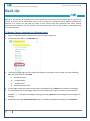
1. Log in to Moodle and select the course you want to restore it.
2. In administration block, click Restore link.
3. Upload the file either by drag and drop file or use file picker to select file to restore then click
Restore button.
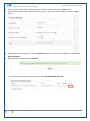
4. In confirmation page review data that will be restored then click continue in bottom of the page.
5. In Destination page, choose whether the course should be restored as a new course or into an existing
course then click the Continue button.
4
Email: [email protected]