1
Verifying the Pressure
WARNING: If the device fails to perform within the stated specifications, have the system serviced by a qualified
Respironics-approved service facility.
If part of your patient setup procedure is to verify actual pressure with a manometer, please use the following instructions to
ensure that the device is functioning properly. You will need the following equipment to verify the pressure:
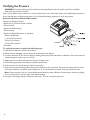
Respironics Pressure Calibration Kit includes:
• Respironics Whisper Swivel II
• Respironics O2 Enrichment Final Assembly
• Closed end cap
• Respironics flexible tubing
• Pressure tubing
• Respironics Digital Manometer or equivalent
Minimum Specifications:
0 - 25 cm H2O (or better)
±0.3 cm H2O accuracy
±0.1 cm H2O resolution
• Foam filter
To verify the pressure, complete the following steps:
1. Install the foam filter into the back of the device.
2. With the device unplugged, connect the system as illustrated in the diagram.
3. Turn the manometer on. If it does not display a reading of zero, adjust the manometer to calibrate it. If the manometer has
variable settings for devices, set it to cm H2O.
4. Supply power to the device then place the device in provider mode.
5. Set the therapy parameters according to the patient specific data.
6. Set the device to the specific pressure value for the patient.
7. Verify that the pressure setting matches the pressure displayed on the manometer. If the pressure setting does not match
the measured value for the device, contact Respironics or an authorized service center to have the device serviced.
Note: Output pressures may vary at local altitude and barometric pressure. Because of these factors, devices may slightly
vary in output pressure over the range of the altitude settings.
8. Set up the remaining parameters and exit provider mode. The unit is ready for patient use.
-8-