1
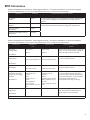
• Mode - This screen displays the therapy mode setting. You can select Bi-level therapy or CPAP therapy (if available on
your device). Bi-level therapy provides one level of output pressure during EPAP (Expiratory Positive Airway Pressure)
and a second higher level during IPAP (Inspiratory Positive Airway Pressure). CPAP therapy provides one level of output
pressure for both the inspiratory and expiratory breathing phases.
Note: The menu options will vary between the various modes.
• IPAP - This screen allows you to modify the IPAP setting. The initial default setting is 20 cm H2O. You can adjust the
setting from the EPAP setting to 25 cm H2O.
Note: This screen only displays if Bi-level therapy is enabled.
• EPAP - This screen allows you to modify the EPAP setting. The initial default setting is 4 cm H2O. You can adjust the
setting from 4 cm H2O to the IPAP setting.
Note: This screen only displays if Bi-level therapy is enabled.
• CPAP pres - If available on your device, this screen displays the current CPAP pressure setting. You can adjust the setting
from 4 cm H2O to 20 cm H2O.
Note: This screen only displays if CPAP therapy is enabled.
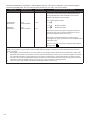
• Flex type - This screen displays the comfort mode setting and will have different options depending on the therapy mode.
• If the device is in Bi-level mode, you can select None or Bi-Flex.
• If the device is in CPAP mode, you can select None or C-Flex.
• Flex - You can modify the Flex setting on this screen. The Flex comfort feature allows you to adjust the level of air
pressure relief that the patient feels when exhaling during therapy. The setting of “1” provides a small amount of pressure
relief, with higher numbers providing additional relief.
Note: The patient also has access to this setting, if Flex is enabled.
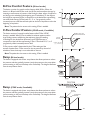
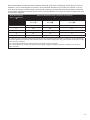
• Rise time - Rise time is the time it takes for the device to change from EPAP to IPAP. This screen allows you to adjust
the rise time so you can find the desired setting. This is only available if Flex has been disabled and the device is in Bi-level
mode.
• 0 (off) reduces the Rise Time feature to the lowest setting (off = 150 msec).
• 1 sets Rise Time to 1 (200 msec).
• 2 sets Rise Time to 2 (300 msec).
• 3 sets Rise Time to 3 (400 msec).
Note: The patient also has access to this setting, if Rise time is enabled.
• Tubing type lock - If available on your device, this enables you to lock the Tubing type setting if you do not want the
patient to change it.
Note: If you lock this setting, the device defaults to a setting of 22, and the patient will not see the Tubing type setting.
• Tubing type - If available on your device, this setting allows you to select the correct size diameter tubing that you are
using with the device. You can choose either (22) for the Respironics 22 mm tubing, or (15) for the optional Respironics
15 mm tubing.
• SYSTEM ONE resistance (
) - This setting allows you to adjust the level of air pressure relief based on the specific
Respironics mask. Each Respironics mask may have a “System One” resistance control setting. System One resistance
compensation can be turned off by choosing the setting “0”.
Note: The patient also has access to this setting, if Lock SYSTEM ONE is off.
• Lock SYSTEM ONE (
) - This enables you to lock the “System One” resistance control setting if you do not want
the patient to change it.
Note: If you lock this setting, the patient will see a “lock” icon next to the setting.
-3-