1
Bi-Flex Comfort Feature (Bi-level mode)
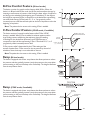
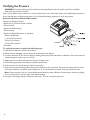
The device consists of a special comfort feature called Bi-Flex. When the
device is in Bi-level with Bi-Flex mode, the Bi-Flex attribute adjusts therapy by
inserting a small amount of pressure relief during the latter stages of inspiration
and during active exhalation (the beginning part of exhalation). In the diagram,
the bold lines represent Bi-Flex in comparison to the dashed line representing
normal Bi-level therapy. Bi-Flex levels of 1, 2, or 3 progressively reflect
increased pressure relief that will take place at the end of inspiration and at the
beginning of expiration.
Note: The patient also has access to this setting, if Flex is enabled.
IPAP
B i PA P
EPAP
Bi-Flex
1
2
3
Time
C-Flex Comfort Feature (CPAP mode, if available)
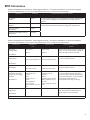
The device consists of a special comfort feature called C-Flex if CPAP
therapy is enabled. When C-Flex is enabled, it enhances patient comfort
by providing pressure relief during the expiratory phase of breathing.
In the diagram, the dashed line represents normal CPAP therapy in
comparison to the bold line representing C-Flex. C-Flex levels of 1, 2, or 3
progressively reflect increased pressure relief.
C-Flex pressure relief is determined by the C-Flex setting and the
amount of patient flow. C-Flex returns to the set pressure by the end of
exhalation, when the airway is most vulnerable to closure.
Exhalation starts and
pressure level decreases
Therapy
Pressure
1
2
C-Flex Levels
(1, 2 and 3)
3
Inhalation
Exhalation
Time
Note: The patient also has access to this setting, if Flex is enabled.
Ramp (Bi-level mode)
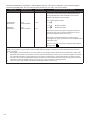
The device is equipped with a linear ramp feature that allows patients to reduce
the pressure and then gradually increase (ramp) the pressure to the prescription
pressure setting so they can fall asleep more comfortably. The diagram illustrates
how the ramp feature works.
Ramp (CPAP mode, if available)
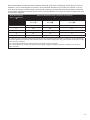
The device is equipped with a linear ramp feature that allows patients to reduce
the pressure and then gradually increase (ramp) the pressure to the prescription
pressure setting so they can fall asleep more comfortably. The diagram illustrates
how the ramp feature works.
Air Flow
Turned On
Therapy
Pressure
Ramp Button
Pressed
Minimum
Ramp
Pressure
Ramp Time
-6-
Time