1
Chapter 3
DFALib API
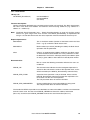
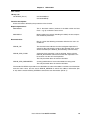
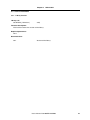
3.2.7 Status Check
Library call:
u32 DFALib_StatusCheck (
void)
Function description:
Performs a check on the status of the ongoing Flash operation.
Required parameters:
none
Returned value:
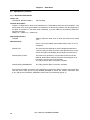
The returned value consists of two parts, bit 0~7 contain the
status itself, whereas bits 8~31 contains an address.
DFALIB_OK:
No error occurred and the operation, of which the status has
been checked completed successfully.
Please refer to the description of the function which initiated the
operation to determine the status of the address part.
DFALIB_BUSY:
The operation of which the status has been checked is not yet
finished and further status checks are required.
The address part does not contain valid data.
DFALIB_ERR_FLASHPROCn
(n=0x00~0x04): The operation of which the status has been
checked finished with an error.
The address part contains the address at which the operation
failed.
Please refer to the description of the function which initiated the
operation to determine the status of the address part.
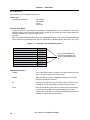
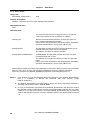
The header file DFALib.h provides macro definitions to extract the address and the error information
from the return value. Use the macro DFALIB_GETADD to extract the address information
(bits 8~31) and the macro DFALIB_GETERR to extract the error information (bits 0~7).
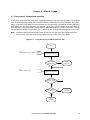
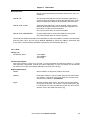
Notes: 1. Each function can only be completed during the execution of the DFALib_StatusCheck(),
thus it is mandatory to execute this command after each function, except
DFALib_LibVersion().
2. The DFALib_StatusCheck() has to be called as long as the flash programming hardware is
operating and the return value is DFALIB_BUSY.
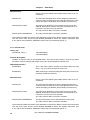
3. As soon as the operation is finished, the next DFALib_StatusCheck() will return the result of
the operation and also automatically reset the flash programming hardware. The user application has to use this return value as any further DFALib_StatusCheck() will not return the
status of the operation anymore since the hardware has been reset by the previous function
call.
20
User’s Manual U18400EE1V0UM00