1
EVALAg6400 Evaluation Board User Manual
9
6 Using the Board
6.1 Hardware Mode
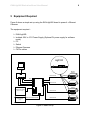
Using the set-up shown in Figure 6; data is connected to the EVALAg6400 board via a
switch connected to a PC.
With the EVALAg6400 set in hardware mode (SW2 - MODE switch Closed), it will
automatically detect equipment presenting a valid IEEE802.3at (or IEEE802.3af)
signature (and classification) connected to an output port.
Upon completion of a valid signature (and classification) the EVALAg6400 board will
add power to the data from the PC on that port. The corresponding LED on the
EVALAg6400 board will illuminate when power is being applied to a port.
6.2 Software Mode (on-board)
Using the set-up shown in Figure 6; data is connected to the EVALAg6400 board via a
switch connected to a PC.
With the EVALAg6400 set in software mode (SW2 - MODE switch Open), it is important
that the mode is set before the Ag6400 is powered up.
The (optional) 5V supply can be connected before or after the main (-45V to -57V)
supply is connected, it doesn’t matter which.
When both supplies have been connected, pressing (and releasing) the push switch
SW1 will enable the on-board µ-controller.
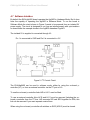
The first operation will be to check the mode of the Ag6400: If it is in software mode, then LED2 will be illuminated.
If it is in hardware mode, then LED1 will be illuminated.
If it is in software mode the µ-controller will continually monitor the status of each output
and respond accordingly.
If it is in hardware mode the µ-controller will do nothing and the Ag6400 will be if full
control of the outputs.