1
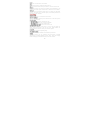
Position of Keys
1. Screen
3. Left Soft key (LSK)
5. Call Key
7. Keypad
Function of Keys
Key
Call Key
End/Power Key
Left Soft Key (LSK)
Right
(RSK)
Soft
Numeric Keys
Key
2. Right Soft Key (RSK)
4. End/Power Key
6. Track Pad/Ok Key
8. Camera
Description
To make/answer a call.
In the standby mode, press this key to
access the Call Log.
End an ongoing call.
Press and hold this key to turn on or off
the mobile phone.
In the menu mode, press this key to quit
the current menu and return back to the
standby mode.
In the standby mode, press this key to
access Main Menu.
After entering the number, use this key to
make a call from Slave SIM.
Use the right soft key to execute the
functions indicated at the right of the
prompt bar on the screen.
Used to enter numbers, letters and some
special characters.
In the standby mode, press and hold the
SYM key to activate Silent Mode, long
press the SPACE Key to activate “FM
Radio”.
In the edit mode, you can press the Shift
key to switch among upper case and lower
case, press the SYM key to enter symbols.
STATUS ICONS
The table below lists various icons that might appear on the status bar
while using the phone. Apart from the icons for signal strength level and
the power, other icons are displayed as per the current mode and
priority of the phone.
4