1
IO-Power Technology Co., Ltd
http:// w w w. io -p ow e r. c om
1F,No.100, Jinzhu Rd., North Dist., Hsinchu City 30055, Taiwan
e-mail: [email protected] Tel:+886 3 5429395 Fax: +886 3 5357297
C: SIP Server Register
1. WiFi phone number setting
You should get SIP phone number (SIP user name), password and SIP server domain from
operator first.
Select VOIP Settings, select one from the default 1-8 AP in WLAN setup, then enter the
"Options" menu, select "Change" menu to set configuration item.
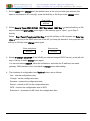
Select VOIP identify> Phone number; input SIP phone number 123456, then press left soft
key or OK key to enter the VOIP identify menu again.
Enter phone no.
123456
2. SIP domain setting
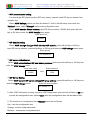
Select VOIP setting> change> VOIP identify> SIP domain, press left soft key or OK key,
input SIP server address, press left soft key or OK key and enter the VOIP change menu again.
Enter domain
31.108.26.51
3. SIP server authentication
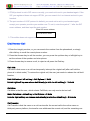
Select VOIP authentication> SIP user name/ password, then press left soft key or OK key and
enter the VOIP change menu.
Enter user name
Enter password
And
123456
1234
4. SIP Server Setting
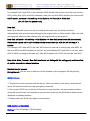
Select VOIP server> SIP server address/SIP proxy address, press left soft key or OK key and
enter the VOIP change menu.
Enter SIP server address
51.108.26.31
5. After VOIP Information is setup, return to VOIP Setup menu, press the left soft key or OK key
to enter the configuration item, select "Use", then the configuration item will be taken effect.
6. The functions of configuration item "Options" menu are as follows:
Use - use the configuration item
Change - set the configuration item
Rename - rename the configuration item
Form No.:IOP-OAPA-001-001
11 / 22
Retention date:6Years