1
TELOS ProSTREAM
Network Audio Processor and Stream Encoder
USER’S MANUAL
Version 1.0
September, 2011
Telos ProSTREAM Manual
© 2011 TLS Corporation. Published by Telos Systems/TLS Corporation. All rights reserved.
Trademarks
Telos Systems, the Telos logo and ProSTREAM are trademarks of TLS Corporation. All other
trademarks are the property of their respective holders.
Notice
All versions, claims of compatibility, trademarks, etc. of hardware and software products not made by Telos
mentioned in this manual or accompanying material are informational only. Telos Systems makes no endorsement
of any particular product for any purpose, nor claims any responsibility for operation or accuracy. We reserve the
right to make improvements or changes in the products described in this manual which may affect the product
specifications, or to revise the manual without notice.
Warranty
This product is covered by a two year limited warranty, the full text of which is included in this manual.
Updates
The operation of the ProSTREAM is determined largely by software. We routinely release new versions to add
features and fix bugs. Check the Telos web site for the latest. We encourage you to sign-up for the email notification
service offered on the site.
Feedback
We welcome feedback on any aspect of the Telos ProSTREAM, or this manual. In the past, many good ideas from
users have made their way into software revisions or new products. Please contact us with your comments.
Service
You must contact Telos before returning any equipment for factory service. We will need the serial number, located
on the back of the unit. Telos Systems will issue a Return Authorization number which must be written on the
exterior of your shipping container. Please do not include cables or accessories unless specifically requested by the
technical support engineer at Telos. Be sure to adequately insure your shipment for its replacement value. Packages
without proper authorization may be refused. US customers please contact Telos technical support at +1-216-6220247. All other customers should contact your local representative to make arrangements for service.
We support you...
By Phone / Fax:
You may reach our 24/7 Support Team anytime around the clock by calling +1-216-622-0247.
For billing questions or other non-emergency technical questions, call +1-216-241-7225 between 9:30 AM to 6:00
PM USA Eastern Time, Monday through Friday.
Our fax is +1-216-241-4103.
By E-Mail:
Technical support is available at [email protected].
All other inquiries at [email protected].
Via World Wide Web:
The Telos Web site has a variety of information which may be useful for product selection and support.
The URL is www.Telos-Systems.com
10 9 8 7 6 5 4 3 2 1
Telos Systems USA
Telos Systems
1241 Superior Avenue E
Cleveland, OH 44114 USA
+1-216-241-7225 (phone)
+1-216-241-4103 (fax)
+1-216-622-0247 (24/7 Technical Support)
[email protected]
[email protected]
Notices and Cautions
This symbol, wherever it appears, alerts you to the presence
of uninsulated, dangerous voltage inside the enclosure –
voltage which may be sufficient to constitute a risk of shock.
This symbol, wherever it appears, alerts you to important
operating and maintenance instructions. Read the manual.
CAUTION:
THE INSTALLATION AND SERVICE INSTRUCTIONS IN THIS MANUAL ARE FOR USE BY QUALIFIED
PERSONNEL ONLY. TO AVOID ELECTRIC SHOCK, DO NOT PERFORM ANY SERVICING OTHER THAN
THAT CONTAINED IN THE OPERATING INSTRUCTIONS UNLESS YOU ARE QUALIFIED TO DO SO. REFER
ALL SERVICING TO QUALIFIED PERSONNEL.
WARNING:
TO REDUCE THE RISK OF ELECTRICAL SHOCK, DO NOT EXPOSE THIS PRODUCT TO RAIN OR MOISTURE.
USA CLASS A COMPUTING DEVICE INFORMATION TO USER. WARNING:
This equipment generates, uses, and can radiate radio-frequency energy. If it is not installed and used as directed by
this manual, it may cause interference to radio communication. This equipment complies with the limits for a Class
A computing device, as specified by FCC Rules, Part 15, Subpart J, which are designed to provide reasonable protection against such interference when this type of equipment is operated in a commercial environment. Operation
of this equipment in a residential area is likely to cause interference. If it does, the user will be required to eliminate
the interference at the user’s expense. NOTE: Objectionable interference to TV or radio reception can occur if
other devices are connected to this device without the use of shielded interconnect cables. FCC rules require the use
of shielded cables.
CANADA WARNING:
“This digital apparatus does not exceed the Class A limits for radio noise emissions set out in the Radio Interference
Regulations of the Canadian Department of Communications.”“Le present appareil numerique n’emet pas de
bruits radioelectriques depassant les limites applicables aux appareils numeriques (de Class A) prescrites dans le
reglement sur le brouillage radioelectrique edicte par le ministere des Communications du Canada.”
TELOS PROSTREAM MANUAL |
Table of Contents
We support you.... . . . . . . . . . . . . . . . . . . . . . . . . . . . . II
A letter from our CEO . . . . . . . . . . . . . . . . . . . . . . . . . . VII
1
Introducing ProSTREAM
1
FYI: MPEG License & Music Copyright. . . . . . . . . . . . . . . . . . . . 1
Quick Start. . . . . . . . . . . . . . . . . . . . . . . . . . . . . . . . 2
Streaming Server software. . . . . . . . . . . . . . . . . . . . . . . . . 2
ProSTREAM Settings. . . . . . . . . . . . . . . . . . . . . . . . . . . . 3
Listening to the encoded ProSTREAM web stream. . . . . . . . . . . . . . . 3
2
Controls and Connections
5
Overview. . . . . . . . . . . . . . . . . . . . . . . . . . . . . . . . . 5
User Interface. . . . . . . . . . . . . . . . . . . . . . . . . . . . . . . 5
Connections . . . . . . . . . . . . . . . . . . . . . . . . . . . . . . . 6
Editing Text. . . . . . . . . . . . . . . . . . . . . . . . . . . . . . . . 6
3
ProSTREAM Controls
7
Audio Menu. . . . . . . . . . . . . . . . . . . . . . . . . . . . . . . 7
Network Menu. . . . . . . . . . . . . . . . . . . . . . . . . . . . . . 9
Status. . . . . . . . . . . . . . . . . . . . . . . . . . . . . . . . . . 10
IN/OUT status bar graphs:. . . . . . . . . . . . . . . . . . . . . . . . . 10
Automatic Gain Control [AGC]:. . . . . . . . . . . . . . . . . . . . . . . 11
Limit: . . . . . . . . . . . . . . . . . . . . . . . . . . . . . . . . . . 12
Omnia Processing . . . . . . . . . . . . . . . . . . . . . . . . . . . . 12
Getting the Sound You Want . . . . . . . . . . . . . . . . . . . . . . . 13
Adding More Detail: When Loudness Isn’t the Last Word. . . . . . . . . . . 15
Equalization Changes. . . . . . . . . . . . . . . . . . . . . . . . . . . 16
Thunder Bass . . . . . . . . . . . . . . . . . . . . . . . . . . . . . . 17
Reducing Codec Artifacts . . . . . . . . . . . . . . . . . . . . . . . . . 17
Codec . . . . . . . . . . . . . . . . . . . . . . . . . . . . . . . . . . 17
V
Compression Codec. . . . . . . . . . . . . . . . . . . . . . . . . . . . 18
Channels . . . . . . . . . . . . . . . . . . . . . . . . . . . . . . . . 19
Bitrate. . . . . . . . . . . . . . . . . . . . . . . . . . . . . . . . . 19
Transport. . . . . . . . . . . . . . . . . . . . . . . . . . . . . . . . 19
Metadata. . . . . . . . . . . . . . . . . . . . . . . . . . . . . . . . 20
Streams. . . . . . . . . . . . . . . . . . . . . . . . . . . . . . . . . 21
System. . . . . . . . . . . . . . . . . . . . . . . . . . . . . . . . . 22
4
Streaming Servers
23
Streaming Servers. . . . . . . . . . . . . . . . . . . . . . . . . . . . 23
Stream Server Service Providers. . . . . . . . . . . . . . . . . . . . . . 24
A1 Warranty and Application Cautions
25
A2 ProSTREAM Audio Specifications
27
A3 Safety Notification
29
A LETTER FROM OUR CEO | VII
A Letter from our CEO...
“What if?” A singularly great question, because it opens the
door to so many other questions and ideas. Those who ask
it are sometimes called dreamers, as if that were somehow
bad, but history has often proven dreamers to be the avatars
of new and exciting things.
eliminate the age-old problem of feedback in open-speaker
environments. And the prize of using the public Internet for
remote connections as reliable as those of switched circuits
is within broadcasters’ grasp, thanks to ever more sophisticated coding algorithms.
“What if?” was the query asked by Steve Church that led
to the start of Telos Systems. In 1984, Steve – then a young
broadcast engineer and part-time talk show host – wondered whether emerging Digital Signal Processing (DSP)
technology might be useful to clean up the terrible caller
audio then the norm at radio stations. The result of asking it
was the Telos 10, the world’s first digital telephone hybrid,
a product that changed the face of radio forever.
Pioneering ideas aren’t limited just to technology, though.
We believe that investing in people pays off big, so we’ve
assembled the largest R&D team in the industry, a talented
staff of engineers, scientists and broadcast professionals.
We’re also the first and only broadcast equipment maker
with a 24/7 support team ready to offer assistance any
time of the day or night. As they say, radio never sleeps – so
neither do we.
Looking back at Telos history, “What if?” is found at the
root of many more technologies broadcasters have since
made ubiquitous. “MP3 bit rates are perfectly matched
to the bandwidth of ISDN; what if we combined them?”
“What if we built a box that let radio stations stream audio
on the Internet?” “What if we could use Ethernet to treat
audio as data and move it around the radio station in real
time?” (By the way, if you recognized the answers to those
questions as the Zephyr ISDN codec, AudioActive MPEG
encoder and Livewire IP-Audio standard, give yourself a
cookie.)
As Telos navigates its third decade in broadcasting’s
choppy waters, the culture of innovation and creativity that
propelled Steve in the early days still guides us today. We’re
still in love with radio, still turned on by new technology,
still driven to ask “What if?” If you’re reading this, you
are too — for which we thank you, from the bottom of our
hearts.
Today, as technology roars ahead, we’re constantly seeking
new ways to apply it to the problems of everyday broadcasting. Voice over IP (VoIP) is particularly compelling for
its ability to packetize high-quality phone calls and direct
them anywhere in the broadcast plant using ubiquitous,
standard Ethernet as a backbone. A new digital tech called
AEC (Advanced Echo Cancellation) is helping to literally
Michael “Catfish” Dosch
CEO
|
1
1
Introducing ProSTREAM
The Telos Systems ProSTREAM is a hardware-based audio processor and web stream encoder device in a
compact 1U rack-mount chassis. The ProSTREAM will process and encode audio sourced from either rearmounted analog audio inputs, via Livewire IP-audio technology, or via optional AES/EBU digital inputs.
ProSTREAM uses Omnia Audio’s proven audio processing algorithms to balance the input audio to fit your
program’s sound. ProSTREAM encodes the processed audio and muxes the companion real-time program
meta data into a compressed web stream. ProSTREAM then connects to a streaming relay server instance or
streaming service provider to deliver a rock solid packet stream for Internet clients.
FYI: MPEG License & Music Copyright
Musical compositions and sound recordings are creative works that are protected by the copyright laws
of the United States (title 17, U.S. Code) and other countries. Under U.S. law, the owner of a copyright
has the exclusive right(and may authorize others)to reproduce the work, use parts of the work in a new
creation, distribute the work in whole or in part, and to publicly display or perform the work (including on
web pages and through webcasting). With few exceptions, it is illegal to reproduce, distribute or broadcast
a sound recording without the permission of the copyright owner. It is your responsibility to comply with
the copyright laws of the United States and other countries in which you broadcast and to pay all applicable
royalties to the copyright owners when you become a webcaster.
There have been recent amendments to the copyright law regarding webcasting of sound recordings. These
new provisions allow webcasting under the terms of a statutory license, as a way to help webcasters get
permission without having to go to each sound recording’s owner. The statutory license, however, has
strict requirements that you must follow. Some of these requirements include the payment of license fees,
limitations on the number of songs from the same album or artist that may be played in a three hour period
(called the sound recording performance complement); a prohibition on publishing advance playlists; and
a requirement to identify the song, artist and album on the website. There are other requirements as well.
The Recording Industry Association of America provides quite a bit of information on copyright law as it
applies to webcasting, and both ASCAP and BMI have created license agreements that they are willing to
grant to webcasters that they believe conform to the provisions of the new copyright rules for webcasting.
For additional information on the statutory license and other aspects of webcasting,
please visit the following sites:
♦♦ The U.S. Copyright Office
http://www.copyright.gov
♦♦ The Recording Industry Association of America
http://www.riaa.com/issues/music/webcasting
♦♦ ASCAP
http://www.ascap.com/weblicense/webintro.html
♦♦ BMI
http://www.bmi.com/iama/webcaster/index.asp Streaming Server software
2
| Section 1
Quick Start
In order to quick start a ProSTREAM web stream, a streaming relay server instance can be used to test
ProSTREAM functionality. This example uses SHOUTcast DNAS 1.9.8 (Current Stable Version) freely
available for major computational platforms from http://www.SHOUTcast.com/broadcast-tools.
Streaming Server software
Once SHOUTcast DNAS is installed, make note of the server machine’s IP address and run SHOUTcast
DNAS with the following minimal sc_serv.conf file:
; SHOUTcast 1.9.8 configuration file
; not production ready
MaxUser=32
Password=Telos
PortBase=8800
SrcIP=ANY
DestIP=ANY
Streaming server operation can be verified by opening a web browser and navigating to the SHOUTcast
server root URL. This URL is the IP of the computer running SHOUTcast DNAS followed by a colon [:] and
the port number configured in the sc_serv.conf file. I.E. http://192.168.0.9:8800 When functioning, the
SHOUTcast DNAS Status webpage will appear displaying Server Status: Server is currently down.
TELOS SYSTEMS PROSTREAM |
3
ProSTREAM Settings
From the front panel of the ProSTREAM, set the following menu options.
1. Audio
Connect an audio source to the XLR inputs and select Audio Input: XLR.
Verify input audio with headphones by pressing the headphone knob to select
“Listening to input audio.”
2. Network
Choose LAN Mode: Auto (DHCP) to select Configure the LAN port of the ProSTREAM to feed your
SHOUTcast server.The stream can be delivered via the LAN port in a single network configuration.
3. Omnia Processing
Select a preset best suited to the audio source material. If unsure, use Normalize. Processor enhancements can be heard live during selection either via the rear XLR outputs or via headphones by
pressing the headphone volume knob and selecting “Listen to output audio.”
4. Codec
Select Codec: MP3, MP3 Channels: Stereo and MP3 Bitrate: 128 9kilobits/sec) from the Codec
menu as a good test stream.
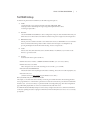
5. Stream1
Set the Stream1 menu options as follows:
♦♦ SHOUTcast Server Address: {SHOUTcast DNAS root URL} [I.E. 192.168.0.9:8800]
♦♦ SHOUTcast Password: Telos
This is the password to access the streaming server set in the sc_serv.conf file.
♦♦ Stream Name: ProSTREAM test
The Stream Name can be anything and should be something. This is the source title for playlists, etc.
♦♦ Stream Genre: test
(SHOUTcast DNAS does require the genre field be set to a value.)
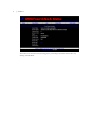
Now you can listen to your encoded web stream!
The output, or encoded audio can be heard by connecting to ProSTREAM with a client audio application.
Use a program like VLC or WinAMP to open the network stream connection to port 8000 at ProSTREAM’s
IP address[I.E. 192.168.0.10:8000] or open the internal web configuration page. The main configuration
page will include playlist links to connect to ProSTREAM’s internal mini-server.
ProSTREAM will automatically attempt to connect to any configured stream servers. When ProSTREAM is
connected, updating the status webpage for SHOUTcast DNAS should yield Server Status: Server is currently
up and public.
4
| Section 1
The stream can now be heard with a streaming player by connecting to the SHOUTcast base URL or by
clicking on the Listen link.
|
2
5
Controls and Connections
Overview
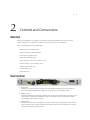
The Telos ProSTREAM is very simple to set up and use, having a minimal amount of controls and easy,
intuitive interface. Here, we’ll take a look at the front and rear panels of your ProSTREAM.
Here’s what you’ll find inside your packing box:
♦♦ Telos Systems ProSTREAM unit
♦♦ Telos Systems ProSTREAM manual
♦♦ warranty reregistration form
♦♦ warranty information sheet
♦♦ IEC 320 power cords (Euro 220v & US 110v)
♦♦ network cable - Cat5e, 7ft. RJ45 to RJ45
♦♦ DB25 Female Solder Cup
♦♦ DB25 Plastic Hood
♦♦ #10 rack screws
User Interface
5
6
1
2
3
4
1. Power LED:
The blue power LED is located to the upper left of the display. When the unit is first powered, the
power LED will flash until the unit is fully booted, when the power LED will light solid.
2. Display Screen:
The OLED display screen will display when the unit is operational. Use the display, control knob, and
return button to navigate the ProSTREAM’s options and settings. When in operation, the display
screen displays audio and process meters.
3. Control Knob:
The main control knob next to the display also acts as a selector by pressing the knob. Once a desired
option is displayed, pressing the control knob will select the option. The control knob is also be used
for character selection in text entry fields.
6
| Section 2
4. Return Button:
The return button is adjacent to the control knob and will step back from a selected option. Repeated
presses of the return button will switch the display between the menu and metering display.
5. Headphone Jack:
1/4” Stereo TRS Jack switching between input and post-process output audio monitoring.
6. Headphone Volume Knob:
The headphone volume knob controls the output level of the audio being sent to the headphone jack.
Pressing the headphone volume knob will toggle the headphone output between the input audio and
the post-process output audio.
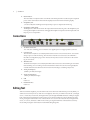
Connections
4
5
6
2
3
7
1
1. AC Mains connection:
110 - 220v auto-switching power connection. Use supplied power cord appropriate for your area.
2. LAN Network
The LAN network jack is a 10/100 RJ45 jack and can be used on a Livewire network for source audio
and post-process audio monitoring. The LAN network can also be used to access ProSTREAM’s
internal web configuration pages. The LAN network may also be used for connection to the streaming server instance.
3. WAN Network
The WAN network jack is a 10/100 RJ45 jack which can be used to access the streaming server instance
if the streaming server is running on a network other than a local or Livewire network. Typically, this
would be an Internet accessible network connection if connecting to a streaming relay service.
4. Analog Audio Inputs:
(female 3-pin XLR, left & right)
5. Analog Audio Outputs:
(male 3-pin XLR, left & right)
6. USB
Future use
7. Parallel Interface
Future use
Editing Text
When a text field is displayed, press the main knob to enter edit mode. If the field was previously blank, you
will now be in text entry mode (a solid cursor is displayed) otherwise you will be in erase mode (a rectangle
cursor). In text entry mode mode, turning the knob cycles though all available characters while pressing the
knob selects the current character and moves the cursor to the next character position. While in text entry
mode, pressing the Return button once switches the cursor to erase mode. In erase mode, turning the knob
erases (or restores) characters. While in erase mode, pressing the main knob switches back to text entry
mode while pressing the return button exits the field editing altogether.
|
3
7
ProSTREAM Controls
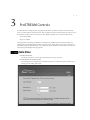
ProSTREAM can be configured via its internal web interface accessible via both the LAN and WAN networks, as well as via the front panel controls. The web interface can be reached by pointing a web browser to
the IP address of either LAN or WAN network. The default credentials to access the web interface are:
♦♦ username: admin
♦♦ password: Telos
All configurations and settings available for ProSTREAM are available via the front panel and the web
interface unless specifically called out in this document. Some setting values may or may not be locked or
unavailable if they are dependant upon other configured options. We’ll show Web interface screenshots as
well as front-panel displays where appropriate.
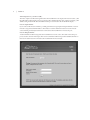
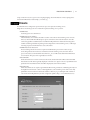
Audio Menu
♦♦ Audio I/O interface:
You may choose XLR or Livewire network inputs from this drop-down box.
♦♦ Audio Input Level:[0.0 dB-22.5 dB]:
The Audio Input Level is adjustable from a 0dB level of gain to 22.5 dB level of gain. 10.0dB is a good
starting point for analog audio input.
8
| Section 3
Audio Output Level: [-95.2 dB - 0.0 dB]:
The Audio Output Level affects the signal level for the ProSTREAM’s rear outputs and Livewire returns. [The
internal audio bridge from the processor to the encoder is unaffected by the Audio Output Level setting.] The
default setting of 0.0 dB will direct the full level of the processed audio to the ProSTREAM outputs.
Livewire Input Channel:
If you’ve chosen the Livewire interface, you’ll be given fields to assign input and output channels. Livewire
IP audio is assigned via channel numbers. This must be set to the channel of an active Livewire IP audio
source channel generated by another device connected to the ProSTREAM’s LAN network port.
Livewire Output Channel:
A channel number should be assigned to the ProSTREAM’s Livewire source. This audio is the same postprocess audio as the rear XLR outputs. The Livewire channel should be unique to the available channels on
the Livewire audio network connected to the ProSTREAM LAN network jack.
PROSTREAM CONTROLS |
9
Network Menu
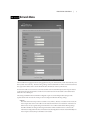
The ProSTREAM is equipped with two RJ45 gigabit network ports marked LAN [Local Area Network] and
WAN [Wide Area Network]. The networking settings of the ProSTREAM are of IPv4 conventions and must
be assigned an IP address before the ProSTREAM will communicate with any other devices.
If Livewire IP audio is to be used as a source instead of the rear-mounted XLR inputs, the LAN port must be
connected and assigned an IP address on the Livewire audio network. Encoded audio can be delivered via
either the LAN or WAN port
The settings available in the ProSTREAM configuration options contain independent settings for the
separate WAN and LAN networks. Each port can be configured with the following settings:
♦♦ Mode:
The Mode of the network port can be set either to Auto (DHCP), Manual, or Disabled. In Auto mode, the
network port must receive it’s IP address via broadcast from a DHCP server elsewhere on the network.
When in Auto mode, assigned settings from the DHCP server will be visible in the following settings,
but will be unable to be changed. The assigned IP address will be needed in order to connect to the
internal web configuration interface. In Manual mode, all configurations must be entered manually. If a
network port is unused, the port should be set to Disabled.
10 | Section 3
♦♦ IP Address:
The IP Address is made up of four octets assigned to either the LAN or WAN network ports on the
ProSTREAM. When the port’s mode is set to manual, this setting can be manually assigned. When
the port’s mode is set to auto, this setting will show the ProSTREAM’s assigned IP address for that
port if the port is connected to a network and has successfully negotiated with a DHCP server for an
address. If the port is set to auto and has not received an IP address from a DHCP server, then the IP
address will show 0.0.0.0.
♦♦ Netmask:
The netmask is a needed component of IPv4 networking. The netmask defines the scope of the local
network that port can speak to without requiring use of the gateway. When the port’s mode is set to
auto, this setting will be locked and displaying the assigned netmask if a DHCP lease has been negotiated, or 0.0.0.0 if not. If the port’s mode is set to manual, the appropriate netmask for the IP address
assigned to this port should be entered.
♦♦ Gateway:
The gateway is a needed component of IPv4 networking. The gateway defines the address of the
router device used to communicate with other subnets if available. When the port’s mode is set to
auto, this setting will be locked and displaying the assigned gateway if a DHCP lease has been negotiated, or 0.0.0.0 if not. If the port’s mode is set to manual, the appropriate gateway for the IP address
assigned to this port should be entered if available. If no network gateway is available, this setting can
be left unassigned or set to 0.0.0.0.
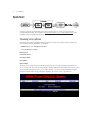
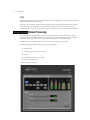
Status
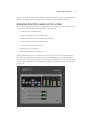
The status display of the ProSTREAM is the default device display interface and provides a visual representation of the aural states of the ProSTREAM. The status display as shown in the display photo above shows
real-time bar graphs representing the metered audio level for each the left and right inputs and post-process
outputs. Clicking on any block in the signal flow diagram lets you adjust the options for that particular
block.
IN/OUT status bar graphs:
The IN bargraphs meter the audio input levels from either the rear-panel or Livewire audio sources connected to the ProSTREAM. This audio can be aurally monitored via the front panel headphone jack if the
headphone audio is set to “Listening to input audio.”
The OUT bargraphs meter the post-process audio levels being sent to the internal stream encoder as well
as either the ProSTREAM’s external outputs or the Livewire output channel on the LAN connector. Note
that the output level of the ProSTREAM’s physical output can be varied with the Audio Output setting. The
post-process audio can be aurally monitored via the front panel headphone jack of the headphone audio is
set to “Listening to output audio.”
The bar graphs are capable of indicating more than just level information. The texture and density of the
audio signal can be observed, based upon the dynamic action of the bar graphs, and peak-responding pills.
Of interest are the pills at the end of the input and output meters which indicate peak level. The bar section
represents the RMS average of the signal. Wide dynamic range will display a separation between the pills
and the bar, whereas signal with little peak information will cause the pills to ride on the crest of the bar
graph. The bar graphs can indicate up to 25 dB of gain reduction.
PROSTREAM CONTROLS | 11
Note:
The input and output levels are displayed relative to 0dB full scale (0dBfs). The 0 indicator on
the input/output bar graphs means that every available bit of signal level is being used at
that time! There is nothing more in the level department, except to create distortion… nasty
sounding distortion!
Automatic Gain Control [AGC]:
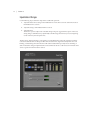
There are two sections to the Automatic Gain Control [AGC] bar graphs display: wide-band automatic gain
control (WB-AGC) and multiband automatic gain controls. The multiband AGC bands are low frequency, mid
frequency, and high frequency. The bar shows the average value of the gain reduction, while the floating pill
indicates the peak value of gain reduction.
The Omnia processor algorithms automatically adapt the style of compression/limiting control being
employed on a moment-by-moment basis. This can be deduced if the metering is studied over time. During
normal operation, the bar graphs will have a dynamic “bounce.” Every now and then, the processor will
react quickly and show a larger amount of gain reduction. This action will recover very slowly, and return to
rest with the main bar graph. This action is more apparent on dynamically textured audio.
Another feature unique to Omnia processing is processor hold. During brief pauses in audio, the bar graphs
will “freeze” indicating the processor in the hold mode of the algorithm. This can occur when there is dry
vocal audio in the signal.
ProSTREAM’s processor is capable of performing many different processing functions at different times.
The processing display bar graphs indicate different kinds of operation with different audio sources. This is
primarily based on dynamic range differences in source audio.
Bar graphs will indicate differently for pre-processed audio or audio lacking dynamic range the than with
audio possessing a high degree of dynamic range. Audio signals which lack dynamic range, whether naturally or by prior processing, will possess a lower peak to average ratio. Conversely, audio with wide dynamic
range possesses a higher peak to average ratio. ProSTREAM adapts to each case.
Low dynamic range audio (audio with high RMS and low peak levels) will show more activity in the WBAGC bar graph and less activity in the multiband bar graphs. The WB-AGC responds to high RMS energy
while the multiband section reacts to lower peak energy. Multiband bar graphs may not indicate any action at
all with some low dynamic range audio which is normal for Omnia processing. This may occur with heavily
processed commercials or music, or with music passages of sustained level.
Wide dynamic range audio (audio with low RMS and high peak levels) causes the opposite to occur. The
multiband bar graphs become active, while the WB-AGC section appears to not respond as much. The multiband AGC’s can work aggressively with wide dynamic range audio while the WB-AGC section indicates
little activity.
The WB-AGC section is designed to operate much slower than the multiband gain controls, primarily
because of the nature of each function. The WB-AGC operates on the audio’s RMS energy. During gain
calculations, the incoming audio’s “average” level is established, and gain adjustments, if needed, are made
based on those calculations. The WB-AGC bar graph will appear to move slower as it makes changes over
relatively long time periods.
The intent of the multiband gain control is to normalize the spectral balance and provide control of the peak
levels. Peak energy must be detected and adjusted in a quick and accurate manner but not interfere with the
sonic integrity of the audio signal. For this reason, the multiband gain controls operate faster, with special
background instructions to govern their behavior, and strictly on an as-needed basis.
12 | Section 3
Limit:
The limit bar graphs monitor the level to which the processor is engaging gain reduction in the post-process
audio for each the left and right channels.
The meters only analyze the signals and aid in adjusting the specific parameters needed to achieve desired
aural results. The processing displays are capable of providing a wide range of information, but is not
recommended to set up processing based on using ears to judge the sound, not specified meter indications.
Omnia Processing
The dynamics processing algorithms in use in the ProSTREAM are based upon Omnia Audio’s highly
successful Omnia.3net, which is a hardware-based DSP audio processor. ProSTREAM performs internal
calculations on the source audio with precision sufficient to guarantee 24-bit dynamic range.
ProSTREAM’s processor effects can be monitored via the front panel when set to Status.
ProSTREAM employs the following Omnia processing architecture:
♦♦ Wideband AGC
♦♦ 3 Band Combined Compressor/Limiter
♦♦ HF EQ
♦♦ Adjustable Bandwidth Lowpass Filter
♦♦ Final Look-Ahead Limiter
♦♦ Processing Preset Editor
PROSTREAM CONTROLS | 13
All audio processing adjustments are performed in the Preset Editor, which is only available via the web
interface. A “preset” represents all of the control values for every control in the Omnia processor. When a
preset is chosen for the processor, control values for the processor’s settings are loaded into the processing
structure and applied to the input audio.
Presets allow different processing setups to be loaded into the processor. The following factory presets have
been provided as starting points for customizing your sound.
♦♦ Music 24kbps
♦♦ Music 32kbps
♦♦ Normalize
♦♦ PhatOne
♦♦ Smooth
♦♦ Sparkle
♦♦ Squashed!
♦♦ Talk 24kbps
♦♦ Talk 32kbps
♦♦ Talk
Note:
It is possible to gain dramatic sonic improvement from ProSTREAM’s Omnia processing right
away. We suggest that an easy way to get started is to choose one of the factory presets and
then customize it to suit your own aural taste!
Processor Adjustment Procedure:
1. Review the aural objectives for the post-processed audio.
2. Start with an Omnia preset and adjust processor values in small increments.
3. Listen to the post-processed audio, then adjust, and listen again. Aural evaluation should occur over
time, not in short moments.
4. While making changes to the system, tweak levels in small increments. Do not make too many different adjustments all at once. Multiple adjustments at once can make for more difficult determination
of what affected an aural change. Make changes in increments of no more than +0.5 dB or -1 dB, or in
1 or 2 step increments. Turn functions on and off to better determine their affect on the audio.
5. Sleep on it. Spend time adjusting and then listening, and when the system gets to a point where it
sounds good, stop. When making changes to processing, ears become less sensitive to the adjustments. Spreading the adjustment period over a number of days is recommended.
Getting the Sound You Want
ProSTREAM is designed to minimize the impact of the quality vs. loudness trade-off. If the desire is to
process aggressively, here are some suggestions that should help achieve that goal. It’s recommend that before tuning the processor for raw loudness, decide what sonic characteristics are lacking in the final sound.
Obtaining the objective sound can be as simple as creating an illusion of added loudness by changing a single
time-constant parameter. There are even instances where stereo enhancement can create the necessary
apparent loudness. The old adage of less is more really can apply.
14 | Section 3
There is no precise recipe for setting up audio processing. While there are some basic fundamentals which
can be used to get started toward the desired sound, it may require a concerted effort with extended listening and subtle processing changes over time to achieve the ultimate goal. It’s very helpful to know the goals,
take time, and adjust methodically.
It’s perfectly acceptable for the final mix to be loud. In the past, loudness was a problem due to the limitations of the processors of the day. In the quest for ultimate loudness, older processors were probably either
adjusted (or modified) well outside of their “safe” range. Another method was to push the 0dBfs ceiling
level in the signal chain and accept the by-products of the interactions and conflicts among them.
ProSTREAM can change that. The Omnia processing is designed to look at the incoming audio and make
the final mix consistently loud without the artifacts or grunge created by older processors. ProSTREAM
makes loudness an effortless exercise.
The trade-off between quality and loudness is primarily determined by the limiting and clipping sections.
While each function alone will generate added loudness, each has its strength as well as side effects.
When excessive limiting is used, inter-modulation distortion is increased, making the audio sound “mushy”,
and “smeared.” The added short term density can also cause the audio to be “tight”, “squashed”, or “dense.”
The “dynamics” artifacts caused by excessive limiting might sound like “pumping,” or “breathing.” The
suggestion for limiting is “a little goes a long way.”
When excessive clipping is used, harmonic distortion is increased. The audio level is in effect “running into the
brick wall.” Too much clipping can cause the audio to sound “broken-up,” “torn,” “rough,” or “edgy.” The
harder the limiters and clippers are driven, the louder the audio perception. However, increased intermodulation and/or harmonic distortion is likely to occur.
Resist the temptation to crank up the aggressive processing sections, like the limiters. Those will add loudness, but usually at the cost of quality. Many times, building a little more RMS level in the AGC sections will
do the trick instead, and with no obvious sonic penalties. Here in order are the best places to start:
1. Alter the following parameters in the AGC sections:
♦♦ Increase the AGC Drive to the WB (wideband) AGC section.
♦♦ Increase the Drive to each band of the multiband AGC screen.
♦♦ Decrease the Release time settings in each band to make it operate faster.
2. Drive the final limiter section harder.
3. Use combinations of the above steps, but in small increments. When multiple changes occur, it
becomes difficult to determine why the result of an adjustment did or did not make sense. Focus on
one specific area the processed sound at a time. Once that area is satisfactory, then move the focus to
the next area, as needed.
It may be desirable to have the processing be perceptibly loud, but dynamic. This may give the
illusion of loudness, retaining detail and clarity, but reduce listener fatigue. This can be achieved by
centering efforts in the multiband section and avoiding heavy use of the final limiter. One trick is to
use fast release times in the multiband limiters, but do not let them produce more than 5 dB - 7 dB
of gain reduction. This keeps the IM distortion of the limiters to a minimum, and doesn’t “oversquash” the audio. When adjusted in this manner, the limiter sections are relied upon to generate
higher long-term RMS levels, which translates into increases in perceived loudness.
If a “loud and proud” signature is desired, then use more from the limiters. Loudness at all costs is usually the
reason for utilizing more aggressive limiting. Using larger amounts of drive to the multiband limiters, along
with faster release times will generate a signal of high short-term density. The effect of this type of processing is that the audio is consistently loud at all times, or a “wall of sound.” The drawback, however, is the
PROSTREAM CONTROLS | 15
density can cause greater listener fatigue. While ProSTREAM’s Omnia processing is designed to minimize
fatigue, it is capable of generating large amounts of density that could eventually lead to fatigue.
Adding More Detail: When Loudness Isn’t the Last Word
The previous examples demonstrate how to heavily process the incoming audio. If more detail and resolution are desired, reversing the procedures listed above will do the trick:
1. Reduce the drive to the Final Limiter.
2. Back off on the influence of the multiband stages:
♦♦ Reduce the amount of Drive to each band in the multiband.
♦♦ Increase the Release times to slow down recovery.
3. Ease up on the Wideband-AGC sections:
♦♦ Reduce the Drive to the WB AGC.
♦♦ Increase the Release time to operate slower.
Backing off the limiting sections first will allow the processing to retain a level of competitive loudness
while enhancing quality, and the overall dynamic texture will be affected less. Start with reducing the
limiter amount in 0.5 dB steps. Detail can be restored from just a small change of 0.5 dB. Generally, changes
in limiter drives will have the most noticeable effect on quality, but it will also affect the relative loudness
level as well.
16 | Section 3
Equalization Changes
Use the following steps to tailor the shape of the overall audio spectrum:
1. Adjust the relative drive settings in the multiband AGC menu. These controls set the drive levels of
the multiband AGC sections.
2. Adjust the settings of the multiband mixer controls.
3. Adjust the mixer.
The first two options will provide noticeable change in EQ. We suggest the first option. In this case,
an EQ change is still followed by a dynamically controlled stage, therefore any excessive EQ change
can be ‘undone’ by the subsequent AGC.
The last option, adjusting the mixer, is designed to provide a final minor trim to the spectrum. The mixer
controls are calibrated in 0.10 dB steps for fine trim. Since the mixer stage follows the dynamic AGC and
limiting, a radical change in level in the mixer will result in additional and possibly excessive limiting of
audio in that band. Changes implemented here are best limited to about 1.0 dB. Decrease in mix level can be
done to a greater amount if needed or desired.
PROSTREAM CONTROLS | 17
Thunder Bass
If your source material has it, ProSTREAM will put it in the mix, and with muscle! Making changes to this
characteristic is done using the following parameters, and for maximum effectiveness, in the order listed:
1. In the enhance menu, increase the amount of deep bass boost.
2. In the enhance menu, increase the amount of phat bass boost.
3. Increase the drive to the LF AFC with the appropriate control in the LO AGC screen.
4. Speed up the release times of the LF LO AGC section.
5. Slightly increase the low control in the mixer section.
When processing, moderation is the key. If all of the above steps are utilized in the pursuit of more bass,
then severe low frequency over-enhancement can occur. Excessive bass boost can produce the illusion that
the presence and high frequencies have been lost. They are still there, but are being acoustically masked by
the lower frequencies. Generally, an increase in the enhance menu’s bass boost functions alone will provide
more than sufficient enhancement to the low end.
Reducing Codec Artifacts
Dynamics processing is an extremely useful tool for reducing audible artifacts from lossy-compression
codecs. High frequencies tend to be the first perceptible annoyances, followed by that swishy-swirly water
like sound common at lower bitrates. These artifacts can be reduced, and in some cases eliminated, when
audio processing is applied as a tool.
Generally, as codec bitrates are reduced, so is the audio bandwidth. ProSTREAM contains selectable low
pass filters in the output section. Reducing the audio bandwidth through filtering will help. Additionally, the
upper band of processing can be reduced in the MIX section, which will allow that band to act as a dynamic
governor.
Operating the HF Band in the slow release time will reduce HF density which improves intelligibility as the
encoder masking algorithm is not loaded as heavily with HF content.
Codec
18 | Section 3
The codec represents the manner in which the 1.4Mbps stream of un-compressed audio data will be
converted into a smaller data stream by means of digital compression. ProSTREAM applies lossy compression
algorithms to the processed audio in order to create a live data stream for end users via the Internet. A lossy
compression technique produces a data stream small enough to be delivered to the client via DSL, EDGE
wireless, or any common Internet network infrastructure.
Telos Systems licenses Motion Picture Experts Group [MPEG] compression codecs from Fraunhofer IIS
[http://www.iis.fraunhofer.de/en/bf/amm/produkte/audiocodec/] and includes the codecs as a source
component of ProSTREAM. Lossless encoding, like a ZIP or DMG file on a computer allow an end user to
un-compress the data and restore all of the original information. In order to gain much greater compression
ratios, audio compression employs lossy compression or encoding by making certain assumptions about
human hearing. For instance, a C# note played by a guitar at 85 db of power overpowers a C harmonic of a
keyboard at 30 db of power, so the 30db signal is minimized or tossed.
Lossy compression relies upon subjective process, thus there are many techniques to digitally compress
audio and there are many more opinions as to which are best. In anticipation of the need for compression
algorithms, the Motion Picture Experts Group (MPEG) [http://mpeg.chiariglione.org/] was formed by
the International Standards Organization (ISO) [http://www.iso.org/] and the International Electromechanical Commission (IEC) [http://www.iec.ch/] to address the needs of digital compression. Their
research has yielded the codecs licensed and used by ProSTREAM.
MPEG has released different standards as technology has required, and each successive standard has built
upon the previous yielding modern codecs which can deliver extremely clear audio at incomprehensibly
high ratios of compression. When selecting a codec, there is a trade-off between more modern compression
standards which sound much better than older standards, but may risk incompatibility with older client
software and devices. The core of this choice will likely be between .MP3 (MPEG Audio Layer III) and the
newer and aptly named Advanced Audio Coding (AAC) (MPEG-4 with MPEG-2 components).
Many factors may be considered when choosing a codec to employ for the output stream.
♦♦ Is content mostly vocal or musical?
♦♦ How is the processor tuned?
♦♦ What types of clients are connecting to the audio stream?
Compression Codec
It is generally accepted that AAC performs better and is the codec of choice. It is rare to find clients which
are MP3 only a decade after the AAC codecs became standard, but they do still exist. MP3 was released
in 1993 and as the first digital compression technique to find widespread acceptance is in most all digital
stream clients that exist.
AAC benefited greatly from being the second go at audio compression as it was able to be designed with all
that was learned with MP3. AAC also boasts multiple “profiles” to fit the need of the transmission.
MP3 “The standard for digital audio”:
MP3 is an all encompassing audio compression codec. MP3 is the safest choice for decoding compatibility,
but creates the least clear audio of all codecs available.
PROSTREAM CONTROLS | 19
AAC-LC “Low Complexity”:
Also known as aacPlus or AAC+, Advanced Audio Coding’s Low Complexity codec is a high performance
codec for excellent audio quality at lower bitrates. AAC-LC can be found in widespread use, most notably in
Apple’s iTunes. When compared side by side with MP3, the superior quality of audio encoded with AAC-LC
becomes much more apparent at lower bitrates.
HE-AAC:
High Efficiency Advanced Audio Coding is a newer AAC codec and incorporates Spectral Band Replication
(SBR) bandwidth expansion to improve audio at very low bitrates.
HE-AAC v2 applies a Parametric Stereo feature to HE-AAC codec allowing for even further reduction in
bandwidth.
Channels
Choose from mono or stereo encoding.
Bitrate
The full spectrum of ProSTREAM encoding can be anywhere from 14-320 kbps for the output data stream
bitrate. The output bitrate constraints will differ depending on which codec is selected and whether the
encode is set to mono or stereo. The range of each codec is shown in the table below:
Codec
Bitrate Range
MP3
16 to 320 kbps
AAC-LC
24 to 320 kbps
HE-AAC
24-96 kbps
HE-AAC v2
24-96 kbps
Transport
AAC audio encoding does not include a container for packaging the data stream as part of it’s format, but
instead allows for a choice of transport to define the container. The most common container for AAC data
on a personal computer is MP4. This is the technique used by iTunes for .m4a audio files. For streaming use,
a file container is not always appropriate or understood by streaming clients, so an alternative container
should be used.
ADTS:
The default transport container to use for all AAC codecs is Audio Data Transport Stream (ADTS). ADTS
encapsulates the packetized elementary streams of encoded AAC audio and metadata for transport over IP
networks.
20 | Section 3
ADTS-CRC:
ADTS-CRC includes CRC error correction and stream synchronization features to the ADTS transport and
can be used for maintaining transmission integrity when the signal is degraded.
ADIF:
Audio Data Interchange Format (ADIF) is a transport container more suited to files then streaming as the
data stream is preceded with a header packet and then raw AAC data follows. ADIF may be used in applications where the audio will be muxed with other audio channels for multi-channel transport, but is not likely
to be used in traditional streaming.
RAW:
Raw mode will release the AAC data stream without any transport container at all and consists of nothing
more than the encoded audio data.
Metadata
Metadata, or “ data about the data ,” can be combined with the audio stream for delivery to end clients. The
metadata includes textual information about the current content of the audio stream, such as track title and
artist, current program titles, or branding and can also include a URL to associate with the stream. Most end
clients which are used to play the streaming audio contain displays which can be used to present the text
information in real-time. In the event that no metadata is provided to ProSTREAM, the stream’s “Stream
Name” configuration will be included as the stream’s text content.
Most automation systems will provide an option for submitting metadata to a streaming server. Metadata
connections are made to ProSTREAM via TCP or UDP connections to port 9000. If no automated data
stream is available, a manual entry form is included in ProSTREAM to allow manual entry of playlist
information.
ProSTREAM includes default templates for several common automation data formats. Each of the templates can be modified to suit any changes needed, or new templates can be created. Metadata templates
can be selected via the front panel or via the web interface, however adding or changing templates can only
be done via the metadata manager portion of the web interface. The templates included with ProSTREAM
include the following:
♦♦ Character Parser Sample
♦♦ Line Parser Sample
♦♦ Nexgen Audio Sense
♦♦ Simian Template 1
♦♦ XML Parser Sample
♦♦ XML-Jazler
♦♦ XML-Jazler2
♦♦ XML-MediaTouch
♦♦ XML-MediaTouch2
♦♦ XML-Sample2
♦♦ XML-Zetta
The metadata selection page describes the format accepted by the templates in more detail. The ProSTREAM metadata parser utilizes the templates to determine the incoming data contents, and will wait for
a complete record before it will update the outgoing metadata. The template files used by ProSTREAM are
PROSTREAM CONTROLS | 21
scripts written in Lua, a free, open-source scripting language. More information on Lua scripting can be
found at the official Lua website at http://www.lua.org.
Streams
ProSTREAM can be configured to push connect to up to four separate streaming servers.
Target Server. Set the target server to match the required streaming server protocol.
♦♦ SHOUTcast
Set the target server to SHOUTcast
♦♦ SHOUTcast Server Address
The SHOUTcast server address should be set to the source URL for the streaming server software.
Once set, the ProSTREAM will attempt to open a connection to this network location. Once the
connection pipeline is established, the ProSTREAM will push the encoded audio muxed together
with the streaming metadata. Depending on the configuration of the streaming server, it will accept
incoming requests from the Internet to access the stream.
♦♦ SHOUTcast Server Password
Most streaming software and services require an authentication password in order to accept
an incoming data stream. In the case of SHOUTcast DNAS steaming server, this is the value of
password={value} used in the SHOUTcast DNAS sc_serv.conf file used to launch the SHOUTcast
server instance. This password is typically case sensitive.
♦♦ Stream Name
When an Internet user or device connects to the stream, the Stream Name will be sent in the initial
meta data burst. This title is typically displayed on the end-user’s player or device. Capitalization and
punctuation of StreamName is fine and will be displayed as such in the end client.
♦♦ Stream Genre
SHOUTcast DNAS server requires a genre field for all incoming connections. While the genre may not
be displayed on the end user’s device or client application, some streaming servers and services may
publish the existence of the encoded audio stream in a directory. A good example of this is SHOUTcast DNAS which will publish any streams configured as public to http://www.SHOUTcast.com/.
22 | Section 3
System
ProSTREAM’s firmware is the actual software code which allows the ProSTREAM unit to function. The
firmware can be periodically updated via images obtainable from Telos Systems. The system configuration
menu allows ProSTREAM’s firmware to be switched and the unit to be rebooted. ProSTREAM has two
separate internal software banks to which firmware images can be installed. The system configuration page
allows for selection of one or the other bank to be the active. The dual firmware options allow for a firmware
image to be tested for proper application. If a new firmware image is installed and then produces undesirable results, ProSTREAM can be rebooted to the previous software bank to restore prior functionality.
Firmware is delivered via a single compressed .tgz file. From the system page of the web interface, the
“Update Software” button will bring up a file browser where the new firmware image file can be updated
to the software bank. Once uploaded, ProSTREAM can be rebooted to the new software bank. All existing
configuration options will remain intact.
| 23
4
Streaming Servers
Streaming Servers
A streaming server or relay must be a component of any ProSTREAM-connected streaming solution. The
streaming server can be either free software from the Internet community or a paid service from a provider.
While ProSTREAM is capable of serving streams directly, a streaming server instance should be utilized for
clients to connect to the encoded stream. ProSTREAM is NOT designed to serve direct client requests.
ProSTREAM has audio outputs as well as inputs. There are stereo male XLR analog outputs mounted on
the rear panel of ProSTREAM, Livewire IP audio input/outputs, or optional AES/EBU inputs and outputs.
The audio output direct from ProSTREAM does not reflect the encoded audio that comes from the stream
container but instead represents the full bandwidth audio feeding the ProSTREAM’s stream compressor.
Both input and output audio can be monitored via the front panel headphone jack and selector, but encoded
audio still requires an external decoder in order to be monitored.
A streaming server instance will accept the continuous stream of packed data from the ProSTREAM and
replicates the packet streams to each client program, device, or mobile phone via the Internet.
As the stream’s content increases in popularity, the task of delivering the stream can require significant
Internet bandwidth may even need to be shared amongst multiple server instances and/or services. A
streaming server instance can be used in this situation to supply multiple streaming server instances or
services.
Just like a terrestrial broadcast, this distribution must all start with the single server instance to which the
ProSTREAM is delivering the compressed packet stream.
Streaming Server Software
♦♦ Icecast2 [http://www.icecast.org/]
♦♦ Wowza [http://www.wowzamedia.com/]
♦♦ Streamcast [http://www.radiotoolbox.com/]
♦♦ Windows Media
HTTP Streaming:
ProSTREAM has a built-in mini server on TCP port 8000. This server can accept only a few connections
and should not be used as the main streaming server. It is intended to be used for stream monitoring with
a player or to have another media server pull the stream from ProSTREAM allowing monitoring of the
encoded stream. This is helpful in troubleshooting server connections or just as a quick way to test everything is working as expected. The HTTP server is also useful when adjusting audio processing parameters as
the audio can be monitored with compression. The audio delay should also be shorter than listening to the
stream delivered through an external server.
SHOUTcast DNAS [http://www.SHOUTcast.com/broadcast-tools]:
SHOUTcast.com is a streaming community on the Internet operated by Nullsoft and sponsored and
supported by AOL. SHOUTcast does not relay streams or provide any live bandwidth features for free.
SHOUTcast.com is the home of the following free software and services:
24 | Section 4
♦♦ Winamp client media player
♦♦ SHOUTcast DNAS Streaming Server
♦♦ SHOUTcast Transcoder
♦♦ SHOUTcast Radio Directory
The SHOUTcast streaming protocols used for the transport of encoded data streams are the protocols used
by many other streaming servers and services. ProSTREAM currently supports SHOUTcast version 1, not
version 2.
Note:
When a SHOUTcast DNAS is used in it’s default configuration, the SHOUTcast DNAS streaming server will accept incoming streams and automatically configure them as PUBLIC. In
it’s default configuration, SHOUTcast DNAS will post PUBLIC streams to the free SHOUTcast
Radio Directory while the stream instance is active. This innocuous listing can be desirable
in a production setup, but is typically unnecessary during development. YP listing feature in
SHOUT cast can be disabled by setting allowpublicrelay=0 in the sc_serv.conf file used to run
the SHOUTcast server instance.
Wowza Media server:
Wowza media server is a popular streaming server which can be used to stream to clients of all kinds via
the Internet. Wowza also includes a customizable flash streaming client. Wowza server does not accept a
push stream configuration from ProSTREAM, and thus will not require any stream configuration within
ProSTREAM, but instead will pull the stream from ProSTREAM’s internal mini-server on port 8000. The
Wowza website at http://www.wowzamedia.com contains documentation on configuring SHOUTcast
compatible streaming.
Streaming Services :
A streaming service can provide all that is needed for distribution of ProSTREAM’s stream. Typically
pricing via a monthly base rate and bandwidth costs. The streaming service provider will provide the stream
configurations for ProSTREAM and return to the client any number of services including stream link URL’s
to provide to listeners. A streaming service can also provide failover and optional configurations should a
connection be lost.
Stream Server Service Providers
♦♦ Stream Guys: http://www.streamguys.com/
♦♦ PlayStream: http://www.playstream.com/
♦♦ ViaStreaming.com: http://viastreaming.com
Additional streaming services can be found at http://www.radiotoolbox.com/hosts/
| 25
A1
Warranty and Application Cautions
ProSTREAM LIMITED WARRANTY
This Warranty covers “the Products,” which are defined as the various audio equipment, parts, software and
accessories manufactured, sold and/or distributed by TLS Corp., d/b/a Telos Systems (hereinafter “Telos
Systems”).
With the exception of software-only items, the Products are warranted to be free from defects in material
and workmanship for a period of two years from the date of receipt by the end-user. Software-only items
are warranted to be free from defects in material and workmanship for a period of 90 days from the date of
receipt by the end-user.
This warranty is void if the Product is subject to Acts of God, including (without limitation) lightning;
improper installation or misuse, including (without limitation) the failure to use telephone and power line
surge protection devices; accident; neglect or damage.
EXCEPT FOR THE ABOVE-STATED WARRANTY, TELOS SYSTEMS MAKES NO WARRANTIES,
EXPRESS OR IMPLIED (INCLUDING IMPLIED WARRANTIES OF MERCHANTABILITY AND FITNESS FOR A PARTICULAR PURPOSE).
In no event will Telos Systems, its employees, agents or authorized dealers be liable for incidental or consequential damages, or for loss, damage, or expense directly or indirectly arising from the use of any Product
or the inability to use any Product either separately or in combination with other equipment or materials, or
from any other cause.
In order to invoke this Warranty, notice of a warranty claim must be received by Telos Systems within the
above-stated warranty period and warranty coverage must be authorized by Telos Systems. If Telos Systems
authorizes the performance of warranty service, the defective Product must be delivered, shipping prepaid,
to: Telos Systems, 1241 Superior Avenue East, Cleveland, Ohio 44114.
Telos Systems at its option will either repair or replace the Product and such action shall be the full extent of
Telos Systems’ obligation under this Warranty. After the Product is repaired or replaced, Telos Systems will
return it to the party that sent the Product and Telos Systems will pay for the cost of shipping.
Telos Systems’ authorized dealers are not authorized to assume for Telos Systems any additional obligations
or liabilities in connection with the dealers’ sale of the Products.
| 27
A2
PROSTREAM AUDIO
SPECIFICATIONS:
Line Input:
: +4dBu input
THD+N Pro/Pro:
< 0.03% @ +12dBu, 1 kHz Sine;
Freq Response:
+/- 1dB 25– 20 kHz
Head Room:
18dB
Dynamic Range:
> 87dB Unweighted
> 90 dB “A” Weighted
Crosstalk:
Over 80 db
Output Clipping:
+ 22dBu
Output Impedance:
50 Ohm differential
Input Impedance:
6K Ohm differential
Analog to Digital Converter:
24bits
Digital to Analog Converter:
24bits
Power:
115Vac
14.2 Watts
| 29
A3
Safety Notification
This symbol, wherever it appears, alerts you to the presence
of uninsulated, dangerous voltage inside the enclosure –
voltage which may be sufficient to constitute a risk of shock.
This symbol, wherever it appears, alerts you to important
operating and maintenance instructions. Read the manual.
1. Read All Instructions. All safety and instructions must be read before operating the product.
2. Retain All Instructions. All safety and operating instructions must be maintained for future reference.
3. Heed All Warnings. All warnings on the product and those listed in the operating instructions must
be adhered to.
4. Follow All Instructions. All operating and product usage instructions must be followed.
5. Heat. This product must be situated away from any heat sources such as radiators, heat registers,
stoves, or other products (including power amplifiers) that produce heat.
6. Water and Moisture. Do not use this product near water.
7. Attachments. Do not use any attachments not recommended by the product manufacturer as they
may cause hazards.
8. Power Sources. This product must be operated from the type of power source indicated on the
marking label and the installation instructions. If you are not sure of the type of power supplied to
your facility, consult your local power company.
9. Grounding and Polarization. This product is equipped with a polarized AC plug with integral safety
ground pin. Do not defeat the safety ground in any manner.
10. Power Cord Protection. Power supply cords must be routed so that they are not likely to be walked
on or pinched by items placed upon or against them. Pay particular attention to the cords at AC wall
plugs and convenience receptacles, and at the point where the cord plugs into the product.
11. Lightning. For added protection during a lightning storm, or when the unit is left unattended or
unused for long periods of time, unplug the unit from the AC wall outlet. This will prevent damage to
the product due to lightning and power surges.
12. Overloading. Do not overload AC wall outlets, extension cords, or integral convenience outlets as
this can result in a fire or electric shock hazard.
13. Object and Liquid Entry. Never push objects of any kind into this product through openings as they
may touch dangerous voltage points or short out parts that could result in a fire or electric shock.
Never spill liquid of any kind on the product.
30 | A 3
14. Accessories. Do not place this product on an unstable cart, stand, tripod, bracket or table. Any
mounting of the product needs to follow the manufacturer’s instructions.
15. Servicing. Refer all servicing to qualified service personnel.
16. Damage Requiring Service. Unplug this product from the wall AC outlet and refer servicing to qualified service personnel under the following conditions:
♦♦ When the AC cord or plug is damaged.
♦♦ If liquid has been spilled or objects have fallen into the product.
♦♦ If the product does not operate normally (following operating instructions).
♦♦ If the product has been exposed to rain or water.
♦♦ If the product has been dropped or damaged in any way.
♦♦ When the product exhibits a distinct change in performance (outside of normally
operating specifications).
17. Replacement Parts. When replacement parts are required, be sure the service technician has used
replacement parts specified by the manufacturer. Unauthorized substitutions may result in fire,
electric shock, or other hazards.
18. Safety Check. Upon completing of any repairs to this product, ask the service technician to perform
safety checks to determine that the product is in proper operating condition.
19. Cleaning. Do not use liquid cleaners or aerosol cleaners. Use only a damp cloth for cleaning the
exterior of the product only.