1
As seen by Octave, an spdc netlist is actually an Octave script. In the netlist
you can use spdc-provided Spice-style commands, as well as any Octave's
statements you like.
The spdc commands are implemented as a set of Octave functions but their
usages appear to be Spice-style. All of them begin with “sp_” in order to be
different from Octave's native function or command names to prevent from
overloading. You will see that usually replacing the prefix dot “.” of a Spice
command with “sp_” will get the corresponding spdc command.
Each spdc command accepts either string or number argument where it
excepts a number. This makes it possible to write your netlist using Octave's
command format (which just accepts string arguments) like Spice netlist style.
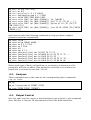
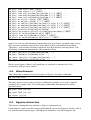
For example, the following statements will perform the same “ac” simulation.
sp_ac dec 10 1e+3 1e+9
sp_ac('dec','10','1e+3','1e+9')
sp_ac('dec',10,1e+3,1e+9)
sp_ac dec n=10 fstart=1e+3 fstop=1e+9
sp_ac('dec','n=10','fstart=1e+3','fstop=1e+9')
n=10;fstart=1e+3;fstop=1e+9; sp_ac('dec',n,fstart,fstop)
Octave's native statements are helpful, for example, to process data or figures,
to perform parameter sweep simulation using loop or conditional branch, and
so on.
Octave's syntax supports the Sha-Bang “#!”. Thus you can even make your
spdc netlist a standalone executable by adding the following line to the head
of netlist and adding executable permission to the file.
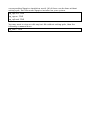
#!/usr/bin/env spdc
Then you can run simulation by either of the following shell commands.
$ spdc your-circuit-netlist-file
$ ./your-circuit-netlist-file
3.
Modeling 3D Distributed Circuit
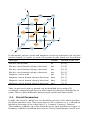
In spdc, 3D distributed circuit in a cuboid zone is discretized to repeated
cubic circuit cells. The following figure shows one of the cubic cells, where “n”
means circuit node, “b” means circuit branch, “e” means electric circuit, “m”
means magnetic circuit.