1
Appearance
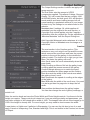
The appearance section sets the look of the internal
elements of the gallery.
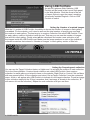
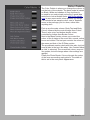
First we have the Identity plate. To edit the ID Plate, click
the triangle on the bottom right of the ID Plate window.
Next is the Web or Mail Link section. By default it’s set to
the home page. You can enter in any relative or absolute
web address here, or an email address by adding
‘mailto:’ before the email address. Logo Alt text lets you
put in Alt text for the image.
The Identity Plate Position control has 3 settings: Left,
Centre and Right, corresponding with the physical
location on the page. It can be nudged with ID Plate
Offset. Logo Position puts it top or bottom.
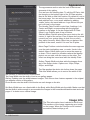
Similarly Menu Position places the menu text on the left,
centre, or right of the screen. Even if these don’t preview
correctly on your system (they do look fine on most),
they export correctly. Menu Offset lets you balance the
position of the menu, useful if it’s near the ID plate.
Menu Page Position controls whether the menu appears
over the main text/gallery area, or under. Under is the
default. Menu Offset allows you to move the menu up
or down. This is useful for situations where the Identity
plate is on one side, with the menu on the other. The
offset can bring the menu level with the Identity Plate.
Gallery Thumb Width sets how wide the images slices
are in the Gallery Index. Options are 100px, 200px,
300px, and 400px.
Top Gap pushes the whole site further down the page.
Text Area Width allows you to control the width of the
text sections in Home/About/Contact/Blank.
Text Area Width sets the width of text in non gallery pages.
Gallery Padding sets the width between images. This is there from feature requests in the original
non website version of this gallery.
Photo Border sets the width of the border on each image on the site.
Set Body Width turns on a fixed width in the Body, while Body Width sets the width. Make sure that
the the width is wide enough to accomodate the images in the home/about/blank/contact and mail
pages. If in doubt use a vertical image.
Image Info
The Title information here is added to the Alt and
Title sections of the image, appearing as a tooltip
on the image. When the Cmotion scroll controls
are added, these tooltips go off.
14 - LRB Portfolio