1
LRB Portfolio (http://lrbportfolio.com) from Lightroom-Blog.com is a true website in a gallery.
Everything you need to create a website from scratch is built in. The website features a Home
Page, About Page, Contact Page, up to 6 Galleries, 2 external links and an optional Blank page.
There’s no need to create multiple galleries, or hand code a gallery page to link to them. All can be
done from within LRB Portfolio.
The base of the code for the galleries is that of a simple scrolling gallery. There are no thumbnails,
and no image links, what you see is what you get. Quite a number of photographer sites use this
style of gallery. Here’s a few examples of this style of site:
Stephen Eastwood: http://stepheneastwood.com
Clicio Barroso: http://clicio.com.br/english/beauty.html
Patrick Hoelck: http://www.patrickhoelck.com/home.html
Pablo Vicente: http://pablovicente.com/female_models_01.htm
Stefan Soell: http://stefansoell.de (some of this is not safe for work)
Stephen Vigar http://www.stevenvigar.com
Please bear in mind that these are just examples, and are NOT created with this plugin. However,
you can create something similar. In fact, the scrolling gallery used by Stephen Eastwood was
added to the gallery when a user pointed out that his site had changed.
Installation
LRB Portfolio is distrubuted as a Lightroom plugin. Not only does this greatly simplify the
installation procedure, but the greater flexibility provided to plugins also allows LRB Portfolio to
automatically check for updates each time Lightroom is restarted. Behind the scenes the plugin
handles the installation of the Web Engine for you.
Unzip the download. You should now have a web engine called ‘LRB Portfolio.lrplugin’.
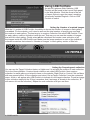
The plugin is installed via the Lightroom plugin manager.
Move LRB Portfolio.lrplugin to a convenient location of your own choosing.
Open Lightroom’s plugin manager from the File menu.
Click the “Add” button.
Browse to the plugin and click “OK” on a Mac or “Add plugin” on a PC.
If you have paid for the web engine you should unlock the trial version using the registration code
that you should have received.
Open the plugin manager from the File menu.
Choose “LRB Portfolio” from the list of plugins.
Enter your registation code into the User Registration section
LRB Portfolio - 3