1
Step 7. Click Finish to complete installation.
3.2.2 Software Functions
Upon rebooting, the computer automatically finds the new 6000 controller board. The touch screen is
connected but not calibrated. Follow the procedures below to carry out calibration.
1. After installation, click the PenMount Monitor icon “PM” in the menu bar.
2. When the PenMount Control Panel appears, select a device to “Calibrate.”
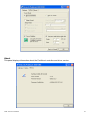
PenMount Control Panel
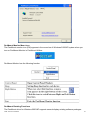
The functions of the PenMount Control Panel are Device, Multiple Monitors, Tools and About,
which are explained in the following sections.
Device
In this window, you can find out that how many devices are detected on your system.
ADP-1224 User Manual
17