1
A3X Pro Expert User Manual Ver.2.7
10
10. PC Config Tool
If you don’t have a program card you can use the PC config tool instead, download and install the newest PC suite
and the USB driver from our website, then you will get the config tool for A3X Pro Expert.
11. Program Card
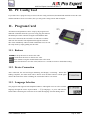
All functions and parameters can be setup by the program card.
When the controller shows the system is ready, plug the card into
the DATA port on the controller using the included black data
cable. Once connected, the card will be on and start to read the
data from the controller. The adjustment through the card will
take effect immediately without a final confirmation. You can exit
the setup mode by simply pulling out the cable.
11.1. Buttons
UP/+ Scroll up the menu or increase the value.
DN/- Scroll down the menu or decrease the value.
ESC Exit without saving the modified and return to the menu.
ENT Enter the function or save the value, hold it over 2 seconds to restore to the default setting.
11.2. Device Connection
After connected, the card will begin initializing and display: Connecting... When data
loading completes, the main menu will be shown. Press the ESC button to reload again
when in the main menu. After reloading, the current data will be overwritten.
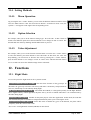
11.3. Language Selection
The program card supports both Simplified Chinese and English. You can select suitable
language through the menu "System Menu -> 语言/Language", or press and hold the
button while connecting the card to the device until the language selection dialog shows.
HTTP://WWW.BAY-TEC.DE
Aug. 01, 2014