1
•
•
•
Windows (pre-Vista): HyperTerminal is available in the Start menu under
Programs >
Accessories > Communication.
Macintosh: ZTerm comes pre-installed with OSX and above.
Linux: CuteCom can be found at: http://cutecom.sourceforge.net/
The instructions in this section are for installing TeraTerm Pro Web, but should give you
enough information to help you set up any of the other programs listed above.
1. Determine which COM port your Machine Science programming board is using
by viewing the Options menu in the Programming Window.
2. Download TeraTerm Pro Web from http://www.ayera.com/teraterm/
3. Unzip the .zip file to a convenient location on your hard drive.
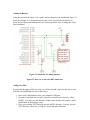
4. Open the folder and double click on the file ttermpro.exe. You will see a dialog
box like the one shown in Figure 4.
Figure 4. New connection dialog box.
5. Select Serial and the COM port being used by your Machine Science
programming board. Turn on your battery pack. Your screen should be mostly
blank with a few lines of text in the upper left as shown in Figure 5.