1
MENU SETTINGS
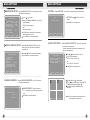
ID SETUP— —S elect "ID S ETU P ", P R E SS "OK " th e p age w ill be sh own on the sc reen
as s ho wn in pic ture (6). A gain pres s "O K" the scree n will ap pea r as
s hown in picture (7) .
ID
ID
SETUP
.....
ID
[ABC01234]
SETUP
ABC01234
D
0
1
2
3
4
5
6
7
8
()MOVE ( ) CAM ID ()SELECT ( )EXIT
()MOVE ( ) CAM ID ()SELECT ( )EXIT
picture (6)
picture (7)
On picture (7) , press " "/" " to select the position. The position press " "/"
Press " MENU" to save setting and exit .
" to set value .
DIRECTION FOR USE
1. Connect all necessary parts then powe r on;
2. Turn on : For autom atic pow er on . The DVR will turn on autom atically w hen the car is ignited. O therw ise,
we need to sw itc h o n the unit by hand.
3. REC :1. Start re co rd ing when p ower on ; 2. Pre ss REC to rec ord in previe w m ode, an d press "STO P" to
s top rec ording.
4. Pla y b ack: In preview m ode(not recording),pre ss "PLAY"to playback the latest vid eo file;I n playback
s tate, pre ss "M ENU"for vide o file list, press" "/ " "to select the video file , a nd pres s"PLAY" to
play back, pres s" MENU "to back to previous menu.
5. PTZ Setup: In preview or rec ordin g s tate (full s creen), p ress"OK"to enter into su bm enu, again press "OK"
button c an widen/narrow view angle; press " "/ " " can m ak e the cam era sway to left o r right,
Press " "/ " " to up or down,press an y key to stop PTZ control, press"M EN U"to ex it.
6. In preview or rec ording s tate, the G PS data appears o n the top left co r ner;G PS data co nsists of
longitude , latitude, radial v elocity.
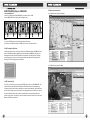
7. Remote Network monitoring.
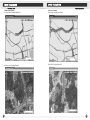
The three pictures of Remote Network monitoring are shown as follow: Conneted State,
Capture Tool, Remote DVR Control Panel.
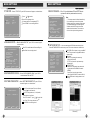
RESET MENU— —S ele ct"R E S ET ME NU ", P RE S S "OK "the sc reen w ill appear as
sho w n b elow:
RESET MENU
Push DVR system password to reset
every menu configurcetion except of
net work menu and system
Enter the password then reset the system
settings, press "MENU" to sae settings and be
back to Main Menu.
password
**********
( )EXIT
19
20